Deploy Llama 3.3 and Mistral locally with Ollama and Open WebUI on Ubuntu 24.04

Actualizado: 2026-05-17
Key takeaways
- Ollama 0.5+ runs Llama 3.3 70B Q4 comfortably on an RTX 4090 (24 GB VRAM); quantized Mistral Large 2 fits the same machine.
- Open WebUI replaces the ollama CLI for non-technical users; same ecosystem, modern UI.
- The piece separating “laptop demo” from “real service” is exposing behind Traefik with TLS and IP/user auth — the second half of this tutorial.
- Q4_K_M quantization offers the best quality/memory trade-off in 2026; drop to Q3 only when GPU is tight.
Prerequisites: Ubuntu 24.04 + NVIDIA drivers
Reasonable minimum hardware:
- NVIDIA GPU with ≥16 GB VRAM (RTX 4080/4090, A4000, RTX 5000 Ada).
- 32 GB RAM, 1 TB NVMe.
- Ubuntu 24.04 LTS Server.
NVIDIA + CUDA drivers:
sudo ubuntu-drivers autoinstall
sudo reboot
nvidia-smi   # check GPU shows up
Docker + nvidia-container-toolkit (follow como-instalar-docker-en-ubuntu-22-04, equivalent steps on 24.04):
curl -fsSL https://nvidia.github.io/libnvidia-container/gpgkey | sudo gpg --dearmor -o /usr/share/keyrings/nvidia-container-toolkit-keyring.gpg
distribution=$(. /etc/os-release; echo $ID$VERSION_ID)
curl -s -L https://nvidia.github.io/libnvidia-container/$distribution/libnvidia-container.list |
  sudo sed 's#deb https://#deb [signed-by=/usr/share/keyrings/nvidia-container-toolkit-keyring.gpg] https://#g' |
  sudo tee /etc/apt/sources.list.d/nvidia-container-toolkit.list
sudo apt update && sudo apt install -y nvidia-container-toolkit
sudo nvidia-ctk runtime configure --runtime=docker
sudo systemctl restart docker
Verify: docker run --rm --gpus all nvidia/cuda:12.4.1-base-ubuntu22.04 nvidia-smi.
Install Ollama and verify GPU
curl -fsSL https://ollama.com/install.sh | sh
sudo systemctl enable --now ollama
ollama --version    # should report 0.5+ as of 2026-06
Verify GPU detected:
journalctl -u ollama | grep -i "gpu|cuda" | head -10You should see cuda and compute capability lines. If it says using cpu, revisit nvidia-smi and nvidia-container-toolkit.
Pull quantized Llama 3.3 and Mistral
Recommended models in 2026:
ollama pull llama3.3:70b-instruct-q4_K_M    # ~40 GB download, ~24 GB VRAM
ollama pull mistral-large:latest             # ~70 GB download, needs 48 GB VRAM or offload
ollama pull qwen2.5-coder:32b-instruct-q4_K_M # large code model
Test:
ollama run llama3.3:70b-instruct-q4_K_M "Explain MCP in one sentence."Expected throughput: ~30-50 tokens/s on an RTX 4090 with a short prompt.
Open WebUI with docker compose
# docker-compose.yml
services:
  open-webui:
    image: ghcr.io/open-webui/open-webui:main
    container_name: open-webui
    restart: unless-stopped
    extra_hosts:
      - host.docker.internal:host-gateway
    environment:
      OLLAMA_BASE_URL: http://host.docker.internal:11434
      WEBUI_SECRET_KEY: "${WEBUI_SECRET_KEY}"
    ports:
      - "127.0.0.1:3000:8080"
    volumes:
      - open-webui-data:/app/backend/data

volumes:
  open-webui-data:
docker compose up -d. Local access: http://127.0.0.1:3000. Create the admin account on first launch.
Expose behind Traefik with TLS
If you already run Traefik (per como-instalar-traefik-con-docker-compose), add labels:
services:
  open-webui:
    networks: [traefik]
    labels:
      - traefik.enable=true
      - traefik.http.routers.openwebui.rule=Host(`llm.your-domain.com`)
      - traefik.http.routers.openwebui.entrypoints=websecure
      - traefik.http.routers.openwebui.tls.certresolver=letsencrypt
      - traefik.http.services.openwebui.loadbalancer.server.port=8080
networks:
  traefik:
    external: true
Drop the ports: localhost binding when using Traefik.
Restrict access by IP and user
Layer 1 — IP allowlist in Traefik:
labels:
  - traefik.http.middlewares.openwebui-ipallow.ipallowlist.sourcerange=10.0.0.0/8,192.168.1.0/24,YOUR.PUBLIC.IP/32
  - traefik.http.routers.openwebui.middlewares=openwebui-ipallow@docker
Layer 2 — Open WebUI native auth: in Settings → Users tick “Require email verification” and set ENABLE_SIGNUP=false so only admin invites.
Layer 3 — auditing: set WEBUI_LOG_LEVEL=info and ship to Loki or Elasticsearch to keep who-asks-what — in enterprise contexts, especially with sensitive data, traceability is mandatory.
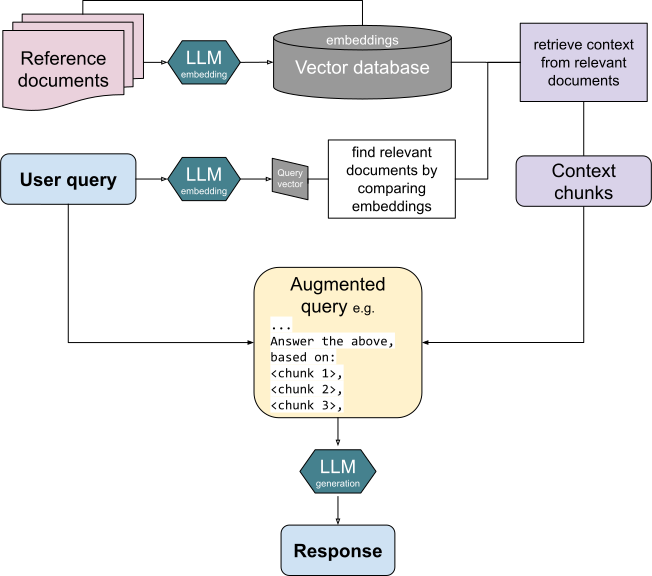
For fine-tuning when generic models aren’t enough, see the upcoming Phase 3 cluster on LoRA + Unsloth. To understand how this Ollama plugs into a full RAG stack, RAG with Postgres + pgvector.
Reference repos: ollama.com[1], github.com/open-webui[2], traefik.io[3].