How to fix You cannot import from disallowed hosts in Gitea 28
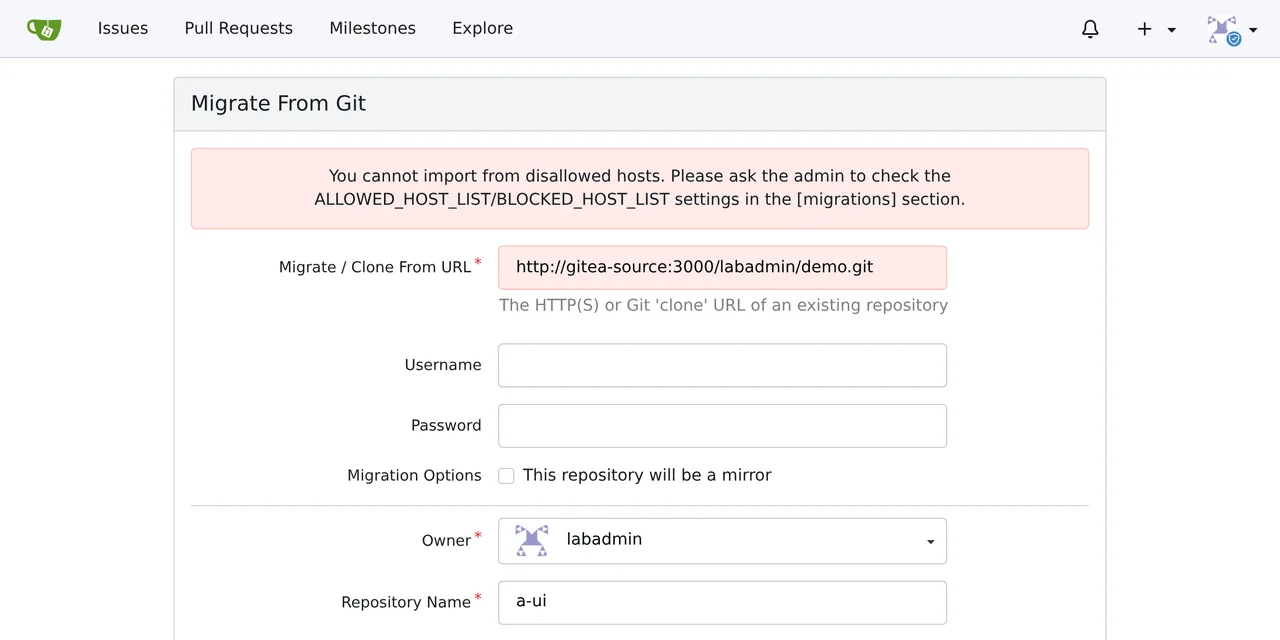
Table of contents
- Key takeaways
- The exact error: You cannot import from disallowed hosts
- Why does it appear on Gitea 28 when it used to work?
- How I reproduced it with two Gitea instances on a Docker network
- Old and new [migrations] settings, tested
- The ALLOWED_DOMAINS = * trap when you upgrade
- The minimal safe allowlist that fixes the error
- If you prefer strict mode
- How to check that the fix works
- Alternatives if you cannot change the list
- Frequently asked questions
- Is the container name in ALLOWED_HOST_LIST enough?
- Do I need to restart Gitea after changing the list?
- Does 28.1.0 change anything compared with 28.0.0?
- Conclusion
- Sources
Gitea 28 shows You cannot import from disallowed hosts because the migration or mirror source resolves to a private IP that [migrations] ALLOWED_HOST_LIST does not cover; you fix it by adding that IP or its subnet with the port, for example 172.31.105.0/24:3000, not the hostname. The message changed in 28: on 1.27 it pointed at ALLOWED_DOMAINS/ALLOW_LOCALNETWORKS/BLOCKED_DOMAINS. I reproduced it on 18 October 2026 with two Gitea 28.1.0 containers on a private Docker network, on arm64 Linux, and compared it with 1.27.3. This guide is also available in Spanish.
Key takeaways
- The 28.x web UI warning names
ALLOWED_HOST_LIST/BLOCKED_HOST_LIST; the API returns a 422 withYou can not import from disallowed hosts.on both versions. - By default (
EGRESS_MODE = lax), Gitea 28 allows migrations from public hosts and blocks private, loopback and CGNAT networks. - A hostname in
ALLOWED_HOST_LISTdoes not unblock a private target: migrations need an IP entry, a CIDR or theprivatealias. - Out of 13 configurations tested on 28.1.0, the narrowest one that worked was the pinned Docker subnet with its port:
172.31.105.0/24:3000. - A 1.27 instance with
ALLOWED_DOMAINS = *andALLOW_LOCALNETWORKS = trueallowed everything; on 28.1.0 the same config blocks GitHub, because*is dropped and the mode switches tostrict.
The exact error: You cannot import from disallowed hosts
The wording depends on the version and on where you migrate from. In the web UI, on the Migrate From Git form, 28.1.0 shows this warning when you try to migrate http://gitea-source:3000/labadmin/demo.git, another Gitea on the same Docker network:
You cannot import from disallowed hosts. Please ask the admin to
check the ALLOWED_HOST_LIST/BLOCKED_HOST_LIST settings in the
[migrations] section.
With the same test, 1.27.3 showed the old wording, which is what most forum threads still quote:
You cannot import from disallowed hosts. Please ask the admin to
check ALLOWED_DOMAINS/ALLOW_LOCALNETWORKS/BLOCKED_DOMAINS settings.
The API (POST /api/v1/repos/migrate) answers on both versions with HTTP 422 and {"message":"You can not import from disallowed hosts."}. The server log does not explain why: it only records the request and its 422. When the block hits an existing mirror, the log shows it on every sync:
.../mirror/mirror_pull.go:118:runSync() [E] SyncMirrors
[repo: <Repository 4:labadmin/mirror1>]: remote URL is not allowed:
migration/cloning from 'gitea-source' is not allowed.
Why does it appear on Gitea 28 when it used to work?
Gitea 28.0.0, released on 30 September 2026, routes migrations and mirrors through an internal proxy that applies the egress policy at connect time (PR 39426). The announcement puts it this way: "Migrations, mirrors, and other Git network operations now go through an internal proxy that applies the egress settings to direct connections." The ALLOWED_DOMAINS, BLOCKED_DOMAINS and ALLOW_LOCALNETWORKS keys are deprecated in favour of ALLOWED_HOST_LIST and BLOCKED_HOST_LIST, and a new key, EGRESS_MODE, decides whether the list is exclusive.
The change that catches people out is that a hostname no longer authorises a private IP. The 28.1.0 app.example.ini says it in one line: "Private and loopback addresses need a builtin or CIDR entry."
The reason is security. The same announcement fixes a bug where a host matching ALLOWED_DOMAINS skipped the IP check. That allowed server-side request forgery (SSRF) through DNS rebinding.
If you are coming from 1.27, the guide to upgrade Gitea to 28 with Docker covers the other egress changes, including the wildcard BLOCKED_HOST_LIST that stops startup.
How I reproduced it with two Gitea instances on a Docker network
The lab is two docker.gitea.com/gitea:28.1.0 containers with SQLite on a bridge network with a pinned subnet. gitea-source hosts a demo repository and target tries to migrate or mirror it. If you do not have Gitea running yet, the guide to install Gitea with Docker starts from a similar Compose file. This is the part that matters:
services:
  source:
    image: docker.gitea.com/gitea:28.1.0
    networks:
      lab:
        ipv4_address: 172.31.105.10
        aliases: [gitea-source]
  target:
    image: docker.gitea.com/gitea:28.1.0
    env_file: [target.env]
    networks:
      lab:
        ipv4_address: 172.31.105.20
networks:
  lab:
    ipam:
      config: [{subnet: 172.31.105.0/24}]
target.env holds each [migrations] configuration I tested, as GITEA__migrations__* variables. Between runs I deleted the target volume, because the image’s startup script writes the variables into app.ini and never removes old ones. Then I started the migration through the API, using the source’s hostname and its IP:
curl -u labadmin:your_password -H 'Content-Type: application/json' \
  -X POST http://127.0.0.1:30502/api/v1/repos/migrate \
  -d '{"clone_addr":"http://gitea-source:3000/labadmin/demo.git",
       "repo_name":"demo","service":"git"}'
A 201 with the repository name means the migration worked; a 422 with the message above means the policy blocked it.
Old and new [migrations] settings, tested
The table sums up the 13 configurations on 28.1.0 and the 1.27.3 baselines. "LAN" is the source Gitea at 172.31.105.10:3000 and "GitHub" is https://github.com/octocat/Hello-World.git:
| Version | [migrations] configuration | LAN | GitHub |
|---|---|---|---|
| 1.27.3 | no keys | Blocked | Not tested |
| 1.27.3 | ALLOW_LOCALNETWORKS = true |
Allowed | Not tested |
| 1.27.3 | ALLOWED_DOMAINS = github.com,gitea-source |
Blocked | Not tested |
| 1.27.3 | ALLOWED_DOMAINS = * and ALLOW_LOCALNETWORKS = true |
Allowed | Allowed |
| 28.1.0 | no keys | Blocked | Not tested |
| 28.1.0 | ALLOW_LOCALNETWORKS = true (deprecated) |
Allowed | Not tested |
| 28.1.0 | ALLOWED_DOMAINS = github.com,gitea-source (deprecated) |
Blocked | Not tested |
| 28.1.0 | ALLOWED_DOMAINS = * and ALLOW_LOCALNETWORKS = true |
Allowed | Blocked |
| 28.1.0 | ALLOWED_HOST_LIST = gitea-source |
Blocked | Not tested |
| 28.1.0 | ALLOWED_HOST_LIST = * |
Blocked | Not tested |
| 28.1.0 | ALLOWED_HOST_LIST = 172.31.105.* |
Blocked | Not tested |
| 28.1.0 | ALLOWED_HOST_LIST = private |
Allowed | Not tested |
| 28.1.0 | ALLOWED_HOST_LIST = 172.31.105.0/24 |
Allowed | Not tested |
| 28.1.0 | ALLOWED_HOST_LIST = 172.31.105.10:3000 |
Allowed | Allowed |
| 28.1.0 | ALLOWED_HOST_LIST = 172.31.105.0/24:3000 |
Allowed | Allowed |
| 28.1.0 | strict, ALLOWED_HOST_LIST = github.com,private |
Blocked | Not tested |
| 28.1.0 | strict, ALLOWED_HOST_LIST = github.com,172.31.105.10:3000 |
Allowed | Not tested |
The old keys still work on 28.1.0 as aliases, but every startup logs [E] Deprecation: config option [migrations].ALLOW_LOCALNETWORKS present, please use [migrations].ALLOWED_HOST_LIST instead. The * and 172.31.105.* entries do not stop startup; Gitea ignores them with an [E] (catch-all host pattern "*" matches every host and is not allowed and target "172.31.105.*" is not an IP, CIDR, named range, or valid hostname pattern) and the list ends up empty.
The ALLOWED_DOMAINS = * trap when you upgrade
The most treacherous row is ALLOWED_DOMAINS = * with ALLOW_LOCALNETWORKS = true, the usual "allow everything" setup on 1.27. On 28.1.0 the automatic translation turns * into *:*, drops it as invalid and, because a domain list was present, switches the mode to strict. You get the opposite of what you had: the internal network stays allowed through the alias, while GitHub, Codeberg or any public host returns You can not import from disallowed hosts.
The fix is to delete both old keys from app.ini and write the new configuration. If you want any public host plus your internal network, keep EGRESS_MODE at lax and list only the private networks you need, as in the next section.
The minimal safe allowlist that fixes the error
The narrowest entry that worked is the source subnet with its port. In lax mode a portless entry allows every port on that IP, and private opens 10.0.0.0/8, 172.16.0.0/12, 192.168.0.0/16, fc00::/7 and 100.64.0.0/10 on every port. That lets any user who can migrate probe internal services, which is the SSRF that 28 sets out to close. With the Docker network pinned, add this to the Gitea service that imports:
    environment:
      GITEA__migrations__EGRESS_MODE: "lax"
      GITEA__migrations__ALLOWED_HOST_LIST: "172.31.105.0/24:3000"
lax keeps public hosts allowed, and the list is only consulted for private targets. In my test, with this line the migrations from gitea-source and from GitHub both returned 201, while the same IP on port 22 stayed blocked. If the source is a LAN server with a fixed IP, use that IP and its port, for example 192.168.1.50:443.
Pin the subnet in Compose (ipam on the network). Without it, Docker can hand out a different subnet when the network is recreated and the entry stops matching. For more than one entry, separate them with commas: 172.31.105.0/24:3000, 192.168.1.50:443.
If you prefer strict mode
In strict the list is exclusive: any host not on it is blocked, public ones included. A portless entry also only allows ports 80 and 443, which is why github.com,private blocked the source Gitea on port 3000. With github.com,172.31.105.10:3000 the LAN migration worked. List every public forge you import from.
How to check that the fix works
Restart the container, read the startup log and repeat the migration. These two commands confirm the effective configuration and that no old key is left in app.ini:
docker exec gitea grep -A4 '^\[migrations\]' /data/gitea/conf/app.ini
docker logs gitea 2>&1 | grep -E 'migrations|Deprecation'
In the first, the [migrations] block should list only EGRESS_MODE and ALLOWED_HOST_LIST; the second should print no ignores an invalid entry and no Deprecation. For an existing mirror, click Synchronize Now in its settings or call POST /api/v1/repos/{owner}/{repo}/mirror-sync. In the lab, after restoring the entry, the mirror fetched the source’s new commit on the first sync.
Alternatives if you cannot change the list
Two routes remain when the admin will not open private ranges. The first is to publish the source Gitea under its public name, behind its reverse proxy with HTTPS. If that name resolves to a public IP from the target server, lax mode allows it with no entry.
The second is not to migrate over the network: run git clone --mirror on your machine and git push --mirror into an empty repository on the target. That push skips the egress policy, although you lose issues and pull requests.
If you are thinking of switching forges, Forgejo with Docker has its own migration settings; I have not tested them against this release.
Frequently asked questions
Is the container name in ALLOWED_HOST_LIST enough?
No. On 28.1.0, ALLOWED_HOST_LIST = gitea-source still returned the error, because gitea-source resolves to 172.31.105.10, a private IP. Migrations require a private target to match an IP entry, a CIDR or the private alias.
Do I need to restart Gitea after changing the list?
Yes. Gitea reads [migrations] at startup. With GITEA__ variables in Docker, recreate the container with docker compose up -d so the startup script writes them into app.ini.
Does 28.1.0 change anything compared with 28.0.0?
28.1.0, released on 6 October 2026, moves link-local, private ranges and CGNAT into a "restricted" class: still blocked by default, but an explicit CIDR in the list allows them (PR 39560). The error text is identical in both, according to each tag’s translation files.
Conclusion
The You cannot import from disallowed hosts warning on Gitea 28 had two causes in my tests: a source on a private IP with no IP entry in [migrations] ALLOWED_HOST_LIST, or an old configuration that 28 translates into strict mode. Remove the old keys, keep EGRESS_MODE = lax and add the source IP or subnet with its port instead of private. If you had ALLOWED_DOMAINS = *, also check that GitHub is still allowed after the upgrade.
Sources: [1] Gitea blog, Gitea 28.0.0 announcement[1], [2] Gitea, PR 39426 on the internal Git proxy[2], [3] Gitea, PR 39560 on restricted ranges[3], [4] Gitea, app.example.ini for 28.1.0[4], [5] Gitea, English strings for 1.27.3[5], [6] Gitea, English strings for 28.1.0[6], [7] Gitea documentation, configuration cheat sheet[7], [8] Docker documentation, ipv4_address in Compose[8].
Sources
- Gitea blog, Gitea 28.0.0 announcement
- Gitea, PR 39426 on the internal Git proxy
- Gitea, PR 39560 on restricted ranges
- Gitea, app.example.ini for 28.1.0
- Gitea, English strings for 1.27.3
- Gitea, English strings for 28.1.0
- Gitea documentation, configuration cheat sheet
- Docker documentation, ipv4_address in Compose
Source code
Access all the source code for this post on GitHub.
View on GitHub