Ollama in 2024: Running LLMs Locally Without Pain

Table of contents
- Key takeaways
- What Ollama actually solves
- Installation and first model
- Sizing the hardware
- The OpenAI-compatible API endpoint
- Modelfile and customisation
- Where it fits versus alternatives
- What "local" means in practice
- Integrations worth the trouble
- Conclusion
- Frequently asked questions
- How much RAM do I need to run a model with Ollama?
- Can I use Ollama with tools built for the OpenAI API?
- Is it safe to expose Ollama on the LAN with OLLAMA_HOST=0.0.0.0?
- Sources
Running large language models on your own laptop stopped being an insider experiment during 2024. The credit is not a single project’s. But if someone had to point at the reason any developer can now have Llama 3.2 answering in their terminal in under five minutes, it would be Ollama[1]. Built on top of llama.cpp, it adds a polished UX layer, a curated model catalogue, and an OpenAI-compatible API that makes it an immediate substitute for the cloud in most development tasks.
Key takeaways
-
Ollama wraps llama.cpp in a single binary with Docker-style CLI and OpenAI-compatible HTTP API.
-
The catalogue covers Llama 3.2, Mistral, Phi-3, Gemma 2, Qwen 2.5, vision models, and embeddings.
-
Practical hardware rule: Phi-3 Mini runs in 4 GB; Llama 3.1 8B Q4 needs 6 GB; Mixtral 8x7B requires 30 GB.
-
OLLAMA_HOST=0.0.0.0without an auth-enabled reverse proxy in front is a real risk: never leave it exposed. -
For serving production traffic at scale, vLLM remains the correct choice.
What Ollama actually solves
The historical problem with local LLMs was not the absence of inference engines but friction. llama.cpp has existed for years and is an excellent project. But compiling with the right flags for Metal, CUDA, or ROCm, locating GGUF files, picking quantisations, and remembering command-line parameters is a serious barrier for someone who just wants to ship code.
Ollama packages all of that into a single binary with a service that starts on localhost:11434. It exposes three things: a Docker-style command line (ollama run, ollama pull, ollama list), an HTTP API in the OpenAI dialect, and a central catalogue where models have readable names and sensible default quantisations. The engine underneath is still llama.cpp, but the surface exposed to the user fits on one page.
Installation and first model
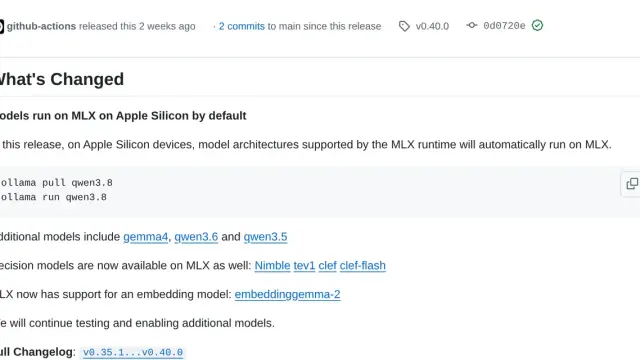
Install depends on platform: brew install ollama on macOS, an official script on Linux, a graphical installer on Windows. In all three cases the service ends up running in the background listening on the local port. From there, a single command downloads and launches a model:
ollama run llama3.2The first invocation pulls the quantised GGUF; subsequent ones are instant. The same pattern works for the full catalogue: Mistral 7B, Mixtral 8x7B, Qwen 2.5, Phi-3, Gemma 2, DeepSeek Coder v2, or embedding models like nomic-embed-text.
Sizing the hardware
As a rule of thumb:
-
Phi-3 Mini runs in 4 GB.
-
Llama 3.1 8B quantised to four bits asks for 6 GB.
-
Mistral 7B sits in the same range.
-
Mixtral 8x7B needs around 30 GB.
-
Llama 3.1 70B roughly 48 GB.
-
The 405B starts asking for more than 240 GB.
Apple Silicon’s unified memory is a clear advantage here, because the GPU reaches the same bank as the CPU without copies. An M3 Max serves Llama 3.1 8B at 50-80 tokens per second; an RTX 4090 pushes past 120. Seventy-billion-parameter models drop to 8-12 tokens per second even on serious hardware. CPU-only is possible for small models, but the experience degrades fast.
The OpenAI-compatible API endpoint
Ollama’s most influential design decision was exposing the /v1/chat/completions endpoint with the same schema as OpenAI. The official OpenAI Python client, pointed at http://localhost:11434/v1 with a dummy key, works unchanged. That means any tool built against the OpenAI API (Aider, Continue, LangChain, LlamaIndex, OpenWebUI) switches providers with a single environment variable.
Llama 3.2 vision models are used exactly the same way, passing base64 images inside the message’s content array.
Modelfile and customisation
For reusable configurations Ollama defines the Modelfile format, with syntax borrowed from Dockerfile. A FROM line indicates the base model, PARAMETER fixes temperature, context, or top-p, and SYSTEM sets the system prompt. ollama create builds a derived model with its own name.
The same mechanism allows importing external GGUF files (your own fine-tunes, specific Hugging Face versions, custom quantisations) and treating them like any catalogue entry.
Where it fits versus alternatives
Against raw llama.cpp, Ollama trades control for ergonomics. If you need obscure flags, experimental quantisations, or custom builds, bare llama.cpp is still the right pick. For the remaining 90%, Ollama’s layer saves hours at no perceptible cost.
Against LM Studio, the difference is philosophical. LM Studio prioritises a graphical interface, is closed source, and targets users who want to explore models without touching a terminal. Ollama is CLI-and-API, open source, designed to drop into development workflows. They coexist fine.
Against vLLM, the divergence is operational. vLLM is designed for multi-user production: continuous batching, paged attention, multi-GPU, high aggregate throughput. Ollama is optimised for one session at a time.
To serve hundreds of concurrent users, vLLM wins without argument. For a developer with a model on their machine or a small team behind a reverse proxy, Ollama is more than enough.
What "local" means in practice
"Local" gets used as a synonym for privacy, but the two are not automatically equivalent. Ollama by default listens on localhost only, which is safe. Switching OLLAMA_HOST=0.0.0.0 to expose the service on the LAN costs one environment variable, and without a reverse proxy in front the service is open: no built-in authentication, no rate limiting, no audit. Any deployment beyond your own machine needs a reverse proxy with auth in front.
Integrations worth the trouble
The ecosystem around Ollama matured fast. The most useful integrations are:
-
OpenWebUI: the most polished ChatGPT-like interface, connects directly to port 11434.
-
Continue.dev: inline chat and autocomplete in VS Code pointed at Ollama instead of Copilot.
-
Aider: terminal-based code assistance with diffs applicable to the repository.
-
LangChain and LlamaIndex: treat it as a first-class provider.
-
ollama/ollama: official container that makes Docker Compose or Swarm deployment trivial.
Conclusion
Ollama won 2024 for the right reason: it solved real friction without pretending to be everything to everyone. The useful mental model is thinking of it as Docker for LLMs (a packaging and distribution layer on top of an existing engine) and judging it on those terms. For daily development, prototyping, individual privacy, offline work, and on-prem deployments with few users, it is the default tool. The Ollama plus OpenWebUI combination comfortably covers 90% of personal and small-team use cases; the remaining 10% is worth solving when it shows up.
Frequently asked questions
How much RAM do I need to run a model with Ollama?
It depends on the model and its quantisation: as a rule of thumb, Phi-3 Mini runs in 4 GB. Llama 3.1 8B quantised to four bits asks for 6 GB and Mistral 7B sits in the same range. Mixtral 8x7B needs around 30 GB, Llama 3.1 70B roughly 48 GB, and the 405B starts asking for more than 240 GB. An M3 Max serves Llama 3.1 8B at 50-80 tokens per second and an RTX 4090 pushes past 120.
Can I use Ollama with tools built for the OpenAI API?
Yes. Ollama exposes the /v1/chat/completions endpoint with the same schema as OpenAI, so the official OpenAI Python client, pointed at http://localhost:11434/v1 with a dummy key, works unchanged. Any tool built against that API (Aider, Continue, LangChain, LlamaIndex, OpenWebUI) switches providers with a single environment variable. Llama 3.2 vision models work the same way, by passing base64 images inside the message's content array.
Is it safe to expose Ollama on the LAN with OLLAMA_HOST=0.0.0.0?
Not without protection in front. By default Ollama listens on localhost only, which is safe, but once you switch OLLAMA_HOST=0.0.0.0 the service has no built-in authentication, no rate limiting and no audit. Any deployment beyond your own machine needs a reverse proxy with auth in front. And for serving hundreds of concurrent users, Ollama is optimised for one session at a time: that is where vLLM wins without argument.