Wolfi: the base distribution designed for containers
Table of contents
- Key takeaways
- What Wolfi actually is
- How to try wolfi-base on arm64
- How to search and list Wolfi packages
- Continuous publishing as a structural decision
- SBOM and signing as first principles
- How to build a minimal image with apko
- Practical comparison with Alpine and Debian slim
- Which Chainguard images are free in 2026
- Where it does not fit
- When it pays off
- Conclusion
- Frequently asked questions
- How do I search and list the packages available in Wolfi?
- Can I use numpy or pandas in a Wolfi image without compiling from source?
- How do I get reproducible builds if Wolfi has no frozen releases?
- Is Wolfi worth it if my team only pulls public images?
- Sources
Tested with wolfi-base (apk-tools 2.14.10, glibc 2.44) · apko 1.4.1 · cosign 3.1.3 · Grype 0.118.0 · arm64 · verified
Updated: 2026-09-16
Wolfi is the kernelless distribution Chainguard announced on 22 September 2022, and it is now the base of Chainguard OS and of Chainguard’s container images. Teams also use it directly because they want tighter control of their supply chain without depending on Debian’s calendar or on musl’s quirks in Alpine. On 16 September 2026 I re-checked this guide on arm64: wolfi-base, apk, apko, cosign and Grype. The outputs below are the real ones, and each section says what could not run here.
Key takeaways
-
Wolfi is a kernelless Linux distribution for container user space. It has no numbered releases: its
/etc/os-releasestill readsVERSION_ID="20230201". -
It uses glibc 2.44 instead of musl, so it accepts Python
manylinuxwheels such as torch and onnxruntime, which ship no musl variant. -
Every package ships an SPDX-format SBOM, the
apkindex is RSA-signed, and Chainguard images are signed with Sigstore cosign. -
Continuous publishing is measured in hours: the arm64 OpenSSL 3.6.4 package was built 1 h 32 min after the upstream release.
-
The repository offers 15,119 packages (106,818 builds), and
apk searchis the tool to search and list them. -
The adoption cost is real: Wolfi runs apk-tools 2.14.10 while Alpine 3.24 is already on 3.0.6. Old versions are also deleted after 6 months, and Chainguard’s free images only publish their latest build.
What Wolfi actually is
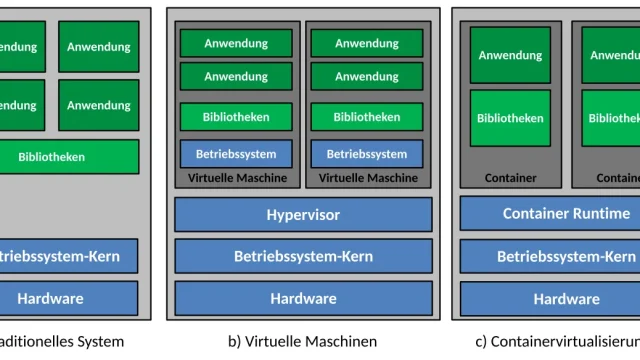
Wolfi describes itself as a Linux distribution without a kernel. That phrase sounds paradoxical until you get the context: a container image never runs its own kernel because it uses the host’s. All the space devoted to kernel, modules, and initramfs in a traditional distribution is, for a container, dead weight. Wolfi strips that layer and keeps only what runs a process in user space: glibc, package manager, libraries, and binaries.
The distinctive move versus Alpine is the choice of glibc as standard library. Alpine 3.24.1 uses musl 1.2.6, which is more compact but subtly incompatible with software built for glibc. Those edge cases show up mostly in:
-
DNS resolution.
-
Locale handling.
-
Dynamic module loading.
-
Python wheels published only for glibc (
manylinux), such as torch and onnxruntime.
Wolfi compiles everything against glibc and recovers compatibility with the binaries that run on Debian or Ubuntu. The cost is a few megabytes: wolfi-base is a 6.2 MB compressed download against 4.2 MB for alpine:3.24.1.
The package manager is apk, Alpine’s format, but against Chainguard’s own repositories, which Chainguard builds and signs. Wolfi packages are not Alpine packages renamed: the wolfi-dev/os README warns that the two are not compatible and that mixing them creates security problems. They are built from source, and since November 2024 every C/C++ package is compiled with the OpenSSF hardening flags (-fstack-protector-strong, -fcf-protection=full, -D_FORTIFY_SOURCE=3).
Two governance changes landed since the previous version of this guide. The public wolfi-dev/os repository is now a read-only clone synced from internal Chainguard repositories, and pull requests there cannot be merged directly. Wolfi also only ships the packages needed to build or run Chainguard’s free images: when MariaDB 12 arrived, the MariaDB 11 packages moved to Chainguard OS’s commercial catalog. The build recipes are still published under the Apache 2.0 licence.
How to try wolfi-base on arm64
The cgr.dev/chainguard/wolfi-base image contains the Wolfi base, apk and a BusyBox shell, and it starts as root. Chainguard publishes the same image on Docker Hub as chainguard/wolfi-base. On 16 September 2026 both registries served the same index, sha256:1d95114038f7…, created at 12:50 UTC.
docker run --rm -it cgr.dev/chainguard/wolfi-base
Inside the container, these commands show the apk version, the glibc version, the configured repository and how many packages the image holds:
$ grep VERSION_ID /etc/os-release
VERSION_ID="20230201"
$ apk --version
apk-tools 2.14.10, compiled for aarch64.
$ /usr/lib/libc.so.6 | head -1
GNU C Library (glibc-2.44-r6) stable release version 2.44.
$ cat /etc/apk/repositories
https://apk.cgr.dev/chainguard
$ apk info 2>/dev/null | wc -l
16
The image takes 15.6 MiB on disk and points at apk.cgr.dev/chainguard, not at packages.wolfi.dev/os as the 2024 documentation showed. Chainguard serves *.cgr.dev files from Cloudflare R2 storage (9236a389bd48b984df91adc1bc924620.r2.cloudflarestorage.com), which its network guide asks you to allow through firewalls. On the test network that host answered with a self-signed certificate: apk add failed with certificate verify failed, and I pulled the image from Docker Hub instead.
If the same happens to you, point apk at packages.wolfi.dev/os, which Chainguard documents as the package repository for its free images:
echo https://packages.wolfi.dev/os > /etc/apk/repositories
apk update
apk add curl | tail -3
fetch https://packages.wolfi.dev/os/aarch64/APKINDEX.tar.gz
 [https://packages.wolfi.dev/os]
OK: 106818 distinct packages available
(23/23) Installing curl (8.22.0-r2)
Executing busybox-1.38.0-r2.trigger
OK: 35 MiB in 39 packages
For curl 8.22.0, apk installs 23 packages, and the image grows from 16 to 39 packages and 35 MiB.
How to search and list Wolfi packages
apk search queries the index that apk update downloads, and it is the method Chainguard documents for finding out what Wolfi ships. The arm64 index on 16 September held 106,818 builds of 15,119 distinct packages, produced from 4,432 recipes. apk update counts every version separately, while apk search shows only the latest one per name:
$ apk search -q | wc -l
15119
$ apk search -e postgresql-18-client
postgresql-18-client-18.6-r2
$ apk search cmd:useradd
shadow-4.20.2-r1
$ apk search 'so:libxml2.so*'
libxml2-2.15.0-r0
libxml2-16-2.15.4-r0
libxml2-2.13-2-2.13.9-r0
$ apk search -v -e nginx
nginx-mainline-1.31.6-r0 - HTTP and reverse proxy server (mainline version)
nginx-stable-1.30.2-r0 - HTTP and reverse proxy server (stable version)
$ apk list -a nginx-stable | tail -3
nginx-stable-1.30.0-r1 aarch64 {nginx-stable} (BSD-2-Clause)
nginx-stable-1.30.1-r0 aarch64 {nginx-stable} (BSD-2-Clause)
nginx-stable-1.30.2-r0 aarch64 {nginx-stable} (BSD-2-Clause)
Each search form answers a different question:
apk search -q: lists names only; pipe it towc -lto count them-e name: exact match with the latest version;-vadds the descriptioncmd:command: the package that installs an executable (useraddcomes inshadow)so:library: the packages that ship a shared libraryapk list -a: every version still in the repository, with its licence
Names differ from Debian’s. There is no nginx package, only nginx-stable and nginx-mainline, and the major version is part of the name (postgresql-18-client, python-3.13). Each package’s recipe is a YAML file in the wolfi-dev/os repository on GitHub.
Continuous publishing as a structural decision
Traditional distributions ship numbered releases. Debian 13 gets point releases (13.7 came out on 12 September 2026). Ubuntu ships a release every six months and an LTS every two years, and Alpine cuts a release branch every May and November. Wolfi has no numbered release: each package is updated when upstream ships a new version, and the repository as a whole is always current.
This decision has consequences in both directions:
-
Upside: OpenSSL 3.6.4 was published on GitHub on 25 August 2026 at 11:53 UTC. Wolfi’s arm64 index records
libssl33.6.4-r0 as built at 13:25, and for OpenSSL 3.6.3, on 9 June, the gap was 9 h 24 min. In the 24 h before my test the index added 751 builds from 91 recipes. -
Downside: there are no stable reference points. The same Dockerfile can produce a different image the next day, and old versions disappear. Since 13 June 2026, Chainguard deletes non-latest versions older than 6 months every month, unless another package or a Chainguard image still needs them.
My recommendation is to pin versions where reproducibility matters, with apk syntax: apk add curl=8.22.0-r2 for an exact version or apk add nginx-stable=~1.30 for a branch (both worked in the test). Review those pins before they turn 6 months old and, if you need older versions, keep your own mirror, as Chainguard’s notice asks. Where staying current matters, accept continuous publishing.
SBOM and signing as first principles
Every Wolfi package ships its SPDX SBOM, generated at build time. In wolfi-base, /var/lib/db/sbom/ holds 16 .spdx.json files, one per installed package. Chainguard images add an image-level SBOM as a signed attestation, so a final image ships an inventory of its content without you having to generate it.
Signing works at two levels. The APKINDEX.tar.gz index carries an RSA signature (.SIGN.RSA256.wolfi-signing.rsa.pub), which apk checks against the keys in /etc/apk/keys, and it stores the checksum of every package. The zlib .apk I downloaded had no signature segment of its own: trust in each package flows through the index, not through Sigstore.
Images are signed with cosign, from the GitHub Actions workflow in chainguard-images/images. With cosign 3.1.3 the check looks like this:
iss=https://token.actions.githubusercontent.com
repo=https://github.com/chainguard-images/images
id="$repo/.github/workflows/release.yaml@refs/heads/main"
args=(--certificate-oidc-issuer "$iss" --certificate-identity "$id")
img=cgr.dev/chainguard/wolfi-base
cosign verify "${args[@]}" "$img" > verify.json
echo $?
The command returned 0 and reported three checks: the cosign claims, their presence in the transparency log (verified offline) and the signing certificate against trusted certificate authorities. The signed digest was sha256:1d95114038f7…, the same one I had pulled. The image SBOM downloads as an attestation:
spdx=https://spdx.dev/Document
opts=(--platform linux/arm64 --predicate-type "$spdx")
cosign download attestation "${opts[@]}" "$img" > att.json
jq -r .payload att.json | base64 -d > sbom.json
jq -r '.predicate.creationInfo.creators[]' sbom.json
jq '.predicate.packages | length' sbom.json
Tool: apko (v1.2.20)
Organization: Chainguard, Inc
80
It is an SPDX 2.3 document with 80 entries, which Chainguard’s own pipeline generated with apko 1.2.20. In my case, those SBOMs feed vulnerability scanning in the pipeline. With the 16 September database, Grype 0.118.0 reported 2 matches in wolfi-base. Both are in zlib 1.3.2.1_rc20260601-r0: CVE-2026-85091 (High) and GHSA-g5fp-32jq-cfw2.
Wolfi’s security feed (security.json), downloaded the same night, lists both identifiers as fixed in exactly that version. Check each finding against the feed before you open a ticket. For a scanner comparison, see Trivy and Grype in CI.
How to build a minimal image with apko
apko builds images from apk packages and a YAML file, with no RUN steps. This curl.yaml creates a shell-less image that runs curl as user 65532:
contents:
  keyring:
    - https://packages.wolfi.dev/os/wolfi-signing.rsa.pub
  repositories:
    - https://packages.wolfi.dev/os
  packages:
    - ca-certificates-bundle
    - curl
accounts:
  groups:
    - groupname: nonroot
      gid: 65532
  users:
    - username: nonroot
      uid: 65532
  run-as: nonroot
entrypoint:
  command: /usr/bin/curl
archs:
  - aarch64
I used apko 1.4.1, released on 14 September 2026, from its official image (the Docker Hub copy, which has the same digest as on cgr.dev). The --user and HOME options keep the container from writing root-owned files into your directory:
img=cgr.dev/chainguard/apko:latest
opts="--user $(id -u):$(id -g) -e HOME=/work -v $PWD:/work -w /work"
docker run --rm $opts $img build curl.yaml wolfi-curl:apko curl.tar
docker load < curl.tar
url=https://packages.wolfi.dev/os/wolfi-signing.rsa.pub
docker run --rm wolfi-curl:apko-arm64 -so /dev/null -w '%{http_code}' "$url"
The build took 4.9 s at a load average of 22 on the machine’s 18 shared cores. apko installed 35 packages, wrote curl.tar (13 MB) plus two SPDX SBOMs, and the image answered 200. If you try to open a shell, Docker answers stat /bin/sh: no such file or directory. Three builds between 21:52 and 22:04 UTC produced the same layer, sha256:fb0b508d….
To freeze versions, apko lock curl.yaml writes curl.lock.json with every package’s checksum, and apko build --lockfile curl.lock.json honours it. With the lockfile the layer got a different digest (the install order changes), but it stayed stable across runs.
melange, the tool that builds the packages, could not run here. Its official guide starts it with docker run --privileged, and the test showed why: melange 0.60.0 isolates each build with bubblewrap and, without that mode, stopped with bwrap: Creating new namespace failed: Operation not permitted. I did not start privileged containers on a machine shared with other workloads, so this guide does not cover building your own packages.
Practical comparison with Alpine and Debian slim
For a statically linked Go binary the base barely matters, and Alpine is still the smallest. The difference shows up with a Python application with compiled libraries. numpy 2.5.3, pandas 3.0.5 and pyarrow 25.0.1 now publish musllinux wheels, so they install on Alpine without compiling. torch 2.14.0 and onnxruntime 1.30.0 only publish manylinux wheels, which require glibc, and on Wolfi pip finds them:
$ apk add -q python-3.13 py3.13-pip
$ python3 -m venv /tmp/v && . /tmp/v/bin/activate
$ python --version
Python 3.13.15+
$ pip download -q --only-binary=:all: --no-deps -d /tmp/w onnxruntime torch
$ ls /tmp/w
onnxruntime-1.30.0-cp313-cp313-manylinux_2_28_aarch64.whl
torch-2.14.0-cp313-cp313-manylinux_2_28_aarch64.whl
The same onnxruntime download on alpine:3.24.1, with Python 3.14.7, ends with No matching distribution found for onnxruntime. numpy, on the other hand, fetches its musllinux_1_2_aarch64 wheel there.
These are the figures for the three bases, measured on 16 September 2026 on arm64:
| Metric | wolfi-base | alpine:3.24.1 | debian:trixie-slim |
|---|---|---|---|
| Compressed download | 6.2 MB | 4.2 MB | 30.2 MB |
| Size on disk | 15.6 MiB | 9.8 MiB | 103.3 MiB |
| Installed packages | 16 | 16 | 78 |
| C library | glibc 2.44 | musl 1.2.6 | glibc 2.41 |
| Package manager | apk-tools 2.14.10 | apk-tools 3.0.6 | apt |
| Per-package SBOM in the image | Yes (SPDX) | No | No |
| Image creation date | 2026-09-16 | 2026-06-16 | 2026-08-24 (Debian 13.6) |
| Grype 0.118.0 matches | 2 (0 critical) | 23 (4 critical) | 189 (11 critical) |
Where Wolfi clearly wins is publishing cadence and the SBOM, not raw size. The Debian image Docker Hub served was still on 13.6 four days after 13.7 shipped, and 48 of its 189 matches already had a published fix. On Alpine, 20 of the 23 did.
The cost of adopting Wolfi is team familiarity with apk; that friction fades within a month but exists. If vulnerability scanning is your main concern, Docker Scout consumes these same SBOMs along the build pipeline.
Which Chainguard images are free in 2026
Chainguard’s free images (Free Containers) pull without an account, but only as their latest build, tagged latest and latest-dev. In the registry, wolfi-base only had the latest tag. Since 16 August 2023, version tags are reserved for paid tiers, although pulling by digest stays open to everyone. The manifest of a wolfi-base digest from 5 September 2025 still resolved without credentials.
Since 17 March 2026, Catalog Starter lets you pick five catalog images, with all their supported versions, on a free account. Paid (Production) images add version tags, patch SLAs and FIPS variants; Chainguard Images: minimal and signed images covers the background. On the free tier, pin the digest in your Dockerfile (cgr.dev/chainguard/wolfi-base@sha256:…) and update it on every rebuild.
Where it does not fit
Wolfi does not fit well in two cases:
-
Applications depending heavily on unported Debian-ecosystem packages. When your system relies on a specific Ubuntu package that Wolfi does not ship, reimporting from source is serious work. Wolfi only ships what Chainguard’s free images need. It also retires packages when their software reaches end of life, so it forces an inventory exercise that sometimes does not pay off.
-
Teams without capacity to maintain their own images. Wolfi gains the most when you rebuild images regularly and maintain your own registry. If the team depends on pulling public images directly, you gain nothing special over a well-chosen Docker Hub official image. Wolfi’s value shows in the pipeline, not in
docker pull.The same applies if your actual runtime is daemonless Podman: the base changes, but the decision stays the same.
When it pays off
Adopting Wolfi depends on your stance on software supply chain:
-
Regulated environments (customer or auditor demands traceability of every binary): Wolfi saves work from the first project. The SBOM ships by default, signatures verify with one command, publishing cadence shrinks the CVE exposure window, and glibc avoids musl’s edge cases.
-
Pragmatic teams (supply chain not audited, images updating every few months): Wolfi will not change your security posture noticeably. The investment in migrating Dockerfiles, training the team on
apkand tracking the 6-month retention does not recoup easily. Debian slim rebuilt regularly offers a reasonable balance without adoption cost.
The middle ground I have settled on is using Wolfi as the base for services that publish images outward or handle sensitive data. I keep Debian slim for internal services where supply chain is not a critical vector. As the team gains familiarity, the frontier keeps shifting toward more adoption as gradual consolidation rather than a disruptive switch.
Conclusion
Wolfi solves the glibc + native SBOM + fast patches triangle that traditional distributions could not solve together. In 2026, add two conditions: old versions last 6 months, and Chainguard’s free tier only publishes latest. It is not the right choice for every team, but for those under compliance pressure or running nightly rebuild pipelines, it reduces real work. Incremental adoption, starting with the most exposed services, is the most sensible path.
Sources:
- Chainguard: “Introducing Wolfi: The first Linux (un)distro designed for securing the software supply chain”[1]
- Official Wolfi package repository on GitHub (wolfi-dev/os)[2]
- Wolfi on GitHub: organization overview and FAQ[3]
- Chainguard Academy: Wolfi overview[4]
- Chainguard Academy: Wolfi FAQs[5]
- Chainguard Academy: package version selection[6]
- Wolfi: retention window for old package versions reduced to 6 months[7]
- Wolfi security feed (security.json)[8]
- Chainguard Academy: Chainguard Containers network requirements[9]
- Chainguard Academy: verifying signatures and attestations with cosign[10]
- Chainguard Academy: container image categories, including free images[11]
- Chainguard: changes for public catalog tier users (2023)[12]
- Chainguard: “Introducing Chainguard Catalog Starter”[13]
- Chainguard: enhanced compiler flags in Wolfi[14]
- Chainguard Academy: getting started with apko[15]
- apko v1.4.1 on GitHub[16]
- Chainguard Academy: getting started with melange[17]
- melange v0.60.0 on GitHub[18]
- Grype v0.118.0 on GitHub[19]
- cosign v3.1.3 on GitHub[20]
- OpenSSL 3.6.4 on GitHub[21]
- PyPI: torch[22]
- PyPI: onnxruntime metadata[23]
- Debian: releases[24]
- Alpine Linux: release schedule[25]
- Ubuntu: release cycle[26]
- SecurityWeek: “New ‘Wolfi’ Linux Distro Focuses on Software Supply Chain Security”[27]
Frequently asked questions
How do I search and list the packages available in Wolfi?
Run apk search inside a wolfi-base container after apk update: on 16 September 2026, apk search -q | wc -l returned 15,119 packages. The cmd: and so: prefixes search by command and by shared library, -e gives the latest version of a name, and apk list -a shows every version still in the repository. If apk.cgr.dev/chainguard does not answer on your network, put https://packages.wolfi.dev/os in /etc/apk/repositories.
Can I use numpy or pandas in a Wolfi image without compiling from source?
Yes: Wolfi compiles everything against glibc 2.44, so pip accepts the same manylinux wheels as on Debian or Ubuntu. Alpine has caught up here, since numpy 2.5.3, pandas 3.0.5 and pyarrow 25.0.1 now publish musllinux wheels. The gap is in packages such as torch 2.14.0 or onnxruntime 1.30.0, which only publish glibc wheels: pip downloaded them on Wolfi and answered No matching distribution found for onnxruntime on Alpine 3.24.1. The cost of glibc is a few megabytes: a 6.2 MB compressed download against 4.2 MB.
How do I get reproducible builds if Wolfi has no frozen releases?
By pinning versions wherever reproducibility matters: apk add curl=8.22.0-r2 pins an exact version, apk add nginx-stable=~1.30 pins a branch, and apko lock writes a lockfile with every package’s checksum. Since 13 June 2026, Chainguard deletes non-latest versions older than 6 months every month. An old pin will eventually break unless you keep your own mirror. The flip side is the upside: the arm64 OpenSSL 3.6.4 package arrived 1 h 32 min after the upstream release, and rebuilt images pick it up immediately.
Is Wolfi worth it if my team only pulls public images?
Not particularly: Wolfi’s value shows in the pipeline, when you rebuild images regularly and maintain your own registry. Chainguard’s free tier also publishes only the latest build (latest), so pinning a version means using the digest, a paid plan or Catalog Starter, with five images of your choice. It also fits poorly if you rely on Debian-ecosystem packages Wolfi does not ship. For pragmatic teams whose supply chain is not audited, Debian slim rebuilt regularly offers a reasonable balance without adoption cost.
Sources
- Chainguard: “Introducing Wolfi: The first Linux (un)distro designed for securing the software supply chain”
- Official Wolfi package repository on GitHub (wolfi-dev/os)
- Wolfi on GitHub: organization overview and FAQ
- Chainguard Academy: Wolfi overview
- Chainguard Academy: Wolfi FAQs
- Chainguard Academy: package version selection
- Wolfi: retention window for old package versions reduced to 6 months
- Wolfi security feed (security.json)
- Chainguard Academy: Chainguard Containers network requirements
- Chainguard Academy: verifying signatures and attestations with cosign
- Chainguard Academy: container image categories, including free images
- Chainguard: changes for public catalog tier users (2023)
- Chainguard: “Introducing Chainguard Catalog Starter”
- Chainguard: enhanced compiler flags in Wolfi
- Chainguard Academy: getting started with apko
- apko v1.4.1 on GitHub
- Chainguard Academy: getting started with melange
- melange v0.60.0 on GitHub
- Grype v0.118.0 on GitHub
- cosign v3.1.3 on GitHub
- OpenSSL 3.6.4 on GitHub
- PyPI: torch
- PyPI: onnxruntime metadata
- Debian: releases
- Alpine Linux: release schedule
- Ubuntu: release cycle
- SecurityWeek: “New ‘Wolfi’ Linux Distro Focuses on Software Supply Chain Security”