How to install Jellyfin with Docker
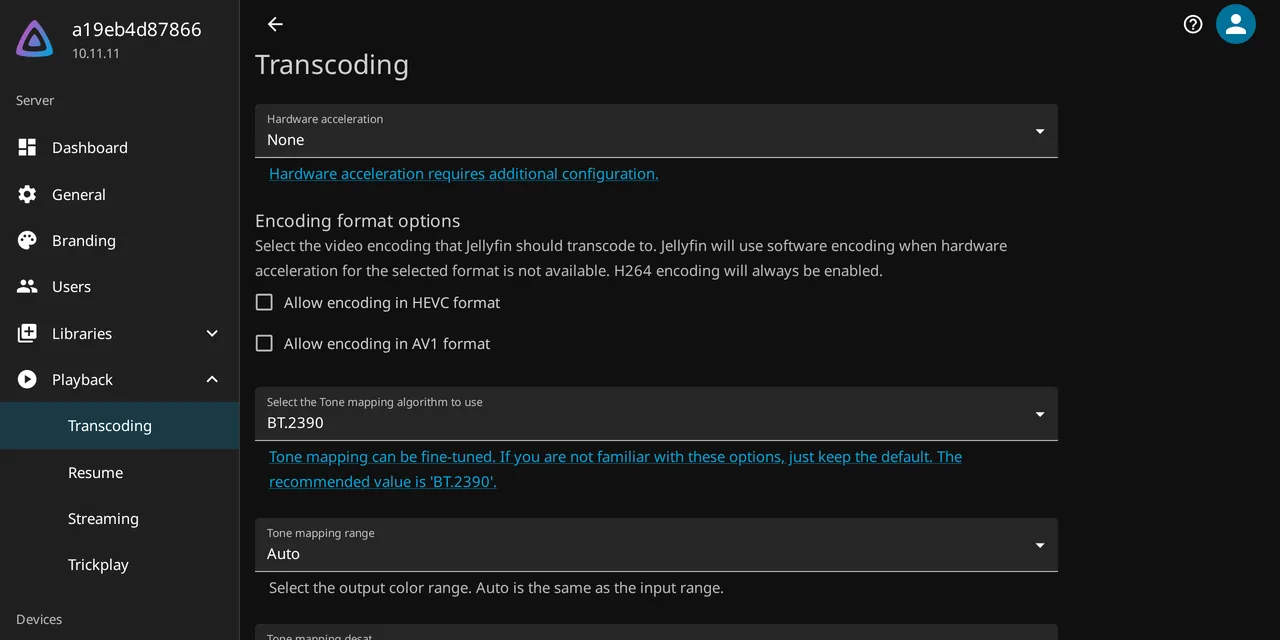
Table of contents
- Key takeaways
- What Jellyfin is, and how it differs from Plex and Emby
- Which version to install
- Installing Jellyfin with Docker Compose
- Why config, cache and media are kept apart
- How to name files so the scanner gets it right
- Users and libraries
- Hardware acceleration, the part that really matters
- How to tell whether a play is direct or transcoded
- Apps for the TV, the phone and the browser
- Remote access without opening ports
- Backups
- What you gain and what you give up
- Frequently asked questions
- Do I need a GPU to install Jellyfin?
- Can I migrate my library from Plex or Emby to Jellyfin?
- Is it safe to open port 8096 on the router?
- Conclusion
- Sources
You have a disk full of films, series or music, and you want to watch it on the TV and on your phone without paying a subscription or entering a licence key. Jellyfin does exactly that: a server that indexes your files, fetches artwork and synopses for them, and serves them to any client app. This guide installs it from the official compose file, tidies the library so the scanner does not miss, turns on GPU transcoding and leaves remote access shut, as it should be.
Key takeaways
- The stable release at the end of August 2026 is 10.11.11, published on 6 June; branch 12 has six release candidates and is not stable yet.
- The official compose file mounts three separate volumes:
/config,/cacheand the library, which goes in as abindmount and read-only if you would rather the server never wrote to it. - The ports are 8096/TCP for HTTP, 8920/TCP for HTTPS if you enable it, and 7359/UDP so client apps can find the server on the local network.
- Hardware transcoding runs through VAAPI, QSV, NVENC, AMF or RKMPP, and in Docker it comes down to passing
/dev/dri/renderD128with therendergroup, or the NVIDIA runtime. - Jellyfin ships no remote access of its own. The documentation advises against opening the port to the internet, so the answer is a reverse proxy or a VPN.
What Jellyfin is, and how it differs from Plex and Emby
Jellyfin is a free media server under GPL-2.0. It began as a fork of Emby 3.5.2, the last release before that project closed its source, and was ported to .NET. The repository holds 56,352 stars and 5,384 forks, and the official Docker Hub image reports over 411 million pulls.
The difference from the other two comes down to three concrete things. First, the account: Plex ties the server to a plex.tv account, whereas in Jellyfin the admin user is created on your machine and stays there.
Second, the paywall. Plex writes on its own page that "To stream remotely from any server you have access to, you’ll need a Remote Watch Pass or a Plex Pass", and hardware transcoding is likewise listed among the paid plan’s features.
Emby is blunter with numbers. Premiere costs 4.99 dollars a month, 54 a year or 119 one-off, and it covers accelerated transcoding, the mobile apps and even backup. In Jellyfin all of that is in the box.
The project’s documentation puts it this way: "There are no strings attached, no premium licenses or features, and no hidden agendas: just a team who want to build something better and work together to achieve it".
What you give up is device coverage and polish on some television clients.
Which version to install
As I write this, the latest release flagged stable in the repository is 10.11.11, from 6 June 2026. Above it sit six candidates from branch 12, from v12.0-rc1 on 21 June to v12.0-rc6 on 26 August, all marked prerelease. If branch 12 tempts you, wait: Jellyfin has no downgrade mechanism, and as soon as a new version starts it applies its migrations and the old one can no longer read the data.
Pin the tag. The official image accepts latest, the major (10), the minor (10.11) and the exact version (10.11.11), and on a home server the exact one saves you surprises on a Tuesday night.
One warning the documentation gives in capitals: containers on Windows or macOS hosts are not supported, and hardware transcoding is broken there. Jellyfin in Docker means Linux.
Installing Jellyfin with Docker Compose
The deployment is four steps:
- Create the
configandcachedirectories and the mount point for your library. - Write the
compose.yamlfile with the three volumes and the two ports. - Bring the stack up and wait for the log to announce that Kestrel is listening.
- Open
http://<your-server>:8096and run through the setup wizard.
Here is the compose file, copied from the official one apart from the pinned tag:
services:
  jellyfin:
    image: jellyfin/jellyfin:10.11.11
    container_name: jellyfin
    user: 1000:1000
    ports:
      - "8096:8096/tcp"
      - "7359:7359/udp"
    volumes:
      - ./config:/config
      - ./cache:/cache
      - type: bind
        source: /srv/media
        target: /media
        read_only: true
    restart: unless-stopped
    environment:
      - JELLYFIN_PublishedServerUrl=http://192.168.1.20:8096
    extra_hosts:
      - "host.docker.internal:host-gateway"
Three details that are not decorative. user: 1000:1000 keeps the server off root and makes the files it writes belong to your user. The library mount is type: bind because it points at a disk that already exists, and read-only because Jellyfin has no business writing to your films. And JELLYFIN_PublishedServerUrl is the address the server announces to apps that look for it on the network.
Port 7359/UDP is what makes that automatic discovery work and is the one port you cannot change. If you also want DLNA, the container has to run in host network mode, which is a separate decision.
Why config, cache and media are kept apart
Because they have different lifecycles, and the startup log proves it. I deployed 10.11.11 on an arm64 machine to write this, and the log states the effective paths:
Main: Jellyfin version: 10.11.11
Main: Operating system: Debian GNU/Linux 13 (trixie)
Main: Architecture: Arm64
Main: Program data path: /config
Main: Cache path: /cache
Startup: Storage path `/config/data` successfully checked with 39GiB free
         which is over the minimum of 2GiB.
SqliteDatabaseProvider: SQLite connection string:
         Data Source=/config/data/jellyfin.db
/config holds the SQLite database, the keys, the logs and the downloaded metadata: that is what you back up. /cache holds thumbnails and temporary transcoding segments: disposable material you can delete whenever you like, and which appreciates an SSD. And the library is yours and nothing touches it. Merging all three into one volume is what turns a 200 MB backup into a 40 GB one.
Startup also checks that each path has a minimum of 2 GiB free, and complains if it does not. Idle, with two small libraries and nobody playing anything, docker stats showed 177.5 MiB of memory for the container.
How to name files so the scanner gets it right
This is where almost everyone trips, but not for the reason the naming guides repeat. I tested the scanner with deliberately good and bad names, and the result corrects the common belief.
For films the documentation asks for one folder per title in the form Name (year) [provider id], with the file inside carrying the same name. For shows, one folder per series with Season 01 folders inside, and this literal warning: do not abbreviate the season name to S01 or SE01. There are also reserved characters that break scanning: < > : " / | ? *.
Now the measured part. A file with a scene release name, sintel.2010.1080p.BluRay.x264-GROUP.mp4, was identified just as well as the tidy Sintel (2010)/Sintel (2010).mp4: both ended up with the same TMDb id (45745) and IMDb id (tt1727587). Another called Tears of Steel 2012.mkv, with no parentheses around the year, also found its record. The name parser strips resolution, source and group tags before searching.
What was not identified was video final DEFINITIVO.mp4: no year, no ids, no synopsis. The problem is not the noise around the title, it is having no title at all.
With shows the picture changes, and there the failure is silent. I put one episode in an S01 folder named capitulo uno.mp4 and another in Season 02 named Serie Mala 2x03.mp4. The second landed perfectly as season 2, episode 3. The first was catalogued as an episode with no season and no episode number, and Jellyfin filed it under a phantom season called Season Unknown that matches no folder on disk.
The numbering has to be in the file name, as S01E01 or 2x03. The folder alone is not enough.
A structure that works:
/srv/media
├── movies
│   └── Sintel (2010)
│       ├── Sintel (2010).mkv
│       └── Sintel (2010).en.srt
└── shows
    └── Cosmos Laundromat (2015)
        └── Season 01
            └── Cosmos Laundromat (2015) S01E01.mkv
External subtitles follow the same suffix rule: .en.srt marks the language, .forced marks forced tracks and .sdh marks hearing-impaired ones. If you want two versions of the same film, they have to sit in one folder and start with the exact folder name followed by space, hyphen, space and a label. Skip that prefix and you get two duplicate films in the catalogue, which is exactly what happened to me when I left the same file in two different folders.
Users and libraries
The setup wizard creates the admin and asks for the metadata language and country. Setting it to your language from the start matters: my records arrived with Spanish synopses because I set es as the preferred metadata language before the first scan.
A library is a content type plus one or more paths. The type, Movies, Shows, Music, decides which parser runs, so mixing films and series in one library is a bad idea even when the disk is tidy. Extra users come later, and each has a remote-connections checkbox that governs whether that person can log in from outside the house.
Hardware acceleration, the part that really matters
With no GPU, every playback that does not match the client comes out of the processor, and one 4K film is enough to flatten a home server. The project validates five methods: Intel QSV, NVIDIA NVENC, AMD AMF, VA-API for Intel and AMD on Linux, VideoToolbox on macOS and RKMPP for Rockchip.
| Method | Who it is for | What to pass into the container |
|---|---|---|
| VA-API | Intel and AMD on Linux, nearly any iGPU | /dev/dri/renderD128 and the render group |
| QSV | Intel Broadwell or newer, better performance | The same as VA-API |
| NVENC | NVIDIA with driver 520.56.06 or newer | NVIDIA runtime and the container toolkit |
| AMF | AMD on Windows | Not applicable to Docker on Linux |
| RKMPP | Rockchip boards such as the RK3588 | /dev/dri and the video devices |
For Intel or AMD, first find the numeric id of the group that owns the device, because it varies between distributions:
getent group render | cut -d: -f3
ls -l /dev/dri
With that number, the compose file grows two blocks:
group_add:
      - "993"          # the real render group id on your host
    devices:
      - /dev/dri/renderD128:/dev/dri/renderD128
NVIDIA works differently because the image carries no proprietary driver. You install it on the host along with the NVIDIA container toolkit, and then the compose file declares the runtime:
runtime: nvidia
    deploy:
      resources:
        reservations:
          devices:
            - driver: nvidia
              count: all
              capabilities: [gpu]
Then you turn it on in the dashboard under Playback and Transcoding, picking the method and unchecking the codecs your card does not handle. The honest check runs from inside the container: docker exec -it jellyfin /usr/lib/jellyfin-ffmpeg/vainfo lists the profiles the GPU actually offers.
Two warnings straight from the documentation. QSV does not work in Docker on Windows or in WSL. And 10-bit H.264 has no hardware decoder on any Intel, NVIDIA or AMD GPU, so that material always falls back to the processor.
In my test, on arm64 and with no /dev/dri on the machine, the server reported Available hwaccel types: ["cuda", "drm", "opencl", "rkmpp"] and the dashboard left acceleration on None. That is exactly what you should see when there is nothing to pass into the container. The transcoder the image ships is ffmpeg version 7.1.4-Jellyfin, not the system ffmpeg.
How to tell whether a play is direct or transcoded

Jellyfin distinguishes three ways of serving a video. In Direct Play the file travels as is because the client understands the container, the video, the audio and the subtitles. In Direct Stream only the container is remuxed or the audio redone. And in transcoding the whole video is re-encoded, which is the expensive one.
The documentation names subtitle burn-in as the most processor-intensive component of the whole process.
I checked it by asking the server for its decision on the same file with two different client profiles. With a profile that accepts mp4, H.264 and AAC, the answer was SupportsDirectPlay: true and no transcoding URL. With a profile that only accepts webm, VP9 and Opus, the same film returned SupportsDirectPlay: false and a /videos/<id>/master.m3u8 URL, which is the sign that it is about to re-encode.
In the dashboard, the active devices section shows during playback whether the method is DirectPlay, DirectStream or Transcode, alongside the specific reason (VideoCodecNotSupported, SubtitleCodecNotSupported, ContainerBitrateExceedsLimit and a couple of dozen more) and the acceleration type in use. If you see constant transcoding on the living room TV, that is your diagnosis: do not touch the GPU until you know which reason appears.
Apps for the TV, the phone and the browser
The web client is included and is the most complete one. On television, the Android TV app is the best kept of the official set. On iOS and tvOS, Swiftfin; on Android, the official app. And for the desktop, Jellyfin Desktop, which plays through mpv rather than the browser and is the sensible route for demanding material.
The rest is patchier, and saying so is more useful than selling it. The Roku, LG webOS and Samsung Tizen clients exist and work, but they lag on features and their release pace depends on the community. HDR is supported on a narrow range of devices. If your TV is a six-year-old Samsung, a cheap Android TV box will serve you better than fighting the native app.
Remote access without opening ports
Jellyfin includes nothing like Plex’s remote access, and its documentation is direct about it: opening a port straight to the internet "is therefore insecure and not recommended". The two sensible ways out are the usual ones.
The first is a reverse proxy with a Let’s Encrypt certificate in front of 8096, the pattern already covered in the Traefik with Docker Compose guide. If you go that way, one setting almost everyone forgets: the proxy address has to appear in Known Proxies, in the network settings. Without it, Jellyfin sees the proxy’s IP instead of the visitor’s, stops telling local from external, and the per-user remote-access permissions stop applying. And mind the proxy logs: Jellyfin sometimes sends the API key inside the URL itself, so logging the full path writes secrets into your log file.
The second is to publish nothing and connect over VPN, whether with Headscale as your own control plane or with WireGuard and wg-easy. It is the one I use when the server is only for me and my family. The server still listens on nothing public, and the phone sees port 8096 as if it were in the living room.
Backups
Since 10.11 there is a built-in backup and it runs with the server up, a real improvement on the manual routine of stopping the container and copying folders. You launch it from the dashboard under Backups and choose what to include: the database always, and optionally metadata, subtitles and trickplay data. It checks for at least 5 GB free, though with subtitles and trickplay that runs short.
The archive is written to <your volume>/config/data/backups, so backing up the /config volume already gets it off the box. Restoring works from the same screen or by starting the binary with --restore-archive and the path to the zip. Do it before every upgrade, no exceptions: as I said above, there is no way back.
What you gain and what you give up
| Jellyfin 10.11.11 | Plex | Emby | |
|---|---|---|---|
| Licence | GPL-2.0 | Proprietary | Proprietary |
| External account required | No | Yes, on plex.tv | For Connect |
| Hardware transcoding | Included | Plex Pass | Premiere |
| Remote access out of the box | No, you build it | Yes, with a subscription | Yes, with Connect |
| Mobile apps | Free | Free | Premiere |
| Advertised cost | 0 | Not visible without a session | 4.99 USD a month |
The deciding column is almost always the last row combined with the one above it. If you want your library on your phone on the train and you do not fancy building a VPN, Plex does that work for you and charges for it. If you already have Portainer running your containers and a Nextcloud behind the same proxy, adding Jellyfin is half an hour and no new account.
Frequently asked questions
Do I need a GPU to install Jellyfin?
Not to install it. You need one if your library holds codecs your clients do not play directly, which is what forces transcoding, more than the power of the server. With H.264 files in mp4 and modern clients, most playbacks are direct and the processor barely works.
Can I migrate my library from Plex or Emby to Jellyfin?
The files, yes, untouched, because the naming conventions are close. The configuration, no: users, playlists and watched states have to be redone. And if you come from the LinuxServer.io image, its internal data paths do not match the official image’s and cannot be swapped as they are.
Is it safe to open port 8096 on the router?
No. Jellyfin’s own documentation advises against it explicitly. Put a reverse proxy with HTTPS in front, or better, connect over VPN and publish nothing.
Conclusion
Installing Jellyfin is fifteen lines of compose and a two-screen wizard. What separates a server that works from one that fights you sits in three later decisions. Keep config, cache and library in separate volumes, and number episodes in the file name rather than trusting the folder. And pass the GPU into the container before the first 4K film flattens the server.
Remote access is not solved for you, and that is the real price of paying no subscription. The Spanish version of this guide is at Cómo instalar Jellyfin con Docker.
Sources
- Jellyfin, documentation introduction
- jellyfin/jellyfin, release 10.11.11 on the repository
- Jellyfin, container installation
- Jellyfin, hardware acceleration
- Jellyfin, movie naming and organization
- Jellyfin, backup and restore
- Docker Hub, official jellyfin/jellyfin image
- Emby, Premiere licences and features
- Plex, what Plex Pass includes
Source code
Access all the source code for this post on GitHub.
View on GitHub