How to upgrade Jellyfin 12 with Docker and keep a way back
Table of contents
- Key takeaways
- What changes in Jellyfin 12 if you run it in Docker?
- Which version can you jump to 12 from?
- How I tested the upgrade
- Three checks before you change the tag
- Users that differ only by capitalization
- Third-party plugins
- Scripts and clients that call the API
- The backup that lets you go back
- Upgrade Jellyfin 12 step by step
- How long do the migration and the first scan take?
- What changes on your server after the upgrade
- How do I go back to 10.11 if something goes wrong?
- Watchtower and the latest tag
- Frequently asked questions
- Can I go from 10.10.3 straight to Jellyfin 12?
- Do I lose watched states, favourites and playlists when upgrading?
- Should I wait for a 12.0.1?
- Conclusion
- Sources
Jellyfin 12.0 is now the stable release, and Docker’s latest tag has pointed at it since 8 September 2026. If you followed the guide to installing Jellyfin with Docker, you have 10.11.11 pinned and a note telling you to wait for 12. The wait is over, but this release rewrites the database on first start and 10.11 can no longer read it afterwards. This guide covers the path to upgrade Jellyfin 12 that I tested end to end: pre-checks, backup, migration, scan and rollback, with what happened at each step.
Key takeaways
- 12.0 was published on GitHub on 8 September 2026, and as of 14 September there is no 12.0.x. The
latest,12and12.0tags share one image;10,10.11and10.11.11stay on 10.11.11. - A direct jump is only supported from 10.10.7 or any 10.11.x. Before you change the tag, remove third-party plugins and check that no two users differ only by capitalization.
- With a 1,144-item test library,
--mode MigrateSystemfinished in a median of 3.66 s, and the first scan afterwards took 12 s against 2 s for the next one. - A 10.11.11 started on already migrated data shows as healthy in Docker, but answers every authenticated request with a 500 error. The only thing that gave me back a working server was the copy of
/configtaken with the server stopped. - Scripts that use
X-Emby-Tokenorapi_keyget a 401 on 12.0, whileApiKeyand theAuthorizationheader keep working.
The upgrade Jellyfin 10.11 to 12 with Docker lab runs the backup, the migration and the rollback on video, reading the version from the API at each step.
What changes in Jellyfin 12 if you run it in Docker?
12.0 is the release that would have been called 10.12.0. The project dropped the fixed "10." from the number so that the first digit moves when a release is big, and the server reports itself as 12.0.0. The announcement cites 10.11.0 as the example, a release that rewrote the library database under a number that looked minor.
For anyone who pins tags in a compose file, the practical change is on Docker Hub. As of 14 September 2026, latest, 12 and 12.0 point at the same image (sha256:baba6304), updated on 8 September at 01:36 UTC.
Meanwhile, 10, 10.11 and 10.11.11 share the 10.11.11 image from 6 June. There are no 12.0.0, 12.0.1 or 12.1 tags. The container documentation warns about it: latest follows the newest stable release "including through major and minor version bumps".
This is what changes inside, checked on both arm64 images and in the release notes:
| 10.11.11 | 12.0 | |
|---|---|---|
| .NET runtime | 9.0.16 | 10.0.11 |
| FFmpeg detected at startup | 7.1.4 | 8.1.2 |
| Compressed arm64 image | 404 MB | 423 MB |
| Default web layout | Classic, now called Legacy | Modern |
/emby/ routes |
Answer | 404 |
EnableLegacyAuthorization |
true |
false after migration |
The move to .NET 10 is the underlying reason for the plugin problem: the release notes say plugins have to be rebuilt against the new runtime.
Which version can you jump to 12 from?
There are only two supported starting points: 10.10.7 or any 10.11.x, with no intermediate steps. If you are below 10.10.7, the notes ask you to upgrade to that release first and then to 12.0.
Check it rather than assuming. In the Hacker News thread for the release, one user believed they were below 10.10.7 and started that version as an intermediate step. The migrations failed, 12.0 then failed to start as well and, with no backup, they ended up wiping the configuration. You can read the real version without logging in:
curl -s http://localhost:8096/System/Info/Public \
  | grep -o '"Version":"[^"]*"'
"Version":"10.11.11"
How I tested the upgrade
I set up 10.11.11 in a throwaway Compose project, with a small library seeded with the traps that 12.0 announces. The machine is a linux/arm64 development container with 18 cores, shared with other workloads. The load average ranged from 24 to 33 during the measurements, so every timing comes with its context.
The library held 5 films, one of them (Sintel) with two versions in the same folder and another (Elephants Dream) as .ogg. I added a real series with 6 episodes and 40 synthetic series with 25 episodes each. That makes 1,012 files of 30 s generated with the image’s own FFmpeg, which add up to 1,144 items in the database.
I created the users ana and carlos, marked 3 episodes as watched and Sintel as a favourite, and built a 6-episode playlist. I also installed two plugins: Playback Reporting 17.0.0.0, which is official, and AniSearch 6.0.0.0.
A note on the environment: on this machine, whose CPU reports the sme and sme2 extensions, the arm64 image of 10.11.11 died again and again with exit code 132 (illegal instruction). The DOTNET_EnableArm64Sve=0 variable fixed startup but not the later crashes, so I finished the 10.11.x steps with the emulated amd64 image. The arm64 12.0 image did not crash in any test. I did not test GPU transcoding or third-party clients.
Three checks before you change the tag
There are three things worth reviewing while 10.11 is still running. The first can break the migration, the second depends on third-party code and the third breaks your scripts without the server warning you.
Users that differ only by capitalization
12.0 stores the normalized username in a column with a unique index, so two accounts such as ana and Ana make the migration fail. I tried to create that duplicate through the application programming interface (API) on 10.10.7, 10.11.9 and 10.11.11, and all three refused with A user with the name 'Ana' already exists. To reproduce the failure I had to force it with SQL on a 10.11.9 database. Its schema no longer prevents that duplicate, whereas the 10.10.7 schema prevented it with COLLATE NOCASE.
This was the result when migrating to 12.0:
Perform migration 20260524120336_AddUniqueNormalizedUsernameIndex
CREATE UNIQUE INDEX "IX_Users_NormalizedUsername" ON "Users"
  ("NormalizedUsername");
[FTL] Error: SQLite Error 19: 'UNIQUE constraint failed:
  Users.NormalizedUsername'.
Attempt to rollback JellyfinDb.
[FTL] Main: Error while starting server
The database went back to its previous state and a copy was left in data/SQLiteBackups. That failure hides two traps.
In server mode the container stays alive with /health returning 503, and with --mode MigrateSystem the process exits with code 0 even though the migration failed. I renamed the user to ana.maria from 10.11.9 and the migration went through on the first try. If you are already on 10.11.10 or 10.11.11, your database has had that index since then. The 10.11.10 release notes include the change, and my 10.11.11 database already carried it.
Third-party plugins
The release notes ask you to uninstall every plugin that is not built in before migrating. The blog adds that plugins built for 10.11 will not load on 12.0. In the official catalogue on 14 September, 33 of the 36 plugins already had a 12.0 build; the ones without it were Bookshelf, AniSearch and Folio.
I wanted to see what happens if you ignore that, so I migrated a copy with both plugins installed. Two seconds after startup, the scheduled plugin update task downloaded Playback Reporting 19.0.0.0 and marked 17 as superseded; after a restart, 19 was active.
AniSearch 6.0.0.0, with no 12.0 build, loaded and showed as active, and even registered as a series metadata provider. None of that proves it works against the interfaces that changed, so the official advice stands. Write down which plugins you have, uninstall them from Plugins on 10.11, restart and reinstall them on 12.0.
Scripts and clients that call the API
12.0 disables the old authentication methods on existing servers too: the DisableLegacyAuthorization migration flips EnableLegacyAuthorization to false in system.xml. I created an API key on 10.11.11 and tested it against both servers:
| How the key is sent | 10.11.11 | 12.0 |
|---|---|---|
X-Emby-Token header |
200 | 401 |
?api_key= parameter |
200 | 401 |
X-Emby-Authorization header |
200 | 401 |
?ApiKey= parameter |
200 | 200 |
Authorization: MediaBrowser Token="…" header |
200 | 200 |
/emby/System/Info prefix |
200 | 404 |
If a dashboard widget or a script of yours uses X-Emby-Token, switch it to the Authorization header before you upgrade. There is a temporary way out: setting EnableLegacyAuthorization to true in config/system.xml brought the 200 back for X-Emby-Token and api_key, though not for the /emby/ routes. The author of the change put it this way in the pull request:
This PR will change the EnableLegacyAuthorization option to false for all installs, allowing a user to (temporarily) keep using the legacy method if they use an client that is not updated yet.
The same pull request says the option and the old methods will be removed in a future release.
The backup that lets you go back
The backup that works is a file copy taken with Jellyfin stopped. The documentation says it bluntly: "Jellyfin does not have a downgrade mechanism", and the 12.0 blog asks in capitals for a full manual backup of data and config. In the official image data and config live together under /config, so with the compose folder from the install guide the backup is two commands:
docker compose stop jellyfin
tar -czf ~/jellyfin-10.11.11-$(date +%F).tar.gz config
My /config took 68 MB (32 MB of metadata, 28 MB of a built-in backup and 5.5 MB of database) and the resulting tar.gz weighed 27.8 MB, written in 0.85 s. You do not need the cache: it is disposable. If you use named volumes instead of folders, you take the copy from a helper container, as explained in the article on Docker volumes and bind mounts:
docker run --rm -v jellyfin-config:/config:ro \
  -v "$PWD":/backup alpine:3 \
  tar -czf /backup/jellyfin-config.tar.gz -C / config
The 10.11 built-in backup, the one behind the dashboard button, did not work for me as a rollback. Restoring its zip with --restore-archive on 10.11.11 failed over the already migrated database (table BaseItems has no column named ExtraIds) and also over an empty /config (no such table: AccessSchedules). It only worked on a /config that 10.11.11 had initialised beforehand with one start and one stop. Keep it as plan C, not plan A.
Do not count on the migration’s automatic copy either: the log announces that it backs up jellyfin.db before touching it and, if all goes well, deletes that copy when it finishes. If you back up the server with restic for encrypted backups, 12.0 leaves a CACHEDIR.TAG file in /cache, and restic’s --exclude-caches option skips that folder on its own.
Upgrade Jellyfin 12 step by step
With the backup done, the whole procedure is seven steps. I ran them as written on the test folder:
- Change the image tag in
compose.yamlfrom10.11.11to12.0. - Pull the new image with
docker compose pull jellyfin. - Run only the migration with
docker compose run --rm jellyfin --mode MigrateSystem. - Check that the log says
Migrations have been appliedand contains no[FTL]. - Start the server with
docker compose up -d. - Run a full scan of all libraries.
- Hard-refresh the browser and reinstall the plugins.
Step 3 is optional, because the server migrates on its own at startup, but it separates the migration from startup and lets you read the result calmly. On my test folder it took 3.5 s and left these lines, trimmed to fit:
sed -i 's#jellyfin/jellyfin:10.11.11#jellyfin/jellyfin:12.0#' compose.yaml
docker compose pull jellyfin
docker compose run --rm jellyfin --mode MigrateSystem 2>&1 \
  | grep -E 'migrations for stage|Migrations have been|FTL'
JellyfinMigrationService: There are 18 migrations for stage
  CoreInitialisation.
JellyfinMigrationService: There are 13 migrations for stage
  AppInitialisation.
Main: Migrations have been applied, optimizing the database...
Because MigrateSystem exits with code 0 even when it fails, the grep is the real check. With the server up, you start the scan from Dashboard with Scan All Libraries, or from the command line with an API key:
docker compose up -d
curl -s -X POST http://localhost:8096/Library/Refresh \
  -H 'Authorization: MediaBrowser Token="your_api_key_here"'
The correct answer is a 204 with no body. Then reload the web interface with Ctrl+Shift+R: according to the announcement itself, stale cached assets in the browser are the number one cause of visual glitches after upgrading.
How long do the migration and the first scan take?
On a 1,144-item library the migration takes seconds and the first scan is the longest step. I repeated the migration with --mode MigrateSystem on three copies of the same backup, with a load average of 24 to 25 on 18 cores. It took 3.82 s, 3.66 s and 3.58 s of wall time, container included. The log shows the work it does: MigrateLinkedChildren processed 1,016 items and removed 1 alternate version with the wrong type, and another routine reviewed the names of all 1,144.
The first scan after migrating, measured on those same three copies with a load of 30 to 33, took 12 s according to the Jellyfin log in all three. The second scan, right afterwards, took 2 s in all three. That matches the announcement: the first scan checks every library item against the files on disk.
My library is small and synthetic, so for large libraries I only have reports, not measurements. In the Hacker News thread, a user with about 40 TB who jumped from 10.10.7 describes "a few minutes" of migration. Another reports about 10 minutes of migration and about 30 of scanning, and a third, coming from 10.11.11, between 2 and 3 minutes.
Disk usage barely changes. jellyfin.db went from 5.46 MB to 6.48 MB with the migration, 19 % more. The whole /config folder went from 68.4 MB to 70.0 MB after migrating and scanning.
What changes on your server after the upgrade
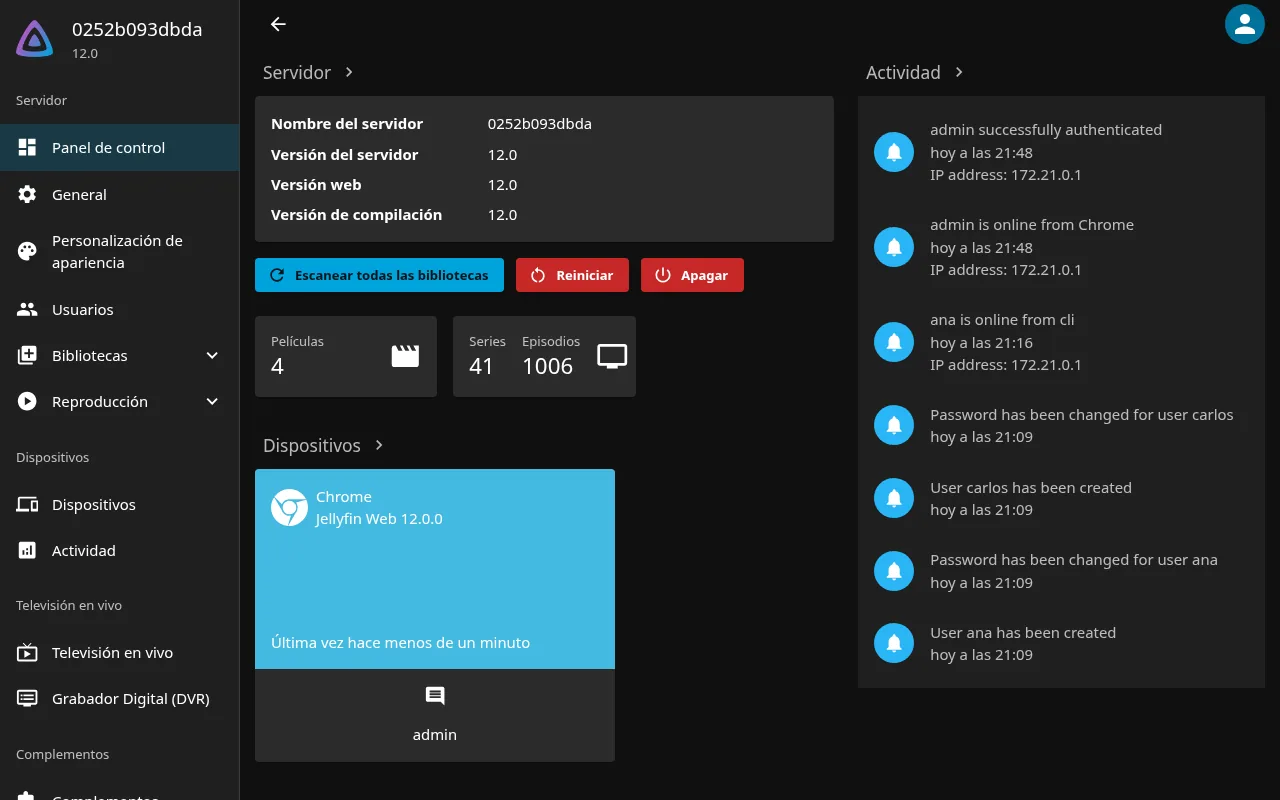
User data survived intact, but the library does not look the same until the first scan. Right after migrating, ana still had her 3 watched episodes and her favourite, and the playlist of carlos still held its 6 episodes. Sintel, on the other hand, had lost its 360p version: the migration removes alternate versions that were grouped automatically, and the scan brings them back. After scanning, Sintel had both versions again.
The .ogg film fared differently. 12.0 treats that extension as audio, so after the scan Elephants Dream stopped being a film. The counter dropped from 5 to 4, which is what the screenshot shows. If you keep video in .ogg, convert it to another container before or after upgrading.
One harmless warning remains in the log: Error loading configuration file: /config/config/encoding.xml with '' is not a valid value for EncoderPreset. I compared the file before and after, and only two lines changed: EncoderPreset went from empty to auto, and the new SubtitleExtractionTimeoutMinutes setting appeared. The rest of the transcoding settings stayed the same. The web interface, for its part, opens in the Modern layout on desktop and mobile; the previous one is still available under the name Legacy.
How do I go back to 10.11 if something goes wrong?
Going back requires restoring the backup, because 10.11.11 does not work on migrated data even when it looks like it does. I started 10.11.11 on a copy already migrated to 12.0: the log printed [FTL] An error occurred starting the application with no such column: b.ExtraIds, but the process stayed alive and reached Startup complete. Docker marked the container healthy, /health returned 200 and so did /System/Info/Public. Every authenticated request, login included, returned 500.
That is the dangerous case: a monitor that only looks at container health will say all is well. The restore that did work, tested with these same commands, was this:
docker compose down
mv config config.12-failed
tar -xzf ~/jellyfin-10.11.11-2026-09-14.tar.gz
sed -i 's#jellyfin/jellyfin:12.0#jellyfin/jellyfin:10.11.11#' compose.yaml
docker compose up -d
10.11.11 came up with its 5 films, the 3 users, the watched states, the favourite and the 6-episode playlist, and login returned 200 again. Keep config.12-failed until you know what went wrong: the migration log is in config.12-failed/log.
Watchtower and the latest tag
If Watchtower watches a Jellyfin on latest, it will have applied 12.0 on its first pass after 8 September, unless you run it in monitor-only mode. That means a migration with no prior backup, third-party plugins still installed and no required scan. Check the log of that first start and the plugin list, and confirm you have a backup from before that date.
Going forward, the article on Watchtower for automatic Docker updates already recommends pinning the major version. With Jellyfin’s new scheme that finally means something: 12 will not jump to a 13.0. Even so, for a service with database migrations I prefer to pin 12.0, or exclude it with the com.centurylinklabs.watchtower.enable: "false" label and upgrade by hand with a backup.
Frequently asked questions
Can I go from 10.10.3 straight to Jellyfin 12?
No. The 12.0 notes only support a direct jump from 10.10.7 or any 10.11.x. Upgrade to 10.10.7 first, check that it starts, take the backup and then move to 12.0.
Do I lose watched states, favourites and playlists when upgrading?
In my test, no. The 3 watched episodes, the favourite film and the 6-episode playlist were still there before and after the scan. What disappears until you scan are the alternate versions that were grouped automatically.
Should I wait for a 12.0.1?
As of 14 September 2026 none has been published, and the announcement recommends upgrading because 12.0 includes security fixes. If you have the backup, use no plugins without a 12.0 build and your scripts already send the Authorization header, there is no technical reason to wait.
Conclusion
Upgrading Jellyfin 12 with Docker costs a few minutes of work and a few seconds of migration, as long as you follow the order. Check the version and the users, remove third-party plugins, copy /config with the server stopped, migrate and scan.
What I take away from the test is the difference between two failures. A broken migration tells you in the log; a rollback without a restore leaves a healthy container that serves nothing, and that is the dangerous one. Keep the tar.gz until you have had a quiet week on 12.0. The Spanish version of this guide is at Cómo actualizar Jellyfin 12 con Docker.
Sources: [1] jellyfin/jellyfin, 12.0 release notes[1], [2] Jellyfin blog, Jellyfin 12.0 announcement[2], [3] jellyfin/jellyfin, 10.11.10 release notes[3], [4] Jellyfin, container installation and tags[4], [5] Docker Hub, official jellyfin/jellyfin image[5], [6] jellyfin/jellyfin, PR 15559 on legacy authorization[6], [7] Jellyfin, backup and restore[7], [8] Jellyfin, stable plugin catalogue[8], [9] restic, backup documentation and –exclude-caches[9], [10] Hacker News, Jellyfin 12.0 release thread[10], [11] Hacker News, comment on the failed 10.10.7 detour[10].
Sources
- jellyfin/jellyfin, 12.0 release notes
- Jellyfin blog, Jellyfin 12.0 announcement
- jellyfin/jellyfin, 10.11.10 release notes
- Jellyfin, container installation and tags
- Docker Hub, official jellyfin/jellyfin image
- jellyfin/jellyfin, PR 15559 on legacy authorization
- Jellyfin, backup and restore
- Jellyfin, stable plugin catalogue
- restic, backup documentation and –exclude-caches
- Hacker News, Jellyfin 12.0 release thread
Source code
Access all the source code for this post on GitHub.
View on GitHub