How to install llama.cpp on Linux, macOS and Docker
Table of contents
- Key takeaways
- Which llama.cpp version to install: stable or nightly
- How to install llama.cpp with the llama.app installer
- How to install llama.cpp on macOS with Homebrew
- How to run llama.cpp with Docker
- How to build llama.cpp from source
- How to download a GGUF model with -hf
- How to chat with the model using llama cli
- How to serve the model with llama serve as an OpenAI-compatible API
- How fast llama.cpp runs on a CPU without a GPU
- What changes in v0.4.1 if you come from an earlier version
- Frequently asked questions
- Does llama.cpp need a GPU?
- Where does llama.cpp store the models it downloads with -hf?
- Which install channel should I pick for a server?
- Conclusion
- Sources
There are four official ways to install llama.cpp, and on 14 September 2026 they did not give you the same version. The llama.app installer drops a nightly build, Homebrew packages the previous stable release, Docker lets you pin the tag and CMake builds whatever you clone. I tested all four in clean containers on Linux arm64, ran Gemma 4 E2B with llama cli and served it as an OpenAI-compatible API with llama serve.
This guide collects the commands that worked, the installer bug I hit along the way and which channel to pick for each use. The Spanish version is at Cómo instalar llama.cpp en Linux, macOS y Docker.
Key takeaways
- The stable release is v0.4.1, tagged on 14 September 2026. The
bNNNNtags are nightly builds: 10 of them were created that same day. curl -LsSf https://llama.app/install.sh | shinstalls a single 15 MBllamabinary into~/.local/bin. On Debian 13 arm64 without thezstdpackage, it fails withVersion mismatch.- On Docker, pin
ghcr.io/ggml-org/llama.cpp:server-v0.4.1. The:servertag pointed at nightly build b10969. -hf user/repo:Q4_0downloads the GGUF into~/.cache/huggingface/hub. Without the quantization tag, the program looks for Q4_K_M and then Q8_0.- v0.4.1 removes
--mmapand--mlock; the replacement is--load-mode. - On CPU, with 4 threads on a shared machine, Gemma 4 E2B in Q4_0 generated a median of 41.92 tokens/s in
llama-bench.
The llama.cpp server in Docker with an OpenAI-compatible API lab shows the Docker route on video. It starts the server with a small model and sends it a real chat request.
Which llama.cpp version to install: stable or nightly
Install v0.4.1 unless you need a model or a fix that has not reached it yet. Since August 2026 llama.cpp publishes two channels. The vX.Y.Z tags follow semantic versioning and started with v0.1.0 on 17 August; the long-standing bNNNN tags are created on almost every commit to master. The v0.2.0 release notes, from 21 August, announce it like this:
"This version marks the beginning of consistent semantic versioning for llama.cpp." (llama.cpp v0.2.0 release notes, ggml-org)
The same notes recommend vX.Y.Z for distribution and casual users. The nightly bNNNN tags are for developers who want the latest code even if it is less stable. v0.4.1 is commit b29c606, the same commit as nightly b10964. It adds Maple 20B-A1B, Tencent Hy 4 and Spark2.5, bumps ggml from 0.23.0 to 0.24.0 and removes three loading options. The practical problem is that each channel hands you something different, and this is what each one installed on 14 September 2026:
| Channel | What it installed | Type | Tested here |
|---|---|---|---|
| llama.app installer | 0.4.0-dev, build 10909 | Nightly | Yes, Debian 13 arm64 |
Homebrew, llama.cpp formula |
0.4.0, build 10809 | Stable | Yes, Linux arm64 |
Docker :server |
b10969 | Nightly | Image inspection only |
Docker :server-v0.4.1 |
0.4.1-dev, build 10964 | Stable | Yes, arm64 |
CMake with --branch v0.4.1 |
0.4.1 | Stable | Yes, Ubuntu 24.04 arm64 |
winget, ggml.llamacpp package |
b10951, Vulkan x64 | Nightly | No, no Windows |
The release process documentation[1] still says the installer downloads binaries built from the release tag. That day, its latest pointer returned b10909, from 11 September. The project is maintained by ggml-org, Georgi Gerganov’s team, which joined Hugging Face[2] on 20 February 2026. On 3 September NVIDIA announced an agreement to acquire Hugging Face[3].
How to install llama.cpp with the llama.app installer
The official installer drops a single static executable, llama, into ~/.local/bin and does not touch your shell startup files. Read a script before piping it into sh. The llama.app[4] one is 225 lines long and does this:
- Detects the architecture (
aarch64orx86_64) and the operating system (Linux, macOS or FreeBSD). - Asks the
ggml-org/install.shHugging Face bucket for thelatestversion, unless you set theLLAMA_VERSIONvariable. - On Linux it tries CUDA, ROCm, Vulkan and the CPU features, in that order; on macOS it looks for an M1 to M5 or A18 chip to use Metal.
- Downloads the binary into
~/.llama-app, checks thatllama versionmatches what it asked for and copies it to~/.local/bin/llama.

In a clean Debian 13 arm64 container, with curl as the only installed dependency, the script failed like this:
Version: b10909
Probing CUDA...
Downloading cuda-probe...
Probing ROCm...
Downloading rocm-probe...
Found:
Downloading llama...
Version mismatch: expected b10909, got
The cause is in the script itself. The bucket has no ROCm probe for aarch64 and curl -f fails, but the pipeline ends in the decompressor the script downloads when zstd is missing, and that decompressor exits 0 on empty input. The script accepts a 0-byte probe, requests the binary for an empty configuration and ends up with a llama file that is also 0 bytes. With the system zstd, the empty decompression returns an error and the script moves on to Vulkan and the CPU:
sudo apt-get install -y curl zstd
curl -LsSf https://llama.app/install.sh | sh
llama version
The second run took 4 s, detected fp16, dotprod, i8mm and sme on the CPU and installed the nightly build, not v0.4.1:
Probing CPU...
Found: fp16
Found: dotprod
Found: i8mm
Found: sme
Downloading llama...
Installation completed successfully

version: 0.4.0-dev (build 10909, commit a2878d30d)
built with Clang 22.1.8 for Linux aarch64
The binary weighs 15 MB and ldd answers "not a dynamic executable". It groups the tools as subcommands: serve, cli, download and update show up in llama help, and bench, quantize, perplexity or completion in llama help all. According to app/llama.cpp, llama update re-runs the script and only exists in binaries installed this way. To uninstall, delete ~/.llama-app and ~/.local/bin/llama, plus the models in ~/.cache/huggingface/hub if you no longer want them.
How to install llama.cpp on macOS with Homebrew
On an Apple Silicon Mac, brew install llama.cpp installs the packaged stable release, and the build guide[5] states that Metal is enabled by default on macOS. I have no Mac for this test, so this part is checked documentation, not a run. The Homebrew formula[6] was at 0.4.0, built from the v0.4.0 tag, with prebuilt bottles for Apple Silicon, Linux arm64 and Linux x86_64.
brew install llama.cpp
llama-server --version
I did test the same formula on Linux arm64 with Homebrew 7.0.1. The install took 35 s, but it pulled 28 dependencies, including gcc 16.2.0 (416 MB) and OpenBLAS, and the Homebrew prefix, with Homebrew itself inside, ended up at 1.2 GB. It installs llama next to the classic binaries (llama-server, llama-cli, llama-bench) and answered version: 0.4.0 (build 10809, commit 5266f24da). v0.4.1 was tagged on the day of the test and had not reached the formula yet.
The llama.app installer also works on macOS, but only on Apple Silicon: the probe reads machdep.cpu.brand_string and accepts M1 to M5 or A18. On an Intel Mac the script stops with "No prebuilt llama binary is available for your system", which leaves you Homebrew, the macOS Intel (x64) zip on the releases page or a source build. If you want a different stack on the Mac, compare with Ollama on macOS with Apple Silicon and with oMLX, the MLX-based server.
How to run llama.cpp with Docker
For a server, the server image is the option with the fewest moving parts: a 295 MB download, only llama-server inside and variants for linux/amd64, linux/arm64 and linux/s390x. Pin the version tag.
On 14 September, :server carried the b10969 version label. The :server-v0.4.1 tag shared its digest with :server-b10964, the v0.4.1 commit. Releases v0.2.0, v0.3.0 and v0.4.0 have no image tag; the first one is v0.4.1, which also exists as server-cuda-v0.4.1 and server-vulkan-v0.4.1.
docker run -d --name llama-server \
  -p 127.0.0.1:8080:8080 \
  -v "$HOME/models:/models:ro" \
  ghcr.io/ggml-org/llama.cpp:server-v0.4.1 \
  -m /models/gemma-4-E2B-it-Q4_0.gguf -t 4 \
  --api-key your_api_key_here
The image runs llama-server as root, listens on 0.0.0.0 because it sets LLAMA_ARG_HOST, and ships a healthcheck against /health. With --api-key, /health still answers 200 without a key and /v1/models returns 401. The binary reports itself as 0.4.1-dev because the image is built with the default LLAMA_BUILD_IS_DEV=ON.
If you would rather have the container download the model, mount a volume for the cache. That way the GGUF survives docker rm:
docker run -d --name llama-hf -p 127.0.0.1:8080:8080 \
  -v "$HOME/llama-cache:/cache" -e LLAMA_CACHE=/cache \
  ghcr.io/ggml-org/llama.cpp:server-v0.4.1 \
  -hf ggml-org/Qwen3.5-0.8B-GGUF -t 4
Downloading and loading Qwen3.5 0.8B took 24 s until the first 200 from /health, and the files ended up owned by root in the volume. According to the project’s Docker documentation[7], the -cuda, -cuda13 and -vulkan variants exist for amd64 and arm64, and the ROCm, SYCL (-intel), MUSA and OpenVINO ones for amd64 only. I did not test them: this machine has no GPU.
How to build llama.cpp from source
Build from source when you need a specific backend (CUDA, Vulkan, ROCm) or an unreleased branch. These are the steps I ran in an Ubuntu 24.04 container limited to 8 CPUs:
sudo apt-get install -y build-essential cmake git libssl-dev
git clone --depth 1 --branch v0.4.1 \
  https://github.com/ggml-org/llama.cpp
cd llama.cpp
cmake -B build -DLLAMA_BUILD_IS_DEV=OFF
cmake --build build --config Release -j 8
The packages took 36 s, the clone 4 s, the configure step 3 s and the build 125 s. The load average was 47.65 on 18 cores, because the machine had other jobs running. build/bin ends up with 32 MB, including llama, llama-cli, llama-server and llama-bench. The -DLLAMA_BUILD_IS_DEV=OFF option makes the version 0.4.1 instead of 0.4.1-dev, which is what the release document asks of anyone distributing binaries.
--depth 1 has an undocumented cost. CMake computes the build number with git rev-list --count HEAD, so my binary said version: 0.4.1 (build 1, commit b29c606). With the default LLAMA_USE_PREBUILT_UI=ON, the build also downloads the web UI from the ggml-org/llama-ui bucket using that number: b1 does not exist and CMake fell back to latest. On a full clone, git rev-list --count v0.4.1 returns 10964 and b10964 is in the bucket, so drop --depth 1 if you want the UI that matches the release.
For GPUs, the guide gives -DGGML_CUDA=ON for NVIDIA and -DGGML_VULKAN=ON for Vulkan. On macOS, Metal is built by default and disabled with -DGGML_METAL=OFF. None of these three paths is tested here.
How to download a GGUF model with -hf
-hf takes user/repo:quantization and stores the GGUF in the standard Hugging Face cache, shared with other tools. Reading common/hf-cache.cpp in v0.4.1, the order for picking the directory is LLAMA_CACHE, HF_HUB_CACHE, HUGGINGFACE_HUB_CACHE, HF_HOME/hub, XDG_CACHE_HOME/huggingface/hub and, last, ~/.cache/huggingface/hub.
llama download -hf ggml-org/Qwen3.5-0.8B-GGUF
The quantization tag matters. The help text says that without it you get Q4_K_M or "the first file in the repo", but the code tries Q4_K_M, then Q8_0, and only then the first file. Because ggml-org/Qwen3.5-0.8B-GGUF has no Q4_K_M, the command above fetched Qwen3.5-0.8B-Q8_0.gguf (795 MB) in 13 s.
ggml-org/gemma-4-E2B-it-GGUF behaves the same way: without a tag you would get 4.97 GB in Q8_0 instead of 2.84 GB in Q4_0. Write the quantization:
llama serve -hf ggml-org/gemma-4-E2B-it-GGUF:Q4_0
If the repository includes a multimodal projector (mmproj), -hf downloads it too; --no-mmproj skips it. With Gemma 4 E2B, that command also fetched mmproj-gemma-4-E2B-it-Q8_0.gguf (557 MB), and the server started with vision, video and audio enabled. For a file you already have on disk, use -m path/to/model.gguf.
For how much memory a multimodal model and its projector take, read the VRAM arithmetic for local multimodal models on a 16 GB card. To estimate your own case, use the local LLM calculator.
How to chat with the model using llama cli
llama cli opens a chat in the terminal; with -st and -p it answers once and exits. With the gemma-4-E2B-it-Q4_0.gguf file (2.84 GB) downloaded from ggml-org, I ran it like this:
llama cli -m gemma-4-E2B-it-Q4_0.gguf -t 4 \
  --reasoning off -st -n 160 \
  -p "Explica en dos frases qué es un fichero GGUF."
The answer (the prompt asks, in Spanish, for a two-sentence explanation of what a GGUF file is) arrived in 4 s, with the speeds llama cli prints at the end:
Un fichero GGUF es un formato de archivo diseñado específicamente para
almacenar modelos de inteligencia artificial de lenguaje (como los LLMs)
de manera eficiente y optimizada para la ejecución local en hardware de
consumo. Permite que los modelos se carguen rápidamente y se utilicen con
una alta capacidad de cuantización, lo que reduce el tamaño del archivo y
el consumo de memoria sin sacrificar demasiado la calidad.

[ Prompt: 104.8 t/s | Generation: 44.8 t/s ]
Two details came up in the test. The Gemma 4 template turns reasoning on under the default --reasoning auto, and my first run, without --reasoning off, opened with [Start thinking] and spent its tokens thinking.
The second is the thread count. Without -t and with a load average of 33 to 39 on the shared machine, the model did not finish processing the prompt within 60 s; with -t 4 it answered in 4 s. If the machine has other heavy processes, set -t below the core count.
How to serve the model with llama serve as an OpenAI-compatible API
llama serve starts an OpenAI-compatible API and a chat web UI on 127.0.0.1:8080. In the Docker image the same server is called llama-server, a name that Homebrew and the source build also install. Start it with a key if anyone else can reach the port:
llama serve -m gemma-4-E2B-it-Q4_0.gguf -t 4 \
  --api-key your_api_key_here
The request is the same one you would send to the OpenAI API, with the key in the Authorization header:
curl -s http://127.0.0.1:8080/v1/chat/completions \
  -H "Content-Type: application/json" \
  -H "Authorization: Bearer your_api_key_here" \
  -d '{"messages": [{"role": "user",
       "content": "Summarise in one sentence what llama.cpp is for."}],
       "max_tokens": 120, "reasoning_effort": "none"}'
Besides the text, the response carries a timings block with the speeds measured by the server. With the v0.4.1 build, the Spanish version of this request, repeated three times, generated 40.76, 37.65 and 40.56 tokens/s at a load average of 23.71. Against the server-v0.4.1 image, at a load of 20.29, it gave 32.54, 34.83 and 33.05 tokens/s.
In another test without "reasoning_effort": "none" and with max_tokens at 200, Gemma 4 spent all 200 tokens in reasoning_content and returned an empty content with finish_reason: length. The alternative is to start the server with --reasoning off.
The server prints two warnings worth reading. Without --api-key it warns that CORS accepts any origin and no key is set. It also announces that the default port will change to 9931 in a future release (PR 26508[8]), so write --port 8080 into scripts and healthchecks.
On memory, with the model’s default context (131072 tokens split across 4 slots), llama serve used 5.2 GB of RSS. With -c 8192 it stayed at 4.4 GB.
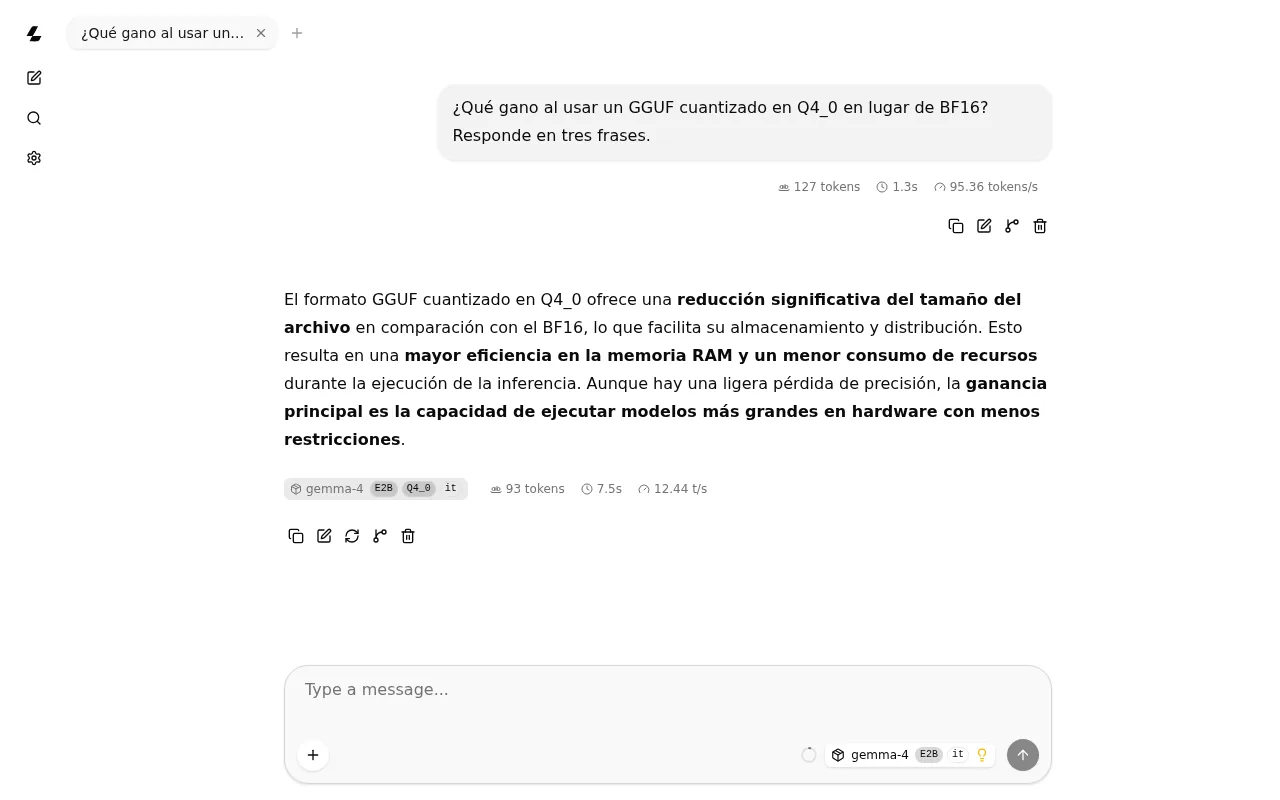
The web UI lives at the server root and shows tokens, time and speed for each message. The 12.44 tokens/s in the screenshot come from a moment of high load on the shared machine. For GPU serving at high concurrency, compare with vLLM in production.
How fast llama.cpp runs on a CPU without a GPU
In this test, Gemma 4 E2B in Q4_0 generated a median of 41.92 tokens/s on 4 CPU threads. The host is a Linux arm64 virtual machine on Apple silicon, with 18 cores, 121 GB of RAM and no GPU, shared with other jobs; the container had an 8-CPU limit. I ran llama-bench three times, each with 5 repetitions:
llama-bench -m gemma-4-E2B-it-Q4_0.gguf -t 4 -p 128 -n 128 -r 5
llama-bench reports 2.63 GiB and 4.63 B parameters for this GGUF.
The figure depends on what the rest of the machine is doing. Through the server and on the same 4 threads, the installer binary gave a median of 40.72 tokens/s at a load of 30. The Docker image dropped to between 2.58 and 4.05 tokens/s when the load rose to 45. If you want to understand why llama.cpp performs this way on a CPU, read the llama.cpp optimisations we covered in 2024.
What changes in v0.4.1 if you come from an earlier version
The v0.4.1 release notes[9] bring four behaviour changes that affect scripts and deployments built for earlier versions:
--mmap,--mlockand--direct-io: removed. The v0.4.1 image answerserror: invalid argument: --mlock. Use--load-modewithauto(mmap unless the device does not support it),none,mmap,mlock,mmap+mlockordio--reasoning-preserve: on by default; it keeps reasoning across the whole history with templates that support itmmprojand draft model devices: they follow the global--deviceselection- Lazy tensor loading: off by default on integrated GPUs
The unified llama binary is older: it arrived with PR 23296, merged on 20 May 2026. llama serve is equivalent to llama-server and llama cli to llama-cli. The source build and Homebrew install both forms; the server image, only llama-server.
Frequently asked questions
Does llama.cpp need a GPU?
No. In this test, Gemma 4 E2B in Q4_0 generated 41.92 tokens/s on 4 threads of an arm64 CPU. With a GPU, use the CUDA, Vulkan or ROCm variants of the Docker image, build with -DGGML_CUDA=ON or -DGGML_VULKAN=ON, or let the llama.app installer detect CUDA, ROCm or Vulkan.
Where does llama.cpp store the models it downloads with -hf?
On Linux, in the Hugging Face cache, ~/.cache/huggingface/hub/models--user--repo/, unless you set LLAMA_CACHE, HF_HUB_CACHE or HF_HOME. llama cli -cl lists the models already in the cache.
Which install channel should I pick for a server?
Docker with the pinned server-v0.4.1 tag, --api-key, and the port published only on 127.0.0.1 or behind a reverse proxy. You upgrade by changing the tag, and the version does not move on its own the way it does with :server or the installer.
Conclusion
For a Linux laptop, the llama.app installer is the route with the fewest steps if you install zstd first and accept a nightly build. For a server, pin server-v0.4.1 on Docker; on a Mac, use Homebrew; and for a specific GPU backend, build the v0.4.1 tag from the full history. Once the model is running, the next step is choosing the right size and quantization. If you prefer Ollama as a management layer on top, Gemma 4 locally, which size fits your GPU runs the same model family there.
Sources: [1] llama.cpp v0.4.1 release notes[9], [2] llama.cpp v0.2.0 release notes: start of semantic versioning[10], [3] llama.cpp release process (docs/release.md)[1], [4] llama.app install script[4], [5] llama.cpp formula on Homebrew[6], [6] llama.cpp Docker images (docs/docker.md)[7], [7] llama.cpp build guide (docs/build.md)[5], [8] llama-server options reference[11], [9] llama.app quickstart[12], [10] Hugging Face: GGML and llama.cpp join HF[2], [11] NVIDIA: agreement to acquire Hugging Face[3], [12] PR 26508: notice of the port change to 9931[8].
Sources
- release process documentation
- joined Hugging Face
- NVIDIA announced an agreement to acquire Hugging Face
- llama.app
- build guide
- Homebrew formula
- project’s Docker documentation
- PR 26508
- v0.4.1 release notes
- llama.cpp v0.2.0 release notes: start of semantic versioning
- llama-server options reference
- llama.app quickstart
Source code
Access all the source code for this post on GitHub.
View on GitHub