Let’s Encrypt 45-day certificates: how to pick the ACME profile in Caddy, Traefik, certbot, acme.sh and lego
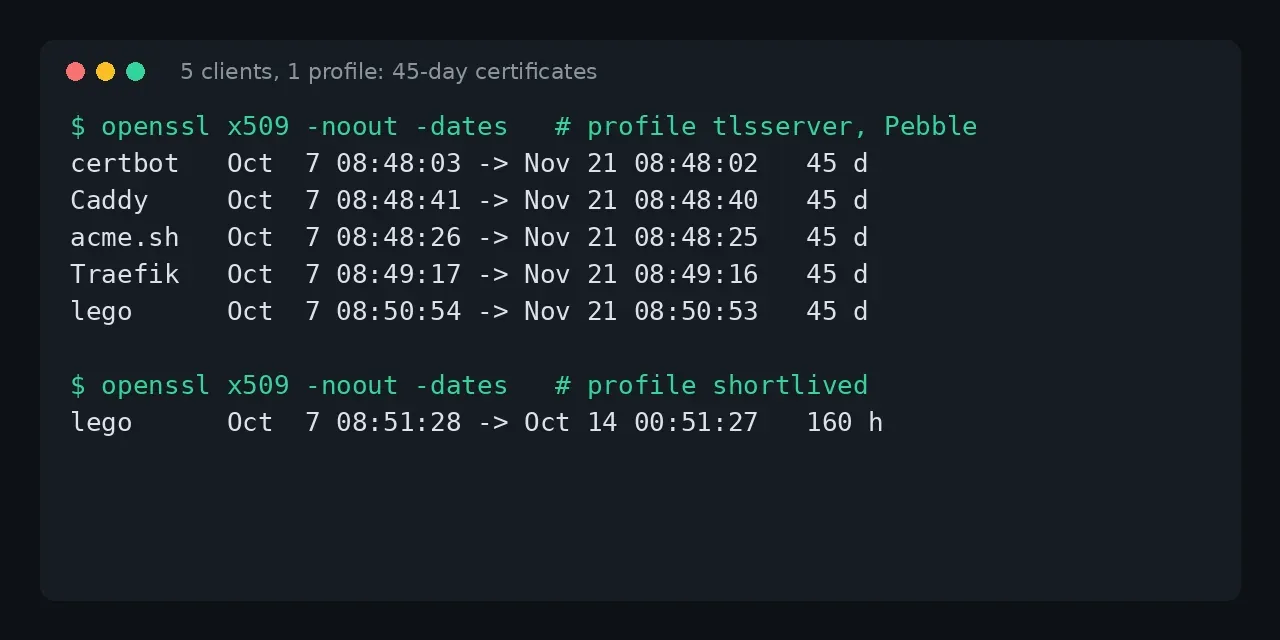
Table of contents
- Key takeaways
- What changes and when: the Let's Encrypt schedule
- Which profiles does Let's Encrypt offer today?
- How I tested the profiles without spending Let's Encrypt rate limits
- How to pick the profile in each ACME client
- certbot 5.8.0
- Caddy 2.11.4
- Traefik 3.7.13
- acme.sh 3.1.6
- lego 5.5.2
- How to check the profile and the renewal time
- Which profile to choose now
- Frequently asked questions
- Do I have to do anything before 10 February 2027?
- Are 45-day certificates ready for production?
- What if my client does not support profiles?
- Conclusion
- Sources
Since 13 May 2026, the Let’s Encrypt tlsserver profile issues 45-day certificates, and the classic profile, the one you get if you pick none, goes from 90 to 64 days on 10 February 2027 and to 45 days on 16 February 2028. Choosing the profile is one line of configuration in your ACME (Automatic Certificate Management Environment) client. I tried that line in certbot, Caddy, Traefik, acme.sh and lego against Pebble, Let’s Encrypt’s test ACME server, and below I show which certificate each one got and what renewal each client needs. There is also a Spanish version.
Key takeaways
- Let’s Encrypt published the schedule on 2 December 2025:
tlsserverat 45 days on 13 May 2026,classicat 64 days on 10 February 2027 and at 45 days on 16 February 2028. - The production ACME directory lists three profiles (checked on 7 October 2026):
classic,tlsserverandshortlived, the last one valid for 160 hours. Thetlsclientprofile stopped being available on 8 July 2026. - All five clients I tested asked for
tlsserverand received a certificate valid for exactly 45 days, from 7 October to 21 November 2026. - Traefik renews 30 days before expiry by default, a rule designed for 90-day certificates. With
shortlivedit renewed the certificate on every restart until I setcertificatesDuration. - If your client does not use ARI (ACME Renewal Information), it should renew about two thirds of the way through a certificate’s life, not on a fixed 60-day interval.
What changes and when: the Let’s Encrypt schedule
Let’s Encrypt is shortening certificate lifetimes in stages, and ACME profiles control the stages. The dates come from the official post of 2 December 2025[1], which I re-checked on 7 October 2026:
| Date | Profile | Validity | Authorization reuse |
|---|---|---|---|
| 13 May 2026 | tlsserver (opt-in) |
45 days | 7 hours, per the profiles page[2] |
| 10 February 2027 | classic (default) |
64 days | 10 days |
| 16 February 2028 | classic (default) |
45 days | 7 hours |
| Available now | shortlived (opt-in) |
160 hours | 7 hours, per the profiles page |
Authorization reuse is the time during which Let’s Encrypt accepts that you already proved control of a domain without validating it again. Today it is 30 days and it will drop to 7 hours in 2028, so every renewal will have to pass a fresh challenge. The post puts it like this: "This profile is opt-in and can be used by early adopters and for testing."
The practical consequence is that 10 February 2027 affects everyone who has not chosen a profile. If your automation works with 64 days, you need to change nothing; if it renews on a fixed interval, it stops working sooner than you think.
Which profiles does Let’s Encrypt offer today?
There are three profiles in production. You can check it yourself by reading the ACME directory:
curl -s https://acme-v02.api.letsencrypt.org/directory \
  | jq .meta.profiles
On 7 October 2026 it returned classic, shortlived and tlsserver, each with a link to its section of the profiles page[2]. The differences that matter:
classic: the profile you already know, 90 days today, with a Common Name in the certificate and up to 100 names.tlsserver: follows the current CA/Browser Forum recommendations, omits the Common Name and allows up to 25 names. Let’s Encrypt recommends it "for subscribers who want smaller certificates and who fully embrace automation".shortlived: the same astlsserver, but valid for 160 hours. It is the only profile that issues certificates for IP addresses, according to the general availability announcement[3] of 15 January 2026.
The 25-name limit is the one thing that can break a move to tlsserver: if you issue certificates with more than 25 alternative names, split them before you switch.
How I tested the profiles without spending Let’s Encrypt rate limits
To avoid requesting certificates from production in a lab, I used Pebble[4] 2.10.1, the test ACME server that Let’s Encrypt itself maintains. Pebble can advertise profiles but does not enforce them: I set the names and validity periods in its configuration file, copying them from the schedule above. What my lab shows is that each client sends the profile and honours the certificate it receives, not what Let’s Encrypt issues in production.
The pebble-config.json file declares the three profiles (in seconds: 90 days, 45 days and 160 hours):
{
  "pebble": {
    "listenAddress": "0.0.0.0:14000",
    "managementListenAddress": "0.0.0.0:15000",
    "certificate": "/cfg/certs/localhost/cert.pem",
    "privateKey": "/cfg/certs/localhost/key.pem",
    "httpPort": 80,
    "tlsPort": 443,
    "keyAlgorithm": "ecdsa",
    "profiles": {
      "classic":    { "description": "90 days",   "validityPeriod": 7776000 },
      "tlsserver":  { "description": "45 days",   "validityPeriod": 3888000 },
      "shortlived": { "description": "160 hours", "validityPeriod": 576000 }
    }
  }
}
I started it with Docker Compose, with PEBBLE_VA_ALWAYS_VALID=1 so it accepts any challenge without public DNS (the challenge itself is not tested in this lab):
services:
  pebble:
    image: ghcr.io/letsencrypt/pebble:latest
    command: ["-config", "/cfg/pebble-config.json"]
    environment:
      PEBBLE_VA_NOSLEEP: "1"
      PEBBLE_VA_ALWAYS_VALID: "1"
    volumes:
      - ./cfg:/cfg:ro
Pebble’s own certificate (cfg/certs/localhost/cert.pem) comes from the Pebble repository and every client has to trust it. Pebble’s ACME directory advertises the profiles in meta.profiles, just like Let’s Encrypt’s does. The certificates come out for names such as certbot.test and caddy.test.
How to pick the profile in each ACME client
Each client has its own option and its own quirk. All certificates below come from real runs on 7 October 2026.
certbot 5.8.0
certbot has two options: --preferred-profile (asks for the profile and, if the server does not know it, issues with the default one) and --required-profile (fails if it does not exist).
certbot certonly --standalone -d certbot.test \
  --server https://pebble:14000/dir \
  --preferred-profile tlsserver
The certificate came out with notBefore=Oct 7 08:48:03 2026 and notAfter=Nov 21 08:48:02 2026, 45 days. With a profile that does not exist, the two modes behave differently: --required-profile nosuch aborted with Order includes unrecognized profile name "nosuch", and --preferred-profile nosuch issued the 89-day certificate from Pebble’s default profile. The value is stored in the renewal file as preferred_profile = tlsserver, so certbot renew reuses it. Choose --preferred-profile in production: if Let’s Encrypt retires a profile, renewal keeps working.
Caddy 2.11.4
In Caddy the profile is an option of the acme issuer, and the documentation marks it as experimental[5] until the draft standard is final. If you declare it, every CA you use has to support it.
caddy.test {
    tls {
        issuer acme {
            dir https://pebble:14000/dir
            trusted_roots /pebble.pem
            profile tlsserver
        }
    }
    respond "ok"
}
In production you drop dir and trusted_roots and keep only profile tlsserver. Caddy issues with Let’s Encrypt and ZeroSSL by default, so if you use both, check that both accept the profile. The certificate ran from 7 October to 21 November, 45 days.
Caddy’s log showed that it fetched the renewal information: "window_start":1793868520,"window_end":1794041320, that is, 5 to 7 November 2026. Caddy renews inside that window without any configuration.
Traefik 3.7.13
In Traefik the profile is the profile option of the certificate resolver:
certificatesResolvers:
  le:
    acme:
      email: you@example.com
      storage: /acme/acme.json
      profile: tlsserver
      certificatesDuration: 1080
      httpChallenge:
        entryPoint: web
With profile: tlsserver the certificate came out valid for 45 days. The certificatesDuration: 1080 line (in hours, 45 days) matters more than it looks. The Traefik documentation[6] says "By default, Traefik manages 90-day certificates and starts renewing them 30 days before their expiry".
With the default, the log said Attempt to renew certificates "720h0m0s" before expiry. With 1080 it changed to "240h0m0s", which is what Traefik’s code computes for certificates between 30 and 90 days: renew 10 days before and check every 12 hours.
With profile: shortlived and no adjustment, the resolver issued a 160-hour certificate. On restart it renewed it again at once (the log showed hoursRemaining=143), because 30 days before expiry is always now for a 6-day certificate. If you use shortlived in Traefik, set certificatesDuration: 160.
acme.sh 3.1.6
acme.sh calls the option --cert-profile (or --certificate-profile):
acme.sh --issue --standalone -d acmesh.test \
  --server https://pebble:14000/dir \
  --cert-profile tlsserver
The certificate ran from 7 October to 21 November 2026. acme.sh --list adds a Profile column showing tlsserver, and the Renew column read 2026-11-06T17:36:57Z: acme.sh picked that moment inside the window announced by Pebble’s ARI (5 to 7 November). The profile is stored in the domain configuration and reused on renewals.
lego 5.5.2
lego uses --profile, and the same run command requests and renews:
lego --path /data --server https://pebble:14000/dir \
  --accept-tos --email you@example.com \
  --domains lego.test --http run --profile tlsserver
With tlsserver it produced a 45-day certificate. With --profile shortlived it produced one from 7 October at 08:51:28 to 14 October at 00:51:27, 160 hours. When I repeated the command, lego answered Skip renewal: ... the renewal can be performed in 3d7h59m58s, which is half the certificate’s life. Lego’s help text describes the rule: "1/3rd of the lifetime left, or 1/2 of the lifetime for short-lived certificates", unless you set --renew-days.
How to check the profile and the renewal time
A certificate does not say which profile issued it. What you can check is its validity and when your client will renew it:
openssl x509 -in cert.pem -noout -dates
certbot certificates
acme.sh --list
openssl x509 -noout -dates gives the two dates and, by subtraction, the days. certbot certificates shows the days left (with Pebble’s default profile it printed VALID: 89 days, and with tlsserver it printed VALID: 44 days a minute after issuing). For the exact renewal moment, the reliable signal is ARI, which each client queries on its own. Caddy logs it and acme.sh prints it in the --issue output.
The Let’s Encrypt post warns about what does not work: "For example, renewing at a hardcoded interval of 60 days will no longer be sufficient." If you schedule renewal by hand with cron, run it daily and let the client decide whether it is time.
Which profile to choose now
Choose tlsserver on services whose renewal is already automated and monitored. From 16 February 2028 everyone gets that 45-day lifetime, and today it lets you find failures with room to spare. Keep classic where you depend on tools that expect the Common Name or more than 25 names. Reserve shortlived for cases with a reason, such as a certificate for an IP address, and first check that renewal (and the restart of the server that loads the certificate) works unattended.
If you manage certificates with Nginx Proxy Manager, first check which ACME client it runs and whether it supports profiles; see the Nginx Proxy Manager installation guide. For a service behind Caddy, Forgejo with Caddy is a complete example, and if you use Traefik there is the Traefik install with Docker Compose.
Frequently asked questions
Do I have to do anything before 10 February 2027?
Only if your renewal depends on a fixed interval, such as a monthly cron job. With a client that renews on its own you change nothing, but it pays to test with tlsserver first: if something fails at 45 days, it will fail at 64 too.
Are 45-day certificates ready for production?
Yes. The tlsserver profile has issued real certificates since 13 May 2026 and is in the production directory. It is opt-in, so no certificate changes until you ask for it.
What if my client does not support profiles?
Wait to update it, because without a profile you always get the default. Meanwhile classic keeps working: it moves to 64 days in February 2027 and you need to change nothing if you renew daily.
Conclusion
The move to 45 days is a configuration decision: one line per client, with a different option in each (--preferred-profile, profile, --cert-profile, --profile). My test against Pebble confirms that all five clients send it and that the resulting certificate lasts 45 days, but also that Traefik’s renewal needs adjusting by hand.
Try tlsserver on a secondary service this week. By 10 February 2027 you will already know what breaks.
Sources: [1] Decreasing Certificate Lifetimes to 45 Days (Let’s Encrypt)[1], [2] Let’s Encrypt profiles[2], [3] Let’s Encrypt: 6-day and IP address certificates now available[3], [4] Pebble on GitHub[4], [5] Traefik ACME resolver documentation[6], [6] Caddy tls directive[5], [7] Six-Day and IP Address Certificates Available in Certbot[7], [8] acme.sh on GitHub[8].