How to fix quay.io/minio/minio 401 UNAUTHORIZED in Docker and Kubernetes
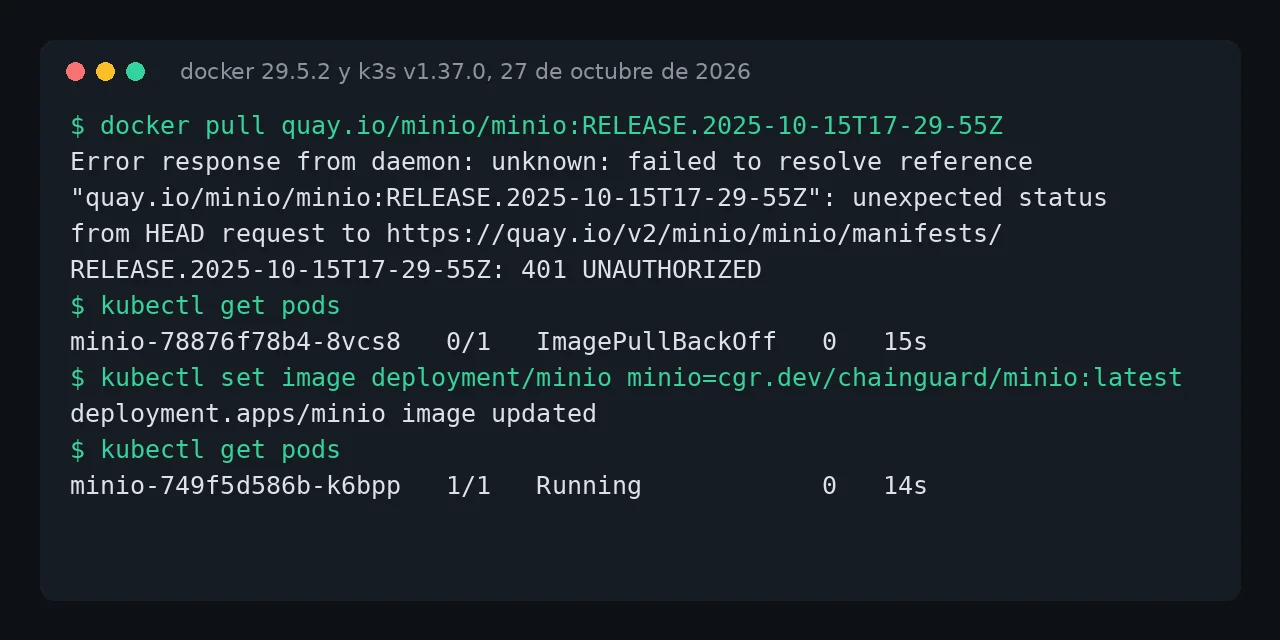
Table of contents
- Key takeaways
- The error: failed to resolve reference quay.io/minio/minio 401 UNAUTHORIZED
- What does the same 401 look like in Kubernetes, BuildKit and other tools?
- Why does quay.io return 401 if the image used to be public?
- Does the quay.io/minio/aistor/minio image work?
- Fix in Docker Compose: which image to use now
- Fix in Kubernetes and in the MinIO Helm chart
- Fix in a Dockerfile that copies mc from the image
- If you would rather not depend on a fork
- Frequently asked questions
- Does docker login quay.io fix it?
- Why does my compose file start on one server and not on another?
- Can I trust the Chainguard and Silo images?
- Conclusion
- Sources
The 401 UNAUTHORIZED error when you pull quay.io/minio/minio is not fixed with credentials: MinIO took public access away from that repository, and it fails for every tag. The fix is to switch the image to cgr.dev/chainguard/minio or pgsty/silo in your compose file, your Kubernetes deployment or your Helm chart values. This guide reproduces the error in Docker, k3s, BuildKit and the official chart, explains why Quay answers 401 and tests each fix. I tested it on 27 October 2026 on arm64 Linux with Docker 29.5.2, Compose v2.40.3 and k3s v1.37.0. There is a Spanish version of this guide.
Key takeaways
quay.io/minio/minioandquay.io/minio/mcreturn 401 for every tag:latest,RELEASE.2025-10-15T17-29-55Zand the 2024 versions the Helm chart pins.- Quay gives an anonymous user an empty permission on
minio/minio, the same 401 it gives for a repository that does not exist, while theminionamespace still publishes 94 repositories. quay.io/minio/aistor/miniodoes pull, but it is AIStor: without a license, creating a bucket fails withAccess denied. No license is installed.cgr.dev/chainguard/minio:latest(RELEASE.2026-10-23T20-06-51Z) andpgsty/silo:RELEASE.2026-10-26T00-00-00Zboth started in Compose and in k3s.- In the MinIO Helm chart 5.4.0, change
imageandmcImagetopgsty/siloand the release starts.
If the message you see is pull access denied for minio/minio, you are coming from Docker Hub: the pull access denied for minio/minio guide covers that case and building from source.
The error: failed to resolve reference quay.io/minio/minio 401 UNAUTHORIZED
The message says the registry rejected the manifest request because you are not authorized, and it is the same in docker pull, docker compose pull and docker compose up when the image is not cached. This is what I got on 27 October 2026:
$ docker pull quay.io/minio/minio:RELEASE.2025-10-15T17-29-55Z
Error response from daemon: unknown: failed to resolve reference
"quay.io/minio/minio:RELEASE.2025-10-15T17-29-55Z": unexpected status
from HEAD request to https://quay.io/v2/minio/minio/manifests/
RELEASE.2025-10-15T17-29-55Z: 401 UNAUTHORIZED

$ docker compose up -d
 minio Pulling
 minio Error unknown: failed to resolve reference "quay.io/minio/minio:
 RELEASE.2025-10-15T17-29-55Z": unexpected status from HEAD request to
 https://quay.io/v2/minio/minio/manifests/RELEASE.2025-10-15T17-29-55Z:
 401 UNAUTHORIZED
In your terminal each message is a single line. I tried latest, RELEASE.2025-09-07T16-13-09Z, RELEASE.2025-04-22T22-12-26Z and RELEASE.2025-10-15T17-29-55Z, the last one ever published: all four fail the same way. So does quay.io/minio/mc. The tag makes no difference, so hunting for an older version does not help.
What does the same 401 look like in Kubernetes, BuildKit and other tools?
Each client wraps the 401 in its own text, but the cause is the same. This table collects what each one returned for the same image:
| Tool | Message you will see |
|---|---|
docker pull, Compose |
unexpected status from HEAD request ... 401 UNAUTHORIZED |
| Kubernetes (containerd) | failed to pull and unpack image ... 401 UNAUTHORIZED, then ImagePullBackOff |
docker build with COPY --from |
failed to resolve source metadata for quay.io/minio/mc:latest |
| skopeo 1.22.3 | unauthorized: access to the requested resource is not authorized |
| crane | UNAUTHORIZED: access to the requested resource is not authorized |
In Kubernetes the error shows up in the pod events. I reproduced it on k3s v1.37.0 running inside Docker with a kubectl run of the image; this is the event kubectl describe pod showed:
Warning  Failed  kubelet  Failed to pull image
"quay.io/minio/minio:RELEASE.2025-10-15T17-29-55Z": failed to pull and
unpack image "quay.io/minio/minio:RELEASE.2025-10-15T17-29-55Z": failed
to resolve reference "quay.io/minio/minio:RELEASE.2025-10-15T17-29-55Z":
unexpected status from HEAD request to https://quay.io/v2/minio/minio/
manifests/RELEASE.2025-10-15T17-29-55Z: 401 UNAUTHORIZED
Warning  Failed  kubelet  Error: ErrImagePull
Warning  Failed  kubelet  Error: ImagePullBackOff
The BuildKit case tends to go unnoticed. A Dockerfile with COPY --from=quay.io/minio/mc:latest /usr/bin/mc /usr/bin/mc kept building on my machine because the image was cached; with docker build --pull --no-cache it failed with the 401. Your CI, which starts with no cache, will hit it on the first run.
Why does quay.io return 401 if the image used to be public?
Because MinIO removed public access to the repository, and Quay answers 401 both for a private repository and for one that does not exist. I checked by asking quay.io/v2/auth for an anonymous pull token. For minio/kes the token grants "actions":["pull"]; for minio/minio it grants "actions":[]. With that token the manifest returns 401 for minio/minio, for minio/mc and for a made-up repository, minio/zz-no-existe-xyz.
The rest of the minio namespace is still open. The Quay API lists 94 public repositories, including kes, warp, operator and a whole series under aistor/. Only the community edition server and client are missing.
registry-stack issue 1402[1] dates the change to about 13:00 UTC on 24 September 2026. One of their CI runs pulled the image at 12:50 and the next one failed.
The reason is in the MinIO repository README[2], archived since April: "The MinIO community edition is now distributed as source code only. We will no longer provide pre-compiled binary releases for the community version." The same text points to AIStor Free and AIStor Enterprise as alternatives. There is no official community image in any registry. GitHub search shows the trickle of broken projects since then: LibreChat[3] on 25 September, a Snowflake Iceberg workshop[4] on 10 October and more this month.
Does the quay.io/minio/aistor/minio image work?
Not as a free replacement. quay.io/minio/aistor/minio:latest pulls without an account and reports RELEASE.2026-09-19T17-05-25Z with License: MinIO AIStor License. It starts and formats the drive, but without a license it stays locked, as its own container log says:
WARN: No valid license found, running in offline mode. All S3
operations are denied. Please install a valid license using
'mc license update' to restore service.

$ mc mb a/pruebas
mc: <ERROR> Unable to make bucket `a/pruebas`. Access denied. No
license is installed. Please install a valid license using
'mc license update' to enable service.
AIStor Free exists, but it is a different product, with a different license you have to install on the server. If you only swap the image, your application gets Access denied on every S3 request. I did not test with a license, so I cannot tell you how it behaves with one installed.
Fix in Docker Compose: which image to use now
Change the image: line to one of these two. Both pull without an account, publish arm64 and amd64 variants and are maintained today:
| Image | Version on 27 October 2026 | User | Maintainer |
|---|---|---|---|
cgr.dev/chainguard/minio:latest |
RELEASE.2026-10-23T20-06-51Z | 65532 | Chainguard, from its fork |
pgsty/silo:RELEASE.2026-10-26T00-00-00Z |
RELEASE.2026-10-26T00-00-00Z | root | Pigsty, community fork |
Chainguard builds the image from its MinIO fork[5]. The fork got a security fix on 22 September and dependency updates on 23 October 2026. Silo[6], the Pigsty fork, has 4,340 stars and shipped releases on 18 and 26 October. This is the compose file I left running with Chainguard:
services:
  minio:
    image: cgr.dev/chainguard/minio:latest
    command: server /data --console-address ":9001"
    environment:
      MINIO_ROOT_USER: ${MINIO_ROOT_USER}
      MINIO_ROOT_PASSWORD: ${MINIO_ROOT_PASSWORD}
    volumes:
      - datos:/data
    ports:
      - "127.0.0.1:9000:9000"
volumes:
  datos:
With a fresh volume it started first time and /minio/health/live returned 200; with Silo on the same image: line, so did it. If your volume already holds data written by the old image, which ran as root, Chainguard first needs a chown to 65532. The pull access denied for minio/minio guide shows the exact error and the command. Chainguard only publishes latest on its free tier, so pin the image by digest if you want reproducible deployments; Silo has per-version tags.
Fix in Kubernetes and in the MinIO Helm chart
In Kubernetes you change the deployment’s image, and Kubernetes replaces the pod stuck in ImagePullBackOff. I tested it on k3s with a Deployment that used the Quay image:
kubectl set image deployment/minio minio=cgr.dev/chainguard/minio:latest
kubectl rollout status deployment/minio
The new pod went to Running, but the MinIO log showed Rename across devices not allowed, because it had no volume on /data. With an emptyDir or a PersistentVolumeClaim mounted on /data and securityContext: {fsGroup: 65532} on the pod, it started cleanly and /minio/health/live answered HTTP/1.1 200 OK. If you do not have a test cluster yet, the guide to installing k3s in your homelab sets one up on a single machine.
The official Helm chart breaks twice. Version 5.4.0 on charts.min.io, the last one published, pins quay.io/minio/minio:RELEASE.2024-12-18T13-15-44Z for the server and quay.io/minio/mc:RELEASE.2024-11-21T17-21-54Z for the job that creates the buckets. After a helm install both pods sat in ImagePullBackOff. This values file fixes it:
image:
  repository: docker.io/pgsty/silo
  tag: RELEASE.2026-10-26T00-00-00Z
mcImage:
  repository: docker.io/pgsty/silo
  tag: RELEASE.2026-10-26T00-00-00Z
Apply it with helm upgrade your_release minio/minio --reuse-values -f silo-values.yaml. I picked Silo because its image ships /usr/bin/mc, which is what the chart’s job calls, plus the docker-entrypoint.sh the server uses.
The server started as Silo Object Storage Server and, from a pod running the same image, mc mb created a bucket against the service. The chart’s own job did not create it in my test: I started k3s without CoreDNS to save memory, so it could not resolve the service name. A cluster with DNS will not have that problem.
Fix in a Dockerfile that copies mc from the image
If your Dockerfile copies the client with COPY --from=quay.io/minio/mc, copy it from Silo instead. Its /usr/bin/mc is a symbolic link, so copy the real binary, mcli, and give it the usual name:
FROM mirror.gcr.io/library/alpine:3.22
COPY --from=docker.io/pgsty/silo:RELEASE.2026-10-26T00-00-00Z \
     /usr/bin/mcli /usr/bin/mc
The resulting image returned mc version RELEASE.2026-10-26T00-00-00Z and the binary is 28.7 MB. If your case is the createbuckets container in a compose file, the pull access denied for minio/mc guide tests three replacements for that pattern.
If you would rather not depend on a fork
Both images above are forks, and the MinIO code is archived. That leaves two paths.
The first is to build MinIO and mc yourself from the GitHub tags and push the result to your private Docker image registry; the Docker Hub guide includes a tested 22-line Dockerfile. The second is to leave MinIO: the MinIO to Garage migration copies the buckets with rclone to a lighter store, and the RustFS migration keeps the console, users and versioning.
Stay on a fork if you need a MinIO feature the destination lacks. In that case pin the version and watch the security advisories of the fork you choose, because the original repository no longer publishes any.
Frequently asked questions
Does docker login quay.io fix it?
I did not test with a Quay account. The anonymous token for minio/minio comes back with no permissions and the repository API answers Requires authentication, the same answer it gives for a made-up repository. MinIO has not announced account access to those images, so there is no reason to expect a personal account to fix it.
Why does my compose file start on one server and not on another?
Because the server that starts has the image cached, and Compose does not pull an image it already has. On my machine docker compose up -d started with quay.io/minio/minio:RELEASE.2025-09-07T16-13-09Z cached, and docker compose pull failed with the 401. A new machine, a CI runner or a freshly added Kubernetes node has no such cache.
Can I trust the Chainguard and Silo images?
Both are actively maintained and have a public fork you can review. Chainguard is a container image company; its catalogue of minimal images signs every image. Silo is a Pigsty community project with no affiliation to MinIO. Both keep the original AGPLv3 license, according to their --version output.
Conclusion
The quay.io/minio/minio 401 has been permanent since 24 September 2026 and does not depend on the tag or on your setup. To get unstuck, switch the image to cgr.dev/chainguard/minio:latest or to pgsty/silo with a fixed tag, in Compose, in Kubernetes or in the Helm chart’s image and mcImage values. Do not use the AIStor image from Quay without a license, because it denies every S3 operation. Then decide calmly whether to stay on a fork or migrate to Garage or RustFS.
Sources: [1] MinIO, archived repository README[2], [2] registry-stack, issue 1402 on the Quay 401[1], [3] Quay, minio/minio repository API[7], [4] MinIO, Helm chart values[8], [5] Chainguard, MinIO image[9], [6] Chainguard, MinIO fork[5], [7] Pigsty, Silo fork[6], [8] LibreChat, issue 259[3], [9] Snowflake Labs, apache-iceberg-from-zero issue 9[4].
Sources
Source code
Access all the source code for this post on GitHub.
View on GitHub