Node.js 26 is now LTS: how to move your Docker image from Node 24
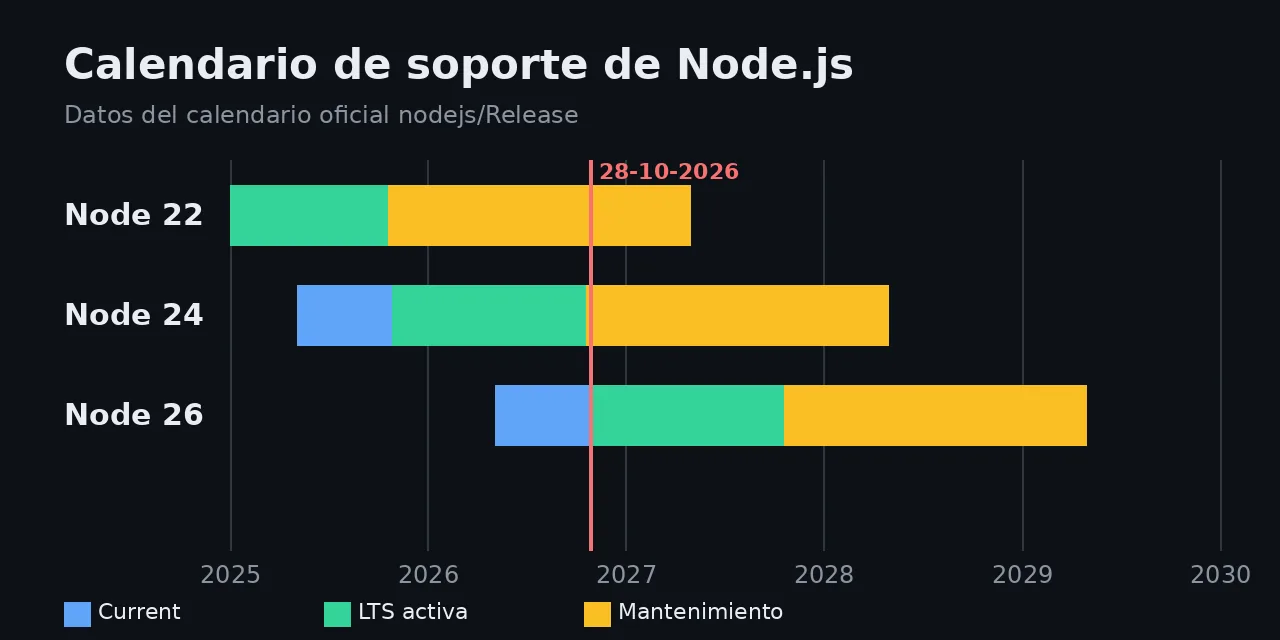
Table of contents
- Key takeaways
- When Node.js 26 becomes LTS and what happens to Node 24
- What changes in Node.js 26 compared with Node 24
- What breaks when you move from Node 24 to Node 26
- What happens to native modules
- How to move your Dockerfile to Node 26
- Frequently asked questions
- Can I run Node 26 in production before 28 October?
- Do I have to leave Node 24 now?
- Do I need a flag for Temporal in Node 26?
- Conclusion
- Sources
Node.js 26 becomes active LTS on 28 October 2026, and that same month Node 24 enters maintenance, so now is the time to move your Docker images from node:24-slim to node:26-slim. On 7 October 2026 I ran the same check script on both official images (Node 24.21.0 and Node 26.10.0) and installed three common native modules. Below are the dates, what changes, what breaks and the steps to migrate. There is also a Spanish version.
Key takeaways
- Node 26 was released on 5 May 2026, becomes active LTS on 28 October 2026, moves to maintenance on 20 October 2027 and reaches end of life on 30 April 2029.
- Node 24 enters maintenance on 20 October 2026, and Node 22 reaches end of life on 30 April 2027.
- On
node:26-slim,Temporal,Map.prototype.getOrInsert()andIterator.concat()work without flags; onnode:24-slimthey do not exist. - Two things that only warned on Node 24 now break:
require('_stream_readable')and its siblings throwMODULE_NOT_FOUND, andresponse.writeHeader()is gone. - The
node:26-slimimage is 85.9 MB versus 80.7 MB fornode:24-slim;better-sqlite3,bcryptandsharpinstalled without compiling on both.
When Node.js 26 becomes LTS and what happens to Node 24
The official schedule from the Node.js release working group[1] sets the dates for the three supported lines. This is the picture on 7 October 2026:
| Version | Status | Active LTS | Maintenance | End of life |
|---|---|---|---|---|
| Node 22 | Maintenance | 2024-10-29 | 2025-10-21 | 2027-04-30 |
| Node 24 | Active LTS | 2025-10-28 | 2026-10-20 | 2028-04-30 |
| Node 26 | Current | 2026-10-28 | 2027-10-20 | 2029-04-30 |
In maintenance, a line only gets critical and security fixes. Node 24 remains a valid base until 2028, but new improvements only land in Node 26.
Node 26 is also the last even release of the old scheme. From Node 27 on, according to the March 2026 announcement of the new schedule[2], there will be one major a year and every one will become LTS. The working group put it this way: "Odd-numbered releases see minimal adoption. Most users wait for Long-Term Support."
What changes in Node.js 26 compared with Node 24
The Node.js 26.0.0 release notes[3] highlight three things: Temporal on by default, V8 14.6 and Undici 8. To check them I ran this script on both images with docker run --rm -v $PWD:/w -w /w node:26-slim node t.mjs:
const d = Temporal.PlainDate.from('2026-10-28');
console.log(d.add({ months: 6 }).toString());

const z = Temporal.ZonedDateTime.from(
  '2026-10-25T01:30[Europe/Madrid]');
console.log(z.add({ hours: 2 }).toString());

const m = new Map();
console.log(m.getOrInsert('a', 1));
console.log([...Iterator.concat([1, 2], [3])]);
On Node 26.10.0 the script printed 2027-04-28, 2026-10-25T02:30:00+01:00[Europe/Madrid], 1 and [ 1, 2, 3 ]. The second line is the case for Temporal: adding two hours to 01:30 on the day the clocks change gives 02:30 winter time, with no offset arithmetic on your side. On Node 24.21.0 the first line already fails with Temporal is not defined.
These are the versions each image reported:
node:24-slim |
node:26-slim |
|
|---|---|---|
| Node.js | 24.21.0 | 26.10.0 |
| V8 | 13.6 | 14.6 |
| Undici | 7.29.1 | 8.10.2 |
| npm | 11.19.0 | 11.19.1 |
| Native module ABI | 137 | 147 |
| Image size | 80.7 MB | 85.9 MB |
What breaks when you move from Node 24 to Node 26
The release notes list four removals or new warnings; two of them failed in my test with code that only warned on Node 24:
- *`stream
modules**:require(‘_stream_readable’)andrequire(‘_stream_wrap’)worked on Node 24 (the second with aDEP0125warning) and throwMODULE_NOT_FOUNDon Node 26. Replace them withrequire(‘node:stream’)`. writeHeader(): on Node 24,http.ServerResponse.prototype.writeHeaderwas a function; on Node 26 it isundefined. UsewriteHead().module.register(): still there, but it now warns at runtime; if you load module hooks, trymodule.registerHooks().--experimental-transform-types: the flag is gone, so aCMDthat uses it will not start.
Search your code and node_modules for these names before switching the image. A grep -rn "_stream_\|writeHeader(" src node_modules finds most of them; if the hit is in a dependency, upgrade that before the runtime.
What happens to native modules
Every Node major changes the native module ABI: 137 on Node 24 and 147 on Node 26. A node_modules copied from a Node 24 image is useless on Node 26, so installation has to happen inside the new image.
I installed better-sqlite3 13.0.3, bcrypt 6.0.0 and sharp 0.35.5 on node:26-slim, which ships no compilers. All three worked without compiling: better-sqlite3 opened an in-memory database with SQLite 3.53.4 and sharp loaded libvips 8.18.7. On both images npm warned that bcrypt had install scripts not approved in allowScripts, which is worth reviewing even though it does not block the install.
How to move your Dockerfile to Node 26
The Dockerfile change is one line; the rest of the work is testing. This two-stage Dockerfile installs dependencies in the new image and never copies node_modules from outside:
FROM node:26-slim AS deps
WORKDIR /app
COPY package.json package-lock.json ./
RUN npm ci --omit=dev

FROM node:26-slim
WORKDIR /app
ENV NODE_ENV=production
COPY --from=deps /app/node_modules ./node_modules
COPY . .
USER node
CMD ["node", "server.js"]
The first stage runs npm ci against the lockfile and the second only copies the result, so native modules are installed for ABI 147. Add node_modules to .dockerignore so COPY . . does not bring in the one from your machine.
Follow these steps to migrate without surprises:
- Set
engines.nodeinpackage.jsonto>=26and run your tests onnode:26-slimin CI. - Search for
_stream_,writeHeader(and--experimental-transform-typesin the code and in start scripts. - Regenerate the lockfile with Node 26 if any dependency ships different binaries per version.
- Pin the full tag (
node:26.10.0-slim) in production and let Renovate or Dependabot propose bumps.
If base image size worries you, the comparison of Wolfi, Alpine and distroless measures the alternatives with the same app.
Frequently asked questions
Can I run Node 26 in production before 28 October?
You can, but until then it is a Current release and minor versions may still bring incompatible changes. If your policy is LTS only, test in CI now and switch the production image from 28 October.
Do I have to leave Node 24 now?
It is not urgent. Node 24 gets security fixes until 30 April 2028. Moving now gives you Temporal and V8 14.6, and spares you a rushed migration in 2028.
Do I need a flag for Temporal in Node 26?
No. Temporal is on by default since Node 26.0.0; on Node 24 it does not exist without flags.
Conclusion
Moving from Node 24 to Node 26 in Docker means changing one tag and reinstalling dependencies inside the new image. What can fail is well bounded: the internal _stream_* modules, writeHeader(), the experimental types flag and any node_modules built for the previous ABI.
Next, add node:26-slim to your CI matrix today and switch the production image when Node 26 becomes LTS on 28 October.
Sources: [1] Node.js 26.0.0 release notes[3], [2] Node.js release schedule[1], [3] Evolving the Node.js release schedule[2], [4] Temporal on MDN[4], [5] Official Node.js images on Docker Hub[5].
Sources
Source code
Access all the source code for this post on GitHub.
View on GitHub