How to fix unexpected argument ‘–frozen-lockfile’ found in pnpm 12
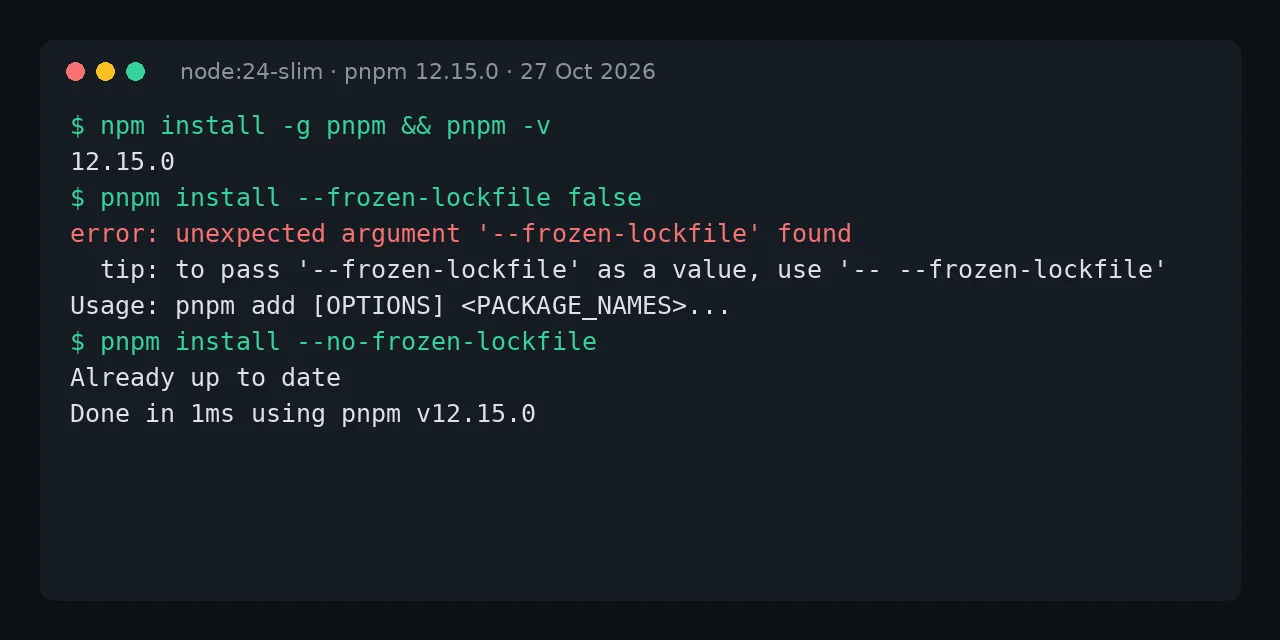
Table of contents
- Key takeaways
- What does unexpected argument '--frozen-lockfile' found mean?
- Why did pnpm 12 reach you without asking?
- How to fix the error in a Dockerfile
- How do I check that frozen mode still protects the build?
- Error ERR_PNPM_UNRECOGNIZED_WORKSPACE_SETTINGS
- Error libatomic.so.1 when going back to pnpm 11 from pnpm 12
- What about Corepack and an old global pnpm?
- Frequently asked questions
- Is --frozen-lockfile=false the same as --no-frozen-lockfile in pnpm 12?
- Do I have to regenerate pnpm-lock.yaml when moving to pnpm 12?
- How do I stop the next major version from breaking the build again?
- Conclusion
- Sources
The unexpected argument '--frozen-lockfile' found error appears because your npm install -g pnpm now installs pnpm 12, and you fix it by writing --no-frozen-lockfile instead of --frozen-lockfile false. pnpm 12 is a Rust rewrite, and its argument parser does not accept a loose value after a boolean flag: it reads false as a package name. This guide reproduces the failure inside a docker build, fixes it, and covers the other two errors you will hit in the same upgrade. I tested it on 27 October 2026 on Linux arm64 with Docker 29.5.2, node:24-slim (Node 24.22.1) and pnpm 12.15.0. There is a Spanish version of this guide.
Key takeaways
- On 27 October 2026 the
latesttag for pnpm on npm points at 12.15.0, so an unversionednpm install -g pnpminstalls pnpm 12. --frozen-lockfile falsefails with exit code 2;--no-frozen-lockfileand--frozen-lockfile=false(with an equals sign) work.- An unknown key in
pnpm-workspace.yamlturns from a warning into theERR_PNPM_UNRECOGNIZED_WORKSPACE_SETTINGSerror when the project pins pnpm inpackageManager. - Going back to pnpm 11 from a global pnpm 12 downloads a 150.7 MB executable that needs
libatomic.so.1, whichnode:24-slimdoes not ship. - The lasting fix is to pin the exact version:
npm install -g pnpm@12.15.0in the Dockerfile and"packageManager": "pnpm@12.15.0"inpackage.json.
What does unexpected argument ‘–frozen-lockfile’ found mean?
It means pnpm 12 does not accept false as a value for --frozen-lockfile and treats it as a positional argument. In pnpm 11 and earlier, pnpm install --frozen-lockfile false turned frozen-lockfile mode off. In pnpm 12, install with a loose argument becomes pnpm add, and the parser rejects the flag. This is the exact output from a docker build whose Dockerfile installs pnpm without a version:
$ pnpm install --frozen-lockfile false
error: unexpected argument '--frozen-lockfile' found

  tip: to pass '--frozen-lockfile' as a value, use '-- --frozen-lockfile'

Usage: pnpm add [OPTIONS] <PACKAGE_NAMES>...

For more information, try '--help'.
The process exits with code 2 and docker build stops with did not complete successfully: exit code: 2. The tip in the message (-- --frozen-lockfile) does not help here, because it would pass the flag as a package name. pnpm install --frozen-lockfile true fails the same way: the problem is the space-separated value, not the false.
Why did pnpm 12 reach you without asking?
Because npm install -g pnpm installs whatever the latest tag points at, and that tag is now pnpm 12. When pnpm published 12.0.0 on 26 August 2026, the announcement said latest still pointed at the 11 line. Today the npm registry returns latest: 12.15.0, latest-11: 11.28.8 and latest-10: 10.34.9. Any Dockerfile or continuous integration (CI) step that installs pnpm without a version has jumped a major without anyone touching the repository.
The jump is large. The 12.0 release post[1] puts it in two sentences: "pnpm 12 is stable. It is a rewrite of pnpm in Rust." The pnpm package no longer ships JavaScript to run; it fetches a native binary per platform. In my container that ELF binary is 45.3 MB, and the standalone pnpm 11 executable (which bundles its own Node) is 150.7 MB:
Adoption is already wide. npm’s per-version download API covers the week before 27 October 2026. In it, pnpm 12 took 20.3 % of the package’s downloads, against 35.7 % for pnpm 11 and 34.1 % for pnpm 10.
How to fix the error in a Dockerfile
The fix has two parts: change the flag and pin the version. This is the Dockerfile that reproduces the failure, with a minimal two-dependency project and its pnpm-lock.yaml:
FROM node:24-slim
RUN npm install -g pnpm
WORKDIR /app
COPY package.json pnpm-lock.yaml ./
RUN pnpm install --frozen-lockfile false
And this is the one that builds cleanly. It pins pnpm to 12.15.0 and uses the flag in its boolean form:
FROM node:24-slim
RUN npm install -g pnpm@12.15.0
WORKDIR /app
COPY package.json pnpm-lock.yaml ./
RUN pnpm install --frozen-lockfile
The build ends with Done in … using pnpm v12.15.0. If you want frozen mode off (for example, on a branch that regenerates the lockfile), write --no-frozen-lockfile. To find every occurrence in your repository, search for the old form in the files that tend to hold it:
grep -rnE "frozen-lockfile +(false|true)" \
  .github .gitlab-ci.yml Dockerfile* Makefile scripts 2>/dev/null
pnpm’s lead maintainer, Zoltan Kochan, answered issue 14741[2], which asked for the old form back, like this: "we can’t really support values with boolean flags. Unless maybe there is an explicit = sign". I checked it: --frozen-lockfile=false works on 12.15.0, but --no-frozen-lockfile is the form the migration notes document.
How do I check that frozen mode still protects the build?
Check that --frozen-lockfile rejects a stale lockfile. I added a dependency to package.json without regenerating pnpm-lock.yaml and ran the install with CI=true, as a runner would:
$ CI=true pnpm install --frozen-lockfile
Error: ERR_PNPM_OUTDATED_LOCKFILE

  × installing dependencies
  ╰─▶ Cannot install with "frozen-lockfile" because pnpm-lock.yaml is not up
      to date with package.json.

        Failure reason:
        specifiers in the lockfile don't match specifiers in package.json:
      * in importers["."]:
      * 1 dependency was added: is-even@1.0.0
The exit code is 1, which is what you want in CI. Without the flag and with CI=true, pnpm 12 also freezes the lockfile by default and prints the same error. The lockfile pnpm 12 writes is still lockfileVersion: '9.0', the same format as pnpm 10 and 11, so you do not need to regenerate it for the version change.
Error ERR_PNPM_UNRECOGNIZED_WORKSPACE_SETTINGS
This second error appears when pnpm-workspace.yaml holds a key pnpm 12 does not know and the project pins its pnpm version. Without a pin, the same key only prints a warning and the install goes on. I reproduced it with a deliberate typo, onlyBuiltDependenciez:
$ pnpm install
Error: ERR_PNPM_UNRECOGNIZED_WORKSPACE_SETTINGS

  × The following settings in pnpm-workspace.yaml are not recognized by this
  │ version of pnpm: "onlyBuiltDependenciez" (did you mean
  │ "onlyBuiltDependencies"?).
  help: The project pins pnpm to a version the running pnpm satisfies, so
        these settings cannot be meant for a different pnpm version. Remove
        them from pnpm-workspace.yaml or fix their spelling.
The fix is to delete the key or spell it correctly. Beyond typos, check for keys pnpm no longer reads. In my test, pnpm 12.15.0 ignores useNodeVersion (it suggests nodeVersion), managePackageManagerVersions and packageManagerStrict, and it drops any kebab-case key such as node-linker with the warning use "nodeLinker". pnpm 11.28.8 already printed the same warnings, so coming from pnpm 10 the jump is a double one.
The pnpm config subcommands never fail on this, so you can use them to edit the file.
Error libatomic.so.1 when going back to pnpm 11 from pnpm 12
Pinning "packageManager": "pnpm@11.28.9" looks like the quick way out, but on node:24-slim it fails differently. The global pnpm 12 tries to switch to the pinned version, downloads the standalone pnpm 11 @pnpm/exe executable, and that executable does not start:
$ pnpm -v
.../@pnpm/exe/pnpm: error while loading shared libraries:
libatomic.so.1: cannot open shared object file: No such file or directory
In your terminal it is a single line; I split it to fit. The cause is that node:24-slim is based on Debian 12.15 and does not include libatomic1, while node:26-slim (Debian 13.7) does. pnpm issue 11531[3] records the same message with the pnpm 11 installer on minimal images. There are two fixes I checked:
- Install the library:
apt-get install -y libatomic1in the image; after thatpnpm -vprints 11.28.9 and the install finishes - Install pnpm 11 with npm:
npm install -g pnpm@11uses the JavaScript package, not the standalone executable; the build ended withusing pnpm v11.28.9and the old command unchanged
Going back to pnpm 11 buys time, but it leaves a major upgrade pending. If you take that path, record it as debt in your dependency bot; the Dependabot and Renovate comparison explains how to group that kind of update.
What about Corepack and an old global pnpm?
Neither caused problems on Linux. On node:24-slim, Corepack 0.36.0 downloaded the pnpm 12.15.0 binary for linux-arm64 from packageManager and installed the project without errors. A global pnpm 10.34.9 and a global 10.6.2 both switched to the pinned 12.15.0 and finished with Done in … using pnpm v12.15.0.
Keep two exceptions in mind. node:26-slim does not include Corepack (corepack: not found), so on that image install pnpm with npm install -g pnpm@12.15.0. And issue 16675[4] records a different failure: a global pnpm 12 older than the pinned version reads pnpm-workspace.yaml before switching and stops if it finds a setting it does not know yet. If that happens to you, update the global pnpm to the version the project pins.
On Alpine, node:22-alpine installed and ran pnpm 12.15.0 with no extra libraries. If you are choosing a base image, the Wolfi, Alpine and distroless comparison measures what each one ships.
Frequently asked questions
Is –frozen-lockfile=false the same as –no-frozen-lockfile in pnpm 12?
In my test on 12.15.0 both turn frozen mode off and regenerate the lockfile. The documented form is --no-frozen-lockfile, and the pnpm maintainer only left the door open for the equals sign. Use --no-frozen-lockfile in new scripts.
Do I have to regenerate pnpm-lock.yaml when moving to pnpm 12?
Not because of the format: pnpm 12 writes lockfileVersion: '9.0', like pnpm 10 and 11. According to the 12.0 release post, the first install may rewrite the variants of packages with cyclic dependencies. Expect a one-off lockfile diff and commit it on its own.
How do I stop the next major version from breaking the build again?
Pin the exact version in two places: in the Dockerfile or CI step (npm install -g pnpm@12.15.0) and in package.json ("packageManager": "pnpm@12.15.0"). If you also want to hold back freshly published versions, the guide to hardening npm with allowScripts and min-release-age covers that part.
Conclusion
unexpected argument '--frozen-lockfile' found is not a bug in your project: it is pnpm 12 arriving through an unversioned npm install -g pnpm. Replace --frozen-lockfile false with --no-frozen-lockfile, review the keys in pnpm-workspace.yaml before pinning the version and, if you go back to pnpm 11 on node:24-slim, add libatomic1 or install it with npm. Then pin the version in the Dockerfile and in packageManager so the next jump is your decision.
Sources: [1] pnpm, 12.0 release notes[1], [2] pnpm, issue 14741 on –frozen-lockfile false[2], [3] pnpm, issue 16675 on version switching[4], [4] pnpm, issue 11531 on libatomic.so.1[3], [5] npm, the pnpm package and its tags[5], [6] Docker Hub, official Node.js image[6].
Sources
Source code
Access all the source code for this post on GitHub.
View on GitHub