How to upgrade to Nginx Proxy Manager 2.16 without losing hosts or certificates
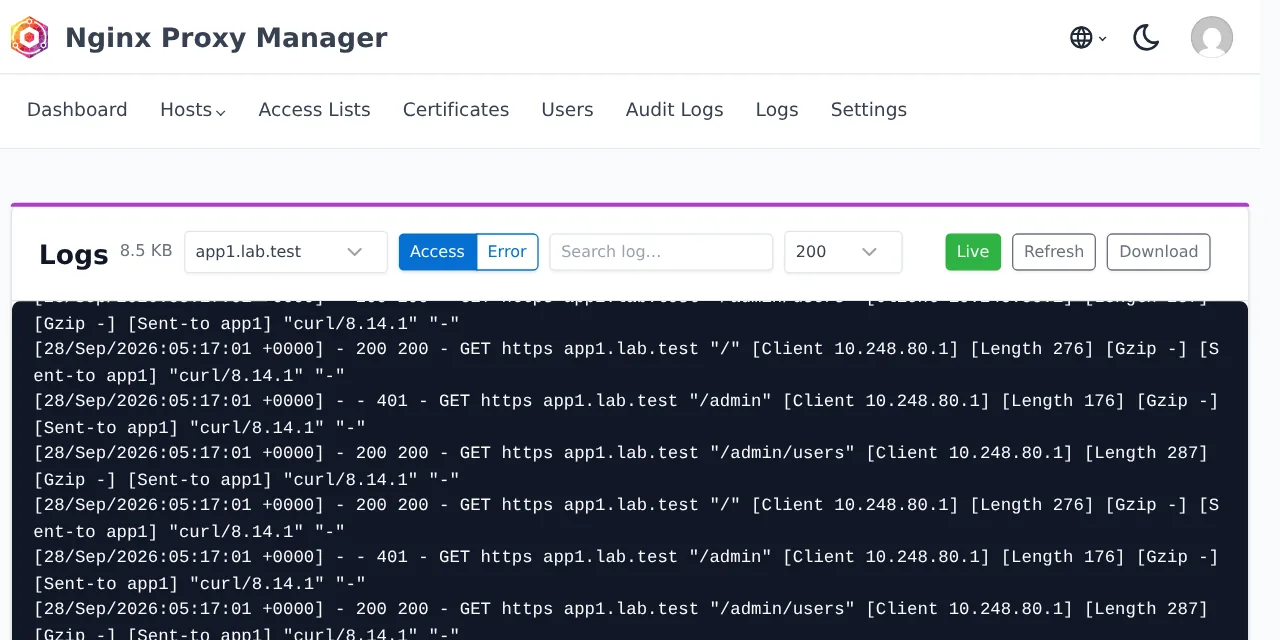
Table of contents
- Key takeaways
- What changes in Nginx Proxy Manager 2.16
- Which security bug 2.16 fixes and who is affected
- How I set up the test
- How to back up before upgrading
- How to upgrade from 2.15 to 2.16 with Docker Compose
- What to check after upgrading
- How to protect a single path with per-path access lists
- What the new log viewer shows
- Changes in 2.16 that can break something
- How to roll back to 2.15 if something fails
- FAQ
- Am I affected by the security bug if I do not use DNS certificates?
- Do I have to go through 2.15 before reaching 2.16?
- Nginx Proxy Manager or Traefik for a new server?
- Conclusion
- Sources
Upgrading Nginx Proxy Manager from 2.15 to 2.16 means changing the image tag and recreating the container, and in my test not a single host, certificate or access list was lost. Version 2.16.0, released on 24 September 2026, adds a log viewer to the admin panel and per-path access lists, and it closes a command injection that affected earlier versions. I tested it on 28 September 2026 with real state: two proxy hosts, an access list, a custom certificate and one issued over DNS-01 by a local ACME authority. There is also a Spanish version of this guide.
Key takeaways
- 2.16.0 adds no database migrations: after recreating the container, the hosts, locations, access list and both certificates were identical and answered the same way.
- The security bug is a command injection at startup, in the code that writes the DNS credentials of certificates; the reporter listed 34 affected versions, from 2.9.14 to 2.14.0, and the vulnerable code is still in 2.15.1.
- 2.16 no longer leaves your DNS provider token on disk, but the file 2.15 left behind stays there until the first renewal or until you delete it.
- Certbot goes from 5.6.0 to 5.8.0 and the DNS plugin catalogue from 86 to 88 entries; the Azure plugin moves to a different package.
- Rolling back to 2.15 by swapping only the image keeps your data, but the first time you save a host, 2.15 regenerates its config without the per-path access lists. Restore the backup.
What changes in Nginx Proxy Manager 2.16
2.16.0 brings two new features and a batch of security fixes. According to the 2.16.0 release notes[1], these are the changes that touch a running install:
- Log viewer: a Logs page in the panel to read the backend log, the Let’s Encrypt log and each host’s logs without entering the container.
- Per-path access lists: every custom location of a proxy host can have its own access list.
- Updated Certbot: the notes warn that DNS plugins may need adjustments.
- Security: the command injection fix, two-factor QR codes generated on the server itself, tokens invalidated on password change and DNS credentials removed from disk after each Certbot run.
- reuseport: the Nginx option that spreads connections across worker processes, which 2.16.0 applies only to TCP and UDP streams.
The notes open with this warning: "Certbot has been updated. Exercise caution with this upgrade as your DNS plugins may not work as expected and require tweaks to dependencies." The NPM Certbot plugin guide[2] adds another risk: using more than one DNS provider in the same instance can cause Python dependency conflicts.
The base components inside the image change too. 2.15.1 shipped Certbot 5.6.0 and OpenResty 1.29.2.5; 2.16.0 ships Certbot 5.8.0 and OpenResty 1.31.1.1. The arm64 image weighs 468 MB compressed on Docker Hub, against 445 MB for 2.15.1.
Which security bug 2.16 fixes and who is affected
2.16.0 fixes a command injection in the code that prepares the Certbot plugins when the backend starts. Pull request 5498[3], opened on 19 April 2026, explains the cause. The field holding the DNS provider credentials was placed into a shell command run with child_process.exec(), and the quotes were escaped in the wrong order. The release notes sum it up in one line and cite no CVE or security advisory.
Exploiting it requires an account allowed to manage certificates, and the injected command would run on the next backend restart, as root inside the container according to the report. So the real risk depends on who has an account on your panel. If you are the only user, the risk is low; if you hand out accounts with certificate permissions, upgrade as soon as you can.
The reporter listed 34 affected versions, from 2.9.14 to 2.14.0, which was the latest one in April. The fix landed in the development branch on 7 June 2026, after 2.15.1 was released. I checked the code of each tag. The 2.15.1 setup.js file[4] still has the vulnerable command, and the 2.16.0 one[5] no longer writes the credentials file at startup.
How I set up the test
The test ran on an arm64 Linux VM with Docker, using the official jc21/nginx-proxy-manager:2.15.1 and 2.16.0 images from Docker Hub. To issue a real certificate without a public domain I used Pebble[6] 2.10.1, Let’s Encrypt’s test ACME authority. Next to it, a BIND 9.20.29 server accepts RFC 2136 updates signed with a TSIG key. This is the NPM service in my compose.yaml, without the network:
services:
  npm:
    image: jc21/nginx-proxy-manager:${NPM_TAG:-2.15.1}
    restart: unless-stopped
    ports:
      - "127.0.0.1:24880:80"
      - "127.0.0.1:24881:81"
      - "127.0.0.1:24843:443"
    environment:
      LE_SERVER: "https://pebble:14000/dir"
      REQUESTS_CA_BUNDLE: "/pebble/pebble.minica.pem"
    volumes:
      - ./data:/data
      - ./letsencrypt:/etc/letsencrypt
      - ./pebble/pebble.minica.pem:/pebble/pebble.minica.pem:ro
The NPM_TAG variable pins the version, so upgrading and rolling back means changing one value. The two environment variables exist only in the lab: LE_SERVER points NPM at Pebble instead of Let’s Encrypt, and REQUESTS_CA_BUNDLE makes Certbot trust Pebble’s certificate. Leave them out in production. The two volumes are the ones from the guide to installing Nginx Proxy Manager with Docker, and they hold all the state you need to back up.
With 2.15.1 running, I created this state through the panel’s API:
- An access list
solo-labwith one user and two rules: allow the Docker network and deny everything else - A self-signed custom certificate for
app2.lab.test - A wildcard certificate
*.lab.testissued over DNS-01 with the RFC 2136 plugin - A host
app1.lab.testwith that certificate and an/adminlocation, and a hostapp2.lab.testfully protected by the access list
The RFC 2136 plugin credentials go into the certificate’s credentials field. These are mine, with the secret replaced:
dns_rfc2136_server = 10.248.80.10
dns_rfc2136_port = 53
dns_rfc2136_name = npm-key
dns_rfc2136_secret = your_tsig_secret_here
dns_rfc2136_algorithm = HMAC-SHA512
How to back up before upgrading
The backup is the data and letsencrypt folders, and you want to take it with the container stopped so the SQLite database does not change halfway. The files belong to root, so I pack them from an Alpine container instead of using sudo. From the folder that holds compose.yaml:
docker compose stop npm
docker run --rm -v "$PWD":/npm -w /npm alpine:3.22 \
  tar czf npm-2.15.1.tar.gz data letsencrypt
docker compose start npm
The first command stops only NPM, the second packs both folders and the third starts it again. If you run MariaDB or PostgreSQL instead of SQLite, add a dump of that database.
Treat that file as a secret. In 2.15.1, the letsencrypt/credentials folder stores the credentials of every DNS-01 certificate in plain text; my backup held the full TSIG secret. Keep it encrypted, for example with restic for encrypted backups.
How to upgrade from 2.15 to 2.16 with Docker Compose
The upgrade is two commands. The NPM upgrade documentation[7] boils it down to docker compose pull and docker compose up -d, and promises that the project "will automatically update any databases or other requirements". I pin the version instead of using latest:
NPM_TAG=2.16.0 docker compose pull npm
NPM_TAG=2.16.0 docker compose up -d npm
curl -s http://127.0.0.1:24881/api/
The last command queries the panel’s API, which returned "version":{"major":2,"minor":16,"revision":0}. Two lines in the startup log matter: Current database version: none, because there were no migrations to apply, and Installed rfc2136, because NPM reinstalls the DNS plugins your certificates use on every start. If that plugin fails to install, that is the moment to revisit the Certbot warning.
Changing the tag recreates the container even if you touch nothing else. The article on why Docker Compose 5.5 recreates your containers explains which other changes trigger it.
What to check after upgrading
After the upgrade I compared the state with the one from before, and it was identical. A script queried the hosts, locations, access lists and certificates through the API, and tested every domain with and without credentials. The responses matched one by one: 200 on app1, 401 without a user on app2, 200 with one and a 301 from HTTP to HTTPS. Both served certificates kept the same serial number.
One detail is not fixed by the upgrade on its own. The credentials-2 file, with the TSIG secret in plain text, was still in /etc/letsencrypt/credentials/ because 2.15.1 left it there and 2.16 does not remove it at startup:
docker compose exec npm ls -l /etc/letsencrypt/credentials/
docker compose exec npm certbot --version
The file goes away on the first renewal, because 2.16 writes it from the database right before running Certbot and deletes it when Certbot finishes. You can also delete it by hand: I did, and the next renewal worked the same. I renewed the DNS-01 certificate from the certificate’s menu, option Renew, and Certbot 5.8.0 with the RFC 2136 plugin renewed it without any change.
Manual renewal has a catch that is not new in 2.16. After the renewal, Nginx kept serving the previous certificate, because the renewal function does not reload Nginx; the code is the same in 2.15.1. Run docker compose exec npm nginx -s reload and check the served serial number with openssl s_client.
How to protect a single path with per-path access lists
Per-path access lists let you keep a service public and protect only part of it, such as an /admin path. Before 2.16 an access list applied to the whole host; protecting a single path meant writing Nginx directives by hand in that location’s advanced configuration. Now you pick it in the host window, Custom Locations tab, in each location’s Access List selector:
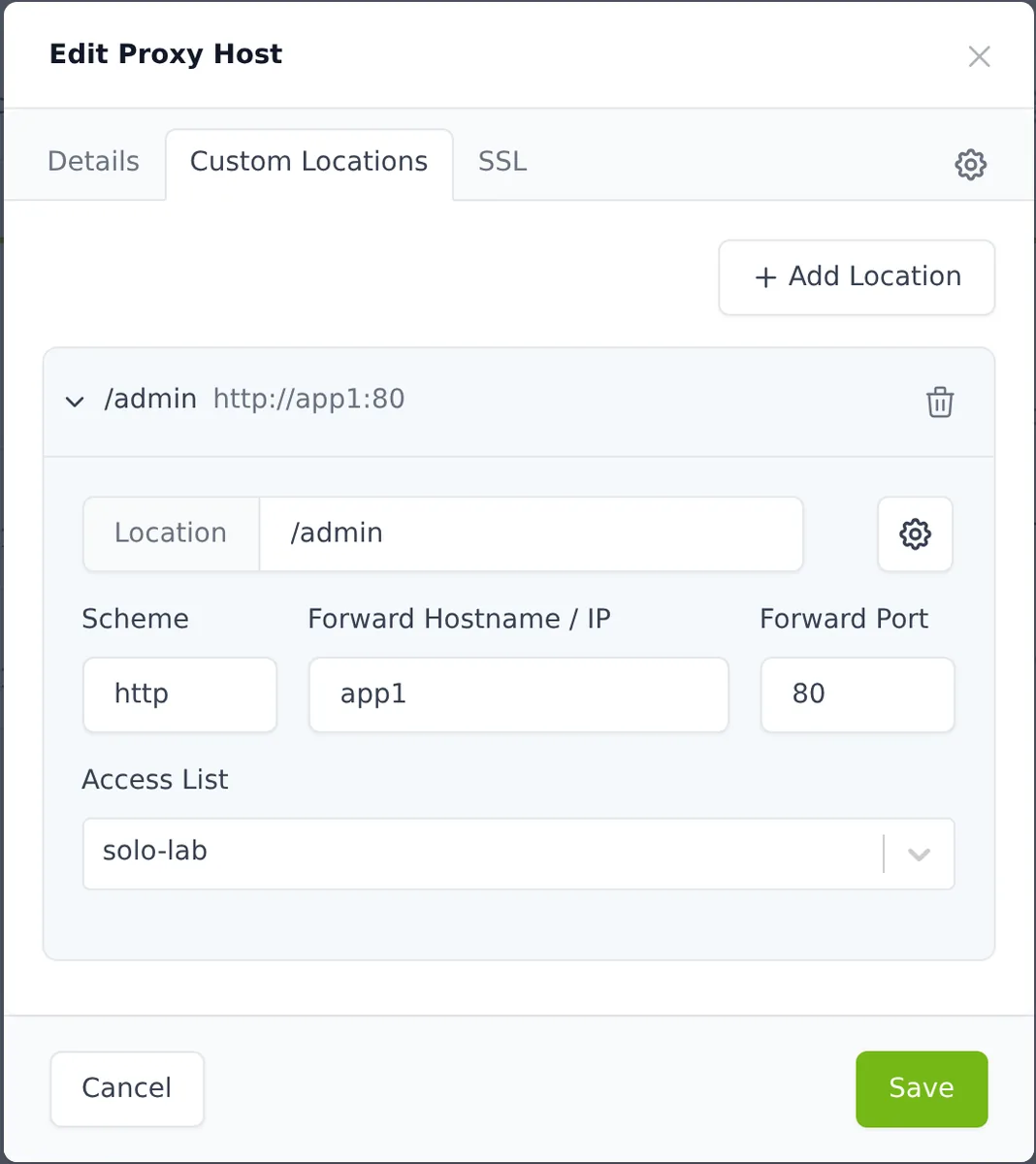
The selector offers Inherit from Proxy Host, which inherits the host’s list, or any list you have created. I picked solo-lab for /admin on app1.lab.test, which has no list of its own. The result was the expected one: /admin answered 401 without a user and 200 with one, and the host root kept answering 200 to anyone.
NPM turns that choice into directives inside the location /admin block of the file it generates: auth_basic, the list’s allow and deny rules and satisfy all. In the API the change is a new field, access_list_id, inside each location. 2.15.1 rejects it with a 400 and the message data/locations/0 must NOT have additional properties, and that detail matters when you roll back.
What the new log viewer shows
The log viewer is the Logs page in the menu, and only administrators can see it. It has a source selector with System (the backend log), Let’s Encrypt and one entry per host, with a toggle between the access and error logs. Above the text there is a level filter, a search box, a 100, 200, 500 or 1000 line selector and the Live, Refresh and Download buttons.
In practice it replaces docker compose logs for everyday lookups. In the System source I saw the whole renewal, with the Certbot command and the Congratulations, all renewals succeeded line. The app1.lab.test access log showed the 401 responses on /admin and the 200 responses of the requests with a user. The 1000-line cap comes from the backend itself, so reviewing a whole day of traffic still needs the file or a log system.
Changes in 2.16 that can break something
The upgrade was clean in my lab, but five changes are worth reviewing before you touch production:
- Certbot DNS plugins: with Certbot 5.8.0, a plugin pinned to an old version may fail to install. Check the startup log and the
Installed <plugin>line. - Azure DNS: the catalogue swaps
certbot-dns-azureforcertbot-dns-azure-modern. If you use Azure, renew one certificate by hand after upgrading to confirm it works. - API tokens: tokens issued before a password change stop working. In 2.15.1 an old token still answered 200 after the password change; in 2.16.0 it answered 401. If a script uses a long-lived token, request a new one after every change.
- Denied permissions: requests without permission return 403 instead of 404, which any script that checked for the 404 will notice.
- Failed config: if Nginx rejects a host’s config, 2.16 keeps the file as
.conf.errso you can see what failed.
There is also a new variable that the notes do not mention: NPM_ADMIN_PORT, which changes the panel’s internal port (81 by default). I found it in the 45-admin-port.sh startup script of 2.16.0; you do not need it to upgrade.
How to roll back to 2.15 if something fails
The safe rollback is to restore the backup and start 2.15.1. Changing only the image tag looks like enough, because there are no migrations and 2.15.1 starts fine on 2.16 data, but I tested that path and it has a trap. After going back to 2.15.1 with the per-path list active, /admin still answered 401 because the Nginx file generated by 2.16 was still on disk. As soon as I saved the host from 2.15.1, it regenerated the config without the location’s list and /admin started answering 200 to anyone, with no warning.
The same rollback wrote the credentials-2 file back to disk, because 2.15.1 recreates it at startup. That is why I restore the full backup:
docker compose stop npm
docker run --rm -v "$PWD":/npm -w /npm alpine:3.22 sh -c \
  'rm -rf data letsencrypt && tar xzf npm-2.15.1.tar.gz'
NPM_TAG=2.15.1 docker compose up -d npm
After the restore, the same check script reported a state identical to the one before the upgrade. Keep in mind that restoring also takes any certificate renewed after the backup back to its previous version; as long as it has not expired, it is still valid. If you created per-path lists in 2.16 and do not want to restore, move them to the whole host or to the advanced configuration before rolling back.
FAQ
Am I affected by the security bug if I do not use DNS certificates?
The vulnerable code only processes Let’s Encrypt certificates with a DNS challenge that have stored credentials. Even so, any user allowed to manage certificates can create one, so upgrade if your panel has more than one user with that permission. If you are the only administrator the risk is lower, but 2.16 also stops keeping your DNS tokens on disk.
Do I have to go through 2.15 before reaching 2.16?
My test started from 2.15.1, so I cannot confirm the jump from older versions. The 2.15.0 notes warn of a major update, with a Debian Trixie base image and an updated Certbot. If you come from 2.14 or earlier, take the backup, move to 2.15.1, check that your DNS plugins install and then move to 2.16.0.
Nginx Proxy Manager or Traefik for a new server?
NPM is still the pick if you want to manage hosts and certificates from a web panel. If you would rather declare routes as labels on your containers, compare it with Traefik with Docker Compose. To filter malicious traffic in front of either one, add CrowdSec as a community WAF.
Conclusion
Upgrading to Nginx Proxy Manager 2.16 takes two commands and, in my test, kept all the state. It is worth doing for the security fix, which also affects 2.15.1, and because it stops keeping your DNS provider tokens on disk. Take the backup with the container stopped, keep it encrypted, renew one DNS-01 certificate after upgrading and reload Nginx. If you need to roll back, restore the backup: swapping only the image leaves the paths you protected with the new feature unprotected.
Sources: [1] Nginx Proxy Manager 2.16.0 release notes[1], [2] Nginx Proxy Manager 2.15.1 release notes[8], [3] Pull request 5498: command injection fix[3], [4] backend/setup.js in 2.16.0[5], [5] 2.16.0 DNS plugin catalogue[9], [6] NPM docs: upgrading[7], [7] NPM docs: Certbot DNS plugins[2], [8] jc21/nginx-proxy-manager tags on Docker Hub[10], [9] Pebble, the test ACME authority[6].
Sources
Source code
Access all the source code for this post on GitHub.
View on GitHub