Wolfi vs Alpine vs distroless, measured with the same Docker app
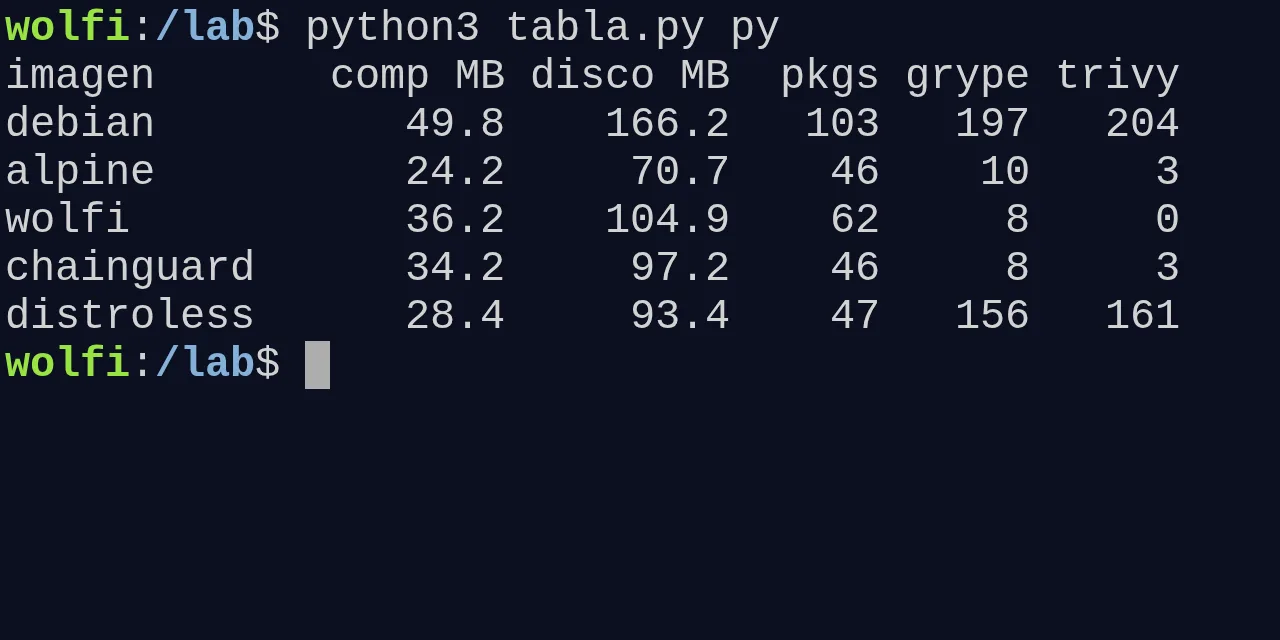
Table of contents
- Key takeaways
- What I compared and how I measured it
- Size and CVEs with a static Go binary
- What failed when the same binary ran on each base
- Size and CVEs with a Python app
- Why Grype and Trivy give different numbers
- The musl traps I hit on Alpine
- How to debug an image without a shell
- What is free on Chainguard and what needs an account
- arm64 availability
- Which base to pick for your case
- Frequently asked questions
- Is Wolfi smaller than Alpine?
- Can I use Chainguard images for free in production?
- Why does Grype find CVEs in Wolfi if Chainguard says there are none?
- Conclusion
- Sources
For a static Go binary, cgr.dev/chainguard/static and gcr.io/distroless/static-debian13 produce a 3.1 and 3.3 MB compressed image with zero CVEs; for a Python app, Alpine gives the smallest image as long as every dependency ships a musl wheel. I measured it by building the same Go app and the same Flask app on Wolfi, Alpine 3.24, distroless and Debian 13 slim, on arm64, scanned with Grype and Trivy on 30 September 2026. Below are the sizes, package counts, security findings, the traps I hit and which image to pick for each case. There is also a Spanish version of this comparison.
Key takeaways
- Go app on arm64: 3.1 MB compressed on chainguard/static, 3.3 on distroless/static, 6.7 on Alpine, 11.9 on wolfi-base and 32.7 on Debian slim.
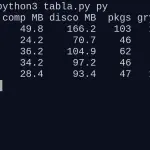
- Flask app: 24.2 MB on Alpine, 28.4 on distroless, 34.2 on Chainguard’s Python image, 36.2 on wolfi-base and 49.8 on Debian slim.
- Trivy reported 204 findings in the Flask image on Debian slim and 161 on distroless; on the Wolfi and Alpine based ones, between 0 and 3.
- For Python 3.14 on arm64, torch 2.14.0, duckdb 1.5.6 and onnxruntime 1.30.0 publish no musllinux wheels: on Alpine, duckdb tries to compile and fails.
- Debian slim ships no root certificates, and Alpine and wolfi-base ship no time zone data: the same Go binary failed on each for a different reason.
- Chainguard’s free public catalog only serves
latestandlatest-dev; to pin a version you pin the digest.
What I compared and how I measured it
The test measures the same application on each base, not the empty bases, because the application is what you deploy. If you want to know what Wolfi is and why it exists, see the article on Wolfi, the base distribution designed for containers; this one is about the numbers.
I set up two minimal applications:
- Go app: a
net/httpserver built withCGO_ENABLED=0ongolang:1.27(Go 1.27.1) and copied onto each base, with acheckmode that loads theEurope/Madridzone, sends an HTTPS GET tocgr.devand prints the UID - Python app: Flask 3.1.3 with gunicorn 26.2.0, answering
holaon port 8000
Everything ran on an 18-core arm64 Linux VM with Docker Engine 29.5.2, on 30 September 2026. These are the bases, with the version each tag pointed to that day:
| Base | Tag | Version |
|---|---|---|
| Debian slim | debian:trixie-slim |
Debian 13.7 |
| Alpine | alpine:3.24 |
3.24.2 |
| Wolfi | cgr.dev/chainguard/wolfi-base:latest |
rolling |
| Chainguard static | cgr.dev/chainguard/static:latest |
rolling |
| Distroless static | gcr.io/distroless/static-debian13 |
Debian 13 |
| Python Debian | python:3.14-slim-trixie |
3.14.7 |
| Python Alpine | python:3.14-alpine3.24 |
3.14.7 |
| Python Chainguard | cgr.dev/chainguard/python:latest |
3.14.7 |
| Python distroless | gcr.io/distroless/python3-debian13 |
3.13.5 |
Compressed size is the sum of the arm64 layers as stored in the registry, which is what a docker pull downloads. On-disk size is the sum of those layers decompressed. I use decimal megabytes (106 bytes).
Syft 1.52.0 counts the packages. The findings come from Grype 0.119.0 and Trivy 0.74.0. Grype’s database was built on 30 September at 06:32 UTC, and Trivy’s on the same day at 07:10 UTC.
Size and CVEs with a static Go binary
With a static binary the base only contributes certificates, time zone data and a user, and the two minimal images win clearly. The Dockerfile is the same for every base; only the BASE argument changes:
ARG BASE=cgr.dev/chainguard/static:latest
FROM mirror.gcr.io/library/golang:1.27 AS build
WORKDIR /src
COPY go.mod main.go ./
RUN CGO_ENABLED=0 go build -trimpath -ldflags="-s -w" -o /hola .

FROM ${BASE}
COPY --from=build /hola /usr/local/bin/hola
ENTRYPOINT ["/usr/local/bin/hola"]
The ARG sits before the first FROM on purpose: declare it later and Docker fails with base name (${BASE}) should not be blank. These are the results:
The binary alone takes 2.5 MB compressed, so chainguard/static adds 0.6 MB and distroless/static adds 0.9. Debian slim makes the image 10 times larger and brings 78 packages a static binary never uses.
What failed when the same binary ran on each base
The Go app’s check mode gave a different result on each base, and only the two minimal images passed all three checks. This is what it printed:
| Base | Time zone | HTTPS | UID |
|---|---|---|---|
| chainguard/static | ok | ok | 65532 |
| distroless/static | ok | ok | 0 |
| alpine:3.24 | fails | ok | 0 |
| wolfi-base | fails | ok | 0 |
| debian:trixie-slim | ok | fails | 0 |
| scratch | fails | fails | 0 |
On Debian slim the HTTPS GET returned x509: certificate signed by unknown authority, because the image lacks the ca-certificates package. On Alpine and wolfi-base, time.LoadLocation returned unknown time zone Europe/Madrid, because neither includes tzdata. Both fixes are one line (apt-get install ca-certificates, apk add tzdata) or an import of time/tzdata in Go, but you only notice if you run the final image.
The UID column matters on Kubernetes with runAsNonRoot. chainguard/static starts as nonroot (65532) out of the box. distroless/static starts as root on latest; its README publishes a :nonroot variant for that.
Size and CVEs with a Python app
In Python the base includes the interpreter and its libraries, and the largest of the five images is only twice the smallest. For the two images without a shell (Chainguard and distroless) I used a multi-stage build: the virtual environment is created in the development variant and copied into the runtime one. Chainguard’s looks like this:
FROM cgr.dev/chainguard/python:latest-dev AS build
WORKDIR /app
RUN python -m venv /app/venv
ENV PATH="/app/venv/bin:$PATH"
COPY requirements.txt .
RUN pip install --no-cache-dir -r requirements.txt

FROM cgr.dev/chainguard/python:latest
WORKDIR /app
COPY --from=build /app/venv /app/venv
COPY app.py .
ENV PATH="/app/venv/bin:$PATH"
ENTRYPOINT ["gunicorn", "-b", "0.0.0.0:8000", "app:app"]
If the pattern is new to you, the multi-stage Docker builds lab walks through it step by step. Debian slim, Alpine and wolfi-base were built in a single stage with pip install, as almost every sample Dockerfile does. All five answered hola on port 8000:
The distroless Python image runs Debian 13’s Python, which is 3.13.5, not the 3.14.7 of the other four. There is no distroless tag for 3.14: if you need a specific Python, distroless does not let you choose it.
Why Grype and Trivy give different numbers
The two scanners read different sources, and the gap is widest on the small images. On Alpine and Wolfi, Trivy reported 0 OS findings because it only reads each distribution’s security feed.
Grype found 4 on Alpine (zlib and busybox) and 6 on wolfi-base (all in glibc 2.44). Its output tags them with the nvd:cpe namespace: they come from matching the package name against the NVD database, not from the distribution’s feed. None had a fixed version.
Trivy’s three findings in the Alpine and Chainguard Python images do not come from the base. They come from pip: its pip/_vendor/vendor.txt list declares setuptools==70.3.0 and msgpack, and Trivy treats them as installed packages. On distroless, Grype’s six fixable findings are in the pip 25.1.1 that Debian puts in the virtual environment. In all three cases pip ships to production for no reason.
Debian is a different scale. Of Grype’s 176 findings on debian:trixie-slim, 103 are marked wont-fix and 73 not-fixed. Trivy marked 28 as fixed, all from three packages with an update in stable-security (libssl3t64, libpcre2-8-0 and openssl-provider-legacy): the image, built on 18 September, already had pending security updates on the 30th. The article on Trivy and Grype for image scanning in CI covers running both in a pipeline.
The musl traps I hit on Alpine
Alpine uses musl instead of glibc, and the practical problem in Python is prebuilt wheels. PEP 656 defines the musllinux tag for them, and in 2026 almost every library I tested publishes one. I queried PyPI for 19 packages with a wheel for Python 3.14 on arm64:
- With a musllinux wheel: numpy, pandas, pyarrow, scipy, polars, grpcio, cryptography, lxml, pillow, orjson, pydantic-core, psycopg-binary, uvloop, httptools, greenlet and tokenizers
- Without a musllinux wheel: torch 2.14.0, duckdb 1.5.6 and onnxruntime 1.30.0, which do ship one for glibc (manylinux)
When there is no wheel, pip downloads the source and tries to compile it. With duckdb==1.5.6 on python:3.14-alpine3.24, pip downloaded an 18.0 MB tarball and failed like this:
Building wheel for duckdb (pyproject.toml): finished with status 'error'
CMake Error: CMAKE_CXX_COMPILER not set, after EnableLanguage
× Failed to build installable wheels for some pyproject.toml based projects
╰─> duckdb
The same pip install on cgr.dev/chainguard/python:latest-dev, which uses glibc, installed the duckdb 1.5.6 wheel and ran select 42 without trouble. If your requirements.txt includes any of those three libraries, Alpine forces you to install a compiler and compile on every build, and the size advantage disappears. The Wolfi article cited numpy, pandas and pyarrow as wheels missing on musl; for Python 3.14 on arm64 they are now published.
How to debug an image without a shell
Chainguard’s and distroless’s Python images ship no shell, and docker exec fails with exec: "sh": executable file not found in $PATH. Debian slim, Alpine and wolfi-base do have one. The distroless README sums it up in its first sentence: "Distroless images contain only your application and its runtime dependencies".
According to Docker’s documentation, docker debug opens a shell in any container, but on Docker Engine 29.5.2 for Linux the command does not exist (docker: unknown command: docker debug). What did work was a helper container that shares the process and network namespaces of the container you want to inspect:
docker run --rm -it --pid container:my_app \
  --network container:my_app --cap-add SYS_PTRACE \
  mirror.gcr.io/library/busybox:1.37 sh
From that shell, wget -qO- 127.0.0.1:8000/ returned hola and ls /proc/1/root/app listed the app’s files. Without --cap-add SYS_PTRACE, the same ls returned Permission denied. I used busybox because wolfi-base has no wget. Distroless also publishes :debug variants with a busybox shell; Chainguard offers the latest-dev variant.
What is free on Chainguard and what needs an account
Images in Chainguard’s public catalog download without an account, but only with the latest and latest-dev tags. I checked: docker pull cgr.dev/chainguard/python:3.14 returns not found, and the registry’s tag list for chainguard/python holds only those two plus the per-digest signatures, SBOMs and attestations. The pricing page puts it this way: about 50 free images "include only ‘:latest’ version tags and are not covered under our CVE remediation SLA".
The same page also offers a free plan of "up to five images per organization", previous versions included, which requires registering an organization. For the anonymous catalog, the way to pin a version is to pin the digest, as Chainguard’s guide for public catalog users[1] recommends:
docker buildx imagetools inspect cgr.dev/chainguard/python:latest \
  --format '{{.Manifest.Digest}}'
On 30 September it returned sha256:38ba1cbf71702bacc5f5be22ea41e3d4ad1bfb2565413b0caf4bafde38e831f2, the multi-arch index. Without a digest, latest will jump from 3.14 to 3.15 when Chainguard moves it, and that release brings the changes covered in what’s new in Python 3.15. One more change affects wolfi-base: its /etc/apk/repositories now points to https://apk.cgr.dev/chainguard, and according to Chainguard’s documentation that public repository keeps older versions of each package for 12 months.
arm64 availability
Every base in the test publishes arm64, so architecture does not decide the choice. These are the architectures in each index on 30 September:
| Image | Architectures |
|---|---|
| Chainguard (wolfi-base, static, python) | amd64, arm64 |
| distroless/static-debian13 | amd64, arm64, arm/v7, ppc64le, riscv64, s390x |
| distroless/python3-debian13 | amd64, arm64, riscv64 |
| alpine:3.24 and debian:trixie-slim | 8 each, including 386, arm/v7 and riscv64 |
If you deploy to a 32-bit Raspberry Pi (arm/v7), Chainguard is out and the others work.
Which base to pick for your case
The choice depends on whether your binary is static and how much you need to debug inside the container. My recommendation after the test:
- Static binary (Go with
CGO_ENABLED=0):cgr.dev/chainguard/staticorgcr.io/distroless/static-debian13:nonroot. About 3 MB, zero findings on both scanners, certificates and time zone data included - Python whose dependencies all have musl wheels: Alpine, the smallest image in the test (24.2 MB), with a shell and apk
- Python with torch, duckdb, onnxruntime or any dependency without a musl wheel: Chainguard’s Python image in a multi-stage build, pinned by digest, or wolfi-base if you want a shell and apk with glibc
- You need Debian and apt: Debian slim, but with
apt-get upgradein the build and a weekly rebuild; the test image already had three packages with a pending patch
I would only pick distroless for Python if Debian’s Python is enough for you: in this test it carried 161 Trivy findings against 3 for Chainguard’s, at a similar size.
Frequently asked questions
Is Wolfi smaller than Alpine?
No. On arm64, wolfi-base takes 9.4 MB compressed and alpine:3.24 takes 4.2 MB. Wolfi’s advantage is glibc, which installs manylinux wheels without compiling, and a security feed on which Trivy reported nothing. If you want something smaller than Alpine, Chainguard’s minimal images (0.6 MB for static) are a different thing: they have no shell and no apk.
Can I use Chainguard images for free in production?
Yes, the public catalog ones, but only with latest and latest-dev and without the CVE remediation agreement of the paid tier. To avoid depending on latest changing under you, pin the digest and bump it yourself when you decide to move. The free plan of up to five images per organization does give access to previous versions.
Why does Grype find CVEs in Wolfi if Chainguard says there are none?
In this test, Grype’s 6 findings on wolfi-base came from matching glibc 2.44 against the NVD database (nvd:cpe), not from Wolfi’s security feed. None had a published fix. Trivy, which only reads the feed, reported 0. Before acting, check the source field of each finding.
Conclusion
For a static binary, chainguard/static and distroless/static tie: about 3 MB, zero findings and both functional checks passed; Chainguard adds the non-root user by default and distroless adds more architectures. For Python, Alpine is the smallest image as long as all your dependencies ship a musl wheel, and Chainguard’s is the glibc alternative that collects the fewest findings. Debian slim was the largest in both tests and carried the most findings, nearly all without a published fix.
The next step is to repeat the measurements with your own image. Build the app on two bases, run Grype and Trivy with that day’s database and run the final image before trusting the size. If you have settled on Chainguard, the article on Chainguard’s minimal and signed images covers signature verification with cosign.
Sources: [1] distroless README[2], [2] Chainguard pricing[3], [3] How to use Chainguard images[4], [4] Chainguard’s guide for the public catalog[1], [5] Chainguard package repository model[5], [6] wolfi-base repository change[6], [7] PEP 656, the musllinux tag[7], [8] docker debug documentation[8], [9] Grype[9], [10] Trivy[10].
Sources
Source code
Access all the source code for this post on GitHub.
View on GitHub