Valkey 9.1 vs Redis 8: how much memory it saves per key, measured
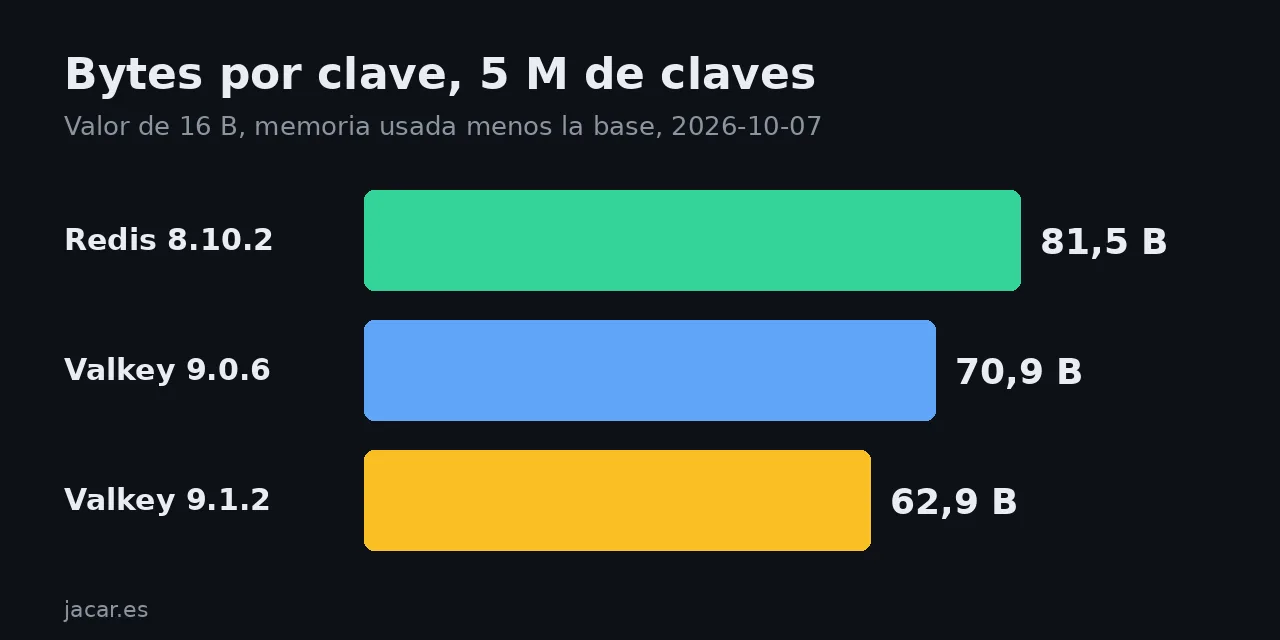
Table of contents
- Key takeaways
- What Valkey 9.1 promises and what it does not compare
- How I measured memory in Docker
- Results: bytes per key with 1 and 5 million keys
- Where the saving starts and where it ends
- What happens when you migrate from Redis 8 to Valkey 9.1
- When moving to Valkey 9.1 pays off
- Frequently asked questions
- How much memory does Valkey 9.1 save compared with Redis 8?
- Can I load a Redis 8 RDB into Valkey 9.1?
- Do I have to change my application to use Valkey 9.1?
- Conclusion
- Sources
Valkey 9.1.2 needed 62.9 bytes per key with 5 million short-value keys, against 70.9 for Valkey 9.0.6 and 81.5 for Redis 8.10.2. I measured it on 7 October 2026 in Docker, with the same data on all three servers. The saving in 9.1 is real, but it only shows with short values, and moving from Redis 8 has a file-format trap. There is also a Spanish version.
Key takeaways
- The Valkey blog claims 9.1 cuts per-key overhead "by up to 44%" for strings, and it compares 9.1 only with 9.0, never with Redis.
- With 5 million keys and 16-byte values, Valkey 9.1.2 used 62.9 bytes per key: 11.3% less than Valkey 9.0.6 and 22.7% less than Redis 8.10.2.
- With 100-byte and 200-byte values, Valkey 9.0 and 9.1 tied, and Redis 8 came in 3.4 bytes per key below both.
- Hashes do not change: 302 bytes per 10-field hash on Valkey 9.0 and 9.1, and 303.7 on Redis 8.
- Valkey 9.1 does not load RDB from Redis 7.4 or Redis 8 (not by file, not by replication, not with
MIGRATE). Client commands behaved the same on both servers.
What Valkey 9.1 promises and what it does not compare
The Valkey team’s claim is precise and narrower than the headlines suggest. The post Reducing Memory Overhead in Valkey 9.1[1], dated 13 August 2026, says: "With Valkey 9.1, per-key memory overhead is cut by up to 44% for strings and up to 8.5 bytes per sorted set member, without changing a single command or configuration."
The 17 to 44% range (26% on average) comes from comparing Valkey 9.0 with 9.1 using 5 million items per test and different key and value sizes.
Three changes explain it. An 8-byte pointer is removed from embedded strings (embstr), the embstr threshold rises from 64 to 128 bytes and sorted-set members move into the skiplist nodes. The post does not compare against Redis, and it warns that the exact saving depends on jemalloc size classes.
That last sentence decides whether it helps you. Here I measure three things the post does not cover: the gap to Redis 8, hashes and what happens when you migrate. For the migration, the post on Valkey as a Redis replacement with Valkey 8.1 covers the server swap. The one on Valkey, the open fork after the license change explains the origin.
How I measured memory in Docker
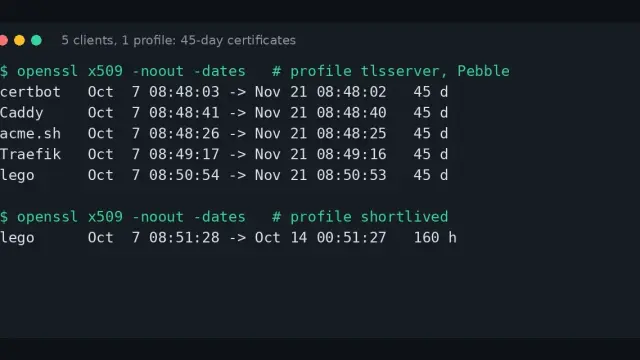
I started three containers on the same machine (arm64, Linux), with no persistence and jemalloc 5.3.0 in all three: valkey/valkey:9.0 (9.0.6), valkey/valkey:9.1 (9.1.2) and redis:8 (8.10.2). The Redis 8 server in the official image ships with modules loaded, so it starts from a higher base memory (1.45 MB against 0.98 MB). I subtract that base from every per-key figure.
services:
  valkey91:
    image: valkey/valkey:9.1
    command: ["valkey-server", "--save", "", "--appendonly", "no"]
    ports: ["29001:6379"]
  redis8:
    image: redis:8
    command: ["redis-server", "--save", "", "--appendonly", "no"]
    ports: ["29002:6379"]
The Compose file also had valkey/valkey:9.0, defined like valkey91. For each dataset I recreated the containers, generated the SET commands with awk and loaded them with --pipe, which sends the whole protocol stream at once:
awk -v n=5000000 'BEGIN{
  v=sprintf("%16s",""); gsub(/ /,"x",v)
  for(i=0;i<n;i++){
    k=sprintf("user:%09d",i)
    printf "*3\r\n$3\r\nSET\r\n$%d\r\n%s\r\n$16\r\n%s\r\n",
           length(k),k,v}}' |
  docker exec -i b8p10-valkey91 valkey-cli --pipe
Keys are 14 bytes (user:000000000) and the value is 16, 100 or 200 bytes depending on the test. After loading I ran MEMORY PURGE and read INFO memory: each figure is used_memory minus the base memory, divided by the key count. The machine was under heavy load (the load average stayed above 24 during the session), so I publish no timings or throughput: used memory does not depend on that load.
Results: bytes per key with 1 and 5 million keys
With short values Valkey 9.1 beats both earlier versions, and the advantage vanishes at 100-byte values. This chart lists bytes per key (or per hash) on each server after subtracting the base memory:
With 1 million keys and a 16-byte value, 9.1 saves 8 bytes per key (10.9%) against 9.0 and 6.6% against Redis 8. With 5 million, the gap to Redis 8 grows to 22.7%, because Redis 8 went from 70.2 to 81.5 bytes per key as the dataset grew.
I did not investigate the cause: I repeated the 5-million load twice more and got 408.8 MB each time, so the result is stable. Resident set size (RSS) of the process follows the same order at 5 million keys. It is 335.1 MB on Valkey 9.1, 374.7 MB on Valkey 9.0 and 434.1 MB on Redis 8.
Where the saving starts and where it ends
The Valkey post suggests comparing MEMORY USAGE on a representative key, so I did that with values of different sizes and the 14-byte key. MEMORY USAGE includes key, value and overhead, and this table gives the bytes each server reports:
| Value size | Valkey 9.0.6 | Valkey 9.1.2 | Redis 8.10.2 | Encoding in 9.1 |
|---|---|---|---|---|
| 8 B | 48 | 40 | 48 | embstr |
| 16 B | 56 | 48 | 56 | embstr |
| 32 B | 80 | 64 | 73 | embstr |
| 48 B | 96 | 80 | 89 | embstr |
| 64 B | 120 | 96 | 113 | embstr |
| 80 B | 136 | 112 | 129 | embstr |
| 100 B | 152 | 152 | 145 | raw |
| 200 B | 264 | 264 | 257 | raw |
Version 9.1 saves 8 to 24 bytes per key while the value fits in embstr.
In my tests it did so up to 96-byte values, and at 100 bytes it switched to raw and the advantage disappeared. Subtract the 14-byte key and the value from each row. The overhead falls from 26 to 18 bytes for 8-byte and 16-byte values, and from 42 to 18 for 64 and 80. So the percentage depends on your value size, just as the blog warns.
One more finding: from 100 bytes up, Redis 8 uses 7 bytes less per key than both Valkey versions. A session or counter cache, with values of a few dozen bytes, is where 9.1 pays off. A cache of HTML fragments or JSON sees no improvement.
What happens when you migrate from Redis 8 to Valkey 9.1
Migration from Redis 8 does not work by the usual means: Valkey 9.1 does not understand the file format Redis has written since version 7.4. The official migration guide[2] says so: "RDB files produced by Redis CE 7.4 and later are not compatible." I tested it with a snapshot from each Redis version loaded into Valkey 9.1.2:
| Source | RDB header | Result on Valkey 9.1.2 |
|---|---|---|
| Redis 6.2.24 | REDIS0009 |
Loads fine, 2 keys |
| Redis 7.4.9 | REDIS0012 |
"Can’t handle RDB format version 12" |
| Redis 8.6.3 | REDIS0013 |
"Can’t handle RDB format version 13" |
| Redis 8.10.2 | REDIS0015 |
"Can’t handle RDB format version 15" |
The failure does not depend on how the file arrives. With REPLICAOF b8p10-redis8 6379 on Valkey 9.1, the primary link stayed down and the log repeated the same error when loading the sync. With MIGRATE (which uses DUMP and RESTORE) it replied "DUMP payload version or checksum are wrong". The reverse direction does not work either: Valkey 9.1 writes VALKEY080 in the header and Redis 8.10.2 stopped with "Wrong signature trying to load DB from file".
What does work is copying by commands. I ran the same list of 25 commands on Valkey 9.1.2 and Redis 8.10.2, covering strings, hashes, lists, sets, sorted sets, streams, HyperLogLog, geospatial and Lua scripts. The outputs were identical except MEMORY USAGE of a 112-byte string: 160 against 153. To move data between the two families, tools that read and write by commands work, such as RedisShake[3] or RIOT, which I did not test here.
If your source is Redis 7.2 or older, the RDB file and replication do work, as the guide confirms.
When moving to Valkey 9.1 pays off
Move to Valkey 9.1 if millions of keys with values under 96 bytes dominate your memory and you can reload the data from its source. Measure with your real keys first: MEMORY USAGE and OBJECT ENCODING on ten representative keys in a Valkey 9.0 and a 9.1 give you the answer in five minutes. If your cache stores large values or hashes, the saving is 0, and migrating only brings licensing and governance, not memory.
If you already run Redis 8 with vector search or modules, Valkey is not a drop-in replacement: the Redis 8 image ships modules that Valkey does not include out of the box. To try either on your own server, the guide to Redis with Docker starts the Redis side in two minutes, and the valkey/valkey image comes up the same way.
Frequently asked questions
How much memory does Valkey 9.1 save compared with Redis 8?
It depends on value size. With 16-byte values and 5 million keys, 22.7% (62.9 against 81.5 bytes per key). With values of 100 bytes or more, Redis 8 used about 3.4 bytes less per key, and with hashes the difference was 0.6%.
Can I load a Redis 8 RDB into Valkey 9.1?
No. Valkey 9.1.2 rejected the files from Redis 7.4.9, 8.6.3 and 8.10.2 (versions 12, 13 and 15). It only loaded the one from Redis 6.2.24 (version 9). Replication and MIGRATE failed for the same reason, so you have to copy by commands.
Do I have to change my application to use Valkey 9.1?
No. My 25 test commands gave the same result as on Redis 8.10.2 with the same client. The Valkey post says the same: the saving arrives "without changing a single command or configuration".
Conclusion
Valkey 9.1 delivers what it promises for short strings: 8 to 24 bytes less per key than Valkey 9.0. With 5 million keys it uses 62.9 bytes per key, against 81.5 for Redis 8.10.2. Outside that range (values of 100 bytes or more, hashes) the saving is 0, and the real obstacle when migrating from Redis 7.4 or later is the RDB format.
Before you decide, measure your own keys and check which Redis version you run. If it is 7.4 or later, plan a copy by commands instead of a file.
Sources: [1] Reducing Memory Overhead in Valkey 9.1[1], [2] Valkey 9.1 delivers improvements in security, performance, and more[4], [3] Migrating from Redis to Valkey[2], [4] MEMORY USAGE command in the Redis docs[5], [5] Official valkey/valkey image on Docker Hub[6], [6] Official redis image on Docker Hub[7].
Sources
Source code
Access all the source code for this post on GitHub.
View on GitHub