NetBird 0.82 drops MySQL: how to migrate to PostgreSQL before upgrading with Docker
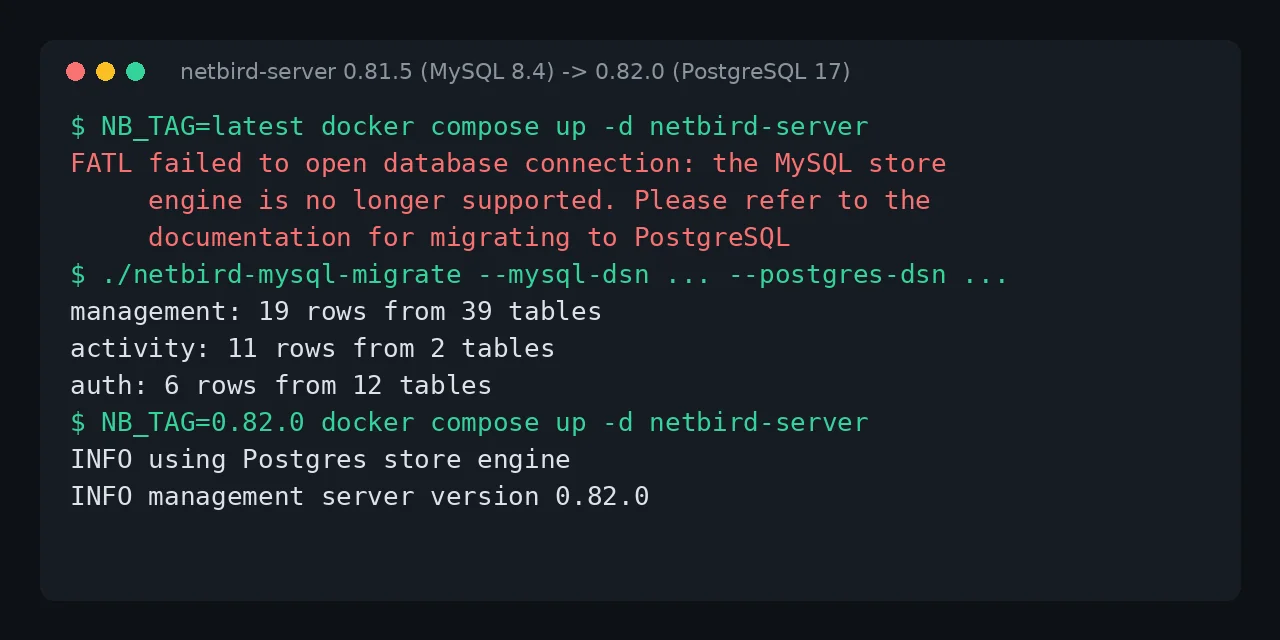
Table of contents
- Key takeaways
- What does the error the MySQL store engine is no longer supported mean?
- Who is affected, and which versions trigger it?
- Immediate fix: roll back to 0.81.5
- How to migrate from MySQL to PostgreSQL with netbird-mysql-migrate
- Step 1: add a PostgreSQL service
- Step 2: stop the server and back up
- Step 3: run netbird-mysql-migrate 0.81.5
- Step 4: point config.yaml at PostgreSQL and start 0.82.0
- How to check that the migration worked
- Pitfalls I ran into
- Other 0.82 changes worth checking
- Frequently asked questions
- Can I stay on NetBird 0.81 with MySQL?
- Am I affected if I use SQLite?
- Do I have to migrate the clients too?
- Conclusion
- Sources
If your NetBird 0.82 server will not start and the log says the MySQL store engine is no longer supported, roll back to the 0.81.5 image, migrate the data to PostgreSQL with the 0.81.5 netbird-mysql-migrate, and only then upgrade by pinning the 0.82.0 tag. The order matters because 0.82 removed MySQL and also stopped shipping the tool that migrates it. I reproduced it on 2 November 2026 on arm64 Linux with Docker 29.5.2, MySQL 8.4.13 and PostgreSQL 17.11, using the combined netbirdio/netbird-server image. This guide is also available in Spanish.
Key takeaways
- NetBird 0.82.0 (29 October 2026) removed the MySQL engine from the management server, only 14 days after 0.81.0 deprecated it.
- On 2 November 2026 the
latesttag ofnetbirdio/netbird-serverandnetbirdio/managementalready points to 0.82.0: onedocker compose pullleaves you without a server. - 0.82.0 stops before touching the database, so rolling back to
0.81.5starts with no data loss. netbird-mysql-migrateexists only in the 0.81.x releases; in my test it copied 19 rows from 39 tables, 11 activity events and 6 identity-provider rows.- After the migration, 0.82.0 on PostgreSQL returned the same peer, both users, all 4 groups, the route and the setup key.
What does the error the MySQL store engine is no longer supported mean?
It means your management server is configured with engine: "mysql" and the version you just started no longer has that engine. NetBird is a mesh virtual private network (VPN) built on WireGuard, and its management server keeps peers, users, groups and policies in SQLite, PostgreSQL or, up to 0.81, MySQL. This is the tail of the log I got after switching the image from 0.81.5 to latest:
INFO combined/cmd/root.go:730:   Store engine: mysql
INFO combined/cmd/root.go:341: Signal server created
FATL management/internals/server/boot.go:101: failed to open database
connection: the MySQL store engine is no longer supported. Please refer
to the documentation for migrating to PostgreSQL:
https://docs.netbird.io/selfhosted/migration/mysql-to-postgresql
Your terminal prints the FATL line in one piece; I wrapped it to fit. The container exits with code 1. If your service has restart: unless-stopped, as the official compose file does, Docker restarts it over and over with the same message: in my test it racked up 9 restarts in 30 s. The text comes straight from the 0.82.0 source (management/server/store/store.go), which the combined image and the older netbirdio/management image share.
Who is affected, and which versions trigger it?
Only people who configured MySQL by hand, because the official installer writes engine: "sqlite" and the other documented option is PostgreSQL. Check your engine in the container log before you change anything:
docker logs netbird-server 2>&1 | grep -i "store engine"
If you see Store engine: mysql or using MySQL store engine, read on. With 0.81.5 on MySQL the log shows no deprecation warning at all: that INFO line is the only trace. These are the dates I checked on GitHub and Docker Hub:
| Version | Date | What changes for MySQL |
|---|---|---|
| 0.81.0 | 15 October 2026 | MySQL deprecated, netbird-mysql-migrate added |
| 0.81.5 | 26 October 2026 | Last release with the migration tool |
| 0.82.0 | 29 October 2026 | MySQL removed; the server will not start |
latest |
2 November 2026 | Same sha256:7b5b53b2… digest as 0.82.0 |
The 0.82.0 release notes[1] spell it out: "The netbird-mysql-migrate tool is no longer part of the release, so run the migration while still on 0.81.x, with the tool from the v0.81.5 release, then upgrade."
Immediate fix: roll back to 0.81.5
0.82.0 fails while opening the connection, before it applies any schema migration, so your MySQL database stays intact. Pin the tag in your compose file and bring the service up again:
  netbird-server:
    image: netbirdio/netbird-server:0.81.5
After docker compose up -d netbird-server, my server logged management server version 0.81.5 again and the API returned the same data as before the attempt. On the older layout, with management, signal and relay in separate containers, the tag you pin is the netbirdio/management one. Keep the tag pinned after the migration too: latest is what got you here.
How to migrate from MySQL to PostgreSQL with netbird-mysql-migrate
The migration copies the management store from MySQL, plus the two SQLite files in the volume (events.db with the activity log and idp.db with the embedded identity provider), into an empty PostgreSQL database. The tool only reads MySQL, so your old setup remains the way back. I repeated these steps with the guide’s exact commands on a second clean install, changing only the container and network names. These are the steps in order:
- Add PostgreSQL to your compose file and start it empty
- Stop the server and back up the volume and MySQL
- Download
netbird-mysql-migrate0.81.5 and run it - Switch
config.yamlto PostgreSQL and start 0.82.0
Step 1: add a PostgreSQL service
Add this service next to your existing ones, with its own volume so the data survives a down. I used PostgreSQL 17; if you have never set it up, the guide to installing PostgreSQL with Docker explains the variables:
  postgres:
    image: postgres:17
    restart: unless-stopped
    environment:
      POSTGRES_USER: netbird
      POSTGRES_PASSWORD: your_postgres_password
      POSTGRES_DB: netbird
    volumes:
      - netbird_pg:/var/lib/postgresql/data
Also declare netbird_pg: in the volumes: section at the end and run docker compose up -d postgres. The database has to be empty: the tool refuses to write over existing NetBird data.
Step 2: stop the server and back up
Stop the management server before copying, so nothing writes to MySQL while you migrate. Then copy the volume and dump MySQL:
docker compose stop netbird-server
mkdir -m 700 backup
docker cp netbird-server:/var/lib/netbird backup/netbird-data
docker compose exec -T mysql mysqldump --no-tablespaces \
  -unetbird -p'your_mysql_password' netbird > backup/netbird-mysql.sql
docker cp works on a stopped container. My dump came to 54,923 bytes for a test install with 1 peer. The --no-tablespaces option avoids the PROCESS privilege error that the official guide describes for the NetBird user. The backup holds password hashes, so keep it at mode 700.
Step 3: run netbird-mysql-migrate 0.81.5
The tool is a Linux binary (amd64, arm64 and arm), not an image, and it sits in the assets of the 0.81.5 release on GitHub. Download the one for your server’s architecture:
V=0.81.5; A=linux_arm64   # or linux_amd64
F=netbird-mysql-migrate_${V}_$A.tar.gz
U=https://github.com/netbirdio/netbird/releases/download
mkdir tool && cd tool
curl -LO "$U/v$V/$F" && tar xzf "$F" && cd ..
My MySQL does not publish its port outside Docker, so I ran the binary inside a postgres:17 container attached to the compose network. Replace netbird_default with your project’s network (docker network ls):
MY='netbird:your_mysql_password@tcp(mysql:3306)/netbird?parseTime=True'
PG='host=postgres dbname=netbird user=netbird sslmode=disable'
PG="$PG password=your_postgres_password"
docker run --rm --network netbird_default \
  -v "$PWD/tool:/tool:ro" -v "$PWD/backup/netbird-data:/data:ro" \
  postgres:17 /tool/netbird-mysql-migrate \
  --mysql-dsn "$MY" --postgres-dsn "$PG" \
  --events-db /data/events.db --auth-db /data/idp.db
The output was four lines:
management: 19 rows from 39 tables
activity: 11 rows from 2 tables
auth: 6 rows from 12 tables
Done. Point the store, activity and auth store settings at Postgres
before starting the server.
If your server did not run in UTC, add --mysql-timezone Europe/Madrid or whichever zone it used. sslmode=disable is acceptable here because PostgreSQL sits on the same Docker network.
Step 4: point config.yaml at PostgreSQL and start 0.82.0
Switch all three stores, not only the main one, and keep the encryptionKey unchanged: without it the server cannot decrypt the copied data. This is the store section of my config.yaml after the change:
  store:
    engine: "postgres"
    dsn: &pg >-
      host=postgres port=5432 dbname=netbird user=netbird
      password=your_postgres_password sslmode=disable
    encryptionKey: "the_key_you_already_had"
  activityStore:
    engine: "postgres"
    dsn: *pg
  authStore:
    engine: "postgres"
    dsn: *pg
The YAML anchor &pg reuses the same connection string (DSN) in all three stores, and >- folds it into a single line. Remove any NB_STORE_ENGINE_MYSQL_DSN or NETBIRD_STORE_ENGINE_MYSQL_DSN variable from the compose file, change the image to netbirdio/netbird-server:0.82.0 and run docker compose up -d netbird-server. On the older layout with management.json, the official guide sets StoreConfig.Engine to postgres and uses the NETBIRD_STORE_ENGINE_POSTGRES_DSN, NB_ACTIVITY_EVENT_STORE_ENGINE and NB_ACTIVITY_EVENT_POSTGRES_DSN variables; I did not test that variant.
How to check that the migration worked
The startup log has to name PostgreSQL for the stores and end with the new version. Mine showed using Postgres store engine, using postgres as activity event store engine and management server version 0.82.0.
Then compare the API with what you had on MySQL. I used a personal access token (PAT) created before the migration, and it still worked afterwards, which already shows the encrypted store was read correctly. These are the counts before and after:
| Object | MySQL on 0.81.5 | PostgreSQL on 0.82.0 |
|---|---|---|
| Peers | 1 | 1, same IP 100.96.215.173 |
| Users | 2 | 2 |
| Groups (incl. All) | 4 | 4 |
| Policies | 2 | 2 |
| Routes | 1 | 1 |
| Setup keys | 1 | 1 |
| DNS nameservers | 1 | 1 |
| Audit events | 11 | 11 |
GET /api/instance returned {"setup_required":false}, so the embedded identity provider found its admin in PostgreSQL. The password table held the e-mail addresses of both local users. With 0.82.0 running, the database had 54 tables and took 10 MB.
Pitfalls I ran into
Three behaviours I did not expect, all reproduced in the lab:
- Re-running the migration fails: with data already copied, the second attempt ends with
migration failed: management: table accounts: target already holds data. To repeat it, empty the PostgreSQL database first - Going back to MySQL loses new changes: the official guide warns that changes made on PostgreSQL are not copied back to MySQL, so your dump is a restore point, not a replica
- An
upwithout the tag puts you back on the old version: if the tag comes from a variable with a default value, a carelessdocker compose up -dstarts the other version. It brought up 0.81.5 on my already migrated PostgreSQL; it started, but that is not a state you want to leave running
Other 0.82 changes worth checking
0.82.0 brings two more notices for self-hosters. Rosenpass, the optional post-quantum layer, is deprecated: it still works, but --enable-rosenpass and --rosenpass-permissive disappear from the help output and print a warning when used. The client’s --admin-url option is now ignored because it never worked.
If you are choosing between mesh networks, setting up Headscale with Docker is the self-hosted alternative to Tailscale. If an access-point VPN is enough, WireGuard with wg-easy in Docker needs no database at all.
Frequently asked questions
Can I stay on NetBird 0.81 with MySQL?
Yes, the 0.81.5 server runs on MySQL, but it will not get any fixes from 0.82 onwards. Pin the 0.81.5 tag and plan the migration: the migration tool only ships in the 0.81.x releases.
Am I affected if I use SQLite?
No. SQLite is the installer’s default engine and 0.82.0 still supports it, as it does PostgreSQL. Check the Store engine line in the log to be sure.
Do I have to migrate the clients too?
No. The migration only touches the management server, and peers store nothing from MySQL. In my test, the peer registered on 0.81.5 kept its name, IP and client version in PostgreSQL.
Conclusion
0.82.0 turns a deprecated MySQL into a server that will not start, and the migration tool no longer ships with that version. Roll back to 0.81.5, migrate with its netbird-mysql-migrate, switch all three stores in config.yaml, and start 0.82.0 with the tag pinned. Then compare the API counts with the earlier ones, and keep the MySQL dump until you are sure.
Sources: [1] NetBird, 0.82.0 release notes[1], [2] NetBird, 0.81.0 release notes[2], [3] NetBird, 0.81.5 release with netbird-mysql-migrate[3], [4] NetBird, MySQL to PostgreSQL migration guide[4], [5] Docker Hub, netbirdio/netbird-server tags[5], [6] NetBird, store code in 0.82.0[6].
Sources
Source code
Access all the source code for this post on GitHub.
View on GitHub