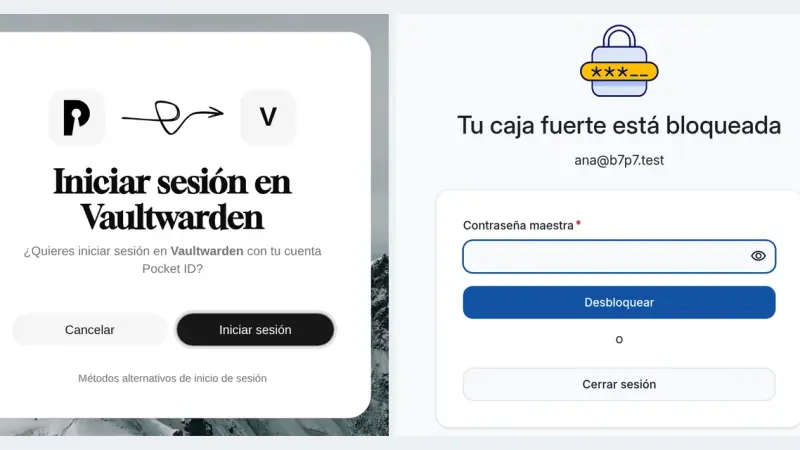
Vaultwarden 1.37.3 supports single sign-on over OpenID Connect through SSO_ENABLED, SSO_AUTHORITY and a client registered in your provider. With Pocket ID you sign in with a passkey, but the master password is still required because it is what encrypts the vault. SSO_SIGNUPS_ALLOWED decides whether SSO may create new accounts.
Pocket ID is an OpenID Connect provider that accepts passkeys and nothing else, so it stores no passwords at all. You deploy it with one container, one port and one env file, it demands HTTPS because WebAuthn needs a secure context, and it puts your self-hosted apps behind single sign-on.
Authelia protects applications from the reverse proxy, Pocket ID is a certified OIDC provider that only accepts passkeys, and Authentik adds SAML, LDAP, SCIM and RADIUS in exchange for PostgreSQL, Redis and 2 GB of RAM. Picking homelab SSO means deciding which of those three mechanisms you need.
An Authentik Docker Compose install now needs only three containers: PostgreSQL, the server and the worker, since Redis stopped being mandatory in version 2025.10. Once running, it acts as your identity provider for single sign-on over OAuth2, OIDC, SAML and LDAP, and a reverse proxy such as Traefik can delegate authentication to it through forward auth.
20 min3714.2
We use first- and third-party cookies to analyze site traffic. You can accept them, reject them, or configure your choice.
Learn more about cookies
Cookie preferences
NecessaryEssential for the site to work. Always on.
AnalyticsHelp us understand how the site is used (Google Analytics).