How to upgrade Stirling-PDF to 3.0 with Docker without losing data
Table of contents
- Key takeaways
- What changes in Stirling-PDF 3.0 if you run it in Docker?
- How much does automation cost in Stirling-PDF 3.0?
- How I tested the upgrade
- The backup before you change the tag
- Upgrade Stirling-PDF to 3.0 step by step
- What I checked after upgrading
- Process a folder, the automation I did find
- How do I go back to 2.14.3 if something goes wrong?
- Frequently asked questions
- Do I need to go through 3.0.1 in Docker?
- Does the 1,000 PDF limit affect normal editor use?
- Do I lose the automations I created in 2.x?
- Conclusion
- Sources
Stirling-PDF 3.0.0 came out on 24 September 2026, and in Docker you upgrade it by changing the image tag, with no manual migration steps. If you followed the guide to installing Stirling-PDF with Docker, you have a pinned 2.14, and in my test 3.0 kept users, settings, API keys and watched folders. What really changes is in the small print: the API and automations now spend an allowance of 1,000 PDFs a month, and the server file library lives in a directory your docker-compose.yml does not mount. This guide walks through the backup, the tag change, what I checked afterwards and the way back to 2.14.3, with the real errors I saw. It is also available in Spanish.
Key takeaways
- 3.0.0 is the latest Docker image: 3.0.1, released on 26 September, only fixes the Windows desktop app and has no tag on Docker Hub or ghcr.io.
- From 2.14.3, the jump was changing the tag and running
docker compose up -d: login, the 5 users, the API key and the watched folder kept working. - 3.0 counts 1 unit for every API-key call and for every file in a processing folder; after 1,000 units the API answers
402withFREE_TIER_EXHAUSTED, and the old watched folder stops too. - The web editor sits outside the limit: the same operation with the browser session returned
200with the allowance already spent. - You need to back up a new file,
configs/credential-encryption.key, and mount/storageif you turn on server storage. - Going back to 2.14.3 by restoring the backup worked first time, with users and the API key intact.
What changes in Stirling-PDF 3.0 if you run it in Docker?
3.0 is mostly a feature release: the Stirling-PDF 3.0.0 release notes[1] sum it up as "PDF Processor, Brand new text editor, Free OAuth and tons of new features". For anyone running it in Docker, these are the differences that touch your deployment:
- Automation meter: the API, the Processor and the AI features spend a free monthly allowance; the web editor is left out
STIRLING_JVM_PROFILE: the variable that picked the Java memory profile is deprecated, and the image uses a single_JVM_OPTScredential-encryption.keyfile: it appears in/configson the first start and encrypts integration secrets- Server storage: the file library and "Process a folder" save to
/storage, a directory the 2.x setup does not mount - Watched folders: the screen to create them is gone (PR 8170), but the engine still processes
/pipeline/watchedFolders - Sandboxed LibreOffice: office conversions run inside a sandbox with Landlock and seccomp
The arm64 image grows from 1.02 GB compressed in 2.14.3 to 1.10 GB in 3.0.0, according to the Docker Hub tag registry[2]. The port is still 8080 and the image name does not change.
The official docs do not yet cover the move from 2.x to 3.0. The Stirling PDF migration guide[3] only covers the jump from 1.x to 2.x. What follows comes from doing the upgrade and reading the startup code of both images.
How much does automation cost in Stirling-PDF 3.0?
The change with the biggest impact on an install with integrations is the free allowance. The release notes put it like this: "Automation now includes 1,000 PDFs per month free. This allowance applies to automated processing through Processor, API, and AI features." Linking the server to stirling.com adds another 500 PDFs a month, and normal editor use stays free and unlimited.
I measured the meter with the endpoint the UI itself uses, /api/v1/account-link/free-tier. The period is not the calendar month: it starts on the first 3.0 boot and lasts one month. This table shows what each operation spent in my test:
| Operation | Units spent |
|---|---|
API call with X-API-KEY and one file |
1 per call, even if you repeat the same file |
| File processed in "Process a folder" | 1 per file |
| Batch from the old watched folder | 1 per batch (5 files spent 1) |
| The same tool with the browser session | Kept answering 200 with the allowance spent |
To see what happens when it runs out, I fired 991 calls at the rotate API with a one-page PDF. The call that made unit 1,001 got this:
$ curl -s -X POST http://127.0.0.1:8080/api/v1/general/rotate-pdf \
    -H "X-API-KEY: your_api_key_here" \
    -F fileInput=@one_page.pdf -F angle=90
{"error":"ACCOUNT_LINK_REQUIRED","reason":"FREE_TIER_EXHAUSTED"}
The HTTP status is 402. The same rotation with the browser session kept returning 200, and the old watched folder stopped processing: it logged the same 402 when calling /api/v1/misc/ocr-pdf and left the file in processing/. If a script, an n8n flow or any other integration calls your Stirling-PDF with an API key, work out its monthly volume before you upgrade.
The free plan already capped users in 2.14.3, and 3.0 keeps the number: the sixth user got "Maximum number of users reached. Allowed: 5" in both versions. According to the Stirling PDF paid offerings page[4], the Team plan costs 99 dollars a month or 999 a year and includes 100 users.
How I tested the upgrade
I tested the upgrade on 27 September 2026 on an aarch64 machine with 18 cores and 47 GiB running Docker 29.5.2. I started from the install guide’s docker-compose.yml, with its four volumes, login turned on, SYSTEM_DEFAULTLOCALE=es-ES and STIRLING_JVM_PROFILE=performance. I ran everything under my own project name with the port published on 127.0.0.1:22780. On 2.14.3 I created this state:
- 4 users besides
admin, the free plan’s maximum - An API key for
admin - Three settings changed through the admin API: app name, a 200 MB upload limit and analytics turned off
- A watched folder
facturaswith a JSON that runs Spanish OCR, which turned 5 scanned two-page invoices into PDFs with text - An automation "Comprimir y OCR facturas" saved in the browser
I do not publish processing times: other jobs shared the machine and the load average swung between 10 and 43 for the whole session. Docker Hub answered 429 Too Many Requests on pull, so I used the same images from ghcr.io; 3.0.0 has the same sha256:66b6edb8… digest in both registries.
The backup before you change the tag
The backup that let me go back was a tar of the data folder and the docker-compose.yml with the container stopped. The container writes to the tessdata directory as root, so I packed it from a container to keep owners and permissions:
docker compose stop
docker run --rm -v "$PWD":/stack -w /stack alpine \
  tar czf /stack/stirling-backup-2.14.3.tar.gz data compose.yaml
On my test install the file came to 1.4 MB. Three things stay out of that backup, and you should know which:
- "Automate" automations: they live in each browser’s
StirlingPDF_AutomationsIndexedDB database, not on the server. Export the ones you care about from the dialog itself credential-encryption.key: it does not exist yet; 3.0 creates it on the first start, and from then on it belongs in every backup- An external database: if you use PostgreSQL, dump it separately; my test used the built-in H2, which lives in
/configs
3.0 also writes its own SQL dump on startup, in configs/backup/db/. In my case it left a 50 KB backup_202609271142.sql, but that dump is made by the new version and does not replace the cold backup.
Upgrade Stirling-PDF to 3.0 step by step
The upgrade is three changes in docker-compose.yml and a docker compose up -d. This is the file I ended up using with 3.0.0:
services:
  stirling-pdf:
    image: stirlingtools/stirling-pdf:3.0.0
    container_name: stirling-pdf
    restart: unless-stopped
    mem_limit: 4g
    ports:
      - "8080:8080"
    volumes:
      - ./data/tessdata:/usr/share/tessdata
      - ./data/configs:/configs
      - ./data/logs:/logs
      - ./data/pipeline:/pipeline
      - ./data/storage:/storage
    environment:
      SECURITY_ENABLELOGIN: "true"
      SYSTEM_DEFAULTLOCALE: "es-ES"
Compared with the 2.14 file, three lines change, each for a reason:
- The tag becomes
3.0.0. Pin the version instead oflatest, which already points at 3.0.0 and will jump to the next one on its own. ./data/storage:/storageis added. The image does not declare that directory as a volume, so without this line the server library files sit in the container layer and are lost when you recreate it.STIRLING_JVM_PROFILEis removed. 3.0 ignores it and warns at startup with "STIRLING_JVM_PROFILE is deprecated; use _JVM_OPTS or JAVA_BASE_OPTS instead".
The mem_limit is not new, but in my test it avoided a scare. 2.14.3 with the performance profile and no limit took 12.95 GiB right after starting. That profile grabs 20 % of the machine’s memory up front; with mem_limit: 4g it stayed at 2.21 GiB.
With the file edited, start it and check the version:
docker compose up -d
curl -s http://127.0.0.1:8080/api/v1/info/status
{"version":"3.0.0","status":"UP"}
On the first start, the log shows the warning that matters most in the whole upgrade: "Generated a new credential encryption key at ./configs/credential-encryption.key. Back this file up: losing it makes stored integration secrets and pipeline supporting files unrecoverable." Copy that file next to the rest of your backup as soon as it appears.
What I checked after upgrading
Everything I had created on 2.14.3 stayed in place, with one surprise in the browser. These are the checks I ran and their result:
- Login and session: the old password worked and the open browser session survived without logging in again
- Users: all 5 were still there, and the sixth was refused as before
- API key: the same key extracted an invoice’s text with
/api/v1/convert/pdf/text - API: 3.0.0 publishes 313 routes against 259 in 2.14.3, and none has gone
- settings.yml: it went from 35,964 to 44,371 bytes, with 66 new keys and my values intact;
premium.proFeatures.ssoAutoLoginmoves tosecurity.ssoAutoLogin - Watched folder: it processed another 5 invoices with the same 2.14.3 JSON
- Browser automation: it showed up under "Saved" in the same browser
The surprise was the translations. In the browser that had used 2.14.3, the UI showed keys such as processingFolders.setup.title instead of text, while a clean session was fully translated.
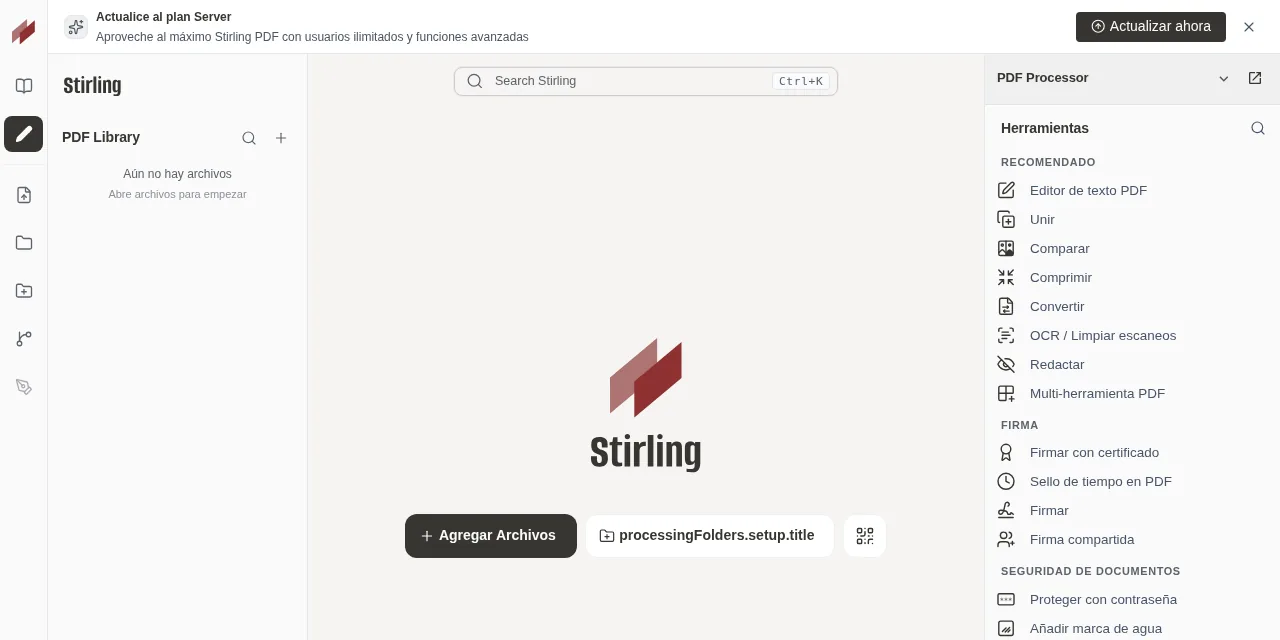
The reason is in the headers: /locales/es-ES/translation.toml is served with max-age=86400, stale-while-revalidate=604800, so the browser keeps the 2.x translation for up to 8 days. A reload that bypasses the cache renews it; in my test, loading the page with the cache disabled was enough. Warn your users, or they will find broken labels the day after the upgrade.
After the upgrade I also found a "Classification" pipeline enabled by default, set up to classify every file uploaded to the editor with AI. The AI engine ships disabled and I did not check what that pipeline does once you turn it on, so review it before you enable AI.
Process a folder, the automation I did find
The Stirling PDF Processor docs[5] say it opens from the quick access bar on the left. In the 3.0.0 container I tested, that bar had no Processor entry, and the /processor route opened the editor. What does appear is "Process a folder", which attaches a workflow to a folder in the server library.
That feature needs server storage, which ships disabled: the name field stayed locked until I set storage.enabled: true and restarted. With storage on, the folder offers five presets (Classification, Ingestion, Security, Compliance and Routing) and a sixth, Retention, which showed as disabled.
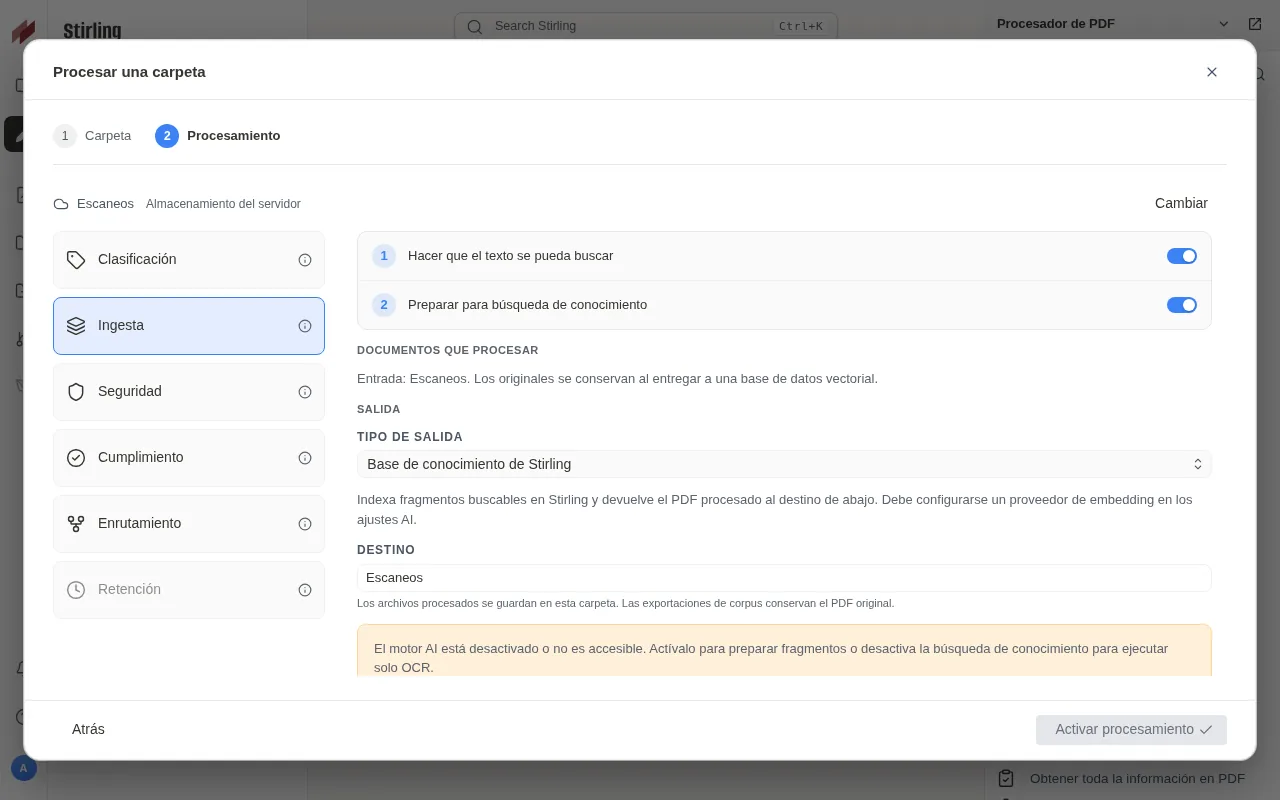
Ingestion runs OCR and, if you leave it on, prepares chunks for AI search, which needs the engine configured. I turned that second step off to keep just the OCR, which defaults to English: switch it to your language if you scan documents in another one. Files are saved in subfolders of /storage, which is exactly the volume you added to docker-compose.yml.
My first two invoices sat in PENDING for more than 5 minutes. The /api/v1/admin/job/queue/stats endpoint answered "resourceStatus":"CRITICAL", and the log explained why: "CPU: 140.0%". Stirling-PDF divides the machine’s load average by its cores and holds jobs above 0.9. On a shared server, raise the threshold with STIRLING_RESOURCE_CPU_CRITICALTHRESHOLD; with 5.0, both invoices finished in under 30 s after the restart, with the load average still at 25.
If you already handle document OCR with Paperless-ngx 3 and its local AI with Ollama, this feature adds little and spends allowance too. Where it fits is in workflows that already live in Stirling-PDF.
How do I go back to 2.14.3 if something goes wrong?
The rollback that worked was restoring the cold backup. With the container stopped, I moved the migrated folder aside, unpacked the backup, which contains the docker-compose.yml with the 2.14.3 tag, and started it:
docker compose down
docker run --rm -v "$PWD":/stack -w /stack alpine sh -c \
  'mv data data-before-rollback && tar xzf stirling-backup-2.14.3.tar.gz'
docker compose up -d
The server answered {"version":"2.14.3","status":"UP"} again, with the 6 users in the database (the plan’s 5 plus the internal API user) and the API key returning 200. You lose what you did on 3.0, including server storage files, but you keep data-before-rollback in case you need to recover something.
I also tried what you should not do: starting 2.14.3 on the already migrated data. On my small install it started and the API key worked, but the official guide asks you not to assume an older version can open a migrated database. With PostgreSQL or much more data, restore the backup.
Frequently asked questions
Do I need to go through 3.0.1 in Docker?
No. 3.0.1 only fixes two Windows desktop app bugs, according to its 3.0.1 release notes[6], and it does not exist as a Docker image. The latest tag points at 3.0.0.
Does the 1,000 PDF limit affect normal editor use?
Not in my test. With the allowance spent, a rotation made with the browser session returned 200, while the same call with an API key got 402. The release notes confirm that normal editor use stays unlimited.
Do I lose the automations I created in 2.x?
The ones from the "Automate" dialog are stored in your browser and are still there in 3.0 if you use the same browser. Server watched folders also keep working, even though they no longer have their own screen and now spend allowance.
Conclusion
Upgrading Stirling-PDF to 3.0 with Docker is changing one tag, and the data survives. The work is around it: back up credential-encryption.key, mount /storage before turning on storage, drop STIRLING_JVM_PROFILE and warn people about the cache-bypassing reload. If your install receives API calls, measure how many it makes a month before upgrading, because from call 1,001 onwards they get a 402 until you link the server or pay. If you have no such dependency, take the cold backup, switch to 3.0.0 and keep the manual way back for a couple of weeks while the near-weekly releases the project promises come out.
Sources: [1] Stirling-Tools, Stirling-PDF 3.0.0 release notes[1], [2] Stirling-Tools, Stirling-PDF 3.0.1 release notes[6], [3] Stirling PDF, Processor setup and access[5], [4] Stirling PDF, migration guide[3], [5] Docker Hub, stirlingtools/stirling-pdf tags[2], [6] GitHub Container Registry, stirling-pdf image[7], [7] Stirling PDF, paid offerings[4], [8] Stirling PDF, Docker installation[8], [9] Stirling PDF, Processor sources[9].
Sources
Source code
Access all the source code for this post on GitHub.
View on GitHub