How to enable Paperless-ngx 3 local AI with Ollama

Table of contents
- Key takeaways
- What changes in Paperless-ngx 3 if you come from 2.20
- Before upgrading: 2.20.15 and a full copy
- How I upgraded from 2.20.15 to 3.1.3
- How to connect Paperless-ngx 3 to Ollama
- The reasoning-model bug
- How long it takes and how much RAM it uses on CPU
- What a small model suggests for real documents
- How the chat answers about your documents
- Limits worth knowing
- Frequently asked questions
- Do I need a GPU to use the AI in Paperless-ngx 3?
- Which model should I use if I don't want to patch anything?
- Do my documents leave my server?
- Conclusion
- Sources
Paperless-ngx 3 ships AI out of the box: it suggests title, tags, correspondent and dates, and it answers questions about your documents. I tested all of it on my own machine, without sending a single PDF to an outside service. I started from a 2.20.15 install like the one in the guide to installing Paperless-ngx with Docker, upgraded it to 3.1.3 and connected it to Ollama on a machine with no GPU. Here are the commands, how long each step took, how much memory the model uses and a bug that doubles the time of every suggestion.
Key takeaways
- 3.0.0 came out on 22 July 2026, and the newest release on 14 September is 3.1.3, from 4 September. You can only upgrade from 2.20.15.
- Upgrading meant changing the image tag: 37 migrations, the search index rebuilt on its own and the API answering after 25.6 s.
- The AI is configured with
PAPERLESS_AI_*variables. The server address goes inPAPERLESS_AI_LLM_ENDPOINT, not inPAPERLESS_AI_LLM_URLas the description of the PR that introduced it said. - On CPU, Gemma 4 E4B took a median of 25.8 s per suggestion for a new document, and its process used between 6.6 and 7.6 GiB of RAM.
- Paperless-ngx 3.1.3 tries to switch off the model’s reasoning, but the instruction gets lost on the way. With reasoning models, every suggestion generates hundreds of extra tokens or ends in a 400 error.
What changes in Paperless-ngx 3 if you come from 2.20
3.0.0 was published on 22 July 2026 and nine more releases have followed up to 3.1.3. These are the big changes according to the 3.0.0 release notes[1]:
- Search with Tantivy instead of Whoosh
- Versions of the same document
- Share link bundles
- A plugin system for reading new formats
- Remote OCR with Azure
- The AI
The AI arrived with PR #10319, "Feature: Paperless AI"[2], by shamoon. It was merged into the dev branch on 13 January 2026. 3.1.0 added a workflow action, "Apply AI Suggestions", that applies the suggestions without you clicking anything.
The v3 migration guide[3] lists quite a few breaking changes. These are the ones that affect anyone running their own install:
| What changes | What you have to do |
|---|---|
PAPERLESS_SECRET_KEY becomes mandatory |
Set it. If you relied on the default key, a new one invalidates open sessions |
PAPERLESS_DBENGINE mandatory with PostgreSQL or MariaDB |
Add PAPERLESS_DBENGINE: postgresql |
PAPERLESS_CONSUMER_POLLING |
Rename it to PAPERLESS_CONSUMER_POLLING_INTERVAL |
PAPERLESS_CONSUMER_IGNORE_PATTERNS |
Now regular expressions, not wildcards |
| Duplicate documents | No longer rejected. PAPERLESS_CONSUMER_DELETE_DUPLICATES=true restores the old behaviour |
PAPERLESS_OCR_MODE=skip or skip_noarchive |
Use auto together with PAPERLESS_ARCHIVE_FILE_GENERATION |
| Document encryption | Removed. Run decrypt_documents before upgrading |
| Pre and post consume scripts | No longer receive $1 to $8. Read DOCUMENT_ID, DOCUMENT_SOURCE_PATH and the other variables |
Searches with note: |
Become notes.note:. Saved views are migrated automatically |
The same guide carries two more warnings. The API drops versions older than 9, so a mobile app or an old script can stop working. And on x86 the CPU needs SSE4.2, because NumPy 2.4 requires it for the classic classifier, whether you use the AI or not.
If you followed our 2.20 guide, you already had PAPERLESS_SECRET_KEY and PAPERLESS_DBENGINE. The only thing you may have to touch is PAPERLESS_CONSUMER_POLLING, if you added it for an NFS folder.
Before upgrading: 2.20.15 and a full copy
Paperless-ngx 3 does not accept a database older than 2.20.15. The migration guide says so in its first line:
Upgrading to Paperless-ngx v3 can only be performed from version 2.20.15. If you are running an older version, please upgrade to v2.20.15 before proceeding with the v3 upgrade.
It is not a recommendation. At startup, the 3.1.3 code looks for the 1075_workflowaction_order migration, the last one in 2.20.15. If it does not find it, it returns the paperless.E002 error and asks you to upgrade to that version first.
I started from 2.20.15, so I never triggered it. If your tag was :2.20, don’t worry: today it points to the same image as 2.20.15, which I checked by comparing the digests of both tags.
Take the copy with the built-in exporter before touching the image. With my five test documents it took 2.4 s and 1.1 MB:
docker compose exec webserver document_exporter ../export
That copy is what you restore with document_importer if something goes wrong, and it should end up off the server, for example with restic encrypted backups.
Also check where your docker-compose.yml mounts the PostgreSQL volume. The 3.x example compose mounts it at /var/lib/postgresql. I checked it on a fresh install: with postgres:18 (18.6) and the volume at /var/lib/postgresql/data, the container exits at startup with Error: in 18+, these Docker images are configured to store database data in a format which is compatible with "pg_ctlcluster". If you already have data from another major version at the old path, do not change the image without going through pg_upgrade first.
How I upgraded from 2.20.15 to 3.1.3
The upgrade came down to changing the image tag and recreating the container. Everything ran in a linux/arm64 development container with 18 cores, 121 GB of RAM and no GPU, shared with other workloads.
My test bench was five made-up PDFs in Spanish. Three had digital text: an electricity bill, a letter from the bank and a home insurance renewal notice. The other two were scans of a garage invoice and of a property tax (IBI) receipt.
In the webserver service, change the image line:
  webserver:
    image: ghcr.io/paperless-ngx/paperless-ngx:3.1.3
Then pull the image, recreate the container and follow the log:
docker compose pull webserver
docker compose up -d
docker compose logs -f webserver
The startup applied 37 migrations, including one that recomputes the SHA-256 checksums of every document, and ended with init completed in 13 seconds. The API answered 25.6 s after running up -d, with a load average of 33 on the 18 cores. The Tantivy index was rebuilt on its own, and searching for "factura" returned both invoices. The X-Api-Version header went from 9 to 10.
The upgrade costs disk and memory. On arm64, the image went from 1.92 GB to 3.32 GB. The difference is PyTorch 2.13.0 for CPU, sentence-transformers and llama-index, which 2.20.15 did not include. The PyTorch folder alone takes 577 MB.
Memory goes up too: idle and with the AI switched off, the container went from 582 to 648 MiB of RAM.
How to connect Paperless-ngx 3 to Ollama
The AI needs two models: a language model, which writes the suggestions and the answers, and a vector embedding model, which indexes your documents to find similar ones. Both can live in the same Ollama. If you don’t know it yet, the guide to running Ollama with Open WebUI on Ubuntu 24.04 covers the basics.
Add a docker-compose.override.yml next to your compose file. Docker Compose merges it with the main one without you passing it with -f, and the variables are added to the ones you already had:
services:
  ollama:
    image: docker.io/ollama/ollama:0.34.0
    restart: unless-stopped
    volumes:
      - ollama:/root/.ollama
  webserver:
    environment:
      PAPERLESS_AI_ENABLED: "true"
      PAPERLESS_AI_LLM_BACKEND: ollama
      PAPERLESS_AI_LLM_ENDPOINT: http://ollama:11434
      PAPERLESS_AI_LLM_MODEL: gemma4-e4b
      PAPERLESS_AI_LLM_EMBEDDING_BACKEND: ollama
      PAPERLESS_AI_LLM_EMBEDDING_MODEL: embeddinggemma
      PAPERLESS_AI_LLM_REQUEST_TIMEOUT: 600
volumes:
  ollama:
Start Ollama and download both models. I pulled them as GGUF files from Hugging Face because, on the network where I tested, the Ollama registry CDN returned an invalid certificate. On a normal connection, the tag in the official registry is gemma4:e4b, which I did not get to test:
docker compose up -d ollama
docker compose exec ollama ollama pull \
  hf.co/unsloth/gemma-4-E4B-it-GGUF:Q4_K_M
docker compose exec ollama ollama pull \
  hf.co/unsloth/embeddinggemma-300m-GGUF:Q8_0
Now create the short names the compose file uses. The PARAMETER num_thread line caps each model’s compute threads, and further down I explain why, on a busy machine, it is the line that saves the most time:
docker compose exec ollama sh -c 'cat > /tmp/Modelfile <<EOF
FROM hf.co/unsloth/gemma-4-E4B-it-GGUF:Q4_K_M
PARAMETER num_thread 6
EOF
ollama create gemma4-e4b -f /tmp/Modelfile'
docker compose exec ollama sh -c 'cat > /tmp/Modelfile <<EOF
FROM hf.co/unsloth/embeddinggemma-300m-GGUF:Q8_0
PARAMETER num_thread 4
EOF
ollama create embeddinggemma -f /tmp/Modelfile'
Finally, recreate Paperless so it reads the variables, and build the embedding index:
docker compose up -d webserver
docker compose exec webserver document_llmindex rebuild
With five documents, the rebuild took about 6 s and left 3.2 MB in data/llm_index, a sqlite-vec database. From then on, every new or edited document is indexed on its own, and a task also goes over the whole index every night at 2:10.
These are the 3.1.3 variables worth knowing. The defaults come from the 3.1.3 configuration documentation[4]:
| Variable | Default | What it does |
|---|---|---|
PAPERLESS_AI_ENABLED |
false |
Master switch for the AI |
PAPERLESS_AI_LLM_BACKEND |
none | ollama or openai-like |
PAPERLESS_AI_LLM_ENDPOINT |
none | Server address, required with Ollama |
PAPERLESS_AI_LLM_MODEL |
llama3.1 with Ollama |
Model that generates suggestions and answers |
PAPERLESS_AI_LLM_EMBEDDING_BACKEND |
none | huggingface, ollama or openai-like. Turns the index on |
PAPERLESS_AI_LLM_EMBEDDING_MODEL |
embeddinggemma with Ollama |
Embedding model |
PAPERLESS_AI_LLM_CONTEXT_SIZE |
8192 |
Sent to Ollama as num_ctx |
PAPERLESS_AI_LLM_REQUEST_TIMEOUT |
120 |
Seconds to wait. On CPU, raise it |
PAPERLESS_AI_LLM_OUTPUT_LANGUAGE |
none | Language of the suggestions |
PAPERLESS_LLM_INDEX_TASK_CRON |
10 2 * * * |
When the whole index is revisited |
One detail catches people out: all of this can also be set under Administration > Configuration, and the value saved there wins over the environment variable. If you change the compose file and see no effect, check that screen.
The reasoning-model bug
My first model was Qwen3.5 4B, and the first two suggestions failed after 5 min 52 s and 4 min 53 s. Paperless returned a 400 with {"ai":["Invalid AI configuration."]}, and the log showed json.decoder.JSONDecodeError: Expecting value: line 1 column 1 (char 0). The configuration was fine. The model had generated more than 2,700 tokens and the answer arrived empty.
I followed the call through the code. Paperless asks Ollama for output matching a JSON schema and passes think=False, but the library in between, llama-index-llms-ollama 0.10.1, picks that parameter up like this:
think = kwargs.pop("think", None) or self.thinking
In Python, False or None evaluates to None. Ollama receives no instruction about reasoning, and the model reasons, which is what it does by default.
In the Qwen3.5 4B response, the reasoning block started with "Thinking Process: 1. Analyze the Request" and the content was empty. The same line is still on the main branch of llama_index[5] as of 14 September.
Gemma 4 E4B also reasons in that situation, even though Ollama did not list that capability for the imported GGUF. With it the suggestions do arrive, but each one generates between 680 and 1,130 reasoning tokens before the 100 to 180 tokens of JSON. Calling Ollama directly with think set to false, the same request generated 163 tokens.
There are two ways out. The first is a model that does not reason, such as Gemma 3 4B, which works without touching anything but gets fewer things right, as the quality section shows. The second is to fix the line when the container starts, using the official startup script mechanism. Save this as init/10-think.sh:
#!/bin/bash
f=$(python3 -c 'import llama_index.llms.ollama.base as b; print(b.__file__)')
viejo='kwargs.pop("think", None) or self.thinking'
nuevo='kwargs.pop("think", self.thinking)'
sed -i "s/$viejo/$nuevo/" "$f"
Mount the folder in the webserver service with - ./init:/custom-cont-init.d:ro. Paperless only runs scripts from a folder owned by root that nobody else can write to, so run sudo chown -R root:root init and sudo chmod 755 init init/10-think.sh. The startup log confirms it with [custom-init] 10-think.sh: exited 0.
This modifies a dependency inside the container, so treat it as a temporary workaround. When you upgrade Paperless, check with grep whether the original line is still there before leaving the script mounted.
How long it takes and how much RAM it uses on CPU
With the fix, Gemma 4 E4B took a median of 25.8 s per suggestion for a new document. Almost all of that time goes into reading the prompt, between 1,634 and 1,674 tokens, at 80 to 88 tokens per second. It is that long because Paperless sends the document text, excerpts from similar documents and the list of candidate tags. Generating the JSON, between 124 and 150 tokens, took 3.8 to 5.2 s.
I measured each configuration with the five documents, requesting each suggestion for the first time. The two Gemma 4 E4B rows were measured back to back to compare them under similar conditions, and the load average is shown on every row because other processes were competing for the CPU:
| Configuration | Median per new document | Tokens generated | Model process RAM | Load average |
|---|---|---|---|---|
| Gemma 4 E4B, stock Paperless | 51.2 s | 840 to 1,180 | 6.6 to 7.6 GiB | 7 to 16 |
| Gemma 4 E4B with the fix | 25.8 s | 124 to 150 | 6.6 to 7.6 GiB | 5 to 11 |
| Gemma 3 4B, stock | 17.8 s | 66 to 157 | 4.5 to 5.9 GiB | 12 to 14 |
| Qwen3.5 4B, stock | 400 error after 4 min 53 s and 5 min 52 s | More than 2,700 | 4.0 GB per ollama ps |
21 to 27 |
Under more load the gap grows. In an earlier batch, with the machine at a load between 24 and 41, the median without the fix was 138.2 s. With the fix and a load between 14 and 20, it dropped to 28.7 s. All 30 suggestions from those two batches completed.
The model’s RAM grows with use because the server keeps earlier prompts in a cache. Thanks to that cache, repeating the suggestion for the same document dropped to 4.8 to 6.2 s. On top of that, the embedding model used between 795 and 924 MiB, and the Paperless container moved between 745 and 840 MiB with the AI on.
The setting that saved the most time has nothing to do with Paperless. With the machine at a load average between 13 and 27, I alternated the same 585-token summary three times with and without a thread cap:
| Threads | Prompt reading | Generation | Total time (median) |
|---|---|---|---|
| Whatever Ollama picks | 26 tokens/s | 0.15 tokens/s | 354.3 s |
num_thread 6 |
80.9 tokens/s | 32.5 tokens/s | 11.9 s |
Uncapped, the process got to use 13 cores at once, and the threads got in each other’s way and in the way of everything else on the machine. On a dedicated, idle server the difference will be smaller, but a NAS running OCR while it suggests looks more like my case than like a clean benchmark.
What a small model suggests for real documents
Gemma 4 E4B got the correspondent and the dates right on all five documents, and it failed mostly on the document type. Before asking for anything I assigned correspondent, type and tags by hand to the three digital PDFs, and left the two scans unclassified. On the document page, suggestions appear under each field and in the Suggest button dropdown:
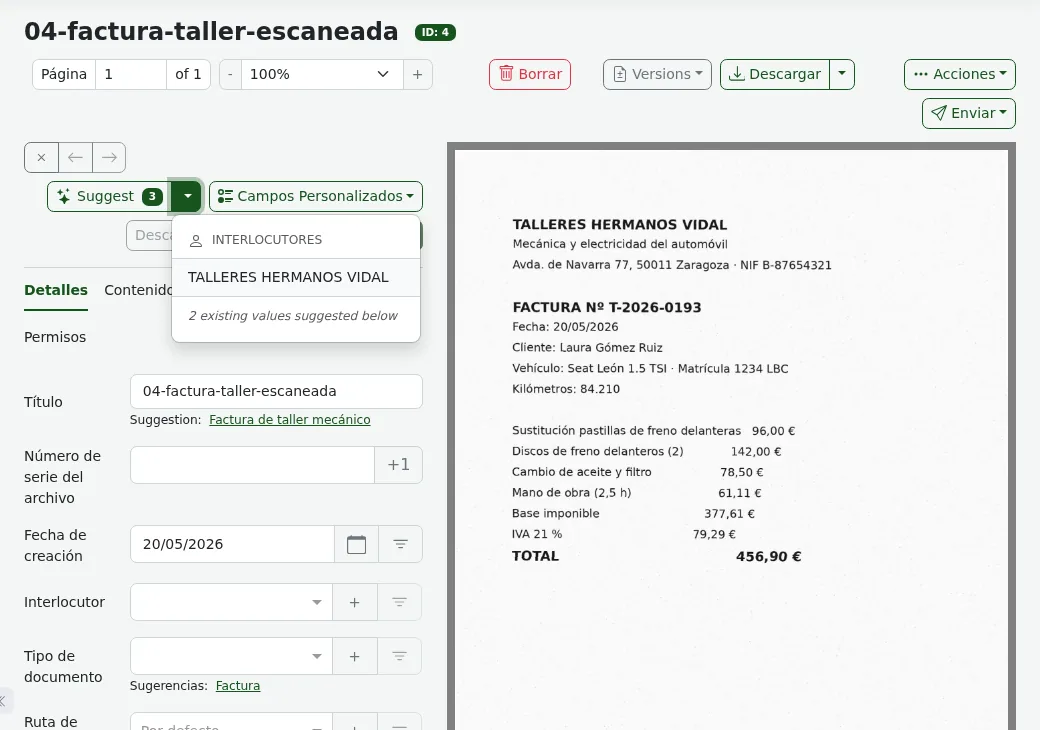
This is the first suggestion for each document in the batch with the fix. The documents are in Spanish, so the suggestions are too:
| Document | Suggested title | Correspondent | Type | Verdict |
|---|---|---|---|---|
| Electricity bill | FACTURA DE ELECTRICIDAD de LUMINIA ENERGÍA S.L. | Luminia Energía | New, "FACTURA DE ELECTRICIDAD" | Creates a type although Factura exists, and proposes a meaningless tag |
| Bank letter | Comunicación de modificación de condiciones de tarjeta de crédito Meridiano Oro | Banco Meridiano | None | Missing the Carta type, and the Hogar tag does not belong |
| Insurance renewal | Aviso de renovación de póliza de Seguro de Hogar | Aseguradora Faro | Carta | Póliza exists and it does not pick it |
| Garage invoice, scanned | Factura Mecánica y Electricidad de Automóvil | New, TALLERES HERMANOS VIDAL | Factura | Correct, apart from the Hogar tag |
| IBI receipt, scanned | Recibo IBI 2026 | New, AYUNTAMIENTO DE VALDECIERZO | Carta | Recibo exists and it does not pick it |
The type errors have an explanation in the code. Paperless only offers the model tags, types and correspondents that similar documents already carry, capped at 10 tags and 5 of each other kind. Nobody used the Recibo type or the Impuestos tag yet, so the model never saw them. With an archive of hundreds of well-classified documents, that list improves by itself.
Gemma 3 4B was faster and made more mistakes. It assigned Aseguradora Faro as correspondent of the bank letter and mixed in wrong correspondents on the electricity bill and on the insurance notice. On the IBI receipt, it copied pieces of the candidate list into the JSON fields. Suggestions also vary between requests: Gemma 4 E4B gave three different titles for the garage invoice in three attempts.
How the chat answers about your documents
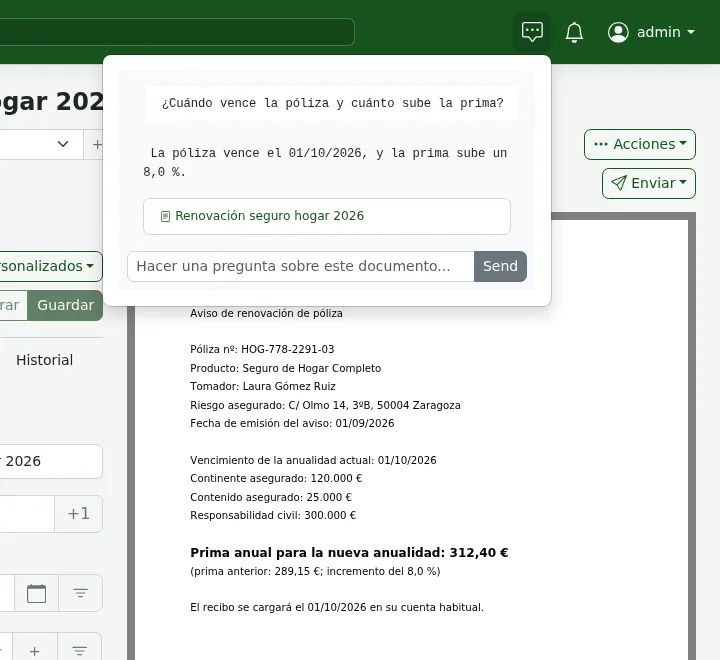
The chat got the sums and the facts I asked about right, although it takes around a minute when it searches the whole archive. It opens from the icon in the top bar, and it asks about a single document or all of them depending on the screen you are on. Every answer links to the documents it drew the information from.
I asked, in Spanish and across the whole archive, how much I pay per year for the home insurance and the IBI together. It answered:
El seguro de hogar tiene una prima anual de 312,40 €. La cuota íntegra del IBI es de 355,94 €. El total anual es de 668,34 €.
That is €312.40 for the insurance premium plus €355.94 of property tax, €668.34 in total. The sum is correct and it cited the insurance notice and the IBI receipt. It took a median of 57.5 s over three attempts.
Inside the insurance notice I asked when the policy renews and how much the premium goes up. It answered "La póliza vence el 01/10/2026 y la prima sube un 8,0%" (it renews on 1 October 2026 and rises 8.0%). The median over three attempts was 13.4 s, with a load average between 12 and 17.
Two of the six whole-archive answers dragged in junk from the context. One included the line "TOTAL A PAGAR: 84,37 €" from the electricity bill, and another the raw metadata of a document. The answer arrives all at once at the end, without appearing word by word. Each chat call also generated between 270 and 780 tokens for answers of one to five lines: the chat does not pass think, so the fix does not reach it and reasoning stays on.
Limits worth knowing
The AI in Paperless-ngx 3 has limits you won’t see on the configuration screen:
- Suggestions only read the first 4,000 characters of each document. In a long contract, the clauses at the end don’t count towards the title or the tags
- If you set an output language, or your user has a saved interface language, every suggestion makes a second call to the model to translate it
- The "Apply AI Suggestions" action queues one call per document. The documentation warns that a workflow matching your whole archive can block the queue and delay the consumption of new documents
PAPERLESS_AI_LLM_ALLOW_INTERNAL_ENDPOINTSdefaults totrueso a local Ollama works. If you only use a remote provider, set it tofalse- Changing the embedding model forces you to rebuild the index with
document_llmindex rebuild - The
openai-likebackend uses tool calls rather than Ollama’s JSON schema, so the server behind it has to support them. I did not test it
The choice of model shows more than any variable. The look at which Gemma 4 size fits your GPU helps you pick one, and the article on constrained decoding for structured LLM outputs explains how Ollama forces the JSON Paperless expects.
Frequently asked questions
Do I need a GPU to use the AI in Paperless-ngx 3?
No. Every measurement in this article is on CPU, with 18 arm64 cores and no GPU. With Gemma 4 E4B and the fix, a suggestion takes between 26 and 29 s and the model uses about 7 GiB of RAM. For a home archive that receives a few documents a day that is acceptable, and a GPU mostly cuts the prompt reading time.
Which model should I use if I don’t want to patch anything?
One that does not reason, but check its hit rate on your own documents. Gemma 3 4B worked without the fix and was the fastest, with a median of 17.8 s, but it got the correspondent wrong on three of five documents. The default, llama3.1, does not reason either, although I did not measure it.
Do my documents leave my server?
With PAPERLESS_AI_LLM_BACKEND=ollama and Ollama on the same Docker network, no. Paperless sends the text to the Ollama container and nowhere else. The documentation warns that if you point it at a remote OpenAI-compatible provider, the content of your documents travels to that provider and may cost money.
Conclusion
Paperless-ngx 3 works with local AI from day one, and the upgrade from 2.20.15 was a tag change that finished in under half a minute. The real work is the model. A reasoning one, without the fix, doubles the time of every suggestion or ends in a 400 error. And on a shared machine, capping Ollama’s threads made the difference between 12 s and almost 6 min.
My recommended setup today is Gemma 4 E4B with num_thread set, the script that fixes think and a 600 s timeout. Use it to propose, not to file without looking: correspondent and dates came out right, but the document type was right on only one of five. The same test is available in Spanish.
Sources: [1] Paperless-ngx v3.0.0 release notes[1], [2] Paperless-ngx v3.1.3 release notes[6], [3] PR #10319, Feature: Paperless AI[2], [4] v3 migration guide[3], [5] 3.1.3 configuration documentation[4], [6] Advanced usage documentation: AI features[7], [7] Paperless-ngx wiki, AI model recommendations[8], [8] llama-index-llms-ollama, base.py[5], [9] Ollama v0.34.0[9], [10] EmbeddingGemma model in the Ollama library[10].
Sources
Source code
Access all the source code for this post on GitHub.
View on GitHub