How to fix docker.io/bitnami/postgresql not found in Docker and Helm
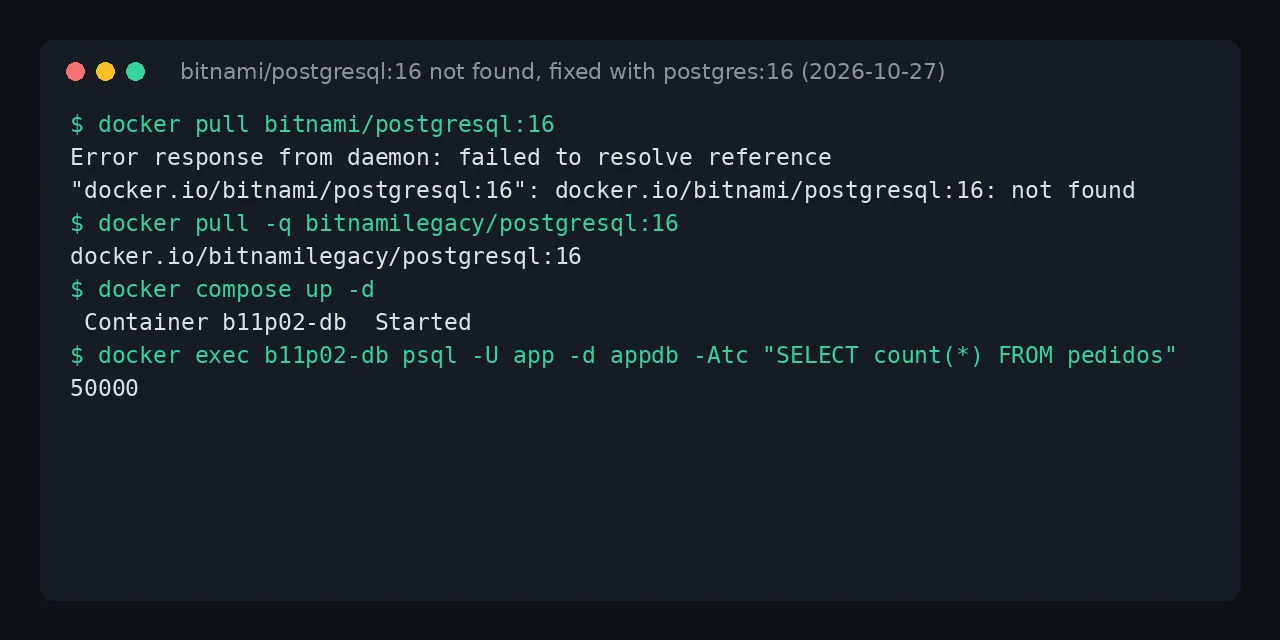
Table of contents
- Key takeaways
- What does the bitnami/postgresql not found error mean?
- Why did the Bitnami images disappear?
- Why is switching to bitnami/postgresql:latest not enough?
- Immediate fix: switch to bitnamilegacy
- How do you migrate PostgreSQL from Bitnami to the official image?
- Two mistakes that leave the database empty or stopped
- Reusing the volume with the postgres:16 image
- Restoring into postgres:18 from the dump
- How do you migrate Redis from Bitnami to the official image?
- How do you fix it in a Bitnami Helm chart?
- What about Kafka, RabbitMQ and the images with no latest?
- FAQ
- Does docker login fix it?
- Can I go back to bitnamilegacy after trying the official image?
- How long will bitnamilegacy stay available?
- Conclusion
- Sources
The docker.io/bitnami/postgresql:16: not found error means that tag no longer exists on Docker Hub: Bitnami only publishes latest under docker.io/bitnami, and in 8 of the 14 repositories I checked not even that. The immediate stop-gap is to replace bitnami/ with bitnamilegacy/ in your compose file or Helm values. The real fix is moving to the official image, and three details there can leave you with an empty database. I tested it on 27 October 2026 on arm64 Linux with Docker 29.5.2, Compose v2.40.3 and Helm v4.3.1, with 50,000 rows in PostgreSQL and 10,000 keys in Redis. There is also a Spanish version of this guide.
Key takeaways
- Of 14 popular
docker.io/bitnamirepositories I checked, 6 only have thelatesttag and 8 have none at all, includingkafka,rabbitmq,mysqlandminio. bitnami/postgresql:latestis now PostgreSQL 18.6 on Photon OS: if your data comes from 16, the server stops withdatabase files are incompatible with server.bitnamilegacy/*still pulls, but it has been frozen since August 2025:bitnamilegacy/postgresql:16is 16.6, while the officialpostgres:16is at 16.15.- To move to
postgres:16without losing data, pointPGDATAat/bitnami/postgresql/dataand createpostgresql.confandpg_hba.conf, because Bitnami does not keep them in the volume. - With Redis, the official image starts with 0 keys unless you pass
--appendonly yes: Bitnami stores the data only in the AOF file.
What does the bitnami/postgresql not found error mean?
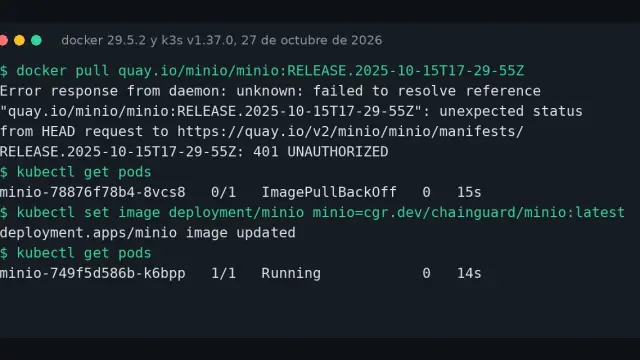
It means Docker Hub has no manifest for the tag you asked for, and it is not a network or credentials problem. These are the exact messages I got on 27 October 2026, first with docker pull and then with docker compose up:
$ docker pull bitnami/postgresql:16
Error response from daemon: failed to resolve reference
"docker.io/bitnami/postgresql:16": docker.io/bitnami/postgresql:16:
not found

$ docker compose up -d
 db Pulling
 db Error failed to resolve reference "docker.io/bitnami/postgresql:16":
 docker.io/bitnami/postgresql:16: not found
In your terminal each message is a single line; I split it here so it fits. That wording comes from the containerd image store, the default in Docker 29. With the classic store the same failure reads manifest for bitnami/moodle:latest not found: manifest unknown: manifest unknown, according to a bitnami/containers issue about Moodle[1] with comments up to October 2026. bitnami/redis:7.4, bitnami/kafka:3.9 and bitnami/kafka:latest fail the same way.
Why did the Bitnami images disappear?
Because Broadcom moved the free catalog to a frozen repository and kept the maintained images for its Bitnami Secure Images subscription. The Bitnami notice on GitHub[2] set the deletion of docker.io/bitnami for 29 September 2025, after three test brownouts. On the fate of the old images, the notice is clear: "This legacy catalog will receive no further updates or support and should only be used for temporary migration purposes".
A year later, the error keeps showing up. In August 2026 someone opened the issue about unresolvable versioned tags[3] because bitnami/postgresql:14 failed while latest worked. GitHub search returns 1,200 issues and PRs mentioning "bitnamilegacy" created since 1 September 2026. This is the state I read from the Docker Hub API:
| Repository | Tags under bitnami/ |
Last push to bitnamilegacy/ |
|---|---|---|
| postgresql, redis, mariadb, mongodb, nginx | latest only |
22 to 29 August 2025 |
| kafka, rabbitmq, mysql, minio | none | 13 to 28 August 2025 |
| elasticsearch, etcd, zookeeper, keycloak | none | 20 to 27 August 2025 |
The remaining latest is the Bitnami Secure Images trial image. In my pull, bitnami/postgresql:latest was PostgreSQL 18.6 and bitnami/redis:latest was Redis 8.10.3, both on Photon OS 5.
Why is switching to bitnami/postgresql:latest not enough?
Because latest jumps a major version and PostgreSQL does not open data from another major version. I checked it on a volume created with 16:
FATAL:  database files are incompatible with server
DETAIL:  The data directory was initialized by PostgreSQL version 16,
which is not compatible with this version 18.6.
Nothing is lost, because the server stops before writing anything. Even so, a floating tag on a database exposes you to this jump on every docker compose pull. Use Bitnami’s latest only for a fresh start.
Immediate fix: switch to bitnamilegacy
Change the namespace on the image: line and keep the tag. bitnamilegacy holds the same images with the same users, variables and paths, so your volume starts as it is:
services:
  db:
    image: bitnamilegacy/postgresql:16
    environment:
      POSTGRESQL_USERNAME: app
      POSTGRESQL_PASSWORD: ${POSTGRESQL_PASSWORD}
      POSTGRESQL_DATABASE: appdb
    volumes:
      - pgdata:/bitnami/postgresql
  cache:
    image: bitnamilegacy/redis:7.4
    environment:
      REDIS_PASSWORD: ${REDIS_PASSWORD}
    volumes:
      - redisdata:/bitnami/redis/data
volumes:
  pgdata:
  redisdata:
I created the test data with this compose file: an pedidos (orders) table with 50,000 rows and 10,000 sesion:* keys in Redis.
Be aware of what this stop-gap buys you. The 16 tag on bitnamilegacy is PostgreSQL 16.6, built on 3 December 2024, and the official image is nine minor releases ahead. Use it to get the service running today and plan the migration in the next section. At least 18.9 million pulls of bitnamilegacy/postgresql are sitting at this point, according to the Docker Hub bitnamilegacy page[4] counter.
How do you migrate PostgreSQL from Bitnami to the official image?
The lowest-risk path is to dump with pg_dump and restore into the official image; the other is to reuse the volume with three adjustments. Before either one, take a dump from the bitnamilegacy container that already works:
docker compose exec -T -e PGPASSWORD=your_app_password db \
  pg_dump -h 127.0.0.1 -U app -d appdb -Fc > appdb.dump
Two mistakes that leave the database empty or stopped
The first is mounting the volume at /var/lib/postgresql. Bitnami keeps the data in the data subdirectory, which matches the VOLUME /var/lib/postgresql/data of the postgres:16 image. Docker mounts an empty anonymous volume on top, the entrypoint runs initdb and you get a healthy server without your database: database "appdb" does not exist. Your data is still in the volume, but you cannot see it.
The second shows up once PGDATA points at the right directory. Bitnami keeps postgresql.conf and pg_hba.conf in /opt/bitnami/postgresql/conf, inside the image, and the volume does not have them:
PostgreSQL Database directory appears to contain a database;
Skipping initialization

postgres: could not access the server configuration file
"/bitnami/postgresql/data/postgresql.conf": No such file or directory
Reusing the volume with the postgres:16 image
Create both files from a throwaway container of the official image. The first copies the sample configuration and opens listening to the Docker network. The second mirrors the rules the official image writes: trust on the local socket and SCRAM passwords for everything else:
docker compose stop db
docker run --rm -v my_project_pgdata:/bitnami/postgresql postgres:16 sh -c '
D=/bitnami/postgresql/data
cp /usr/share/postgresql/16/postgresql.conf.sample $D/postgresql.conf
echo "listen_addresses = '"'*'"'" >> $D/postgresql.conf
printf "local all all trust\nhost all all 127.0.0.1/32 trust\n" > $D/pg_hba.conf
echo "host all all all scram-sha-256" >> $D/pg_hba.conf
chown 999:999 $D/postgresql.conf $D/pg_hba.conf'
Replace my_project_pgdata with the real volume name, which docker volume ls shows. Then change the service. POSTGRES_PASSWORD is only used when creating a new database, so it changes nothing here: the app user keeps the password it had:
  db:
    image: postgres:16
    environment:
      POSTGRES_PASSWORD: ${POSTGRESQL_PASSWORD}
      PGDATA: /bitnami/postgresql/data
    volumes:
      - pgdata:/bitnami/postgresql
With that, PostgreSQL 16.15 started on the 16.6 volume, with the 50,000 rows and the same MD5 sum over all their content. The entrypoint changed file ownership from Bitnami’s user 1001 to the official image’s 999. Every query also returned this warning:
WARNING:  database "appdb" has a collation version mismatch
DETAIL:  The database was created using collation version 2.36,
but the operating system provides version 2.41.
The Bitnami image ran Debian 12 with glibc 2.36 and the official one runs Debian 13 with glibc 2.41, which can sort text differently. Rebuild the indexes and record the new version, as the ALTER DATABASE documentation[5] describes. Repeat the ALTER on postgres and template1:
docker compose exec db psql -U postgres -d appdb \
  -c "REINDEX DATABASE appdb" \
  -c "ALTER DATABASE appdb REFRESH COLLATION VERSION"
Restoring into postgres:18 from the dump
If you are changing major version, restore the dump into a new database. In the postgres:18 image the volume mounts at /var/lib/postgresql, and the data goes to /var/lib/postgresql/18/docker. Mount it at the old path and the image refuses to start with Error: in 18+, these Docker images are configured to store database data in a format which is compatible with "pg_ctlcluster", because of docker-library/postgres PR 1259[6].
With the right mount, pg_restore --no-owner loaded the 50,000 rows into PostgreSQL 18.6 with the same MD5 sum. For what that branch brings, see PostgreSQL 19 tested in Docker, which includes the pg_upgrade jump from 18.
How do you migrate Redis from Bitnami to the official image?
Mount the same volume at /data and turn on AOF, because Bitnami starts Redis with appendonly yes and the volume only holds the appendonlydir directory. My first attempt, with redis:7.4 and only --requirepass, started without errors and with dbsize at 0.
The official image uses RDB snapshots by default, found no dump.rdb and started empty. The AOF files were still intact next to it. This is the service that worked:
  cache:
    image: redis:7.4
    command: redis-server --appendonly yes --requirepass ${REDIS_PASSWORD}
    volumes:
      - redisdata:/data
With it, Redis 7.4.12 logged DB loaded from append only file and returned the 10,000 keys. The Redis persistence guide[7] explains the difference between RDB and AOF. Do not write to the empty Redis before fixing the startup, because its next snapshot will not have your data. If you also plan to switch engines, the real Redis to Valkey migration starts from the same point.
How do you fix it in a Bitnami Helm chart?
Override the repository of each image in the chart with its bitnamilegacy copy. An old chart points at tags that no longer exist: version 16.7.27 of bitnamicharts/postgresql asks for docker.io/bitnami/postgresql:17.6.0-debian-12-r4, which returns not found, so the pod never gets its image. The current chart, 18.12.16, asks for bitnami/postgresql:latest, which takes you back to the 18.6 jump. These --set flags keep the chart version; on a release that is already installed, pass the same ones to helm upgrade:
helm install my-postgres \
  oci://registry-1.docker.io/bitnamicharts/postgresql --version 16.7.27 \
  --set image.repository=bitnamilegacy/postgresql \
  --set volumePermissions.image.repository=bitnamilegacy/os-shell \
  --set metrics.image.repository=bitnamilegacy/postgres-exporter
The chart recognises bitnamilegacy and only prints a WARNING: Original containers have been substituted. With a third-party image such as library/postgres, the install fails in NOTES.txt with Error: INSTALLATION FAILED until you add global.security.allowInsecureImages=true. Do not do that to run the official image inside the chart: its variables and paths are Bitnami’s. I checked this with helm install --dry-run=client, without deploying to a cluster.
What about Kafka, RabbitMQ and the images with no latest?
For those there is no Bitnami image to pull without a subscription, so the choice is bitnamilegacy or the official project. The official alternatives I saw published on 27 October 2026 are these:
- Kafka:
apache/kafka, with 4.4.0 as the newest tag - RabbitMQ:
rabbitmq, with 4.3.7 - MariaDB:
mariadb, with 12.3.3 - MinIO: there is no official image; the guide to the pull access denied error for MinIO tests three replacements
Of these I only pulled apache/kafka; I did not migrate Kafka or RabbitMQ data. Each one has its own environment variables and paths, so treat the switch as a migration and not a tag change. Before you start, copy your volumes as the guide to Docker volumes and bind mounts explains.
FAQ
Does docker login fix it?
No. Docker Hub no longer has those tags for anyone, and the error is not found, not unauthorized. The maintained versions live in the Bitnami Secure Images registry, which needs a paid subscription. I did not test it with an account.
Can I go back to bitnamilegacy after trying the official image?
Yes, but you have to undo two changes. The official image moved the files to user 999, and bitnamilegacy failed with ls: cannot open directory '/bitnami/postgresql/data': Permission denied. A chown -R 1001:0 from a throwaway container fixed it. Bitnami also deleted the postgresql.conf and pg_hba.conf I had created when it started, so repeat that step if you move to the official image again.
How long will bitnamilegacy stay available?
Bitnami has not published a shutdown date. The 2025 notice presents it as temporary, and it has received no patches since August 2025. Copy the images you use into your own private Docker image registry so you do not depend on it staying online.
Conclusion
docker.io/bitnami/postgresql:16: not found cannot be fixed from your machine: the tag no longer exists and latest is another major version. Switch to bitnamilegacy today so the service starts.
This week, take a pg_dump and move to postgres with PGDATA and the two configuration files, or restore into postgres:18. For Redis, add --appendonly yes. In both cases, count rows and keys before and after.
Sources: [1] Bitnami, catalog changes notice[2], [2] bitnami/containers, issue 96169 on unresolvable tags[3], [3] bitnami/containers, issue 90492 on bitnami/moodle[1], [4] Docker Hub, bitnamilegacy namespace[4], [5] docker-library/postgres, PR 1259 on PGDATA in 18[6], [6] bitnami/charts, issue 30850 on substituted images[8], [7] PostgreSQL, ALTER DATABASE documentation[5], [8] Redis, persistence guide[7].
Sources
Source code
Access all the source code for this post on GitHub.
View on GitHub