How to migrate your MCP server to FastMCP 4 and the Python SDK 2
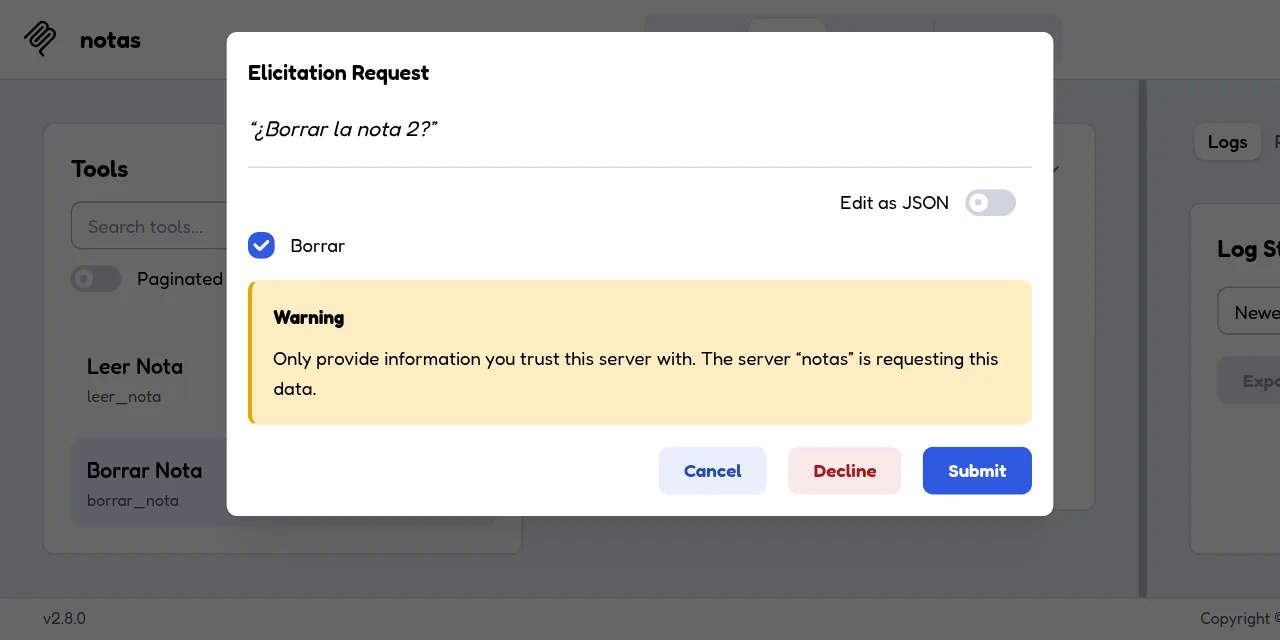
Table of contents
- Key takeaways
- What changes with FastMCP 4 and the Python SDK 2
- The starting server on SDK 1.30
- How to set up the test bench in Docker
- What fails when you upgrade to mcp 2.2.0, and how to fix it
- ModuleNotFoundError: No module named 'mcp.server.fastmcp'
- ImportError: cannot import name 'McpError'
- TypeError: unexpected keyword argument 'host'
- The three changes that raise nothing
- ctx.elicit() has no back-channel on 2026-07-28
- The 1.x client and protocol errors
- How to migrate to FastMCP 4 instead of MCPServer
- What FastMCP 4 breaks if you come from FastMCP 3
- How to test the migrated server with a real client
- What happens behind a load balancer with two replicas
- Frequently asked questions
- Do I have to migrate now if my server works on mcp 1.x?
- MCPServer or FastMCP 4?
- Do older clients keep working against the migrated server?
- Conclusion
- Sources
If your Model Context Protocol (MCP) server starts with from mcp.server.fastmcp import FastMCP, the next pip install -U mcp knocks it over on line one. The official Python software development kit (SDK) shipped version 2.0.0 on 28 July 2026 and renamed FastMCP to MCPServer, and FastMCP 4.0.0, the standalone project, followed on 31 August on the same foundation. Here I migrate a small but real server to both destinations, with every error exactly as it appeared, its fix, and tests with real clients over stdio, over Streamable HTTP and behind a load balancer. If you are starting from scratch, begin with building your own MCP server. This guide is also available in Spanish.
Key takeaways
- With
mcp2.2.0 the old server fails at import withModuleNotFoundError: No module named 'mcp.server.fastmcp'. There are two ways out: the SDK’s ownMCPServer, orfrom fastmcp import FastMCPwith FastMCP 4.0.10. - On both destinations
hostandportmove torun(), andMcpError(ErrorData(...))raisesTypeErrorbecause the error is now built from a code and a message. - Three changes raise nothing: with
MCPServer, instructions passed by position end up intitle, exception text stops reaching the client, and the server version comes out empty. ctx.elicit()only works on 2025-11-25 connections. On 2026-07-28,MCPServerhandles it withResolve(Elicit(...))and FastMCP 4 makes you return anInputRequiredResult.- Behind nginx with two round-robin replicas, the 2026-07-28 client passed 5 of 5 runs; the same client in session mode passed 1 of 5, and the 1.x client none.
What changes with FastMCP 4 and the Python SDK 2
SDK 2 rewrites the protocol layer for MCP revision 2026-07-28, where every request travels without a session. Even so, it keeps serving older clients from the same server.
The SDK 2.0.0 release notes[1] boil it down to three facts. pip install mcp now installs 2.x, "FastMCP is now MCPServer", and the 1.x line "will only receive security fixes". What that revision breaks at the protocol level is covered in the article on the MCP 2026-07-28 specification.
FastMCP, the PrefectHQ project the original class came from, builds its version 4 on SDK 2. The FastMCP 4.0.0 release notes[2] mention five betas in five weeks, 23 contributors and more than 80 pull requests, and describe the underlying change like this: "modern requests are sessionless and self-contained, so any replica behind an ordinary load balancer can answer them".
These are the versions I used on 27 September 2026, according to the PyPI indexes for mcp[3] and fastmcp[4]:
| Package | Version | Released | Depends on |
|---|---|---|---|
mcp (1.x line) |
1.30.0 | 2026-09-07 | nothing from SDK 2 |
mcp |
2.2.0 | 2026-09-07 | mcp-types 2.2.0, httpx2 |
fastmcp (3.x line) |
3.4.7 | 2026-08-10 | mcp>=1.24.0,<2.0 |
fastmcp |
4.0.10 | 2026-09-25 | mcp>=2.0.0,<3.0.0 |
FastMCP releases almost daily (ten patches between 31 August and 25 September), so pin the exact version in your requirements.txt. The FastMCP 4 virtual environment took 115 MB against 71 MB for SDK 2 with its cli extra.
The starting server on SDK 1.30
The test server stores notes in SQLite and has the parts of a real MCP server. That means four tools, a resource template notas://{nota_id}, a prompt, a validation error with McpError and a confirmation with ctx.elicit() before deleting. The identifiers are Spanish (crear_nota is "create note", borrar_nota is "delete note"), because this is the code that ran. Here is the header and the first tool as they worked on mcp 1.30.0 (the db() helper opens the database and creates the table):
import os
import sqlite3
import sys

from pydantic import BaseModel
from mcp.server.fastmcp import Context, FastMCP
from mcp.shared.exceptions import McpError
from mcp.types import INVALID_PARAMS, ErrorData

DB = os.environ.get("NOTAS_DB", "/tmp/notas.db")
mcp = FastMCP("notas", "Guarda y busca notas cortas del equipo.",
              host="0.0.0.0", port=8000)

@mcp.tool()
def crear_nota(titulo: str, cuerpo: str) -> int:
    """Guarda una nota y devuelve su id."""
    if not titulo.strip():
        raise McpError(ErrorData(code=INVALID_PARAMS,
                                 message="El título está vacío"))
    with db() as con:
        cur = con.execute("insert into notas(titulo, cuerpo) values (?, ?)",
                          (titulo, cuerpo))
        return cur.lastrowid
The constructor’s second positional argument is the instructions string the client hands to the model, and host and port also sit in the constructor. Both change in version 2. The other two tools that matter for the migration are these:
@mcp.tool()
def leer_nota(nota_id: int) -> str:
    """Devuelve el cuerpo de una nota."""
    with db() as con:
        fila = con.execute("select cuerpo from notas where id = ?",
                           (nota_id,)).fetchone()
    if fila is None:
        raise ValueError(f"No existe la nota {nota_id}")
    return fila[0]

class Confirmacion(BaseModel):
    borrar: bool

@mcp.tool()
async def borrar_nota(nota_id: int, ctx: Context) -> str:
    """Borra una nota después de pedir confirmación al usuario."""
    r = await ctx.elicit(f"¿Borrar la nota {nota_id}?", Confirmacion)
    if r.action != "accept" or not r.data.borrar:
        return "Cancelado"
    with db() as con:
        con.execute("delete from notas where id = ?", (nota_id,))
    await ctx.info(f"nota {nota_id} borrada")
    return f"Nota {nota_id} borrada"
leer_nota ("read note") raises a generic ValueError, and borrar_nota asks for confirmation with ctx.elicit(), which MCP calls elicitation: the server asks the user a question in the middle of a call. The file ends with mcp.run(transport=sys.argv[1] if len(sys.argv) > 1 else "stdio").
How to set up the test bench in Docker
Each version lives in its own virtual environment inside a python:3.14.7-slim-trixie container, so all of them share one directory without touching the system Python. I ran this on an aarch64 machine with Docker; --user 1000:1000 keeps the files the container creates owned by you:
mkdir notas && cd notas
docker run --rm --user 1000:1000 -e HOME=/work -v "$PWD":/work -w /work \
  python:3.14.7-slim-trixie sh -c '
  python -m venv venv-sdk1 && venv-sdk1/bin/pip install -q "mcp[cli]==1.30.0"
  python -m venv venv-sdk2 && venv-sdk2/bin/pip install -q "mcp[cli]==2.2.0"
  python -m venv venv-fm4 && venv-fm4/bin/pip install -q "fastmcp==4.0.10"'
The server goes in v1/server.py. Next to it, v1/cliente.py uses the 1.x client: ClientSession with stdio_client or streamablehttp_client. It creates a note, searches for it, reads one that does not exist, sends an empty title, reads the resource and deletes the note by accepting the confirmation. The baseline passes in full:
docker run --rm --user 1000:1000 -e HOME=/work -v "$PWD":/work -w /work/v1 \
  python:3.14.7-slim-trixie /work/venv-sdk1/bin/python cliente.py stdio
The output shows the server identity, the negotiated protocol version and the result of each call:
server: notas 1.30.0 proto: 2025-11-25
instructions: Guarda y busca notas cortas del equipo.
tools: ['crear_nota', 'buscar', 'leer_nota', 'borrar_nota']
crear_nota -> 1
buscar -> {'result': [{'id': 1, 'titulo': 'Backups'}]}
leer_nota(999) -> True Error executing tool leer_nota: No existe la nota 999
crear_nota(vacío) -> True Error executing tool crear_nota: El título está vacío
recurso -> restic cada noche
  elicit: ¿Borrar la nota 1?
borrar_nota -> Nota 1 borrada
Look at the version: 1.30.0 is the SDK’s, not your server’s, because the constructor never received one. That detail changes in version 2.
What fails when you upgrade to mcp 2.2.0, and how to fix it
Run the same file with venv-sdk2 and the server dies at import, then fails once per start until it works. This is the order the errors appeared in, with the fix from the MCP Python SDK migration guide from v1 to v2[5]. I have wrapped the long message lines so they fit.
ModuleNotFoundError: No module named ‘mcp.server.fastmcp’
The first run never gets as far as creating the server:
ModuleNotFoundError: No module named 'mcp.server.fastmcp'. This is mcp
2.x, where FastMCP was renamed to MCPServer (from mcp.server.mcpserver
import MCPServer) and other APIs changed; see the migration guide at
https://py.sdk.modelcontextprotocol.io/v2/migration/#fastmcp-renamed-to-mcpserver
or pin 'mcp<2' to keep running v1 code.
The message with the link to the guide arrived in 2.1.1 and 2.0.1. If you cannot migrate yet, pin mcp>=1.28,<2 in your dependencies. To carry on, change the import to from mcp.server.mcpserver import Context, MCPServer and the class to MCPServer("notas", ...). The @mcp.tool(), @mcp.resource() and @mcp.prompt() decorators stay as they are.
ImportError: cannot import name ‘McpError’
The protocol exception was renamed too:
ImportError: cannot import name 'McpError' from 'mcp.shared.exceptions'
(...). Did you mean: 'MCPError'?
Renaming is not enough, because the constructor changed as well. With only the new name, MCPError(ErrorData(...)) raises TypeError: MCPError.__init__() missing 1 required positional argument: 'message' as soon as someone sends an empty title. The new form is raise MCPError(INVALID_PARAMS, "El título está vacío"), importing MCPError straight from mcp.
TypeError: unexpected keyword argument ‘host’
The transport parameters left the constructor:
TypeError: MCPServer.__init__() got an unexpected keyword argument 'host'
They move to run(). The same goes for port, json_response, stateless_http, streamable_http_path, event_store and transport_security:
if __name__ == "__main__":
    if len(sys.argv) > 1 and sys.argv[1] == "streamable-http":
        mcp.run(transport="streamable-http", host="0.0.0.0", port=8000)
    else:
        mcp.run(transport="stdio")
The three changes that raise nothing
With those three fixes the server starts and the 1.x client lists the tools, but the output is no longer the same:
server: notas  proto: 2025-11-25
instructions: None
tools: ['crear_nota', 'buscar', 'leer_nota', 'borrar_nota']
crear_nota -> 1
leer_nota(999) -> True Error executing tool leer_nota
crear_nota(vacío) -> True Error executing tool crear_nota
None of these three regressions leaves a trace on the client:
- Lost instructions: the
MCPServerconstructor insertstitleanddescriptionbeforeinstructions, so your text goes out as the title and the model stops receiving instructions. Passinstructions=by name - Empty version: a server without
version=announces an empty string instead of the SDK version. Passversion="2.0.0" - Silent errors: since 2.1.0, an unexpected exception in a tool reaches the client as
Error executing tool leer_nota, without the text. The full traceback stays in the server log. If the message is meant for the model, raiseToolErrorfrommcp.server.mcpserver.exceptions
A fourth change does warn you, in the server log: ctx.info() emits MCPDeprecationWarning: The logging capability is deprecated as of 2026-07-28 (SEP-2577).. It works on both protocol eras, so you can keep it or replace it with Python’s logging module.
ctx.elicit() has no back-channel on 2026-07-28
The SDK 2 client negotiates revision 2026-07-28 by default (mode="auto"), and on that revision the server can no longer send requests to the client. The borrar_nota confirmation fails on the client side:
mcp.shared.exceptions.MCPError: Cannot send 'elicitation/create': this
transport context has no back-channel for server-initiated requests.
The SDK elicitation documentation[6] recommends a resolver: a parameter annotated with Resolve(fn) that the SDK fills before the tool runs. When fn returns Elicit(...), the SDK asks the question over whatever channel the connection has, and the model never sees that parameter:
async def pedir_ok(nota_id: int) -> Elicit[Confirmacion]:
    return Elicit(f"¿Borrar la nota {nota_id}?", Confirmacion)

@mcp.tool()
async def borrar_nota(
    nota_id: int,
    ok: Annotated[ElicitationResult[Confirmacion], Resolve(pedir_ok)],
) -> str:
    """Borra una nota después de pedir confirmación al usuario."""
    match ok:
        case AcceptedElicitation(data=Confirmacion(borrar=True)):
            with db() as con:
                con.execute("delete from notas where id = ?", (nota_id,))
            return f"Nota {nota_id} borrada"
    return "Cancelado"
Elicit, ElicitationResult, AcceptedElicitation and Resolve are imported from mcp.server.mcpserver. With this change the server passed the full battery with the SDK 2 client in mode="auto" (2026-07-28) and in mode="legacy" (2025-11-25), over both stdio and HTTP.
The 1.x client and protocol errors
An MCPError raised inside a tool is no longer turned into a result with isError. It now arrives as a JSON-RPC error, code included. The SDK 2 client receives it as an exception (MCPError -32602 El título está vacío), and a 1.x client that did not expect it crashes with mcp.shared.exceptions.McpError: El título está vacío. If you have older clients, or you want the model to read the error and fix the title, use ToolError instead.
How to migrate to FastMCP 4 instead of MCPServer
The FastMCP guide for upgrading from SDK v1[7] promises that "for most servers, it’s a single import change": from fastmcp import Context, FastMCP. My server needed three more changes, and the errors were more explicit:
McpError: the sameImportErrorfrommcp.shared.exceptions. FastMCP keeps the old name as an alias infastmcp.exceptions, with the new constructor:McpError(code=INVALID_PARAMS, message="...")host:TypeError: FastMCP() no longer acceptshost. Passhosttorun_http_async(), or set FASTMCP_HOST.The fix ismcp.run(transport="http", host="0.0.0.0", port=8000). FastMCP calls the Streamable HTTP transporthttpctx.elicit(): with a 2026-07-28 client the tool returnselicitation via server-initiated requests is unavailable on 2026-07-28 connections.
FastMCP 4 has no equivalent of the SDK’s Resolve, so the tool has to tell the connection eras apart. On 2026-07-28 it returns an InputRequiredResult carrying the question, and the client repeats the call with the answer in ctx.input_responses, as the FastMCP elicitation documentation[8] explains:
def pedir_ok(msg: str) -> InputRequiredResult:
    esquema = Confirmacion.model_json_schema()
    params = ElicitRequestFormParams(message=msg, requested_schema=esquema)
    return InputRequiredResult(
        result_type="input_required",
        input_requests={"ok": ElicitRequest(method="elicitation/create",
                                            params=params)})

@mcp.tool()
async def borrar_nota(nota_id: int,
                      ctx: Context) -> str | InputRequiredResult:
    """Borra una nota después de pedir confirmación al usuario."""
    msg = f"¿Borrar la nota {nota_id}?"
    if ctx.request_context.protocol_version < "2026-07-28":
        r = await ctx.elicit(msg, Confirmacion)
        ok = r.action == "accept" and r.data.borrar
    elif ctx.input_responses is None:
        return pedir_ok(msg)
    else:
        r = ctx.input_responses["ok"]
        ok = r.action == "accept" and r.content["borrar"]
    if not ok:
        return "Cancelado"
ElicitRequest, ElicitRequestFormParams and InputRequiredResult come from mcp.types, and the string comparison works because revisions are ISO dates. After the return "Cancelado" line ("cancelled"), the function deletes the note as before.
With the same server and the same client, the two destinations do not behave the same:
| Observed behaviour | MCPServer (mcp 2.2.0) |
FastMCP 4.0.10 |
|---|---|---|
| Instructions as the second positional argument | End up in title |
Stay instructions |
Version when you pass no version= |
Empty string | FastMCP’s own (4.0.10) |
Text of a ValueError raised in a tool |
Hidden from the client | Reaches the client |
McpError raised in a tool |
JSON-RPC error | Result with is_error |
| Elicitation on both eras | Resolve(Elicit(...)), no branches |
Branch on protocol version |
| Virtual environment size | 71 MB | 115 MB |
If your server is small and you need no middleware, proxies or auth providers, MCPServer leaves you with one dependency fewer and cleaner elicitation. If you already use any of those, or you want the smallest diff, FastMCP 4 is the natural destination.
What FastMCP 4 breaks if you come from FastMCP 3
FastMCP 3.4.7 pins mcp<2.0, so a FastMCP 3 server does not break when mcp updates: it breaks when fastmcp does. I ported the same server to FastMCP 3.4.7, with one extra tool that summarises a note with ctx.sample() using the client’s model, and ran it unchanged on 4.0.10. The FastMCP guide for upgrading from 3[9] lists twelve checklist items; this server hit four:
McpErrorfrommcp.shared.exceptionsgives the sameImportError. Import the alias fromfastmcp.exceptionsand build it withcode=andmessage=ctx.sample()is gone:ToolError: Error calling tool 'resumir_nota': 'Context' object has no attribute 'sample'. The guide suggests calling a model from your server with your own key, asking for the generation through theInputRequiredResultpattern, or staying on 3.x if using the caller’s model is the reason the server exists. I removed the tool, because theresumirprompt already covers that casectx.elicit()fails with the same era error as before. The stopgap isClient(server, mode="legacy")in your clients, which made it work first time. The lasting fix is the version branch from the previous sectionClient("server.py")warns withFastMCPDeprecationWarning: Inferring a stdio transport from the string 'server.py' is deprecated and will be removed in FastMCP 5. PassPath("server.py")
The guide also warns about two breaks that raise no runtime error. FastMCP now uses httpx2, so an except httpx.ConnectError around a call becomes dead code. And the resource-not-found error code moves from -32002 to -32602.
How to test the migrated server with a real client
The SDK 2 client replaces the ClientSession plus transport plus initialize() stack with a single Client object, which takes a URL or a StdioServerParameters and negotiates the protocol version on its own. This is the core of the migrated test client:
async def main(destino: str) -> None:
    if destino == "stdio":
        destino = StdioServerParameters(
            command=os.environ.get("SERVER_PY", sys.executable),
            args=[os.environ.get("SERVER_FILE", "server.py")])
    modo = os.environ.get("MODO", "auto")
    async with Client(destino, mode=modo,
                      elicitation_callback=confirmar) as c:
        info = c.server_info
        print("server:", info.name, repr(info.version),
              "proto:", c.protocol_version)
        r = await c.call_tool("leer_nota", {"nota_id": 999})
        print("leer_nota(999) ->", r.is_error, r.content[0].text)
        try:
            await c.call_tool("crear_nota", {"titulo": " ", "cuerpo": "x"})
        except MCPError as e:
            print("crear_nota(vacío) -> MCPError", e.code, e.message)
Fields become snake_case (is_error, structured_content, server_info), and the exception is imported with from mcp import Client, MCPError, StdioServerParameters. confirmar is the same elicitation callback as before, returning ElicitResult(action="accept", content={"borrar": True}). For Streamable HTTP, start the server on a Docker network and point the client at its URL:
docker network create mcp-net
docker run -d --name mcp-srv --network mcp-net --user 1000:1000 \
  -e HOME=/work -v "$PWD":/work -w /work/sdk2 python:3.14.7-slim-trixie \
  /work/venv-sdk2/bin/python server.py streamable-http
docker run --rm --network mcp-net --user 1000:1000 -e HOME=/work \
  -v "$PWD":/work -w /work/sdk2 python:3.14.7-slim-trixie \
  /work/venv-sdk2/bin/python cliente.py http://mcp-srv:8000/mcp
The server migrated to MCPServer answered like this, with the version, the instructions and the errors back in place:
server: notas '2.0.0' proto: 2026-07-28
instructions: Guarda y busca notas cortas del equipo.
tools: ['crear_nota', 'buscar', 'leer_nota', 'borrar_nota']
crear_nota -> 1
leer_nota(999) -> True Error executing tool leer_nota: No existe la nota 999
crear_nota(vacío) -> MCPError -32602 El título está vacío
recurso -> restic cada noche
  elicit: ¿Borrar la nota 1?
borrar_nota -> False Nota 1 borrada
With MODO=legacy the output is identical except for proto: 2025-11-25. The original 1.x client also works against the migrated server up to the empty title, where it crashes because of the MCPError change described earlier. The FastMCP 4 version of the server passed the same battery over stdio and HTTP with the SDK 2 client and with fastmcp.Client, in both modes. The 1.x client completed it in full, because FastMCP turns the McpError into a result with is_error.
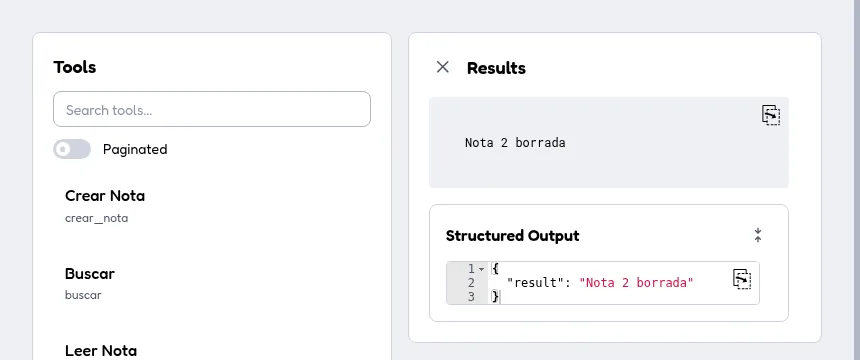
As a third client I used MCP Inspector 2.8.0, the version published on npm on 23 September, in both its CLI mode and its web interface. Version 2.8.0 still negotiates 2025-11-25, so it exercises the ctx.elicit() branch of the FastMCP 4 server. The interface drew the confirmation form from the Confirmacion schema, and after submitting it the tool returned its result:
What happens behind a load balancer with two replicas
Revision 2026-07-28 promises that any replica can answer any request. I tested it with two server containers behind nginx 1.30.1 in round-robin mode, sharing the SQLite file. This is the load balancer configuration:
upstream mcp {
    server mcp-a:8000;
    server mcp-b:8000;
}
server {
    listen 8080;
    location /mcp {
        proxy_pass http://mcp;
        proxy_http_version 1.1;
        proxy_buffering off;
        proxy_set_header Host $host;
    }
}
I ran each client five times against http://mcp-lb:8080/mcp. The replicas are the mcp-a and mcp-b containers. In one run of the 2026-07-28 client I counted 8 POST requests, split 4 and 4 between the two:
| Server behind nginx | Client | Successful runs | Error |
|---|---|---|---|
| FastMCP 4.0.10 | SDK 2, mode="auto" (2026-07-28) |
5 of 5 | none |
| FastMCP 4.0.10 | SDK 2, mode="legacy" (2025-11-25) |
1 of 5 | Session not found |
| FastMCP 4.0.10 | SDK 1.30.0 | 0 of 5 | Session terminated |
MCPServer without a shared key |
SDK 2, mode="auto" |
0 of 5 | Invalid or expired requestState |
MCPServer with a shared key |
SDK 2, mode="auto" |
5 of 5 | none |
The MCPServer row without a key is the trap no local trace shows. The borrar_nota resolver keeps its state in a requestState sealed with a random per-process key. The SDK deployment guide[10] explains it: if the retry lands on another replica, the call fails with -32602. The fix is to give every replica the same key and the same server name:
clave = os.environ.get("NOTAS_CLAVE")
sello = RequestStateSecurity(keys=[clave]) if clave else None
mcp = MCPServer("notas", version="2.0.0",
                instructions="Guarda y busca notas cortas del equipo.",
                request_state_security=sello)
Generate the key with python -c "import secrets; print(secrets.token_hex(32))" and pass it to each replica as an environment variable. FastMCP 4 has the same request_state_security parameter, and you need it as soon as your tool stores anything in request_state.
Session-based clients still need affinity: MCP Inspector 2.8.0 failed through the round-robin balancer with a 404 Session not found and worked with ip_hash; in the upstream block. Since mcp 2.2.0, an idle legacy session also expires after 30 minutes. A server accepts at most 10,000 sessions, according to the 2.2.0 release notes[11].
Frequently asked questions
Do I have to migrate now if my server works on mcp 1.x?
Not immediately, but pin mcp<2 today: a pip install -U, a fresh lockfile or a rebuilt image already installs 2.x. The 1.x line only gets security fixes, and 1.30.0 on 7 September already changed defaults such as idle session expiry.
MCPServer or FastMCP 4?
For a server that only uses decorators, both take similar work. MCPServer handles elicitation on both eras without branches and weighs 44 MB less. FastMCP 4 keeps more old code working (positional instructions, the McpError alias, error text) and adds middleware, proxies and auth.
Do older clients keep working against the migrated server?
Yes. Both MCPServer and FastMCP 4 served a 1.30.0 client on revision 2025-11-25, over stdio and HTTP. The exceptions are MCPServer‘s MCPError, which now arrives as a JSON-RPC error, and deployments with two or more replicas and no session affinity.
Conclusion
Migrating a small MCP server to FastMCP 4 or to SDK 2 takes an afternoon, and the visible errors get fixed by following their own message. What deserves your time is what you cannot see. Instructions end up in the title, errors lose their text, an MCPError crashes older clients, and a requestState fails the moment there are two replicas.
Pin mcp==2.2.0 or fastmcp==4.0.10, test with one client in mode="auto" and another in mode="legacy", and run the battery behind a load balancer before you deploy. If your server plugs into an editor, go over how to install a local MCP server for your editor with the new configuration.
Sources: [1] PyPI index for the mcp package[3], [2] PyPI index for the fastmcp package[4], [3] MCP Python SDK releases (Atom feed)[1], [4] MCP Python SDK 2.2.0 release notes[11], [5] MCP Python SDK migration guide from v1 to v2[5], [6] Elicitation in the MCP Python SDK[6], [7] Deploy and scale in the MCP Python SDK[10], [8] FastMCP 4.0.0 release notes[2], [9] FastMCP: upgrading from FastMCP 3[9], [10] FastMCP: upgrading from MCP SDK v1[7], [11] FastMCP: user elicitation[8].
Sources
Source code
Access all the source code for this post on GitHub.
View on GitHub