How to use OpenCode with local models on llama.cpp and Ollama
Table of contents
- Key takeaways
- What OpenCode is and who maintains it
- What you need before you start
- How to install OpenCode and pin the version
- How to start llama-server with a model that calls tools
- How to configure opencode.json for a local server
- What changes if you use Ollama
- How many tokens OpenCode sends before it reads your message
- Which permissions ask and which let things through
- A real task with Qwen3.5-4B on a CPU
- What is true in the criticism of OpenCode
- Which settings to change so you do not depend on remote services
- Frequently asked questions
- Which local model works with OpenCode?
- How much context does OpenCode need?
- Does OpenCode send data out if I use a local model?
- Conclusion
- Sources
OpenCode talks to any server that speaks the OpenAI API, and that includes a llama-server on your own machine. OpenCode[1] is an open source coding agent that works in the terminal: it reads your project, edits files and runs commands. I tested version 1.18.31 against Qwen3.5-4B on a CPU, logged every request it sent and counted the tokens. Below is the configuration that worked, what each turn costs, and the settings worth changing before you trust its defaults.
Key takeaways
- OpenCode 1.18.31 shipped on 14 September 2026 under the MIT licence. The repository now lives at
anomalyco/opencode, and the oldsst/opencodeaddress redirects there. - You declare a local model as an
@ai-sdk/openai-compatibleprovider with itsbaseURLand itslimit.contextinopencode.json. - The first turn sent 7,516 tokens to the server (10 tools and a 9,733-character system prompt), plus a separate 558-token request to title the session.
- Denying four tools you do not use (
webfetch,task,todowriteandskill) removes them from the request and cuts the first turn to 5,335 tokens, 29 % less. - Qwen3.5-4B fixed a narrow bug in 3 out of 3 attempts, with four tool calls and a median of 217 s. On a more open task it ignored
AGENTS.mdand installed numpy outside the project. - The default permissions let almost everything through without asking, and the command filter compares text: treat it as a speed bump, not as isolation.
What OpenCode is and who maintains it
OpenCode is a coding agent that runs in the terminal, as a desktop app (in beta) or inside the editor. Anomaly, the company named on the opencode.ai[2] site, maintains it, and the code is published under the MIT licence.
The project started as sst/opencode. Today GitHub answers that address with a permanent redirect to anomalyco/opencode, which had 207,375 stars on 14 September 2026. The site claims more than 16 million developers use it every month; that is the project’s own figure and I could not verify it.
It ships releases at a pace that forces you to pin the one you test. Between 1.18.17 (12 August) and 1.18.31[3] (14 September) there were 15 releases. GitHub also shows v2.0.0 to v2.0.3 tags from 11 and 12 September, but with no binaries and no npm package, so the stable line is still 1.18.
What you need before you start
OpenCode does not run the model: it only sends requests to a server. To work with a model on your own machine you need four pieces:
- An OpenAI-compatible server: llama-server, which ships with llama.cpp, or Ollama
- A model trained to call tools, because OpenCode edits files and runs commands through them
- Enough context: the first turn is already above 7,500 tokens and the test task reached 8,932
- Node.js to install with npm, or the official install script
If you have never seen how a local model asks for a function to run, the guide to function calling with Ollama explains it step by step.
My test bench was a linux/arm64 container with 18 cores, 121 GB of RAM and no GPU. Other processes shared it and kept the load average between 20 and 40 during the measurements. The timings you will see are pessimistic for that reason; the token counts do not depend on the machine.
How to install OpenCode and pin the version
The npm package is called opencode-ai and downloads a native binary for your platform:
npm install -g opencode-ai@1.18.31
opencode --version
On Linux arm64 it installed two packages and a 176 MiB binary. The official script (curl -fsSL https://opencode.ai/install | bash) and Homebrew (brew install anomalyco/tap/opencode) end up in the same place.
Turn off automatic updates before the first launch. OpenCode downloads new releases when it starts, and with 15 releases in 33 days your setup can change behaviour between two sessions. Add "autoupdate": false to your configuration or export OPENCODE_DISABLE_AUTOUPDATE=1.
I ran it with HOME and the XDG_CONFIG_HOME, XDG_DATA_HOME and XDG_CACHE_HOME variables pointing at a throwaway directory. The test never touched my real configuration, and cleaning up meant deleting that directory.
How to start llama-server with a model that calls tools
I used the official ghcr.io/ggml-org/llama.cpp:server image for arm64, version 0.4.1-dev (build 10969, commit 391fac164), with the Qwen3.5-4B Q4_K_M GGUF from unsloth[4]. The file is 2.74 GB and the model is Apache-2.0:
docker run -d --name llama -p 127.0.0.1:8080:8080 \
  -v "$HOME/models:/models:ro" \
  ghcr.io/ggml-org/llama.cpp:server \
  -m /models/Qwen3.5-4B-Q4_K_M.gguf -a qwen3.5-4b \
  -c 32768 -np 1 -t 4 --reasoning off \
  --host 0.0.0.0 --port 8080
With the model loaded, the container used 3.7 GiB of RAM. Each option has a specific job:
-a qwen3.5-4b: the alias the server advertises on/v1/models. Use the same identifier in OpenCode and there is no doubt about which model answers.-c 32768: the context window in tokens. It has to hold the whole first turn plus the history that builds up.-np 1: a single slot, so all 32,768 tokens belong to one conversation. The log confirms it withn_slots = 1, n_ctx_slot = 32768.-t 4: CPU threads. On a loaded machine, asking for more threads than free cores makes generation slower; match it to what you have available.--reasoning off: Qwen3.5 reasons by default according to its model card[5], and on a CPU that reasoning multiplies the time of every answer.
Tool calls depend on the Jinja chat templates, which this build enables by default; the llama.cpp function calling documentation[6] lists the formats it recognises.
How to configure opencode.json for a local server
The global configuration lives in ~/.config/opencode/opencode.json. This file combines what I tested, with the URL adapted to the port in the previous example:
{
  "$schema": "https://opencode.ai/config.json",
  "model": "llamacpp/qwen3.5-4b",
  "small_model": "llamacpp/qwen3.5-4b",
  "enabled_providers": ["llamacpp"],
  "provider": {
    "llamacpp": {
      "npm": "@ai-sdk/openai-compatible",
      "name": "llama-server (local)",
      "options": { "baseURL": "http://127.0.0.1:8080/v1" },
      "models": {
        "qwen3.5-4b": {
          "name": "Qwen3.5 4B Q4_K_M",
          "tool_call": true,
          "reasoning": false,
          "limit": { "context": 32768, "output": 8192 }
        }
      }
    }
  }
}
Each key had an effect I could check in the requests:
provider.llamacpp: a free-form identifier. You then refer to the model asllamacpp/qwen3.5-4b.npm:@ai-sdk/openai-compatibletalks to/v1/chat/completions, which is what llama-server and Ollama expose.models.<id>: OpenCode sends that identifier verbatim in themodelfield of every request.limit:outputbecomesmax_tokens: 8192, andcontexttells OpenCode how much room it has left before compacting.small_model: the model that generates the session title. When no cheap model is available, the config documentation[7] says it falls back to the main one.enabled_providers: keeps only your local provider in the model list.
The providers documentation[8] sums up the role of the limit: "The limit fields allow OpenCode to understand how much context you have left. Standard providers pull these from models.dev automatically." A local model is not on models.dev, so if you leave limit out, OpenCode cannot tell when it is nearing the end of the window.
The last key matters more than it looks. On a clean install with no credentials, opencode models listed seven free remote models from the opencode provider. With enabled_providers only llamacpp/qwen3.5-4b appeared, so a mistyped model name can no longer end up on a remote provider.
What changes if you use Ollama
With Ollama the configuration is the same with a different baseURL, http://localhost:11434/v1, and the model name as it appears in ollama list. The catch is the context. The Ollama context length documentation[9] sets 4k by default on machines with less than 24 GiB of VRAM, 32k between 24 and 48 GiB, and 256k from 48 GiB up.
I checked it with Ollama 0.34.0 on the same GPU-less container. The log started with default_num_ctx=4096, and OpenCode’s first request (6,378 tokens with eight tools) was cut down without any error. This is the log line, split in three so it fits:
level=WARN source=llama_server.go:317
msg="truncating input prompt"
limit=2050 prompt=6378 keep=4 new=2050
The response came back with status 200, prompt_tokens: 2050 and text instead of a tool call: [use the run tests tool to execute the test suite]. From inside OpenCode that looks like a clumsy model, not a truncated context. For that measurement I resent to Ollama the request OpenCode had generated, because qwen3.5:4b reasons by default and the title request was still unfinished after five minutes.
The fix is to start Ollama with more context. The Ollama guide to the OpenCode integration[10] asks for 64k, and also offers ollama launch opencode to start OpenCode already configured:
OLLAMA_CONTEXT_LENGTH=32768 ollama serve
ollama ps
With OLLAMA_CONTEXT_LENGTH=32768, the same request went in whole: 6,380 tokens in a 32,768-token slot, with no truncation warning, and ollama ps showed CONTEXT 32768.
How many tokens OpenCode sends before it reads your message
With a 22-character message, "Reply with exactly: OK", OpenCode 1.18.31 sent 8,074 tokens across two requests. I measured it with a logging proxy between OpenCode and llama-server, and took the tokens from the usage.prompt_tokens field the server itself returns.

The system prompt is 9,733 characters, about 2,200 tokens with the Qwen3.5 tokenizer. The rest is tool definitions: 21,144 characters of JSON, of which the bash definition takes 5,310. The figure is in line with the Systima measurement[11], which reached 706 points on Hacker News[12]. Systima counted about 6,900 tokens for OpenCode 1.17.18 and about 32,800 for Claude Code, both with an Anthropic model and a different tokenizer.
The cache is the good news. The second and third runs sent a byte-identical prefix, llama-server reused 7,512 of the 7,516 tokens and each run finished in about 3 s. With an empty cache, processing those 7,516 tokens took a median of 137 s over three repetitions, with a load average between 12 and 16 and four threads. There is one exception: the prompt includes the current date (Today's date: Mon Sep 14 2026), so the first request after midnight processes the whole prefix again.
The project’s AGENTS.md also goes into the system prompt. In the test task, a three-line AGENTS.md plus the question tool, which appears when you use opencode serve, raised the first request to 7,706 tokens.
Which permissions ask and which let things through
OpenCode’s defaults are permissive. According to the permissions documentation[13], almost every action is set to allow; only external_directory and doom_loop ask, and reading .env files is denied. For the test I restricted editing and commands in the project’s opencode.json:
{
  "$schema": "https://opencode.ai/config.json",
  "permission": {
    "edit": "ask",
    "webfetch": "deny",
    "bash": {
      "*": "ask",
      "python3 -m unittest*": "allow",
      "git status*": "allow",
      "git diff*": "allow",
      "git commit *": "deny",
      "git push *": "deny"
    }
  }
}
The last matching rule wins, which is why the * wildcard goes first. A tool that is denied outright disappears from the list the model receives, which also saves tokens. An always approval lasts until you close the session.
In practice, the filter compares the command text. On the second attempt the model ran python3 -m unittest -v 2>&1 | head -100, and because head was not on the list, OpenCode asked. The revealing part was the suggestion for always: python3 * and head *. Accepting it would have authorised any Python script for the rest of the session.
There is a second limit in the code. In shell.ts in version 1.18.31, the check for paths outside the project only applies to a fixed list of commands (cd, rm, cp, mv, mkdir, touch, chmod, chown and cat). A python3 -c that writes to another directory never goes through that check. If the repository is not yours, run OpenCode inside a container or a virtual machine.
A real task with Qwen3.5-4B on a CPU
The test was a throwaway repository with a stats.py whose median function failed on even-length lists. It had four tests, one of them red, and the prompt asked for a fix without touching test_stats.py. I ran the same task three times against opencode serve, answering "once" to every permission request.
All three runs followed the same four-tool path:
bashto runpython3 -m unittest -vand see the failurereadonstats.pyeditto add the even-length case, which asked for permissionbashagain to confirm the four tests passed
The change was correct all three times, two lines that average the two middle elements, and test_stats.py stayed untouched. The first run took 335 s with an empty cache; the other two took 123 s and 217 s with the prefix already cached. Median generation speed was 6.3 tokens per second with the load average between 25 and 38.
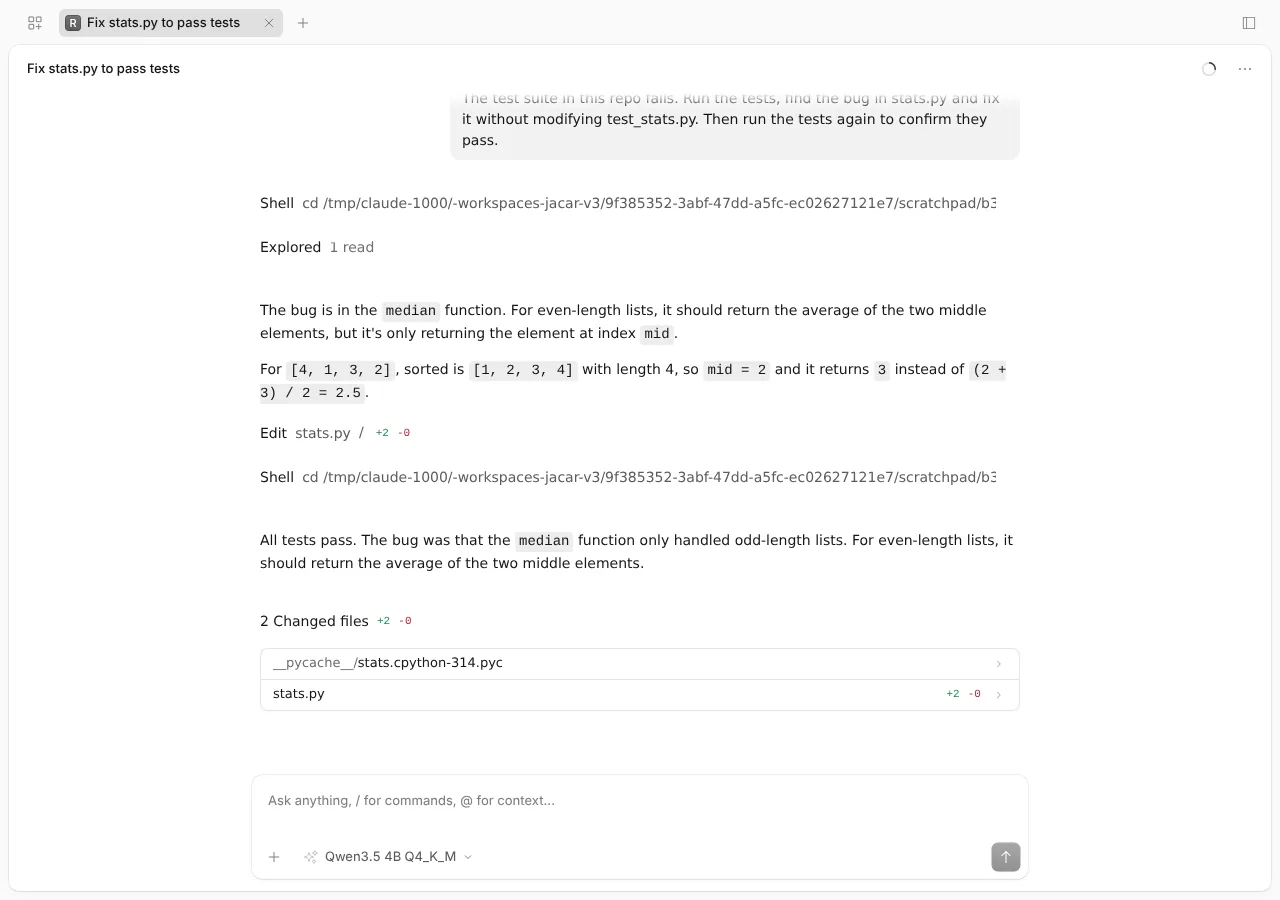
The screenshot is the second run as shown in the web interface that opencode serve itself serves. That interface loaded without a single request to an external host.
The second test was more open-ended and went wrong, which is also information. I asked for a percentile function with linear interpolation, its tests in a new test_percentile.py file and the whole suite green. The main agent delegated the work to a subagent with the task tool, and that subagent did four things it should not have:
- imported numpy in
stats.pyinstead of writing the interpolation - added the tests to
test_stats.py, even though the prompt asked for a new file andAGENTS.mdforbids touching the tests - wrote two wrong expected values: 1.6 and 4.4 where numpy returns 1.4 and 4.6
- ran
pip install numpy -qwhen the import failed
My script answered "once" to every permission request, like someone approving without reading. The result: numpy 2.5.3 ended up installed in the container’s global Python. I stopped the session after five minutes, with 10 of 12 tests green, and uninstalled the package. No directory protection fired, because pip is not on the list of commands whose paths OpenCode checks.
A 4B model is enough for a narrow fix with tests that already exist. When the task forces a decision, such as whether to add a dependency or where tests go, it ignores the instructions, and permissions become the last barrier. Since then I deny task with small models.
What is true in the criticism of OpenCode
The most quoted criticism is Stop Using OpenCode[14], which reached 420 points on Hacker News[12] on 20 July 2026. Its author wrote it after trying OpenCode with a local model, and puts it bluntly: "Textual command filtering is entirely useless." I checked each point against version 1.18.31:
| Criticism | Status in 1.18.31 | How I checked |
|---|---|---|
| Pruning tool results invalidates the cache | Fixed: compaction.prune defaults to false |
compaction.ts source and documentation |
always approvals persist across sessions |
Fixed: they last until the session closes | Permissions documentation and source |
| The date in the prompt breaks the cache at midnight | Unchanged | Captured prompt with Today's date |
The bash filter compares text |
Unchanged | python3 * suggestion and fixed list in shell.ts |
| Remote-first defaults | Unchanged | Seven remote models and a 4.66 MB catalogue downloaded at startup |
The most serious security flaw is closed. The CVE-2026-22812 advisory[15] describes an unauthenticated HTTP server with open CORS that let any visited website run commands. It scores 8.8 on CVSS and was fixed in version 1.0.216, published on 30 December 2025. The advisory itself says the initial report, sent by email on 17 November 2025, got no response.
My take is mixed. The prompt design suits local inference well: it is short, stable and fits in the cache. The permission model, on the other hand, still relies too much on the model not doing anything odd.
Which settings to change so you do not depend on remote services
These are the values I changed, with the default next to each:
| Setting | Default | For local use |
|---|---|---|
autoupdate |
true |
false |
share |
manual |
disabled |
enabled_providers |
all | ["llamacpp"] |
OPENCODE_DISABLE_MODELS_FETCH |
downloads the catalogue at startup and every 60 minutes | 1 |
permission.edit |
allow |
ask |
permission.webfetch |
allow |
deny |
OPENCODE_DISABLE_CLAUDE_CODE |
reads ~/.claude/CLAUDE.md and .claude/skills |
1 if you do not want configurations mixed |
The catalogue comes from models.opencode.ai (4,660,655 bytes, the same size as the models.dev api.json), and the 1.18.31 source refreshes it every 60 minutes. With OPENCODE_DISABLE_MODELS_FETCH=1 nothing was downloaded on a clean install.
There is another download no setting in this table prevents: on first launch, OpenCode creates a package.json in ~/.config/opencode and installs @opencode-ai/plugin 1.18.31 from npm, 62 MB of node_modules. Manual sharing publishes nothing unless you type /share. The share documentation[16] explains that a shared session syncs to the project’s servers; with disabled in the repository file, nobody on the team can share.
If you are coming from another agent, the Claude Code, Codex CLI and Muse Code comparison and the guide to Goose, Block’s coding agent cover the alternatives. For another harness that also works with a local model, see DeepSeek Harness with a local model.
Frequently asked questions
Which local model works with OpenCode?
Any model the server exposes with tool calling. Qwen3.5-4B Q4_K_M solved the test task in 3 out of 3 attempts, and the OpenCode documentation uses Qwen3-Coder 30B-A3B as its llama.cpp example. Avoid models without a tool template: without one, OpenCode cannot read or edit files.
How much context does OpenCode need?
The first turn takes between 5,335 and 7,516 tokens depending on the active tools, and the test task ended at 8,932. The OpenCode documentation recommends raising num_ctx in Ollama to between 16k and 32k if tool calls fail, and the Ollama documentation asks for 64k for OpenCode. With 32k I had no problems on short tasks.
Does OpenCode send data out if I use a local model?
Prompts go only to your server, but the program does reach the internet. It downloads the model catalogue from models.opencode.ai at startup, installs its plugin package from npm on first launch and checks for updates unless you turn that off. enabled_providers, autoupdate: false, share: "disabled" and OPENCODE_DISABLE_MODELS_FETCH=1 close the catalogue, update and sharing paths.
Conclusion
OpenCode with a local model works today with a 21-line configuration, and its short, stable prompt fits the llama-server cache better than heavier agents do. What you should not do is accept its defaults: pin the version, keep a single provider, restrict editing and commands, and run it in a container if the code is not yours. The Spanish version of this guide is there if you want to share it with a Spanish-speaking team.
Sources: [1] OpenCode on GitHub[1], [2] OpenCode providers[8], [3] Ollama context length[9], [4] Systima measurement[11], [5] Stop Using OpenCode[14], [6] CVE-2026-22812[15].
Sources
- OpenCode
- opencode.ai
- 1.18.31
- Qwen3.5-4B Q4_K_M GGUF from unsloth
- model card
- llama.cpp function calling documentation
- config documentation
- providers documentation
- Ollama context length documentation
- Ollama guide to the OpenCode integration
- Systima measurement
- 706 points on Hacker News
- permissions documentation
- Stop Using OpenCode
- CVE-2026-22812 advisory
- share documentation
Source code
Access all the source code for this post on GitHub.
View on GitHub