How to migrate self-hosted Langfuse from v3 to v4
Table of contents
- Key takeaways
- What changes in Langfuse v4 and who it affects
- Why you should not upgrade with docker compose up --pull always
- How I tested the migration
- Step 0: reach the latest v3 and check the migrations
- Step 1: upgrade ClickHouse to 26.4 without touching Langfuse
- The trap in the version pinned by the v4 compose file
- Step 2: back up PostgreSQL and ClickHouse
- Step 3: start v4 in dual write mode
- Step 4: check the dual write with each SDK
- Step 5: backfill the history
- Step 6: cut over to events_only
- How to roll back to v3 if something fails
- How much disk you get back at the end
- Frequently asked questions
- Can I stay on Langfuse v3?
- Can I upgrade the SDKs before the server?
- How much disk does the historic backfill need?
- Conclusion
- Sources
Langfuse v4 changes the table it reads traces from, so moving from v3 to v4 takes more than a new image tag. This guide covers the full migration of a Docker Compose installation: ClickHouse first, then the server in dual write mode, the historic backfill and the final cutover. I ran all of it on 16 September 2026, from Langfuse v3.225.8 to v4.37.0, with data from three versions of the Python SDK. Below are the timings, the errors and the details the official guide leaves out. If you are new to the tool, start with what Langfuse is and how to deploy it.
Key takeaways
- Langfuse v4 reads from a new ClickHouse table,
events_full. After the cutover to the default mode (events_only), the Python SDK v2 gets 400 errors, and the guide lists 22 public API endpoints that start returning 404. - The
latesttag and the repository’sdocker-compose.ymlalready point to v4, sodocker compose up --pull alwaysupgrades you with no transition mode. Pin your tags before you start. - The v3 compose file used an untagged ClickHouse image (26.8 today) and the v4 file pins 25.12. On data that 26.8 had already opened, 25.12 does not start.
- If you have producers on the Python SDK v3, set
LANGFUSE_MIGRATION_V4_NATIVE_OTEL_BEHAVIOUR=dual_writefrom the first v4 start. Without it, their child observations lose the user and session, and the historic backfill does not fix them. - With 45,931 traces, the backfill took 3 min 5 s, and the trace tables grew to 3.55 times their starting size along the way. Rolling back to v3 without restoring the backup works (
migrate goto 37took 2.4 s), but anything written after the cutover is lost.
What changes in Langfuse v4 and who it affects
Langfuse v4 stores every model call, tool call and agent step as one row of events_full, a wide and mostly immutable table. Each row carries a copy of the trace attributes: user, session and tags. A second table, events_core, is a trimmed projection that serves tables and charts, and each trace becomes the root observation of its tree.
According to Langfuse’s technical write-up[1], this removes joins and deduplication from every read, and dashboards for large projects load "at least 10x" faster. That is the vendor’s figure, and I did not measure it.
Three dates matter:
- 29 July 2026: Langfuse v4.0.0[2] is released
- 16 November 2026: Langfuse Cloud becomes v4-only, according to the v4 announcement[3]
- January 2027: the last month of security patches for self-hosted v3
The official migration guide[4] puts it this way: "Langfuse v3 will receive security patches until end of January 2027". If you host Langfuse yourself there is no forced cutover date, but v3 now only gets patches: v3.225.8, from 16 September, carries three fixes backported from v4.
What breaks depends on your clients. This is the compatibility matrix[5], summarised for a v4 server:
| Client | On a v4 server | What to do |
|---|---|---|
| Python SDK 4.7.0 or later, JS/TS 5.4.0 or later | Full support, direct writes | Nothing |
| Python SDK 4.0 to 4.6, JS/TS 5.0 to 5.3 | Works, with a delay during dual write | Upgrade to the minimum |
| Python SDK v3, JS/TS v4 | Deprecated | Move to Python v4 or JS/TS v5 |
| Python SDK v2, JS/TS v3 | Unsupported after the cutover | Migrate before the cutover |
| Direct OpenTelemetry | Full support | Send the x-langfuse-ingestion-version: 4 header |
After the cutover, trace-level LLM-as-a-judge evaluators and the "Traces and observations (legacy)" export to blob storage, PostHog or Mixpanel also stop working. If your agents already use OpenTelemetry with the GenAI conventions, you are halfway there.
Why you should not upgrade with docker compose up –pull always
The Docker Compose deployment guide[6] sums up upgrading as stopping the containers and running docker compose up --pull always. Today that command takes you to v4 with no transition mode, because of three changes in the repository:
- The
latesttag: since PR #15607[7], from 23 July, it points to the v4 line. On 16 September,langfuse/langfuse:latesthad the same digest as4.37.0(sha256:06c0eaae…) - The compose tag: the
docker-compose.ymlon the main branch uses:4, while the one at the v3.225.8 tag[8] uses:3 - The registry: since PR #16265[9], from 12 August, images are pulled from
docker.langfuse.cominstead ofdocker.io
If you run git pull in your copy of the repository and start the stack, you land straight in events_only. The v2 SDK is rejected, and the historic backfill starts on its own before you have checked the dual write.
The new registry caused me one more problem: on this machine, docker.langfuse.com did not resolve, because the network DNS answered ::.
Through a public resolver, the name is an alias of langfuse.docker.reo.dev, and the Reo.Dev[10] home page quotes a customer who values that its product "shows which developers are pulling Docker images". A DNS filter that blocks that domain breaks the pull. The proxy authenticates against Docker Hub and serves the same digest, so you can switch the registry to docker.io and get the identical image.
How I tested the migration
I built the stack from the official docker-compose.yml files at the v3.225.8 and v4.37.0 tags, plus an override file with pinned versions and my own ports. Everything ran in a linux/arm64 development container with 18 cores and 121 GB of RAM. The machine was shared with other workloads, and the load average ranged from 2 to 73 during the test, so treat the timings as indicative.
These are the versions:
- Langfuse: v3.225.8, then v4.37.0 (web and worker)
- ClickHouse: 25.8.33.6, then 26.4.5.143
- Rest of the stack: PostgreSQL 17, Redis 7 and the Chainguard MinIO image that ships with the compose file
- Tooling: Docker 29.5.2 and Docker Compose v2.40.3
With the server on v3, I generated 45,931 traces and 137,762 observations. Of those, 40,000 traces came from Python SDK 2.60.10, 3,598 from 3.15.0 and 2,318 from 4.15.3. I sent 10,000 traces with each of the two OpenTelemetry-based SDKs, but my loop did not drain the queue and the SDK dropped the rest without a warning.
In ClickHouse, that data took 81.2 MiB in the default database. The whole volume took 1.7 GB, because the system logs weigh more than the data. It is a small data set, so the backfill timings do not represent an installation with millions of traces.
Step 0: reach the latest v3 and check the migrations
Langfuse v4 drops tables that v3 stopped using, and the guide requires every v3 background migration to have finished first. If one stopped halfway, the data it never copied is lost. Upgrade to the latest v3 first (v3.225.8 as I write this) and pin the full tag instead of :3.
The guide gives a query that "must return zero rows". On a healthy v3.225.8, with the worker reporting nothing left to run, it returned these five:
20260701_v4_step_1_create_root_spans_from_traces
20260701_v4_step_2_rewrite_observations_to_pid_tid_sorting
20260701_v4_step_3_backfill_events_full_from_observations
20260701_v4_step_4_backfill_events_full_from_dataset_run_items
20260701_v4_step_5_drop_pid_tid_sorting_tables
They are the v4 backfill steps, which v3 already registers and leaves dormant. They block nothing, and the query you actually need excludes them:
docker compose exec -T postgres psql -U postgres -c "
  SELECT name, failed_at, failed_reason
  FROM background_migrations
  WHERE finished_at IS NULL
    AND name NOT LIKE '20260701_v4_%';"
It must return zero rows. On the fresh installation of my test it returned ten, because the worker started before the web container had created the tables, and its migration run failed with The table public.background_migrations does not exist. The worker only tries at startup: a docker compose restart langfuse-worker finished them in under a second.
Step 1: upgrade ClickHouse to 26.4 without touching Langfuse
Langfuse v4 requires ClickHouse 25.12 at minimum and recommends 26.4, plus PostgreSQL 15 and Redis 7.0 or later. Langfuse v3 runs on ClickHouse 24.3 or later, according to Langfuse’s ClickHouse page[11], so you can upgrade ClickHouse with v3 running and stay there as long as you like. Pin the version in an override file next to the compose file:
services:
  clickhouse:
    image: docker.io/clickhouse/clickhouse-server:26.4
Then recreate only that service with docker compose up -d clickhouse; Compose reads docker-compose.override.yml without being told to. In my test, ClickHouse went from 25.8.33.6 to 26.4.5.143 and was healthy again in 7.4 s. Langfuse v3 kept ingesting: 20 new traces from the v2 SDK showed up in the API, and the trace list answered in 0.18 s.
The guide adds a list of grants for the ClickHouse user. With the official compose file you do not need them, because the user the image creates already had ALTER, CREATE, DROP and SYSTEM on every database, according to SHOW GRANTS. If you use an external ClickHouse with a restricted user, grant them before step 3.
Set aside disk for step 5 as well. The guide asks for headroom of "roughly 3x" the current ClickHouse volume, and in my test the trace tables reached 3.55 times their size before cleanup.
The trap in the version pinned by the v4 compose file
Do not let the new compose file downgrade ClickHouse. The v3 file used the untagged image, which on 16 September was 26.8.5, and the v4 file pins 25.12. I tried three combinations on a copy of my data:
| Data last opened by | Started with | Result |
|---|---|---|
| 26.4 | 25.12 | Starts and reads the 45,931 traces |
| 26.8 | 26.4 | Starts |
| 26.8 | 25.12 | Stops with exit code 210 |
The error shows up in the system log tables that 26.8 had created, not in Langfuse’s tables:
Code: 115. DB::Exception: Unknown setting 'table_readonly':
for storage MergeTree: Cannot attach table `system`.`text_log_1`
The ClickHouse upgrade documentation[12] warns that you can only go back to an earlier version "if you have not started to use any of the new features". If you already run 26.8, pin 26.8 in your override instead of inheriting 25.12 from the compose file.
Step 2: back up PostgreSQL and ClickHouse
There is no automatic way back to v3 once the v4 migrations have run, so the backup goes right before the server change. For PostgreSQL, a dump is enough; mine took 312 KB, because only configuration, users and prompts live there:
docker compose exec -T postgres \
  pg_dump -U postgres -Fc postgres > langfuse-pg.dump
ClickHouse holds the traces. On a single machine, the most direct way is to stop the web container, the worker and ClickHouse and archive the volume:
docker compose stop langfuse-web langfuse-worker clickhouse
docker run --rm -v langfuse_langfuse_clickhouse_data:/src:ro \
  -v "$PWD":/dst alpine \
  tar czf /dst/clickhouse-data.tgz -C /src .
docker compose start clickhouse
The volume name starts with your Compose project name; check it with docker volume ls. Stopping and archiving the 1.7 GB volume took 70.5 s and produced a 934 MB file. Keep both files off the machine, for example with restic and an encrypted repository.
Step 3: start v4 in dual write mode
dual mode writes every event to both the old and the new tables, so everything from v3 keeps working while you migrate your clients. The migration variables are not in the official docker-compose.yml, and Compose only passes the variables the file declares to the container: if you put them in .env, they never arrive. Add them to both services in the override:
x-migracion-v4: &migracion-v4
  LANGFUSE_MIGRATION_V4_WRITE_MODE: dual
  LANGFUSE_MIGRATION_V4_NATIVE_OTEL_BEHAVIOUR: dual_write
  LANGFUSE_MIGRATION_V4_ALLOW_PREVIEW_OPT_IN: "false"
  LANGFUSE_BACKGROUND_MIGRATION_V4_ENABLE_HISTORIC_BACKFILL: "false"

services:
  langfuse-worker:
    image: docker.io/langfuse/langfuse-worker:4.37.0
    environment: *migracion-v4
  langfuse-web:
    image: docker.io/langfuse/langfuse:4.37.0
    environment: *migracion-v4
  clickhouse:
    image: docker.io/clickhouse/clickhouse-server:26.4
Each variable controls one part of the transition:
LANGFUSE_MIGRATION_V4_WRITE_MODE:dualwrites to both families of tables;legacykeeps the full v3 behaviourLANGFUSE_MIGRATION_V4_NATIVE_OTEL_BEHAVIOUR:dual_writesends OpenTelemetry traces without the v4 header through the pipeline that copies the trace attributesLANGFUSE_MIGRATION_V4_ALLOW_PREVIEW_OPT_IN: withfalse, everyone keeps the v3 interface and the v2 API does not answerLANGFUSE_BACKGROUND_MIGRATION_V4_ENABLE_HISTORIC_BACKFILL: withfalse, the backfill waits until you turn it on
The last one matters most. The backfill runs only once, and anything that arrives between its end and the start of the dual write never reaches the new tables.
With the new compose file and the override, start with docker compose up -d. The web container answered {"status":"OK","version":"4.37.0"} after 10.7 s. In that time it applied 14 PostgreSQL migrations, including drop_legacy_tracing_tables, and 12 ClickHouse migrations, from version 38 to 49.
The 12 ClickHouse migrations create events_full, events_core and the staging table observations_batch_staging, and drop event_log, project_environments and dataset_run_items. With the preview disabled, the v3 endpoints still answered 200, and GET /api/public/v2/observations returned 404 with the notice "The observations v2 API is only available in a Langfuse v4 write mode".
Step 4: check the dual write with each SDK
Each SDK generation reaches events_full by a different path, and you want to see that with your own data before moving on. I sent 50 traces with each SDK and noted when they appeared in the new table and whether the child observations carried the user and session:
| Python SDK | v3 tables | events_full |
User on the children |
|---|---|---|---|
| 2.60.10 | Immediately | After 11 min | Yes |
3.15.0 without dual_write |
Immediately | Immediately | No |
3.15.0 with dual_write |
Immediately | After 8.5 min | Yes |
| 4.15.3 | Immediately | Immediately | Yes |
The second row is the trap. Without LANGFUSE_MIGRATION_V4_NATIVE_OTEL_BEHAVIOUR, the default is direct, and the v3 SDK’s spans are written to events_full as they come. That SDK only puts the user, session and tags on the root span, so the 100 child observations ended up without them, and a user filter in the new view does not find them.
The step 5 backfill did not fix them either. With dual_write, the same kind of traces went through the staging table and came out complete, with a virtual root row above each one.
The delay has a concrete cause. The propagation job runs every minute and only processes partitions older than 10 minutes, the default of LANGFUSE_EXPERIMENT_EVENT_PROPAGATION_PARTITION_DELAY_MINUTES in the v4.37.0 code. The guide mentions about 15 minutes.
To watch the propagation, the worker answers GET /api/health?failIfEventPropagationStuck=true on its port 3030, which returns 503 when the job has gone too long without running. The guide says the default threshold is 15 minutes, but v4.37.0 answered "thresholdSeconds":2100 (35 minutes), and that is the value set in its code. A comment in that code asks for probes to wait at least 60 s before the first check.
Step 5: backfill the history
The backfill copies into events_full everything that arrived before the dual write, and you should only turn it on once step 4 checks out. Set LANGFUSE_BACKGROUND_MIGRATION_V4_ENABLE_HISTORIC_BACKFILL to "true" and run docker compose up -d again. The worker chains four background migrations:
- Creates a virtual root observation for each trace, with the ID
t-followed by the trace ID - Rewrites the observations into an intermediate table,
observations_pid_tid_sorting, sorted for the next join - Joins that table with the traces and writes the child observations to
events_full - Adds experiment metadata to the spans that need it
With my 45,931 traces, the chain took 3 min 5 s, from 16:11:57 to 16:15:02 UTC. Each step finished almost exactly one minute after the previous one, so that time measures the worker’s cadence. The copying itself was shorter: step 1’s data was already on disk after 7 s.
At the end, events_full had 185,623 rows, 46,201 of them virtual roots. The 120,000 observations from the v2 SDK got the user and session, but the trace metadata stayed only on the virtual root, as the guide warns.
Disk is what you need to watch:
| Point | Size in ClickHouse |
|---|---|
traces and observations tables before the backfill |
49.9 MiB |
New events_full and events_core tables |
93.8 MiB |
Intermediate observations_pid_tid_sorting table |
33.1 MiB |
default database before and at the peak |
82.3 MiB and 208.6 MiB |
Adding old, new and intermediate tables, the traces went from 49.9 MiB to 176.8 MiB, 3.55 times their starting size and a little above the guide’s "roughly 3x". Synthetic data compresses differently from real data, so treat the ratio as specific to this data set and leave more headroom than the guide asks for.
Step 6: cut over to events_only
The cutover is the point of no return: from here on, new data is only written to the v4 tables. Before it, migrate everything that sends data to Langfuse or reads it:
- Producers: the Python SDK to 4.7.0 or later, where
update_current_trace()becomespropagate_attributes()according to the SDK migration guide[13] - API readers: to Observations API v2, Metrics API v2 and Scores API v3
- Evaluators: from the trace to the observation
- Exports: to the "Enriched observations" source
Then remove the LANGFUSE_MIGRATION_V4_* variables from the override and run docker compose up -d again. The web container and the worker were back in 17.9 s.
This is what I saw right after the cutover, with 20 traces per SDK:
- Python SDK 2.60.10: printed "Bad request. Please check your request for any missing or incorrect parameters" 140 times, once per event, and exited with code 0. Nothing was stored
- Python SDK 3.15.0: stored, but the child observations again lacked the trace tags
- Python SDK 4.15.3: stored in full
GET /api/public/traces,observations,sessionsandmetrics/daily: 404, with the message "This endpoint is not available on deployments running in Langfuse v4 events_only mode"POST /api/public/ingestion: 207, with 201 for thescore-createand 400 for thetrace-createGET /api/public/v2/observations?traceId=…: 200 in 16 ms, with the four rows of an old v2 SDK trace (the virtual root and its three children)
The server’s 400 response explains the problem and even suggests going back to dual as a bridge, but the v2 SDK does not show that text. If an old application slips through, all you will see is those generic lines in its log, with no process failure. Check every producer’s logs after the cutover.
The variable combination is validated too, although in my test only the worker did it. With events_only and LANGFUSE_MIGRATION_V4_ALLOW_PREVIEW_OPT_IN=false, the worker exited with code 1 and the message Invalid V4 config: LANGFUSE_MIGRATION_V4_WRITE_MODE=events_only requires LANGFUSE_MIGRATION_V4_ALLOW_PREVIEW_OPT_IN=true, while the web container started without complaint.
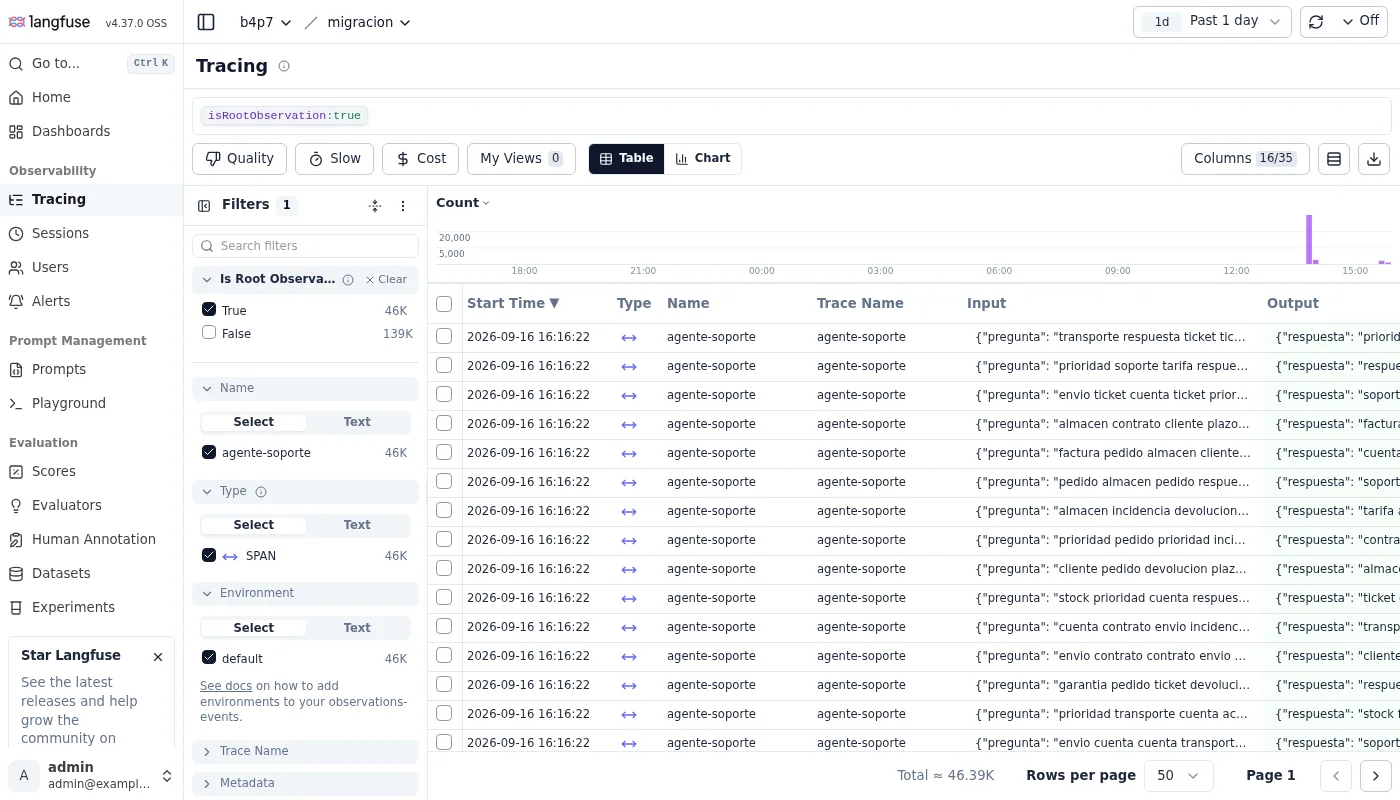
After the cutover, the tracing view opens filtered by isRootObservation:true, which on my installation showed 46,000 roots against 139,000 child observations.
How to roll back to v3 if something fails
While you are still on dual or legacy, you can go back to v3 without restoring the backup, but changing the image tag is not enough. I tried it with v4 in dual: the v3.225.8 web container went into a restart loop with error: no migration found for version 49. The guide quotes version 46; the number is the last ClickHouse migration your v4 applied, so it will vary.
The fix is to rewind the ClickHouse schema with the migrate binary shipped in the v4 web image, from a container of the same version you have deployed:
docker compose exec langfuse-web sh -c '
cd /app/packages/shared && migrate \
  -source file://clickhouse/migrations/unclustered \
  -database "${CLICKHOUSE_MIGRATION_URL}?username=${CLICKHOUSE_USER}\
&password=${CLICKHOUSE_PASSWORD}&database=default\
&x-multi-statement=true&x-migrations-table-engine=MergeTree" \
  goto 37'
The command undid the 12 migrations in 2.4 s: it dropped the v4 tables and recreated event_log, project_environments and dataset_run_items. With the v3.225.8 images, the web container started in 16.7 s on the v4 PostgreSQL schema, showed the 46,201 traces and accepted the v2 SDK again.
I did it after the cutover, on purpose, to see what gets lost. The traces sent in dual mode were all there; the 20 sent with the v4 SDK after the cutover were missing, because they only existed in events_full. That is why the cutover is the point of commitment, and from there the only way back is the step 2 backup.
How much disk you get back at the end
Cleanup has two parts, and both are optional. The first is the intermediate table: with LANGFUSE_BACKGROUND_MIGRATION_V4_DROP_PID_TID_SORTING_TABLES set to "true", the worker dropped it at startup, and the database went from 208.6 to 175.7 MiB.
The second is the traces and observations tables, which get no writes or reads after the cutover. The guide says to empty them with TRUNCATE TABLE rather than drop them, because Langfuse expects them to exist. In my case that would free another 49.9 MiB, but it would also remove the only source for repeating the backfill and for the v3 rollback in the previous section. Keep them for a few weeks and empty them once you have checked the history in the new view.
Frequently asked questions
Can I stay on Langfuse v3?
Until the end of January 2027, with security patches and no new features. If you also use Langfuse Cloud, that side becomes v4-only on 16 November 2026, so your SDKs will need upgrading before that date anyway.
Can I upgrade the SDKs before the server?
Yes. Python SDK 4.15.3 sent traces to my v3.225.8 server without errors, and the guide confirms that Python v4 and JS/TS v5 work with v3 servers. The exception is langfuse.api.observations and langfuse.api.metrics, which in SDK v4 point to the v2 APIs; against a v3 server, use langfuse.api.legacy.observations_v1.
How much disk does the historic backfill need?
In my test, the trace tables reached 3.55 times their starting size before the intermediate table was dropped, and 2.88 times after. Work out the headroom from the size of traces and observations in system.parts, not from the whole ClickHouse volume, which includes the system logs.
Conclusion
Migrating Langfuse v3 to v4 takes six steps, and none of them needs more than a minute of downtime, except the volume backup. The risks sit in what the documentation does not say. The compose file and the latest tag already point to v4, and the new compose file can downgrade your ClickHouse. On top of that, v3 SDK traces lose their attributes unless you turn on dual_write from the start.
My recommendation is to pin versions, spend a couple of days in dual checking which producers still run old SDKs, and cut over only when every producer’s logs are clean. With v4 running, go over what to instrument first in your agents to get the most out of per-row observations.
The Spanish version of this guide is at Cómo migrar Langfuse autoalojado de v3 a v4.
Sources: [1] Langfuse, Migrate Langfuse v3 to v4 (self-hosted)[4], [2] Langfuse, v4.0.0 release notes[2], [3] Langfuse, Versions and compatibility[5], [4] Langfuse, Langfuse v4 announcement[3], [5] Langfuse, Simplifying Langfuse for Scale[1], [6] Langfuse, Docker Compose deployment[6], [7] Langfuse, ClickHouse requirements[11], [8] Langfuse, docker-compose.yml at v3.225.8[8], [9] Langfuse, PR #15607 on the latest tag[7], [10] Langfuse, PR #16265 on docker.langfuse.com[9], [11] ClickHouse, upgrading and downgrading[12], [12] Langfuse, Python SDK v3 to v4 migration[13], [13] Reo.Dev, home page[10].
Sources
Source code
Access all the source code for this post on GitHub.
View on GitHub