How to secure your MCP server with Keycloak and OAuth in Docker
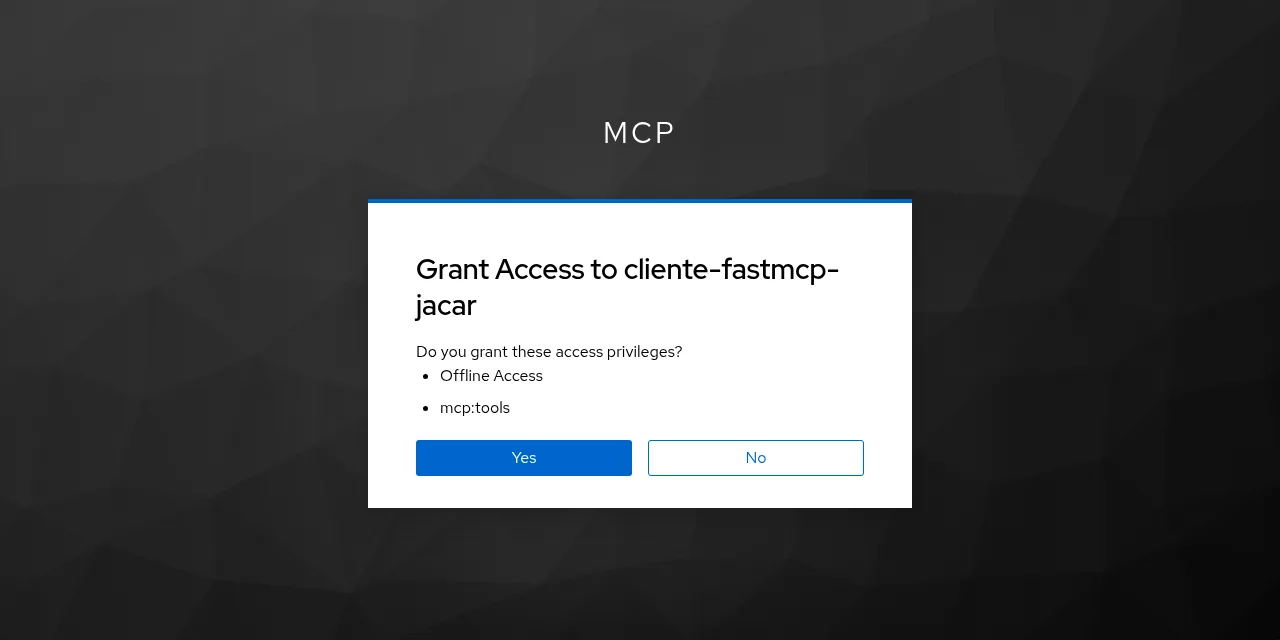
Table of contents
- Key takeaways
- What role Keycloak plays in MCP authorization
- Which part of the MCP specification Keycloak does not meet
- How to run Keycloak and PostgreSQL with Docker
- How to create the realm and the mcp:tools scope with kcadm
- How to protect the FastMCP server with Keycloak
- What the MCP server answers without a token
- How a real MCP client connects with OAuth
- What happens when a token issued to another application arrives
- Why the KeycloakAuthProvider defaults fail on a fresh realm
- Why mcp:tools must not be a realm default scope
- What changes with CIMD, VS Code and Claude Code
- What to review before taking it to production
- Frequently asked questions
- Is Keycloak compatible with the latest MCP specification?
- Do I need dynamic client registration?
- Is it enough that the token is signed by my realm?
- Conclusion
- Sources
Keycloak can authorize access to your MCP server, but it only partly meets the current specification: it does not recognize the RFC 8707 resource parameter, which is what binds each token to one specific server. In this guide I run Keycloak 26.7.4 with PostgreSQL in Docker, create the realm with kcadm.sh, protect a FastMCP 4.0.10 server and connect a real MCP client that discovers the authorization server, registers itself and gets a token. Then I test what happens with no token, with an expired token and with a token issued to another application. Everything ran on 28 September 2026 on an arm64 Linux machine. There is also a Spanish version of this guide.
Key takeaways
- Keycloak 26.7.4 fully supports only the 2025-03-26 MCP revision; in the 2025-06-18, 2025-11-25 and 2026-07-28 revisions it lacks RFC 8707, according to its own guide.
- Keycloak ignores the
resourceparameter without returning an error: the token audience comes from a client scope with an audience mapper. - With the mapper, the client’s token carried
audequal tohttp://localhost:24200/mcp, and FastMCP answered a token from another application in the realm with a 401. - With the
KeycloakAuthProviderdefaults (scopeopenid, no audience), dynamic registration failed with a 403 on a fresh realm, and that same server accepted the other application’s token. - Anonymous dynamic registration ships closed: you have to declare the trusted hosts and the allowed scopes.
- If
mcp:toolsis a realm default scope, any client can request a token for your MCP server.
What role Keycloak plays in MCP authorization
In MCP authorization, your server is an OAuth 2.1 resource server and Keycloak is the authorization server that issues the tokens. The MCP 2026-07-28 authorization specification[1] requires the MCP server to publish its protected resource metadata (RFC 9728), listing the authorization servers it accepts. The client reads that document, fetches Keycloak’s metadata (RFC 8414) and runs an authorization code flow with PKCE.
The specification also says what the MCP server must check on every request. In its own words, servers "MUST validate that access tokens were issued specifically for them as the intended audience". A token that is valid but was issued for another service has to end in a 401.
If you do not have a server yet, start with building your own MCP server. For the 2026-07-28 changes beyond authorization, see the summary of the MCP 2026-07-28 specification.
Which part of the MCP specification Keycloak does not meet
The Keycloak guide for MCP[2] maps each standard MCP requires against what Keycloak supports. Of the five MCP revisions, four cover authorization, and Keycloak fully meets only 2025-03-26:
| Standard | What MCP 2026-07-28 requires | Keycloak 26.7.4 |
|---|---|---|
| OAuth 2.1 | Required | Supported |
| Authorization server metadata (RFC 8414) | Required, or OpenID Connect Discovery | Supported |
| Resource Indicators (RFC 8707) | Required | Not supported |
| Issuer identification (RFC 9207) | Recommended | Supported |
| Dynamic client registration (RFC 7591) | Optional and deprecated | Supported |
| Client ID Metadata Document (CIMD) | Recommended | Experimental |
RFC 8707 is the missing piece. With it, the client sends resource=http://localhost:24200/mcp and the authorization server puts that URL in the token audience. The Keycloak guide says so plainly: "However, Keycloak cannot recognize resource parameter". Until the community adds support, it proposes the scope parameter instead: an optional client scope with an audience mapper that writes the MCP server URL into aud.
The workaround works, but it has two consequences. First, the scope acts as the resource selector, so each MCP server in the realm needs its own scope name. Second, Keycloak does not validate what the client asks for in resource: I checked by requesting a token with resource=http://localhost:24299/otro-servidor and scope=mcp:tools, and the token came back with my server’s audience and no error.
How to run Keycloak and PostgreSQL with Docker
The compose.yaml has three services: db with postgres:18-alpine (PostgreSQL 18.6) and a pg_isready healthcheck, keycloak, and the MCP server. Keycloak starts in start-dev mode, which serves plain HTTP without TLS and is fine for development, not for production:
  keycloak:
    image: quay.io/keycloak/keycloak:26.7.4
    command: start-dev
    environment:
      KC_DB: postgres
      KC_DB_URL: jdbc:postgresql://db:5432/keycloak
      KC_DB_USERNAME: keycloak
      KC_DB_PASSWORD: cambia_esta_clave
      KC_HOSTNAME: http://localhost:24280
      KC_HOSTNAME_BACKCHANNEL_DYNAMIC: "true"
      KC_BOOTSTRAP_ADMIN_USERNAME: admin
      KC_BOOTSTRAP_ADMIN_PASSWORD: cambia_esta_clave
    ports:
      - "127.0.0.1:24280:8080"
    depends_on:
      db: {condition: service_healthy}
    networks: [mcpnet]
The two KC_HOSTNAME* variables solve the problem that costs the most time in this setup. The token issuer (iss) depends on the URL Keycloak uses for itself, and the user’s browser reaches it through localhost:24280, while the MCP server container can only reach keycloak:8080. KC_HOSTNAME pins the issuer to the public URL, and KC_HOSTNAME_BACKCHANNEL_DYNAMIC lets the MCP server download the public keys over the internal network.
On my machine the containers, the network and the ports carried a prefix so they could coexist with other labs; every other file is the one shown here. The quay.io image is multi-architecture and ran on arm64 with Java 21.0.12.1 and Quarkus 3.33.3.2. I use 26.7.4, released on 16 September 2026. According to its release notes[3], it fixes six CVEs, among them an escalation in which the impersonation role could impersonate a realm administrator.
How to create the realm and the mcp:tools scope with kcadm
kcadm.sh ships inside the Keycloak image and talks to the admin API, so the whole realm comes from a script you can rerun. The first half creates the mcp realm, a test user and the mcp:tools scope with its audience mapper:
KC="docker exec keycloak /opt/keycloak/bin/kcadm.sh"
MCP_URL="http://localhost:24200/mcp"
$KC config credentials --server http://localhost:8080 --realm master \
  --user admin --password cambia_esta_clave
$KC create realms -s realm=mcp -s enabled=true
$KC create users -r mcp -s username=ana -s enabled=true \
  -s email=ana@example.com -s emailVerified=true \
  -s firstName=Ana -s lastName=Prueba
$KC set-password -r mcp --username ana --new-password clave_de_ana
SCOPE_ID=$($KC create client-scopes -r mcp -i \
  -s name=mcp:tools -s protocol=openid-connect \
  -s 'attributes."include.in.token.scope"=true')
$KC create client-scopes/$SCOPE_ID/protocol-mappers/models -r mcp \
  -s name=audiencia-mcp -s protocolMapper=oidc-audience-mapper \
  -s protocol=openid-connect \
  -s "config.\"included.custom.audience\"=$MCP_URL" \
  -s 'config."access.token.claim"=true' \
  -s 'config."id.token.claim"=false'
The included.custom.audience value must match the MCP server URL that its metadata advertises, /mcp path included. Note that I do not add mcp:tools to the realm default scopes, which is what I did first and what I advise against further down.
The second half opens anonymous dynamic registration, which Keycloak ships closed. The client registration service documentation[4] explains it: "By default, there is not any whitelisted host, so anonymous client registration is de-facto disabled". The script trusts localhost, 127.0.0.1 and the Docker network gateway, which is the IP that host requests arrive from, and allows mcp:tools at registration:
policy_id() {
  $KC get components -r mcp -q name="$1" --fields id,subType \
    --format csv --noquotes | grep ',anonymous$' | cut -d, -f1
}
GW=$(docker network inspect mcpnet \
  -f '{{(index .IPAM.Config 0).Gateway}}')
$KC update components/$(policy_id "Trusted Hosts") -r mcp \
  -s "config.\"trusted-hosts\"=[\"localhost\",\"127.0.0.1\",\"$GW\"]"
$KC update components/$(policy_id "Allowed Client Scopes") -r mcp \
  -s 'config."allowed-client-scopes"=["mcp:tools"]'
$KC create clients -r mcp -s clientId=portal-web \
  -s publicClient=false -s serviceAccountsEnabled=true \
  -s standardFlowEnabled=false -s secret=secreto_del_portal
The last command creates portal-web, an unrelated application in the same realm with a service account. It has nothing to do with MCP: I use it later to test a token with the wrong audience.
How to protect the FastMCP server with Keycloak
FastMCP 4.0.10, released on 25 September 2026, ships KeycloakAuthProvider, which serves the protected resource metadata and validates tokens as JWTs. I give it my own JWTVerifier for two reasons. The public keys are downloaded through the internal Docker URL, and I want to pin the audience and the scope instead of taking the defaults:
import os

from fastmcp import FastMCP
from fastmcp.server.auth.providers.jwt import JWTVerifier
from fastmcp.server.auth.providers.keycloak import KeycloakAuthProvider
from fastmcp.server.dependencies import get_access_token

REALM = os.environ["KC_REALM_URL"]          # URL pública (el issuer)
INTERNO = os.environ["KC_INTERNAL_URL"]     # la misma, dentro de Docker
AUDIENCE = os.environ.get("MCP_AUDIENCE") or None
SCOPES = os.environ.get("MCP_SCOPES", "mcp:tools").split()

verifier = JWTVerifier(
    jwks_uri=f"{INTERNO}/protocol/openid-connect/certs",
    issuer=REALM,
    audience=AUDIENCE,
    required_scopes=SCOPES,
)
auth = KeycloakAuthProvider(
    realm_url=REALM,
    base_url=os.environ["MCP_BASE_URL"],
    token_verifier=verifier,
)
mcp = FastMCP("notas-protegidas", auth=auth)
JWTVerifier checks, in this order, the signature against the realm keys, the expiry, the issuer, the audience and the scopes. The server’s two tools are minimal. quien_soy returns the token claims so you can see which identity each call arrives with, and sumar is an ordinary tool:
@mcp.tool
def quien_soy() -> dict:
    """Devuelve las claims del token con el que llamas."""
    c = get_access_token().claims
    keys = ("preferred_username", "azp", "aud", "scope")
    return {k: c.get(k) for k in keys}

@mcp.tool
def sumar(a: int, b: int) -> int:
    """Suma dos enteros."""
    return a + b

if __name__ == "__main__":
    mcp.run(transport="http", host="0.0.0.0", port=8000)
The image starts from python:3.13-slim, installs fastmcp==4.0.10 with pip and runs as nobody. In compose.yaml, the service gets its URLs from environment variables:
  mcp:
    build: ./server
    environment:
      KC_REALM_URL: http://localhost:24280/realms/mcp
      KC_INTERNAL_URL: http://keycloak:8080/realms/mcp
      MCP_BASE_URL: http://localhost:24200
      MCP_AUDIENCE: ${MCP_AUDIENCE-http://localhost:24200/mcp}
      MCP_SCOPES: ${MCP_SCOPES-mcp:tools}
    ports:
      - "127.0.0.1:24200:8000"
    depends_on: [keycloak]
    networks: [mcpnet]
MCP_AUDIENCE and MCP_SCOPES have defaults so the same server can start with another configuration in the tests below. Bring everything up with docker compose up -d --build and run the realm script once Keycloak answers.
What the MCP server answers without a token
A request without an Authorization header gets a 401 carrying the hint the client needs to start the flow:
$ curl -si -X POST http://localhost:24200/mcp \
    -H 'Content-Type: application/json' -d '{}'
HTTP/1.1 401 Unauthorized
www-authenticate: Bearer scope="mcp:tools",
  resource_metadata="http://localhost:24200/.well-known/
  oauth-protected-resource/mcp"
I split the header over three lines so it fits; the server sends it on one. The document that resource_metadata points to is the RFC 9728 one, and it says which resource this is and who issues its tokens:
{
  "resource": "http://localhost:24200/mcp",
  "authorization_servers": ["http://localhost:24280/realms/mcp"],
  "scopes_supported": ["mcp:tools"],
  "bearer_methods_supported": ["header"]
}
scopes_supported comes from the verifier’s required_scopes, and it is what the client will later request from Keycloak. That is why the scope you put there matters so much.
How a real MCP client connects with OAuth
The FastMCP client runs the whole flow with OAuth: it discovers, registers, opens the browser and stores the token. I ask it to register as a public client (token_endpoint_auth_method set to none), because without that field Keycloak created a confidential client with a secret that the client keeps in memory:
import asyncio

from fastmcp import Client
from fastmcp.client.auth import OAuth

async def main():
    auth = OAuth(
        client_name="cliente-fastmcp-jacar",
        callback_port=24210,
        additional_client_metadata={"token_endpoint_auth_method": "none"},
    )
    async with Client("http://localhost:24200/mcp", auth=auth) as client:
        tools = await client.list_tools()
        print("herramientas:", [t.name for t in tools])
        print("quien_soy:", (await client.call_tool("quien_soy")).data)
        r = await client.call_tool("sumar", {"a": 2, "b": 40})
        print("sumar:", r.data)

asyncio.run(main())
Nobody sat in front of the browser in the lab, so the BROWSER variable pointed to a Playwright script that filled in the login for ana and clicked Yes on the consent screen. With the httpx2 logger at INFO level, which logs every HTTP request, this is the sequence I saw, with the URLs trimmed:
POST /mcp                                                401
GET  /.well-known/oauth-protected-resource/mcp           200
GET  /.well-known/oauth-authorization-server/realms/mcp  200
POST /realms/mcp/clients-registrations/openid-connect    201
GET  /realms/mcp/protocol/openid-connect/auth?...
     code_challenge_method=S256
     resource=http://localhost:24200/mcp
     scope=mcp:tools offline_access                      200
POST /realms/mcp/protocol/openid-connect/token           200
POST /mcp (x4)                                           200
herramientas: ['quien_soy', 'sumar']
sumar: 42
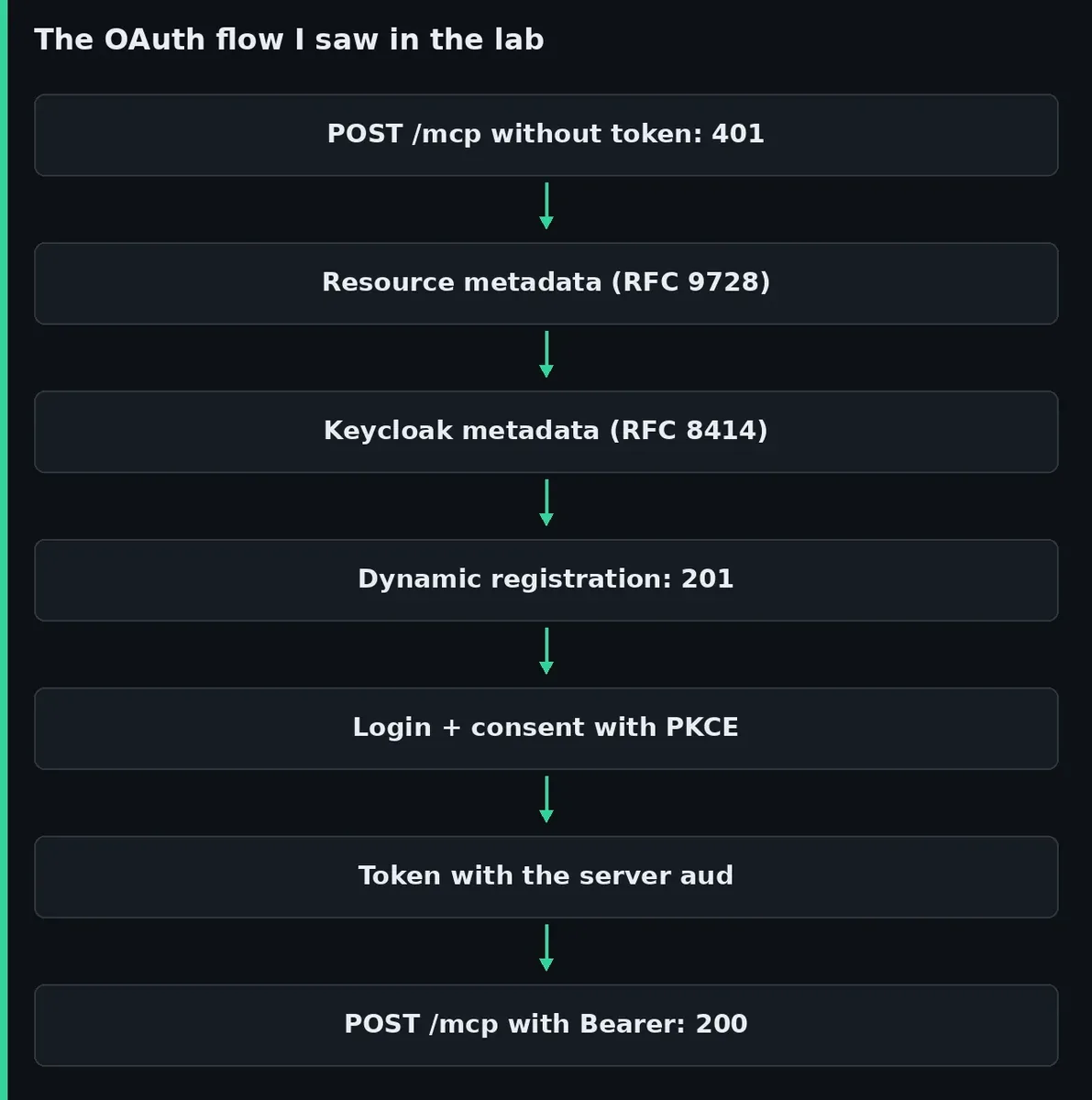
The client sent resource, as the specification asks, and Keycloak ignored it. The right audience arrived through the mcp:tools scope. These are the token claims, without the session identifiers:
{
  "iss": "http://localhost:24280/realms/mcp",
  "aud": "http://localhost:24200/mcp",
  "typ": "Bearer",
  "azp": "5c8263fc-1d27-4b5b-bc08-b3fd3ec7de66",
  "scope": "offline_access mcp:tools"
}
The token lasts 300 s, the realm default. After that, the same token got a 401 and the server logged token expired.
The client also added offline_access to the scope and Keycloak handed it a refresh token, which exists to renew access without repeating the login. Every run with in-memory storage registered a new client in Keycloak, five in five runs. The anonymous registration policy stops at 200 clients per realm, so real use calls for a persistent store for the token and the registration.
What happens when a token issued to another application arrives
A token signed by your realm is not necessarily meant for your MCP server. portal-web can request a token with its service account, and that token carries aud equal to account and the scope openid profile email. Against the server configured above, the result is as expected:
HTTP/1.1 401 Unauthorized
www-authenticate: Bearer error="invalid_token", ...

WARNING  Bearer token rejected for client portal-web:
         audience mismatch (got 'account',
         expected 'http://localhost:24200/mcp')
Then I started the same server with an empty MCP_AUDIENCE and MCP_SCOPES=openid, which reproduces the validation KeycloakAuthProvider does when you give it neither a verifier nor an audience. The portal-web token went through with a 200, and quien_soy returned azp equal to portal-web. The Keycloak page in the FastMCP documentation[5] already warns about it: without audience, "your server accepts tokens issued for any audience".
Why the KeycloakAuthProvider defaults fail on a fresh realm
Those defaults have an earlier problem too. KeycloakAuthProvider requires the openid scope unless told otherwise, and advertises it in its metadata. The client requests it at registration, and the "Allowed Client Scopes" policy of a freshly created realm rejects it, because openid is not a Keycloak client scope:
RuntimeError: Client failed to connect: Registration failed: 403
{"error":"insufficient_scope","error_description":"Policy
'Allowed Client Scopes' rejected request to client-registration
service. Details: Not permitted to use specified clientScope"}
The fix is the server above: require your own scope such as mcp:tools and pin audience to the MCP server URL. The FastMCP documentation points to a companion project, fastmcp-keycloak-local, with a ready-made realm; I did not test it.
Why mcp:tools must not be a realm default scope
My first version of the script added mcp:tools to the realm default optional scopes, because dynamically registered clients then receive it without touching any policy. The side effect is that every client created afterwards receives it too. portal-web requested scope=mcp:tools and got a token with aud equal to ["http://localhost:24200/mcp", "account"], valid for the MCP server.
With mcp:tools out of the defaults and inside the anonymous registration policy, the MCP client still receives the scope. A new client that asks for it gets {"error":"invalid_scope","error_description":"Invalid scopes: mcp:tools"}.
What changes with CIMD, VS Code and Claude Code
The 2026-07-28 MCP revision deprecates dynamic registration in favour of Client ID Metadata Document (CIMD): the client_id is an HTTPS URL pointing to a JSON document with the client metadata. According to the Keycloak release notes[6], 26.6.0 added CIMD as an experimental feature and 26.7.0 documented Claude Code as an MCP client alongside VS Code. Both are public clients with PKCE and a localhost callback.
CIMD is switched on with --features=cimd. I checked it on a separate Keycloak 26.7.4: the metadata document started advertising client_id_metadata_document_supported: true and the log warned "Experimental features enabled: cimd:v1". After that you create a client profile with the client-id-metadata-document executor and a policy with the client-id-uri condition, as the Keycloak guide describes. I did not test the full CIMD flow: the MCP SDK client requires an HTTPS URL for the document, and this lab runs on HTTP.
What to review before taking it to production
This setup is for development. Before exposing it, review these points:
- Start mode:
startinstead ofstart-dev, with TLS and an HTTPSKC_HOSTNAME - Audience:
audienceset in the verifier, with the exact URL the metadata advertises - One scope per MCP server: without RFC 8707, the scope name is the only thing that tells one server from another
- Anonymous registration: trusted hosts, allowed scopes and the 200-client limit
- Client token store: persistent and encrypted, or every start will register a new client
- Patches: 26.7.4 fixes six CVEs; follow every patch release of the 26.7 branch
If Keycloak is too much for a home lab, the Pocket ID vs Authelia vs Authentik comparison helps you choose, and how to install Authentik covers the most featureful alternative. In each case, check what they say about RFC 8707 and dynamic registration before putting them in front of an MCP server.
Frequently asked questions
Is Keycloak compatible with the latest MCP specification?
Partly. Its guide claims full support only for the 2025-03-26 revision. In the 2025-06-18, 2025-11-25 and 2026-07-28 revisions it lacks RFC 8707, and the substitute is one scope with an audience mapper per MCP server.
Do I need dynamic client registration?
Not always. If you control the clients, you can register them by hand and pass the client_id to the MCP client. Dynamic registration is for clients you do not know in advance, it is deprecated in MCP 2026-07-28, and its replacement, CIMD, is still experimental in Keycloak.
Is it enough that the token is signed by my realm?
No. Signature, issuer and expiry prove that Keycloak issued the token, not who it was issued for. In the test, a token from another application in the realm went through as soon as I removed the audience check.
Conclusion
Keycloak 26.7.4 works as the authorization server for an MCP server, as long as you accept what is missing. It publishes its metadata, registers MCP clients through dynamic registration with consent and PKCE, and issues tokens that FastMCP validates. It does not understand resource, so you build the separation between servers yourself with one scope per server and an audience mapper, and the MCP server enforces it.
The next step is to copy the realm script, change the mapper URL to your server’s and start FastMCP with audience set. Then repeat the portal-web token test in your environment: if it goes through, your server accepts tokens that are not meant for it.
Sources: [1] Keycloak guide to integrating with MCP[2], [2] MCP 2026-07-28 authorization specification[1], [3] Keycloak release notes[6], [4] Keycloak 26.7.4 release[3], [5] Keycloak client registration service[4], [6] Keycloak integration in FastMCP[5], [7] FastMCP 4.0.10 on PyPI[7], [8] RFC 8707: Resource Indicators for OAuth 2.0[8], [9] Keycloak pull request 45309 on dynamic registration[9].
Sources
Source code
Access all the source code for this post on GitHub.
View on GitHub