Home Assistant 2026.10 MCP server: connect your AI agent to your home in one click
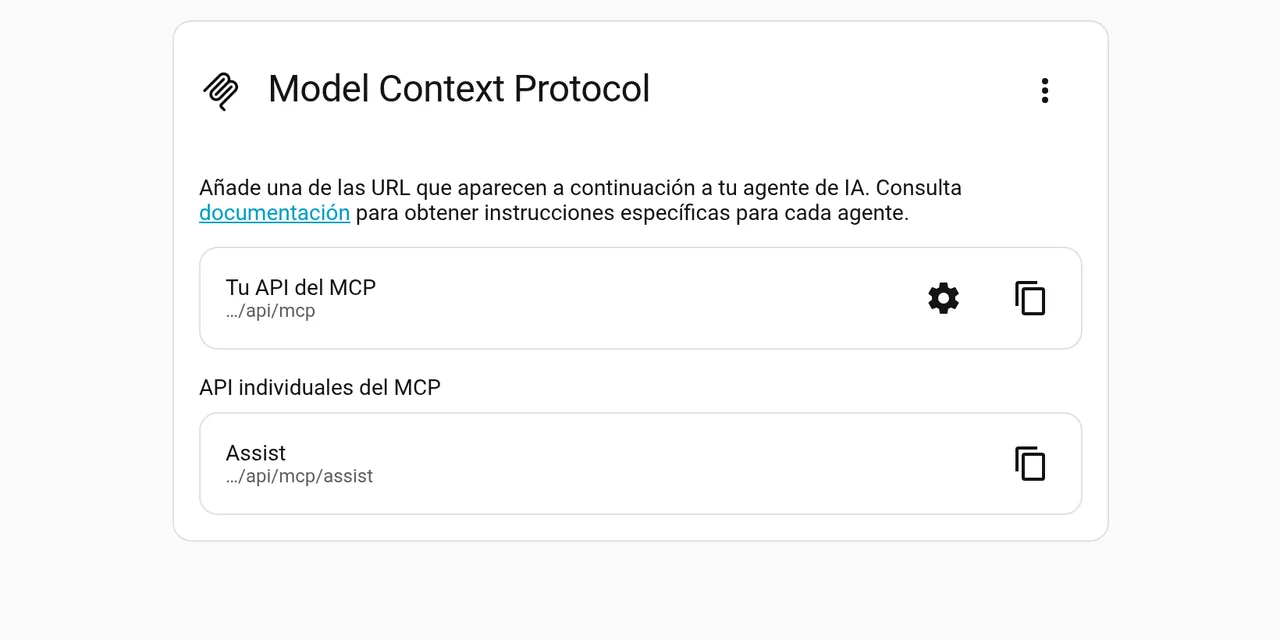
Table of contents
- Key takeaways
- What Home Assistant 2026.10 changes for MCP
- How to run Home Assistant 2026.10 in Docker
- How to turn the MCP server on in one click
- How to connect your agent with a long-lived token
- What the agent sees of your home
- What to restrict before you connect a model
- What I did not test
- Frequently asked questions
- Do I need Home Assistant Cloud to use the MCP server?
- Can the agent unlock my door?
- Does it work with local models?
- Conclusion
- Sources
Tested with Home Assistant 2026.10.0 · MCP Python SDK 2.3.0 · Docker · verified
Home Assistant 2026.10 turns your home into an MCP server in one click: Settings > System > AI now has a card that switches the server on and gives you the URL to paste into your agent. I set it up in Docker on 7 October 2026 with the 2026.10.0b4 beta and connected it with the MCP Python SDK and with Claude Code. On 9 October I repeated the test on the 2026.10.0 stable release with the same result: 28 tools, the same MCP server and the same exposed entities. Below are the steps, what the agent sees of your home and what to restrict. There is also a Spanish version of this guide.
Key takeaways
- The AI tasks page is renamed AI and gains a Model Context Protocol card that turns the server on and lists the
/api/mcpand/api/mcp/assistURLs with a copy button. - A new setup exposes every LLM API, including ones added later, and only lets administrator accounts connect. Both options can be changed without removing the integration.
- In my lab the server offered 28 tools and its live context described 45 of the demo’s 122 entities: locks, cameras and alarms were not exposed.
- Turning on a light with the
intent__HassTurnOntool took 12 ms; asking for the front door lock returned a not-exposed error. - The server negotiated protocol revision
2025-11-25, because Home Assistant still ships the 1.28.1 Python SDK. An SDK 2 client connects without changes.
What Home Assistant 2026.10 changes for MCP
Home Assistant could already act as an MCP server since 2025.2, but turning it on took three separate steps. 2026.10 folds them into one card.
The Model Context Protocol (MCP) is the protocol an AI application uses to discover and call tools from other programs. Before, you added the integration, chose which parts of the home to expose and worked out which URL to give the agent. The release notes, signed by Franck Nijhof, put it this way: "New setups expose everything Home Assistant has to offer, including anything added later, and only allow administrator accounts to connect."
You notice four changes when you use it:
- Model Context Protocol card under Settings > System > AI, with a one-click server switch
- Two new options on the integration:
all_llm_apis(expose every LLM API) andrequire_admin(require an administrator account), both on by default - Per-API paths:
/api/mcpserves every enabled API and/api/mcp/assistonly the Assist one - Reverse discovery: the MCP client integration detects apps that publish their own MCP server and only asks for confirmation
Installations that already had the integration keep their behaviour: the two new options stay off so existing clients do not break.
How to run Home Assistant 2026.10 in Docker
One container with a volume for /config is enough to try it. If you already run Home Assistant, the guide to install Home Assistant with Docker covers networking and permissions; here I use a separate port so it does not clash with another instance.
services:
  homeassistant:
    image: ghcr.io/home-assistant/home-assistant:2026.10.0
    container_name: homeassistant
    ports:
      - "8123:8123"
    volumes:
      - ./config:/config
    environment:
      - TZ=Europe/Madrid
    restart: unless-stopped
Start it with docker compose up -d and finish the onboarding wizard at http://localhost:8123. For my test I added demo: to configuration.yaml to get fake lights, covers, thermostats and locks: after a restart the instance had 122 entities.
How to turn the MCP server on in one click
Go to Settings > System > AI and flip the switch on the Model Context Protocol card. The card shows two URLs: Your MCP API (/api/mcp) and, under Individual MCP APIs, the Assist one (/api/mcp/assist).
Under the hood, that click creates the Model Context Protocol Server integration titled "All LLM APIs". I checked it by running the same flow through the REST API: the setup form no longer asks for any field, and the options form shows the two switches with this schema:
[
  {"name": "all_llm_apis", "required": true, "default": true},
  {"name": "require_admin", "required": true, "default": true}
]
The server needs a token on every request. Without an Authorization header, /api/mcp answers 401, and a non-existent API path such as /api/mcp/nope answers 404.
How to connect your agent with a long-lived token
The most direct method for an agent on your network is a long-lived access token. Create it under Profile > Security > Long-lived access tokens and copy it, because Home Assistant does not show it again.
With Claude Code, one command adds the server. Use --transport http, because Home Assistant speaks Streamable HTTP:
claude mcp add --transport http home-assistant \
  http://homeassistant.local:8123/api/mcp \
  --header "Authorization: Bearer your_access_token_here"
With --scope project the server is written to the project’s .mcp.json and Claude Code asks you to approve it the first time it starts; until then claude mcp list shows it as pending. If your client only supports stdio, the integration docs suggest mcp-proxy as a gateway.
For your own Python agent, the official MCP SDK connects like this. With SDK 2.3.0, authentication goes into an httpx2.AsyncClient:
import asyncio, httpx2
from mcp import ClientSession
from mcp.client.streamable_http import streamable_http_client

URL = "http://homeassistant.local:8123/api/mcp"
TOKEN = "your_access_token_here"

async def main():
    auth = {"Authorization": f"Bearer {TOKEN}"}
    async with httpx2.AsyncClient(headers=auth) as hc, \
            streamable_http_client(URL, http_client=hc) as (r, w):
        async with ClientSession(r, w) as s:
            await s.initialize()
            tools = (await s.list_tools()).tools
            print([t.name for t in tools])
            res = await s.call_tool("intent__HassTurnOn",
                                    {"name": "Kitchen Lights"})
            print(res.content[0].text)

asyncio.run(main())
The script lists the tools and turns on the kitchen light. If you come from SDK 1.x, watch for two changes that broke my first attempt: the function is now streamable_http_client and yields two streams instead of three, and result fields are snake_case (server_info, protocol_version). Both are covered in the guide to migrate an MCP server to FastMCP 4 and SDK 2.
What the agent sees of your home
What the agent can touch depends on two filters: the enabled LLM APIs and the entities exposed to assistants. With the defaults, the server offered 28 tools, each prefixed with its domain:
- Control:
intent__HassTurnOn,intent__HassTurnOff,intent__HassSetPosition,light__HassLightSet,climate__HassClimateSetTemperature - Media: pause, resume, next, volume and mute for
media_player - Lists:
todo__get_items,todo__HassListAddItemand two more - Context:
homeassistant__GetLiveContextandllm__GetDateTime
The server also publishes a prompt called Assist with the assistant’s instructions. Mind the names: calling HassTurnOn without the prefix returns Tool "HassTurnOn" not found. An agent that reads the tool list copes with it, but a hand-written script based on older docs fails.
GetLiveContext returned 5,030 characters describing 45 entities across 12 domains: lights, covers, climate, fans, humidifiers, media players, switches, vacuums, water heaters, to-do lists and some sensors. Locks were missing, and calling intent__HassTurnOn on the front door got "No matching entities are exposed to the assistant".
The reason is in Home Assistant’s code. The DEFAULT_EXPOSED_DOMAINS list in exposed_entities.py includes light, cover, climate and eight other domains, but not lock, alarm_control_panel or camera. "Expose everything" refers to LLM APIs, not entities: a lock only reaches the agent if you expose it by hand under Settings > Voice assistants > Expose.
| What I tested | Result |
|---|---|
| Negotiated protocol version | 2025-11-25 (Python SDK 1.28.1 on the server) |
| Tools offered | 28 |
| Entities in the live context | 45 of 122 |
intent__HassTurnOn on a light |
Success, 12 ms |
intent__HassTurnOn on a lock |
Error: entity not exposed |
| Request without a token | HTTP 401 |
What to restrict before you connect a model
A model with access to your home can pick the wrong entity or run an instruction hidden in some text. Three settings cut the risk:
- Create a user just for the agent. Turn off Require an administrator account and connect the agent with that user’s token. According to the docs, the
/api/mcp/assistpath stays available to non-admin accounts, while every other API still requires an administrator. - Review the exposed entity list. Remove what the agent does not need. Do not expose locks or alarms without a clear reason.
- Turn off "Expose all LLM APIs" if you install integrations that bring their own tools, such as the KNX one that debuts in 2026.10 and can write values to the bus.
If the agent runs outside your network, the docs recommend OAuth instead of a fixed token. Home Assistant does not use dynamic client registration (RFC 7591): the client ID is the app’s base URL, for example https://claude.ai. To see why an exposed MCP server needs that layer, read what the 2026-07-28 MCP specification breaks.
What I did not test
I tested a fresh instance with demo entities, not a real home. I did not connect ChatGPT or Cursor, nor did I try OAuth. I also did not measure how many tokens the live context costs with hundreds of devices; the only figure I have is 5,030 characters for 45 entities. Nor did I check the Assist path with a non-admin user; that part comes from the docs.
Frequently asked questions
Do I need Home Assistant Cloud to use the MCP server?
No. The server works locally with a long-lived token, as in this guide. Home Assistant Cloud only simplifies remote access with OAuth, because it saves you from setting up a reverse proxy or a tunnel. The service will be renamed Home Assistant Link with the 2026.12 release, as the project announced on 2 October.
Can the agent unlock my door?
Not with the defaults. The lock, alarm_control_panel and camera domains are not exposed to assistants unless you do it by hand on the exposed entities page.
Does it work with local models?
Yes, as long as the client speaks MCP over Streamable HTTP. You can use your own agent with the Python SDK, as in the example, and a locally served model that supports function calling with Ollama.
Conclusion
2026.10 does not change what Home Assistant’s MCP server can do, it changes what it takes to turn it on: a switch, a URL and a token. The defaults are cautious with accounts (admins only) and generous with APIs, while sensitive entities stay out until you expose them yourself.
Next, create a dedicated user for the agent, review the exposed entities and connect Claude Code or your own script with that user’s token.
Sources: [1] Home Assistant 2026.10 release notes[1], [2] Model Context Protocol Server integration docs[2], [3] Exposing entities to voice assistants[3], [4] exposed_entities.py in home-assistant/core[4], [5] home-assistant/core releases[5], [6] Model Context Protocol Python SDK[6], [7] Streamable HTTP transport in the MCP specification[7], [8] Home Assistant blog, renaming Home Assistant Cloud[8].
Sources
- Home Assistant 2026.10 release notes
- Model Context Protocol Server integration docs
- Exposing entities to voice assistants
- exposed_entities.py in home-assistant/core
- home-assistant/core releases
- Model Context Protocol Python SDK
- Streamable HTTP transport in the MCP specification
- Home Assistant blog, renaming Home Assistant Cloud