Docker Desktop 4.94 switches the logging driver to local: what it means and how to do it on your server
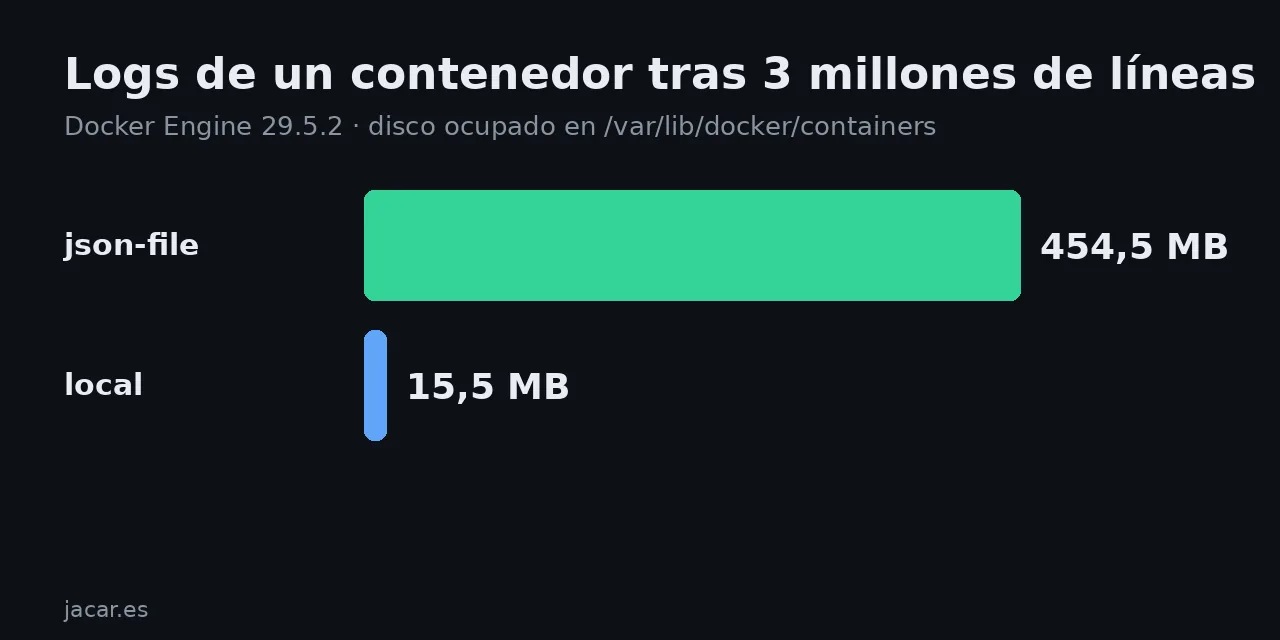
Table of contents
- Key takeaways
- What changed in Docker Desktop 4.94
- How much disk the local driver saves, measured
- How to make local the default on a Linux server
- What stops working with the local driver
- When to stay on json-file
- Frequently asked questions
- Do I lose logs when I switch to the local driver?
- How many logs does the local driver keep by default?
- Does the Docker Desktop change affect my servers?
- Conclusion
- Sources
Docker Desktop 4.94, released on 5 October 2026, uses the local logging driver for new Linux containers instead of json-file, so logs rotate and compress without you configuring anything. Docker Engine on Linux has not changed: a server still writes logs as JSON with no size limit. I measured it on Docker Engine 29.5.2 with 3 million lines, and below I explain how to make the same change on your server, what breaks and what does not. There is also a Spanish version.
Key takeaways
- The Docker Desktop 4.94 notes say: "Changed the default logging driver for new Linux containers to
localto enable automatic log rotation and reduce disk usage." - The same container that wrote 3 million lines used 454.5 MB with
json-fileand 15.5 MB withlocal, 29 times less. - With its defaults,
localkept the last 873,409 lines: it rotates at 20 MB per file, keeps 5 files and compresses the old ones. - Docker Engine 29 on Linux still defaults to
json-file. To change it, add"log-driver": "local"to/etc/docker/daemon.json; it only affects containers you create afterwards. - The
localformat is binary.docker logsand collectors that read the Docker API keep working; those that read the*-json.logfiles on disk do not.
What changed in Docker Desktop 4.94
Docker Desktop 4.94 ships Docker Engine 29.8.2 and a default change that affects the disk of any laptop with long-running containers. The line in the release notes[1] is the one quoted above: new Linux containers are created with the local driver.
The logging driver decides where and how Docker stores what a container writes to stdout and stderr. Until now, Docker Desktop and Docker Engine used json-file, which stores each line as a JSON object in one file and, unless you set max-size, never rotates. The guide to Docker resource limits and logging covers both drivers; here I focus on the change and on what each one costs.
How much disk the local driver saves, measured
To measure it I started two identical Alpine 3.22 containers on Docker Engine 29.5.2, one per driver. Each writes 3 million 76-byte lines, shaped like an access log:
for d in json-file local; do
  docker run -d --name logs-$d --log-driver $d alpine:3.22 sh -c '
    i=0
    while [ $i -lt 3000000 ]; do
      echo "2026-10-07T09:00:00Z INFO request id=$i" \
           "path=/api/items status=200 dur_ms=12"
      i=$((i+1))
    done
    sleep 3600'
done
The loop writes the lines and keeps the container alive so it can be inspected. When both finished, I measured each container’s directory under /var/lib/docker/containers/ with sudo du -sb:
| Driver | Disk used | Files | Lines returned by docker logs |
|---|---|---|---|
json-file (no options) |
454.5 MB | 1 *-json.log file |
3,000,000 |
local (defaults) |
15.5 MB | 1 active + 4 .gz |
873,409 |
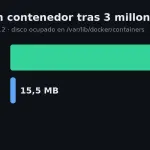
The original lines add up to about 228 MB. json-file nearly doubles that, because it wraps each line with the stream name and a JSON timestamp. local stores 66 MB of lines in 15.5 MB thanks to compression, at the cost of keeping only the most recent ones: the first line it returned was id=2126591.
How to make local the default on a Linux server
On Linux the change does not arrive by itself. Docker Engine 29 still starts with json-file (29.5.2 on my machine), which you can check with docker info --format '{{.LoggingDriver}}'. To change it, edit /etc/docker/daemon.json:
{
  "log-driver": "local",
  "log-opts": {
    "max-size": "10m",
    "max-file": "3"
  }
}
Restart the daemon with sudo systemctl restart docker. I tested it with the docker:29-dind image and that file mounted: docker info switched to local, and a new container came up with {local map[max-file:3 max-size:10m]} in docker inspect -f '{{.HostConfig.LogConfig}}'.
Three details matter before you restart:
- Existing containers keep their driver. The value is fixed when the container is created, so recreate them with
docker compose up -d --force-recreateto pick it up. - Defaults differ per driver.
max-size,max-fileandcompressexist on both, butlocalrotates at 20 MB and compresses out of the box, whilejson-filedoes neither. - Restarting the daemon stops every container unless you have
"live-restore": truein the same file.
If you would rather not touch the daemon, set the driver per service in Compose with the logging block:
services:
  web:
    image: nginx:1.30
    logging:
      driver: local
      options:
        max-size: "10m"
        max-file: "3"
What stops working with the local driver
The local format is not text. Reading the first bytes of container.log with od -c shows a binary header before each line, because Docker stores each entry as a protobuf message prefixed with its length.
That splits tools into two groups:
- Still working are those that ask the Docker API for logs:
docker logs,docker compose logs, Portainer and collectors that connect to the socket, such as Grafana Alloy’sloki.source.dockercomponent - Breaking are those that read the files from disk with a pattern like
/var/lib/docker/containers/*/*-json.log, a common setup in Promtail, Fluent Bit or Vector
If you centralise logs with Grafana Loki in Docker by reading files, switch the source to the Docker API first, or keep json-file with max-size and max-file, which also rotates.
When to stay on json-file
json-file with rotation is still a valid choice when a tool needs to read the files directly or when you want to open the log with grep without going through Docker. Configure it with limits instead of leaving it unbounded:
{
  "log-driver": "json-file",
  "log-opts": { "max-size": "20m", "max-file": "5" }
}
The option with no defence is the one Docker Engine ships with: unbounded json-file, which in my test grew to 454.5 MB for a single container.
Frequently asked questions
Do I lose logs when I switch to the local driver?
Not the existing ones: containers created before the change stay on json-file until you recreate them. When you recreate them, the old log goes away with the old container, as with any driver.
How many logs does the local driver keep by default?
At most five 20 MB files, all compressed except the active one. In my test that came to the last 873,409 lines of 76 bytes in 15.5 MB of disk.
Does the Docker Desktop change affect my servers?
No. Docker Desktop 4.94 only changes its own engine. Docker Engine on Linux keeps json-file until you edit daemon.json.
Conclusion
Docker Desktop moved to local because unbounded json-file fills disks, and my measurement agrees: 454.5 MB versus 15.5 MB for the same container. On your Linux servers nothing changes until you change it, and the change costs five lines in daemon.json plus recreating the containers.
Before you apply it, check whether your log collector reads files from disk. If it does, move it to the Docker API first.
Sources: [1] Docker Desktop 4.94 release notes[1], [2] Local logging driver[2], [3] JSON File logging driver[3], [4] Configure logging drivers[4], [5] loki.source.docker in Grafana Alloy[5], [6] Local driver source in moby/moby[6].