How to fix Traefik plugin integrity check failed (Pangolin Badger v1.8.0, Sablier)
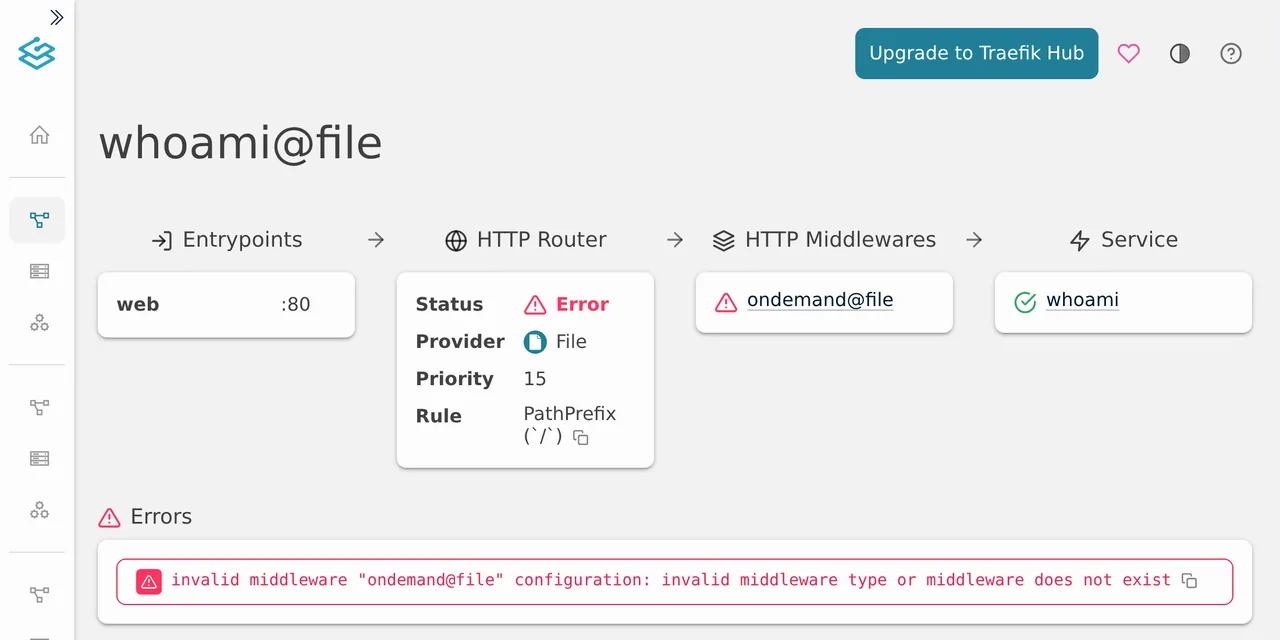
Table of contents
- Key takeaways
- What does the plugin integrity check failed error mean in Traefik?
- Which plugins and versions fail today
- Why does the Traefik catalog reject its own zip?
- Why it works on one server and fails on another
- Fix 1: pin the hash of the zip you download in Traefik
- Is it safe to pin the hash of a zip the catalog rejects?
- Fix 2: go back to Badger v1.7.0 on Pangolin
- Fix 3: load the plugin as a local plugin
- How to check that the plugin works again
- What to do once Traefik fixes the catalog
- Frequently asked questions
- Does upgrading or downgrading Traefik fix it?
- Why does Traefik disable all my plugins and not only the broken one?
- Am I affected if I keep /plugins-storage in a volume?
- Conclusion
- Sources
The plugin integrity check failed error does not come from your configuration or from the plugin: the Traefik plugin catalog serves one zip and validates the hash of another. Both zips hold the same code, but one was compressed by Go 1.26 and the other by Go 1.27. You fix it by adding hash: with the SHA-256 of the zip you receive, after checking its contents against the Go checksum database, or by going back to the previous plugin version. I reproduced it on 27 October 2026 with Traefik 3.7.16, Badger v1.8.0 (Pangolin’s plugin) and Sablier v1.3.1, on arm64 Linux with Docker 29.5.2. There is a Spanish version of this guide.
Key takeaways
- Traefik downloads the zip from
plugins.traefik.io, computes its SHA-256 and asks the catalog whether it is valid; the catalog answers 404 and Traefik disables every plugin. - Badger v1.8.0 is served with hash
1337d349…while the catalog only accepts60f02559…, theproxy.golang.orgzip; the 18 files inside are identical byte for byte. - Cloudflare caches the validation answer for 3600 s without looking at the hash sent, which is why the same plugin loads on one server and fails on another.
- The
hashkey has existed since Traefik v3.5.3: with it, Traefik compares the hash on your machine and never asks the catalog. - On Pangolin, staying on Badger v1.7.0 also fixes it; you only lose the permanent redirects of Pangolin 1.25.
What does the plugin integrity check failed error mean in Traefik?
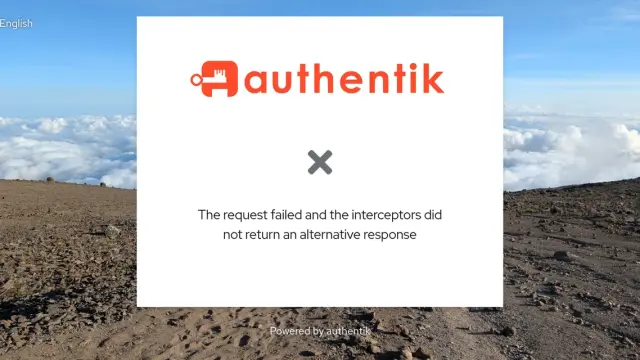
It means the Traefik plugin catalog does not recognise the zip it has just served you. Traefik downloads the plugin at startup and sends its SHA-256 to the /public/validate endpoint; if the answer is not 200, it stops loading every plugin, not only the affected one. This is the log I got with Sablier v1.3.1:
INF Loading plugins... plugins=["sablier"]
ERR Plugins are disabled because an error has occurred.
error="unable to set up plugins environment: unable to install
plugin sablier: unable to check archive integrity of the plugin
github.com/sablierapp/sablier-traefik-plugin: plugin integrity
check failed" plugins=["sablier"]
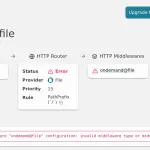
In your terminal each entry is a single line; I wrapped it here to fit. With Badger v1.8.0 the text is the same with github.com/fosrl/badger, according to the log posted in Traefik issue 14115. Right after it comes a second error for each router that uses the middleware, and that is the one the Traefik dashboard shows:
ERR error="invalid middleware \"ondemand@file\" configuration:
invalid middleware type or middleware does not exist"
entryPointName=web routerName=whoami@file
The router ends up disabled and the route answers 404. If the middleware is Badger, every resource Pangolin publishes behind Traefik stops answering at once.
Which plugins and versions fail today
The failure hits plugin versions published after proxy.golang.org moved to Go 1.27, whatever your Traefik version. On 27 October 2026, between 09:13 and 09:18 UTC, I downloaded six versions from the catalog and computed their hashes. Then I compared each with the proxy.golang.org zip and asked the catalog about the served hash:
| Plugin and version | Served hash | Go proxy hash | Validation of served zip |
|---|---|---|---|
fosrl/badger v1.8.0 |
1337d349… |
60f02559… |
404, fails |
sablierapp/sablier-traefik-plugin v1.3.1 |
c819d45f… |
6f33a870… |
404, fails |
andrewkroh/google-oidc-auth-middleware v0.4.0 |
f33d4264… |
b6b848c5… |
404, fails |
DIE-Bonn/MatomoTracking v1.2.0 |
68b86912… |
539f858c… |
200 from the origin |
maxlerebourg/crowdsec-bouncer-traefik-plugin v1.8.1 |
1c63fab0… |
854eb7a9… |
200 from the cache |
crazygolem/traefik-subsonic-basicauth v0.2.1 |
aceed5ec… |
aceed5ec… |
200, they match |
Two different hashes are not enough to fail: MatomoTracking validates now because the catalog corrected the hash it stores. The CrowdSec bouncer result is not conclusive, because the answer came from the cache.
The problem reached Pangolin on 21 October. Its update guide asks you to raise the Badger version in config/traefik/traefik_config.yml to the latest GitHub release, which has been v1.8.0 since that day. The Pangolin 1.25.3 installer, on the other hand, still writes v1.7.0: I checked it in the build options of the arm64 binary. If you set Pangolin up with the Pangolin installation guide and never touched that line, you are not affected.
Why does the Traefik catalog reject its own zip?
Because the catalog stores the hash of one build of the zip and serves another. A Go module is packed with zip.CreateFromVCS, and Go 1.27 compresses with a different deflate output than Go 1.26: same files, same dates, different compressed size. Andrew Kroh, author of the OIDC plugin, summed it up in Traefik issue 13845: "the Go 1.27 toolchain produces different deflate output than Go 1.26, and the catalog builds the archive it serves with one toolchain while the hash it validates against matches the other".
I checked it with Badger v1.8.0. I unpacked both zips and diff -r found no difference across their 18 files. The only thing that changes is the compressed size: 33,136 bytes for the catalog zip and 33,442 bytes for the Go proxy zip.
Why it works on one server and fails on another
The second piece is the Cloudflare cache in front of plugins.traefik.io. The /public/validate answer carries cache-control: max-age=3600, and the cache key does not include the X-Plugin-Hash header Traefik sends. I saw it live: after one request with the proxy hash returned 200, the London node answered 200 with cf-cache-status: HIT to any hash, including one made of 64 zeros. At 10:14 UTC that answer was still cached with age: 3673, and my Traefik loaded Badger v1.8.0 with no hash and no error.
That is why the same docker compose up loads Badger on a VPS and fails on your home server two minutes later, as a user reports in Badger issue 38. It depends on which answer the Cloudflare node you reach has cached. Waiting or restarting is not a fix: Pangolin does not keep /plugins-storage in a volume, so every new container downloads and validates again.
Fix 1: pin the hash of the zip you download in Traefik
The plugin’s hash key makes Traefik compare the SHA-256 on your machine and skip the call to /public/validate. I saw it in the pkg/plugins/manager.go code of v3.7.16, and it exists since Traefik v3.5.3. First download the zip the same way Traefik does and compute its hash:
M=github.com/fosrl/badger
curl -sSo badger.zip https://plugins.traefik.io/public/download/$M/v1.8.0
sha256sum badger.zip
The result was 1337d3490a9eda1d20207d881cee37e40991d74443bdcfa61182c5416678b7e8, the same one another user published from two different Cloudflare nodes. Before you trust it, check the contents as the next section explains. Then add the hash line to the plugin in config/traefik/traefik_config.yml:
experimental:
  plugins:
    badger:
      moduleName: github.com/fosrl/badger
      version: v1.8.0
      hash: 1337d3490a9eda1d20207d881cee37e40991d74443bdcfa61182c5416678b7e8
Recreate the Traefik container so it reads the static configuration again, and check the log. With the hash pinned, Badger v1.8.0 and Sablier v1.3.1 loaded without errors:
$ docker compose up -d --force-recreate traefik
$ docker logs traefik 2>&1 | grep -i plugin
INF Loading plugins... plugins=["badger"]
INF Plugins loaded. plugins=["badger"]
If you pin the Go proxy hash (60f02559…) instead of the served one, Traefik refuses the plugin and tells you exactly what it received: invalid hash for plugin github.com/fosrl/badger, expected 60f02559…, got 1337d349…. That message proves the comparison is real and gives you the right hash.
Is it safe to pin the hash of a zip the catalog rejects?
It is safe if you check that the contents match the published module version, and that check does not depend on the Traefik catalog. The Go checksum database, sum.golang.org, stores an h1: hash of each version’s contents, computed over the files and not over the compression. This Python script computes the same h1: from the zip:
import sys, zipfile, hashlib, base64

z = zipfile.ZipFile(sys.argv[1])
lines = [
    f"{hashlib.sha256(z.read(n)).hexdigest()}  {n}\n"
    for n in sorted(z.namelist()) if not n.endswith("/")
]
digest = hashlib.sha256("".join(lines).encode()).digest()
print("h1:" + base64.b64encode(digest).decode())
Save it as h1.py and compare its output with the Go checksum database entry:
$ python3 h1.py badger.zip
h1:HiHK8coR8OGurUoGipAhmQIasyvmOi5lbfL6kOPaA84=
$ curl -s https://sum.golang.org/lookup/$M@v1.8.0 | sed -n 2p
github.com/fosrl/badger v1.8.0 h1:HiHK8coR8OGurUoGipAhmQIasyvmOi5lbfL6kOPaA84=
Both values match, so the zip the catalog serves holds exactly the code Go recorded for v1.8.0. With Sablier v1.3.1 I also got the same sum on both sides. If yours do not match, do not pin that hash and go to fix 2.
Fix 2: go back to Badger v1.7.0 on Pangolin
Going back to the previous version is what the Pangolin team itself recommends while Traefik fixes the catalog. The Badger v1.8.0 release notes say it plainly: "Badger v1.8.0 is currently broken, so please stay on v1.7.0". Change the version in config/traefik/traefik_config.yml, with no hash line:
experimental:
  plugins:
    badger:
      moduleName: github.com/fosrl/badger
      version: v1.7.0
After recreating Traefik, the log showed Plugins loaded. and the downloaded v1.7.0 zip had hash 4eb41cc6…. The only new feature in v1.8.0 is permanent redirect support: according to the Pangolin 1.25 notes, normal redirects work with v1.7.0. For Sablier, the equivalent version is v1.3.0, which loaded without errors next to Badger v1.7.0 in my test.
Fix 3: load the plugin as a local plugin
A local plugin never goes through the catalog, so there is no download and no validation. It takes the most work and depends the least on third parties: copy the plugin source into the container and declare it under experimental.localPlugins. Traefik looks for the code in /plugins-local/src/ followed by the module name:
mkdir -p plugins-local/src/github.com/fosrl
unzip -q badger.zip -d /tmp/badger
cp -r "/tmp/badger/github.com/fosrl/badger@v1.8.0" \
  plugins-local/src/github.com/fosrl/badger
Mount that directory in the Traefik service with ./plugins-local:/plugins-local:ro and replace the plugins block with this one:
experimental:
  localPlugins:
    badger:
      moduleName: github.com/fosrl/badger
The name badger stays the same, so the middlewares Pangolin generates as badger still find it. In my test the log showed Plugins loaded. and the Traefik application programming interface (API) returned the middleware with status enabled. The price is that upgrades become manual.
How to check that the plugin works again
The Plugins loaded. log line is the first signal, and the confirmation is the router status. The Pangolin installer leaves the Traefik API on in the container’s port 8080, so you can query it with wget from inside:
docker exec traefik wget -qO- \
  http://localhost:8080/api/http/routers/whoami@file \
  | grep -o '"status":"[a-z]*"'
Replace whoami@file with the name of one of your routers; the full list is at /api/http/routers.
With the plugin broken, the router returned disabled and the route, 404. With any of the three fixes, the router and its middleware returned "status":"enabled". In the lab the route then answered 500, because there was no Pangolin or Sablier server behind it. On a real install, Badger asks the Pangolin API at that point whether to let the request through.
What to do once Traefik fixes the catalog
Remove the hash line as soon as the catalog validates the zip it serves. A Traefik maintainer wrote in issue 13845 on 26 October that it is his priority and will be solved before the end of the week. If the fix means serving the Go 1.27 zip, the hash you pinned will stop matching and you will see invalid hash for plugin … expected 1337d349…, got 60f02559….
To find out whether it is fixed yet, ask the catalog about the hash it serves you:
H=$(sha256sum badger.zip | cut -c1-64)
curl -s -D - -o /dev/null -H "X-Plugin-Hash: $H" \
  https://plugins.traefik.io/public/validate/$M/v1.8.0 \
  | grep -iE '^HTTP|cf-cache-status'
A 404 means it is still broken. A 200 is only reliable when cf-cache-status does not say HIT, because of the cache that ignores the hash. This already happened in August with Badger v1.6.0 to v1.7.0, in issue 13771, and Traefik resolved it on 27 August.
Frequently asked questions
Does upgrading or downgrading Traefik fix it?
No. The validation happens on the catalog server, and Traefik 3.7.16, the latest release from 20 October, fails just like the 3.7.12 of the first reports. Traefik v2.11 runs the same check and has no hash key, so only fixes 2 and 3 work there.
Why does Traefik disable all my plugins and not only the broken one?
Because it sets up the plugin environment in one go and any failure voids all of it. In my test, with Badger v1.7.0 (which validates) and Sablier v1.3.1 (which does not) in the same configuration, the log said Plugins are disabled for both. Every router that uses either of them ends up disabled.
Am I affected if I keep /plugins-storage in a volume?
Yes. With the zip already stored, Traefik sends its hash when downloading and, if the catalog answers 304, still calls /public/validate. Only the hash key or a local plugin avoids that query.
Conclusion
plugin integrity check failed is a Traefik catalog fault, not a fault in your Pangolin or your Sablier: the zip it serves and the hash it validates come from two Go toolchains. If you need the new version, check the zip against sum.golang.org and pin its hash with the hash key. If not, go back to Badger v1.7.0 or Sablier v1.3.0 and wait for the fix. If you do not run a reverse proxy yet, the guide to install Traefik with Docker Compose starts from zero.
Sources: [1] Traefik, issue 13845 on the plugin catalog[1], [2] Traefik, issue 14115 on Badger v1.8.0[2], [3] Badger, v1.8.0 release notes[3], [4] Badger, issue 38[4], [5] Traefik, pkg/plugins/manager.go at v3.7.16[5], [6] Traefik, static configuration options[6], [7] Pangolin, how to update[7], [8] Go checksum database, Badger v1.8.0 entry[8], [9] Traefik, August issue 13771[9].
Sources
Source code
Access all the source code for this post on GitHub.
View on GitHub