How to fix invalid featureCompatibilityVersion document after mongo:latest moved to MongoDB 9.0
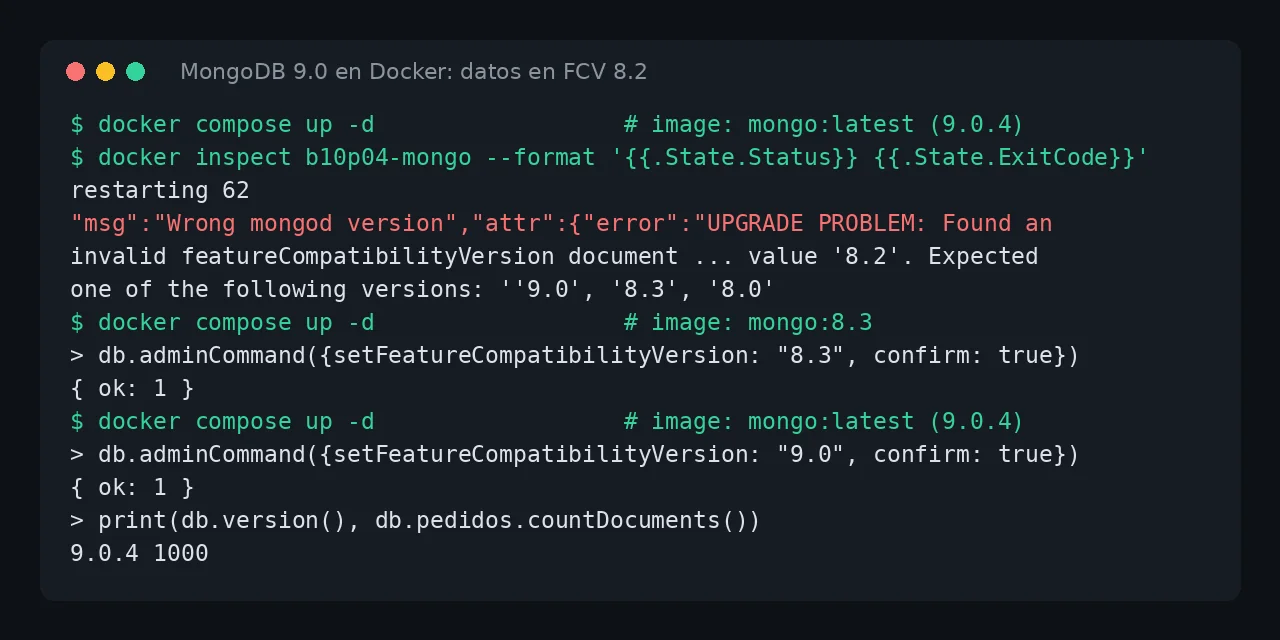
Table of contents
- Key takeaways
- What does UPGRADE PROBLEM: Found an invalid featureCompatibilityVersion document mean?
- Why has it started failing now?
- How to check your data's FCV without starting 9.0
- Immediate fix: pin the tag that opened your data
- How to upgrade MongoDB 8.2 to 9.0 without losing data
- If your data is still at FCV 7.0
- Can you go back from MongoDB 9.0 to 8.3?
- How to stop it from happening with the next release
- Frequently asked questions
- Do I lose data if 9.0 already tried to start?
- Can I jump straight from 8.2 to 9.0 by setting the FCV to 9.0?
- Does deleting and recreating the container help?
- Conclusion
- Sources
The UPGRADE PROBLEM: Found an invalid featureCompatibilityVersion document error means a 9.0 mongod found data saved at a compatibility version it cannot open, and you fix it by upgrading in steps, not by wiping the volume. The mongo:latest tag on Docker Hub has pointed at MongoDB 9.0 since 1 October 2026, and 9.0 only accepts data with the featureCompatibilityVersion (FCV) at 8.0 or 8.3. If your data sits at 8.2 or is still at 7.0, the container restarts in a loop with exit code 62. I reproduced it on 27 October 2026 on arm64 Linux with Docker 29.5.2, Compose v2.40.3 and the mongo:8.2 (8.2.12), mongo:8.3 (8.3.13) and mongo:latest (9.0.4) images. There is a Spanish version of this guide.
Key takeaways
mongo:latest,mongo:9andmongo:9.0are the same image today, MongoDB 9.0.4;mongo:8is 8.3.13.- MongoDB 9.0 only starts on data with the FCV at 9.0, 8.3 or 8.0. With 8.2 or 7.0 the process exits with code 62.
- Going back to the previous image fixes startup at once: the failed 9.0 attempt does not touch the data.
- The safe path from 8.2 is
mongo:8.3,setFeatureCompatibilityVersion: "8.3",mongo:9.0andsetFeatureCompatibilityVersion: "9.0", all withconfirm: true. - Komodo’s official compose file uses
image: mongowith no tag, so it is affected too.
What does UPGRADE PROBLEM: Found an invalid featureCompatibilityVersion document mean?
It means the mongod binary is too new for the FCV stored with your data. MongoDB records that version in the admin.system.version collection, and each binary only opens a handful of values. This is the fatal message my container logged with mongo:latest on data created by 8.2, split over ten lines to fit:
"s":"F", "c":"CONTROL", "id":20573, "msg":"Wrong mongod version",
"attr":{"error":"UPGRADE PROBLEM: Found an invalid
featureCompatibilityVersion document (ERROR: Location4926900: Invalid
featureCompatibilityVersion document in admin.system.version:
{ _id: \"featureCompatibilityVersion\", version: \"8.2\" }. [...]
:: caused by :: Invalid feature compatibility version value '8.2'.
Expected one of the following versions: ''9.0', '8.3', '8.0'. [...]
If the current featureCompatibilityVersion is below 8.0, see the
documentation on upgrading at https://docs.mongodb.com/master/
release-notes/8.0/#upgrade-procedures."}}
The last sentence is misleading, because it talks about versions below 8.0 even when your data is at 8.2. The useful clue is the Expected one of the following versions list: those are the FCVs the binary accepts. After the error, mongod logs Shutting down with exitCode 62 and Docker restarts it. In my tests docker inspect showed restarting 62 and eight restarts in the first 15 seconds.
Why has it started failing now?
It started failing because the tag you use changed major version without you doing anything. MongoDB released 9.0 on 29 September 2026, and the official image added it the next day with docker-library/mongo change 771[1]. Since 1 October latest has pointed at 9.0, as the author of docker-lmelp noted in issue 74[2]. The next docker compose pull, or the next Watchtower run, pulls 9.0 on top of your existing data.
MongoDB alternates long-term support releases, such as 8.0, with rapid releases, such as 8.1, 8.2 and 8.3. The official 9.0 upgrade guide[3] is explicit: "To upgrade an existing MongoDB deployment to 9.0, you must be running a 8.3 or 8.0 release." 8.2 is not on that list, and the mongo:8.2 tag has not been updated since 23 July 2026. This is what I got when I started mongo:latest (9.0.4) on each combination:
- Data from
mongo:8.0(FCV 8.0): 9.0.4 starts and the FCV stays at 8.0 - Data from
mongo:8.2(FCV 8.2): exit code 62 withvalue '8.2' - Data from
mongo:7.0moved tomongo:8.0without changing the FCV (FCV 7.0): exit code 62 withvalue '7.0' - Data from
mongo:8.3with the FCV raised to 8.3: 9.0.4 starts
The third case is the least visible trap. An 8.0 mongod opens FCV 7.0 data without complaint, so you can run 8.0 for months with the 7.0 FCV.
How to check your data’s FCV without starting 9.0
You can only query the FCV from a mongod that starts, so go back to the image that worked first. I use this compose file, with the tag in a variable so I can change it from the command line:
services:
  mongo:
    image: mongo:${MONGO_TAG:-8.2}
    volumes:
      - mongo-data:/data/db
    ports:
      - "127.0.0.1:32417:27017"
    restart: unless-stopped
volumes:
  mongo-data:
Start the previous version and ask for the FCV. The -T option on exec skips the terminal allocation, and you can drop it when you run it by hand:
MONGO_TAG=8.2 docker compose up -d
docker compose exec -T mongo mongosh --quiet --eval \
  'db.adminCommand({getParameter: 1, featureCompatibilityVersion: 1})'
In my lab the answer was featureCompatibilityVersion: { version: '8.2' }, and the tienda.pedidos count was still 1000 documents after the 9.0 attempt. If you do not know which version created the data, trust the number it returns: that is the version that counts, not the tag in your compose file.
Immediate fix: pin the tag that opened your data
The emergency fix is to replace image: mongo or mongo:latest with the exact tag you used before the failure. With mongo:8.2 my container started at the first attempt with the same 1000 documents. If your data was at FCV 8.0, mongo:8.0 works the same way. You get the service back and decide when to upgrade, instead of letting an automatic pull decide.
Do not delete the volume or initialise it again to get rid of the error. The error is raised during startup (initandlisten), before mongod accepts connections, and 8.2 opened the data without trouble after the failure.
How to upgrade MongoDB 8.2 to 9.0 without losing data
The path that works from 8.2 has four steps and a mandatory stop on 8.3. Take a copy with mongodump first, which ships inside the official image (version 100.20.0 in 8.3.13):
docker compose exec -T mongo mongodump --archive --gzip \
  > copia-mongo.archive.gz
In my case the 1000-document archive took 7215 bytes. Then move to 8.3, which does open FCV 8.2 data, and change the FCV:
MONGO_TAG=8.3 docker compose up -d
docker compose exec -T mongo mongosh --quiet --eval \
  'db.adminCommand({setFeatureCompatibilityVersion: "8.3", confirm: true})'
Without confirm: true the command fails with MongoServerError: To proceed with the FCV upgrade, please re-run this command with 'confirm: true'. The right answer is { ok: 1 }, and getParameter then returns version: '8.3'.
With the FCV at 8.3, switch to 9.0 and repeat the command with the new value:
MONGO_TAG=9.0 docker compose up -d
docker compose exec -T mongo mongosh --quiet --eval \
  'db.adminCommand({setFeatureCompatibilityVersion: "9.0", confirm: true})'
mongo:9.0 and mongo:latest share the sha256:741da947cd8d digest today, and I tested both. The container started with no restarts and stayed at FCV 8.3 until I ran the command. After that db.version() returned 9.0.4, the collection still held 1000 documents and the sum of the total field was 749,250, as before.
If your data is still at FCV 7.0
If the query returns 7.0, the shortcut is 8.0, because 9.0 accepts that FCV directly. Start mongo:8.0, run setFeatureCompatibilityVersion: "8.0" with confirm: true and switch to 9.0. I tested it with data created by mongo:7.0 (7.0.45) and moved to mongo:8.0 (8.0.34) without touching the FCV, and 9.0.4 started at the first attempt with the test document.
Can you go back from MongoDB 9.0 to 8.3?
Yes, but only if you lower the FCV before changing the image. With the FCV at 9.0, mongo:8.3 fails with the same error in reverse: Invalid feature compatibility version value '9.0'. Expected one of the following versions: ''8.3', '8.2', '8.0'. That list also explains why 8.3 opens 8.2 data.
To go back, run setFeatureCompatibilityVersion: "8.3" with confirm: true on 9.0 and then start mongo:8.3. That is what I did, and 8.3.13 started with the 1000 documents and FCV 8.3. So leave the FCV at 8.3 for a few days after moving to 9.0. As long as you do not change it, going back is a tag change.
How to stop it from happening with the next release
Prevention means not using mongo or mongo:latest for a database that holds data. Pin the tag of the major version you want, such as mongo:8.0 or mongo:9.0, and upgrade when you decide to. On 27 October 2026 the MongoDB compose file in the Komodo repository still had image: mongo, so if you installed it with the Komodo with Docker guide, check that line.
If you update with Watchtower, exclude the MongoDB container or pin its tag, because Watchtower pulls whatever the tag points at without looking at the FCV. A Docker Compose healthcheck does not prevent the failure, but it turns a silent restart loop into a container marked unhealthy that your monitoring does see.
Frequently asked questions
Do I lose data if 9.0 already tried to start?
Not in my test. 9.0 restarted at least eight times on the FCV 8.2 data, and 8.2 opened it afterwards with all 1000 documents. The error is raised in the initandlisten startup phase, before mongod accepts connections.
Can I jump straight from 8.2 to 9.0 by setting the FCV to 9.0?
No. 8.2 does not know the 9.0 value, and 9.0 does not open 8.2 data, so the stop on 8.3 is mandatory. From 8.0 you can jump to 9.0, because FCV 8.0 is on the 9.0 list.
Does deleting and recreating the container help?
No, because the FCV lives in the /data/db volume, not in the container. Recreating it with the same image gives the same error. Only changing the image helps or, as a last resort, restoring a mongodump copy onto a new volume.
Conclusion
UPGRADE PROBLEM: Found an invalid featureCompatibilityVersion document is not data corruption: it is 9.0 arriving through the latest tag at data stored at FCV 8.2 or 7.0. Go back to the previous tag to restore the service and take a mongodump copy. Then upgrade through 8.3, or through 8.0 if you come from 7.0, with confirm: true at each step. Keep that copy on another machine too, for example with restic, before you touch the FCV in production.
Sources: [1] MongoDB, Upgrade 8.3 Standalone to 9.0[3], [2] MongoDB, Upgrade 8.3 to 9.0[4], [3] MongoDB Community, MongoDB 9.0 is Now Available[5], [4] docker-library/mongo, change 771 adding 9.0[1], [5] Docker Hub, official mongo image[6], [6] stoatchat/self-hosted, issue 312 with the same error[7], [7] Komodo, MongoDB compose file[8], [8] castorfou/docker-lmelp, issue 74[2].
Sources
Source code
Access all the source code for this post on GitHub.
View on GitHub