How to fix the PyYAML cython_sources and CSafeLoader errors on Python 3.15 in Docker
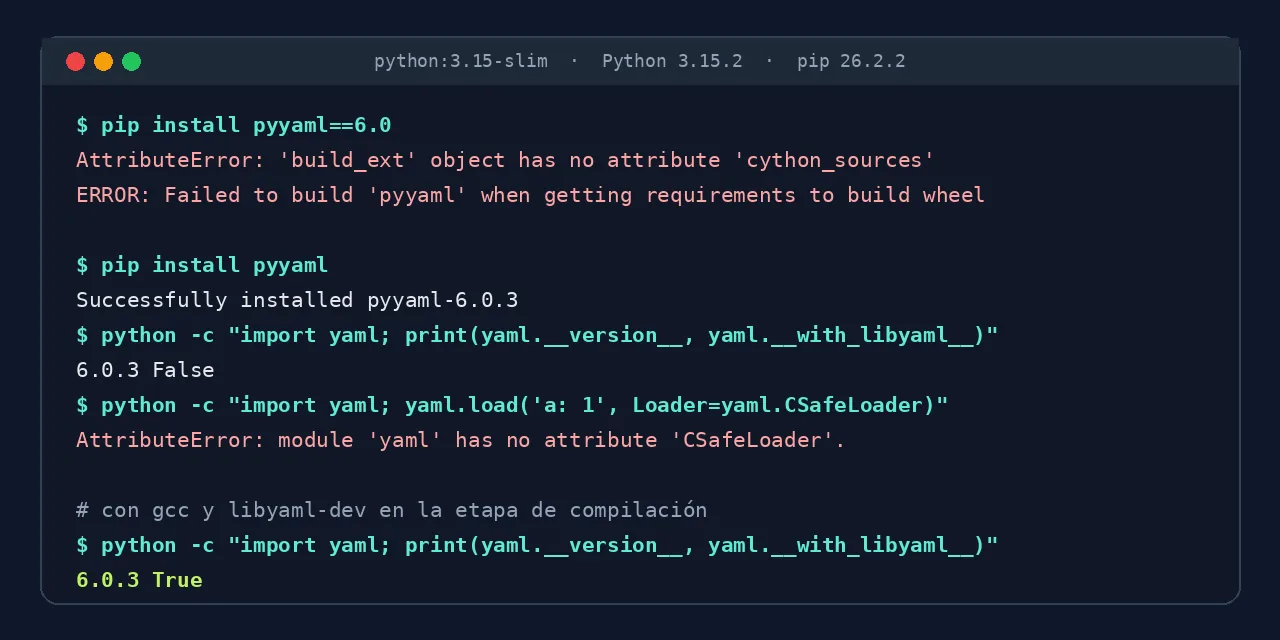
Table of contents
- Key takeaways
- Why does PyYAML fail on Python 3.15?
- Error 1: AttributeError cython_sources with pinned versions
- Error 2: module 'yaml' has no attribute 'CSafeLoader'
- Fix: build PyYAML with libyaml on python:3.15-slim
- How much performance you lose without libyaml
- Alternatives: the full image, Python 3.14 or a fallback loader
- How to catch the problem in CI before you deploy
- Frequently asked questions
- When will PyYAML publish wheels for Python 3.15?
- Does it affect yamllint and other tools that depend on PyYAML?
- Does capping Cython below 3 let you install PyYAML 6.0?
- Conclusion
- Sources
PyYAML fails on Python 3.15 because its latest release, 6.0.3, ships no cp315 wheels: pip builds it from source, and the outcome depends on the version you pinned and on the Docker image. Versions 6.0 and 5.4.1 end with AttributeError: 'build_ext' object has no attribute 'cython_sources'. Version 6.0.3 installs on python:3.15-slim without a warning, but without libyaml, and code that uses CSafeLoader stops working. This guide reproduces both errors and fixes them with a multi-stage image. I tested it on 11 November 2026 on Linux arm64 with Docker 29.5.2, Python 3.15.2 and pip 26.2.2. There is a Spanish version of this guide.
Key takeaways
python:latestandpython:slimhave pointed to Python 3.15 since October 2026, and PyYAML 6.0.3 only ships wheels up tocp314.pip install pyyaml==6.0andpyyaml==5.4.1fail on Python 3.15 withcython_sources; versions 6.0.1, 6.0.2 and 6.0.3 do build.- On
python:3.15-slim, 6.0.3 installs as pure Python:yaml.__with_libyaml__isFalseandyaml.CSafeLoaderdoes not exist. - With libyaml, loading a 377 KiB YAML file took 41 ms; without it, 299 ms.
- A multi-stage image with
gccandlibyaml-devonly in the build stage is 225 MB, against 496 MB if you leave them in the final image.
Why does PyYAML fail on Python 3.15?
It fails because pip finds no prebuilt wheel for Python 3.15 and falls back to the source distribution. The PyYAML 6.0.3 files page on PyPI[1] lists 73 files, published on 25 September 2025, with wheels from cp38 to cp314. Three open issues ask for cp315 wheels and add up to 129 reactions: #951[2], #981[3] and #994[4]. The last one puts it this way: "pyyaml is missing Python 3.15 wheels, thus blocking python 3.15 adoption".
What the source build does depends on the pinned version. This is what each one did on python:3.15-slim:
| Pinned version | Result on python:3.15-slim |
|---|---|
pyyaml==5.4.1 |
cython_sources error |
pyyaml==6.0 |
cython_sources error |
pyyaml==6.0.1, 6.0.2 |
installs as pure Python, without libyaml |
pyyaml (6.0.3) |
installs as pure Python, without libyaml |
For the rest of the release, see the summary of what is new in Python 3.15.
Error 1: AttributeError cython_sources with pinned versions
This error appears with pyyaml==6.0 and pyyaml==5.4.1, two pins that are common in older requirements.txt files. pip downloads the .tar.gz and stops before compiling:
Getting requirements to build wheel: finished with status 'error'
  error: subprocess-exited-with-error
      AttributeError: 'build_ext' object has no attribute 'cython_sources'
ERROR: Failed to build 'pyyaml' when getting requirements to build wheel
The cause is in the pyproject.toml of those versions, which asks for Cython with no version limit. pip installs Cython 3, which no longer has the attribute the old setup.py uses. It is the failure in PyYAML issue #601[5], opened in January 2022, with 112 reactions and 106 comments.
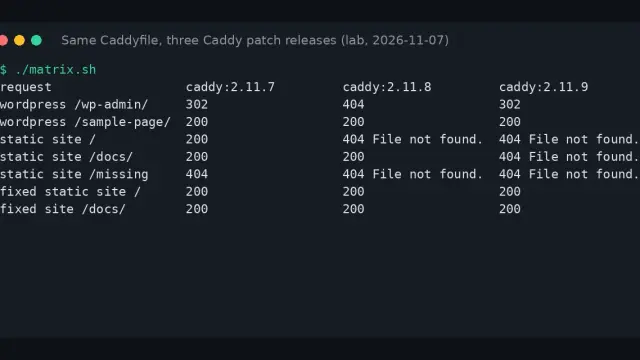
The fix is to raise the pin to pyyaml==6.0.3. You did not see this on earlier Python versions because pip downloaded a wheel and never compiled. The classic workaround of capping Cython did not work for me on 3.15: with PIP_CONSTRAINT pointing to a file containing cython<3, version 6.0 ended with the same error.
If the old pin comes from a dependency you do not control, add your own pyyaml==6.0.3 line to the constraints file and check that its code uses nothing removed in the 6 series.
Error 2: module 'yaml' has no attribute 'CSafeLoader'
This is the silent failure: on python:3.15-slim, pip install pyyaml ends with Successfully installed pyyaml-6.0.3 and nothing says the C part is missing. The slim image has no compiler and no libyaml headers, so PyYAML builds a 45 KB wheel from Python alone. Check it with one line:
python -c "import yaml; print(yaml.__version__, yaml.__with_libyaml__)"
In my test it printed 6.0.3 False. From then on, code that asks for the C loader fails at run time, not at install time:
AttributeError: module 'yaml' has no attribute 'CSafeLoader'.
Did you mean '.SafeLoader' instead of '.CSafeLoader'?

ImportError: cannot import name 'CSafeLoader' from 'yaml'
The first message comes from yaml.CSafeLoader and the second from from yaml import CSafeLoader. The same happens with CLoader, CDumper and CSafeDumper.
Fix: build PyYAML with libyaml on python:3.15-slim
PyYAML links against libyaml when it finds a compiler and the headers at build time. On Debian 13, the base of python:3.15-slim, those are the gcc, libc6-dev and libyaml-dev packages. With them installed, the wheel went from 45 KB to 635 KB and yaml.__with_libyaml__ returned True.
To keep the compiler out of production, build the wheel in one stage and copy it into the final image, which only needs the libyaml-0-2 library:
FROM python:3.15-slim AS build
RUN apt-get update \
 && apt-get install -y --no-install-recommends \
      gcc libc6-dev libyaml-dev \
 && rm -rf /var/lib/apt/lists/*
RUN pip wheel --no-cache-dir --wheel-dir /wheels pyyaml==6.0.3

FROM python:3.15-slim
RUN apt-get update \
 && apt-get install -y --no-install-recommends libyaml-0-2 \
 && rm -rf /var/lib/apt/lists/*
COPY --from=build /wheels /wheels
RUN pip install --no-cache-dir --no-index --find-links /wheels \
      pyyaml==6.0.3 \
 && rm -rf /wheels
The --no-index option forces pip to use the copied wheel and to fail if it is missing, instead of rebuilding without libyaml. The resulting image printed 6.0.3 True and loaded a document with CSafeLoader. Its size barely moves from the base, while leaving gcc in the final image more than doubles it:
The multi-stage Docker builds lab walks through the pattern with another example.
How much performance you lose without libyaml
Without libyaml, PyYAML works the same but slower, so the cost depends on how much YAML you process. I measured loading and dumping a document shaped like a Compose file: 2000 services, 22,001 lines and 377 KiB. The C loader was 7.3 times faster and the C dumper 4.4 times:
For a service that reads one configuration file at startup, a 258 ms difference does not justify a build stage. For a tool that processes thousands of manifests, it does.
Alternatives: the full image, Python 3.14 or a fallback loader
Three ways out need no apt-get in the Dockerfile, each with its own cost:
- Full image:
python:3.15already hasgccandlibyaml-dev, so 6.0.3 builds with libyaml with no extra steps. It is 1.64 GB against 208 MB for slim. - Python 3.14: on
python:3.14-slim(3.14.10), pip downloads a 766 KBcp314wheel with libyaml included. It works if you need nothing from 3.15, andpyyaml==6.0fails there too, because that version has nocp314wheel either. - Fallback loader: if performance does not matter to you, make the code accept both variants.
The fallback loader is two lines, and they work with and without libyaml:
import yaml

Loader = getattr(yaml, "CSafeLoader", yaml.SafeLoader)

with open("config.yaml") as config_file:
    data = yaml.load(config_file, Loader=Loader)
My recommendation is the multi-stage image when YAML is on the critical path, and the fallback loader everywhere else. If you are also choosing a base image, the comparison of Wolfi, Alpine and distroless measures sizes and vulnerabilities.
How to catch the problem in CI before you deploy
The risk with this change is that the install succeeds and the failure shows up in production. Two checks turn it into a build error. The first one forbids building from source:
pip install --only-binary=:all: -r requirements.txt
On Python 3.15 it ends with No matching distribution found for pyyaml, a clearer message than an AttributeError at run time. The second one checks the built image:
python -c "import yaml, sys; sys.exit(not yaml.__with_libyaml__)"
The command exits with code 1 when libyaml is missing, so you can make it the last RUN in the Dockerfile.
Frequently asked questions
When will PyYAML publish wheels for Python 3.15?
There is no date. As of 11 November 2026, issues #951, #981 and #994 are still open and the latest release on PyPI is 6.0.3. When the wheels arrive, pip install pyyaml on the slim image will download one with libyaml and the second error will go away, but the 6.0 and 5.4.1 pins will keep failing.
Does it affect yamllint and other tools that depend on PyYAML?
It depends on whether they use the C loaders. yamllint==1.35.1 installed and linted a file on python:3.15-slim with no errors, because it works with the pure Python build. Tools that import CSafeLoader with no alternative fail with the second error.
Does capping Cython below 3 let you install PyYAML 6.0?
On Python 3.15 it did not work for me: with cython<3 in PIP_CONSTRAINT, installing pyyaml==6.0 ended with the same cython_sources. Moving to 6.0.3 is the only fix I verified.
Conclusion
Both errors share one origin, the missing cp315 wheels, and have different fixes. For cython_sources, raise the pin to pyyaml==6.0.3. For CSafeLoader, build with gcc and libyaml-dev in a build stage and keep libyaml-0-2 in the final image. Before changing anything, run python -c "import yaml; print(yaml.__with_libyaml__)" in your current image: if it prints False, your install is already using the slow build.
Sources: [1] PyYAML 6.0.3, files published on PyPI[1], [2] PyYAML, issue #951: Python 3.15 support[2], [3] PyYAML, issue #981: Publish wheels for Python 3.15[3], [4] PyYAML, issue #994: Please publish Python 3.15 wheels[4], [5] PyYAML, issue #601: AttributeError cython_sources[5], [6] python image tags on Docker Hub[6], [7] PyYAML documentation on the LibYAML bindings[7].
Sources
Source code
Access all the source code for this post on GitHub.
View on GitHub