How to fix bitnami/minio not found in Docker and the Helm chart
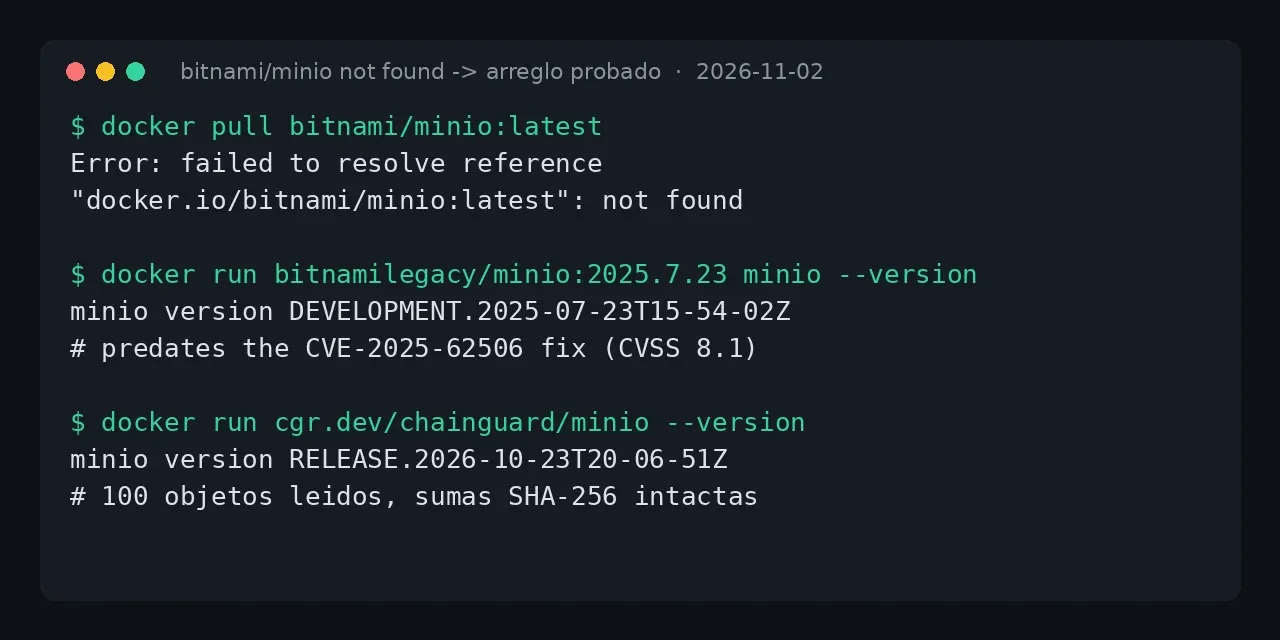
Table of contents
- Key takeaways
- What does the bitnami/minio not found error mean?
- Why is bitnamilegacy/minio not the fix?
- Immediate fix: which MinIO image to use today
- How do you fix it in the Bitnami Helm chart?
- How to run the Chainguard image inside the chart
- Do I lose my data when I switch images?
- When migrating off MinIO pays off
- Frequently asked questions
- Does docker login fix it?
- Can I keep using the official Bitnami chart?
- What about the Bitnami Secure image?
- Conclusion
- Sources
The bitnami/minio not found error means Bitnami deleted that repository from Docker Hub and left it with zero tags, so any pull fails. The advice you will see most, swapping bitnami/ for bitnamilegacy/, does start, but it leaves you a July 2025 build that predates the fix for CVE-2025-62506, a privilege escalation rated 8.1 out of 10. The maintained way out is cgr.dev/chainguard/minio or pgsty/silo. I tested it on 2 November 2026 on arm64 Linux with Docker 29.5.2, Compose v2.40.3 and Helm v4.3.1, with a Bitnami chart on a kind cluster and 100 real objects. There is a Spanish version of this guide.
Key takeaways
bitnami/minio,bitnami/minio-clientandbitnami/minio-object-browserhave 0 tags on Docker Hub, even though the server repository has 58 million pulls.bitnamilegacy/miniofroze at2025.7.23-debian-12-r5on 19 August 2025, and its binary isDEVELOPMENT.2025-07-23, older than theRELEASE.2025-10-15T17-29-55Zthat fixes CVE-2025-62506.cgr.dev/chainguard/minioservesRELEASE.2026-11-12T01-15-23Zandpgsty/siloservesRELEASE.2026-11-12as of 16 November; both pull without an account, ship arm64 and amd64, and that day I migrated thebitnamilegacydata to them again without losing an object.- The
bitnamicharts/minio17.0.21 chart leaves pods inImagePullBackOff; the fix is to override the images and accept the unrecognized ones. - I migrated 100 objects from
bitnamilegacy/minioto both maintained images, in Docker and in Kubernetes, with every SHA-256 sum identical.
What does the bitnami/minio not found error mean?
It means the repository no longer publishes any image: it exists, but it has zero tags, so the registry cannot resolve any reference. This is the exact message I got on 2 November 2026, first with docker pull and then with docker compose up:
$ docker pull bitnami/minio:latest
Error response from daemon: failed to resolve reference
"docker.io/bitnami/minio:latest": docker.io/bitnami/minio:latest:
not found

$ docker compose up -d
 minio Error failed to resolve reference
 "docker.io/bitnami/minio:2025.7.23-debian-12-r5": not found
In your terminal each message is a single line; I wrapped them here to fit. It does not matter which tag you ask for, because none is left.
The Docker Hub API confirms it: hub.docker.com/v2/repositories/bitnami/minio/tags/ returns count: 0, and the same holds for bitnami/minio-client and bitnami/minio-object-browser, the web console image. The server repository is still marked active with 58,059,520 historical pulls, but with no tag to serve. It is the same pattern I documented for the bitnami/postgresql not found error: of 14 popular bitnami repositories, 8 lost every tag.
Why is bitnamilegacy/minio not the fix?
Because it starts, but it leaves you an old binary with a known security flaw. When Bitnami retired its free catalogue, it copied the last images to the bitnamilegacy namespace. The container itself warns about this on startup, with this literal text in its logs:
NOTICE: Starting August 28th, 2025, only a limited subset of
images/charts will remain available for free. Backup will be
available for some time at the 'Bitnami Legacy' repository.
"Backup will be available for some time" is not a maintenance promise. bitnamilegacy/minio stopped at the 2025.7.23-debian-12-r5 tag, published on 19 August 2025, and bitnamilegacy/minio-client at 2025.7.21-debian-12-r3. Pull it and ask for its version:
docker run --rm bitnamilegacy/minio:2025.7.23-debian-12-r5 \
  minio --version
The answer is minio version DEVELOPMENT.2025-07-23T15-54-02Z, not a RELEASE. The latest tag is older still, DEVELOPMENT.2025-05-24. Both predate RELEASE.2025-10-15T17-29-55Z, which fixes CVE-2025-62506[1].
That advisory, rated high at 8.1 out of 10 (CVE:3.1/AV:N/AC:L/PR:L/UI:N/S:U/C:H/I:H/A:N), describes a privilege escalation: a service account with a restricted policy can create itself a second account with no restrictions and inherit the parent's permissions. The advisory is blunt about the remedy: "No workarounds available. You can upgrade to the latest version immediately". Staying on bitnamilegacy is the opposite of upgrading.
Immediate fix: which MinIO image to use today
Change the image: line in your compose file to one of these two. I checked that both pull without an account, ship arm64 and amd64 variants and start on the data of an earlier MinIO:
| Image | Version tested | Tags | Maintained by |
|---|---|---|---|
cgr.dev/chainguard/minio:latest |
RELEASE.2026-11-12T01-15-23Z | latest only |
Chainguard, from its fork |
pgsty/silo:RELEASE.2026-11-12T00-00-00Z |
RELEASE.2026-11-12 | per version | Pigsty, community fork |
The Chainguard image is the most direct replacement: its entrypoint is already the minio binary, so your usual command: works. This is the service I left running, with the credentials in a .env file next to it:
services:
  minio:
    image: cgr.dev/chainguard/minio:latest
    command: server /data --console-address ":9001"
    environment:
      MINIO_ROOT_USER: ${MINIO_ROOT_USER}
      MINIO_ROOT_PASSWORD: ${MINIO_ROOT_PASSWORD}
    volumes:
      - minio_data:/data
    ports:
      - "127.0.0.1:9000:9000"
      - "127.0.0.1:9001:9001"
    restart: unless-stopped
The Bitnami image stored data in /bitnami/minio/data and ran as root; the Chainguard one uses /data and user 65532. If you reuse the earlier volume, change its owner first, or MinIO stops with file access denied:
docker compose down
docker run --rm -v minio_data:/data \
  mirror.gcr.io/library/busybox:1.37 chown -R 65532:65532 /data
docker compose up -d
After the change, /minio/health/live returned 200 and I downloaded the 100 test objects with SHA-256 sums identical to the originals. Chainguard only publishes latest and latest-dev on its free plan: asking for a per-version tag returns 404, so pin it by digest (@sha256:18c8fa28… on 16 November 2026) if you want reproducible builds. If you prefer per-version tags and the full web console, pgsty/silo runs as root and needs no chown; the quay.io/minio/minio 401 error walks through both images in Compose, Kubernetes and Helm.
How do you fix it in the Bitnami Helm chart?
The oci://registry-1.docker.io/bitnamicharts/minio chart stopped at version 17.0.21, published on 14 August 2025, and points at images that no longer exist. A helm install leaves the pods in ImagePullBackOff, and the pod events explain why:
Failed to pull image "docker.io/bitnami/minio:2025.7.23-debian-12-r3":
failed to resolve reference ...: not found
Error: ImagePullBackOff
The minimal patch repeats the Docker pattern: override each image's repository with its bitnamilegacy copy. There are three, because the chart runs a server, a client and a console:
helm upgrade my-minio \
  oci://registry-1.docker.io/bitnamicharts/minio --version 17.0.21 \
  --reuse-values \
  --set image.repository=bitnamilegacy/minio \
  --set clientImage.repository=bitnamilegacy/minio-client \
  --set console.image.repository=bitnamilegacy/minio-object-browser
The pods go to Running, but the notes print SECURITY WARNING: Original containers have been substituted and list the three "Unrecognized images". The binary inside is still DEVELOPMENT.2025-07-23, with CVE-2025-62506 unfixed. I checked this on a kind v0.33.0 cluster with Kubernetes v1.37.0, without deploying anything to production.
How to run the Chainguard image inside the chart
An image outside Bitnami's catalogue needs three adjustments, and I found them by trial and error. Keep them in a chainguard-values.yaml:
image:
  registry: cgr.dev
  repository: chainguard/minio
  tag: latest
args:
  - server
  - /bitnami/minio/data
console:
  enabled: false
global:
  security:
    allowInsecureImages: true
The args is required: the chart passes no arguments to the container because the Bitnami image carries them inside, and the Chainguard image, whose entrypoint is just minio, enters CrashLoopBackOff printing its help. I disable the console because its image (minio-object-browser) is gone too. And global.security.allowInsecureImages=true is what the chart itself asks for: without it, the install fails with ERROR: Original containers have been substituted for unrecognized ones.
Apply it with helm upgrade my-minio ... --reuse-values -f chainguard-values.yaml. The pod started with Version: RELEASE.2026-10-23T20-06-51Z on the same volume, and a client read the 100 objects with their sums intact. For pgsty/silo, use the same args and allowInsecureImages, with registry set to docker.io and repository to pgsty/silo; it runs as root.
Do I lose my data when I switch images?
Not in my tests. MinIO's on-disk format is the same whatever binary wrote it, because all three images come from the same code. I wrote 100 objects with bitnamilegacy/minio and read them back unchanged with Chainguard and with Silo, both in Docker and in the Helm chart, and all 100 SHA-256 sums matched in the four cases. Back up the data directory before the switch anyway, and remember to point the new image at that same path.
When migrating off MinIO pays off
Switching images brings MinIO back to life, but the upstream code is archived and patches depend on Chainguard, on Pigsty or on you. If you set up the service with the guide to installing MinIO with Docker and use it as S3 storage for backups or attachments, you have two destinations tested on this blog.
The migration from MinIO to Garage is the lightweight option, though Garage has no versioning or bucket policies. The migration from MinIO to RustFS is the closest to MinIO, with a console, users and versioning. Stay on a fork if your application uses a feature the destination lacks, and pin the image by version or digest in that case.
Frequently asked questions
Does docker login fix it?
No. Docker Hub lists no tag for bitnami/minio, so there is nothing an account could pull. The error here is not found, not pull access denied, because the repository exists but is empty. Logging in does not change that.
Can I keep using the official Bitnami chart?
Yes, with the images substituted, but assume two things. The bitnamicharts/minio chart froze at 17.0.21, with no new versions, and any outside image requires global.security.allowInsecureImages=true, which the chart flags as a security risk. For anything beyond a test environment, a generic chart pointing at cgr.dev/chainguard/minio leaves you less locked in.
What about the Bitnami Secure image?
Bitnami still publishes MinIO in its paid catalogue, Bitnami Secure Images, which requires a subscription and authentication. I did not test it, because this guide covers the free ways out. If you already pay for that catalogue, its documentation gives the registry and credentials.
Conclusion
bitnami/minio not found has no fix on your side: Bitnami left the repository with no tags. Switching to bitnamilegacy/minio brings you back with a July 2025 binary and CVE-2025-62506 open, so it is not the fix. For the smallest change in Docker, use cgr.dev/chainguard/minio and chown the data; in Helm, override the images with args and allowInsecureImages. After that, decide whether you stay on a maintained fork or migrate to Garage or RustFS.
Sources: [1] Advisory GHSA-jjjj-jwhf-8rgr (CVE-2025-62506)[1], [2] CVE-2025-62506 on the Debian security tracker[2], [3] Bitnami, catalogue changes notice (issue 83267)[3], [4] Docker Hub, bitnamilegacy namespace[4], [5] Chainguard, MinIO image[5], [6] Pigsty, Silo fork[6], [7] MinIO, RELEASE.2025-10-15T17-29-55Z notes[7].
Sources
Source code
Access all the source code for this post on GitHub.
View on GitHub