PHP 8.6 on Docker: Maximum execution time of 30 seconds exceeded because the image is now ZTS
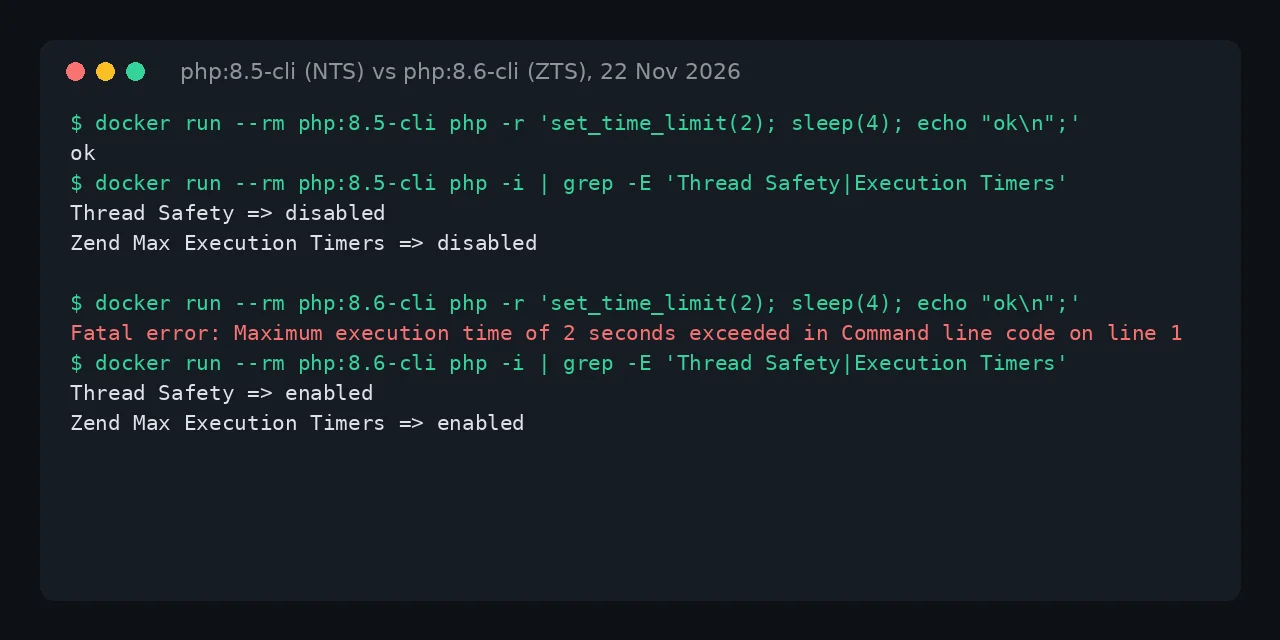
Table of contents
- Key takeaways
- Fatal error: Maximum execution time of 30 seconds exceeded on php:8.6
- Why does php:8.6 kill requests that finished on php:8.5?
- Which waits count now
- Who is affected by the change and who is not?
- How to check whether your image is ZTS
- Fix 1: raise max_execution_time to the wall-clock time you need
- The same limit per pool or per script
- Fix 2: pin php:8.5-fpm while you decide
- Request_terminate_timeout does not change with ZTS
- Gotchas I ran into
- Will the NTS build come back to php:8.6?
- Frequently asked questions
- Is this a PHP 8.6 bug or a Docker image change?
- Does it affect WordPress or Laravel on php:8.6?
- Can I get the CPU limit back without changing the image?
- Conclusion
- Sources
If your slow requests started dying with Maximum execution time of 30 seconds exceeded after moving to php:8.6 on Docker, the cause is the image and not your code: the official PHP 8.6 images are built in ZTS (Zend Thread Safety) mode, and in that mode max_execution_time counts wall-clock time, not CPU time. The fix is to raise the limit to the wall-clock time your long requests need, or to pin php:8.5-fpm until you choose to migrate. I reproduced it on 22 November 2026 on Docker 29.5.2 on arm64, with php:8.5-fpm and php:8.6-fpm behind nginx. This guide is also available in Spanish.
Key takeaways
- The
php:8.6-cli,8.6-fpm,8.6-fpm-alpineand8.6-apachetags ship PHP 8.6.0 in ZTS mode.php:latestpoints to the same image as8.6-cli. - A script with
sleep(40)and the default 30 s limit answeredokonphp:8.5-fpm. Onphp:8.6-fpmit died at 30 s with the error. - On 8.6,
sleep(), a slow SQL query and an HTTP call made with cURL all count. On 8.5 only CPU time counted. - With an
.inifile that setsmax_execution_time = 120, the same script finished onphp:8.6-fpm. - On 22 November 2026 there is no
php:8.6-ntstag. The two pull requests that would bring back a non-thread-safe build are still open.
Fatal error: Maximum execution time of 30 seconds exceeded on php:8.6
This is the error as PHP-FPM (FastCGI Process Manager) writes it to the container log, with php.ini-production and a script that waits 40 s:
NOTICE: PHP message: PHP Fatal error:  Maximum execution time of
30 seconds exceeded in /var/www/html/slow.php on line 2
Stack trace:
#0 /var/www/html/slow.php(2): sleep()
#1 {main}
172.26.0.3 -  22/Nov/2026:01:04:32 +0000 "GET /slow.php" 500
In your log, the first two lines are a single line. The client gets an HTTP 500 error with an empty body. The stack trace names the call the script was in when the limit ran out: sleep() here, and mysqli->query(), curl_exec() or PDOStatement->execute() in a real application.
These are the variants of the same error I saw in the lab. The number follows your limit: 30 is the default, and 60, 120 and 300 are common too.
Fatal error: Maximum execution time of 30 seconds exceeded in
/var/www/html/slow.php on line 2

PHP Fatal error:  Maximum execution time of 3 seconds exceeded in
/var/www/html/db.php on line 3

Fatal error: Maximum execution time of 2 seconds exceeded in
Command line code on line 1
The first one shows up in the browser when display_errors is on. The second comes from a script started in the terminal that queries MariaDB. The third comes from php -r.
Why does php:8.6 kill requests that finished on php:8.5?
Because the limit measures something else. In a non-thread-safe (NTS) build, PHP on Linux counts only the CPU time of the script. The set_time_limit() manual page[1] puts it this way: "Any time spent on activity that happens outside the execution of the script such as system calls using system(), stream operations, database queries, etc. is not included when determining the maximum time that the script has been running."
A ZTS build uses a different mechanism, the Zend Max Execution Timers. The max_execution_time entry in the manual[2] explains the difference: "the limit is tracked with POSIX per-thread timers that measure elapsed time, so time spent sleeping or waiting on I/O counts towards it". The time your script spends waiting for the database now counts against the limit.
Up to PHP 8.5, the official images were NTS and ZTS was a separate -zts variant. That changed with pull request 1686 in docker-library/php[3], merged on 29 September 2026. From 8.6 on, every variant is built as ZTS. PHP 8.6.0 was released on 19 November 2026 and the floating tags moved that same day.
Two commands show the change. The script sets a 2 s limit and sleeps for 4 s:
docker run --rm php:8.5-cli \
  php -r 'set_time_limit(2); sleep(4); echo "ok\n";'
docker run --rm php:8.6-cli \
  php -r 'set_time_limit(2); sleep(4); echo "ok\n";'
The first one prints ok, because sleeping uses no CPU. The second one ends with Fatal error: Maximum execution time of 2 seconds exceeded in Command line code on line 1 and exit code 255.
Which waits count now
I tested four kinds of wait with a 3 s limit and a 6 s wait. The first three rows are requests to PHP-FPM through nginx 1.31.9; the last one is a terminal script against MariaDB 11.8.9:
| What the script does | php:8.5 (NTS) | php:8.6 (ZTS) |
|---|---|---|
sleep(6) |
Finishes | Fatal error |
| Loop that burns CPU | Fatal error | Fatal error |
curl_exec() to a slow server |
Finishes | Fatal error |
mysqli with SELECT SLEEP(6) |
Finishes | Fatal error |
The second row confirms that the CPU limit still works the same way on both. The other three are the change: every wait outside PHP counts on 8.6.
Who is affected by the change and who is not?
You are affected if you build on php:8.6-* or on a floating tag (php:latest, php:fpm, php:apache, php:8) and a web request spends longer waiting than the value of max_execution_time. The usual cases are a report with a one-minute SQL query, an import that calls an external API and an export that compresses large files. With the default 30 s limit, anything that used to take more than 30 s of wall-clock time while using little CPU now fails.
You are not affected in these cases, which I checked in the same lab:
- Terminal scripts with no limit of their own: the command-line interface (CLI) forces
max_execution_timeto 0, even with aphp.inithat sets 30. A cron job or a queue worker does not change, unless it callsset_time_limit()or runs with-d max_execution_time php:8.5and older images: they are still NTS- Requests that burn CPU: a computation loop already died at the limit on 8.5
Nicolas Grekas, of the Symfony team, described the same effect when he moved an application from PHP-FPM to FrankenPHP, which is also ZTS. In php-src issue 25499[4] he reports that requests waiting for the lock on their session file started dying at 10 s.
How to check whether your image is ZTS
Two lines of php -i tell you. Run this against the tag you use:
docker run --rm php:8.6-fpm php -i \
  | grep -E 'Thread Safety|Execution Timers'
On php:8.6-fpm the output is the one below. On php:8.5-fpm both lines say disabled:
Thread Safety => enabled
Zend Max Execution Timers => enabled
If Zend Max Execution Timers says enabled, your limit counts wall-clock time. I saw it in the four variants I tested: 8.6-cli, 8.6-fpm, 8.6-fpm-alpine and 8.6-apache. From PHP, the PHP_ZTS constant is true on those images.
Fix 1: raise max_execution_time to the wall-clock time you need
The fix that keeps you on 8.6 is to give your requests the wall-clock time they use. Create a zz-timeouts.ini file with the new limit:
max_execution_time = 120
Mount it in the directory PHP reads at startup. In Docker Compose that is one volumes line in the PHP service:
services:
  php86:
    image: php:8.6-fpm
    volumes:
      - ./www:/var/www/html
      - ./zz-timeouts.ini:/usr/local/etc/php/conf.d/zz-timeouts.ini:ro
Recreate the container with docker compose up -d and check the value PHP-FPM sees:
docker compose exec php86 php-fpm -i | grep '^max_execution_time'
The output must be max_execution_time => 120 => 120. With that file, the sleep(40) script that died at 30 s answered ok after 40 s, limit=120 on php:8.6-fpm. Pick the value from your longest legitimate request, measured in wall-clock time, and do not set it to 0 on a web server.
The same limit per pool or per script
If only one PHP-FPM pool serves the long requests, set the limit in its configuration. I added this file to /usr/local/etc/php-fpm.d/ and reloaded PHP-FPM:
[www]
php_admin_value[max_execution_time] = 12
With that test value, a request with sleep(8) finished and one with sleep(14) died at 12 s. For a single long script, call set_time_limit() at the top: with set_time_limit(10), a sleep(6) finished on php:8.6-fpm.
Remember that the proxy has its own clock. The nginx documentation[5] sets fastcgi_read_timeout to 60 s by default, so a request that takes longer needs that value raised as well.
Fix 2: pin php:8.5-fpm while you decide
If you do not want to review your limits this week, go back to 8.5 with an explicit tag. PHP 8.5 keeps the previous behaviour and received version 8.5.13 on 19 November 2026:
FROM php:8.5-fpm
In my lab, php:8.5-fpm (PHP 8.5.13, NTS) completed the 40 s script with the default 30 s limit. This fix matters above all if your FROM uses php:fpm, php:apache or php:latest, because those tags change minor version without notice.
There are more reasons to wait. The 8.6 images also ship without pecl and mbstring, and the stable releases of redis, apcu and imagick do not compile yet. The guide to the pecl: not found error on php:8.6 covers both problems. Keep 8.5 current with its security patches, as described in the guide to checking the October PHP CVEs.
Request_terminate_timeout does not change with ZTS
The PHP-FPM request_terminate_timeout directive already measured wall-clock time on 8.5 and behaves the same on 8.6. With request_terminate_timeout = 5 and a sleep(8), both versions killed the worker and nginx returned a 502 error:
WARNING: [pool www] child 2764, script '/var/www/html/t.php'
(request: "GET /t.php?mode=sleep&wait=8") execution timed out
(5.020630 sec), terminating
WARNING: [pool www] child 2764 exited on signal 15 (SIGTERM)
The difference from the error in this guide is in the message and in the status code. request_terminate_timeout writes execution timed out and the client sees a 502, because PHP-FPM kills the worker. max_execution_time writes Maximum execution time of … seconds exceeded and the client sees a 500. If your log shows the first one, the move to ZTS is not the cause.
Gotchas I ran into
The first one is that the unconfigured image hides the failure. The official images ship no php.ini, and with the built-in defaults display_errors is on and log_errors is off. The result on php:8.6-fpm was an HTTP 200 response with the error text in the body and no error line in the log. Only after copying php.ini-production to php.ini did I get the 500 and the message in the log.
The second one is where to look. The message goes to the PHP container log (docker logs), not to the nginx log. In my test, the nginx log only recorded the request with its 500 status.
The third one is that the cut does not always arrive when the limit is reached. With a 3 s limit, sleep(6) was interrupted at 3 s. curl_exec() against a server that took 6 s was not interrupted: the request lasted the full 6 s and the error was raised when the call returned. The visitor waits the whole time and still gets the error.
The fourth one is chroot(). On php:8.5-cli, function_exists("chroot") returns true; on php:8.6-cli it returns false. A terminal script that uses it fails with Call to undefined function.
Will the NTS build come back to php:8.6?
On 22 November 2026 nothing is decided. Issue 1719 in docker-library/php[6], opened on 19 November, asks the maintainers to reconsider the ZTS-only images. That day it has 70 thumbs up and 42 comments. Two proposals came out of it, and both are still open:
- Pull request 1721[7]: restores NTS as the default build for 8.6 and keeps ZTS as the
-ztsvariant - Pull request 1722[8]: written by Tianon Gravi, a maintainer of the image, it adds an
ntsvariant for 8.6 only and leaves the default build alone
Tianon Gravi explained his position in the issue. He is willing to add the variant, but not to flip the default build again. In his words: "I'm somewhat open to introducing an "NTS" build just for 8.6, but changing the default back to NTS is going to cause the same disruption in the opposite direction". That same day, Docker Hub lists 342 tags that contain 8.6 and none that contains nts; php:8.6-nts and php:8.6-zts return a 404.
If 1722 is merged, you will be able to switch your FROM to the nts variant and get the CPU limit back. If 1721 is merged, php:8.6-fpm will be NTS again and the limit will measure CPU again without any change on your side. Before you decide, repeat the two docker run commands from this guide with a freshly pulled image.
Frequently asked questions
Is this a PHP 8.6 bug or a Docker image change?
It is the image. PHP 8.6 built without thread safety keeps the CPU limit: the third-party image ghcr.io/rapira-rs/php:8.6-nts, with PHP 8.6.0 NTS, printed ok with the same sleep(4) script. That image ships the CLI only, with no php-fpm, so it does not replace php:8.6-fpm. I used it to tell the two causes apart.
Does it affect WordPress or Laravel on php:8.6?
It affects any application whose web request waits longer than the limit. The framework does not matter: what counts is the wall-clock time between the start of the request and its end. Terminal tasks such as wp cron event run or php artisan queue:work use the CLI, where the limit is 0, unless the code calls set_time_limit().
Can I get the CPU limit back without changing the image?
Not with a configuration option. The mechanism is chosen when PHP is compiled, and php -i shows it on the Zend Max Execution Timers line. On php:8.6 the alternatives are to raise the limit, or to build your own image without --enable-zts, which I have not tested.
Conclusion
Maximum execution time of 30 seconds exceeded on php:8.6 does not mean your application got slower. It means the limit now includes the waits, because the official image is ZTS from 8.6 on. Check it with php -i, measure how long your long requests take in wall-clock time and raise max_execution_time with a file in conf.d, or pin php:8.5-fpm and migrate once you have reviewed the limits.
The change reaches you with a docker pull if you use floating tags. The same happened with PostgreSQL, as the guide to postgres:latest jumping to 19 describes: pin the minor version in your FROM and decide yourself when it changes.
Sources: [1] docker-library/php, issue 1719: reconsider ZTS-only builds for 8.6[6], [2] docker-library/php, PR 1686: all 8.6 images are built as ZTS[3], [3] docker-library/php, PR 1721: restore NTS as the default for 8.6[7], [4] docker-library/php, PR 1722: nts variant for 8.6[8], [5] php-src, issue 25499: max_execution_time counts wall time on ZTS builds[4], [6] PHP manual, set_time_limit()[1], [7] PHP manual, max_execution_time directive[2], [8] nginx, fastcgi_read_timeout directive[5], [9] Docker Hub, tags of the PHP official image[9].
Sources
Source code
Access all the source code for this post on GitHub.
View on GitHub