pecl: not found in the php:8.6 Docker image: how to install redis, apcu and imagick
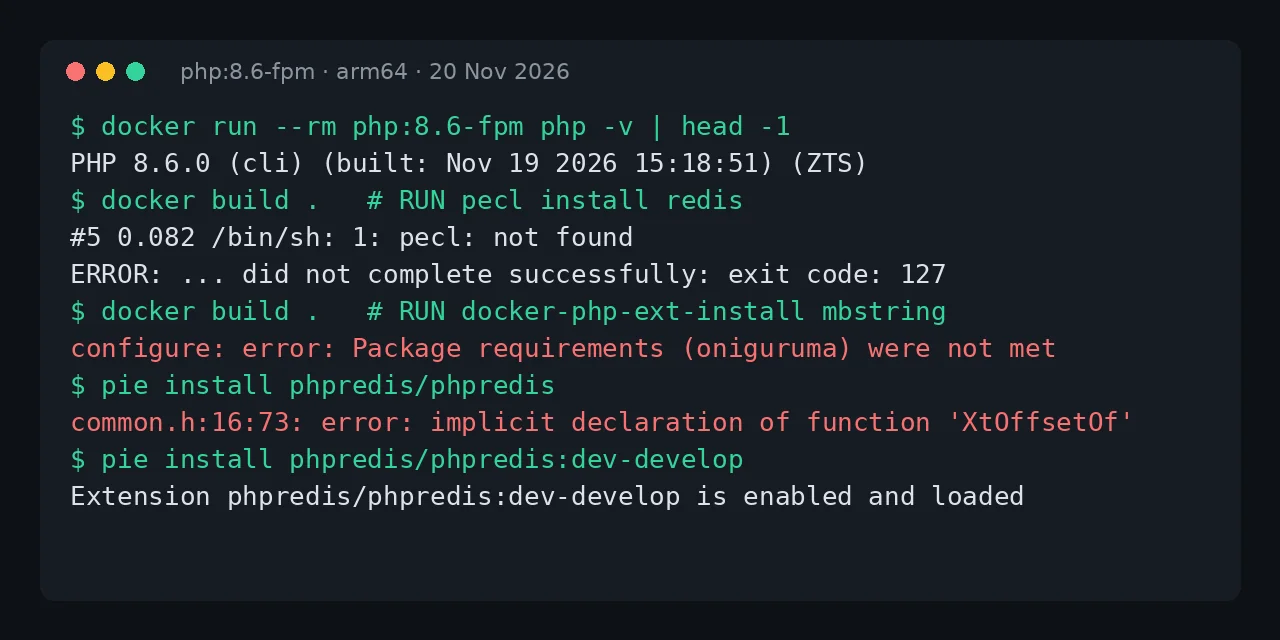
Table of contents
- Key takeaways
- Why pecl: not found appears on php:8.6
- The other two changes in the php:8.6 image
- How to install extensions on php:8.6 with PIE
- Which extensions compile on PHP 8.6 today
- install-php-extensions does not solve it either
- WordPress and Nextcloud on PHP 8.6
- Which tag to use in production
- Frequently asked questions
- Does getting pecl back on php:8.6 help?
- Are the development branches safe for production?
- Does the same apply to amd64?
- Conclusion
- Sources
If your Dockerfile fails with pecl: not found after switching to php:8.6, you broke nothing: the official PHP 8.6 images no longer include pecl or pear, and they no longer ship mbstring compiled in. The tool that replaces PECL is PIE (PHP Installer for Extensions). But on 20 November 2026 the stable releases of redis, apcu and imagick do not compile against PHP 8.6, so pin php:8.5 in production and keep 8.6 for testing. I reproduced it in Docker on arm64 the day after the release, with real WordPress and Nextcloud installs. This guide is also available in Spanish.
Key takeaways
- PHP 8.6.0 shipped on 19 November 2026. The
php:8.6,8.6-fpmand8.6-apacheimages have nopecl,pearormbstring, and every variant is built as ZTS (thread safe). RUN pecl install redisends with/bin/sh: 1: pecl: not foundand exit code 127. Onphp:8.5-fpmthe same command still exists.- Of 8 PECL extensions I tried with PIE 1.5.5, only mongodb 2.5.8 installed as a stable release. Five failed to compile, Xdebug 3.5.3 requires PHP below 8.6 and igbinary has no installable package.
- The development branches of phpredis, apcu, imagick, memcached and Xdebug do compile and load. They are not published releases.
- WordPress 7.1.5 runs on PHP 8.6 with deprecation notices. Nextcloud 35.0.3 refuses to start with a 500 error.
Why pecl: not found appears on php:8.6
The error appears because the image no longer contains the binary. This is what BuildKit prints for a two-line Dockerfile on php:8.6-fpm:
#5 [2/2] RUN pecl install redis && docker-php-ext-enable redis
#5 0.082 /bin/sh: 1: pecl: not found
The step ends with exit code: 127, the code the shell returns when it cannot find a command. The official image maintainers dropped the --with-pear flag for PHP 8.6 in docker-library/php PR 1654[1], merged on 25 June 2026. Without PEAR there is no pecl. The decision follows the PHP RFC that adopts PIE and deprecates PECL[2], accepted 36 to 0 in September 2025: "PECL becomes formally deprecated as the recommended installation method for non-bundled PHP Modules and Zend Extensions."
It is not coming back. A user reported it in issue 1682[3] against the first RC. Maintainer Tianon Gravi answered: "Yep, this is intentional and this time it's for keeps." The PHP 8.5 and older images keep pecl, because the change only applies from 8.6 on.
The other two changes in the php:8.6 image
pecl is not the only thing missing. I compared php:8.5-fpm (8.5.13) and php:8.6-fpm (8.6.0) with the same commands:
| Check | php:8.5-fpm | php:8.6-fpm |
|---|---|---|
pecl and pear |
Yes | No |
mbstring in php -m |
Yes | No |
| Build mode | NTS | ZTS |
| Extension directory | no-debug-non-zts-20250925 |
no-debug-zts-20261112 |
The mbstring extension is no longer compiled in because the image stopped installing oniguruma, the regular expression library behind mb_ereg(). PHP 8.6 deprecates those functions, according to the PHP 8.6 release notes[4]. If you install it the old way, configure fails:
checking for oniguruma... no
configure: error: Package requirements (oniguruma) were not met:
Package 'oniguruma', required by 'virtual:world', not found
ZTS comes from PR 1686[5]: from 8.6 on every variant is built with threads, cli, fpm and apache included. Extensions compiled in your Dockerfile do not notice. A .so copied from an NTS image or another version does not load, so rebuild it.
How to install extensions on php:8.6 with PIE
PIE installs by copying one binary from its official image, and it needs libtool to compile. Without libtool, PIE 1.5.5 warns The following build tools are missing: libtoolize/glibtoolize and the build fails later. This Dockerfile builds on php:8.6-fpm on 20 November 2026:
FROM php:8.6-fpm
COPY --from=ghcr.io/php/pie:bin /pie /usr/bin/pie
RUN apt-get update \
 && apt-get install -y --no-install-recommends \
      libtool git unzip libmagickwand-dev \
 && rm -rf /var/lib/apt/lists/*
RUN docker-php-ext-configure mbstring --disable-mbregex \
 && docker-php-ext-install mbstring
RUN pie install phpredis/phpredis:dev-develop \
 && pie install apcu/apcu:dev-master \
 && pie install imagick/imagick:dev-master
The mbstring line avoids oniguruma with --disable-mbregex. With it, mb_strlen() works and mb_ereg() no longer exists.
If your code calls mb_ereg(), install libonig-dev and build without that flag, knowing the function is already deprecated. PIE enables each extension when it installs it, so you do not need docker-php-ext-enable. Check the result like this:
docker build -t php86-ext .
docker run --rm php86-ext php -m | grep -E '^(mbstring|redis|apcu|imagick)$'
docker run --rm php86-ext php -r 'echo phpversion("redis"), PHP_EOL;'
In my test all four extensions appear, and phpversion("redis") returns 6.3.0RC1. The apcu version is 5.1.29-dev. These are development branches taken on 20 November: another build on another day can pull different code.
Which extensions compile on PHP 8.6 today
The fix above uses development branches because the stable releases do not compile. I tried each extension with pie install and its latest stable release, then with its main branch:
| Extension | Stable release | Stable result | Development branch |
|---|---|---|---|
| mongodb | 2.5.8 | Compiles and loads | Not needed |
| redis | 6.3.0 | Compile error | Compiles |
| apcu | 5.1.28 | Compile error | Compiles |
| imagick | 3.8.1 | Compile error | Compiles |
| memcached | 3.4.0 | Compile error | Compiles |
| msgpack | 3.0.1 | Compile error | Not tried |
| xdebug | 3.5.3 | PIE refuses it | Compiles |
| igbinary | None | No installable package | No package |
The compile errors come from macros and functions PHP 8.6 removed from its internal API, such as XtOffsetOf, zval_dtor and INI_STR. This is how phpredis 6.3.0 fails, with the compiler's trailing hint trimmed from each line:
common.h:16:73: error: implicit declaration of function 'XtOffsetOf'
redis_array.c:69:9: error: implicit declaration of function 'zval_dtor'
library.c:142:53: error: implicit declaration of function 'INI_STR'
Xdebug never reaches the compiler, because its package declares a version limit. PIE answers: Cannot use xdebug/xdebug's latest version 3.5.3 as it requires php >=8.0,<8.6 which is not satisfied by your platform. The extensions bundled with the PHP source (gd, intl, zip, bcmath, exif, mysqli, pdo_mysql, soap, pcntl and sockets) install unchanged with docker-php-ext-install.
install-php-extensions does not solve it either
mlocati's install-php-extensions script, common in Dockerfiles, works without pecl, but it downloads the same stable releases. With install-php-extensions redis apcu imagick on php:8.6-fpm, the build stopped while compiling apcu:
ERROR: `make -j18' failed
The problem is the extension code, not the installer.
WordPress and Nextcloud on PHP 8.6
WordPress starts on PHP 8.6 and Nextcloud does not. On 20 November there is no wordpress:php8.6 tag on Docker Hub, so I ran WordPress 7.1.5 on php:8.6-apache with MariaDB 11.
The home page, login, dashboard and Site Health returned 200 with WooCommerce, Yoast SEO, Elementor, Contact Form 7 and Wordfence active. The log only showed PHP Deprecated notices. Yoast SEO warned Calling is_subclass_of() with a string when $allow_string is false, and Elementor that a class constant is named namespace.
Nextcloud 35.0.3 checks the PHP version before loading anything and answers with an HTTP 500 error and this text:
This version of Nextcloud is not compatible with PHP>=8.6.<br/>You are currently running 8.6.0.
The block lives in lib/versioncheck.php and no configuration setting turns it off. If your Nextcloud runs on your own image built from php:*-apache with a floating tag, pin it to 8.5 before the next build. The guide to upgrade Nextcloud 35 with Docker uses the official nextcloud:35 image, which ships PHP 8.5.13 on 20 November and does not have this problem.
Which tag to use in production
Pin php:8.5 until your extensions publish a stable release for 8.6. PHP 8.5 has active support until 31 December 2027, according to endoflife.date[6], and it got the 8.5.13 security release on 19 November. If you build on php:fpm or php:latest, those tags can jump to 8.6 on any build. Change the FROM to an explicit version:
FROM php:8.5-fpm
On PHP 8.5 your pecl install keeps working, even though PECL is deprecated. To get ahead, switch to PIE on 8.5: the same COPY --from=ghcr.io/php/pie:bin works from PHP 8.1 on. Keep the image current with security releases, as the guide on checking the October PHP CVEs explains.
Frequently asked questions
Does getting pecl back on php:8.6 help?
It is not worth it. install-php-extensions downloads the PECL packages without using pecl, and apcu failed to compile the same way. Getting the tool back does not fix the code: the stable releases of redis, apcu and imagick do not compile against the PHP 8.6 API, whether they come from PECL or PIE.
Are the development branches safe for production?
No. They compile and load, but they are unreleased code. Use them to test your application on PHP 8.6 and go back to a stable release as soon as a compatible one ships. With PIE, drop the :dev-develop or :dev-master suffix.
Does the same apply to amd64?
Yes. I checked php:8.6-cli on linux/amd64: it has no pecl or mbstring either, and it is ZTS too. The compile errors live in the extensions' C code, so they do not depend on the architecture.
Conclusion
pecl: not found on php:8.6 is a deliberate change to the official image, not a passing glitch. PIE replaces it, and mbstring builds with --disable-mbregex.
The real blocker is elsewhere: on 20 November 2026, the stable releases of redis, apcu, imagick, memcached and msgpack do not compile against PHP 8.6, and Nextcloud 35 refuses to start. Pin php:8.5 in production, test 8.6 with the development branches and rebuild when each extension publishes a compatible release. If you use Redis as an object cache, the guide to install Redis with Docker covers the server side.
Sources: [1] PHP, 8.6 release notes[4], [2] docker-library/php, PR 1654: drop --with-pear with PHP 8.6[1], [3] docker-library/php, issue 1682: no pecl in 8.6-rc[3], [4] docker-library/php, PR 1686: ZTS images from 8.6[5], [5] PHP RFC, recommend PIE and deprecate PECL[2], [6] PIE, the PHP Installer for Extensions[7], [7] endoflife.date, PHP support calendar[6], [8] Docker Hub, official PHP image[8].
Sources
Source code
Access all the source code for this post on GitHub.
View on GitHub