How to fix http: server gave HTTP response to HTTPS client on localhost:5000 after Docker 29.10
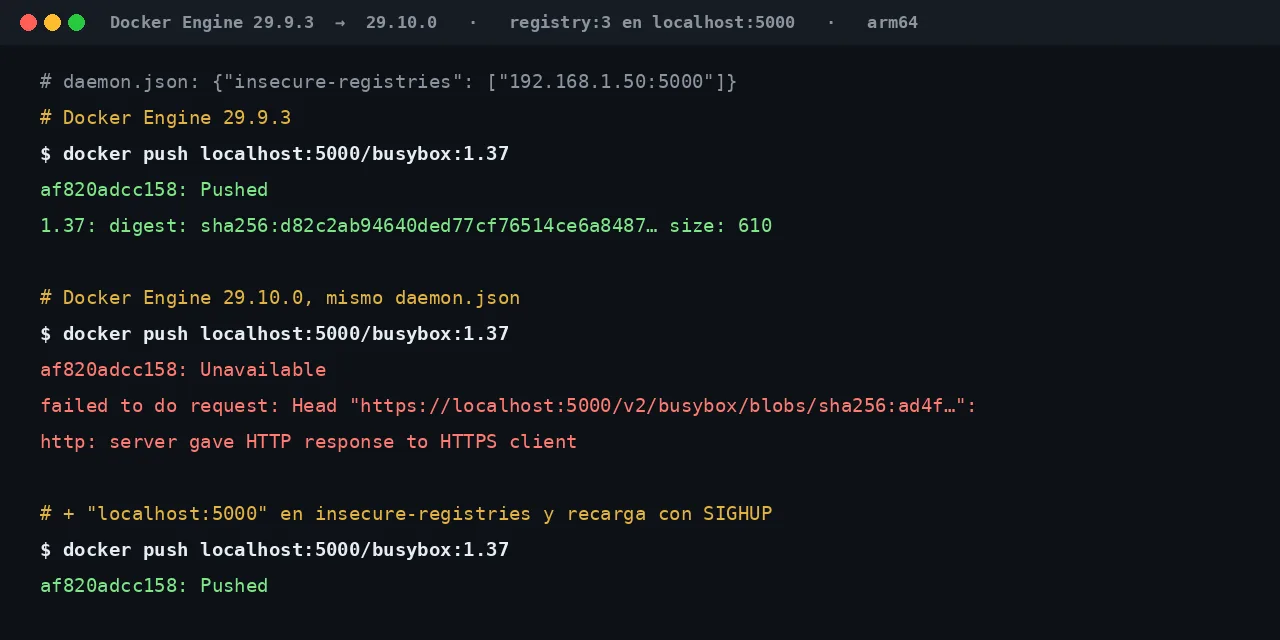
Table of contents
- Key takeaways
- Http: server gave HTTP response to HTTPS client when pushing to localhost:5000
- Why did it work yesterday and not on Docker 29.10?
- Who does the Docker 29.10 change affect, and who is safe?
- Fix 1: add localhost:5000 to insecure-registries
- Localhost:5000 and 127.0.0.1:5000 are not the same entry
- Removing the key needs a restart, not a reload
- Fix 2: TLS with a trusted certificate
- What "insecure-registries": [] does now in daemon.json
- FAQ
- Can I go back to Docker 29.9.3 to avoid the error?
- Does this error always mean Docker 29.10 is the cause?
- Do I have to restart my containers when I change insecure-registries?
- Conclusion
- Sources
If pushing to localhost:5000 fails with http: server gave HTTP response to HTTPS client after you upgrade to Docker Engine 29.10, the cause is a change in version 29.10.0: once daemon.json declares insecure-registries, Docker stops treating loopback as an insecure registry. The fix is to add localhost:5000 to that list and reload the daemon, or to serve the registry over TLS (Transport Layer Security) with a trusted certificate. I reproduced it on 18 November 2026 on arm64 Linux, with Docker Engine 29.9.3 and 29.10.0 and the same daemon.json. There is a Spanish version of this guide.
Key takeaways
- Docker Engine 29.10.0 came out on 16 November 2026 and no longer adds
127.0.0.0/8or::1/128to aninsecure-registrieslist that you declared yourself. - With
"insecure-registries": ["192.168.1.50:5000"], version 29.9.3 pushed tolocalhost:5000and 29.10.0 failed with the HTTPS error. - Adding
"localhost:5000"fixes that name but not127.0.0.1:5000; covering both takes127.0.0.0/8and::1/128. - If
daemon.jsonhas noinsecure-registrieskey, nothing changes: loopback stays insecure by default. "insecure-registries": []now disables the defaults too; on 29.9.3 it had no effect.
Http: server gave HTTP response to HTTPS client when pushing to localhost:5000
This is the error you see after upgrading, with a registry that only speaks HTTP on port 5000 of the same machine. The docker push that worked on the previous version ends like this on 29.10.0:
$ docker push localhost:5000/busybox:1.37
The push refers to repository [localhost:5000/busybox]
af820adcc158: Unavailable
failed to do request: Head "https://localhost:5000/v2/busybox/blobs/
sha256:ad4f11f7c85f87c0a6d6c0fe492ad53f9cdcff6e8c88b881360c70eff701c67b":
http: server gave HTTP response to HTTPS client
Your terminal prints the last three lines as one. docker pull fails the same way with a different prefix: failed to resolve reference "localhost:5000/busybox:1.37": failed to do request: Head "https://localhost:5000/v2/busybox/manifests/1.37": http: server gave HTTP response to HTTPS client. The clue is in the address: Docker asks for https:// from a registry that answers in plain HTTP.
To confirm this is your case and not another one, look at which registries your daemon considers insecure. With the same daemon.json, 29.9.3 lists three entries and 29.10.0 lists only yours:
$ docker info | sed -n '/Insecure Registries/,/Live Restore/p'
 Insecure Registries:
  192.168.1.50:5000
  127.0.0.0/8
  ::1/128
 Live Restore Enabled: false

$ docker info | sed -n '/Insecure Registries/,/Live Restore/p'
 Insecure Registries:
  192.168.1.50:5000
 Live Restore Enabled: false
The first output is from Docker Engine 29.9.3 and the second from 29.10.0. If yours is missing 127.0.0.0/8 and ::1/128, and your local registry has no TLS, this guide is about your case.
Why did it work yesterday and not on Docker 29.10?
It worked because Docker added loopback to the insecure registry list without being asked, and since 29.10.0 it does that only when you have declared no list at all. The dockerd documentation already warned that the rule could change: "Local registries, whose IP address falls in the 127.0.0.0/8 range, are automatically marked as insecure as of Docker 1.3.2. It isn't recommended to rely on this, as it may change in the future". On 18 November 2026 that page still describes the old behavior.
The change arrived with moby pull request 53868[1], merged on 12 November 2026. Its description says the daemon added ::1/128 and 127.0.0.0/8 as insecure registries even when the user had configured their own, and that it now applies those values only when nothing is configured. The 29.10.0 release notes[2] announce it as "Potential breaking change: local registry connections".
I built the same lab on both versions to see the before and the after. Each daemon ran in a docker:29.9.3-dind or docker:29.10.0-dind container, with registry:3 (distribution 3.1.2) published on port 5000 and this daemon.json:
{
  "insecure-registries": ["192.168.1.50:5000"]
}
The 192.168.1.50:5000 entry stands in for an HTTP registry on another machine of the local network, which is the usual reason to have this key. With that file, 29.9.3 completed the push to localhost:5000:
$ docker push localhost:5000/busybox:1.37
The push refers to repository [localhost:5000/busybox]
af820adcc158: Pushed
1.37: digest: sha256:d82c2ab94640ded77cf76514ce6a8487076110505
8a4a9e51b05a8a79be97a6c size: 610
The digest is split over two lines to fit. Version 29.10.0, with the same file and the same registry, returned the error from the previous section. The same happened when I started the daemon with --insecure-registry 192.168.1.50:5000 instead of using daemon.json.
Who does the Docker 29.10 change affect, and who is safe?
It affects you when three conditions hold at once. You run Docker Engine 29.10.0 or later, your daemon declares some insecure registry, and you push to or pull from a loopback registry without trusted TLS. The common case is a server or a continuous integration (CI) runner that added the local network registry to insecure-registries long ago, and that also uses a local registry on localhost:5000 for tests.
It does not affect you in these cases, which I checked in the same lab:
- No
insecure-registrieskey: with an emptydaemon.json({}), 29.10.0 started with127.0.0.0/8and::1/128in the list and the push tolocalhost:5000worked - Local registry with trusted TLS: the daemon speaks HTTPS to it and the list plays no part
- Docker Engine 29.9.3 or earlier: the defaults are always added
The release notes put it this way: "When insecure-registries is omitted, loopback registries remain insecure by default". I did not test Docker Desktop or rootless mode, so I cannot tell you how they behave.
Fix 1: add localhost:5000 to insecure-registries
The smallest change is to declare the entry Docker no longer adds. Edit /etc/docker/daemon.json and append localhost:5000 to the list you already have:
{
  "insecure-registries": ["192.168.1.50:5000", "localhost:5000"]
}
You do not need to restart the daemon or stop your containers. I sent the daemon a SIGHUP, its log wrote Reloaded configuration and the push worked again. On a systemd server, sudo systemctl reload docker sends that same signal, because Moby's docker.service unit defines ExecReload=/bin/kill -s HUP $MAINPID:
$ docker info | sed -n '/Insecure Registries/,/Live Restore/p'
 Insecure Registries:
  localhost:5000
  192.168.1.50:5000
 Live Restore Enabled: false
$ docker push localhost:5000/busybox:1.37
The push refers to repository [localhost:5000/busybox]
af820adcc158: Pushed
Localhost:5000 and 127.0.0.1:5000 are not the same entry
The localhost:5000 entry covers that exact name and nothing else. With it in the list, pushing to 127.0.0.1:5000/busybox:1.37 and to [::1]:5000/busybox:1.37 kept failing with the same error. If your scripts mix both forms, you need the ranges. I tested each combination on 29.10.0, always next to the local network entry:
| Entry added | localhost:5000 |
127.0.0.1:5000 |
[::1]:5000 |
|---|---|---|---|
"localhost:5000" |
Works | Fails | Fails |
"127.0.0.0/8" |
Fails | Works | Fails |
"::1/128" |
Fails | Fails | Works |
"127.0.0.0/8" and "::1/128" |
Works | Works | Works |
The second row is the surprising one: the release notes name 127.0.0.0/8 as a loopback range, but with that range alone localhost:5000 kept failing. In my container, /etc/hosts maps localhost to 127.0.0.1 and to ::1 as well, and the name did not pass until both ranges were present. To restore the full previous behavior, use this list:
{
  "insecure-registries": ["192.168.1.50:5000", "127.0.0.0/8", "::1/128"]
}
With the ranges, every loopback port accepts HTTP again, not only 5000. If you use a single local registry, the localhost:5000 entry is narrower and is the one the release notes recommend.
Removing the key needs a restart, not a reload
If you would rather delete insecure-registries from the file to get the defaults back, restart the daemon. After I removed the key and sent SIGHUP, docker info still showed the previous list and the push kept failing. The defaults only came back when the daemon restarted with the key already gone from the file.
Fix 2: TLS with a trusted certificate
The fix Docker recommends is to stop depending on the list: serve the registry over HTTPS with a certificate the daemon accepts. For a registry on localhost, your own certificate authority (CA) is enough. I created the CA and a certificate for localhost and 127.0.0.1 with OpenSSL:
openssl req -x509 -newkey rsa:4096 -nodes -days 3650 \
  -keyout ca.key -out ca.crt -subj "/CN=CA del laboratorio"
openssl req -newkey rsa:2048 -nodes -keyout registry.key \
  -out registry.csr -subj "/CN=localhost"
openssl x509 -req -in registry.csr -CA ca.crt -CAkey ca.key \
  -CAcreateserial -days 825 -out registry.crt \
  -extfile <(printf 'subjectAltName=DNS:localhost,IP:127.0.0.1')
The first command creates the CA, the second creates the registry key and signing request, and the third signs the certificate with both names. Then I started registry:3 with that certificate on the same port and copied ca.crt into the directory Docker reads for that registry:
docker run -d --name registry-tls -p 5000:5000 -v /certs:/certs:ro \
  -e REGISTRY_HTTP_TLS_CERTIFICATE=/certs/registry.crt \
  -e REGISTRY_HTTP_TLS_KEY=/certs/registry.key registry:3
mkdir -p /etc/docker/certs.d/localhost:5000
cp /certs/ca.crt /etc/docker/certs.d/localhost:5000/ca.crt
Before I copied the CA, the push failed with tls: failed to verify certificate: x509: certificate signed by unknown authority. After copying it, the push worked without restarting or reloading the daemon, with 192.168.1.50:5000 as the only insecure-registries entry. The Docker certificates documentation[3] explains that the directory is named after the registry, and I checked it: pushing to 127.0.0.1:5000 kept failing until it had its own directory.
If the registry is going to leave the machine, put TLS on a reverse proxy with a public certificate. The private Docker image registry guide sets it up with Traefik and Docker Compose.
What "insecure-registries": [] does now in daemon.json
An empty list is no longer the same as leaving the key out. On 29.10.0, "insecure-registries": [] leaves docker info with no entries, and pushing to localhost:5000 and to 127.0.0.1:5000 fails with the HTTPS error. On 29.9.3, the same file left 127.0.0.0/8 and ::1/128 in the list and the push worked.
It is the way to require TLS on loopback too, and it did not exist before. The pull request states one limit: you cannot do it from the command line, because --insecure-registry does not accept an empty value. If your configuration manager writes [] when there are no insecure registries, you will see this error after upgrading without having changed anything.
FAQ
Can I go back to Docker 29.9.3 to avoid the error?
You can, but there is no need: one line in daemon.json and a reload bring back the previous behavior. Downgrading also costs you the fixes in 29.10.0, which updates runc to 1.5.3 and BuildKit to 0.35.0 according to its notes. If you installed Docker from the official repository, as in the Docker on Ubuntu 26.04 guide, add the entry before you upgrade.
Does this error always mean Docker 29.10 is the cause?
No. server gave HTTP response to HTTPS client has appeared for years whenever an HTTP registry is missing from insecure-registries. The Stack Overflow question about this error[4] dates from 2018 and had 363,286 views and 22 answers on 18 November 2026. What is new in 29.10 is seeing it with localhost or 127.0.0.1, which used to be exempt.
Do I have to restart my containers when I change insecure-registries?
Not to add entries. The SIGHUP reload applied the new list in my lab without stopping the registry or the other containers. I only needed a daemon restart to get the defaults back after deleting the key.
Conclusion
The error does not come from your registry or your network: Docker Engine 29.10.0 applies your insecure-registries list exactly as written and no longer adds loopback to it. Check with docker info which entries your daemon has. Add localhost:5000, or 127.0.0.0/8 together with ::1/128 if you also use the IP, and reload with sudo systemctl reload docker. If the local registry is there to stay, give it TLS with your own CA in /etc/docker/certs.d and leave the list as it is.
Sources: [1] Moby, Docker Engine 29.10.0 release notes[2], [2] Moby, pull request 53868[1], [3] Docker Docs, dockerd reference and insecure registries[5], [4] Docker Docs, verify the registry client with certificates[3], [5] Distribution, test an insecure registry[6], [6] Stack Overflow, Docker repository server gave HTTP response to HTTPS client[4], [7] Moby, docker.service systemd unit[7].
Sources
Source code
Access all the source code for this post on GitHub.
View on GitHub