How to upgrade self-hosted Renovate 42 to Renovate 44 on Gitea and fix Artifact update problem
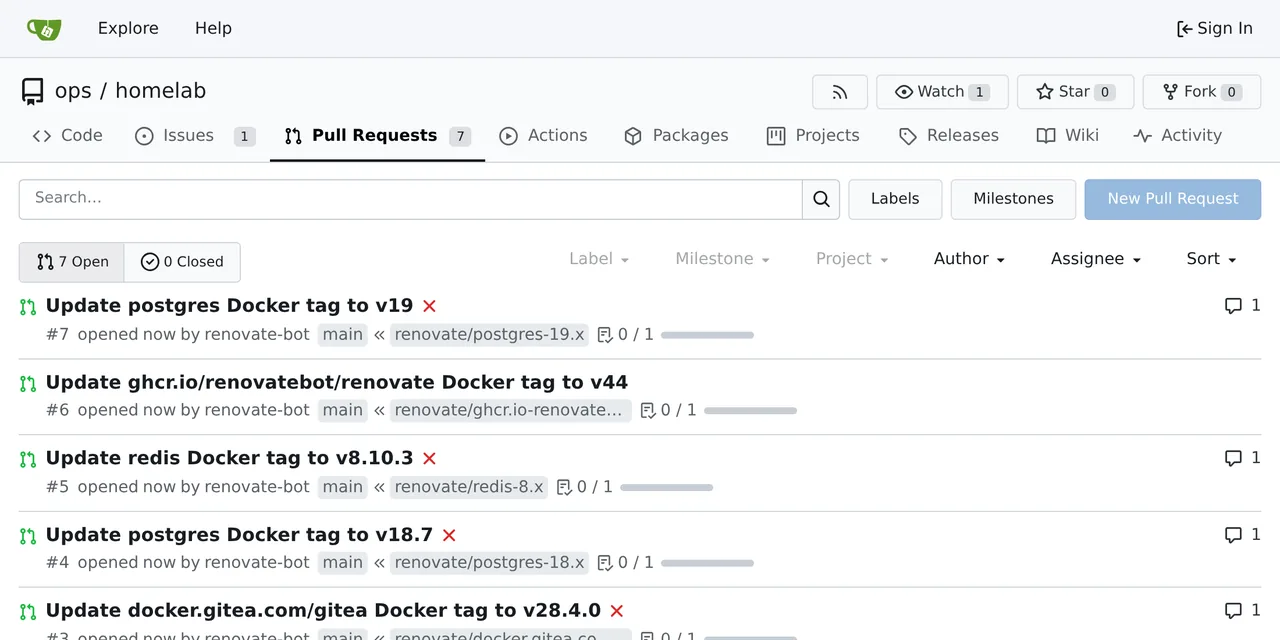
Table of contents
- Key takeaways
- What really changes between Renovate 42 and Renovate 44
- The lab: Gitea 28.4.0, a bot and a repository with pinned tags
- Artifact update problem: grep: |: No such file or directory in postUpgradeTasks
- Fix 1: allowShellExecutorForPostUpgradeCommands in the global configuration
- Fix 2: move the command into a script and keep the shell off
- Pull requests that already failed do not fix themselves
- The option is a global option reserved only for Renovate's global configuration
- Docker image updates stay under Pending Status Checks with minimumReleaseAge
- FATAL: Initialization error, Authentication failure and the token scopes on Gitea
- Could not resolve host: Renovate clones from the URL the forge advertises
- How to pin the version of Renovate itself
- FAQ
- Can I jump from Renovate 42 straight to 44?
- Why does Renovate exit with code 0 when postUpgradeTasks fails?
- Does the Gradle Wrapper change affect me if I only update Docker images?
- Conclusion
- Sources
If you upgrade a self-hosted Renovate from 42 to Renovate 44 and your pull requests get an Artifact update problem comment with grep: |: No such file or directory, the cause is a change in 43.0.0: postUpgradeTasks no longer run inside a shell. The fix is to enable allowShellExecutorForPostUpgradeCommands in the global configuration, or to move the command into a script, and then tick the retry checkbox. I reproduced it on 22 November 2026 on arm64 Linux, with Gitea 28.4.0 and the Renovate images 41.173.1, 42.99.0 and 44.257.9. There is a Spanish version of this guide.
Key takeaways
- Renovate 44.0.0 has no breaking changes: it shipped as a major version by mistake on 29 July 2026. The changes that break things are in 42.0.0 and 43.0.0.
- Since 43.0.0, a pipe or a redirect in
postUpgradeTasksfails, but Renovate still opens the pull request and exits with code 0. allowShellExecutorForPostUpgradeCommandsonly works in the global configuration. Inrenovate.jsonit produces a warning and changes nothing.- Pull requests that already failed do not regenerate when you fix the configuration: tick the retry checkbox.
- With
minimumReleaseAge, since 42.0.0 Docker images without a release timestamp stay under "Pending Status Checks". In my lab, the pull requests dropped from 7 to 2.
What really changes between Renovate 42 and Renovate 44
The jump from 43 to 44 changes no behavior, and the jump from 42 to 43 changes fourteen things. The 44.0.0 notes put it this way: "This release was incorrectly flagged as a major bump". Maintainer Jamie Tanna explained in the version 44 announcement[1] that a commit message carrying the BREAKING CHANGE marker triggered the automated release.
| Version | Date | What it brings |
|---|---|---|
| 42.0.0 | 6 November 2025 | minimumReleaseAge requires a release timestamp; Node 24 in the image |
| 43.0.0 | 29 January 2026 | 14 breaking changes: postUpgradeTasks without a shell, Gradle Wrapper blocked, global options out of the repository schema |
| 44.0.0 | 29 July 2026 | One improvement to the pep621 manager; no breaking change |
| 45.0.0-next.1 | 10 November 2026 | Pre-release of the next line |
On 22 November 2026, the latest tag of the npm package is 44.257.9, published on the 21st. The 44 line has 788 releases in 115 days, close to 7 a day, and 43 had 744 between January and July. That is why when and how you upgrade Renovate itself is a matter of method, not a detail.
If you are still comparing tools, the article on Dependabot and Renovate explains why Renovate is the usual choice outside GitHub. Here I assume you already run it against your own forge.
The lab: Gitea 28.4.0, a bot and a repository with pinned tags
I set up a Gitea 28.4.0 instance with Docker Compose, as in the guide on how to install Gitea with Docker, with a renovate-bot user and an ops/homelab repository. The repository has three files with pinned versions: a compose.yaml, a package.json and the workflow that launches Renovate.
services:
  gitea:
    image: docker.gitea.com/gitea:28.3.0
  db:
    image: postgres:18.6
  cache:
    image: redis:8.8.4
The bot needs a token with four scopes. The Renovate documentation for Gitea[2] lists them: repository and issue with read and write, user and organization with read. The bot also has to be a collaborator on the repository with write permission. The global configuration lives in a config.js that only the administrator controls:
module.exports = {
  platform: 'gitea',
  endpoint: 'http://gitea:3000',
  gitAuthor: 'Renovate Bot <renovate-bot@lab.example>',
  autodiscover: true,
  allowedCommands: [
    "^grep -h 'image:' compose\\.yaml \\| sort > IMAGES\\.txt$",
  ],
};
Renovate 43 switched to shipping as ECMAScript modules (ESM), but this file with module.exports loaded the same on 42.99.0 and on 44.257.9. Each run is a throwaway container on the Gitea network, with the token in an environment variable:
docker run --rm --network gitea_default \
  -e RENOVATE_TOKEN=your_bot_token_here \
  -e LOG_LEVEL=debug \
  -v "$PWD/config.js:/usr/src/app/config.js:ro" \
  ghcr.io/renovatebot/renovate:42.99.0
The first run opened the "Configure Renovate" pull request, which announces seven updates. After I merged it, 42.99.0 opened the seven pull requests: prettier, yaml, Gitea 28.4.0, PostgreSQL 18.7 and 19, Redis 8.10.3 and Renovate itself. That last one, which moves the image from 42.99.0 to 44.257.9, causes everything else.
Artifact update problem: grep: |: No such file or directory in postUpgradeTasks
This is the failure you get after merging the pull request that moves Renovate to 44. My repository keeps an image inventory with a postUpgradeTasks command that uses a pipe and a redirect:
{
  "matchManagers": ["docker-compose"],
  "postUpgradeTasks": {
    "commands": [
      "grep -h 'image:' compose.yaml | sort > IMAGES.txt"
    ],
    "fileFilters": ["IMAGES.txt"],
    "executionMode": "branch"
  }
}
On 42.99.0, every Docker Compose pull request included the updated compose.yaml and IMAGES.txt. On 44.257.9 with the same configuration, the pull request carries only compose.yaml, and the bot adds a comment titled "Artifact update problem" with this detail:
##### File name: undefined

Command failed: grep -h image: compose.yaml | sort > IMAGES.txt
grep: |: No such file or directory
grep: sort: No such file or directory
grep: >: No such file or directory
The comment opens with the sentence "Renovate failed to update an artifact related to this branch. You probably do not want to merge this PR as-is". In the Renovate log, the same output appears under the line WARN: artifactErrors, and the commit gets a failing renovate/artifacts status with the description "Artifact file update failure". That is the red cross in the screenshot.
The error itself shows the cause: grep receives |, sort and > as file names, because no shell is there to interpret them. The log at debug level confirms it with "shell": false. The 43.0.0 notes announce it as "postUpgradeTasks will no longer run with shell mode by default", and justify it with the security advisory GHSA-pfq2-hh62-7m96[3] on command injection.
The dangerous part is what does not happen. Renovate exited with code 0, the pull request opened and the compose.yaml change is correct. If your forge does not require statuses to pass before merging, the inventory goes stale and nothing tells you.
Fix 1: allowShellExecutorForPostUpgradeCommands in the global configuration
The one-line fix is to give postUpgradeTasks their shell back from the global configuration. Add the option to config.js, or set RENOVATE_ALLOW_SHELL_EXECUTOR_FOR_POST_UPGRADE_COMMANDS=true on the container:
module.exports = {
  platform: 'gitea',
  endpoint: 'http://gitea:3000',
  autodiscover: true,
  allowShellExecutorForPostUpgradeCommands: true,
  allowedCommands: [
    "^grep -h 'image:' compose\\.yaml \\| sort > IMAGES\\.txt$",
  ],
};
I tested both forms on 44.257.9 against a freshly created repository, and the pull requests included IMAGES.txt again. It has a cost that the self-hosted configuration documentation[4] does not hide: "It is difficult to craft an allowedCommands regex to restrict this". With a shell, anyone who can write to the repository can try to chain commands inside an allowed one.
Fix 2: move the command into a script and keep the shell off
The option I recommend is to re-enable nothing and take the pipe out of renovate.json. Save the command as scripts/images.sh in the repository and call the interpreter explicitly:
{
  "postUpgradeTasks": {
    "commands": ["sh scripts/images.sh"],
    "fileFilters": ["IMAGES.txt"],
    "executionMode": "branch"
  }
}
In the global configuration, the allowed expression becomes '^sh scripts/images\\.sh$', which is shorter and leaves no gaps. On 44.257.9 without the shell option, this command updated IMAGES.txt in the four Docker Compose pull requests. The variant sh -c "grep -h 'image:' compose.yaml | sort > IMAGES2.txt" worked too, because Renovate passes the quoted string as a single argument.
The script is still repository code, so whoever can write to it decides what the bot runs. If more than one person has that permission, protect the main branch and review changes under scripts/.
Pull requests that already failed do not fix themselves
Fixing the configuration does not regenerate branches that already exist. After enabling the shell I ran 44.257.9 again over the broken pull requests: the log showed no Executing command line and the error comments stayed. The comment itself warns that Renovate retries in four cases only, and a change to the global configuration is not one of them.
To force it, tick the "If you want to rebase/retry this PR, check this box" checkbox on each pull request. If there is more than one, use "Click on this checkbox to rebase all open PRs at once" in the "Dependency Dashboard" issue. I ticked that box, ran Renovate once more and got seven Branch updated lines, the correct IMAGES.txt and the error comments removed.
The option is a global option reserved only for Renovate's global configuration
If you put the fix in the repository's renovate.json, Renovate rejects it and the commands keep failing. It is the likeliest mistake when you administer both the forge and the repository, because the repository file is the one you have open. With "allowShellExecutorForPostUpgradeCommands": true in renovate.json, 44.257.9 wrote this (wrapped here to fit):
 WARN: Found renovate config warnings (repository=ops/homelab)
   "topic": "Configuration Error",
   "message": "The \"allowShellExecutorForPostUpgradeCommands\"
     option is a global option reserved only for Renovate's
     global configuration and cannot be configured within a
     repository's config file."
The warning also shows up in the "Dependency Dashboard" issue, under "Repository Problems", as "WARN: Found renovate config warnings". The four Docker Compose pull requests failed again with the grep error. The option only counts in config.js, in RENOVATE_* variables or on the container command line.
The same holds for allowedCommands. If a command matches no expression in the global list, the pull request comment says Post-upgrade command '…' has not been added to the allowed list in allowedCommands, with your command between the quotes.
Docker image updates stay under Pending Status Checks with minimumReleaseAge
If your configuration uses minimumReleaseAge, the jump that affects you is 42.0.0, and the symptom is that image pull requests stop arriving. Since that version, Renovate needs the release timestamp of each version to apply the delay. If the registry does not give one, the update stays pending with no end date.
I added "minimumReleaseAge": "3 days" to renovate.json and repeated the run with each Renovate image against a freshly created repository:
On 42.99.0 and 44.257.9 only the two npm pull requests opened. The five image updates moved to the "Pending Status Checks" section of the "Dependency Dashboard" issue. The debug log gives the reason, and for the Renovate image alone it marked 1703 releases:
DEBUG: Marking 1703 release(s) as pending, as they do not have
a releaseTimestamp and we're running with
minimumReleaseAgeBehaviour=timestamp-required
The minimum release age documentation[5] states that, among container registries, only Docker Hub gives that timestamp. GitHub Container Registry (GHCR), Quay and docker.gitea.com do not. In my lab I did not get it from Docker Hub either. The hub.docker.com application programming interface (API) answered 403 to the anonymous request for page 11 of the tags, so PostgreSQL and Redis stayed pending all the same.
The fix is to declare that, for images, the timestamp is optional. With this rule, 44.257.9 opened the seven pull requests again and left the warning Some release(s) did not have a releaseTimestamp in the log:
{
  "minimumReleaseAge": "3 days",
  "packageRules": [
    {
      "matchDatasources": ["docker"],
      "minimumReleaseAgeBehaviour": "timestamp-optional"
    }
  ]
}
Be clear about what you accept: an image without a timestamp is proposed the day it comes out, without the three-day margin. The delay still protects npm, where the attacks described in the guide on allowScripts and min-release-age in npm concentrate.
FATAL: Initialization error, Authentication failure and the token scopes on Gitea
Three different causes produce the same Authentication failure, and info level does not tell them apart. I tested each scope combination on 44.257.9 and wrote down the literal message:
| Message in the log | Cause in my lab |
|---|---|
FATAL: Initialization error with "errorMessage": "Authentication failure" |
Invalid token, token without the user scope, or an endpoint that does not resolve |
token does not have at least one of required scope(s), required=[read:repository] |
Token without the repository scope |
required=[read:issue], after Repository has unknown error |
Token without the issue scope; the onboarding pull request is created before the failure |
remote: Forbidden and The requested URL returned error: 403 |
Read-only repository scope: it reads the repository but cannot push the branch |
No github.com token has been configured. Skipping release notes retrieval |
No github.com token for release notes |
With a mistyped endpoint, the real message (getaddrinfo ENOTFOUND) only appears with LOG_LEVEL=debug. The last warning breaks nothing: the pull requests open without the changelog summary. The documentation says a read-only github.com token in the RENOVATE_GITHUB_COM_TOKEN variable resolves it. I did not test that.
Could not resolve host: Renovate clones from the URL the forge advertises
Renovate talks to the API at the endpoint, but it clones from the address the forge declares in its ROOT_URL. If that name does not resolve from the Renovate container, the repository is skipped with no fatal error. I saw it on Forgejo 17.0.1, with ROOT_URL=http://forgejo:3000/ and a container that only answered under another name:
 WARN: Host error (repository=ops/homelab)
   "message": "fatal: unable to access
     'http://forgejo:3000/ops/homelab.git/':
     Could not resolve host: forgejo"
 INFO: External host error causing abort - skipping
The run ended with code 0 and zero pull requests. With the variable RENOVATE_GIT_URL=endpoint, Renovate ignores the advertised address and clones from the endpoint: the same run opened the seven pull requests. You will see this when Renovate enters through the internal Docker network and the forge advertises its public domain, as in the guide on Forgejo with Docker and Caddy.
On Forgejo there is a second change worth making now. With RENOVATE_PLATFORM=gitea, 44.257.9 writes Detected Forgejo instance, please use 'forgejo' platform instead. The documentation confirms it: "Forgejo support will be removed from gitea platform in a future release". Change the variable to forgejo before it stops being a notice.
How to pin the version of Renovate itself
The practice that avoids surprises is to treat Renovate as one more dependency: a full tag, never latest, and let Renovate propose its own upgrade. In my lab, the github-actions manager detected the image in .gitea/workflows/renovate.yaml with no extra configuration:
jobs:
  renovate:
    runs-on: ubuntu-latest
    container:
      image: ghcr.io/renovatebot/renovate:42.99.0
At close to 7 releases a day, with no brake you would get a Renovate pull request on every run. These two rules limit it to early Monday mornings and require manual approval for major version jumps:
{
  "packageRules": [
    {
      "matchPackageNames": ["ghcr.io/renovatebot/renovate"],
      "schedule": ["before 6am on monday"]
    },
    {
      "matchPackageNames": ["ghcr.io/renovatebot/renovate"],
      "matchUpdateTypes": ["major"],
      "dependencyDashboardApproval": true
    }
  ]
}
I tested them on a Sunday with 44.257.9. The upgrade from 42.99.0 to 44 stayed under "Pending Approval". The one from 44.250.0 to 44.257.9 stayed under "Awaiting Schedule". Both show in the "Dependency Dashboard" issue, with no pull request opened.
Manual approval gives you the moment to read the major version notes before merging, which is exactly what was missing in the scenario of this guide.
The same method works for the rest of the forge. The Gitea 28.4.0 pull request gets reviewed like any other change. Major version jumps deserve their own guide, such as upgrading Gitea 1.27 to Gitea 28 or PostgreSQL 19 in Docker. Renovate proposes the change, but it does not migrate the data.
FAQ
Can I jump from Renovate 42 straight to 44?
Yes. I went from 42.99.0 to 44.257.9 with no intermediate versions, and the only failure was the postUpgradeTasks one. Between 43.288.0 and 44.0.0 there are no breaking changes, so reading the 43.0.0 notes covers the whole jump. If you come from 41, read the 42.0.0 notes too because of minimumReleaseAge.
Why does Renovate exit with code 0 when postUpgradeTasks fails?
Because it treats the failure as a problem of that branch, not of the run. It logs it as WARN: artifactErrors, adds the comment to the pull request and marks the commit with a failing renovate/artifacts status. To keep it from going unnoticed, require that status in the main branch protection or search the job log for artifactErrors.
Does the Gradle Wrapper change affect me if I only update Docker images?
No. The 43.0.0 notes say it only affects repositories with a Gradle Wrapper, which since that version need gradleWrapper in the global allowedUnsafeExecutions option. My test repository has no Gradle, so I did not reproduce it.
Conclusion
Renovate 44 breaks nothing by itself: what changes when you upgrade a self-hosted Renovate comes from 42.0.0 and 43.0.0. Before you merge the pull request that bumps its image, look for pipes, redirects and && in your postUpgradeTasks and move them into a script. If you use minimumReleaseAge, add the timestamp-optional rule for images. After the first run, check the "Dependency Dashboard" issue and tick the retry checkbox on whatever failed.
Leave the Renovate tag pinned as well, with manual approval for major versions. The 45 line has had a pre-release since 10 November 2026, and this time it does announce breaking changes.
Sources: [1] Renovate, 43.0.0 release notes[6], [2] Renovate, 44.0.0 release notes[7], [3] Renovate, announcement of version 44 released by mistake[1], [4] Renovate, 42.0.0 release notes[8], [5] Renovate Docs, self-hosted configuration[4], [6] Renovate Docs, Gitea platform[2], [7] Renovate Docs, minimum release age[5], [8] GitHub Advisory Database, GHSA-pfq2-hh62-7m96[3], [9] npm, versions of the renovate package[9], [10] Gitea, release 28.4.0[10].
Sources
Source code
Access all the source code for this post on GitHub.
View on GitHub