How to fix ghcr.io denied when pulling a public Docker image
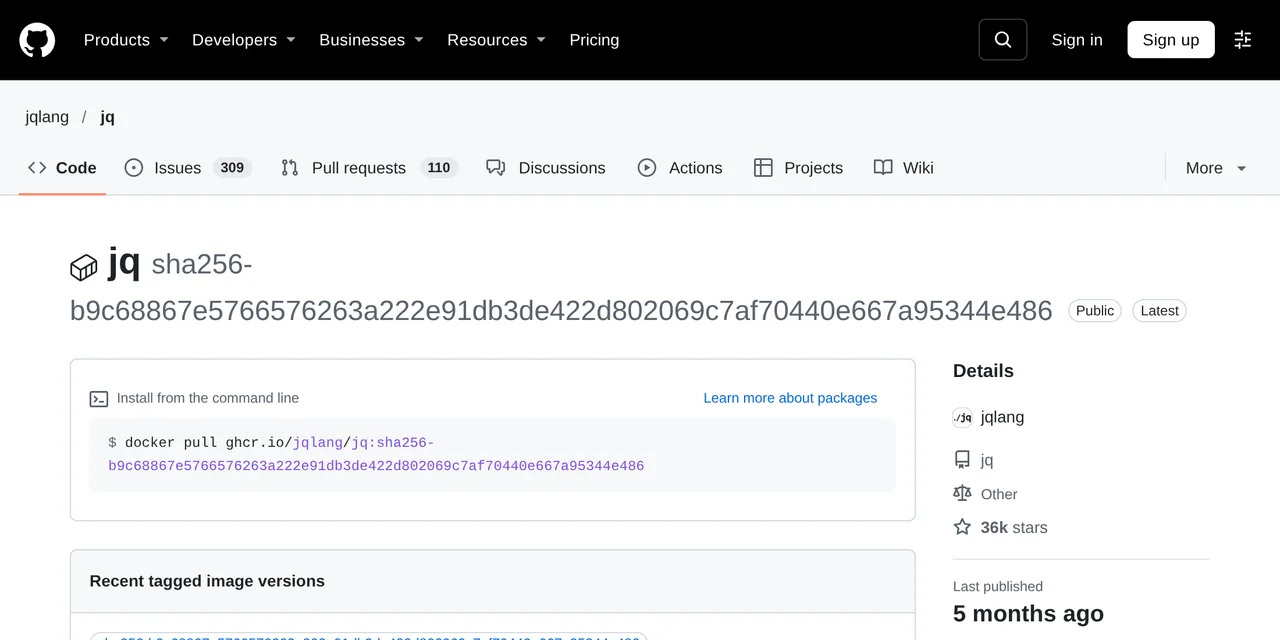
Table of contents
- Key takeaways
- The error: error from registry: denied on docker pull from ghcr.io
- Why ghcr.io rejects a public image
- Immediate fix: docker logout ghcr.io
- How to tell a public image from a bad token
- Where Docker keeps the ghcr.io token
- If the token comes from DOCKER_AUTH_CONFIG or a missing helper
- If the package is private: which token works
- How to check that the fix worked
- Frequently asked questions
- Why does it fail on the server and not on my laptop?
- Does an uppercase name give the same error?
- What if the tag does not exist?
- Conclusion
- Sources
If docker pull from ghcr.io answers denied for an image that is public, the problem is on your machine: Docker sends an expired or revoked GitHub token and the registry rejects it without checking whether the image is public. The fix is docker logout ghcr.io plus a check that the package really is public. I reproduced it on 2 November 2026 on arm64 Linux with Docker 29.5.2, and compared the message with Docker 26.1.4, 28.5.2 and 29.9.2. This guide is also available in Spanish.
Key takeaways
- With an invalid token saved for
ghcr.io, pulling any image fails, including public ones such asghcr.io/jqlang/jqorghcr.io/open-webui/open-webui. - The text depends on the image store:
error from registry: deniedwith the containerd store, andHead "https://ghcr.io/v2/…": denied: deniedwith the classic overlay2 store. - An anonymous request to
https://ghcr.io/tokenreturns 200 if the package is public and 403 if it is private or does not exist. - The token can live in three places:
authsinconfig.json, a credential helper (credsStoreorcredHelpers) or theDOCKER_AUTH_CONFIGvariable. docker logout ghcr.ioclears the first two; the environment variable takes precedence and you have to unset it yourself.
If you hit the error with MinIO, the cause is different: those images no longer pull. The quay.io/minio/minio 401 UNAUTHORIZED guide, the pull access denied for minio/minio guide and the bitnami/minio not found guide explain why. If the message is toomanyrequests, the limit is Docker Hub's, not ghcr.io's: the Docker Hub toomanyrequests guide covers it.
The error: error from registry: denied on docker pull from ghcr.io
The message says the ghcr.io token server rejected the request, and Docker does not say whether it rejected the image or your credentials. These are the messages I got with Docker 29.5.2, which uses the containerd image store, with a fake token saved for ghcr.io:
$ docker pull ghcr.io/open-webui/open-webui:main
Error response from daemon: error from registry: denied

$ docker compose pull
 jq Pulling
 jq Error error from registry: denied
Error response from daemon: error from registry: denied

$ docker run --rm ghcr.io/jqlang/jq:latest --version
Unable to find image 'ghcr.io/jqlang/jq:latest' locally
docker: Error response from daemon: error from registry: denied
If your Docker uses the classic overlay2 store, the same failure looks like this. I got it the same way with Docker 26.1.4, with 28.5.2 and with 29.9.2 with the containerd store turned off:
Error response from daemon: Head "https://ghcr.io/v2/jqlang/jq/
manifests/latest": denied: denied
Your terminal prints it on one line. It is the same text as in serge-chat/serge issue 68[1], opened and closed on 26 March 2023. The reporter had an old ghcr.io token saved and fixed it by logging out.
Other tools phrase it their own way. docker buildx imagetools inspect says failed to fetch oauth token with a 403 Forbidden, and docker login with a bad token answers Get "https://ghcr.io/v2/": denied: denied.
Why ghcr.io rejects a public image
ghcr.io rejects the request because your Docker client does not arrive anonymous: it presents a username and a token, and the registry validates that token before it looks at the package visibility. Public images pull without an account, and the GitHub Container registry documentation[2] puts it this way: "You can also access public container images anonymously." But if you send credentials, they have to be valid.
I checked this against the token server with curl. With no credentials, https://ghcr.io/token?scope=repository:jqlang/jq:pull returned 200 and an anonymous token. With a username and a fake 40-character token it returned 403 with this body:
{"errors":[{"code":"DENIED","message":"denied"}]}
A token stops working if you revoked it, if it expired, if you switched accounts or if you deleted the machine account that created it. To Docker they all look the same, and the message does not tell you which one it was.
Immediate fix: docker logout ghcr.io
docker logout ghcr.io deletes the saved token and lets Docker pull anonymously, which is all a public image needs. In my test the sequence was this (without the per-layer progress lines):
$ docker logout ghcr.io
Removing login credentials for ghcr.io

$ docker pull ghcr.io/jqlang/jq:latest
latest: Pulling from jqlang/jq
Digest: sha256:b9c68867e5766576263a222e91db3de422d802069c7af70440e667a95344e486
Status: Downloaded newer image for ghcr.io/jqlang/jq:latest
ghcr.io/jqlang/jq:latest
The jq image is 2.66 MB and docker compose run --rm jq printed jq-1.8.2. For a large image such as Open WebUI you do not need to download it all: docker buildx imagetools inspect ghcr.io/open-webui/open-webui:main resolves the manifest and confirms that the registry now lets you through.
If you also need private packages, log in again with a valid token instead of staying anonymous. The section on private packages explains which token works.
How to tell a public image from a bad token
One anonymous request to the token server separates the two cases without touching your Docker configuration. Replace owner/image with your image path, without ghcr.io/ or a tag:
curl -s -o /dev/null -w '%{http_code}\n' \
  "https://ghcr.io/token?scope=repository:owner/image:pull"
A 200 means the package is public and the problem is the credentials your Docker sends. A 403 means the package is private or does not exist under that name, and from outside ghcr.io does not tell the two apart. On 2 November 2026 I got 200 for open-webui/open-webui, ggml-org/llama.cpp and immich-app/immich-server, and 403 for a made-up repository.
The error text is a clue too. Without credentials, a private or missing image failed with error from registry: denied followed by a second denied line on Docker 29, and with a single denied, not denied: denied, on the classic store. With a bad token, Docker 29 prints a single line and the classic store prints denied: denied.
Where Docker keeps the ghcr.io token
Docker looks for credentials in three places, and cat ~/.docker/config.json only shows you one of them. This command lists which registries have credentials and which helpers are configured, without printing any token:
jq -c '{auths: (.auths // {} | keys), credsStore, credHelpers}' \
  ~/.docker/config.json
echo "${DOCKER_AUTH_CONFIG:+DOCKER_AUTH_CONFIG is set}"
This is what each result means:
authscontainsghcr.iowith no helper: the token is base64-encoded insideconfig.jsonitself. That is the case I reproduced firstcredHelperscontainsghcr.io: a helper such asdocker-credential-passkeeps the token elsewhere, andauthscan come out empty. The Docker command-line reference[3] sayscredHelpersis used "preferentially overcredsStoreorauths"credsStoreis set: the default store, such asdesktoporosxkeychain, holds the tokens for every registryDOCKER_AUTH_CONFIGis set: the variable carries a wholeconfig.jsonand wins over the file
For the helper case I wrote a fake helper that returned the expired token. With auths empty, the pull failed with the same error from registry: denied, and docker logout ghcr.io called the helper's erase command and fixed it. To see which user your helper stores, printf ghcr.io | docker-credential-desktop get | jq -r .Username prints it without the token.
If the token comes from DOCKER_AUTH_CONFIG or a missing helper
DOCKER_AUTH_CONFIG is an environment variable that the Docker 29 command-line interface (CLI) reads instead of config.json, and it is common on continuous integration (CI) systems. With a bad token in it, the pull fails the same way, and docker logout does not fix it. This is what it answered:
$ docker logout ghcr.io
 Warn -> DOCKER_AUTH_CONFIG is set and takes precedence.
         Unset DOCKER_AUTH_CONFIG to restore the CLI auth behaviour.

Removing login credentials for ghcr.io
The next pull failed with denied again. Remove the variable with unset DOCKER_AUTH_CONFIG or fix the token inside it, and the pull works.
The other frequent case is a config.json copied from another machine with "credsStore": "desktop". On a Linux box without Docker Desktop the error is no longer denied, although the cause is similar:
error getting credentials - err: exec: "docker-credential-desktop":
executable file not found in $PATH, out: ``
Delete the credsStore line from config.json or install the helper it names, and try again.
If the package is private: which token works
If the anonymous curl returned 403 and the image belongs to you or your organization, you need a token that can read the package. I did not reproduce this case, because it needs a real token; what follows comes from the GitHub documentation. The Container registry documentation[2] says that "GitHub Packages only supports authentication using a personal access token (classic)", with the read:packages scope to download. A fine-grained token is not among the supported ones.
With that token, the login looks like this:
echo "your_classic_token_with_read_packages" \
  | docker login ghcr.io -u your_github_username --password-stdin
Keep two details from the package visibility page[4] in mind. First, "When you first publish a package, the default visibility is private", so an image your workflow just published is private even when the repository is public. Second, the package does not inherit the repository visibility: you change it in the package settings, under Danger Zone and then Change visibility. In GitHub Actions, if the package is linked to another repository, add the workflow's repository under the package's Manage Actions access.
If you would rather not depend on ghcr.io for your own images, the guide to running a private Docker image registry covers the self-hosted alternative.
How to check that the fix worked
The real test is the same pull that failed, on the same machine and as the same user that runs it. These three checks should come out like this:
- The
jqcommand above lists noghcr.iounderauthsorcredHelpers, or lists it with a token you just created docker buildx imagetools inspect ghcr.io/owner/image:tagprintsName,MediaTypeandDigestdocker compose pullfinishes withoutErroranddocker compose up -dstarts the service
Docker reads config.json from the .docker directory in your $HOME, according to its command-line reference, and sudo switches $HOME to /root (I checked on this machine). So sudo docker uses a different file, and the old token may sit in /root/.docker/config.json. The guides on this blog that use ghcr.io images, such as installing llama.cpp, installing Open WebUI with Docker or installing Immich with Docker, pull public images, so none of them needs docker login.
Frequently asked questions
Why does it fail on the server and not on my laptop?
Because each machine has its own config.json and its own credential helpers. The server may keep a docker login from months ago, from a test or a deployment, with a token that no longer exists. Run the jq command from this guide on both machines and compare the output.
Does an uppercase name give the same error?
No. docker pull ghcr.io/Open-WebUI/open-webui:main fails before it reaches the registry with invalid reference format: repository name (Open-WebUI/open-webui) must be lowercase. It shows up in GitHub Actions when the name comes from github.repository, which keeps the uppercase letters of the user or organization.
What if the tag does not exist?
Then the message changes. With ghcr.io/open-webui/open-webui:no-existe-esta-etiqueta, Docker 29 answered failed to resolve reference and ended in not found, not denied. If you see not found, check the tag on the package page; if you see denied, check the credentials and the visibility.
Conclusion
A ghcr.io denied on a public image is nearly always a saved token that no longer works, in config.json, in a credential helper or in DOCKER_AUTH_CONFIG. First check with the anonymous curl whether the package is public. If it returns 200, run docker logout ghcr.io, unset the variable if it exists and pull again. If it returns 403, the package is private or the name is wrong, and you need a classic token with read:packages or the owner has to make it public.
Sources: [1] GitHub Docs, Working with the Container registry[2], [2] GitHub Docs, configuring a package's access control and visibility[4], [3] GitHub Docs, publishing and installing a package with GitHub Actions[5], [4] Docker Docs, CLI reference and config.json[3], [5] Docker Docs, containerd image store[6], [6] serge-chat/serge, issue 68[1].
Sources
Source code
Access all the source code for this post on GitHub.
View on GitHub