HashiCorp Vault for Secrets Management

Table of contents
- Key takeaways
- Problems it solves
- Architecture in 60 seconds
- Vault 2.x: current release, changes and licence
- A practical example: dynamic secrets
- Relevant operational patterns
- Dynamic vs. static secrets
- Auto-unseal
- Kubernetes integration
- CI/CD integration
- What not to do
- Alternatives
- Conclusion
- Frequently asked questions
- Is Vault worth it if I only plan to store key-value pairs?
- What do I need to run Vault in production with high availability?
- How do Kubernetes pods get secrets without a static token?
- Is Vault still open source?
- Sources
Tested with Vault 2.1.0 · PostgreSQL 18.6 · Python 3.14 (hvac 2.4.0) · verified
Updated: 2026-09-16
Secrets management is one of those topics where everyone knows .env files on servers are bad practice, but few teams fix it until there’s an incident. HashiCorp Vault[1] is the ecosystem’s most mature solution and, beyond the hype, solves concrete problems that persist in most infrastructures. We reviewed this guide in September 2026 for Vault 2.1.0 and re-ran the dynamic secrets example against PostgreSQL 18.6.
Key takeaways
-
Vault addresses three common pathologies: distributed static secrets, lack of access traceability, and weak role separation.
-
Vault 2.1.0 (1 September 2026) is the current release. It has shipped under the Business Source License (BUSL) since 1.15.0, and OpenBao is the fork that keeps the Mozilla Public License 2.0 (MPL 2.0).
-
Dynamic secrets (ephemeral credentials generated on demand) are the most important differentiating feature over a protected KV store.
-
Auto-unseal with AWS/GCP KMS is essential for high availability; never run a single node in production.
-
Kubernetes integration via Vault Agent Injector eliminates static auth tokens in pods.
-
The root token must be revoked after initial setup; per-service granular policies are the norm.
Problems it solves
Three typical pathologies Vault addresses:
-
Distributed static secrets. The same password on 15 servers, copied manually, impossible to rotate without coordinated deployment. Vault centralises and rotates.
-
No access traceability. Nobody knows who accessed which secret, or when. Vault audits every operation.
-
Weak role separation. The whole team knows every password. Vault offers granular policies by role/service.
Architecture in 60 seconds
Vault works as a server that stores secrets in a backend (Consul, integrated storage, etc.) and serves them encrypted. Its main components:
-
Secret engines: different secret types: generic KV, dynamic database credentials, PKI certificates, AWS IAM, SSH. Each with its specific API.
-
Auth methods: how clients authenticate: tokens, userpass, Kubernetes service accounts, AWS IAM, OIDC. Determines which policies apply.
-
Policies: HCL rules defining which secret-store paths a client can read/write. Granular by verb and path.
-
Audit devices: log of every operation: file, syslog, socket. Essential for compliance.
Vault 2.x: current release, changes and licence
The stable release is Vault 2.1.0[2], published on 1 September 2026. The 2.x line started with 2.0.0 on 14 April 2026 as the successor to the 1.21 series, and the official image[3] hashicorp/vault:2.1.0 ships for amd64, arm64 and 386.
The 2.0 change that breaks the most procedures is in emergency recovery: sys/rekey and sys/generate-root now require a valid token on top of the unseal key shares. We checked it on the 2.1.0 image, where vault operator generate-root -status without a token returns 403 permission denied. If your emergency procedure relies on that tokenless flow, the enable_unauthenticated_access server setting restores the old behaviour, according to Vault’s important changes page[4].
The licence changed in 2023: 1.15.0, released on 27 September according to the 1.x series changelog[5], was the first release under the Business Source License 1.1. On the 1.14 branch, 1.14.8 is the last MPL 2.0 release and 1.14.9 already uses the BUSL. The BUSL allows production use but forbids offering Vault to third parties inside a paid product that competes with Vault’s paid versions. Each release converts to MPL 2.0 four years after it is published.
The licensor is changing too: since a commit on 26 March 2026, the LICENSE on the main branch[6] names IBM, which completed its acquisition of HashiCorp[7] on 27 February 2025. The one in the v2.1.0 tag[8] still names HashiCorp, Inc., and the rest of the text is identical in both.
If the BUSL does not fit your case, OpenBao[9] is the closest alternative. It is an MPL 2.0 fork of Vault run by the Linux Foundation’s Open Source Security Foundation (OpenSSF). It starts from Vault’s last MPL code, between 1.14.8 and 1.14.9, and keeps compatibility with Vault’s API where it can. Its stable release is 2.6.2[10], from 18 August 2026, and the installation steps are in how to install OpenBao with Docker.
A practical example: dynamic secrets
Say a service needs database credentials. Without Vault they’re in .env:
DB_USER=api_service
DB_PASSWORD=AbCdEf1234XYZ
With Vault, the service requests a fresh user every time it starts. To reproduce it locally, start PostgreSQL 18.6 and Vault 2.1.0 in dev mode, which keeps everything in memory and starts unsealed with the root token you pass in. That mode is for testing, never for production. The sample table is called pedidos (orders):
docker network create vault-demo
docker run -d --name pg --network vault-demo \
  -e POSTGRES_PASSWORD=pg_admin_pass_1234 -e POSTGRES_DB=app postgres:18.6
docker run -d --name vault --network vault-demo -p 127.0.0.1:8200:8200 \
  -e VAULT_DEV_ROOT_TOKEN_ID=dev_root_token_1234 hashicorp/vault:2.1.0
until docker exec pg pg_isready -q -h 127.0.0.1; do sleep 1; done
docker exec pg psql -U postgres -d app \
  -c "CREATE ROLE vault_admin LOGIN CREATEROLE PASSWORD 'vault_pass_1234'" \
  -c "CREATE TABLE pedidos (id int PRIMARY KEY, total numeric)" \
  -c "INSERT INTO pedidos VALUES (1, 42.50), (2, 13.00)" \
  -c "GRANT SELECT ON pedidos TO vault_admin WITH GRANT OPTION"
The vault_admin role is the account Vault uses to create the ephemeral users. It needs SELECT with GRANT OPTION on every table it will grant: in our test, a new table without that privilege made issuance fail with permission denied for table.
Open a shell in the container with docker exec -it vault sh and configure the PostgreSQL secrets engine[11], the service policy and an audit device:
export VAULT_ADDR=http://127.0.0.1:8200 VAULT_TOKEN=dev_root_token_1234
vault secrets enable database
vault write database/config/app \
  plugin_name=postgresql-database-plugin allowed_roles=api_service \
  connection_url="postgresql://{{username}}:{{password}}@pg:5432/app" \
  username=vault_admin password=vault_pass_1234
vault write -force database/rotate-root/app
vault write database/roles/api_service db_name=app \
  default_ttl=1h max_ttl=24h creation_statements="CREATE ROLE \"{{name}}\" \
  LOGIN PASSWORD '{{password}}' VALID UNTIL '{{expiration}}'; \
  GRANT SELECT ON ALL TABLES IN SCHEMA public TO \"{{name}}\";"
vault policy write api-service - <<'EOF'
path "database/creds/api_service" {
  capabilities = ["read"]
}
EOF
vault audit enable file file_path=/vault/logs/audit.log
vault token create -policy=api-service -ttl=24h -field=token
rotate-root replaces the vault_admin password with one only Vault knows. The api_service role issues users with a time to live (TTL) of 1 hour, renewable up to 24 hours, and the api-service policy only allows reading database/creds/api_service. The last command prints the application token, which starts with hvs.
The application uses hvac[12] 2.4.0 and psycopg[13] 3.3.5. Save this code as app.py; psycopg reads the host and database from the PGHOST and PGDATABASE variables:
import os

import hvac
import psycopg

vault = hvac.Client(url=os.environ["VAULT_ADDR"],
                    token=os.environ["VAULT_TOKEN"])
creds = vault.secrets.database.generate_credentials(name="api_service")
user = creds["data"]["username"]
print(user, creds["lease_duration"])

with psycopg.connect(user=user, password=creds["data"]["password"]) as db:
    print(db.execute("SELECT current_user, count(*) FROM pedidos").fetchone())
Run it in a throwaway Python 3.14 container on the same network, with the token from the previous step:
docker run --rm --network vault-demo -v "$PWD":/app \
  -e VAULT_ADDR=http://vault:8200 -e VAULT_TOKEN=your_app_token \
  -e PGHOST=pg -e PGDATABASE=app python:3.14-slim \
  sh -c "pip install -q hvac==2.4.0 'psycopg[binary]==3.3.5' \
         && python /app/app.py"
The script printed these two lines (pip also adds a warning about installing as root):
v-token-api_serv-zb2HRy6sAXe13YOqf19g-1789591717 3600
('v-token-api_serv-zb2HRy6sAXe13YOqf19g-1789591717', 2)
Vault generates an ephemeral database user on demand. Its name combines the token’s display name, the role, a random part and a Unix timestamp, and PostgreSQL stores it with a VALID UNTIL one hour ahead. When the TTL runs out, Vault revokes it: with a 30-second test role, the server log showed revoked lease 30 seconds after issuance and the user was gone from pg_roles. If there’s a breach, leaked credentials expire in minutes, not years.
The audit device recorded every read of database/creds/api_service in /vault/logs/audit.log, with the token’s policies and the source IP. The username and password appear as hmac-sha256:…, never in plain text.
During an incident you do not have to wait for the TTL. This command revokes every credential the role has issued, and Vault answers All revocation operations queued successfully!. Revocation is asynchronous: in our test, a pg_roles query right after it still listed two v-token-* users, and the next one found none:
vault lease revoke -prefix database/creds/api_service
Relevant operational patterns
Dynamic vs. static secrets
Vault supports both. Dynamic (generated on request) are safer, but not all systems support them well. Static with automatic rotation (Vault rotates periodically) is a good middle ground for legacy systems.
Auto-unseal
At startup, Vault is "sealed": encrypted secrets aren’t accessible until a master key is used. Auto-unseal with AWS KMS, Azure Key Vault, GCP Cloud KMS or the Transit engine removes the need to enter keys manually (full list of seals[14]). Essential for high availability.
Kubernetes integration
Vault Agent Injector[15] injects secrets into pods as mounted files, automatically synced. The pod never sees a static auth token; it authenticates with its Kubernetes ServiceAccount.
CI/CD integration
GitHub Actions, GitLab CI, and Jenkins can authenticate to Vault with short-lived tokens generated via OIDC or JWT. The pipeline requests secrets at runtime, without storing them in persistent environment variables.
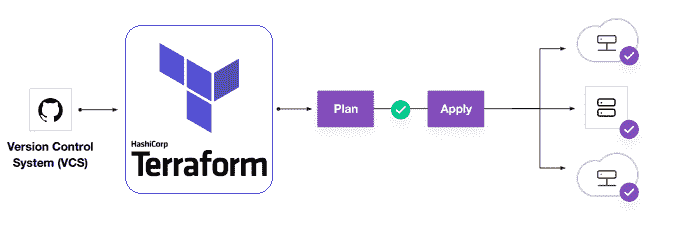 Terraform workflow, another HashiCorp tool: version control, plan and apply (Image: dsmscm, CC BY-SA 4.0, via Wikimedia Commons)
What not to do
These are the recurring mistakes:
-
Use Vault only as "fancy KV". If you only store static key-value pairs, the gain over a well-protected
.envis marginal. Value comes from dynamic secrets, rotation, and auditing. -
Leave the root token active. It has full permissions and shouldn’t be used beyond initial setup. Revoke it after generating operational tokens and policies.
-
Single instance, no HA. Vault down = deployments down. In production, at least 3 nodes with raft or Consul.
-
Permissive wildcard policies.
path "*" { capabilities = ["read"] }nullifies Vault’s value. Per-service granularity is the rule.
Alternatives
Besides OpenBao, which keeps Vault’s API under MPL 2.0, there are other valid options:
-
AWS Secrets Manager / GCP Secret Manager / Azure Key Vault: if you’re 100% in a single cloud, native integration may be enough.
-
Infisical[16]: open-source platform under the MIT licence (except the
eedirectory) with a friendlier UI; its dynamic secrets[17] require the paid Advanced plan. -
1Password for Teams[18]: suitable for small teams where secrets are mostly human.
-
Sealed Secrets + External Secrets Operator: GitOps pattern for K8s without needing Vault.
Also see how the NIS2 directive reinforces the need for formal secret management in certain sectors, and supply-chain attacks, a frequent entry vector when credentials are compromised.
Conclusion
Vault is the most complete secrets-management option, but also the most operationally demanding. For teams still living with distributed .env files, the first step is deciding whether Vault’s operational investment is justified or a simpler alternative covers the case. Since 2023 that decision includes the licence: BUSL for Vault, MPL 2.0 for OpenBao. What’s not an option is carrying on as before.
Frequently asked questions
Is Vault worth it if I only plan to store key-value pairs?
Barely: if you only store static secrets, the gain over a well-protected .env is marginal. Vault's value lies in dynamic secrets, which generate ephemeral credentials on demand with a configurable TTL (for example 1 hour) and revoke them automatically. It is also in automatic rotation for legacy systems and in auditing every operation. If a credential leaks, it expires in minutes, not years.
What do I need to run Vault in production with high availability?
At least 3 nodes with raft or Consul, because Vault down means deployments down. Add auto-unseal with AWS KMS, Azure Key Vault, GCP Cloud KMS or the Transit engine so nodes do not require entering the master key by hand at startup. Also revoke the root token after initial setup, define granular HCL policies per service instead of wildcards like path "*", and enable an audit device (file, syslog or socket) for compliance. If you upgrade to Vault 2.x, review your generate-root and rekey procedures, which now require a valid token.
How do Kubernetes pods get secrets without a static token?
Through Vault Agent Injector, which injects secrets into the pod as mounted files and keeps them automatically synced. The pod never sees a static auth token: it authenticates to Vault with its Kubernetes ServiceAccount and policies apply according to that auth method. For CI/CD the equivalent pattern is short-lived tokens generated via OIDC or JWT in GitHub Actions, GitLab CI or Jenkins.
Is Vault still open source?
Its source code is still public, but since Vault 1.15.0 and 1.14.9 the licence is the Business Source License 1.1 instead of MPL 2.0. The BUSL allows production use but forbids offering Vault to third parties inside a paid product that competes with Vault's paid versions. Each release converts to MPL 2.0 four years after it is published. If you need the MPL licence today, OpenBao is the Vault fork maintained under the OpenSSF, with 2.6.2 as its stable release in September 2026.
Sources: Official HashiCorp Vault documentation[19] · Vault 2.1.0 release notes[2] · Vault 2.x important changes[4] · Vault BUSL licence[6] · PostgreSQL secrets engine[11] · OWASP Secrets Management Cheat Sheet[20] · Vault Agent Injector for Kubernetes[15] · OpenBao[9]
Sources
- HashiCorp Vault
- Vault 2.1.0
- official image
- important changes page
- 1.x series changelog
- LICENSE on the main branch
- completed its acquisition of HashiCorp
- one in the v2.1.0 tag
- OpenBao
- 2.6.2
- PostgreSQL secrets engine
- hvac
- psycopg
- full list of seals
- Vault Agent Injector
- Infisical
- dynamic secrets
- 1Password for Teams
- Official HashiCorp Vault documentation
- OWASP Secrets Management Cheat Sheet