What the TrueNAS Proxmox plugin does and when it pays off
Table of contents
- Key takeaways
- What Open Storage for Proxmox is and what it installs on each node
- How a TrueNAS disk reaches the virtual machine
- Why every node needs a broker service
- Snapshots, clones and live migration
- What changes versus ZFS over iSCSI, NFS, LVM over iSCSI and Ceph
- Versus the built-in ZFS over iSCSI
- Versus NFS and LVM over iSCSI
- Versus Ceph
- How to install the TrueNAS Proxmox plugin
- Prepare TrueNAS
- Install the package on Proxmox VE
- Declare the storage
- What I checked without a Proxmox cluster
- Limits, risks and open questions
- A single NAS is a single point of failure
- Maturity and support
- Open issues worth reading first
- What the docs say and the code no longer does
- Thin provisioning without a safety net
- Frequently asked questions
- Can I store ISOs and backups on this storage?
- Do I need NVMe/TCP or will iSCSI do?
- Does it replace Ceph in a three-node cluster?
- Conclusion
- Sources
TrueNAS published the "Open Storage for Proxmox" page on 10 September 2026, and behind the marketing name sits a GPL-3.0 storage plugin for Proxmox VE. It creates one zvol on TrueNAS for every virtual machine disk, publishes it over iSCSI or NVMe/TCP and connects the cluster nodes without you opening the NAS console. I read the code of release 2.1.23~beta3, reproduced the official install steps in a Debian 13 container and went through the open issues; I did not run it on a real cluster, because this machine has no nested virtualisation. Here is what it does, how it differs from ZFS over iSCSI, NFS, LVM over iSCSI and Ceph, how to install it and what is still unresolved.
Key takeaways
- It is a Proxmox VE storage plugin, of type
truenasplugin, that you install on every node; nothing gets installed on TrueNAS - It talks to the WebSocket API of TrueNAS 25.10 or later, so it needs none of the root SSH keys the built-in ZFS over iSCSI type requires
- It adds what the built-in type lacks: linked clones from templates, created as ZFS clones on the NAS itself
- The latest release is 2.1.23~beta3, from 11 September 2026, but the official APT repository still serves 2.1.17
- A single TrueNAS holds the disks of every VM, and Proxmox high availability has an open issue with the plugin
What Open Storage for Proxmox is and what it installs on each node
Open Storage for Proxmox is the marketing name of the TrueNAS Proxmox VE Storage Plugin, a Perl module that Proxmox VE loads as external storage. The Proxmox storage plugin development guide[1] describes the mechanism: third-party plugins live in /usr/share/perl5/PVE/Storage/Custom/ and must use a licence compatible with AGPLv3. The TrueNAS one declares the package PVE::Storage::Custom::TrueNASPlugin, the type truenasplugin and two content types, images for VM disks and rootdir for LXC containers, always in raw format.
The .deb package of release 2.1.23~beta3 weighs 197,384 bytes and installs four pieces: the TrueNASPlugin.pm module (8,736 lines), the truenas-plugin-broker service with its systemd unit, the truenas-plugin-lvm-filter helper and the interactive install.sh installer. It depends on pve-manager 8.0 or later, open-iscsi and multipath-tools, and recommends nvme-cli. No software is added on TrueNAS: the plugin uses the iSCSI and NVMe-oF services the system already ships.
The published requirements are Proxmox VE 8.x or later, with 9.x recommended, and TrueNAS 25.10 or later. The NVMe/TCP transport requires Proxmox VE 9.x. In the code, the api function returns the system’s storage API version as long as it sits between 11 and 15, which covers Proxmox VE 8 through 9.2.
How a TrueNAS disk reaches the virtual machine
The plugin uses two separate channels: the TrueNAS API to create, clone and delete resources, and iSCSI or NVMe/TCP to read and write the disk blocks. When you add a disk in the Proxmox interface, alloc_image asks TrueNAS for a zvol with pool.dataset.create, publishes it with iscsi.extent.create and iscsi.targetextent.create (or with nvmet.namespace.create), and then every node connects with iscsiadm or nvme connect.
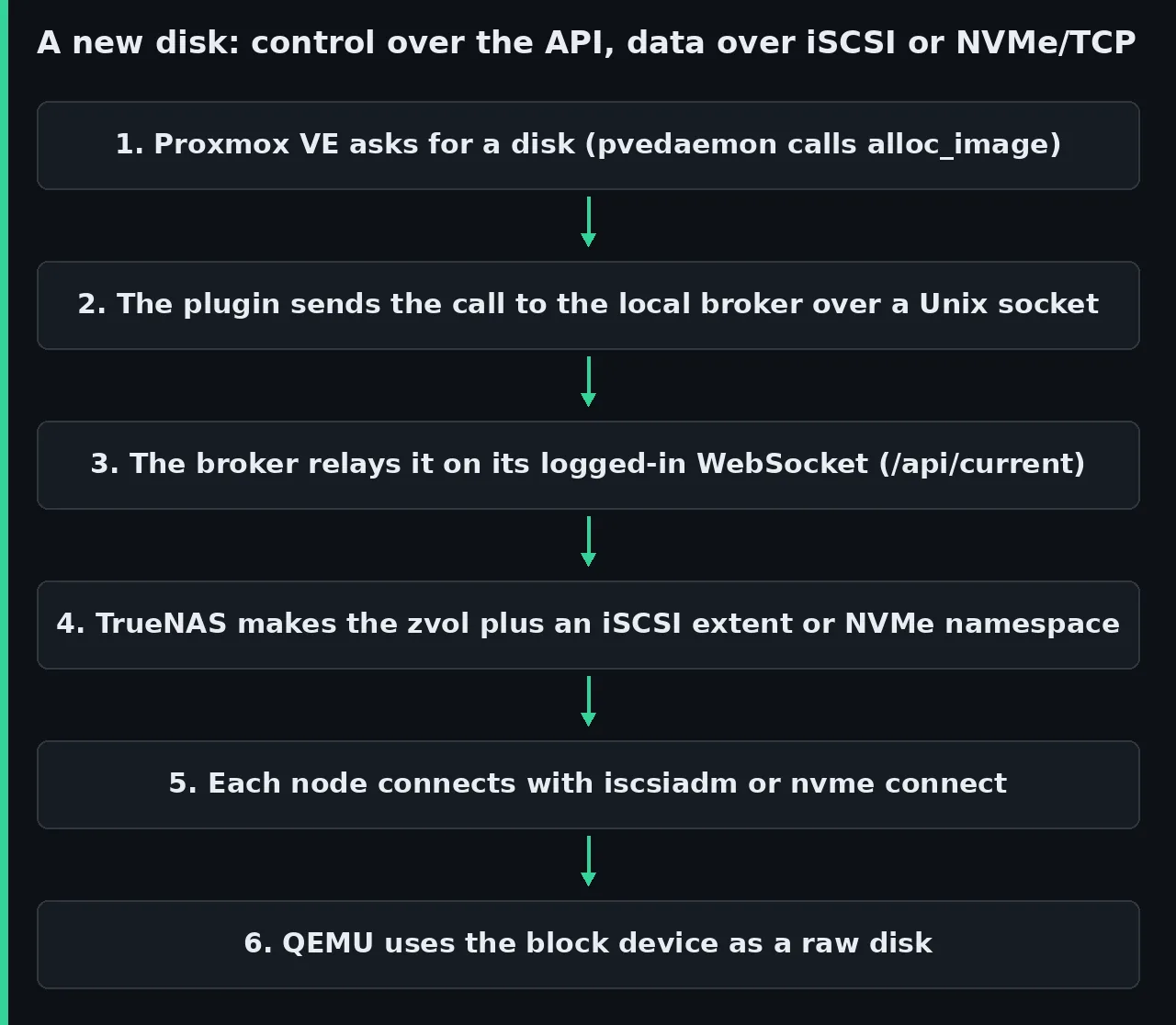
The _tn_dataset_create function creates sparse volumes by default (tn_sparse is 1 unless you change it) with a 16K block size. The Proxmox volume name stores the LUN number, in the form vol-vm-109-disk-0-lun11, or the NVMe namespace UUID. All told, the code outside comments calls 37 distinct TrueNAS middleware methods, spread across the pool, iscsi, nvmet, service, auth and core families.
Why every node needs a broker service
Each qm or pvesh command and each pvedaemon worker is a separate Perl process, and each one that opened its own session would have to log in again. The broker’s header comment puts a number on it: TrueNAS limits auth.login_with_api_key to 20 calls every 60 s per IP. That is why the package installs truenas-plugin-broker, which keeps a single authenticated WebSocket session to wss://your_truenas_host:443/api/current and serves the plugin over the Unix socket /run/truenas-plugin/broker.sock.
Since release 2.1.21~alpha1 the broker is mandatory. The _ws_get_persistent function aborts when the socket is missing, and its error message explicitly asks you not to copy TrueNASPlugin.pm by hand. The README still documents that manual copy as an alternative, so that path no longer works unless you set TRUENAS_PLUGIN_ALLOW_DIRECT_WS=1, which the code itself reserves for development.
Snapshots, clones and live migration
Snapshots are ZFS snapshots on the NAS: volume_snapshot calls pool.snapshot.create inside a cluster lock, and Proxmox stores the RAM state separately. The volume_rollback_is_possible function refuses to roll back to anything but the most recent snapshot, like Proxmox’s local ZFS plugin, because a ZFS rollback destroys the later ones.
Linked clones are real ZFS clones. When you turn a VM into a template, create_base renames the zvol to base-<vmid>-disk-N and creates the @__base__ snapshot; every linked clone comes from there with pool.snapshot.clone. Full clones, disk moves and backups copy the data through the node. TrueNAS admits it in its announcement: "Clones, moves, backups, and imports still run host-side".
Proxmox allows live migration because the storage is declared shared 1 and every node sees the same iSCSI target or NVMe subsystem. Replication is a different story: Proxmox storage replication[2] only supports local ZFS, so copies between sites are configured with TrueNAS replication tasks, outside Proxmox.
What changes versus ZFS over iSCSI, NFS, LVM over iSCSI and Ceph
The plugin combines three things the alternatives do not put together: disks created from the Proxmox interface, ZFS snapshots and clones on the NAS, and no root SSH credential on the storage. The snapshot and clone columns come from the feature tables in the Proxmox storage documentation[3] and its per-type pages.
| Option | Snapshots | Linked clones | Who creates the disk | NAS access | Main cost |
|---|---|---|---|---|---|
| TrueNAS plugin | ZFS; rollback to the latest only | Yes, from a template | The plugin, over the API | API key | Beta and a single NAS |
| Built-in ZFS over iSCSI | Yes | No | Proxmox, over SSH | Passwordless root SSH key | No provider for SCST, the TrueNAS target |
| NFS with qcow2 | qcow2; they block a running VM | With qcow2 | Proxmox, as files | None | Slow snapshots on large disks |
| LVM on an iSCSI LUN | Volume chain, technology preview since PVE 9 | No | You the LUN, Proxmox the volumes | None | LUN created and grown by hand |
| Ceph RBD | Yes | Yes | Proxmox | No NAS | Three servers and a 10 Gbps network |
Versus the built-in ZFS over iSCSI
The Proxmox zfs type does the same job another way: it logs into the server over SSH, creates the zvol and exports it as a LUN. The ZFS over iSCSI page[4] asks for a passwordless key in /etc/pve/priv/zfs/<target_ip>_id_rsa and accepts four target implementations: LIO, IET, ISTGT and Comstar. TrueNAS uses SCST, which the middleware configures from the scst.conf template[5], and SCST is not on that list.
The same Proxmox table marks clones as unavailable for this type, and that is the plugin’s functional advantage. TrueNAS calls the built-in type "legacy", although the general Proxmox table still marks it as stable. Until now the gap was covered by the community project freenas-proxmox[6], licensed AGPL-3.0, which manages LUNs through the TrueNAS REST API instead of SSH. It still asks for the SSH keys to list the pool, and its stable 2.x branch goes up to Proxmox VE 8.4.
Versus NFS and LVM over iSCSI
According to TrueNAS, the Proxmox clusters already sitting on its storage run today on NFS or on hand-built iSCSI LUNs, and the NFS problem is documented. The Proxmox storage guide warns that creating and deleting internal qcow2 snapshots "will block a running VM". It adds that performance is "particularly bad with network storages like NFS" and that on disks hundreds of GiB in size it can stretch to hours "in extreme cases". The plugin does not replace NFS for everything: ISOs, container templates and backups still need file storage.
A bare iSCSI LUN has no snapshots or clones, so Proxmox recommends exporting one big LUN and putting LVM on top. The LVM page[7] makes clear that LVM does not support linked clones and that snapshots as a volume chain "are currently a technology preview in Proxmox VE". Every LUN extension is still a manual change on TrueNAS.
Versus Ceph
Ceph is a different architecture: the storage lives on the Proxmox nodes themselves and there is no NAS. The hyper-converged Ceph guide[8] asks for at least three servers, preferably identical, and recommends a dedicated network of 10 Gbps or more. The TrueNAS announcement is explicit: "Treat it as separated compute and storage on TrueNAS, not as a hyperconverged Ceph substitute".
How to install the TrueNAS Proxmox plugin
The installation has a TrueNAS part (dataset, service, target and API key) and a Proxmox part (package and storage.cfg entry). The ports that must be open between them are 443 for the API, 3260 for iSCSI and 4420 for NVMe/TCP.
Prepare TrueNAS
These steps summarise the TrueNAS installation guide[9] and the repository README:
- Create a dataset for Proxmox, for example
tank/proxmox, with the Generic preset - Enable the iSCSI service (or NVMe-oF Target if you will use NVMe/TCP) and set it to start automatically
- Create an iSCSI target named
proxmox, which becomesiqn.2005-10.org.freenas.ctl:proxmox, and check that the portal on port 3260 exists - Generate an API key in Credentials > Local Users, preferably for a dedicated user rather than root
The project wiki has a minimum-permissions page. For iSCSI the roles POOL_READ, DATASET_WRITE, DATASET_DELETE, SNAPSHOT_WRITE, SNAPSHOT_DELETE and SERVICE_READ are enough, plus the four iSCSI ones (SHARING_ISCSI_GLOBAL_READ, SHARING_ISCSI_TARGET_READ, SHARING_ISCSI_EXTENT_WRITE and SHARING_ISCSI_TARGETEXTENT_WRITE). With NVMe/TCP, SHARING_NVME_TARGET_WRITE replaces the iSCSI roles.
Install the package on Proxmox VE
The documentation recommends the APT repository, with the bookworm suite for Proxmox VE 8 and trixie for 9. I reproduced those steps on 15 September 2026 and the repository offers an old release:
$ apt-cache policy truenas-proxmox-plugin
truenas-proxmox-plugin:
  Installed: (none)
  Candidate: 2.1.17+deb1
It was the biggest surprise of the review: the path the documentation calls recommended installs a release ten weeks older than the latest one. The repository’s Release file is dated 1 July 2026. Release 2.1.22 fixed a pool.dataset.create failure on TrueNAS 25.10.4 that prevented disk creation (issues #58, #65 and #78), and 2.1.17 does not carry that fix. If your TrueNAS runs 25.10.4 or later, install the .deb of the latest release published on GitHub:
rel=https://github.com/truenas/truenas-proxmox-plugin/releases/download
wget "$rel/v2.1.23-beta3/truenas-proxmox-plugin_2.1.23.beta3_all.deb"
wget "$rel/v2.1.23-beta3/SHA256SUMS"
sha256sum truenas-proxmox-plugin_2.1.23.beta3_all.deb
grep _all.deb SHA256SUMS
dpkg -i truenas-proxmox-plugin_2.1.23.beta3_all.deb
apt-get -f install -y
Compare the two sums by eye. The SHA256SUMS file names the package 2.1.23~beta3 while the GitHub asset is called 2.1.23.beta3, so sha256sum -c fails with "No such file" even when the content matches; in my download both sums started with 223fc74f. The postinst script starts the broker and restarts pvedaemon, pveproxy and pvestatd, which drops your web interface session; if that is inconvenient right then, install with TRUENAS_PLUGIN_NO_RESTART=1 and restart them later.
If you use the high availability manager, also restart pve-ha-crm and pve-ha-lrm on every node. Issue #100[10] documents that without that restart, HA-managed VMs do not start and the log shows unsupported type 'truenasplugin'. The fix landed on the alpha branch on 14 September and is not in beta3.
Declare the storage
The entry goes in /etc/pve/storage.cfg. This is the minimal iSCSI example from the README, with the option names the current release uses:
truenasplugin: truenas-storage
    tn_api_host 192.168.1.100
    tn_api_key your_truenas_api_key
    tn_api_insecure 1
    tn_target_iqn iqn.2005-10.org.freenas.ctl:proxmox
    tn_dataset tank/proxmox
    tn_discovery_portal 192.168.1.100:3260
    content images
    shared 1
The TrueNAS page tells you to add the entry on each node, but Proxmox replicates /etc/pve/storage.cfg across the whole cluster, so editing it on one node is enough. That same page, last modified on 26 March 2026, shows the options without the tn_ prefix (api_host, dataset), which the package renames on install after saving a storage.cfg.bak.<date> copy. Remove tn_api_insecure 1 if TrueNAS has a valid certificate: with that value the plugin does not verify TLS.
For NVMe/TCP three lines change: tn_transport_mode nvme-tcp, tn_subsystem_nqn instead of tn_target_iqn, and the portal on port 4420. Check the result with two README commands, the first to see whether the storage is active and the second to create a 32 GiB disk on VM 100:
pvesm status truenas-storage
qm set 100 --scsi0 truenas-storage:32
What I checked without a Proxmox cluster
I did not boot TrueNAS or Proxmox VE. The test machine is an 18-core ARM64 box without /dev/kvm, so it cannot virtualise either of them, and the APT repository only publishes an amd64 index. What I did check, on 15 September 2026:
- The code of the
v2.1.23-beta3tag, function by function:api,plugindata,_ws_open,_tn_dataset_create,volume_snapshot,volume_rollback_is_possible,clone_imageand_ws_get_persistent - The APT repository steps in a Debian 13 container: the candidate is 2.1.17+deb1 and
apt-get install -sstops at thepve-managerdependency, so the package does not install outside Proxmox VE - The SHA256 sum of the beta3
.deb, which matches the published one, and its file list - The list of the 38 issues and pull requests open in the repository that day
This is the package file list, with each file’s size in bytes:
$ dpkg-deb -c truenas-proxmox-plugin_2.1.23.beta3_all.deb \
    | awk '{print $3, $6}'
783 ./usr/lib/systemd/system/truenas-plugin-broker.service
23027 ./usr/sbin/truenas-plugin-broker
7010 ./usr/sbin/truenas-plugin-lvm-filter
387282 ./usr/share/perl5/PVE/Storage/Custom/TrueNASPlugin.pm
410605 ./usr/share/truenas-proxmox-plugin/install.sh
Limits, risks and open questions
The biggest risk is architectural: every disk of every VM depends on a single TrueNAS. The rest are symptoms of a beta project moving fast, with 22 releases published on GitHub since 19 February 2026.
A single NAS is a single point of failure
The Proxmox documentation warns about it for its ZFS over iSCSI type, and the warning applies equally to the plugin. It reads: "You need to make sure that the ZFS appliance does not become a single point of failure in your deployment". The Proxmox high availability[11] stack requires at least three nodes and shared storage, but if the NAS goes down, every VM goes down with it. TrueNAS attributes high availability to its Enterprise H-Series and V-Series appliances; a Community Edition install on a single server does not have it.
Maturity and support
TrueNAS presents this release as aimed at "Early Adopters". Beta3 was tagged on the alpha branch, while main stopped on 20 July with a 2.1.17 changelog and a $VERSION that still says 2.1.5 (issue #87).
The official messages do not match either. The documentation page says the plugin "is not yet supported on TrueNAS Enterprise systems" and asks you not to use it in production. The 11 September announcement[12], on the other hand, says Enterprise support "is in active validation and orderable".
All the code is GPL-3.0: plugin, broker and installer. There is no published price: what you pay for is TrueNAS Enterprise hardware and its support contract, negotiated with sales. The documentation states that this support "covers plugin functionality only". Proxmox problems remain a matter for Proxmox and its subscription.
Open issues worth reading first
These are the ones that affect an ordinary deployment, as of 15 September:
- #100: HA-managed VMs do not start until you restart
pve-ha-crmandpve-ha-lrm; fixed onalpha, not released - #96: with NVMe/TCP and TrueNAS 25.10.4, requests of 6 to 32 MiB fail sporadically with an internal error under load; the reporter traces it to the kernel’s
nvmet-tcptarget and sent a patch to the linux-nvme list - #88: a failed full clone or
qm destroyleaves orphaned datasets, and reusing the VMID fails with "already exists" - #89: two simultaneous full clones of the same template race while creating the dataset
- #59: snapshot-mode LXC backups fail when a clone from a previous run was left behind
What the docs say and the code no longer does
The wiki’s Known Limitations page, shipped inside beta3 itself, claims that only content images is supported and that there are no fast clones. The code of the same tag declares rootdir for containers and has implemented linked clones since 2.1.17, from 29 June. When the wiki and the code disagree, trust the code and the changelog.
Thin provisioning without a safety net
Zvols are sparse by default, so you can allocate more space than the pool has. The Proxmox guide is explicit about what happens when it fills up: "all guests using volumes on that storage receive IO errors". The plugin checks free space before creating a disk, with a cache of up to one hour, and refuses extensions above 80 % of the dataset’s free space. Neither check stops data written later from filling the pool, so watch its usage with Prometheus or with TrueNAS’s own alerts.
Frequently asked questions
Can I store ISOs and backups on this storage?
No. The plugin only declares VM disks and container root filesystems; ISOs, templates and vzdump backups go to an NFS or SMB share on the same TrueNAS or to Proxmox Backup Server. For file backups outside Proxmox there is the guide to encrypted backups with restic.
Do I need NVMe/TCP or will iSCSI do?
Start with iSCSI, which works with Proxmox VE 8 and 9. NVMe/TCP requires 9, nvme-cli on every node and the NVMe-oF service on TrueNAS, and it has issue #96 open about errors with large requests. Moving from one to the other later means creating another storage and moving the disks.
Does it replace Ceph in a three-node cluster?
No, and TrueNAS does not sell it that way. Ceph replicates data across the Proxmox nodes; the plugin concentrates the disks on an external NAS. Pick the plugin if you already own TrueNAS and want to separate compute from storage, and Ceph if you want storage to survive losing a server.
Conclusion
The TrueNAS Proxmox plugin pays off if you already run TrueNAS 25.10 and today you create LUNs by hand or put up with qcow2 snapshots over NFS. It gives you disks, snapshots and linked clones from the Proxmox interface without root SSH keys. It does not pay off yet if you need storage high availability without buying Enterprise hardware, or if you already run Ceph comfortably.
Test it on a non-production cluster, with the GitHub .deb instead of the APT repository, and read issues #100 and #96 first. If you build that test in a home lab with two clusters, give each one its own dataset and its own target. PegaProx gives you a shared view of both. The Spanish version is at /plugin-truenas-proxmox/.
Sources:
- TrueNAS, Open Storage for Proxmox[13]
- TrueNAS, Proxmox Integration Early Access Brief (PDF)[14]
- TrueNAS, TrueNAS Proxmox Plugin announcement[12]
- TrueNAS Documentation Hub, Proxmox VE Storage Plugin[9]
- GitHub, truenas/truenas-proxmox-plugin[15]
- GitHub, release v2.1.23-beta3[16]
- GitHub, issue #100 on HA[10]
- GitHub, issue #96 on NVMe/TCP[17]
- Proxmox VE, Storage[3]
- Proxmox VE, ZFS over iSCSI[4]
- Proxmox VE, Storage: LVM[7]
- Proxmox VE, Deploy Hyper-Converged Ceph Cluster[8]
- Proxmox VE, High Availability[11]
- Proxmox VE, Storage Replication[2]
- Proxmox VE, Storage Plugin Development[1]
- TrueNAS middleware, scst.conf template[5]
- GitHub, TheGrandWazoo/freenas-proxmox[6]
Sources
- Proxmox storage plugin development guide
- Proxmox storage replication
- Proxmox storage documentation
- ZFS over iSCSI page
- scst.conf template
- freenas-proxmox
- LVM page
- hyper-converged Ceph guide
- TrueNAS installation guide
- Issue #100
- Proxmox high availability
- 11 September announcement
- TrueNAS, Open Storage for Proxmox
- TrueNAS, Proxmox Integration Early Access Brief (PDF)
- GitHub, truenas/truenas-proxmox-plugin
- GitHub, release v2.1.23-beta3
- GitHub, issue #96 on NVMe/TCP
Source code
Access all the source code for this post on GitHub.
View on GitHub