How to install Forgejo with Docker, Caddy and Forgejo Runner
Table of contents
- Key takeaways
- Which Forgejo version to install in September 2026
- SQLite or PostgreSQL for Forgejo on Docker?
- The docker-compose.yml for Forgejo behind Caddy
- How to create the admin without leaving the installer exposed
- Why Forgejo 16 ignores your proxy unless you set REVERSE_PROXY_TRUSTED_PROXIES
- How to register Forgejo Runner 13 and run the first workflow
- The runner URL has to be the public one
- Host socket or Docker-in-Docker
- How to check the version and upgrade to the patched release
- How Forgejo relates to Gitea today
- Frequently asked questions
- Can I use a latest tag for Forgejo?
- How do I back up Forgejo on Docker?
- Does Forgejo run on ARM64?
- Conclusion
- Sources
Forgejo is the self-hosted Git forge developed by its community under the umbrella of the non-profit association Codeberg e.V., and on 14 September 2026 I installed it with Docker Compose on an arm64 machine to write this guide. Here is the docker-compose.yml that worked, with Caddy as the reverse proxy and Forgejo Runner 13 running Forgejo Actions, the two failures I hit along the way, and how to stay on a patched release. There is also a Spanish version of this guide.
Key takeaways
- The release you should be running today is 16.0.4, or 15.0.8 if you follow the long-term support (LTS) branch. Both came out on 10 September 2026 and fix a critical flaw when creating repositories from templates, tracked as CVE-2026-89094 with a CVSS score of 9.9.
- Forgejo has already announced another security release, 16.0.5 and 15.0.9, for 17 September 2026. With the
16.0tag you get it throughdocker compose pullanddocker compose up -d. - The 16.0 branch is not LTS and loses support on 29 October 2026. The 15.0 LTS branch keeps it until 15 July 2027.
- Since 16.0 the image no longer trusts every proxy. If you do not set
REVERSE_PROXY_TRUSTED_PROXIESto Caddy’s IP, the logs record the proxy’s IP instead of the client’s. - The runner has to connect through Forgejo’s public URL. With
http://forgejo:3000my first workflow failed to clone the repository. - At idle, Forgejo on SQLite used 141 MiB of RAM, Caddy 18 MiB and the runner 12 MiB.
Which Forgejo version to install in September 2026
Install the 16.0 branch if you can upgrade every three months, and 15.0 LTS if you would rather change major versions once a year. Forgejo ships a major release every three months, and the Forgejo 16.0 release post[1] calls that branch "a non-LTS release" supported until 29 October 2026. The Forgejo releases page[2] showed this on the day of the test:
| Branch | Latest release | Released | Supported until | Image tag |
|---|---|---|---|---|
| 16.0 (stable) | 16.0.4 | 10 Sep 2026 | 29 Oct 2026 | 16.0 |
| 15.0 (LTS) | 15.0.8 | 10 Sep 2026 | 15 Jul 2027 | 15.0 |
| 17.0 (next) | not released | planned for 15 Oct 2026 | 28 Jan 2027 | not released |
This guide uses 16.0 because it brings the trusted-proxies change explained below. That change does not reach 15.0: according to Forgejo’s advisory on CVE-2026-20896, the LTS branch has to apply it by hand. The price is that in October you will have to move to 17.0, a major upgrade with manual checks.
Versions 16.0.4 and 15.0.8 fix a flaw that Forgejo marks as critical in its notes for the 10 September security release[3]. When generating a repository from a template, variable expansion in the files listed in .forgejo/template could create a new .git folder that git adopted while initialising the repository. A malicious template could read data from the server and run processes on it. The CVE-2026-89094 record[4] scores it 9.9 and its vector requires low privileges: an account that can create repositories.
I do not reproduce the flaw in this guide. On 14 September 2026, the CISA assessment attached to that record listed no active exploitation (Exploitation: none).
The next batch already has a date. The Forgejo advisory for 16.0.5 and 15.0.9[5] schedules it for 17 September 2026, with no details until that day. If you are reading this later, install the latest release of the branch, not 16.0.4.
SQLite or PostgreSQL for Forgejo on Docker?
For a personal instance or a small team, pick SQLite: it is what the documentation itself recommends, and in my test it used no more memory than PostgreSQL. The Forgejo recommended settings guide[6] puts it this way:
"If your instance sees a low to moderate amount of activity, it is recommended to change this value to sqlite3."
I brought up both variants with Forgejo 16.0.4 and measured idle memory with docker stats. Each figure is the median of six samples taken at a load average between 37 and 50 on 18 cores, because other jobs shared the machine:
| Idle stack | Forgejo | Database | Total |
|---|---|---|---|
| SQLite, inside the container | 141 MiB | included | 141 MiB |
| PostgreSQL 18.6 in its own container | 109 MiB | 48 MiB | 158 MiB |
The two instances were not identical: the SQLite one had already run two workflows, and in an earlier, less loaded batch its Forgejo showed 163 MiB. The practical conclusion holds: memory does not decide the choice. Concurrency does. When activity is high, the documentation recommends PostgreSQL or MySQL, and it warns that switching databases later is not trivial.
If you choose PostgreSQL, do not copy the Forgejo documentation example as is, because it uses postgres:14. That version loses support on 12 November 2026. Also, according to the PostgreSQL image documentation[7], from 18 onwards the volume mounts at /var/lib/postgresql rather than /var/lib/postgresql/data. The details of that container are in the guide to PostgreSQL with Docker.
The docker-compose.yml for Forgejo behind Caddy
This docker-compose.yml runs Forgejo and Caddy on a network with a fixed subnet, so you can tell Forgejo which single proxy IP it should trust. It is the configuration I tested, with the domain replaced by git.example.com:
services:
  forgejo:
    image: codeberg.org/forgejo/forgejo:16.0
    restart: unless-stopped
    environment:
      USER_UID: "1000"
      USER_GID: "1000"
      FORGEJO__server__DOMAIN: "git.example.com"
      FORGEJO__server__ROOT_URL: "https://git.example.com/"
      FORGEJO__server__SSH_DOMAIN: "git.example.com"
      FORGEJO__server__SSH_PORT: "2222"
      FORGEJO__security__INSTALL_LOCK: "true"
      FORGEJO__service__DISABLE_REGISTRATION: "true"
      FORGEJO__security__REVERSE_PROXY_TRUSTED_PROXIES: "172.30.10.10/32"
    volumes:
      - forgejo-data:/data
      - /etc/localtime:/etc/localtime:ro
    ports:
      - "2222:22"
    healthcheck:
      test: ["CMD", "curl", "-fs", "http://localhost:3000/api/healthz"]
      interval: 10s
      retries: 10
    networks:
      forgejo_net:

  caddy:
    image: caddy:2.11.4
    restart: unless-stopped
    ports:
      - "80:80"
      - "443:443"
    volumes:
      - ./Caddyfile:/etc/caddy/Caddyfile:ro
      - caddy-data:/data
    networks:
      forgejo_net:
        ipv4_address: 172.30.10.10

networks:
  forgejo_net:
    name: forgejo_net
    ipam:
      config:
        - subnet: 172.30.10.0/24

volumes:
  forgejo-data:
  caddy-data:
The Caddyfile, next to the compose file, is the one the Forgejo documentation proposes, with the service name instead of 127.0.0.1:
git.example.com {
    reverse_proxy forgejo:3000
}
These are the pieces that are not in the documentation’s basic example:
codeberg.org/forgejo/forgejo:16.0: receives the 16.0 patches and never jumps to another branch. On 14 September it pointed to the same digest as16.0.4, and the image exists forlinux/amd64,linux/arm64andlinux/arm/v6. There is nolatesttag.FORGEJO__server__SSH_DOMAIN: without it, the Secure Shell (SSH) clone URLs showlocalhost. The image’s start-up script uses that default even when you setDOMAIN, and I saw it in the API before adding the variable.FORGEJO__security__INSTALL_LOCK: disables the web installer. The next section explains why.FORGEJO__security__REVERSE_PROXY_TRUSTED_PROXIES: only Caddy’s fixed IP. That is why the network hasipamwith its own subnet; the details of named networks are in the guide to Docker networking.- No published port 3000: Forgejo is reachable only through Caddy. Host port 2222 goes to the container’s SSH server, so it does not collide with the host’s own
sshdon port 22. healthcheck: the image shipscurl, and the runner will use this check to avoid starting before Forgejo.
The FORGEJO__section__KEY variables are written into app.ini on every start, but deleting a variable does not delete the value it already wrote, so removing a setting means editing app.ini. Bring the stack up with docker compose up -d and check with docker compose ps that Forgejo shows as healthy.
According to the Forgejo documentation, Caddy obtains the certificate for the Caddyfile domain automatically. My lab had no public domain: I tested Caddy 2.11.4 serving HTTP on a high port, so I have not verified certificate issuance here. If you already run another proxy, the same setup works for Nginx Proxy Manager or Traefik, as long as its container has a fixed IP.
How to create the admin without leaving the installer exposed
With INSTALL_LOCK set to true, the web installer does not appear and you create the admin from the container. Without that lock, the first visit to the URL shows the Initial configuration screen, and on a public domain anyone can complete it before you do. I completed it in my first test and it worked, but on an exposed server I would rather not leave that window open:
docker compose exec -u git forgejo forgejo admin user create \
  --admin --username your_username --email your_email@example.com \
  --random-password
The command prints a random 12-character password and the line New user 'your_username' has been successfully created!. According to its help, the user will have to change it at first login. Then check which version you are running, from the container and from the application programming interface (API):
docker compose exec forgejo forgejo --version
curl -s https://git.example.com/api/v1/version
On my instance they returned forgejo version 16.0.4+gitea-1.22.0 (release name 16.0.4) built with GNU Make 4.4.1, go1.26.8 and {"version":"16.0.4+gitea-1.22.0"}. The web interface footer also shows Version: 16.0.4.
Why Forgejo 16 ignores your proxy unless you set REVERSE_PROXY_TRUSTED_PROXIES
Forgejo only uses the X-Forwarded-For header when the request comes from a trusted IP, and in 16.0 the image stopped trusting all of them. The /etc/templates/app.ini template in the 15.0.8 image contains REVERSE_PROXY_TRUSTED_PROXIES = *, and the 16.0.4 one no longer has that line, so the default 127.0.0.0/8,::1/128 applies. The Forgejo configuration cheat sheet[8] documents that value. Inside Docker, Caddy is never at 127.0.0.1.
I tested three values, also publishing port 3000 on 127.0.0.1 to try to slip a forged header past the proxy:
REVERSE_PROXY_TRUSTED_PROXIES |
Request through Caddy | Direct request with X-Forwarded-For: 203.0.113.7 |
|---|---|---|
| Not set (16.0 default) | Logged with Caddy’s IP, 172.30.10.10 |
Ignored |
Whole subnet 172.30.10.0/24 |
Logged with the client’s IP | Accepted, logged as 203.0.113.7 |
Only 172.30.10.10/32 |
Logged with the client’s IP | Ignored |
The middle row is the trap. Trusting the whole subnet looks convenient, but a connection to the published port reaches Forgejo from the Docker network gateway, 172.30.10.1. That IP is inside the range, so anyone who can reach that port can make up their IP.
With Caddy’s exact IP the forged header is dropped, and Caddy does not forward the one a client sends either. In the lab the "client IP" was 172.30.10.1 because the requests came from the host itself; from outside you will see the public IP.
The real IP matters for logs and for tools such as fail2ban that block by IP. On top of that, if you enable proxy header authentication (ENABLE_REVERSE_PROXY_AUTHENTICATION), the * value allowed impersonating any user through X-WebAuth-User: that is CVE-2026-20896, which 16.0 closes by changing that default.
How to register Forgejo Runner 13 and run the first workflow
Forgejo Runner is a separate program that picks up Forgejo Actions jobs and runs them in containers. I used version 13.1.0, published on 31 August 2026, and registered it from the web interface, which is the method the runner registration documentation[9] recommends:
- Go to
/admin/actions/runners(Admin settings, Actions, Runners) and click Create new runner - Give it a name and click Create
- Copy the UUID and the token: Forgejo warns that the token is not shown again
- Create a
runner/directory next to the compose file, owned by user 1000, with aconfig.ymlfile inside
With Forgejo 16 and runner 13 you do not need forgejo-runner register, which the documentation marks as deprecated: the UUID and token go in the server.connections section of the configuration file. This is the minimum that worked, with defaults left out:
runner:
  labels:
    - "docker:docker://data.forgejo.org/oci/node:lts"
server:
  connections:
    forgejo:
      url: https://git.example.com/
      uuid: your_runner_uuid
      token: your_runner_token
The docker label makes jobs with runs-on: docker run in the data.forgejo.org/oci/node:lts image, which takes 1.63 GB on arm64 and ships Node for actions such as actions/checkout. Add the runner to the compose file as one more service:
runner:
    image: data.forgejo.org/forgejo/runner:13.1.0
    restart: unless-stopped
    user: "1000:1000"
    group_add:
      - "999"
    command: forgejo-runner daemon --config /data/config.yml
    volumes:
      - ./runner:/data
      - /var/run/docker.sock:/var/run/docker.sock
    depends_on:
      forgejo:
        condition: service_healthy
    networks:
      forgejo_net:
The 999 in group_add is the group that owns /var/run/docker.sock on my host; get yours with stat -c %g /var/run/docker.sock. The service_healthy condition prevents an error I did hit without it: the runner started before Forgejo, failed with connection refused and only registered after restarting. After docker compose up -d runner, the log ends with declared successfully and version: v13.1.0.
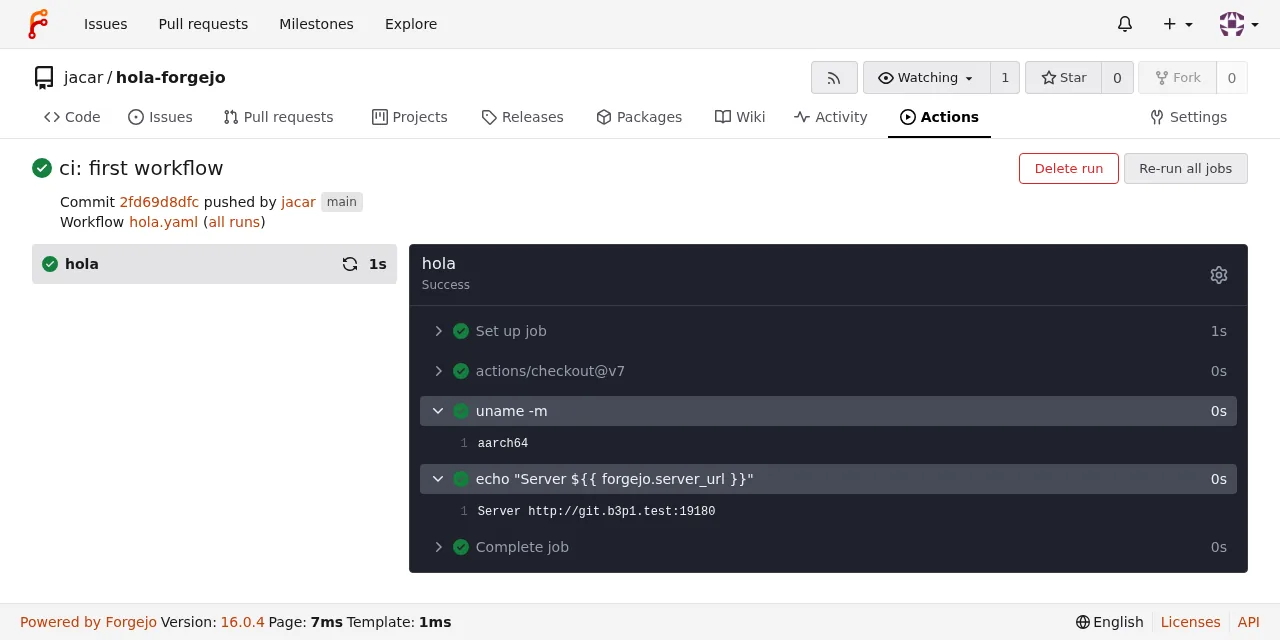
To test it, push the file .forgejo/workflows/hola.yaml to any repository (hola is Spanish for hello, and it is the name you will see in the screenshot):
on: [push]

jobs:
  hola:
    runs-on: docker
    steps:
      - uses: actions/checkout@v7
      - run: uname -m
      - run: echo "Server ${{ forgejo.server_url }}"
actions/checkout@v7 is downloaded from data.forgejo.org, the default value of DEFAULT_ACTIONS_URL. On my instance the job went green, with aarch64 in the second step and the public URL in the third:
The runner URL has to be the public one
My first attempt set url: http://forgejo:3000/ in config.yml, because the runner sits on the same network as Forgejo and registered fine that way. The workflow failed in actions/checkout with this error:
fatal: unable to access 'http://forgejo:3000/jacar/hola-forgejo/':
Could not resolve host: forgejo
The runner hands its connection URL to the job as the server address, and actions/checkout clones from there. But each job runs on its own network created for it, where the name forgejo does not exist. With the public URL, the same workflow succeeded. My lab had no public DNS, so I added --add-host in container.options and extra_hosts on the runner service; with a real domain you do not need them.
Host socket or Docker-in-Docker
Mounting /var/run/docker.sock into the runner gives it control over the host’s Docker, and each job runs as a sibling container of Forgejo. With the default settings (container.docker_host: "-", privileged: false) the socket is not shared with jobs, and on arm64 it worked without privileges. If you also share it with them (docker_host: automount), the Forgejo guide to Docker within Actions[10] warns that it is only advisable when only trusted users can access the instance.
If you are going to run third-party code, use Docker-in-Docker as in the runner’s official compose file, which needs privileged: true on that container, or move the runner to a virtual machine. I have not tested those variants in this guide. Keep in mind too that runner 13 requires Docker 25.0 or later and removed the set-output, set-env and add-path commands: write to $FORGEJO_OUTPUT, $FORGEJO_ENV and $FORGEJO_PATH instead.
How to check the version and upgrade to the patched release
A patch upgrade within 16.0 takes four steps, and I tested it by moving an instance from 16.0.3 to 16.0.4:
- Check the version with
forgejo --versionor/api/v1/version - Flush the queues with
docker compose exec -u git forgejo forgejo manager flush-queues, which answeredFlushed - Take a backup with
forgejo dump - Pull the new image and recreate the container
The backup and the upgrade are these commands:
docker compose exec -u git -w /tmp forgejo \
  forgejo dump --file /tmp/forgejo-dump.zip
docker compose cp forgejo:/tmp/forgejo-dump.zip .
docker compose pull forgejo
docker compose up -d forgejo
On a freshly created instance the zip took 213 KB and contained the forgejo-db.sql dump, the repositories, app.ini and the JWT private keys. Store it encrypted, for example with restic. The jump from 16.0.3 to 16.0.4 left Forgejo unresponsive for 2.1 s, and the repository was still there. That is the median of three runs, at a load average between 47 and 49 on 18 cores.
Moving from 16.0 to 17.0 is different. It is a major release, and Forgejo asks you to read the breaking changes and verify by hand; that is why it does not publish a latest tag. To hear about each security patch in advance, subscribe to the RSS feed of the forgejo/security-announcements repository on Codeberg.
How Forgejo relates to Gitea today
Forgejo started as a fork of Gitea and since early 2024 it has been a hard fork whose code diverges from Gitea’s. According to Forgejo’s comparison with Gitea[11], it was created in October 2022, after Gitea’s domain and trademark moved to a company. Since version 9.0 it is distributed under the GPL v3 or later. That page is Forgejo’s side of the story, so read it as such.
Two practical consequences follow. The +gitea-1.22.0 suffix in the version tells tools that talk to both which Gitea version its API is compatible with. And transparent migration from Gitea is only supported up to Gitea 1.22, going through Forgejo 10.0. If you followed our guide to installing Gitea with Docker, which uses 1.26.4, you have no direct path.
As for the template flaw, neither Forgejo’s notes nor the CVE record mention Gitea, so I make no claim about its exposure.
Frequently asked questions
Can I use a latest tag for Forgejo?
It does not exist. Forgejo publishes tags per branch (16, 16.0, 16.0.4) because moving from one major version to the next requires manual review. The 16.0 tag gets patches only, 16 also gets minor releases, and pinning 16.0.4 forces you to edit the compose file for every security patch.
How do I back up Forgejo on Docker?
With forgejo dump inside the container, which packs the database, repositories and configuration into a zip. That file includes app.ini and the private keys, so encrypt it before it leaves the server. With SQLite everything lives in the /data volume, which on my instance took 6.5 MB with one repository and two Actions runs.
Does Forgejo run on ARM64?
Yes. This whole guide ran on linux/arm64: Forgejo 16.0.4, Caddy 2.11.4, Forgejo Runner 13.1.0 and the Actions job, which printed aarch64. The Forgejo image is also published for linux/arm/v6, but I have not tested it on a Raspberry Pi.
Conclusion
Installing Forgejo with Docker comes down to two containers and a Caddyfile. The two details that break the install are not in the basic example: set REVERSE_PROXY_TRUSTED_PROXIES to the proxy’s exact IP and give the runner the public URL. Create the admin from the command line with INSTALL_LOCK, check that the version is 16.0.4 or later, and mark 17 September for 16.0.5. Version 17.0 is planned for 15 October: decide before 29 October whether you move up a branch or switch to 15.0 LTS.
Sources
- Forgejo 16.0 release post
- Forgejo releases page
- notes for the 10 September security release
- CVE-2026-89094 record
- Forgejo advisory for 16.0.5 and 15.0.9
- Forgejo recommended settings guide
- PostgreSQL image documentation
- Forgejo configuration cheat sheet
- runner registration documentation
- Forgejo guide to Docker within Actions
- Forgejo’s comparison with Gitea
- Forgejo, installation with Docker
- Forgejo, Forgejo Runner v13.0.0 is available