What Colibri is and how it runs giant MoE models by streaming experts from disk
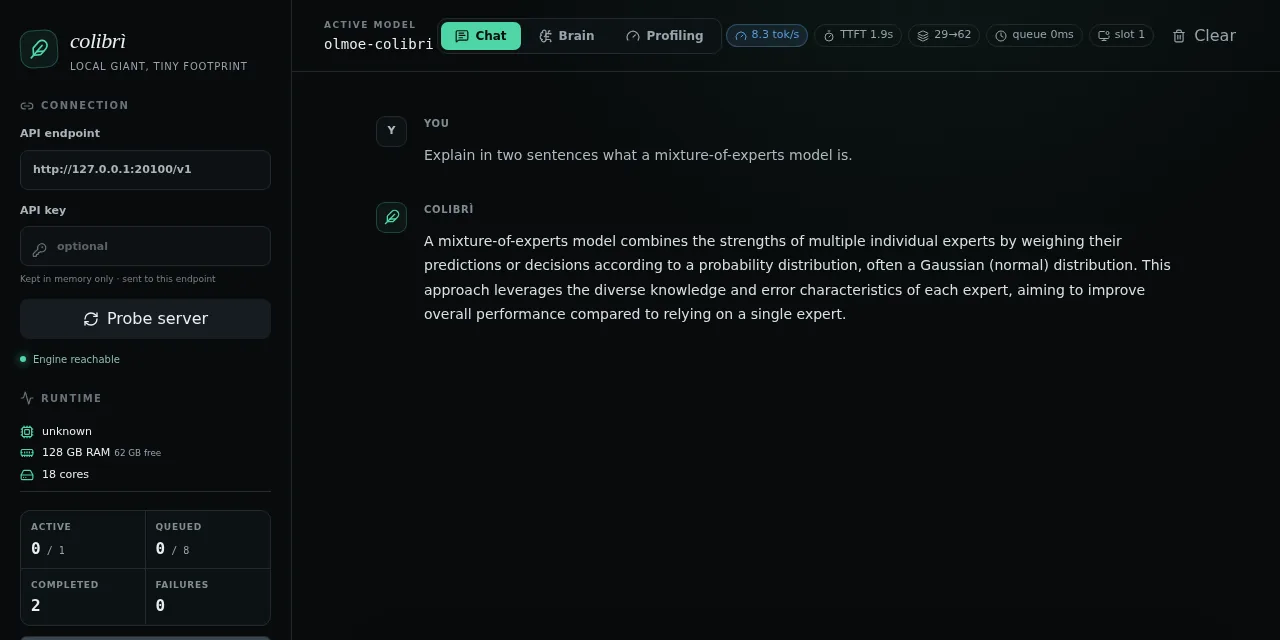
Table of contents
- Key takeaways
- What Colibri is and who builds it
- Why a MoE model can be read from disk
- What becomes the bottleneck when the experts live on the SSD
- How it differs from FreeToken, llama.cpp and oMLX
- What speed to expect and what it is good for
- Installing and running it on ARM64 Linux
- What happens when you force it to read experts from disk
- Limits and risks before you dedicate an SSD to it
- Frequently asked questions
- Do I need a GPU to use Colibri?
- Can Colibri load llama.cpp GGUF models?
- Does reading experts from disk all day damage the SSD?
- Conclusion
- Sources
GLM-5.2 takes about 370 GB on disk, and Colibri started out running it on a 12-core laptop with 25 GB of RAM. It gets there without squeezing the model until it fits, because it never loads the whole thing. The engine keeps in memory the part every token always uses and reads from the SSD, on demand, the experts the router picks. This article explains why that idea works for Mixture-of-Experts (MoE) models, how it differs from FreeToken, llama.cpp and oMLX, what speeds the project publishes and what we measured when we built version 1.11.0 on an ARM64 machine with no GPU. The Spanish version is at /colibri-modelos-moe-gigantes-desde-disco/.
Key takeaways
- Colibri is an Apache 2.0 inference engine written in C by Vincenzo Fornaro (JustVugg). Version 1.11.0 shipped on 13 September 2026 and the repository has 31,868 stars after ten weeks.
- It works because a MoE activates little of what it holds: GLM-5.2 uses 8 of its 256 experts per layer, about 11 GB of experts per token out of 370 GB in total.
- With the experts on disk, speed is set by SSD read bandwidth, the page cache and the expert cache hit rate. On a PCIe 5.0 NVMe the limit moves back to the CPU.
- The project’s GLM-5.2 figures range from 0.05 tok/s on a 25 GB laptop to 6.8 tok/s on six RTX 5090s: it suits batch jobs, not conversation.
- In our OLMoE test, cutting the cache from 64 to 8 experts per layer and forcing disk reads dropped the median from 2.84 to 1.52 tok/s; with the disk capped at 300 MiB/s, from 1.25 to 0.35 tok/s.
- Before adopting it, weigh three risks: weight containers only Colibri reads, eight security advisories published in August, and a ten-week-old project whose merges nearly all go through its author.
What Colibri is and who builds it
Colibri is an inference engine for Mixture-of-Experts models written in C, with no external dependencies in the engine and an Apache 2.0 licence. It is published by the GitHub user JustVugg, whose profile identifies him as Vincenzo Fornaro, the project’s founder. The author spells it "colibrì", with an Italian accent; in the repository and on the command line it is colibri.
The Git history dates the first commit to 1 July 2026 and the first engine, for GLM-5.2, to 5 July. Version 1.0.0 was tagged on 19 July and 1.11.0 on 13 September, seventeen releases in eight weeks. On 14 September the GitHub page showed 31,868 stars and 3,378 forks.
The code layout is unusual: one C file per model family (colibri.c for GLM-5.2, kimi_k3.c, olmoe.c…) on top of shared headers for the safetensors reader, the tokenizer and the expert cache. Above that sits a Python launcher, coli, with the chat, serve, web, doctor, plan and tune commands. Python only runs that launcher, the weight conversion and the HTTP gateway; inference is plain C with OpenMP.
The README lists nine families: GLM-5.2 and 5.3, GLM-5.3-Flash, Inkling, Kimi K3, DeepSeek V4 Flash and V4.1 Flash, Qwen3.8-Flash-Next, Qwen3.6 and OLMoE. Its design promise fits in one README sentence: "there is no SLA on speed, and a hard guarantee on semantics". In practice, placing an expert on disk or in VRAM can change the speed, but not the weights’ precision or the router’s decisions.
Why a MoE model can be read from disk
A MoE model replaces the feed-forward layer of each block with a set of small networks, the experts, and a router that picks a few of them for each token. Total parameters measure how much the model takes up; active parameters, how much it computes at each step. If you already know how Mixtral 8x22B works, the principle is the same with 256 experts per layer instead of 8. These are the figures from the config.json files and the Hugging Face tensor counts:
| Model | Total parameters | Layers | Experts per layer | Experts per token |
|---|---|---|---|---|
| GLM-5.2 (Z.ai) | 753.3 billion | 78 (75 MoE) | 256 + 1 shared | 8 |
| Kimi K3 (Moonshot AI) | 2.78 trillion | 93 (92 MoE) | 896 + 2 shared | 16 |
| DeepSeek V4 Flash | 290.9 billion | 43 | 256 + 1 shared | 6 |
| OLMoE 1B-7B 0125 (Ai2) | 6.92 billion | 16 | 64 | 8 |
For GLM-5.2 the arithmetic goes like this. Each expert has three 6,144 × 2,048 matrices, 37.7 million parameters, which take about 19 MB at int4 with group-64 scales. A token passes through 75 MoE layers and uses 8 experts in each: 600 experts, about 11.3 GB. The model holds 19,456 experts in total (including the multi-token prediction layer), about 370 GB.
The gap between Hugging Face’s 753.3 billion and the 744 billion Colibri quotes is that last layer: 256 experts of 37.7 million parameters add up to 9.66 billion. The dense part (attention, shared expert and embeddings) is around 17 billion parameters and stays resident in RAM, 9.9 GB at int4. The rest does not need to fit in memory: it needs a place it can be fetched from in time.

This only works because routing is not random. Colibri records in a .coli_usage file which experts your workload picks and pins the most used ones in RAM. It also applies the next layer’s router to the current layer’s state to start reads early. According to its tuning guide, that trick recalls 71.6% of the next layer’s experts on GLM-5.2.
What becomes the bottleneck when the experts live on the SSD
When the experts live on disk, decoding is limited by how many bytes you can read per second. One row of the community benchmarks shows it: an i9-12900K with 64 GB and a Samsung 990 Pro read about 9.9 GB per GLM-5.2 token. It split its time into 48% disk, 34% matrix multiplication and 12% attention.
There are three levers, and each one is worth measuring on its own:
- Read bandwidth: on a Ryzen 9 9950X with 123 GB, moving the model from a PCIe 3.0 QLC SSD (1.51 GB/s buffered) to a Samsung 9100 PRO PCIe 5.0 (8.81 GB/s with
O_DIRECT) raised the speed from 0.10 to 0.28 tok/s. The profile flipped from 66% of the time on disk to 57% on compute - Page cache: Linux keeps pages it has read in RAM, so free memory acts as one more tier.
DIRECT=1(O_DIRECT) bypasses that cache; the README cites 34% faster decoding on a Blackwell box running Windows, and warns it can make things worse on QLC or virtual disks - Routing locality: the expert cache hit rate. With two NVMe drives on independent controllers and Colibri’s mirror mode, a Threadripper PRO 7965WX went from 0.80 to 1.10 tok/s, 37.5% more
The practical consequence is that RAM still matters, in a different way. Every gigabyte not taken by dense weights or the KV cache is a gigabyte of experts that does not have to be read again. In the DeepSeek V4 Flash section, the README calls --ram "the single most valuable knob". Even so, a test on an M1 Max with 64 GB ran slower with more RAM assigned, so measure on your own machine.
How it differs from FreeToken, llama.cpp and oMLX
All four move part of the work out of fast memory, but only Colibri treats the SSD as a tier for expert weights, with a cache and prefetch driven by routing. The FreeToken engine, which we covered in August, splits experts across GPU, CPU and system RAM according to the bandwidth it measures at each step. In llama.cpp, the operating system pages the weights in through mmap. And oMLX uses the SSD for the KV cache, not for the weights.
| Criterion | Colibri 1.11.0 | FreeToken 0.1.2 | llama.cpp | oMLX |
|---|---|---|---|---|
| Where experts that do not fit live | SSD, with an LRU cache and pins in RAM | System RAM; the GPU caches hot ones | Wherever mmap pages them, or on CPU with --cpu-moe |
They must fit in unified memory |
| What decides placement | Measured routing heat and one-layer-ahead prefetch | Bandwidth measured at each step | Fixed at load (-ot, --n-cpu-moe) |
Does not apply to weights |
| What the SSD is used for | Expert weights | Not as a weight tier | Implicitly, through mmap | Cold KV cache blocks |
| Hardware | x86 and ARM CPUs, CUDA, Metal, Vulkan | NVIDIA RTX 30, 40 and 50 GPUs | CPU, CUDA, Metal, Vulkan, SYCL and more | Apple Silicon |
| Weight format | Own containers or original checkpoint, per family | Hugging Face checkpoints and FTW format | GGUF | MLX |
| Reference version | 1.11.0, 13 September 2026 | 0.1.2, 19 August 2026 | Main branch | 0.6.4 |
The choice depends on where your memory is. If the model fits in RAM, FreeToken or llama.cpp get more tokens per second, because they pay for no reads. If you have a Mac and the model fits in unified memory, oMLX is the comfortable option. Colibri makes sense when the model fits in none of your machine’s memory and you accept that the disk sets the pace.
What speed to expect and what it is good for
The GLM-5.2 figures the project publishes range from 0.05 to 6.8 tokens per second, and the difference is the hardware, not the engine. They all come from the README and the community benchmark table; we have not reproduced them:
| Machine, per the project | Configuration | Decoding |
|---|---|---|
| 6 × RTX 5090, 2 Xeon Silver 4510, 251 GB | Every expert in VRAM and RAM | 5.8–6.8 tok/s |
| Ryzen AI Max+ 395, 128 GB, PCIe 4.0 NVMe | CPU only, learned cache | 1.83 tok/s |
| Core Ultra 9 185H, 32 GB, QLC, RTX 5070 Ti | GPU-resident pipeline | 1.07 tok/s |
| Development box, 25 GB, WSL2 disk at ~1 GB/s | Cold, everything from disk | 0.05–0.1 tok/s |
| Apple M3, 16 GB (OLMoE int8, not GLM-5.2) | CPU only | 3.69–4.18 tok/s |
Put as waiting time, a 500-token answer takes 83 minutes at 0.1 tok/s, 8 minutes at 1 tok/s and 83 seconds at 6 tok/s. Prompt processing comes on top: on DeepSeek V4 Flash the project measured 90 s for a 3,324-token prompt with an RTX 5080. That rules out agents with long tool loops and fluid conversation on home hardware.
What does fit is work you can leave running overnight. For example, summarising or classifying a batch of documents, reviewing code without sending it to an API, or evaluating a frontier open model before paying for its hardware. For daily use with a model that fits your machine, the local LLM calculator tells you what size your memory can hold.
Installing and running it on ARM64 Linux
Version 1.11.0 ships binaries for x86_64 Linux, ARM64 macOS and x86_64 Windows, but not for ARM64 Linux, so we built from source. The test ran on 14 September 2026 in an OrbStack virtual machine on a Mac: ARM64 Linux, 18 cores, 121 GB of RAM, no GPU and gcc 14.2.
git clone https://github.com/JustVugg/colibri
cd colibri && git checkout v1.11.0
cd c && ./setup.sh
make olmoe
setup.sh checks the compiler and OpenMP and builds the GLM-5.2 engine: it took 9.3 s in total, and the OLMoE engine 2.2 s. The binaries weigh 552 KB (colibri) and 210 KB (olmoe). The self-test the guide describes did not run, because it looks for a tiny reference model that is not in the cloned repository.
Since we were not going to download 372 GB, we used the smallest family, Ai2’s OLMoE-1B-7B-0125-Instruct. There is no pre-converted container: you convert it with a repository script that needs PyTorch.
python3 -m venv venv && . venv/bin/activate
pip install torch --index-url https://download.pytorch.org/whl/cpu
pip install safetensors numpy huggingface_hub
python tools/convert_olmoe_merged.py \
  --model ~/models/OLMoE-1B-7B-0125-Instruct \
  --out /var/tmp/olmoe_i8
The conversion turned the 13.8 GB bf16 checkpoint into a 7.0 GB int8 container in 45.5 s: 1,024 experts and 147 dense tensors. We then validated the engine against the transformers reference shipped in the repository: it produced 12 of the 12 expected tokens. It loaded the dense weights in 0.9 s and used 1.79 GB of RSS.
SNAP=/var/tmp/olmoe_i8 ./olmoe 64 8 ref_olmoe_real.json
python3 coli doctor --model /var/tmp/olmoe_i8
The first olmoe argument is the expert cache per layer and the second is the bit width. coli doctor checked the model, the safetensors and the RAM. Its plan: 1.0 GB dense, 6.5 GB of cached experts, 64 per layer and 100% projected residency.
With the engine validated, coli serve starts the OpenAI-compatible API. It listens on 127.0.0.1:8000 by default; we moved it to port 20100 and tried it with curl:
python3 coli serve --model /var/tmp/olmoe_i8 --port 20100
curl -s http://127.0.0.1:20100/v1/chat/completions \
  -H 'Content-Type: application/json' \
  -d '{"model": "olmoe-colibri", "max_tokens": 80, "temperature": 0,
    "messages": [{"role": "user",
      "content": "Explain in two sentences what a mixture-of-experts model is."
    }]}'
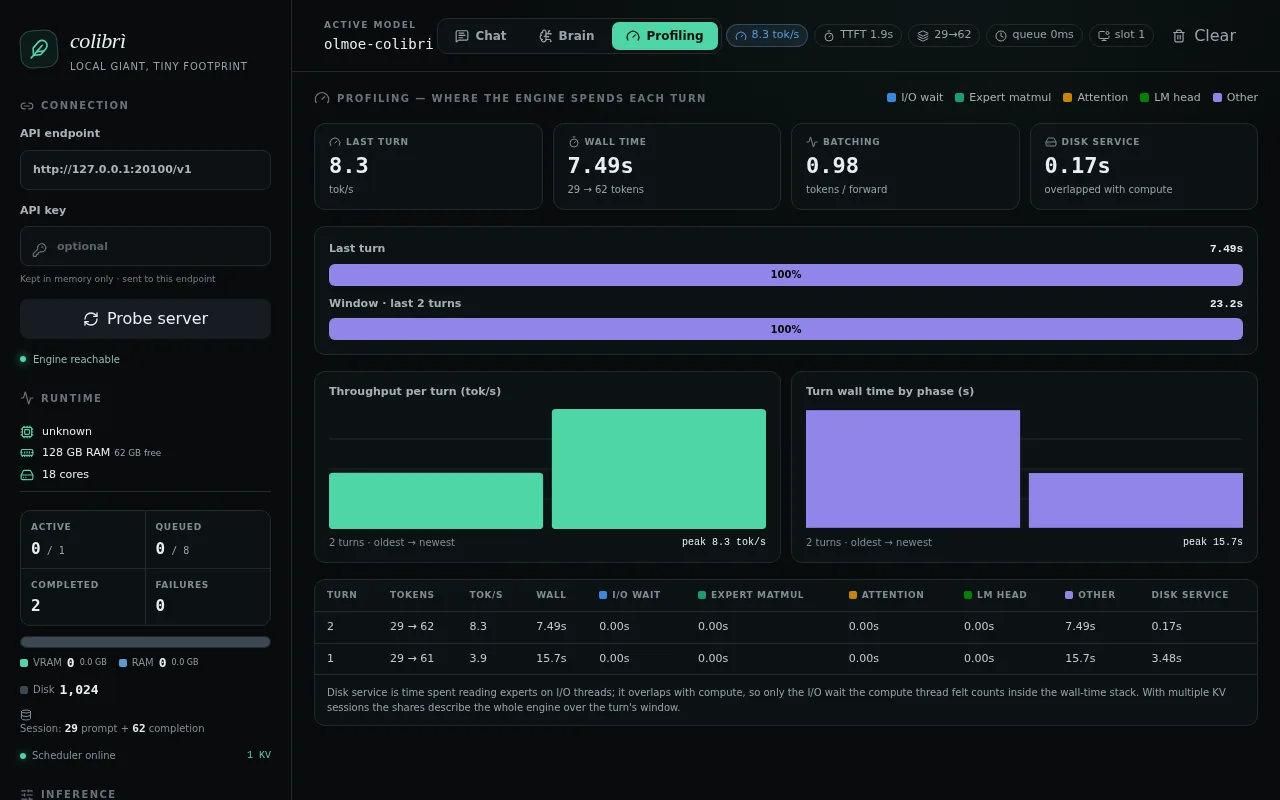
The first request returned 61 tokens in 15.7 s, of which 3.48 s were cold expert reads according to the /profile endpoint. Over the next three, with a warm cache, disk reads dropped to 0 s and the median was 3.62 tok/s, at a load average of 31 on 18 cores. According to its documentation, the server handles one generation at a time and, with OLMoE, rejects tools with an HTTP 400 error.
The web dashboard is built separately (cd web && npm ci && npm run build; the Vite build took under a second) and served by the same process. It has three tabs: chat with the speed and time to first token, Brain with the 16-layer by 64-expert grid, and Profiling with time per phase. With OLMoE, the phase breakdown only fills in disk reads, and the tier split kept showing all 1,024 experts as disk even though, with a warm cache, they were served from RAM.
What happens when you force it to read experts from disk
The expert cache is the lever that turns Colibri into a disk engine, so we cut it on purpose. With OLMoE, going from 64 experts per layer to 8 and forcing every miss to be read from the SSD dropped the median from 2.84 to 1.52 tok/s. With disk reads capped at 300 MiB/s, the drop was from 1.25 to 0.35 tok/s.
The OLMoE engine takes the cache size as its first argument. By default, Linux keeps what it has already read in the page cache, so a miss does not go back to disk. With EXPERT_DROP=1, the engine discards those pages after each read (fadvise(DONTNEED)) and every miss becomes a real read. We extended the repository’s reference to 64 tokens and alternated the four configurations over six rounds:
export SNAP=/var/tmp/olmoe_i8 OMP_NUM_THREADS=4
./olmoe 64 8 ref_64.json                 # everything cached
EXPERT_DROP=1 ./olmoe 8 8 ref_64.json    # 8 per layer, reads the SSD
The hit and read columns are deterministic: they repeated exactly in all six rounds. With 8 experts per layer, each generated token triggers 106 reads of 6.4 MB, about 680 MB per token.
Speed, on the other hand, varied up to fivefold between rounds, because other processes were sharing the machine at a load average of 20 to 48 on 18 cores. The order held: the full cache beat the 8-expert cache with disk reads in all six rounds. That spread made us distrust any single speed figure, our own included.
One caveat changes how those figures read. Our disk is virtual and the host Mac serves its reads from its own cache. The project’s iobench tool measured 17.9 GB/s with O_DIRECT and 6.4 MB blocks, which no consumer NVMe drive reaches, so those penalties are a lower bound. To see the regime of a real SSD, we repeated the test in a Docker container with disk reads capped:
G=/lib/aarch64-linux-gnu/libgomp.so.1
docker run --rm --device-read-bps /dev/vdb:300mb \
  -v /var/tmp:/var/tmp -v "$PWD":/colibri:ro -v $G:$G:ro \
  -e SNAP=/var/tmp/olmoe_i8 -e OMP_NUM_THREADS=4 -e EXPERT_DROP=1 \
  -w /colibri debian:13 ./olmoe 8 8 /var/tmp/ref_32.json
At 300 MiB/s, the 22.8 GB of experts the 8-expert cache asks for over 32 tokens need 73 s of reading alone. The full run took 91 to 98 s, so the disk accounts for 75% to 80% of the time. It is the same regime the GLM-5.2 benchmarks describe on real machines, where each token reads 9.9 GB instead of 0.68 GB. The 64-expert cache also pays its warm-up (749 experts, 4.8 GB), but stops reading after that.
One last lesson applies outside Colibri. In a 32-token run with the 18 threads OpenMP assigns by default, the full cache gave 0.84 tok/s on the loaded machine; with 4 threads, 2.01 tok/s. On a shared machine, lower OMP_NUM_THREADS before blaming the disk.
Limits and risks before you dedicate an SSD to it
SSD wear from reads is smaller than the folklore says. Program and erase cycles are what wear NAND cells; reading does not consume them. Reading the same block over and over does shift the voltage of neighbouring cells, and the controller fixes it with what the Cai et al. study of flash read-disturb errors calls read reclaim: "remap the data in a block to a new flash block, if the block has experienced a high number of reads". Those are writes, but occasional ones. We have not measured SSD wear under Colibri; the write that does count is the initial conversion of hundreds of gigabytes.
Containers tie you to the engine. The recommended GLM-5.2 container, published by mastouri on Hugging Face, uses a grouped-scale int4 format (fmt=4) inside safetensors files that only Colibri reads. It is not GGUF, so if you switch engines you download the original again. Kimi K3, DeepSeek V4 Flash, DeepSeek V4.1 Flash and Qwen3.8-Flash-Next are the exception, because Colibri reads their official checkpoints without conversion.
The loader has had security bugs. On 5 August 2026 the project published eight advisories, including out-of-bounds writes in the safetensors reader with crafted model files and an unauthenticated /profile endpoint. The GLM-5.2 container’s own model card asks for version 1.5.0 or later. Use 1.11.0 and containers from a known source, because loading a third-party model means running a C parser over data you do not control.
Each model brings its own licence. Colibri is Apache 2.0, GLM-5.2 and DeepSeek V4 Flash are MIT, and OLMoE is Apache 2.0. Kimi K3 uses its own MIT-style licence with one clause: a company offering models as a service with more than USD 20 million of revenue over twelve months needs a separate agreement with Moonshot AI.
The project is ten weeks old. It has 2,228 commits, 825 merged pull requests, 398 closed issues and 58 open ones. The activity comes from a community, with 161 distinct author addresses, but merges go through one person: 745 of the 777 merge commits are by Vincenzo Fornaro, who also authored 448 of the other 1,451 commits. Another data point on the pace: 443 of those commits carry a co-author line for Claude, Anthropic’s assistant. The project website still shows old counters (25,157 stars and "six weeks"), so the documentation lags behind the code.
Frequently asked questions
Do I need a GPU to use Colibri?
No: the README states that none of the nine families needs a GPU and that a graphics card only speeds things up. We confirmed it with OLMoE on an ARM64 machine with no GPU. For GLM-5.2 the README asks for 372 GB on a fast disk and at least 16 GB of RAM. Even so, in its benchmarks an i5-12450H with 16 GB and a DRAM-less QLC SSD did not get to a decode figure.
Can Colibri load llama.cpp GGUF models?
No. It reads safetensors: containers converted for Colibri, such as the GLM-5.2 int4 one, or the official checkpoints in the case of Kimi K3 and DeepSeek V4 Flash. If your models are already in GGUF, stay with llama.cpp and the optimisations that keep it fast.
Does reading experts from disk all day damage the SSD?
Reads do not consume write cycles. What they cause, once a block piles up a high number of reads, is the controller copying its data to another block to avoid errors. It is a small cost compared with writing the model, but we have not measured it under Colibri.
Conclusion
Colibri shows something that seemed reserved for data centres: a 744-billion-parameter model answers on a home machine if you accept that the SSD sets the pace. The idea is sound because it exploits MoE sparsity and the structure of routing, and the project documents it with reproducible figures and with its failures. Our OLMoE test confirms the mechanism: less cache means more reads and fewer tokens per second, with the same output.
For interactive work, a model that fits in your memory is still the better option; check the open models of August 2026 before buying a disk. If you want to evaluate a frontier model on your own machine and you have patience and a high-end NVMe drive, Colibri 1.11.0 is the most direct route today. Always use it with trusted containers.
Sources:
- JustVugg/colibri repository, README and documentation[1]
- Colibri 1.11.0 release[2]
- JustVugg GitHub profile[3]
- Colibri benchmarks[4]
- Colibri tuning guide[5]
- Colibri API reference[6]
- Colibri security advisories[7]
- GLM-5.2 on Hugging Face[8]
- Kimi K3 on Hugging Face[9]
- DeepSeek V4 Flash on Hugging Face[10]
- OLMoE-1B-7B-0125-Instruct on Hugging Face[11]
- GLM-5.2 int4 g64 container for Colibri[12]
- FreeToken repository[13]
- llama.cpp server options[14]
- oMLX repository[15]
- Cai et al., Read Disturb Errors in MLC NAND Flash Memory[16]
- colibrì official website[17]
Sources
- JustVugg/colibri repository, README and documentation
- Colibri 1.11.0 release
- JustVugg GitHub profile
- Colibri benchmarks
- Colibri tuning guide
- Colibri API reference
- Colibri security advisories
- GLM-5.2 on Hugging Face
- Kimi K3 on Hugging Face
- DeepSeek V4 Flash on Hugging Face
- OLMoE-1B-7B-0125-Instruct on Hugging Face
- GLM-5.2 int4 g64 container for Colibri
- FreeToken repository
- llama.cpp server options
- oMLX repository
- Cai et al., Read Disturb Errors in MLC NAND Flash Memory
- colibrì official website
Source code
Access all the source code for this post on GitHub.
View on GitHub