MariaDB 13 new features in Docker, and whether to upgrade
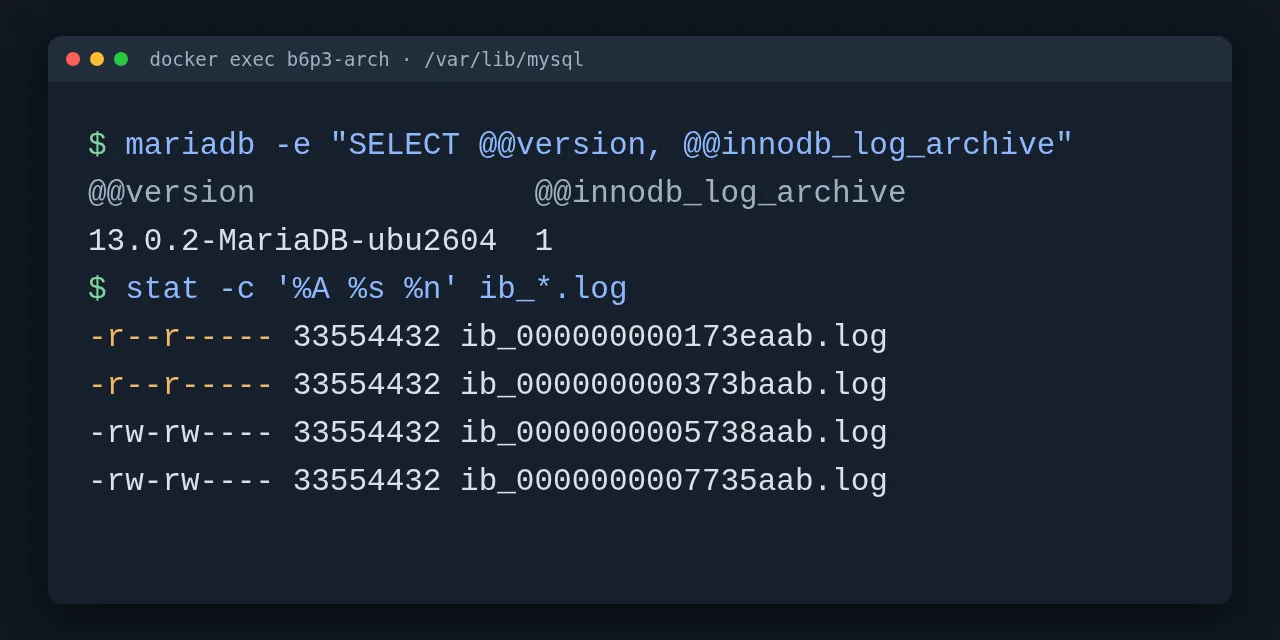
Table of contents
- Key takeaways
- What MariaDB 13.0 is and how long it will be supported
- What MariaDB 13.0 brings and what was left out
- How I set up the lab in Docker
- Upgrading MariaDB 12.3 to 13.0 with mariadb-upgrade
- What breaks when jumping from 11.8 to 13.0
- How redo log archiving works
- What fails with archiving switched on
- What archiving costs on writes
- Point-in-time recovery from the archived files
- QB_NAME and implicit query block names
- UPDATE with RETURNING and deprecated variables
- Should you upgrade to MariaDB 13.0?
- Frequently asked questions
- Is MariaDB 13.0 an LTS release?
- Do I need to run mariadb-upgrade when moving to 13.0 in Docker?
- Can I use innodb_log_archive with mariadb-backup?
- Conclusion
- Sources
MariaDB 13.0.2 has been stable since 15 September 2026, but it is a rolling release: the MariaDB Foundation supports it only until Q4 2026, against 12 June 2029 for the 12.3 LTS. It adds InnoDB redo log archiving (innodb_log_archive), UPDATE ... RETURNING, implicit query block names for optimizer hints and deprecation metadata for system variables. I tested it in Docker on aarch64 and upgraded two real data directories, one from 12.3.3 and one from 11.8.9, to see what breaks. There is also a Spanish version of this analysis.
Key takeaways
- MariaDB 13.0 is rolling, not LTS: community support ends in Q4 2026, and the
mariadb:latesttag on Docker Hub already points to 13.0.2 whilemariadb:ltsstays on 12.3.3. - A 12.3.3 data directory started on 13.0.2 without
MARIADB_AUTO_UPGRADE;mariadb-upgradedetected the major version jump and passed its 8 phases without errors. - From 11.8.9,
mariadb-upgradealso reported everything OK, yet a procedure with a variable namedto_datefailed when called, becauseTO_DATEhas been a reserved word since 12.3. - With
innodb_log_archive=ON, InnoDB replacesib_logfile0with 32 MiBib_<lsn>.logfiles that turn read-only;mariadb-backupfails with "cannot read redo log header". - With sysbench
oltp_write_onlyon 4 CPUs, archiving lowered the median from 6,073 to 5,883 transactions per second (3.1 %, within the noise), but left up to 1.5 GiB of redo in one minute. - Point-in-time recovery worked up to the end of an archived file, but not to any LSN in between: the server answered "cannot fulfill innodb_log_recovery_target" in every test.
- The mariadb.com release notes announce atomic
CREATE OR REPLACE TABLE, but the stable announcement and the MDEV-25292 issue on Jira say it did not make it into 13.0.
What MariaDB 13.0 is and how long it will be supported
MariaDB 13.0 is the newest stable series of the rolling channel, the one that ships new features every quarter. The MariaDB Foundation maintenance policy[1] promises one LTS per year, with community binaries for 3 years, and announces rolling releases quarterly. The stable release announcement[2], by Frédéric Descamps, puts it this way: "Stable describes the maturity of the release. Rolling describes its update path."
These are the dates the Foundation publishes for the series a production server may run today:
| Series | Type | Status and date | End of community support |
|---|---|---|---|
| 13.0 | Rolling | Stable, 15 Sep 2026 (13.0.2) | Q4 2026 |
| 13.1 | Rolling | RC on 15 Sep 2026 | Q1 2027 |
| 12.3 | LTS | Stable, 28 May 2026 | 12 Jun 2029 |
| 11.8 | LTS | Stable, 4 Jun 2025 | 4 Jun 2028 |
| 11.4 | LTS | Stable, 29 May 2024 | 29 May 2029 |
| 10.11 | LTS | Stable, 16 Feb 2023 | 16 Feb 2028 |
The Foundation’s calendar marks 13.3 as the next LTS. In October 2026, 13.0 has at most three months of patches left: adopting the rolling channel commits you to moving to 13.1 and the next ones every quarter. The all releases page[3] already lists 13.1.1 RC and 13.2.0 preview.
On Docker Hub the difference matters more than it looks. On 28 September 2026, mariadb:latest, mariadb:13 and mariadb:13.0 shared the 13.0.2 digest, and mariadb:lts and mariadb:12.3 the 12.3.3 one. A compose.yaml with image: mariadb:latest and a data volume moves to a rolling release on the next docker compose pull.
What MariaDB 13.0 brings and what was left out
The 13.0.2 release notes[4] describe it as "an evolution of MariaDB 12.3 with several entirely new features". These are the new features, with the ones I tested marked:
innodb_log_archive(MDEV-37949): keeps the redo log in successive files instead of overwriting a ring buffer. Tested.UPDATE ... RETURNING(MDEV-5092) for single tables, withOLD_VALUE()to read the previous value. Tested.- Implicit query block names for views, CTEs and derived tables, plus the
QB_NAME(name, path)form (MDEV-38045). Tested. IS_DEPRECATEDandDEPRECATED_REPLACEMENTinINFORMATION_SCHEMA.SYSTEM_VARIABLES(MDEV-35369). Tested.binlog_row_event_max_sizeraises its default to 64 KB (MDEV-37608). Tested.TYPE ... IS REF CURSORandRECORDas a parameter orRETURNtype of package routines, in Oracle mode. Not tested.- Performance Schema digests with XXH3_128, a configurable timestamp format in the audit plugin,
init_rpl_rolevisible inSHOW VARIABLESand a globaldefault_master_connection.
Two features from the preview announcement did not arrive. Descamps says so in the stable announcement: the optimizer trace with the statistics actually used (MDEV-38701) and atomic CREATE OR REPLACE TABLE (MDEV-25292) "didn’t make it to the release yet". The mariadb.com notes, however, still list both. I checked Jira on 28 September: MDEV-25292[5] is "Stalled" with fix version 13.2, and MDEV-38701 was closed in 13.1.1.
The DuckDB storage engine the announcement mentions is a separate package (MariaDB-duckdb-engine, in gamma). The official 13.0.2 Docker image does not include it: its plugin directory has no ha_duckdb.
How I set up the lab in Docker
I used the official mariadb:13.0.2, mariadb:12.3.3 and mariadb:11.8.9 images from Docker Hub on an aarch64 OrbStack virtual machine on Apple silicon, with 18 cores and 47 GB of RAM, shared with other tests. The 13.0.2 image takes 531 MB on disk on Ubuntu 26.04.1, and 12.3.3 takes 486 MB on Ubuntu 24.04.5. If you are starting from scratch, the guide to installing MariaDB with Docker covers the basic setup.
Each data directory was seeded with the old version: a tienda database with 20,000 customers, 200,000 orders, a view, a stored procedure and a user with mysql_native_password. Containers carry my lab’s b6p3 prefix and the data lives in bind-mounted folders, so I could copy them between versions:
docker run -d --name b6p3-v123 -v "$PWD/data/v123:/var/lib/mysql" \
  -e MARIADB_ROOT_PASSWORD=root_pass mariadb:12.3.3
docker exec -i b6p3-v123 mariadb -uroot -proot_pass --force < lab/seed.sql
Before each test I copied the folder with cp -a, so every upgrade started from the same state. It is the same cold copy you want before touching a real server, because a major version downgrade is not supported.
Upgrading MariaDB 12.3 to 13.0 with mariadb-upgrade
The upgrade from the 12.3 LTS worked with no data changes, but the image does not complete it on its own. I started 13.0.2 on the copy of the 12.3.3 directory without the MARIADB_AUTO_UPGRADE variable:
docker run -d --name b6p3-up123 -v "$PWD/data/up123:/var/lib/mysql" \
  -e MARIADB_ROOT_PASSWORD=root_pass mariadb:13.0.2
docker logs b6p3-up123 2>&1 | grep -i upgrade
The entrypoint warned that the upgrade was needed and skipped it: "MariaDB upgrade (mariadb-upgrade or creating healthcheck users) required, but skipped due to $MARIADB_AUTO_UPGRADE setting". The server accepted connections anyway. The mariadb-upgrade reference[6] explains why: "The MariaDB server never performs the upgrade itself". Debian and Ubuntu packages run it for you; a container does not.
The manual step reads the previous version from the mariadb_upgrade_info file in the data directory:
docker exec b6p3-up123 mariadb-upgrade -uroot -proot_pass
# Major version upgrade detected from 12.3.3-MariaDB to 13.0.2-MariaDB.
# Phase 1/8: Checking and upgrading mysql database
# ...
# Phase 8/8: Running 'FLUSH PRIVILEGES'
# OK
The 8 phases checked the mysql tables, the sys views, the tienda.v_pedidos_es view and both data tables, and all of them returned OK. Over three repetitions on copies of the same 185 MB directory, mariadb-upgrade took a median of 2.25 s (2.04 to 2.68 s), with the container already running. A second run answered "This installation of MariaDB is already upgraded to 13.0.2-MariaDB". Users with mysql_native_password kept logging in unchanged.
There is no official "Upgrading from MariaDB 12.3 to 13.0" guide in the documentation yet: the mariadb.com llms.txt index stops at the 11.8 to 12.3 one.
What breaks when jumping from 11.8 to 13.0
The direct jump from the 11.8 LTS brings in the 12.x changes too, and the one that bit me is caught by no tool. This time I used MARIADB_AUTO_UPGRADE=1 and left the big_tables = 1 option in my.cnf, which the 11.8 to 12.3 guide[7] tells you to remove because it was dropped in 12.0.
The server did not refuse to start. It only logged a warning: "’big-tables’ was removed. It does nothing now and exists only for compatibility with old my.cnf files". The entrypoint saved a copy of the system schema to system_mysql_backup_11.8.9-MariaDB.sql.zst, ran mariadb-upgrade and started the final server.
The problem showed up later. On 11.8 I created a procedure that declares a variable named to_date, which was valid then. Version 12.3 turned TO_DATE and CONVERSION into reserved words, and 13.0 inherits the change:
CALL resumen('2025-01-01');
-- ERROR 1457 (HY000): Failed to load routine tienda.resumen
-- (internal code -6). For more details, run SHOW WARNINGS
SHOW WARNINGS;
-- Error 1064: You have an error in your SQL syntax; ...
-- near 'to_date DATE DEFAULT CURRENT_DATE; ...'
mariadb-upgrade misses it because a routine body is parsed when it is called, not during the upgrade: even with --force it marked mysql.proc as OK. The INFORMATION_SCHEMA.ROUTINES view does keep the text, so a search before upgrading finds the candidates:
SELECT ROUTINE_SCHEMA, ROUTINE_NAME
FROM information_schema.ROUTINES
WHERE ROUTINE_DEFINITION REGEXP '\\b(to_date|conversion)\\b';
In my case it returned tienda.resumen. The query gives false positives when the word appears in a comment or a string, but it is cheaper than finding the failure in production.
How redo log archiving works
Archiving replaces the InnoDB ring buffer with a sequence of files that are never overwritten, designed for point-in-time recovery and incremental backups. The variable is dynamic and can be switched on live:
SET GLOBAL innodb_log_archive = ON;
SHOW GLOBAL STATUS LIKE 'innodb_lsn%';
-- Innodb_lsn_current         24373947
-- Innodb_lsn_last_checkpoint 24373931
-- Innodb_lsn_archived        24373931
Right away, ib_logfile0 disappeared from the data directory and ib_000000000173eaab.log appeared in its place. The name is the LSN in hexadecimal: 0x173eaab is 24,373,931, the same value as Innodb_lsn_archived. Each file is as large as innodb_log_file_size, 32 MiB in my configuration.
After six UPDATE statements over the 200,000 orders there were four files, 128 MB on disk: two read-only (-r--r-----), the current one and one allocated in advance. The names advance by 0x1FFD000, that is 32 MiB minus the 12 KiB header described on the InnoDB Log Archiving page[8]. According to that page, a file turns read-only once a checkpoint completes in the next one, and that is the moment to move it to other storage.
What fails with archiving switched on
Archiving changes the redo log format, and four things stopped working in my tests:
mariadb-backupstops with "Error: cannot read redo log header" and exit code 1. The notes admit it: no backup tool understands this format yet.- Enabling it in
my.cnfbefore doing it live prevents startup: "[ERROR] InnoDB: innodb_log_archive=ON but ./ib_logfile0 exists". FirstSET GLOBAL, then the config file. - Going back to 12.3.3 fails with "[ERROR] InnoDB: File ./ib_logfile0 was not found". With
SET GLOBAL innodb_log_archive = OFF, 13.0 recreatedib_logfile0, deleted the writable files and left the read-only ones; after that 12.3.3 started and read the 200,000 orders. - Restarting without the variable in the config does not turn it off: the server came back with
@@innodb_log_archiveat 1 when it found the files. ButInnodb_lsn_archivedjumped from 24,373,931 to 96,524,445 even though the old files were still in place.
If your daily backup is mariadb-backup, enabling archiving breaks it today. A file copy with restic after a clean shutdown still works, but you lose the hot backup.
What archiving costs on writes
In my test, archiving took 3.1 % off transactions per second, less than the variation between runs. I used sysbench 1.0.20 with oltp_write_only: 4 tables of 250,000 rows, 8 threads and 60 s per run. The 13.0.2 server ran with --cpus 4 --memory 4g, a 1 GB buffer pool and a 256 MiB innodb_log_file_size, on a fresh data directory for every run. I alternated three runs with archiving off and three with it on, and each one started with a machine load between 2.78 and 2.98:
| Mode | Transactions/s (median) | p95 (median) | Redo on disk after 60 s |
|---|---|---|---|
| Archiving off | 6,073 | 2.43 ms | 256 MiB fixed |
| Archiving on | 5,883 | 2.35 ms | 1.25 to 1.5 GiB |
The runs without archiving ranged from 5,698 to 6,207 transactions per second, so the difference sits inside the noise of a shared, virtualised machine. The cost you do see is disk: one minute of writes left 5 to 6 files of 256 MiB, and the archive keeps growing until you move them to other storage.
Point-in-time recovery from the archived files
The recovery guide for log archiving[9] uses two startup options: innodb_log_recovery_start, the LSN where the replay starts, and innodb_log_recovery_target, where it stops. I rehearsed it with a cold copy of the directory and three later changes. First, 1,000 rows tagged lote1 and another 1,000 tagged lote2; then a 200,000-row UPDATE that did not finish within the first file.
The start LSN has to match a checkpoint recorded in the header. With the value of Innodb_lsn_last_checkpoint (24,375,896) it answered "Did not find innodb_log_recovery_start=24375896 in ib_000000000173eaab.log". The header stores 64-bit big-endian offsets, and this script turns them into LSNs:
import struct, sys, os
for path in sys.argv[1:]:
    base = int(os.path.basename(path)[3:19], 16)
    h = open(path, 'rb').read(12288)
    offs = [struct.unpack('>Q', h[i:i+8])[0] for i in range(0, 12288, 8)]
    offs = [o for o in offs if 12288 <= o < 1 << 40]
    print(os.path.basename(path), [base + o - 12288 for o in offs])
With the real checkpoint, 24,375,880, recovery started. No intermediate target worked: I tried six values and all of them ended in "cannot fulfill innodb_log_recovery_target=T<X", with X a few bytes above T. What did work was replaying to the end of the first file with the target at 0:
docker run -d --name b6p3-pitr \
  -v "$PWD/data/pitr-restore:/var/lib/mysql" \
  -v "$PWD/lab/arch2.cnf:/etc/mysql/conf.d/zz-lab.cnf:ro" \
  -e MARIADB_ROOT_PASSWORD=root_pass mariadb:13.0.2 \
  --innodb-log-recovery-start=24375880 --innodb-log-recovery-target=0
The server reported "Starting crash recovery from checkpoint LSN=24375880" and "End of log at LSN=57904184". The 2,000 rows of both batches were there, and the unfinished UPDATE was rolled back. One detail: the copied archive file keeps its read-only permission, and with it the server died with "[FATAL] InnoDB: pwrite(log) returned -1, operating system error 9". I had to make it writable before starting.
In short, on 13.0.2 recovery from the archive has the granularity of a file, not of a transaction. Jira lists three bugs in this feature fixed in 13.0.2, among them MDEV-40080 ("innodb_log_archive=ON may corrupt the log") and MDEV-39861, which opened the log read-write during a recovery with a target.
QB_NAME and implicit query block names
What is new in 13.0 is not QB_NAME(), which already existed: it is the implicit names by alias and the path form. I checked that an explicit QB_NAME(dt) inside a derived table already works on 12.3.3. The new part is that every view, CTE or derived table gets its alias as a query block name without writing anything, according to the Query Block Naming page[10]:
EXPLAIN SELECT /*+ NO_INDEX(p@dt idx_estado) */ COUNT(*)
  FROM (SELECT * FROM pedidos p WHERE estado = 'devuelto') AS dt;
On 13.0.2 the hint applied: the plan switched to a full table scan (type ALL, 200,000 estimated rows) instead of using idx_estado. On 12.3.3 the same text kept the index and a warning: "Warning 4220: Query block name dt is not found for NO_INDEX hint". The v_pedidos_es view behaved the same way: NO_INDEX(p@v_pedidos_es idx_estado) removed the index from possible_keys on 13.0.
The path form, QB_NAME(qv, v_pedidos_es), names a block inside a view, and 12.3.3 rejects it as a hint syntax error. Both forms only work in SELECT, not in UPDATE or DELETE, and they do not work inside a view definition. Misspelled hints do not fail: the optimizer ignores them with a warning, so check SHOW WARNINGS while you test them.
UPDATE with RETURNING and deprecated variables
UPDATE ... RETURNING returns the modified rows in the same statement, and OLD_VALUE() gives each column’s previous value:
UPDATE pedidos SET estado = 'enviado'
  WHERE id IN (1, 2, 3) AND estado <> 'enviado'
  RETURNING id, OLD_VALUE(estado) AS antes, estado AS despues;
-- | id | antes    | despues |
-- |  1 | pagado   | enviado |
-- |  3 | devuelto | enviado |
It returned 2 rows because order 2 was already shipped and the filter excluded it. Version 12.3.3 answers with a syntax error. It only works on one table: a multi-table UPDATE does not support RETURNING yet, according to the notes.
The other practical improvement is the IS_DEPRECATED and DEPRECATED_REPLACEMENT columns. On 13.0.2 there are 19 deprecated variables, and crossing them with GLOBAL_VALUE_ORIGIN tells you which ones come from your my.cnf:
SELECT VARIABLE_NAME, GLOBAL_VALUE, DEPRECATED_REPLACEMENT
FROM information_schema.SYSTEM_VARIABLES
WHERE IS_DEPRECATED = 'YES' AND GLOBAL_VALUE_ORIGIN = 'CONFIG';
With a test my.cnf it flagged innodb_flush_method and log_slow_admin_statements; for the latter it suggests log_slow_filter. I also checked that binlog_row_event_max_size went from 8,192 bytes on 12.3.3 to 65,536 on 13.0.2.
Should you upgrade to MariaDB 13.0?
For a production server, no: the 12.3 LTS is supported until June 2029 and 13.0 until the end of 2026. The Foundation’s own announcement says upgrading makes sense if you want to try one of the new features. This table sums up my recommendation:
| Situation | Recommendation |
|---|---|
| Production on 11.8 or 12.3 LTS | Stay on the LTS; if you are on 11.8, plan the move to 12.3 |
mariadb:latest image with a volume |
Pin mariadb:lts or mariadb:12.3 today |
You need UPDATE ... RETURNING or hints by alias |
Upgrade and accept a jump every quarter |
| You want point-in-time recovery without the binlog | Wait: without mariadb-backup or an LSN target it is not ready |
| Still on 11.7 or another old rolling release | Move to the 12.3 LTS; 11.7 stopped getting releases in February 2025 |
| Test or CI environment | Try 13.0 now, with MARIADB_AUTO_UPGRADE=1 |
If you come from the MariaDB 11.7 analysis, that one was also a rolling release: its last version, 11.7.2, shipped on 13 February 2025. It is the same pattern, and the lesson is to check the series type before the number.
Frequently asked questions
Is MariaDB 13.0 an LTS release?
No. It is a stable rolling release, with community support until Q4 2026 under the Foundation’s policy. The next LTS on the calendar is 13.3; the current LTS is 12.3, supported until 12 June 2029.
Do I need to run mariadb-upgrade when moving to 13.0 in Docker?
Yes. The official image runs it only if you set MARIADB_AUTO_UPGRADE, and it saves a copy of the mysql schema first. Without that variable the server starts, logs a warning and you have to run mariadb-upgrade by hand.
Can I use innodb_log_archive with mariadb-backup?
No, not on 13.0.2. mariadb-backup fails with "cannot read redo log header" while archiving is on, and the documentation says a tool that understands that format is being worked on.
Conclusion
MariaDB 13.0 delivers what it promises in SQL: UPDATE ... RETURNING, hints that reach inside views and derived tables, and metadata to clean up the configuration worked first time in my tests. Redo log archiving is the most far-reaching feature and the least mature. It breaks mariadb-backup, makes going back harder and on 13.0.2 only let me recover up to the end of a file.
My recommendation is to keep production on the 12.3 LTS and pin the image tag, because mariadb:latest is already a rolling release. Before any major version jump, take a cold copy, search your routines for to_date and conversion, and run mariadb-upgrade, even though its OK does not guarantee that your procedures still compile.
Sources: [1] MariaDB 13.0 Is Now Stable[2], [2] MariaDB 13.0 Preview Now Available[11], [3] MariaDB Server: all releases[3], [4] MariaDB Foundation maintenance policy[1], [5] MariaDB 13.0.2 release notes[4], [6] MDEV-25292 on the MariaDB Jira[5], [7] InnoDB Log Archiving documentation[8], [8] Point-in-time recovery with InnoDB log archiving[9], [9] Query Block Naming documentation[10], [10] Docker Official Image environment variables[12], [11] mariadb-upgrade reference[6], [12] Upgrading from MariaDB 11.8 to 12.3[7].
Sources
- MariaDB Foundation maintenance policy
- stable release announcement
- all releases page
- 13.0.2 release notes
- MDEV-25292
- mariadb-upgrade reference
- 11.8 to 12.3 guide
- InnoDB Log Archiving page
- recovery guide for log archiving
- Query Block Naming page
- MariaDB 13.0 Preview Now Available
- Docker Official Image environment variables
Source code
Access all the source code for this post on GitHub.
View on GitHub