CVE-2026-80521 container escape: check your Docker and k3s hosts and mitigate it
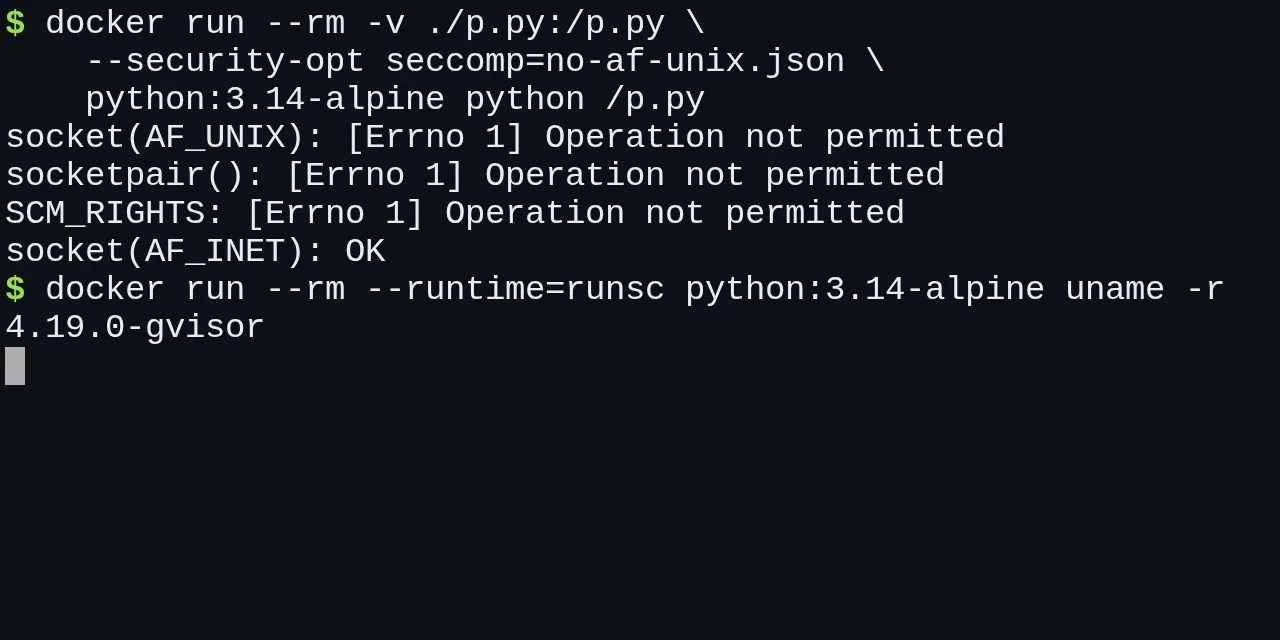
Table of contents
- Key takeaways
- What CVE-2026-80521 is and why it escapes the container
- Which kernels are affected
- How to check your kernel and whether a fixed package exists
- How to see each node's kernel on k3s
- How to patch and reboot without surprises
- Which mitigations cut the path while you are unpatched
- Why userns-remap, rootless and no-new-privileges are not enough
- The seccomp profile without AF_UNIX: it blocks, but it breaks things
- gVisor: the mitigation that does not break your applications
- gVisor on k3s with a RuntimeClass
- Lightweight VMs for what you do not trust
- What I do depending on the host
- Frequently asked questions
- Does CVE-2026-80521 affect me if I only use Docker Desktop on a Mac?
- Do Docker's default seccomp profile or Kubernetes' RuntimeDefault protect me?
- Does running the container as a non-root user help?
- Conclusion
- Sources
Updated: 2026-10-07
CVE-2026-80521 is a Linux kernel bug that lets an unprivileged process inside a default Docker or Kubernetes container become root on the host. The bug lives in the garbage collector for Unix sockets (AF_UNIX), the fix has been in the kernel since August, and the exploit has been public since 22 September 2026. This guide covers how to tell whether your host or k3s node is affected, which package fixes it on each distribution, and which mitigations work while you cannot reboot. I tested them on Docker and k3s without touching the exploit. There is also a Spanish version of this guide.
Key takeaways
- The CVE scores 7.8 on CVSS and affects kernels 6.10 and later without the fix, plus the 6.1 and 6.6 branches from 6.1.141 and 6.6.93 onwards.
- The fixed upstream versions are 6.12.111, 6.18.53, 7.1.10 and 7.2. Debian 13 already ships a package (6.12.111-1) and Debian 12 has one for its alternative
linux-6.12kernel (DLA-4817-1). As of 7 October, Ubuntu 24.04 and 26.04 and RHEL 10 still do not. - userns-remap, no-new-privileges, dropping every capability or the default seccomp profile do not cut the path: in my tests such a container creates Unix sockets and passes descriptors with SCM_RIGHTS without trouble.
- A seccomp profile that forbids creating AF_UNIX sockets does block those calls with EPERM, but PostgreSQL will not start under it and nginx is left without worker processes.
- gVisor (runsc) serves the container’s Unix sockets from its own user-space kernel: 500 socket pairs inside the sandbox created none on the host.
- The only real fix is a patched kernel and a reboot. Everything else reduces exposure until it arrives.
What CVE-2026-80521 is and why it escapes the container
CVE-2026-80521 is a use-after-free in net/unix/garbage.c, the code that frees Unix sockets left in reference cycles when processes pass file descriptors in SCM_RIGHTS messages. A race between a sendmsg() and a close() leaves a pointer to freed memory in an internal list, and the collector’s next pass reads it. The fix commit[1], signed by Kuniyuki Iwashima on 4 August 2026, describes the race and closes it by unlinking that entry before the vertex is freed.
A container shares the host kernel. Once a process in the container corrupts kernel memory, namespaces and cgroups no longer matter: the attacker’s code runs with kernel privileges. The CVE record[2] sums it up in its CVSS vector: local attack, low complexity and low privileges, because any user can create Unix sockets and pass descriptors. The bug arrived with the collector rewrite (commit 4090fa373f0e, March 2024), which shipped in Linux 6.10.
DepthFirst published its analysis and exploit[3] on 22 September, written by Zhenpeng Lin. The company exploited the bug in July on kernelCTF, Google’s reward programme, against kernel 6.12.95. According to its timeline, when it reported the bug on 5 August it learned that a researcher from OpenAI had already sent it; the commit credits the report to Kyle Zeng.
The write-up counts 5,976 kernel CVEs published between 1 January and 16 September 2026, and argues that the container is no longer a reliable boundary. On this bug it is blunt: "We have released our complete container escape exploit for CVE-2026-80521 here, which successfully targets the latest Ubuntu 26.04."
I have neither run nor downloaded that exploit. What follows rests on each distribution’s tracker, on the kernel code and on tests of the mitigations in my lab.
Which kernels are affected
You are affected if your kernel contains the new collector and not the fix. The CVE record on cve.org, published by the kernel team itself as CNA, gives these ranges for upstream kernels:
| Branch | Status |
|---|---|
| Up to 6.9 (except 6.1 and 6.6) | Not affected |
| 6.1.141 onwards | Affected, no fixed version published |
| 6.6.93 onwards | Affected, no fixed version published |
| 6.10, 6.11 and 6.13 to 6.17 | Affected; unmaintained branches |
| 6.12 | Fixed from 6.12.111 |
| 6.18 | Fixed from 6.18.53 |
| 6.19 and 7.0 | Affected; unmaintained branches |
| 7.1 | Fixed from 7.1.10 |
| 7.2 and later | Fixed |
Distribution kernels do not follow these numbers. Each distribution backports patches to its own version, so the number in uname -r is not enough and your distribution’s tracker has the final word. As of 30 September 2026, this was the state:
| Distribution | Kernel | Status |
|---|---|---|
| Ubuntu 26.04 LTS | linux 7.0 | Vulnerable, "work in progress" |
| Ubuntu 24.04 LTS | linux 6.8, HWE 6.17 and 7.0 | Vulnerable |
| Ubuntu 22.04 LTS | linux 5.15 | Not affected (HWE 6.8 is) |
| Debian 13 trixie | 6.12.111-1 (DSA-6528-1) | Fixed |
| Debian 12 bookworm | 6.1.187-1 | Vulnerable |
Debian 12 bookworm, linux-6.12 |
6.12.111-1~deb12u1 (DLA-4817-1) | Fixed in October |
| Debian 11 bullseye | 5.10 | Not affected |
| RHEL 10 | kernel | Affected |
| RHEL 6, 7, 8 and 9 | kernel | Not affected |
The table comes from the Ubuntu tracker[4] (checked again on 7 October), the Debian tracker[5] and the Red Hat page[6]. Red Hat rates it Important and says it has no mitigation that meets its criteria. Ubuntu 24.04 runs a 6.8 kernel, which upstream would not be affected. Its tracker marks it vulnerable, so the affected code is in that kernel even though the number says 6.8.
How to check your kernel and whether a fixed package exists
Check which kernel is running first, not which one is installed. A fixed package does nothing until you reboot. For upstream kernels (built by you, from a cloud provider that tracks the stable branches, or from an image such as Talos), this script classifies the version against the CVE ranges:
#!/usr/bin/env bash
# Classifies an upstream Linux version against CVE-2026-80521.
# Vanilla or stable kernels only: for distro kernels, use the tracker.
v=${1:-$(uname -r)}
IFS=. read -r maj min pat <<<"${v%%[-+]*}"
pat=${pat:-0}
k=$((maj * 1000 + min))
st=AFFECTED
case $k in
  6001) ((pat < 141)) && st="not affected" ;;
  6006) ((pat < 93)) && st="not affected" ;;
  6012) ((pat >= 111)) && st=FIXED ;;
  6018) ((pat >= 53)) && st=FIXED ;;
  7001) ((pat >= 10)) && st=FIXED ;;
esac
((k < 6010 && k != 6001 && k != 6006)) && st="not affected"
((k >= 7002)) && st=FIXED
echo "$v: $st"
With no argument it reads uname -r; with one, it classifies the version you pass. This is what it printed in my lab:
7.0.14-orbstack-00380-ga7e0a2dc9535: AFFECTED
6.8.0-142-generic: not affected
6.12.111: FIXED
The first line is my lab’s kernel, an OrbStack 7.0 on a branch with no fix. The second shows the script’s limit. Ubuntu 24.04’s 6.8.0-142 kernel comes out as not affected because upstream it would not be, yet the Ubuntu tracker says the opposite.
With a distribution kernel, use the package manager. On Debian 13, apt-cache policy shows the installed and candidate versions:
$ apt-get update
$ apt-cache policy linux-image-arm64 | head -4
linux-image-arm64:
  Installed: (none)
  Candidate: 6.12.111-1
  Version table:
I ran it in a debian:trixie container, which is why Installed is empty; on your host you will see the installed version.
On an amd64 host the package is linux-image-amd64. If the installed version is older than 6.12.111-1, you are missing the patch. On Debian 12 the candidate was 6.1.187-1, still vulnerable. Debian LTS has since fixed the alternative linux-6.12 kernel (6.12.111-1~deb12u1), so on Debian 12 the way out is to move to that kernel. On Ubuntu 24.04 the linux-image-generic candidate was 6.8.0-142.142 and on 26.04 it was 7.0.0-34.34, both without the fix according to the tracker.
On the RHEL family, dnf updateinfo looks for a security advisory that cites the CVE. On AlmaLinux 10.2, with kernel 6.12.0-211.56.1.el10_2, it returned nothing, which matches Red Hat not having published a fix yet:
dnf updateinfo list --cve CVE-2026-80521
How to see each node’s kernel on k3s
A k3s node uses the host kernel, just like Docker. kubectl gives you every node’s kernel at once:
$ kubectl get nodes -o custom-columns=NODE:.metadata.name,\
KERNEL:.status.nodeInfo.kernelVersion
NODE           KERNEL
24774a916b97   7.0.14-orbstack-00380-ga7e0a2dc9535
If you built k3s as in the k3s homelab guide, each node is a Debian or Ubuntu host and everything above applies node by node.
How to patch and reboot without surprises
The fix is to install the new kernel and reboot. On Debian 13, apt-get -s simulates the upgrade and shows which version it would install:
$ apt-get -s install linux-image-arm64 \
    | awk '/^Inst linux-image/ {print $2, $3}'
linux-image-6.12.111+deb13-arm64 (6.12.111-1
linux-image-arm64 (6.12.111-1
Drop -s to install it for real, reboot and check that uname -r returns 6.12.111+deb13-arm64 or later. On a k3s cluster, empty each node with kubectl drain before rebooting it, one at a time. My lab runs on the OrbStack kernel, so I have not rebooted a real host with this patch: I simulated the install and the rest is Debian’s standard procedure.
Live patches, such as Canonical Livepatch or kpatch on RHEL, only help once the vendor publishes one for this CVE. As of 30 September neither Ubuntu nor Red Hat had a fixed package, so check their tracker before counting on it.
Which mitigations cut the path while you are unpatched
Almost none of the usual container hardening measures block this bug. They all limit what the process can do to the host, but the exploit only needs to create Unix sockets and pass descriptors, two things any program can do. To check, I wrote a Python probe that attempts exactly that, without triggering the bug:
import os, socket

def scm_rights():
    a, b = socket.socketpair()
    socket.send_fds(a, [b"x"], [os.open("/", os.O_RDONLY)])
    socket.recv_fds(b, 1, 1)
    return [a, b]

tests = {
    "socket(AF_UNIX)": lambda: [socket.socket(socket.AF_UNIX)],
    "socketpair()": lambda: list(socket.socketpair()),
    "SCM_RIGHTS": scm_rights,
    "socket(AF_INET)": lambda: [socket.socket(socket.AF_INET)],
}
for name, make in tests.items():
    try:
        for s in make():
            s.close()
        print(f"{name}: OK")
    except OSError as e:
        print(f"{name}: {e}")
I ran it in python:3.14-alpine under five configurations. The runc ones ran on Docker 29.5.2; userns-remap and gVisor ran on a nested dockerd 29.8.1, so the shared daemon stayed untouched. This is the result:
| Configuration | socket(AF_UNIX) | socketpair | SCM_RIGHTS | Reaches the host’s vulnerable code? |
|---|---|---|---|---|
| runc, default seccomp | OK | OK | OK | Yes |
runc, no-new-privileges, --cap-drop ALL, user 1000 |
OK | OK | OK | Yes |
| runc with userns-remap | OK | OK | OK | Yes |
| runc, seccomp without AF_UNIX | EPERM | EPERM | EPERM | No |
| runsc (gVisor) | OK | OK | OK | No, gVisor handles it |
Why userns-remap, rootless and no-new-privileges are not enough
userns-remap makes the container’s root an unprivileged user on the host. With "userns-remap": "default" in daemon.json, the daemon created the dockremap user with the range 165536:65536, and a sleep started as root in the container showed up on the host as UID 165536:
$ docker exec probe cat /proc/self/uid_map
         0     165536      65536
$ ps -o user,pid,args | grep 'sleep 300'
165536     739 sleep 300
That protects you against configuration mistakes, such as a host volume mounted with too many permissions. It does not protect you from a kernel bug: the exploit corrupts kernel memory, and the kernel does not check which UID the corrupting process had. Rootless Docker and rootless Podman rest on the same user namespace mechanism; I did not test them here, but the reasoning is the same.
no-new-privileges only stops privilege gains through setuid binaries, and dropping capabilities does not touch Unix sockets. Kubernetes behaved the same way: a pod with runAsNonRoot, capabilities.drop: ["ALL"] and the RuntimeDefault seccomp profile printed socketpair OK.
The seccomp profile without AF_UNIX: it blocks, but it breaks things
Docker’s default seccomp profile allows socket() for domains 0 to 2, AF_UNIX included, and socketpair() unconditionally. I took the moby default profile[7] and changed two things: I removed socketpair from the allow list and restricted socket() to domain 2 (AF_INET). The profile’s default action returns EPERM for everything else:
import json

d = json.load(open("default.json"))
allow = d["syscalls"][0]
allow["names"] = [n for n in allow["names"] if n != "socketpair"]
rule = d["syscalls"][2]
assert rule["names"] == ["socket"]
assert rule["args"][0]["op"] == "SCMP_CMP_LT"
rule["args"] = [{"index": 0, "value": 2, "op": "SCMP_CMP_EQ"}]
json.dump(d, open("no-af-unix.json", "w"), indent=1)
Indexes 0 and 2 match the default.json I downloaded on 30 September; the assert lines fail if they change. With the profile applied, the three Unix socket calls return Operation not permitted and TCP keeps working:
$ docker run --rm -v ./p.py:/p.py \
    --security-opt seccomp=no-af-unix.json \
    python:3.14-alpine python /p.py
socket(AF_UNIX): [Errno 1] Operation not permitted
socketpair(): [Errno 1] Operation not permitted
SCM_RIGHTS: [Errno 1] Operation not permitted
socket(AF_INET): OK
The price is steep, because AF_UNIX is everywhere. I started three common images under the profile:
- postgres:18-alpine: does not start.
FATAL: could not create any Unix-domain sockets - nginx-unprivileged:alpine: the process stays up, but the log repeats
socketpair() failed while spawning "worker process"and no worker is left to serve requests - redis:8.10.2-alpine: starts and accepts TCP connections
- Python asyncio:
asyncio.run()fails withPermissionError, because the event loop uses an internalsocketpair()
Use it only for specific workloads you have tested, such as a worker that only speaks TCP. There is another limit: the profile stops the container from creating Unix sockets, not from using one it receives already open. If you mount /var/run/docker.sock or any host socket, the container holds an AF_UNIX socket and the profile does not cover it. On Kubernetes the profile goes into /var/lib/kubelet/seccomp/profiles/ on each node and the pod references it:
spec:
  securityContext:
    seccompProfile:
      type: Localhost
      localhostProfile: profiles/no-af-unix.json
On k3s v1.37.0 a pod with that profile printed socketpair: [Errno 1] Operation not permitted.
gVisor: the mitigation that does not break your applications
gVisor runs the container on top of its own kernel, the Sentry, which serves system calls in user space. The gVisor security documentation[8] puts it this way: "the application’s direct interactions with the host System API are intercepted by the Sentry, which implements the System API instead." The container’s Unix sockets live inside the Sentry, so the host’s vulnerable collector never sees them. We introduced it in the article on gVisor for multi-tenant containers.
To check, I opened 500 socket pairs with Python inside a runc container and inside a runsc one, and counted the sockets each process held on the host:
== runc: socketpairs open: 500 | uname -r: 7.0.14-orbstack-00380-ga7e0a2dc9535
== runsc: socketpairs open: 500 | uname -r: 4.19.0-gvisor
== host processes running python /h.py
pid 1430: 1000 sockets
== gVisor Sentry on the host
pid 1490 gvisor_sentry: 8 sockets
Under runc, the 500 pairs are 1,000 real sockets in the host kernel. Under runsc, the Python process does not even exist on the host and the Sentry holds only 8 sockets of its own. The probe passed in full inside gVisor, and the two images the seccomp profile broke worked under runsc: PostgreSQL 18.6 answered queries and nginx served its welcome page. To use it with Docker, install runsc from the gVisor installation guide[9] (the gvisor.tar.zstd tarball carries runsc, the containerd shim and a gvisor-bin directory) and register the runtime:
{
  "runtimes": {
    "runsc": {
      "path": "/usr/local/bin/runsc",
      "runtimeArgs": ["--platform=systrap"]
    }
  }
}
After that, docker run --runtime=runsc isolates only the containers you choose. I used release release-20260921.0 for arm64. runsc failed the first time with sidecar "gvisor_sentry" not usable because I had only copied the binary: the gvisor-bin directory must sit next to it, in /usr/local/bin/gvisor-bin/.
gVisor on k3s with a RuntimeClass
k3s does not detect runsc by itself: its list of auto-detected runtimes includes crun and the NVIDIA ones, but not gVisor. You add it with a containerd template in /var/lib/rancher/k3s/agent/etc/containerd/config-v3.toml.tmpl, as the k3s advanced documentation[10] describes:
{{ template "base" . }}

[plugins.'io.containerd.cri.v1.runtime'.containerd.runtimes.'runsc']
  runtime_type = "io.containerd.runsc.v1"
After restarting k3s, a RuntimeClass with handler: runsc lets each pod choose gVisor through runtimeClassName:
apiVersion: node.k8s.io/v1
kind: RuntimeClass
metadata:
  name: gvisor
handler: runsc
On k3s v1.37.0+k3s1 with containerd 2.3.4, a pod with runtimeClassName: gvisor returned 4.19.0-gvisor from uname -r. gVisor is not free: it adds cost to every system call and not every application behaves the same inside it. I did not measure that cost here; try it with your workload before moving it.
Lightweight VMs for what you do not trust
You may run third-party code: CI runners, agent sandboxes or different customers on the same node. For that, DepthFirst recommends giving each workload its own kernel with Kata Containers or Firecracker. I tested neither here: both need /dev/kvm and my lab does not have it.
On a server exposed to the internet, a local bug like this one adds to any intrusion into an application. Filtering that first step with CrowdSec narrows the window, although it does not replace the patch.
What I do depending on the host
The decision depends on who can run code in your containers. This is the order I follow:
- Check the running kernel of every host and node against your distribution’s tracker
- If a fixed package exists, install it and reboot today; on a cluster, node by node with
drain - If there is none and your containers only run your own software or software from trusted vendors, the risk depends on someone first breaking into an application: watch the tracker and patch as soon as the fix lands
- If you run untrusted code, move it to gVisor now, or to a microVM if you can
- If a specific workload only speaks TCP and cannot move to gVisor, test the seccomp profile without AF_UNIX with it
Frequently asked questions
Does CVE-2026-80521 affect me if I only use Docker Desktop on a Mac?
Docker Desktop and OrbStack run containers in a Linux virtual machine with its own kernel. The escape would take the attacker to that virtual machine, not straight to macOS. My lab, on OrbStack, runs 7.0.14, an affected branch. Update the app once the vendor ships a fixed kernel.
Do Docker’s default seccomp profile or Kubernetes’ RuntimeDefault protect me?
No. Both allow creating AF_UNIX sockets and passing descriptors with SCM_RIGHTS, which is all the bug needs. I checked it on Docker 29.5.2 and on k3s v1.37.0.
Does running the container as a non-root user help?
Against this bug, no. The CVSS vector says low privileges, and the probe passed in full as user 1000 with no capabilities. It is still good practice against other risks.
Conclusion
CVE-2026-80521 turns any container into a possible path to host root until the kernel is fixed, and the exploit is public. The fix is a patched kernel and a reboot: Debian 13 has it since DSA-6528-1, and on Ubuntu and RHEL you have to watch the tracker. Until then, the usual hardening measures do not cut the path. gVisor does, without breaking the applications I tested, and a seccomp profile without AF_UNIX works for specific workloads.
Start today with uname -r on every host and every node.
Sources: [1] CVE-2026-80521 record on cve.org[2], [2] CVE-2026-80521 on NVD[11], [3] Kernel fix commit[1], [4] DepthFirst, Containers Are No Longer a Security Boundary[3], [5] Ubuntu tracker[4], [6] Debian tracker[5], [7] Red Hat page[6], [8] gVisor security model[8], [9] gVisor installation[9], [10] moby default seccomp profile[7], [11] k3s advanced documentation[10], [12] Kernel versions on kernel.org[12].