How to install Dockhand with Docker Compose and a socket proxy
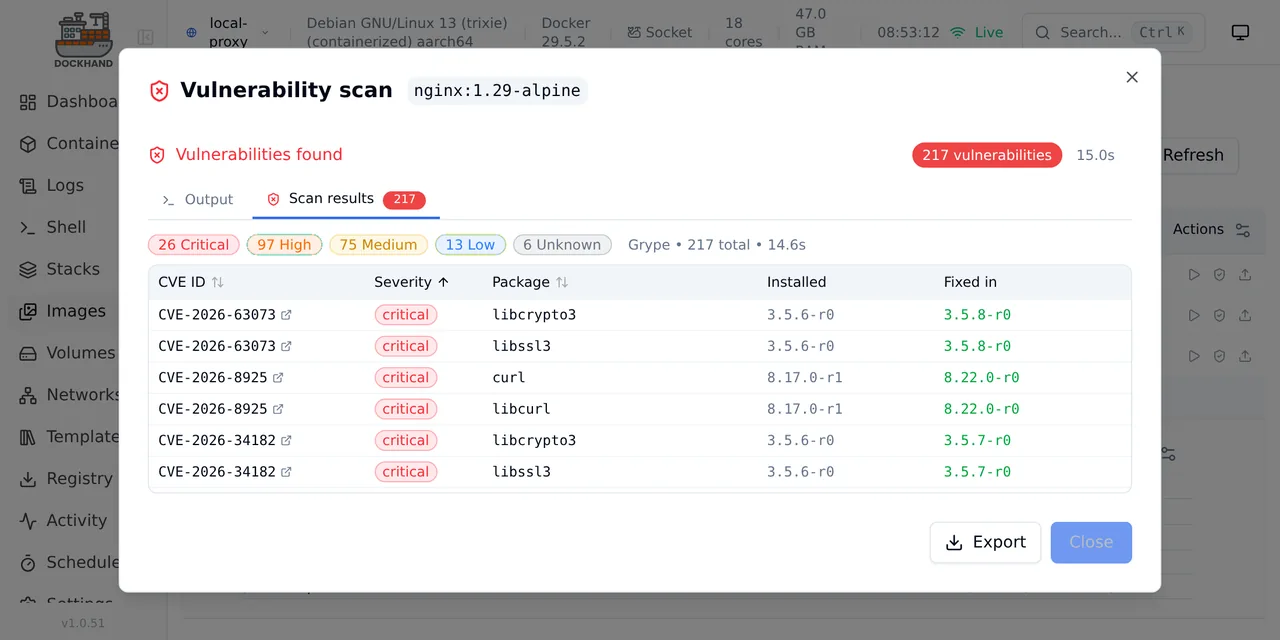
Table of contents
- Key takeaways
- What Dockhand is and what it does
- What licence it has and when you have to pay
- How to install Dockhand with a socket proxy
- What happens on first start
- How to connect the local environment through the proxy
- How to deploy a Compose stack
- How to scan an image with Grype
- How it compares with Portainer, Komodo and Dockge
- Frequently asked questions
- Is Dockhand free?
- Is it safe to mount the Docker socket in Dockhand?
- Can I use Dockhand with more than one server?
- Conclusion
- Sources
Dockhand is a web interface for managing Docker that deploys Compose stacks, ships its own vulnerability scanners and keeps its state in SQLite. I installed version 1.0.51 on 7 October 2026 with Docker Compose and a socket proxy in front of the Docker socket. This guide has the Compose file I ran, what I saw when deploying a stack and scanning an image, and the small print of its licence. There is also a Spanish version.
Key takeaways
- Version 1.0.51 came out on 3 October 2026. It is a SvelteKit app on Bun whose image is 199 MB on arm64 and which uses SQLite by default, or PostgreSQL if you configure it.
- Its licence is Business Source License 1.1: free for personal use, non-profits and education, and paid for anyone running a company’s production systems on it.
- With authentication off, which is the initial state, anyone who reaches the port controls Docker. In my test the API listed environments and created one without credentials.
- Behind a socket proxy, Dockhand deployed a stack and scanned an image.
nginx:1.29-alpinegave 217 vulnerabilities with Grype 0.119.0: 26 critical, 97 high, 75 medium, 13 low and 6 unknown. - Next to Portainer, Komodo and Dockge it fills its own niche: built-in scanners and Git deploys, but without the maturity of the first two.
What Dockhand is and what it does
Dockhand manages containers, images, volumes, networks and Compose stacks on one or more Docker hosts from a single dashboard. The project README[1] defines it as: "Dockhand is a modern, efficient Docker management application providing real-time container management, Compose stack orchestration, and multi-environment support."
This is what it offers, according to its documentation and what I checked:
- Compose stacks with a YAML editor beside the environment variables and a visual graph editor
- Git deploys with webhooks and automatic sync (I did not test them; the README describes them)
- Vulnerability scanning with Grype or Trivy, which Dockhand runs as throwaway containers
- Authentication with local users and OIDC (OpenID Connect, the single sign-on protocol); role-based permissions are in the Enterprise edition
- Multiple environments: the local socket, its own agent called Hawser, or a direct TCP connection
It is a young project. The repository was created on 28 December 2025 and had 6,639 GitHub stars on the day of the test.
What licence it has and when you have to pay
Dockhand uses the Business Source License 1.1 (BSL 1.1), which publishes the source but restricts commercial use. It is not an open source licence under the Open Source Initiative definition, so read it before putting it in a company.
The LICENSE.txt[2] file, last updated on 14 September 2026, summarises it as: "Paid (Commercial License, Part B): production use by or for any business, public body or other organization not listed above." In practice:
- Free in production: individuals for personal use (a homelab), non-profits and schools
- Free for everyone, companies included: development, testing, staging, continuous integration, evaluation, demos and training
- Paid: running an organisation’s live systems with Dockhand when it has employees
- Forbidden without another agreement: offering it to third parties as a managed service
Each version becomes Apache 2.0 four years after it is released. The README and the licence file agree on this summary, but the legal text governs.
How to install Dockhand with a socket proxy
Dockhand needs to talk to the Docker API, and the most direct way is to mount /var/run/docker.sock in its container. That gives it full control of the host, so the Dockhand documentation[3] suggests putting the Tecnativa socket proxy[4] in front, which only lets through the calls you enable.
This is the file I used, with project name b8p11, port 29100 instead of the default 3000, and the permissions the documentation lists as required:
services:
  socket-proxy:
    image: tecnativa/docker-socket-proxy
    restart: unless-stopped
    environment:
      - CONTAINERS=1
      - IMAGES=1
      - NETWORKS=1
      - VOLUMES=1
      - EVENTS=1
      - POST=1
      - DELETE=1
      - INFO=1
      - SYSTEM=1
      - ALLOW_START=1
      - ALLOW_STOP=1
      - ALLOW_RESTARTS=1
      - ALLOW_LOGS=1
    volumes:
      - /var/run/docker.sock:/var/run/docker.sock:ro
    networks:
      - socket-proxy
The proxy mounts the socket read-only and enables only containers, images, networks, volumes, events and logs. The second half defines Dockhand and the networks:
  dockhand:
    image: fnsys/dockhand:latest
    restart: unless-stopped
    depends_on:
      - socket-proxy
    ports:
      - "29100:3000"
    volumes:
      - dockhand_data:/app/data
    networks:
      - socket-proxy
      - default

networks:
  socket-proxy:
    internal: true

volumes:
  dockhand_data:
The socket-proxy network is internal, so the proxy cannot reach the Internet and publishes no port. Dockhand is the only service with an open port, and it keeps its database in the dockhand_data volume.
Start everything with docker compose -f compose.yaml -p b8p11 up -d. On my machine the Dockhand image is 199 MB uncompressed and the proxy image 20.5 MB. After deploying a stack and scanning an image, docker stats showed 212.3 MiB for Dockhand and 33.6 MiB for the proxy. With the latest tag, the interface reported version fnsys/dockhand:v1.0.51.
For production, pin the version instead of using latest. The container runs without root privileges, which is why the documentation has a section on socket permissions for when you mount it directly.
What happens on first start
When you open http://localhost:29100, Dockhand does not ask you to create a user: it goes straight to the dashboard with an empty environment list. curl localhost:29100/api/auth/session returned {"authenticated":false,"authEnabled":false}, and the API answered without credentials. That means that until you turn on authentication in Settings, anyone who can reach the port manages Docker.
So do not publish the port to the Internet as it is. Turn on local users or OIDC sign-in before opening it, or keep it behind a VPN or an authenticating reverse proxy such as Traefik with Docker Compose.
The database file is /app/data/db/dockhand.db, a SQLite database in WAL mode. After my test the whole /app/data directory took 4.8 MB. To back it up, copy the volume with the container stopped.
How to connect the local environment through the proxy
An environment is a Docker host that Dockhand manages, and you add the local one under Settings, Environments. Because the container does not mount the socket, I chose the TCP connection and pointed it at the proxy. I did it through the API to keep it reproducible, and the interface asks for the same fields:
curl -s -X POST localhost:29100/api/environments \
  -H 'content-type: application/json' \
  -d '{"name":"local-proxy","connectionType":"direct",
       "host":"socket-proxy","port":2375,"protocol":"http"}'
The response returned the environment with id 1, and the dashboard started showing host information: Debian GNU/Linux 13, Docker 29.5.2, 18 cores and 47 GB of RAM. That confirms the proxy lets the INFO and SYSTEM calls through.
One consequence I did not expect: Dockhand sees the whole daemon, not only what it creates. The stacks screen listed every Compose project on my machine as "Untracked", including others that are not mine. Manage only what you create and treat the rest as read-only.
How to deploy a Compose stack
You create a stack from Stacks, Create: type the name, paste the YAML into the editor and press "Create & Start". Dockhand stores the file at /app/data/stacks/<environment>/<stack>/compose.yaml and runs the deploy through the Docker API. The stack I used has two services:
services:
  web:
    image: nginx:1.29-alpine
    ports:
      - "29101:80"
    depends_on:
      - cache
  cache:
    image: redis:8-alpine
After the deploy, docker ps showed b8p11-demo-web-1 and b8p11-demo-cache-1 running, and curl localhost:29101 returned 200. The deploy worked through the proxy, so the create (POST=1) and start (ALLOW_START=1) calls are enough.
One limitation of the proxy: the in-container terminal, the volume browser and the file browser use the exec API. With EXEC disabled, the documentation says Dockhand gets a 403. I did not test it; if you need those features, add EXEC=1 and restart the proxy, knowing that you widen what Dockhand can do on the host.
How to scan an image with Grype
The scanner ships disabled: GET /api/settings/scanner returned "scanner":"none" and "availability":{"grype":false,"trivy":false}. I turned it on with curl -X POST localhost:29100/api/settings/scanner -H 'content-type: application/json' -d '{"scanner":"grype"}', which is the same as choosing Grype in Settings.
Then, in Images, I expanded the nginx row, found the 1.29-alpine tag and pressed "Scan for vulnerabilities". Dockhand pulled anchore/grype:v0.119.0, ran it as a throwaway container through the proxy and read the result through the logs API, which is why ALLOW_LOGS=1 is mandatory. The result:
| Severity | Vulnerabilities |
|---|---|
| Critical | 26 |
| High | 97 |
| Medium | 75 |
| Low | 13 |
| Unknown | 6 |
| Total | 217 |
The critical ones cluster in four packages: libcrypto3 and libssl3 at version 3.5.6-r0 (fixed in 3.5.8-r0) and curl and libcurl at 8.17.0-r1 (fixed in 8.22.0-r0). The image dated from April 2026.
That points at what the scanner is really for: it does not measure Dockhand, it measures how old what you deploy is. The fix is to rebuild with a newer tag. For contrast, the Trivy and Grype comparison explains how they differ, and Docker Scout covers Docker’s own alternative.
How it compares with Portainer, Komodo and Dockge
Dockhand competes on the same ground as three older managers, and the difference is in what each one includes out of the box. To choose among the three classics, the Komodo vs Portainer vs Dockge guide compares them in depth. These are the GitHub figures from 7 October 2026:
| Manager | Licence | Latest version | Stars |
|---|---|---|---|
| Dockhand | BSL 1.1 | 1.0.51 (3 Oct 2026) | 6,639 |
| Komodo | GPL-3.0 | 2.3.3 (1 Sep 2026) | 12,642 |
| Dockge | MIT | 1.5.0 (30 Mar 2025) | 24,559 |
| Portainer CE | zlib | 2.45.1 (17 Sep 2026) | 38,623 |
What Dockhand adds over them is the integrated Grype and Trivy scanner, Git deploys and the visual editor in the same dashboard. What it lacks is track record: it is less than a year old and its licence is not open source. Dockge has not published a release since March 2025.
My rule is this: for a homelab or a small team that wants to scan images without setting up another tool, Dockhand deserves a trial. For more than one host with their own agent, Portainer with Docker Compose or Komodo have more history behind them.
Frequently asked questions
Is Dockhand free?
It depends on who uses it. It is free for personal use, non-profits and education, and for development and testing in any company. Running an organisation’s production systems with employees on it requires a commercial licence.
Is it safe to mount the Docker socket in Dockhand?
Mounting the socket directly gives full control of the host. A socket proxy such as Tecnativa’s narrows it to the calls you enable, and the Docker security guide[5] explains why when it describes the daemon attack surface. Also turn on Dockhand’s authentication, because it ships off.
Can I use Dockhand with more than one server?
Yes. It supports remote environments through its own agent, Hawser, or a direct TCP connection. I tested only the local environment through the proxy.
Conclusion
Dockhand 1.0.51 installs with two Compose services, deployed a stack without trouble through a socket proxy, and its scanner gave a useful result on the first image. The weak points are authentication being off from the start and a licence that makes companies pay.
If you try it, start in a homelab, keep the proxy at minimum permissions and turn on users before you open the port.
Sources: [1] Dockhand repository on GitHub[1], [2] Dockhand documentation[3], [3] Dockhand licence (LICENSE.txt)[2], [4] Tecnativa socket proxy[4], [5] Anchore Grype[6], [6] Docker Engine security[5].
Sources
Source code
Access all the source code for this post on GitHub.
View on GitHub