How to self-host Paperclip with Docker and what it does for your AI agents
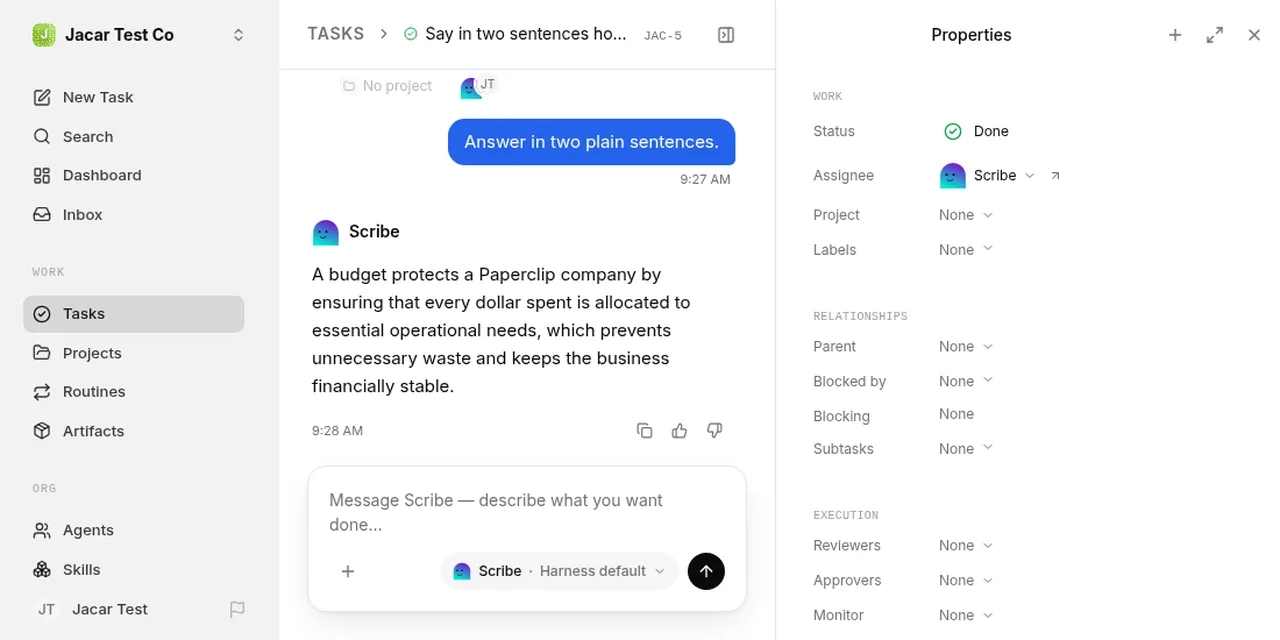
Table of contents
- Key takeaways
- What Paperclip is and what problem it solves
- What concepts it has: companies, agents, adapters, budgets and heartbeats
- How to install Paperclip with Docker
- What breaks if you change the port
- What happens with the first-run wizard if you have no paid keys
- How to connect an agent to a local model without paid keys
- The process adapter with a 40-line script
- What the local agent answered and what it costs
- When Paperclip is worth it and when it is not
- Frequently asked questions
- Does Paperclip work without paid keys?
- Which adapter do I use for a local model?
- How do I upgrade Paperclip?
- Conclusion
- Sources
Paperclip is an open-source platform that coordinates AI agents as if they were a company’s employees: it gives them tasks, a budget and heartbeats instead of leaving them running. I started it on 7 October 2026 in Docker at version v2026.1005.0 and connected a 0.8B-parameter local model, with no paid key. The server starts fine, but the first-run wizard assumes you have a Claude or OpenAI account, and my local agent answered wrongly. There is also a Spanish version.
Key takeaways
- Paperclip, per its README, is "open-source orchestration for teams of AI agents" and is MIT licensed. As of 7 October 2026 the repository has 98,209 stars, and it was created on 2 March 2026.
- You self-host it with one container and an embedded PostgreSQL database. The image is built from source, because the official Compose does not pull a prebuilt image, and it takes 7.29 GB.
- It has five core concepts: companies, agents, tasks, budgets and heartbeats. Each agent connects through an adapter, and v2026.1005.0 ships 12 built in.
- Without paid keys, the first-run wizard and the new-agent form do not let you continue with a local model. What worked was the
processadapter created through the API: 4 of 8 runs succeeded and 2 produced an answer. - The cost of that local agent was recorded as 0 cents, with 55 input tokens and 85 output tokens across two cost events.
What Paperclip is and what problem it solves
Paperclip is a Node.js server with a React interface that manages AI agents using a company’s logic. Its own definition is short: "If OpenClaw is an employee, Paperclip is the company", according to the project README[1]. The agent does the work; Paperclip decides whose turn it is, how much it may spend and when it wakes up.
If you have read what an AI agent is, the difference is one of layers. An agent reasons and uses tools. Paperclip replaces none of them: it wraps them in an org chart, with tasks that keep a history, approvals and an activity log. To coordinate two or more agents without that layer you have the multi-agent system patterns, an earlier and more hand-built step.
The project is young and moves fast. Release v2026.1005.0[2], published on 5 October 2026, bundles 179 commits, and its notes include breaking changes, so read the log before you upgrade.
What concepts it has: companies, agents, adapters, budgets and heartbeats
The core concepts of Paperclip[3] are few and fit in a table:
| Concept | What it is | Verified detail |
|---|---|---|
| Company | The top-level unit: goal, agents, tasks and budget | One instance can host more than one; each uses a prefix (JAC in my test) |
| Agent | An AI employee with a role, a manager, an adapter and a budget | States: active, idle, running, error, paused, terminated |
| Task | The unit of work, with a single assignee at a time | Has the states backlog, todo, in_progress, in_review and done |
| Adapter | The bridge between Paperclip and the program that runs the agent | 12 built in, including claude_local, codex_local, opencode_local, process and http |
| Budget | A monthly cap in cents, per company and per agent | Warning at 80% and automatic stop at 100% |
| Heartbeat | A short execution window that Paperclip triggers | Fired by schedule, assignment, comment, manual invoke or approval resolution |
The heartbeat deserves its own sentence. A Paperclip agent is not switched on: it wakes up, checks its identity, reads its assigned tasks, checks one out, works and updates the status. That cycle is the heartbeat protocol[4], and the checkout is atomic: if two agents claim the same task, one gets a 409 Conflict.
The spending cap fits FinOps on agent tokens: a runaway loop costs real money. An orchestrator that stops the agent at 100% of its budget is a useful safety net. In my test the spend was zero, so I did not see that brake act.
How to install Paperclip with Docker
The official quickstart Compose file is docker/docker-compose.quickstart.yml and builds the image from the repository. Clone the exact version, generate the session secret and start the service:
git clone https://github.com/paperclipai/paperclip
cd paperclip
git checkout v2026.1005.0
export BETTER_AUTH_SECRET="$(openssl rand -hex 32)"
docker compose -f docker/docker-compose.quickstart.yml up --build -d
The build compiles a Rust toolchain inside the image, and the result weighs 7.29 GB. The Compose file publishes port 3100 and keeps the database, the agents’ workspaces and the local secrets key in ./data/docker-paperclip. Inside the container run Node 24.21.0 and the Claude Code 2.1.292, Codex 0.160.1 and OpenCode 1.18.35 CLIs. To check that it answers:
curl -s http://localhost:3100/api/health
In my case the response included "status":"ok", "deploymentMode":"authenticated" and "bootstrapStatus":"bootstrap_pending", which means no administrator exists yet.
What breaks if you change the port
I did not use 3100 because this machine splits port ranges between simultaneous tests: I published 29200 with PAPERCLIP_PORT=29200 and PAPERCLIP_PUBLIC_URL=http://localhost:29200. Creating the account returned Invalid origin. The server log showed authPublicBaseUrl at http://localhost:3100/ and only four trusted origins, all on port 3100, despite the variable. I fixed it with an override file that adds the real origin:
services:
  paperclip:
    environment:
      BETTER_AUTH_TRUSTED_ORIGINS: "http://localhost:29200"
I passed it as a second -f to the same docker compose up -d. I did not try the default port 3100, so I do not know whether the failure is specific to a remapped port. What I do know is that PAPERCLIP_PUBLIC_URL was not enough.
What happens with the first-run wizard if you have no paid keys
The onboarding wizard has four steps: organisation name, first agent, model connection and confirmation. After creating the account with a request to /api/auth/sign-up/email and clicking Claim this instance, I reached step 3, "Connect a model", which only offers Claude or OpenAI by subscription, or an API key.
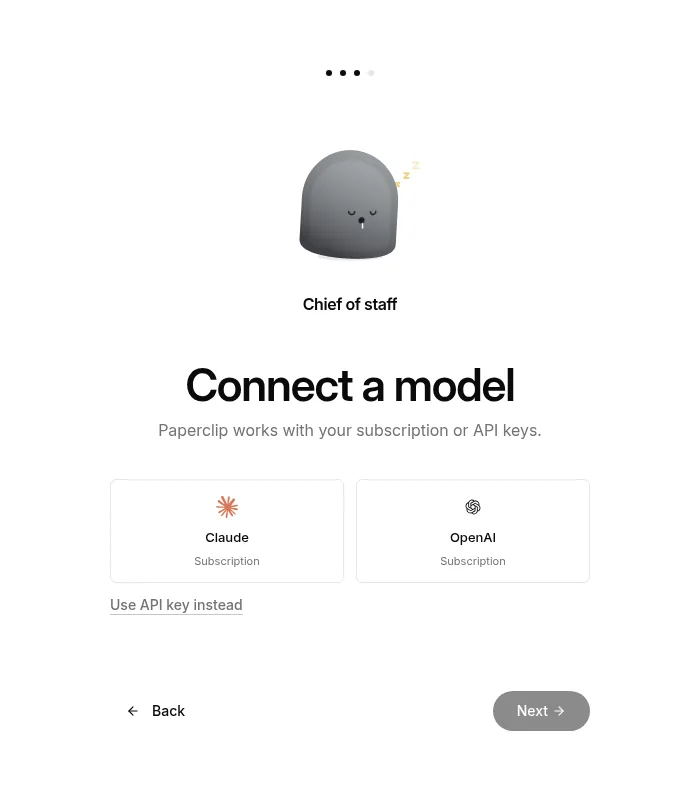
The new-agent form is just as strict. I chose the OpenCode adapter and it asked for an OpenRouter connection: "No connection selected. Connect an account to continue". The picker offers 12 adapters, and process and http are not among them. The Docker documentation anticipates this: "Without API keys, the app runs normally", but each adapter’s environment checks warn about what is missing.
I left the wizard at step 3. The company (Jacar Test Co, prefix JAC) was already created, so I did the rest through the API.
How to connect an agent to a local model without paid keys
There are two paths, and I tried both. The first is the opencode_local adapter, which accepts any OpenAI-compatible provider. I started Ollama 0.40.0 in another container, pulled qwen3.5:0.8b (752 million parameters, Q8_0 quantisation) and attached it to the Compose network with the alias ollama. Then I declared the provider in OpenCode’s configuration, inside Paperclip’s volume:
{
  "provider": {
    "ollama": {
      "npm": "@ai-sdk/openai-compatible",
      "options": { "baseURL": "http://ollama:11434/v1" },
      "models": { "qwen3.5:0.8b": {} }
    }
  }
}
That file goes in /paperclip/.config/opencode/opencode.json, and opencode models then listed ollama/qwen3.5:0.8b.
I created the agent with a POST /api/companies/{id}/agents request sent with fetch from the browser console, already signed in, and assigned a task.
The assignment fired a heartbeat, but the run never wrote a single line of output. I cancelled it after 5 minutes 50 seconds. Ollama logged 500 responses to the container’s calls, one after exactly 5 minutes. The largest request it saw was 3,375 tokens, against a 4,096-token context.
I draw no conclusion about OpenCode with a 0.8B model. The machine’s load average was between 15 and 44 while I tested, so I give no timings. All I can say is that in my environment that path did not finish.
The process adapter with a 40-line script
The second path is process, which runs any command. I wrote a dependency-free Python script that follows the heartbeat protocol and queries Ollama. The first half identifies the agent, looks up its tasks and checks one out:
import datetime, json, os, urllib.request

API, KEY = os.environ["PAPERCLIP_API_URL"], os.environ["PAPERCLIP_API_KEY"]
RUN, CO = os.environ["PAPERCLIP_RUN_ID"], os.environ["PAPERCLIP_COMPANY_ID"]
OLLAMA, MODEL = "http://ollama:11434", "qwen3.5:0.8b"

def call(method, url, body=None, auth=True):
    h = {"Content-Type": "application/json", "X-Paperclip-Run-Id": RUN}
    if auth:
        h["Authorization"] = f"Bearer {KEY}"
    data = json.dumps(body).encode() if body is not None else None
    req = urllib.request.Request(url, data, h, method=method)
    with urllib.request.urlopen(req, timeout=600) as r:
        return json.loads(r.read() or "null")

me = call("GET", f"{API}/api/agents/me")
q = f"assigneeAgentId={me['id']}&status=todo,in_progress"
issues = call("GET", f"{API}/api/companies/{CO}/issues?{q}")
if not issues:
    raise SystemExit(0)
issue = issues[0]
call("POST", f"{API}/api/issues/{issue['id']}/checkout", {
    "agentId": me["id"], "expectedStatuses": ["todo", "backlog", "blocked"]})
Paperclip injects PAPERCLIP_API_URL, PAPERCLIP_API_KEY, PAPERCLIP_RUN_ID, PAPERCLIP_AGENT_ID and PAPERCLIP_COMPANY_ID into the process. The process adapter does not pass the task identifier, so the script lists its own assignments, as step 3 of the protocol says. The second half queries the model, records the cost and closes the task with a comment:
out = call("POST", f"{OLLAMA}/api/chat", {
    "model": MODEL, "stream": False, "think": False,
    "options": {"num_predict": 120, "temperature": 0.2},
    "messages": [{"role": "user", "content": issue["title"]}]}, auth=False)
now = datetime.datetime.now(datetime.timezone.utc)
call("POST", f"{API}/api/companies/{CO}/cost-events", {
    "agentId": me["id"], "provider": "ollama", "model": MODEL,
    "occurredAt": now.strftime("%Y-%m-%dT%H:%M:%S.000Z"),
    "inputTokens": out["prompt_eval_count"],
    "outputTokens": out["eval_count"], "costCents": 0})
call("PATCH", f"{API}/api/issues/{issue['id']}", {
    "status": "done", "comment": out["message"]["content"].strip()})
I copied the script to /paperclip/scribe.py, inside the volume, and created a second agent, Scribe, with another API request:
{
  "name": "Scribe", "role": "researcher",
  "adapterType": "process", "budgetMonthlyCents": 500,
  "adapterConfig": {
    "command": "python3", "args": ["/paperclip/scribe.py"],
    "cwd": "/paperclip", "timeoutSec": 900
  }
}
Each new task assigned to Scribe wakes its heartbeat. Three details cost me failed runs, and you should know them:
occurredAtis required onPOST /cost-events, in ISO format ending inZ. The documentation example leaves it out, and the first response was400.- A failed run blocks the task. Paperclip moves it to
blocked, and setting it back totodothrough the API did not help: the recovery process blocked it again. A fresh task worked. - An identical title does not create another task. The API returns the existing one with a
200instead of a201.
What the local agent answered and what it costs
Scribe had seven runs, plus the cancelled OpenCode one: 4 succeeded, 3 failed and 1 was cancelled. Of the four that succeeded, two found no pending work and two resolved a task. The dashboard showed the finished and blocked tasks clearly, and in the end the month’s spend was $0.00, with 55 input tokens and 85 output tokens spread over two cost events.
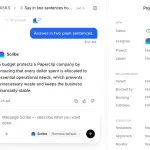
What went wrong was the content. I asked Scribe how a budget protects a Paperclip company, and it answered that it "ensures that every dollar spent is allocated to essential operational needs", which has nothing to do with the monthly cap that stops at 100%. On the next task, "What does a Paperclip adapter do, in two sentences?", it answered that it is "a small electronic device that connects to the power supply of an old computer". A 0.8B model does not know Paperclip, and Paperclip does not explain itself to it in a process adapter.
This is not a Paperclip bug. It is a reminder of what it orchestrates: it hands out tasks, records the cost and stores the comment, but it does not check that the answer is true. For that you need a human in the loop or the approvals Paperclip does offer.
When Paperclip is worth it and when it is not
It is worth it if you already have three or more agents, especially coding ones such as Claude Code or Codex, and you lose track of who does what. The instance keeps tasks, comments, costs and activity in one place, and budget control is built in. The claude_local and codex_local adapters come ready, and the first-run wizard is designed around them.
It is not worth it for trying out a local model. The direct path forces you to create agents through the API, debug the adapter and accept that a tiny model’s answers cannot be used as they are. For that, Ollama with a plain client is shorter. I would also not expose it to the internet without first reading its deployment documentation: the Compose file leaves it in authenticated mode with private exposure, and you should keep it that way.
Frequently asked questions
Does Paperclip work without paid keys?
The server does. The onboarding interface and the new-agent form ask for a Claude, OpenAI or OpenRouter subscription or key. With a local model, only the process adapter created through the API worked for me.
Which adapter do I use for a local model?
opencode_local accepts OpenAI-compatible providers and opencode models listed my Ollama model, but the run did not finish in my environment. process resolved a task for me with a script of my own. A model larger than 0.8B would give more useful answers.
How do I upgrade Paperclip?
Change the Git tag, rebuild with docker compose up --build -d and keep the data/docker-paperclip folder. Read the release notes first: v2026.1005.0 includes breaking changes.
Conclusion
Paperclip does what it promises: tasks with a single assignee, heartbeats, costs and an activity log in an instance you start with Docker. The weak spot, if you do not pay a model provider, is the way in. The wizard and the agent form assume Claude, OpenAI or OpenRouter, and my local model answered with invented facts.
Next, connect a real agent. If you have a Claude or Codex subscription, the wizard takes you through in four steps, and I recommend setting a low monthly budget before you assign the first task.
Sources: [1] Paperclip repository[1], [2] Paperclip release v2026.1005.0[2], [3] Paperclip core concepts[3], [4] Paperclip adapters overview[5], [5] Paperclip Docker deployment[6], [6] OpenCode providers, with Ollama[7], [7] qwen3.5 in the Ollama library[8].
Sources
Source code
Access all the source code for this post on GitHub.
View on GitHub