Lightpanda vs Obscura vs headless Chrome: which browser your agent should use
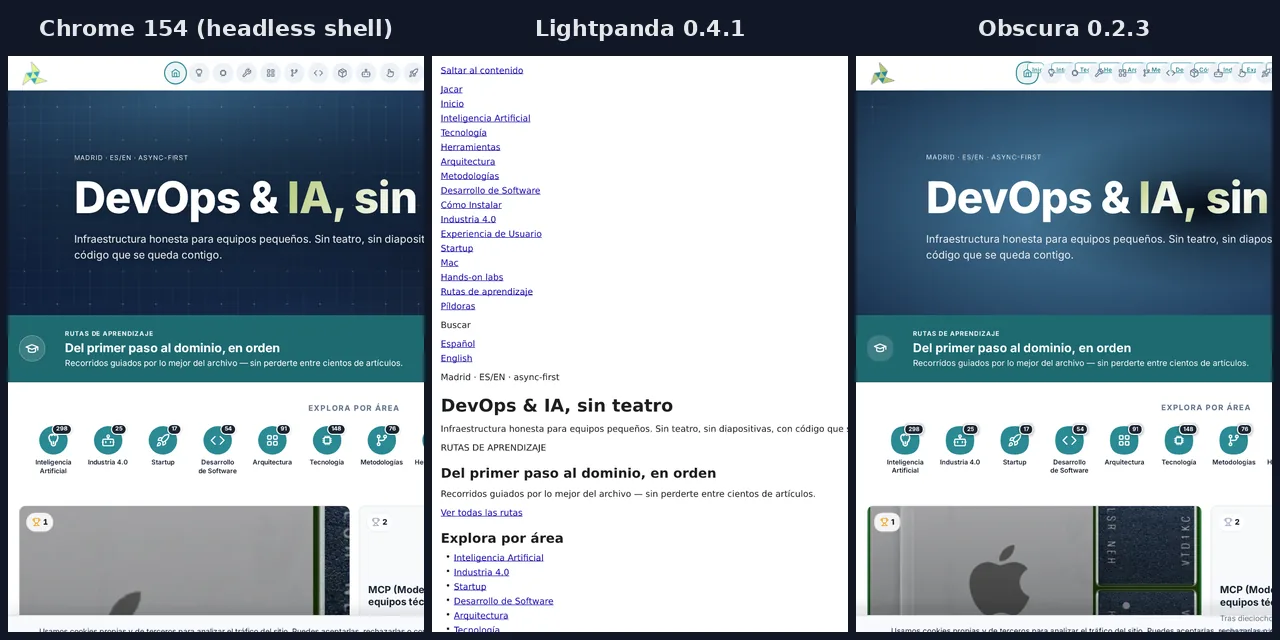
Table of contents
- Key takeaways
- What Lightpanda, Obscura and headless Chrome are
- How I set up the test on arm64
- What worked the same in all three browsers
- Where Lightpanda 0.4.1 fails
- Where Obscura 0.2.3 fails
- Playwright compatibility table
- What happens with a real agent task
- How long they take and how much memory they use
- How my figures compare with what the projects claim
- Which browser to pick for your agent
- Frequently asked questions
- Can I use Lightpanda or Obscura with Playwright without changing my code?
- Do Lightpanda and Obscura run on arm64?
- Which uses less memory, Lightpanda or Obscura?
- Conclusion
- Sources
Lightpanda and Obscura open the same pages as headless Chrome, but an agent that does more than read will notice the difference. I tested them on 28 September 2026 in Docker on arm64, with Lightpanda 0.4.1, Obscura 0.2.3 and the Chrome 154 headless shell, driven by Playwright and Puppeteer over the Chrome DevTools Protocol (CDP). Chrome passed all 17 functional Playwright tests, Lightpanda passed 10 and Obscura another 10, but they failed in different places. If you want to know what each engine is, start with Obscura, the Rust headless browser for AI agents; this article covers the failures, with the errors exactly as they came out. There is also a Spanish version of this comparison.
Key takeaways
- All three loaded the seven real sites in the test, a React 19.3 app, cookies and 50 local pages without a single failure, and all three produce PNG screenshots and PDFs.
- Lightpanda 0.4.1 does not load iframes, workers or external stylesheets unless you ask for them with
--load-resources, and it allows only one context and one page per CDP connection. - Obscura 0.2.3 breaks Playwright’s
page.selectOption, makes shadow DOM clicks that never reach the button and has an IndexedDB that stores nothing. - In an agent task on Wikipedia, Chrome completed all 7 steps; Lightpanda and Obscura stopped at 6, both on a link click.
- With 8 sessions and 50 local pages, Lightpanda loaded 276 pages per second, Obscura 196 and Chrome 49.6; peak container memory was 160, 132 and 1038 MiB.
- The licence decides too: Lightpanda is AGPL-3.0 and Obscura is Apache-2.0.
What Lightpanda, Obscura and headless Chrome are
All three are browsers without a user interface that a program drives over CDP, but only Chrome is a complete browser. Lightpanda and Obscura are engines written from scratch that run JavaScript on V8 and build their own DOM, without Chromium’s compositor or rendering stack. That trade-off is their pitch: less memory and a shorter start-up per session.
| Chrome headless shell | Lightpanda | Obscura | |
|---|---|---|---|
| Version tested | 154.0.8037.57 | 0.4.1 | 0.2.3 |
| Release date | Stable in CfT on 28 September 2026 | 15 September 2026 | 21 September 2026 |
| Engine language | C++ (Chromium) | Zig | Rust |
| Licence | BSD, Chromium source | AGPL-3.0 | Apache-2.0 |
| Compressed arm64 image | Own, on Debian | 80.3 MB | 99.6 MB |
| Protocols | CDP | CDP and WebDriver BiDi | CDP |
The Chrome headless shell is the old headless mode that Google ships as a separate binary. Its developer blog[1] describes it like this: "The old Headless shell is a lightweight wrapper around Chromium’s //content module, and it therefore has substantially fewer dependencies". Playwright uses it by default in headless mode, according to its browsers guide[2]. Google publishes linux-arm64 builds in Chrome for Testing[3] since version 153.0.8001.0, so you no longer need to compile Chromium to run it on arm64.
Lightpanda shipped six releases between 1 July and 15 September 2026. The Lightpanda 0.4.0 release notes[4], from 1 September, changed the defaults: "Iframes and workers no longer load by default". Version 0.4.1 added experimental CORS and IndexedDB conformance work. Obscura 0.2.3, according to its release notes[5], requires a token of at least 32 bytes when the CDP port listens outside loopback.
How I set up the test on arm64
Each browser runs in its own container, and the Playwright and Puppeteer scripts connect from outside over CDP. The machine is an 18-core arm64 Linux VM (OrbStack on Apple silicon). The performance figures are medians of 5 repetitions taken on 28 September, with the one-minute load average between 1.73 and 2.78 at the start of each one.
An nginx container on the same Docker network serves the test pages. These are the Lightpanda and Obscura services in compose.yaml:
  lightpanda:
    image: lightpanda/browser:0.4.1
    command: ["/bin/lightpanda", "serve", "--host", "0.0.0.0",
      "--port", "24402", "--advertise-host", "127.0.0.1"]
    ports: ["127.0.0.1:24402:24402"]
  obscura:
    image: h4ckf0r0day/obscura:0.2.3
    command: ["serve", "--port", "24403", "--host", "0.0.0.0",
      "--allow-private-network"]
    environment:
      OBSCURA_CDP_TOKEN: ${OBSCURA_CDP_TOKEN}
    ports: ["127.0.0.1:24403:24403"]
Setting it up hit three snags, one per browser:
- Obscura: without a token,
/json/versionanswers{"error":"authentication required"}. With the token but publishing container port 9222 on host port 24403, it answers{"error":"request refused"}, because it rejects aHostheader whose port differs from its own. That is why the published port and the listening port match.--allow-private-networkis needed to open pages on private IPs. - Lightpanda:
--advertise-hostmakes/json/versionadvertise a WebSocket URL that is reachable from outside the container. - Chrome 154: it listened on
127.0.0.1inside the container even though I passed--remote-debugging-address=0.0.0.0. I worked around it withsocatin the same image, forwarding port 9223 to 9222.
For Playwright, the connection is connectOverCDP with the token header. This is how Obscura opens the React test app:
import { chromium } from 'playwright-core';

const browser = await chromium.connectOverCDP('http://127.0.0.1:24403', {
  headers: { Authorization: `Bearer ${process.env.OBSCURA_CDP_TOKEN}` },
});
const ctx = await browser.newContext();
const page = await ctx.newPage();
await page.goto('http://b6p4-site/03-react.html');
await page.locator('.ritem').first().waitFor();
console.log(await page.locator('.ritem').allInnerTexts());
await browser.close();
I used playwright-core 1.63.0 and puppeteer-core 25.12.0. The Playwright documentation[6] warns that this path is a compromise: "This connection is significantly lower fidelity than the Playwright protocol connection via browserType.connect()". For Lightpanda and Obscura there is no other option, because Playwright only launches its own browsers. Chrome, connected the same way, is the baseline that separates engine failures from connection failures.
What worked the same in all three browsers
Reading tasks worked in all three, and reading is the main job a browser does for an agent. The common tests were these:
- A static page, a SPA that loads data with
fetchand changes route withhistory.pushState, and a React 19.3 app with a filter filled in withfill - Cookies, including one set by a
Set-Cookieheader,localStorageandsessionStorage - An exception thrown inside
page.evaluatethat reaches the script with its message - Seven real sites: example.com, Hacker News, a Wikipedia article, a GitHub repository, react.dev, MDN and jacar.es, all with HTTP 200 and no JavaScript errors
- A fixed set of 50 local pages (articles, React SPAs and JavaScript-heavy pages), loaded one after another and with 4 and 8 parallel sessions, without failures
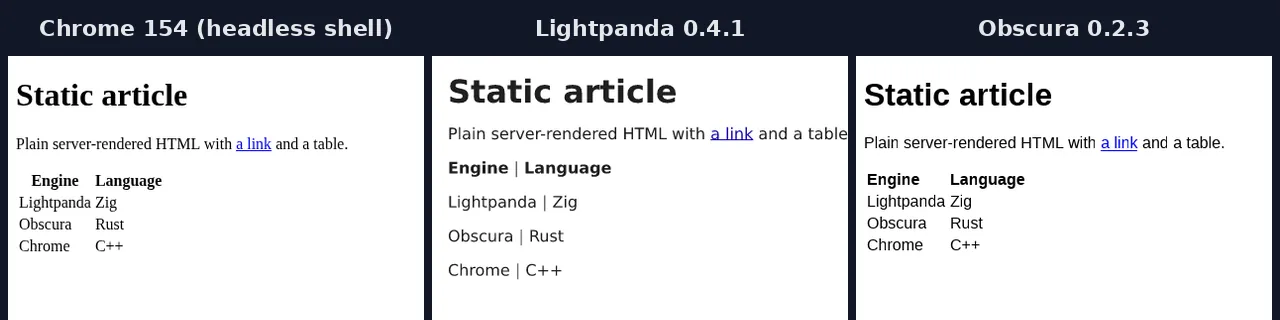
Screenshots and PDFs also come out of all three, but they are not the same picture. According to the 0.4.0 notes, Lightpanda’s screenshot "renders the page’s markdown": it draws a text version of the page, not its layout. Obscura does lay out and paint the page, and gets closer to Chrome:
Where Lightpanda 0.4.1 fails
Lightpanda loads the minimum by default and treats each CDP connection as one session with one page. With factory settings, an iframe does not load, a worker never runs and an external stylesheet is not applied. That is why Playwright reported two elements as visible that the CSS hid. The lightpanda serve help says so under --load-resources: "Defaults to requesting none of them".
With --load-resources iframe, worker and stylesheet, the iframe and the worker ran, and display: none and visibility: hidden were honoured. The rest of the CSS did not reach the computed style: the text colour stayed at rgb(0, 0, 0) and the opacity of a ::after pseudo-element at 1.
The limit that hurts an agent most is contexts. A second browser.newContext() on the same connection returned this error:
Protocol error (Target.createBrowserContext): Cannot have more
than one browser context at a time
A second page in the same context failed with Protocol error (Target.createTarget): TargetAlreadyLoaded. Concurrency in Lightpanda means one CDP connection per session, and that did work with four parallel sessions.
Its server accepts 16 simultaneous connections by default (--cdp-max-connections); Obscura accepts 128. Lightpanda’s own benchmark compares Lightpanda processes with Chrome tabs. This is the pattern that ran, one connection per session:
async function session(url) {
  const browser = await chromium.connectOverCDP('http://127.0.0.1:24402');
  const ctx = await browser.newContext();
  const page = await ctx.newPage();
  await page.goto(url);
  const title = await page.title();
  await browser.close();
  return title;
}
console.log(await Promise.all(urls.map(session)));
Lightpanda does not lay out pages like a browser, and that breaks coordinate clicks. Playwright could not click a button inside a shadow DOM ("<html>…</html> intercepts pointer events"). Nor could it click a Wikipedia link that Lightpanda placed 7920 pixels down in a 5 by 5 box ("element is outside of the viewport").
The geometry is not real either: document.elementFromPoint returns null, the canvas paints nothing and toDataURL returns a 1×1 PNG, which the 0.4.0 notes acknowledge. An infinite scroll built on IntersectionObserver added one batch of rows while scrolling, where Chrome and Obscura added three.
Where Obscura 0.2.3 fails
Obscura does real layout and allows more than one context and more than one page per connection, but its failures are more treacherous: some raise no error. The most visible one breaks page.selectOption, the usual way to pick an option from a drop-down with Playwright:
page.selectOption: TypeError: Cannot read properties of undefined
(reading 'replace')
    at normalizeWhiteSpace (eval at <anonymous> ...)
    at InjectedScript.selectOptions (eval at <anonymous> ...)
The cause is in Obscura’s DOM: option.label returns null where Chrome returns "ES", and the code Playwright injects into the page does not expect it. Puppeteer’s page.select worked. The accessibility (ARIA) snapshot shows the drop-down as combobox "Language": es, without its options, so an agent reading that snapshot cannot know which values it can pick.
The other failures give no warning:
- Shadow DOM: Playwright and Puppeteer both reported the click as done, but the button’s counter stayed at 0. The event never reached the element inside the shadow root; a
click()from JavaScript did. - IndexedDB: opening the database works, but
onupgradeneedednever fires and agetafter aputreturnsundefined. - Request interception: with
page.route(...)andfulfill,locator.waitFor()timed out although the element was already in the DOM andisVisible()returnedtrue. It happened in all 11 runs where I repeated it;waitForFunctionworked. - Iframes: the iframe runs its script and talks to the page through
postMessage, but Playwright’sframeLocator('#f')finds nothing inside it. Lightpanda, with iframes on, fails the same way.
Two more differences affect what an agent reads. innerText includes text hidden with CSS: on the test page it returned the display: none paragraph, and on the GitHub repository it came to 111,970 characters against Chrome’s 14,449. Obscura also presents two identities: /json/version says Chrome 145 on Linux x86_64, and navigator.userAgent inside the page says Chrome 143 on Windows, without --stealth turned on.
Playwright compatibility table
The Playwright suite has 17 tests with a checkable result, and it ran in full four times per browser with the same failures. The first row groups three tests, and the full Lightpanda column uses --load-resources iframe, worker and stylesheet:
| Test | Chrome 154 | Lightpanda | Full Lightpanda | Obscura |
|---|---|---|---|---|
| Static page, SPA and React | Yes | Yes | Yes | Yes |
Iframe with frameLocator |
Yes | Not loaded | Loads; frameLocator fails |
Loads; frameLocator fails |
| Web Worker | Yes | Never runs | Yes | Yes |
| External CSS and visibility | Yes | Not applied | Visibility only | ::after fails |
Form with selectOption |
Yes | Yes | Yes | TypeError |
Cookies and localStorage |
Yes | Yes | Yes | Yes |
| IndexedDB | Yes | Yes | Yes | Stores nothing |
| Click in shadow DOM | Yes | Click blocked | Click blocked | Click has no effect |
| Canvas | Yes | Paints nothing | Paints nothing | Yes |
| Infinite scroll | Yes | One batch of three | One batch of three | Yes |
| PNG screenshot and PDF | Yes | Markdown version | Markdown version | Yes, with differences |
| ARIA snapshot | Yes | Yes | Yes | No options |
route with fulfill |
Yes | Yes | Yes | waitFor hangs |
| Two contexts at once | Yes | Error | Error | Yes |
Error in evaluate |
Yes | Yes | Yes | Yes |
| Total | 17 of 17 | 10 of 17 | 11 of 17 | 10 of 17 |
With Puppeteer, the 10-test suite scored 10 on Chrome and 9 on the other two; the failure was the same, the shadow DOM click. The web API test added a nuance: the page is served over HTTP, and Chrome hides crypto.subtle and crypto.randomUUID outside a secure context. Lightpanda and Obscura expose them anyway, and Obscura also exposes navigator.serviceWorker and navigator.clipboard. navigator.webdriver is true in Chrome and false in the other two.
What happens with a real agent task
A short task on Wikipedia separates reading from acting. The script opens the main page, takes the ARIA snapshot, types "Headless browser" into the search box by its role, presses Enter, reads the first sentence, follows the "Chromium" link and reads the heading. It finds elements by role and name, the way an agent working from accessibility snapshots does:
| Step | Chrome 154 | Lightpanda | Obscura |
|---|---|---|---|
| Open, snapshot, search, read | Yes | Yes | Yes |
| Click the "Chromium" link | Yes | Outside the viewport | No navigation |
| Steps completed | 7 of 7 | 6 of 7 | 6 of 7 |
Obscura’s failure is the dangerous one. Playwright reported the click as done, but the page did not change. document.elementFromPoint at the centre of the link returned a different link, footnote "[27]", because Obscura places elements at different positions from Chrome.
An agent that does not check the URL after the click would carry on working on the wrong page. In Lightpanda, a click() from JavaScript on the link did navigate. In Obscura, the same click() navigated, but evaluate threw "Execution context was destroyed"; the reliable route is to read the href and call page.goto.
How long they take and how much memory they use
On the 50-page local set, Lightpanda was the fastest and Obscura used the least container memory; Chrome trailed on both. Every figure is the median of 5 repetitions, with the browser restarted at the start of each one:
Summed RSS adds up the resident memory of every process in the container. It overstates Chrome, which splits the work across processes that share pages, so the container row (the peak of its cgroup’s memory.current) is the fair comparison. The 50 pages loaded without failures in all 15 series per browser. One caveat on Lightpanda: by default it does not fetch stylesheets, and part of its lead comes from doing less work.
On the real web, the network rules. These are the medians of 5 loads per page up to the load event, in a fresh context each time and alternating the browsers:
Lightpanda matched or beat Chrome on four of the five pages and lost on Wikipedia. Obscura was the slowest on all five, and on GitHub it took 7.5 times as long as Chrome.
How my figures compare with what the projects claim
Both projects sell performance, and their figures are theirs, not mine. Lightpanda’s README advertises "16x lighter and 9x faster than Chromium" over 933 real pages: 123 MB of peak memory against 2 GB, with 100 pages. The README mentions an m5.large instance and the Lightpanda benchmark document[7] an m5.xlarge with Chrome 143, both x86_64.
The Obscura benchmark[8] covers 98 public pages. Obscura rendered 94 and headless Chrome 85, with a median peak memory of 64.2 MB against 201.2 MB. The same report admits that Obscura’s median latency was worse, 5.2 s against 2.1 s.
My figures confirm the direction, not the multipliers. With 8 sessions, Lightpanda loaded 5.6 times as many pages per second as Chrome and used 6.5 times less container memory, well short of the 9 and 16 in its README. Obscura used 7.9 times less memory than Chrome, more than the factor of 3 in its own report, and its slower real-page latency showed up here too.
Which browser to pick for your agent
Pick by what your agent does with the page, not by the memory figure in the README. Based on what I saw in these tests:
- Headless Chrome: for any agent that fills forms, clicks by coordinates, works with iframes or depends on faithful screenshots. It is the only one that passed everything.
- Lightpanda: for reading and extracting at scale, with one CDP connection per session. Turn on
--load-resources stylesheetif your agent decides by visibility, and account for the AGPL-3.0 if you expose it as a service. - Obscura: for extraction with more than one tab per connection and approximate screenshots, when the Apache-2.0 licence matters. Avoid
selectOptionin Playwright and check the URL after every click. - An extraction service: if you only want clean content, Firecrawl gives your agent web data without running the browser yourself.
If your agent only decides where to click, like the ones described in Browser Use, agents that browse, try the light engine in parallel and compare the final URLs before you switch. Switching engines costs one connection URL, so the trial is cheap.
Frequently asked questions
Can I use Lightpanda or Obscura with Playwright without changing my code?
Yes for reading, not always for acting. You swap launch() for connectOverCDP() with the server URL, and for Obscura you add the token header. The reading code worked untouched; selectOption on Obscura and multiple contexts on Lightpanda force you to rewrite parts.
Do Lightpanda and Obscura run on arm64?
Yes. Both publish multi-architecture Docker images with arm64 and Linux aarch64 binaries, and both started without changes in this test. Chrome for Testing publishes the headless shell for linux-arm64 since version 153.
Which uses less memory, Lightpanda or Obscura?
Obscura, by a small margin. With 8 sessions over the 50 local pages, the Obscura container peaked at 132 MiB, Lightpanda’s at 160 MiB and Chrome’s at 1038 MiB. At rest the lead flips: after the first page, Lightpanda held 22 MiB of RSS and Obscura 38 MiB.
Conclusion
Lightpanda and Obscura already open the real web over CDP, and for reading pages they replace Chrome with a change of URL. On speed and memory both leave Chrome behind on local pages, but not on the real web. Where they part ways is acting.
Lightpanda fails visibly and predictably: one context per connection, resources turned off and coordinate clicks that never land. Obscura covers more of Playwright’s surface, but some of its failures, like the shadow DOM click or the wrong Wikipedia link, raise no error.
If your agent types, clicks and chooses, stay with headless Chrome or verify every action. If it only reads, either one works, and the licence may decide for you.
Sources: [1] Lightpanda 0.4.1 release notes[9], [2] Lightpanda 0.4.0 release notes[4], [3] Lightpanda repository[10], [4] Lightpanda benchmarks[7], [5] Obscura 0.2.3 release notes[5], [6] Obscura repository[11], [7] obscura-benchmark[8], [8] Chrome for Testing[3], [9] Chrome headless shell, Chrome blog[1], [10] Playwright, connectOverCDP[6].
Sources
Source code
Access all the source code for this post on GitHub.
View on GitHub