What works today in ArtCraft’s Crafting Apps, twelve creative apps in Rust
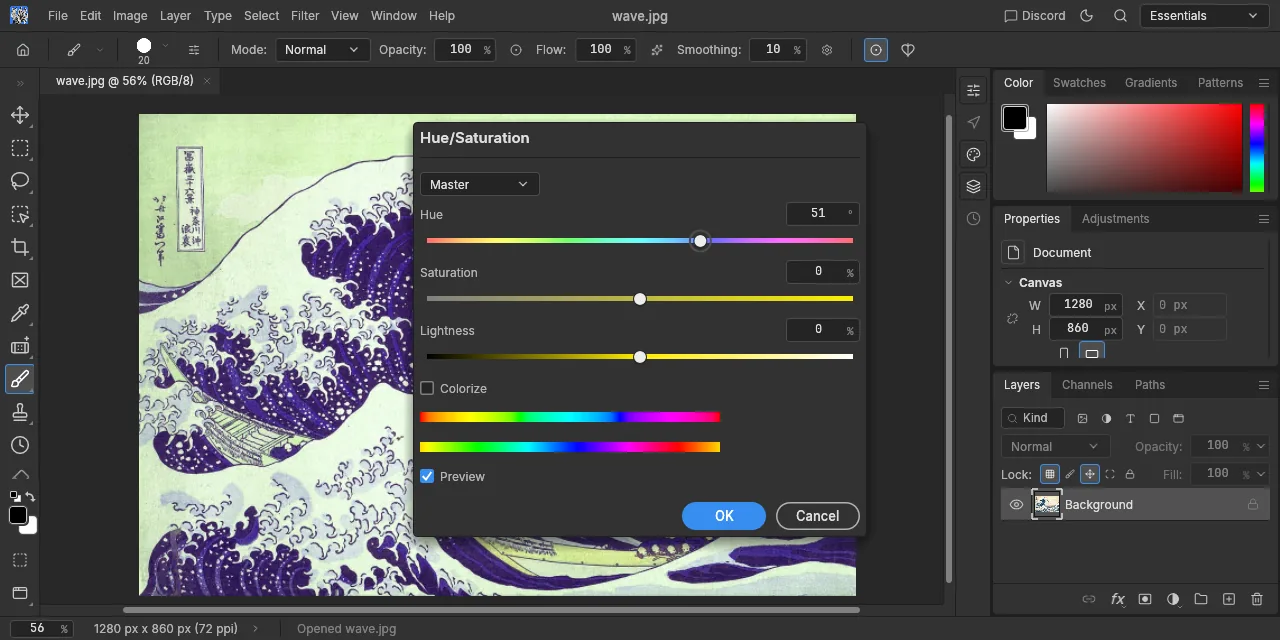
Table of contents
- Key takeaways
- What ArtCraft's Crafting Apps are
- Why native Rust, WebAssembly and MCP matter
- What I tested on Linux arm64, and with which versions
- PhotoCraft from the terminal
- PdfCraft from the terminal
- How an agent drives PhotoCraft over MCP
- What works today in the browser with WebAssembly
- How to install the Crafting Apps
- Licence and business model
- What is missing, and gotchas when testing them
- Who the Crafting Apps are for today
- Frequently asked questions
- Are ArtCraft's Crafting Apps free and open source?
- Can I use PhotoCraft with Claude or another agent over MCP?
- Do they run in the browser without installing anything?
- Conclusion
- Sources
The Crafting Apps are twelve open-source creative apps the ArtCraft team wrote from scratch in Rust: an image editor, vectors, video, PDF, audio, a spreadsheet and CAD, among others. You can drive all of them from a command-line interface (CLI), a JSON control channel or a Model Context Protocol (MCP) server, and eleven of the twelve also compile to WebAssembly for the browser. On 13 October 2026 I installed PhotoCraft 0.8.2 and PdfCraft 0.7.1 on Linux arm64, drove them from the terminal, over MCP and in Chromium, and this is what works and what does not. There is also a Spanish version.
Key takeaways
- Twelve native Rust apps, no Electron, for macOS, Windows and Linux, licensed MIT or Apache 2.0 at your option.
- Only PhotoCraft and PdfCraft are "early alpha"; the other ten are "in development", although all of them shipped a release on 12 October.
photocraft-cli0.8.2 lists 892 commands and its MCP server exposes 25 tools;pdfcraft-cli0.7.1 exposes 161.- In Chromium without a GPU, PhotoCraft web worked on software WebGL; with WebGPU the canvas stayed blank.
- There is no hosted web version: the browser runs a static ZIP that you serve yourself.
What ArtCraft’s Crafting Apps are
The Crafting Apps are the family of free tools that comes with ArtCraft, the AI image and video studio from the company Storyteller, whose code lives in the storytold GitHub organisation. According to OMG! Ubuntu[1], the project is led by Brandon Thomas, former CEO of storyteller.ai. The repositories were created between 30 September and 7 October 2026, so this is software with two weeks of life.
Each app imitates a well-known commercial program, menus and shortcuts included, and presents itself as a "clean-room" reimplementation (written from public specifications and observed behaviour, with no code from the original). This is the picture on 13 October 2026, with the status the Crafting Apps page[2] declares and the latest GitHub release:
| App | What for | Status | Latest release |
|---|---|---|---|
| PhotoCraft | Image editing | Early alpha | 0.8.2 |
| VectorCraft | Vector illustration | In development | 0.10.0 |
| FilmCraft | Video editing | In development | 0.7.2 |
| LightCraft | Photo library and RAW developer | In development | 0.7.1 |
| PdfCraft | Reading and editing PDFs | Early alpha | 0.7.1 |
| EffectCraft | Motion graphics and effects | In development | 0.9.2 |
| DesignCraft | Page layout | In development | 0.7.1 |
| WordCraft | Word processor | In development | 0.6.1 |
| SoundCraft | Audio workstation | In development | 0.6.1 |
| DeckCraft | Presentations | In development | 0.6.1 |
| CADCraft | Computer-aided design (CAD) | In development | 0.6.2 |
| GridCraft | Spreadsheet | In development | 0.6.1 |
Together the twelve add up to 88 GitHub releases in those two weeks. PhotoCraft had 54,261 stars and 9,071 forks when I queried the GitHub API. The pace has an explanation: Phoronix[3] reported on 7 October that the apps come mostly from AI agents such as Claude Code. Indeed, the PdfCraft repository has a CLAUDE.md and an AGENTS.md at its root.
Why native Rust, WebAssembly and MCP matter
The combination lets the same engine serve a person with a mouse, a script and an AI agent. The PhotoCraft README explains it this way: every menu, tool and dialog runs a command from a registry of more than 500. The UI, the CLI, the JSON channel and the MCP server all call those same commands.
For an agent, that changes how the work gets done. Instead of moving the mouse over screenshots, as agents that drive the computer do, the agent calls doc_open or command_run with JSON parameters and gets a structured result back. If MCP is a new acronym to you, the MCP guide for 2026 covers the protocol from client to server.
Rust gives native binaries without Electron and one codebase for desktop and browser. PhotoCraft draws with wgpu on Metal, Vulkan, DirectX 12 or WebGPU, and the same app compiles to WebAssembly. The price of that ambition is maturity: copying Photoshop’s surface in two weeks is not the same as copying its behaviour.
What I tested on Linux arm64, and with which versions
I tested the two early-alpha apps, the ones the team itself considers usable, in a headless Linux arm64 container. I downloaded the binaries from the 12 October GitHub releases: photocraft-0.8.2-linux-aarch64.tar.gz, which ships the app and photocraft-cli, and pdfcraft-cli-0.7.1-linux-aarch64.tar.gz. I did not test the windowed desktop apps (this machine has no display server), the Launcher or the ArtCraft studio.
PhotoCraft from the terminal
photocraft-cli opens a file, runs engine commands in order and saves the result. With this command I applied a smart sharpen and a curves adjustment layer to Hokusai’s Great Wave, a public-domain work:
photocraft-cli run wave.jpg \
  --cmd filter.sharpen.smartSharpen --params '{"amount":80}' \
  --cmd layer.newAdjustmentLayer.curves \
  --params '{"points":[[0,0],[64,48],[192,212],[255,255]]}' \
  --out wave-final.psd
Each --params applies to the preceding --cmd, and the CLI prints each step’s JSON result. The resulting PSD has two layers, Curves 1 as an adjustment layer and Background as pixels, according to photocraft-cli info. If you convert that PSD to WebP with photocraft-cli convert, it warns that it flattens the layers and drops the DPI.
Command order matters. When I created the adjustment layer first, the next filter failed with filters need a pixel layer (active layer is an Adjustment layer), because the adjustment layer becomes the active one. photocraft-cli commands prints the full registry, which lists 892 entries in 0.8.2.
PdfCraft from the terminal
pdfcraft-cli covers the usual PDF workbench jobs without opening a window. I combined two three-page PDFs generated with Chromium, rotated one page, deleted another and changed the title:
pdfcraft-cli combine doc1.pdf doc2.pdf --out combinado.pdf
pdfcraft-cli edit combinado.pdf --out final.pdf \
  --rotate 2:90 --delete 6 --title "Prueba PdfCraft"
pdfcraft-cli info final.pdf
pdfcraft-cli audit final.pdf
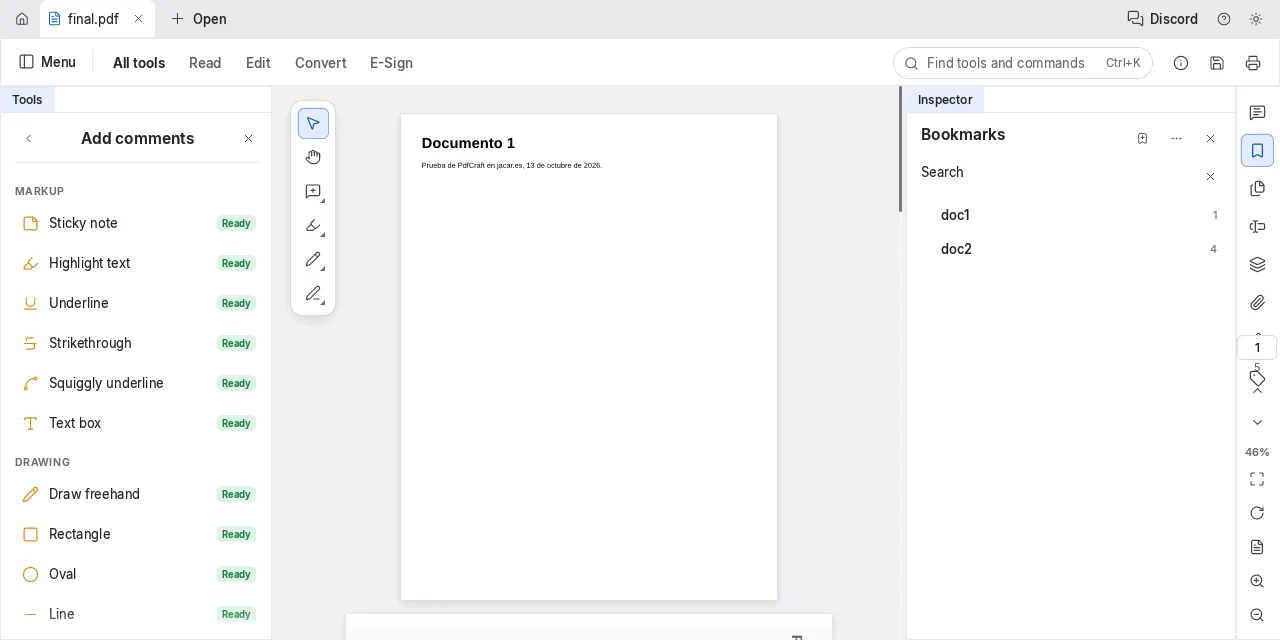
info returned 5 pages, PDF 1.7, the new title and 2 bookmarks that the merge created on its own, one per source document. text --page 4 extracted the second document’s text, and audit, which looks for faux redactions (text covered by a rectangle but still present), finished with 0 findings.
How an agent drives PhotoCraft over MCP
Both CLIs start an MCP server over standard input and output with the mcp subcommand. Both announce protocol version 2025-06-18. PhotoCraft exposes 25 generic tools (doc_open, command_run, doc_export, ui_screenshot…) that reach the whole command registry, and PdfCraft exposes 161 specific tools, from page_rotate to redact_apply.
To register it in your editor, use the pattern of any local MCP server launched as a process, the same one as in the guide to installing a local MCP server. I tested it with a minimal Python JSON-RPC client that sends each call and waits for its answer. These are the three calls, in tools/call format:
{"name": "doc_open", "arguments": {"path": "wave.jpg"}}
{"name": "command_run", "arguments": {
  "id": "image.adjustments.hueSaturation",
  "params": {"saturation": -100}}}
{"name": "doc_export", "arguments": {"path": "wave-bn.png"}}
I started the server with photocraft-cli mcp --automation-read-root pointing at the working folder and --automation-write-root at an output subfolder. The three calls answered without errors and the PNG came out desaturated. The two roots limit what the agent can read and write: a path outside them returns an error instead of touching your disk.
What works today in the browser with WebAssembly
The web versions ship as one static ZIP per app, and there is no public URL to open them: you download them and serve them with any file server. PhotoCraft 0.8.2’s WebAssembly module weighs 24.2 MB and PdfCraft 0.7.1’s, 37.9 MB, uncompressed. I served them with python3 -m http.server and opened them in Playwright’s headless Chromium 155.
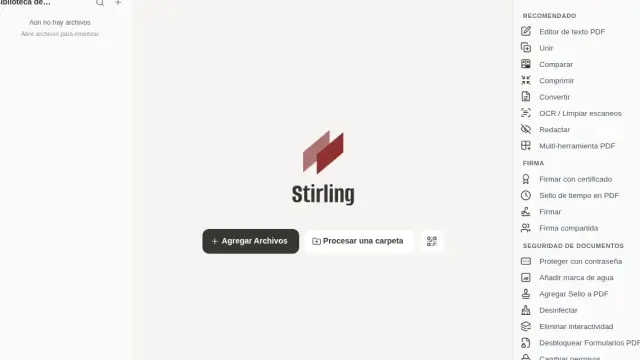
PhotoCraft first tried WebGPU, lost the graphics device and left the canvas blank. Forcing WebGL with the SwiftShader software renderer, the whole app loaded. I opened the image with Ctrl+O, shifted the hue by 51 degrees in Hue/Saturation with live preview on, and applied the change. PdfCraft opened the combined PDF with its bookmarks panel:
The apps page says FilmCraft is the only one without a web version, but its 0.7.2 GitHub release already includes a filmcraft-web-0.7.2.zip. I did not test it.
How to install the Crafting Apps
There are three routes, and the right one depends on how many apps you want:
- ArtCraft Launcher: installs and updates every app, picks the build for your system and processor, and checks each download’s SHA-256. The website advertises v0.2.1, but the latest on GitHub is 0.3.2, from 11 October.
- Per-app installer: each GitHub release ships a universal DMG for macOS, MSI and portable builds for Windows, and AppImage,
.deb,.rpm, Flatpak and tarball for Linux on x86_64 and arm64. - Browser: download the app’s
-web-ZIP and serve it on your own machine or on static hosting.
To automate, the Linux tarball works, since it includes photocraft-cli. PdfCraft also publishes a tarball with only pdfcraft-cli, 28.8 MB on arm64.
Licence and business model
All twelve apps are dual-licensed MIT or Apache 2.0, at your option: each repository has LICENSE-MIT and LICENSE-APACHE, although GitHub only shows Apache 2.0. The ArtCraft name, logo and brand are excluded: forks must remove them. The apps are free and ship no generative AI features.
The money is in the ArtCraft studio, which is separate. According to its pricing page[4], the Basic plan costs 10 dollars a month for 1,000 credits. Those credits pay for cloud models such as Nano Banana, GPT-Image-1.5, Seedance 2.0 or Kling 3.0 Pro. You can also use it without a subscription, with your own compute or your third-party subscriptions.
What is missing, and gotchas when testing them
The team itself lowers expectations. The PhotoCraft README says "it is not yet a Photoshop replacement for daily professional work", and lists generative features, 15 missing tools, advanced typography and plug-ins as gaps. These are the gotchas I hit:
- Order over MCP: if you pipe three requests at once, the server does not resolve them in order; my
command_runarrived beforedoc_openand failed withno document open. Wait for each response - Filters after adjustments: a filter needs an active pixel layer; create adjustment layers last
- WebGPU without a GPU: in a browser without acceleration, force WebGL or the canvas stays blank
- Versions that change daily: between 2 and 12 October PhotoCraft went from 0.1.0 to 0.8.2; pin the version in your scripts
There is also the legal and authorship question Phoronix raises: "clean-room" is the project’s own claim, and nobody outside has audited it.
Who the Crafting Apps are for today
Today they fit whoever wants to automate image or PDF work from scripts and agents, under a permissive licence and on their own machine. For that, pdfcraft-cli is already useful: it combines, splits, rotates, extracts text and audits redactions. They also suit anyone who wants to study a large image editor written in Rust, with more than 1,700 tests and 24 crates.
They do not fit, yet, anyone who makes a living in Photoshop, Premiere or Acrobat: these are two-week-old alphas with new releases every few days. And the ten "in development" apps are, for now, a promise with installers.
Frequently asked questions
Are ArtCraft’s Crafting Apps free and open source?
Yes. All twelve are licensed MIT or Apache 2.0 at your option and download for free from GitHub or through the Launcher. The only paid part is the ArtCraft studio, with credits for cloud AI models.
Can I use PhotoCraft with Claude or another agent over MCP?
Yes, with photocraft-cli mcp, which speaks MCP over standard input and output. It exposes 25 tools, among them command_run, which reaches the engine’s 892 commands in version 0.8.2. Restrict paths with --automation-read-root and --automation-write-root.
Do they run in the browser without installing anything?
They run in the browser, but there is no hosted version: you download each app’s web ZIP and serve it yourself. Eleven of the twelve publish that ZIP according to ArtCraft’s website, and FilmCraft also ships it since 0.7.2.
Conclusion
The Crafting Apps are already a set of engines an agent can drive, although they do not replace the commercial suites yet. PhotoCraft and PdfCraft did what they promise from the CLI, over MCP and in the browser on Linux arm64, with alpha bugs you can work around. If you automate image or PDF work, try pdfcraft-cli and PhotoCraft’s MCP server with a pinned version, and look at the other ten apps again once they leave "in development".
Sources: [1] Crafting Apps, getartcraft.com[2], [2] storytold/photocraft on GitHub[5], [3] storytold/pdfcraft on GitHub[6], [4] ArtCraft Launcher releases on GitHub[7], [5] Phoronix, AI Makes "Open-Source, Clean Room" Implementations Of Adobe Photoshop & Premier In Rust[3], [6] OMG! Ubuntu, PhotoCraft is an open-source, AI-built clone of Photoshop[1], [7] ArtCraft pricing[4].
Sources
Source code
Access all the source code for this post on GitHub.
View on GitHub