Jellyfin 12: fix Error loading configuration file encoding.xml
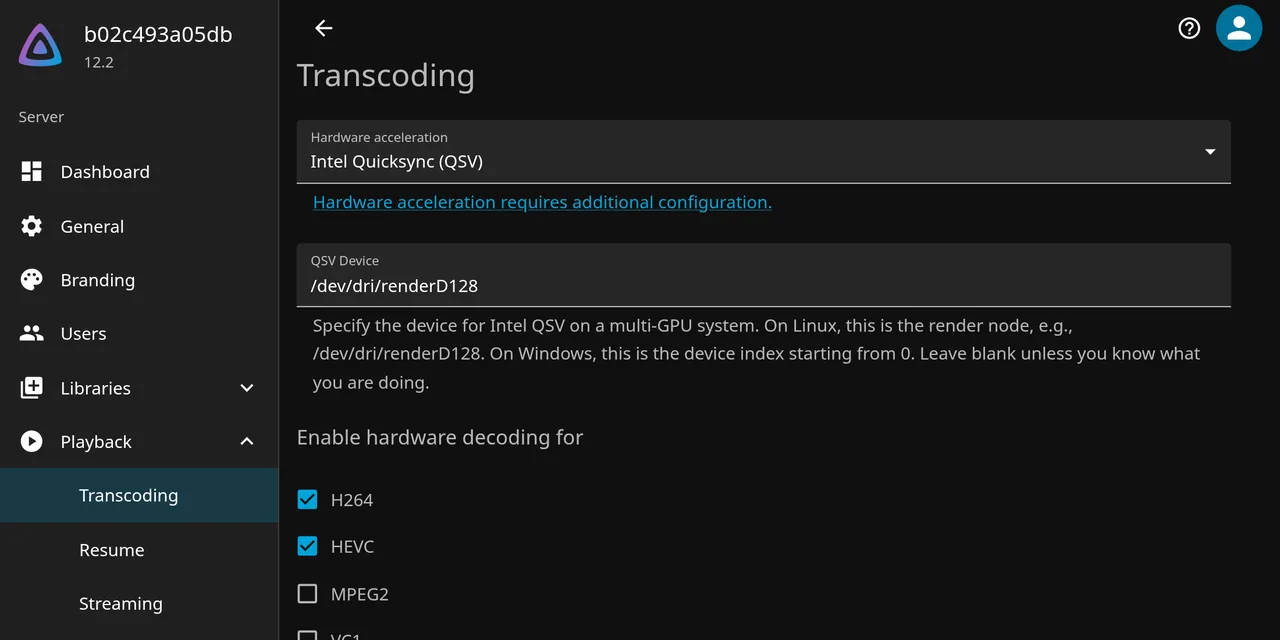
Table of contents
- Key takeaways
- Error loading configuration file: /config/config/encoding.xml in Jellyfin 12
- Why can't Jellyfin 12 read EncoderPreset?
- Which Jellyfin versions have the bug?
- How I reproduced the error
- Fix 1: upgrade straight to 12.2
- Fix 2: change the encoding.xml line by hand
- If you already started 12.0 or 12.1
- How do I check that transcoding was not reset?
- Frequently asked questions
- Do I lose my library or users with this error?
- Can Watchtower get me into this?
- Does it affect other configuration files?
- Conclusion
- Sources
The Error loading configuration file: /config/config/encoding.xml message in Jellyfin 12.0 and 12.1 comes from one line, <EncoderPreset xsi:nil="true" />, and you fix it by changing that line to <EncoderPreset>auto</EncoderPreset> or by upgrading straight to 12.2. The server still starts, but it discards all of encoding.xml and rewrites it with factory defaults: Intel Quick Sync Video (QSV) hardware acceleration, thread count and quality settings vanish, with that log line as the only warning. I reproduced it on 18 October 2026 in Docker 29.5.2, migrating a 10.11.11 server to 12.1 and to 12.2. If you have not upgraded yet, start with the guide to upgrading Jellyfin 12 with Docker. There is also a Spanish version of this fix.
Key takeaways
- A clean 10.11.11 install already writes
<EncoderPreset xsi:nil="true" />toencoding.xml: you are affected even if you never touched that setting. - 12.0 and 12.1 cannot read that value, log the error with
'' is not a valid value for EncoderPresetand overwrite the file with defaults one second later. - 12.2, released on 5 October 2026, adds the
FixNullEncoderPresetmigration, which turns the null value intoautobefore the file loads. - If 12.0 or 12.1 already started, 12.2 does not bring your settings back: restore
encoding.xmlfrom the backup, edited, or enter them again. - Restoring the old
encoding.xmlunedited onto an already migrated 12.2 gives the same error again, because the migration runs only once.
Error loading configuration file: /config/config/encoding.xml in Jellyfin 12
The error means Jellyfin could not turn the transcoding options file into its configuration object. It is an [ERR], not a fatal failure, so the container stays healthy and /health returns 200. These are the exact lines 12.1 wrote when it started on a 10.11.11 configuration:
[ERR] [8] Emby.Server.Implementations.AppBase.BaseConfigurationManager:
  Error loading configuration file: /config/config/encoding.xml
System.InvalidOperationException: There is an error in XML document (30, 35).
 ---> System.InvalidOperationException: Instance validation error: ''
  is not a valid value for EncoderPreset.
   at Microsoft.Xml.Serialization.GeneratedAssembly.
  XmlSerializationReaderEncodingOptions.Read6_EncoderPreset(String s)
In your terminal each line comes out whole; I wrapped them here to fit. Position (30, 35) points at line 30 of encoding.xml, which is the EncoderPreset line. In the official Docker image the path is /config/config/encoding.xml; on a Debian or Ubuntu package install the configuration directory is /etc/jellyfin, and the original issue quotes it as /config/encoding.xml.
To find out whether your server logged it, search the container log for the line:
docker compose logs jellyfin 2>&1 | grep -A2 "Error loading configuration"
Why can’t Jellyfin 12 read EncoderPreset?
Because the field’s type changed between versions and nothing migrated the existing files. In 10.11, EncoderPreset accepted a null value, and the .NET Extensible Markup Language (XML) serializer stores that as xsi:nil="true". PR #17007, merged on 3 June 2026, made it required so the web client would stop showing an empty field after a clean install.
The new default only applies to objects built from scratch, not to a file that already exists. User dotspencer summed it up in issue #17861:
When it’s unset, configs serialize it as
xsi:nilwhich no longer deserializes and there’s no migration. The constructor default only covers newly constructed objects and not an existing file.
I checked that the null value is the norm and not an oddity: I started a 10.11.11 server without configuring anything, and its encoding.xml already had <EncoderPreset xsi:nil="true" />. Only servers where someone picked a value in the Encoding preset dropdown escape it.
Which Jellyfin versions have the bug?
The bug shows up when you jump from 10.11.x to 12.0 or 12.1, and it is gone in 12.2. These are the versions involved and what happens to a 10.11 encoding.xml that has the null value:
| Version | Released | With a null EncoderPreset |
|---|---|---|
| 10.11.11 | 6 June 2026 | Writes it that way by default |
| 12.0 | 8 September 2026 | Error and settings back to defaults (issue #17861) |
| 12.1 | 15 September 2026 | Error and settings back to defaults (tested) |
| 12.2 | 5 October 2026 | Changes it to auto and keeps the settings (tested) |
12.2 ships 51 changes, and the fix is PR #18059 by scr4bble, merged on 27 September into the release-12.z branch. As of 18 October 2026, the latest, 12 and 12.2 tags on Docker Hub point at the same image (sha256:357724bf), so anyone following latest already has it.
How I reproduced the error
I set up 10.11.11 in a throwaway Compose project on Linux arm64, finished the wizard and changed nine transcoding options through the application programming interface (API). I left EncoderPreset alone, like any server where nobody has opened that dropdown. Then I stopped the container, saved /config to a 30 KB tar.gz and extracted it into a separate folder for each test.
When 12.1 started on the first copy, the error appeared within the first second, and by 11:45:46 12.1 had rewritten encoding.xml with defaults. The API confirmed what the file showed:
| Option | 10.11.11 | 12.1 unfixed | 12.2 or edited file |
|---|---|---|---|
HardwareAccelerationType |
qsv |
none |
qsv |
QsvDevice |
/dev/dri/renderD128 |
empty | /dev/dri/renderD128 |
H264Crf |
20 |
23 |
20 |
EncodingThreadCount |
4 |
-1 |
4 |
EnableThrottling |
true |
false |
true |
HardwareDecodingCodecs |
h264, hevc, vp9, av1 | h264, vc1 | h264, hevc, vp9, av1 |
All nine options went back to their factory values, including ThrottleDelaySeconds, AllowHevcEncoding and EnableTonemapping. No copy of the old file is kept next to the new one, so what you had only lives in your backup.
Fix 1: upgrade straight to 12.2
If you are still on 10.11, skip 12.0 and 12.1 and change the tag to 12.2. First back up /config with the server stopped, as the Jellyfin documentation asks, because there is no way to downgrade. With the Compose folder from the guide to installing Jellyfin with Docker, the change is this:
docker compose stop jellyfin
sudo tar -czf jellyfin-10.11.11.tar.gz config
sed -i 's|jellyfin/jellyfin:10.11.11|jellyfin/jellyfin:12.2|' compose.yaml
docker compose pull -q jellyfin
docker compose up -d
You need sudo because the official image runs as root and owns the files in config. On its first start, 12.2 wrote these three lines and no error:
[INF] InternalCodeMigration: Perform migration
  20260915104305_FixNullEncoderPreset
[INF] Jellyfin.Server.Migrations.Routines.FixNullEncoderPreset: Replaced
  null encoder preset with auto in encoding configuration
[INF] InternalCodeMigration: Migration
  20260915104305_FixNullEncoderPreset was successfully applied
The file ended up with <EncoderPreset>auto</EncoderPreset> and the nine options from the table above intact.
Fix 2: change the encoding.xml line by hand
If you must stay on 12.0 or 12.1 for some reason, edit the file before their first start. It is the workaround scr4bble posted in the issue, and with it 12.1 loaded the configuration with no error and with QSV kept. Stop the container and change the line:
docker compose stop jellyfin
grep -n EncoderPreset config/config/encoding.xml
30:  <EncoderPreset xsi:nil="true" />
sudo sed -i \
  's|<EncoderPreset xsi:nil="true" />|<EncoderPreset>auto</EncoderPreset>|' \
  config/config/encoding.xml
grep -n EncoderPreset config/config/encoding.xml
30:  <EncoderPreset>auto</EncoderPreset>
auto is the same value 12.2 writes in its migration and the one the dropdown shows by default. If grep returns a value such as veryfast or medium, your file does not have the problem and there is nothing to change. When 12.2 starts on an already edited file, it still runs the migration but does not log the Replaced null encoder preset line, because it finds nothing to change.
If you already started 12.0 or 12.1
In that case the file is already overwritten and upgrading to 12.2 recovers nothing. I tested it by starting 12.2 on the copy that had been through 12.1: the migration was applied and the API still returned none for hardware acceleration and 23 for quality.
You have two ways out. If you saved /config before the upgrade, pull only encoding.xml out of the backup, edit the line and start:
docker compose stop jellyfin
sudo tar -xzf jellyfin-10.11.11.tar.gz config/config/encoding.xml
sudo sed -i \
  's|<EncoderPreset xsi:nil="true" />|<EncoderPreset>auto</EncoderPreset>|' \
  config/config/encoding.xml
docker compose up -d
Do not skip the sed. Restoring the old file as it was onto an already migrated 12.2 repeated the exact error, because FixNullEncoderPreset is marked as applied and does not run again. With the line edited, 12.2 loaded QSV, H264Crf 20 and the 4 threads from 10.11.
The other way out is to configure it again by hand in Dashboard > Playback > Transcoding. One user in the issue fixed it that way: they picked QSV again and restarted. If you back up the volume with the method from the guide to Docker volume backup and restore, you can extract the file the same way.
How do I check that transcoding was not reset?
Run three checks after the first 12 start: the log, the file and the API. The first is the grep from the error section, which must return nothing. The second looks at the lines you notice most when they are lost:
grep -nE "HardwareAccelerationType|QsvDevice|H264Crf|EncoderPreset" \
  config/config/encoding.xml
13:  <HardwareAccelerationType>qsv</HardwareAccelerationType>
16:  <QsvDevice>/dev/dri/renderD128</QsvDevice>
28:  <H264Crf>20</H264Crf>
30:  <EncoderPreset>auto</EncoderPreset>
The third asks the server which values it has loaded, which is what it uses when it transcodes. You need an API key created in Dashboard > Advanced > API Keys:
curl -s -H 'Authorization: MediaBrowser Token="your_api_key_here"' \
  http://localhost:8096/System/Configuration/encoding \
  | grep -oE '"(HardwareAccelerationType|H264Crf|EncoderPreset)":"?[^,"]*"?'
"HardwareAccelerationType":"qsv"
"H264Crf":20
"EncoderPreset":"auto"
If you see "none" where you had qsv, vaapi or nvenc, your settings were reset. Compare them with the encoding.xml in your backup before you sign off the upgrade.
Frequently asked questions
Do I lose my library or users with this error?
No. The error only affects encoding.xml, the transcoding options. In my tests the database migrated normally, the 10.11 token kept working and the server answered 200 on /health. What you lose is the transcoding configuration, and hardware acceleration with it.
Can Watchtower get me into this?
Yes, if your container follows latest and Watchtower updates your containers between 8 September and 5 October 2026. In that window latest pointed at 12.0 or 12.1. Today latest is 12.2, but if 12.0 or 12.1 ever started, your settings are already gone and the recovery section applies.
Does it affect other configuration files?
In my logs, encoding.xml was the only file with Error loading configuration file. system.xml did change during the migration, but for another reason: 12 sets EnableLegacyAuthorization to false, as the Jellyfin 12 upgrade guide explains.
Conclusion
Error loading configuration file: /config/config/encoding.xml does not bring Jellyfin 12 down, but it takes your transcoding with it, with one [ERR] line as the only warning. If you are on 10.11, jump straight to 12.2 with the /config backup done. If you already went through 12.0 or 12.1, pull encoding.xml out of the backup, change EncoderPreset to auto and start. Then check hardware acceleration in the file or the API, not only in the log.
Sources: [1] Jellyfin, issue 17861 on encoding.xml[1], [2] Jellyfin, PR 18059 with the FixNullEncoderPreset migration[2], [3] Jellyfin, PR 17007 making EncoderPreset required[3], [4] Jellyfin, 12.2 release notes[4], [5] Docker Hub, jellyfin/jellyfin tags[5], [6] Jellyfin documentation, backup and restore[6], [7] Jellyfin documentation, hardware acceleration[7].
Sources
Source code
Access all the source code for this post on GitHub.
View on GitHub