What PixelRAG is and how well it searches Wikipedia with screenshots
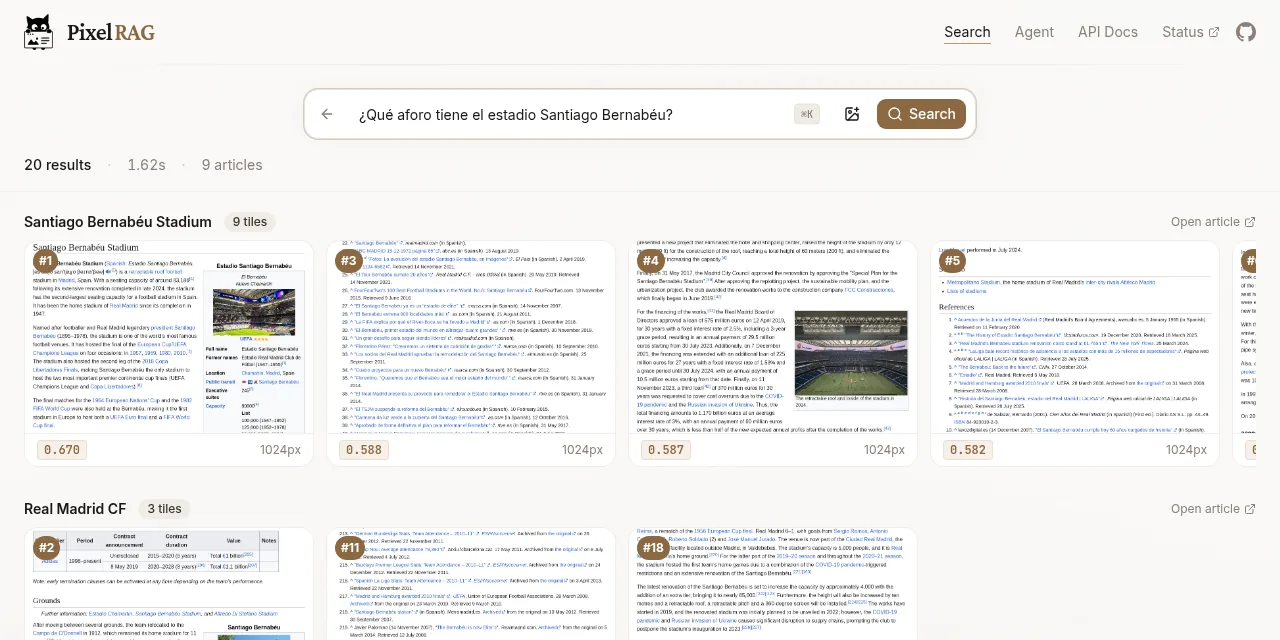
Table of contents
- Key takeaways
- What is PixelRAG?
- How does search over screenshots work?
- How much does it beat a text RAG, according to the paper?
- How well does the public API search in English and Spanish?
- Can you install PixelRAG on your own machine?
- When is PixelRAG worth it over a text RAG?
- Frequently asked questions
- Does PixelRAG need a GPU?
- Does it search in languages other than English?
- Does the public API answer the questions?
- Conclusion
- Sources
PixelRAG is a retrieval system for retrieval-augmented generation (RAG) that stores every web page as screenshots and searches those images, without converting the HTML to text. A Berkeley team including Matei Zaharia and Joseph E. Gonzalez released it in June 2026, and their paper measures more correct answers than a text RAG on Wikipedia questions. I tested its public API on 28 October 2026 with 10 questions in English and Spanish, tried to install the package on arm64 Linux, and installed it on x86_64 to index a PDF. This is how it works, what its numbers say and what I found. There is a Spanish version of this article.
Key takeaways
- PixelRAG cuts every page into 875 x 1024 pixel tiles and stores one 2048-dimension vector per tile, computed with a LoRA-tuned Qwen3-VL-Embedding-2B.
- In the paper, recall among the top three results (Recall@3) on NQ-Tables rises from 37.2% with Trafilatura to 51.1%.
- The public API serves 26.3 million vectors from a 216 GB index, with no key.
- In my test it found the right article in the top three for 10 of 10 English questions and 8 of 10 Spanish ones, with a 1.9 s median.
pip install pixelrag0.4.0 fails on arm64 Linux because of a dependency,cef-capi-py, that the code never imports. On x86_64 it installs, but takes 6.3 GB with the index extras.
What is PixelRAG?
PixelRAG is the code behind the paper PIXELRAG: Web Screenshots Beat Text for Retrieval-Augmented Generation[1], submitted to arXiv on 1 June 2026. Yichuan Wang and Zhifei Li are the lead authors, with Matei Zaharia, Joseph E. Gonzalez and Sewon Min advising, from Sky Lab, BAIR and Berkeley NLP. The GitHub repository[2] is Apache 2.0 licensed and had 10,680 stars on 28 October 2026.
A text RAG downloads the page, converts it to plain text with a parser such as Trafilatura and splits it into chunks. Tables, infoboxes, charts and layout get lost on the way. PixelRAG skips that step: it renders the page in a browser, keeps the screenshot and lets a vision-language model (VLM) read the answer off the pixels. If you need a refresher on the basics, start with what a vector embedding is.
The paper’s abstract puts it like this: "Our results challenge the necessity of text representations in web retrieval, suggesting that web RAG can operate directly in the web’s native visual form while improving both performance and efficiency."
How does search over screenshots work?
Search has three parts: rendering, the index and the reader. This is how they split the work:
- Rendering. The
pixelshottool opens the page in Chromium at 875 pixels wide, Wikipedia’s content width, and slices the full screenshot into 1024-pixel-tall tiles. The paper’s Wikipedia, with 7 million pages, yields 30 million tiles. - Index. Each tile goes through Qwen3-VL-Embedding-2B, LoRA-tuned on screenshots, and comes out as a single 2048-dimension vector. The full FAISS index takes 120 GB in fp16. Building it took 2 days on one machine with 128 cores, 2 TB of RAM and 8 H100 GPUs.
- Reader. The question is embedded with the same model, FAISS returns the closest tiles, and a VLM, Qwen3-VL-4B in the paper, answers by looking at the images.
The single vector per tile is a scale decision. Document retrievers such as ColPali store one vector per image patch: about 875 vectors of 128 dimensions per tile. The paper works out that, with 30 million tiles, that index would take about 6.5 TB. With one vector per tile the index fits in a single machine’s RAM.
The public API[3] works in two steps, with no key: you search, then you download the tile. This request asks for the top three results for a question:
curl -s -X POST https://api.pixelrag.ai/search \
  -H "Content-Type: application/json" \
  -d '{"queries": [{"text": "How tall is Mount Teide?"}],
       "n_docs": 3}'
Each hit carries url (the article title), score, article_id, tile_index and chunk_index. With those three ids you download the tile image:
curl -s https://pixelrag.ai/api/tile/742671/0/0 -o tile.png
The same search request accepts a base64 image in the image field, alone or next to the text. The API only searches: to get an answer you pass the tiles to a VLM of your own.
How much does it beat a text RAG, according to the paper?
The paper measures gains on all six benchmarks, and the biggest retrieval gap is on questions that depend on tables. Table 1 compares PixelRAG with two text RAGs over the same Wikipedia: one that extracts text with mwparserfromhell and one with Trafilatura. The chart shows recall among the top three results (Recall@3) for Trafilatura and for the tuned PixelRAG:
Final answer accuracy rises less than retrieval. On NQ it goes from 55.9% to 58.7%, and on SimpleQA from 71.6% to 78.8%. On LiveVQA, with news, it rises from 59.0% to 70.0%. The abstract claims up to 18.1% over the text baselines and up to 3 times lower token cost when the tiles are downscaled.
The paper’s section 5.6 makes one condition clear: the reader has to read text in images well. Small Llama 3.2 Vision and Qwen2-VL models trail the text RAG by more than 12.5 percentage points. The crossover comes with Qwen3-VL-4B, at 70.5% against 69.0%. If you run a small multimodal model on your own machine, like the ones in this comparison of multimodal models on 16 GB of VRAM, check first that it reads text screenshots well.
How well does the public API search in English and Spanish?
In my test, the API found the right article for almost every English question. Spanish missed 2 of 10, both on names that change between languages: Tajo and núcleo Linux. I asked 10 factual questions about Wikipedia articles, each in English and in Spanish, with n_docs set to 3, on 28 October 2026 from Spain. A hit means the expected article came first, or in the top three.
Latency was steady: a 1.88 s median in English and 1.90 s in Spanish, with every request between 1.82 s and 2.02 s. The web demo took 1.62 s for the query in the cover image.
The misses show well how the system works inside:
- "¿Cuánto mide el río Tajo?" returned Tagil, Taymura and Taoer River. The English article is called Tagus, and the question’s vector landed near titles starting with "Ta". The same question in English got it first time
- "What license is the Linux kernel released under?" put the Lennox disambiguation page first. The tile was its footer, with the line "Linux, an open-source Unix-like operating-system kernel". Linux kernel came second. In Spanish it did not show up in the top three
- "¿Qué aforo tiene el estadio Santiago Bernabéu?" returned the stadium’s infobox first, with the capacity in view. That is exactly the case the project sells: the figure sits in a table, not in a paragraph
The practical lesson is that the public index is English Wikipedia. Spanish questions work because the Qwen3-VL model is multilingual, but proper names that change between languages are where it misses. For a Spanish corpus you would have to build your own index.
Can you install PixelRAG on your own machine?
Not on arm64 Linux, with version 0.4.0 from PyPI. The install stops before downloading anything:
Because cef-capi-py==131.3.5 has no wheels with a matching
platform tag (e.g., `manylinux_2_41_aarch64`) and
pixelrag==0.4.0 depends on cef-capi-py, we can conclude
that pixelrag==0.4.0 cannot be used.
cef-capi-py only ships packages for x86_64 Linux, macOS and Windows. Issue #197[4], from 27 October, explains that no file in the project imports it and that it takes about 296 MB. Until it goes, you cannot install it on a Raspberry Pi or an Ampere server without editing the dependencies. On an Apple Silicon Mac there is a package.
On x86_64 it does install. I tested it in a python:3.12-slim container for linux/amd64, emulated on an Apple Silicon Mac, so CPU times are worse than on native x86:
pip install 'pixelrag[index,serve,pdf]==0.4.0'took 8 min 16 s and left 6.3 GB insite-packages, nearly all of it PyTorch with the CUDA libraries- On first run
pixelshotdownloads an 81 MB headless Chromium compressed with zstd. Without thezstdpackage it fails withzstd not found - The README config with
path: ./paper.pdfrenders 0 documents on 0.4.0, because the local source only walks folders. The fix is on the main branch but not on PyPI yet: pointpathat a folder holding the PDF - Indexing 4 pages of the paper’s PDF took 20 min 27 s: 8 minutes downloading the 4 GB model, and about 3 minutes per page on CPU in fp32
The resulting index takes 2.5 MB. Once served, the process used 8.7 GB of RAM and each search took 4.5 s to 5.5 s, because the 2B model embeds the question on the CPU. The query "Overview of PixelRAG and the diagram" returned page 2, the one the README promises.
Serving the index reproduced issue #196[5]: the README command, with only --index-dir, stops at startup with FileNotFoundError: './articles.json'. The server looks for articles.json and tiles in the current directory, not the index directory. Pass both paths:
pixelrag serve --index-dir ./my_index \
  --articles-json ./my_index/articles.json \
  --tiles-dir ./my_index/tiles --port 30001
When is PixelRAG worth it over a text RAG?
PixelRAG pays off when answers live in tables, infoboxes, charts or layout that a text extractor breaks. For running-text documents in your own language, a text RAG is still cheaper to set up. These are the differences that matter when you choose:
| Criterion | Text RAG | PixelRAG |
|---|---|---|
| What it stores | Text chunks | 875 x 1024 px screenshots |
| Tables and infoboxes | Lost or scrambled | Read off the image |
| Reader | Any LLM | VLM of 4B or more |
| Vectors | One per chunk | One 2048-dimension vector per tile |
| Wikipedia index in the paper | Not published | 120 GB in fp16 |
| Tokens per result | Few | More, reducible with lower resolution |
| Package platforms | All | x86_64, macOS and Windows (0.4.0) |
If you already run a text RAG in production, there is no need to throw it away. A hybrid RAG can add screenshot search only for pages with tables, and the patterns for RAG with PostgreSQL and pgvector in production still apply to storing the vectors. If the problem is result order rather than format, try local reranking with llama.cpp and pgvector first.
Frequently asked questions
Does PixelRAG need a GPU?
No, but it is slow on CPU. In my emulated x86_64 test, each page took about 3 minutes to index and each search about 5 s. According to the README, the full sample PDF takes about 3 minutes on an Apple Silicon Mac and 1 minute on a GPU.
Does it search in languages other than English?
Yes, because Qwen3-VL is multilingual. In my test, 8 of 10 Spanish questions found the right article in the top three, against 10 of 10 in English. The misses were names that change between languages, like Tajo and Tagus.
Does the public API answer the questions?
No. The API returns the closest tiles and their images. Your VLM generates the answer, or the agent in the pixelrag.ai web demo.
Conclusion
PixelRAG shows that you can search the web without converting it to text, and its numbers win exactly where text fails: tables and infoboxes. The public API lets you try it today without installing anything, and in my test it found the right article in the top three for 10 of 10 English questions. The 0.4.0 package does not install on arm64 Linux yet, on x86_64 it needs two manual workarounds to index and serve, and to answer you need a VLM of 4B or more. If your documents have tables that your current RAG mangles, try the API with your own questions before building an index.
Sources: [1] PixelRAG on GitHub[2], [2] arXiv 2606.28344, PIXELRAG: Web Screenshots Beat Text for Retrieval-Augmented Generation[1], [3] PixelRAG API documentation[3], [4] PixelRAG public index status[6], [5] Issue 197 on cef-capi-py[4], [6] Issue 196 on pixelrag serve[5], [7] pixelrag on PyPI[7].
Sources
Source code
Access all the source code for this post on GitHub.
View on GitHub