How to fix r.map is not a function in the Jellyfin 12 dashboard
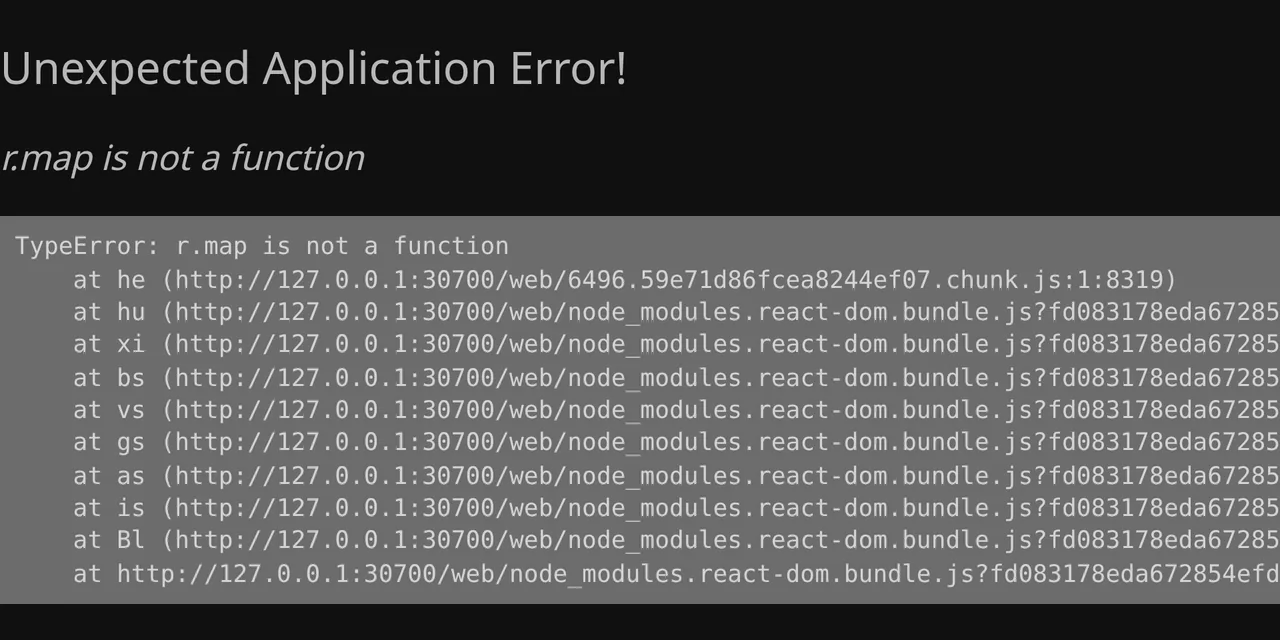
Table of contents
- Key takeaways
- What does r.map is not a function mean in the Jellyfin dashboard?
- Why does the response arrive as HTML or empty?
- Why does it keep failing after you fix the proxy?
- How to check whether your proxy returns HTML on /web/ConfigurationPages
- Fix 1: let nginx pass /web/ConfigurationPages to Jellyfin
- Fix 2: delete jellyfin-query-cache and the browser cache
- Do the WebSocket headers or opening /web/#/dashboard help?
- Is there a fix in Jellyfin 12 yet?
- Frequently asked questions
- Do I lose anything when I delete jellyfin-query-cache?
- Why does it work with the IP and port but not with my domain?
- Does it affect me if I use no plugins?
- Conclusion
- Sources
The Jellyfin 12 dashboard error r.map is not a function appears when the /web/ConfigurationPages request gets HTML or an empty body instead of a JSON list, and it survives fixing the proxy because the browser keeps that answer. The web client stores it in IndexedDB for up to 24 hours, and if your proxy served HTML, in the HTTP cache too. I reproduced it on 18 October 2026 with Jellyfin 12.2.0 in Docker, nginx 1.29.8 and Chrome for Testing 155. This guide shows how to check your proxy, what to change in nginx, what to delete in the browser and which shortcuts from the thread did not work for me. There is a Spanish version of this guide.
Key takeaways
- The failure comes from one line of the dashboard sidebar: it calls
.map()on the/web/ConfigurationPagesresponse, and a text string has no such method. - I reproduced the exact error two ways: with an nginx that serves
/web/from disk and falls back toindex.html, and with an empty 200 response. - After fixing nginx, the dashboard stayed broken: the component fails before it asks for fresh data, so the bad answer is never replaced.
- Clearing the browser’s HTTP cache and deleting the
jellyfin-query-cachekey from IndexedDB worked; either step alone did not. - As of 28 October 2026, issues jellyfin#17989 and jellyfin-web#8190 are still open and neither 12.3 nor 12.4 ships a fix.
What does r.map is not a function mean in the Jellyfin dashboard?
It means the dashboard code got text where it expected a list. When you open the dashboard, the browser draws this page instead of the menu, with the same trace that affected users posted in Jellyfin issue 17989[1]:
Unexpected Application Error!
r.map is not a function

TypeError: r.map is not a function
    at he (http://127.0.0.1:30700/web/6496.59e71d86fcea8244ef07.chunk.js:1:8319)
    at hu (http://127.0.0.1:30700/web/node_modules.react-dom.bundle.js?...)
The r is the name the bundler gave a variable when it minified the code, which is why other users see j.find is not a function or u.forEach is not a function from the same root. In the jellyfin-web source, the variable is the list of plugins with a settings page in the menu, and the PluginDrawerSection component walks it like this:
const { data: pagesInfo } = useConfigurationPages({ enableInMainMenu: true });

{pagesInfo?.map(pageInfo => (
    <ListItemLink key={pageInfo.PluginId} /* ... */ />
))}
The ?. operator guards against null and undefined, but not against a string. If the response is the home page HTML or the empty string "", pagesInfo.map does not exist and React takes down the whole dashboard route.
Why does the response arrive as HTML or empty?
Because something between the browser and Jellyfin answers in its place. The /web/ConfigurationPages route lives under /web/, like the client’s static files, even though the server API serves it. If your proxy serves /web/ from disk with a try_files that falls back to index.html, that request gets HTML. This is how my lab looked:
location /web/ {
    alias /srv/jellyfin-web/;
    try_files $uri $uri/ /web/index.html;
}
With that block, the dashboard request returned 200 text/html and the dashboard crashed with the trace above. The second way I reproduced it was a proxy that answers 200 with an empty body: the client stored "" as data and failed the same way. A participant in the thread found exactly that empty string in their cache, next to three other dashboard queries. I do not know which proxy or network returned the empty body to them, and nobody in the thread has isolated it.
Why does it keep failing after you fix the proxy?
Because since 12.0 the web client stores API responses in the browser. The 12.0 release notes[2] announce it like this: "Add caching of queries to indexed db for the tanstack query client for improved loading performance". In the code, that cache lives in the keyval-store IndexedDB database, under the jellyfin-query-cache key, and it keeps each query for up to 24 hours.
I checked it by switching nginx to a correct config with the dashboard already broken. The server answered JSON, but the browser did not even repeat the request: the component fails while rendering, before the query is refreshed, and the bad data is loaded again on every visit. If your proxy served HTML, there is a second trap: nginx sent that index.html with Last-Modified and no Cache-Control, and Chrome kept it in its HTTP cache. When I deleted only the IndexedDB key, the new request got the HTML again from disk.
How to check whether your proxy returns HTML on /web/ConfigurationPages
Request that route without credentials: Jellyfin should answer 401 and your proxy should not change that. This curl prints the status code and the content type:
curl -s -o /dev/null -w '%{http_code} %{content_type}\n' \
  'https://your_jellyfin_domain/web/ConfigurationPages?enableInMainMenu=true'
In my lab, the correct nginx returned 401 with no content type. The nginx that served /web/ from disk returned 200 text/html, the sign of the failure. With a signed-in session, a healthy answer is 200 application/json with [] if you have no plugins with a page in the menu. If you see 401, also check the guide to installing Jellyfin with Docker and compare your proxy with the one there.
Fix 1: let nginx pass /web/ConfigurationPages to Jellyfin
The root fix is not to serve /web/ from disk: the Jellyfin nginx guide[3] sends everything to Jellyfin with a single location /. If you want to keep serving the static files, take the two API routes under /web/ out of that block. This regular expression covers ConfigurationPages and ConfigurationPage:
location ~ ^/web/ConfigurationPages?$ {
    proxy_pass http://jellyfin:8096;
    proxy_set_header Host $host;
}
Put it in the same server as the location /web/ above; nginx gives regular expressions priority over prefixes. With this block, the request returned 200 application/json and a fresh browser profile opened the dashboard without error. If you use Caddy or Traefik with the static files on disk, apply the same exclusion; I did not test it there.
Fix 2: delete jellyfin-query-cache and the browser cache
With the proxy already fixed, clear the HTTP cache for your Jellyfin domain first and the IndexedDB key second. In Chrome, the first one is under Delete browsing data, with the cached images and files box. I cleared it with the equivalent Chrome DevTools Protocol command, Network.clearBrowserCache.
For the second one, close your Jellyfin tabs and open https://your_jellyfin_domain/web/config.json, which is the same origin but does not start the app. Paste this into the developer tools console:
const r = indexedDB.open('keyval-store');
r.onsuccess = () => {
  const tx = r.result.transaction('keyval', 'readwrite');
  tx.objectStore('keyval').delete('jellyfin-query-cache');
  tx.oncomplete = () => console.log('jellyfin-query-cache borrada');
};
The code opens the keyval-store database, deletes only the query cache key and reports in the console. It does not touch your session, which lives in localStorage. If you would rather skip the console, open the Application tab in Chrome, or Storage in Firefox, expand IndexedDB, go into keyval-store and delete the jellyfin-query-cache row.
I did it from config.json because doing it from the broken dashboard did not work: I deleted the key with the app open, reloaded, and the cache held the HTML again. With both caches empty, the dashboard requested /web/ConfigurationPages, got JSON and loaded.
Do the WebSocket headers or opening /web/#/dashboard help?
In my lab they did not fix a dashboard that was already broken, although two users in the thread say the headers worked for them. I tried every shortcut from the two issues on the same Chrome profile with the poisoned cache:
| What I tried | Result in my lab |
|---|---|
Open /web/#/dashboard directly |
still fails |
Add Upgrade and Connection to nginx |
still fails |
| Clear only the HTTP cache | still fails |
| Sign out and sign back in | still fails |
Delete only jellyfin-query-cache, with the proxy that served HTML |
still fails |
| Clear the HTTP cache and delete the key | works |
| Fresh browser profile, like a private window | works |
Without the WebSocket headers, Jellyfin’s /socket answered 404 and the console showed 9 failed connection attempts, but the dashboard loaded fine on a clean profile. Keep the headers anyway, because the dashboard’s live updates depend on them. This is the block I kept, with the headers that the WebSockets switch in Nginx Proxy Manager also turns on:
location / {
    proxy_pass http://jellyfin:8096;
    proxy_set_header Host $host;
    proxy_set_header X-Forwarded-For $proxy_add_x_forwarded_for;
    proxy_set_header X-Forwarded-Proto $scheme;
    proxy_http_version 1.1;
    proxy_set_header Upgrade $http_upgrade;
    proxy_set_header Connection $http_connection;
}
The private window result fits what another affected user reported, whose Firefox 157 failed while a private window did not: a clean profile has no stored bad answer. If your proxy keeps answering wrongly, the error comes back as soon as the browser stores it again.
Is there a fix in Jellyfin 12 yet?
No, as of 28 October 2026. Issue jellyfin#17989[1] was opened on 11 September, is still open with the bug label and sits as needing testing on the project board. Contributor fma-rc flagged it as a duplicate of jellyfin-web#8190[4], opened on 10 July against an unstable build after 12.0-rc2. That one was closed as not planned on 10 September and reopened on the 13th.
The thread proposes checking with Array.isArray that the response is a list before walking it, but there is no linked pull request in jellyfin-web. The only commits that cite the failure sit in a fork outside the project, from 13 October. 12.3, from 23 October, and 12.4, from the 26th, leave that code alone. The jellyfin-web main branch has 278 commits since the v12.2 tag and useConfigurationPages.ts is unchanged from 12.2, released on 5 October.
One detail of the code works in your favour when you upgrade: the cache is discarded when the client’s build version changes, as the persistQueryClient documentation[5] explains. If you follow the guide to upgrading Jellyfin 12 with Docker, the bad answer will not survive the version change. I have not tested it: my lab is on 12.2 and I have not repeated the upgrade to 12.4.
Frequently asked questions
Do I lose anything when I delete jellyfin-query-cache?
You lose no server data. The key only stores copies of API responses so the client loads faster, and it refills itself as you browse. In my test, the session stayed signed in after deleting it.
Why does it work with the IP and port but not with my domain?
Because each origin has its own cache in the browser. If you go in through http://ip:8096, the request does not go through the proxy and the cache stored for your domain is not read. The first report in issue 17989 describes exactly that with Cloudflare Tunnel and Caddy.
Does it affect me if I use no plugins?
Yes. My lab had no plugins installed and the dashboard failed all the same, because the menu always makes the request. With a healthy server, the answer is an empty list, [], and the dashboard loads normally.
Conclusion
r.map is not a function in Jellyfin 12 has two parts: a non-JSON answer on /web/ConfigurationPages and a cache that keeps it. Check with curl that your proxy returns 401 without credentials, take that route out of any block that serves /web/ from disk, then clear the HTTP cache and the jellyfin-query-cache key. Check issue 17989 before your next upgrade: when the type check lands, the dashboard will stop crashing even if the proxy misbehaves, but the proxy will still need the fix.
Sources: [1] Jellyfin, issue 17989 on r.map is not a function[1], [2] jellyfin-web, issue 8190[4], [3] Jellyfin, 12.0 release notes[2], [4] jellyfin-web, PluginDrawerSection.tsx[6], [5] jellyfin-web, queryClient.ts[7], [6] Jellyfin, DashboardController.cs[8], [7] Jellyfin documentation, nginx reverse proxy[3], [8] Nginx Proxy Manager, proxy_host.conf template[9], [9] TanStack Query, persistQueryClient[5].
Sources
Source code
Access all the source code for this post on GitHub.
View on GitHub