RabbitMQ 4.4 hangs on boot with management.load_definitions in Docker: cause and fix
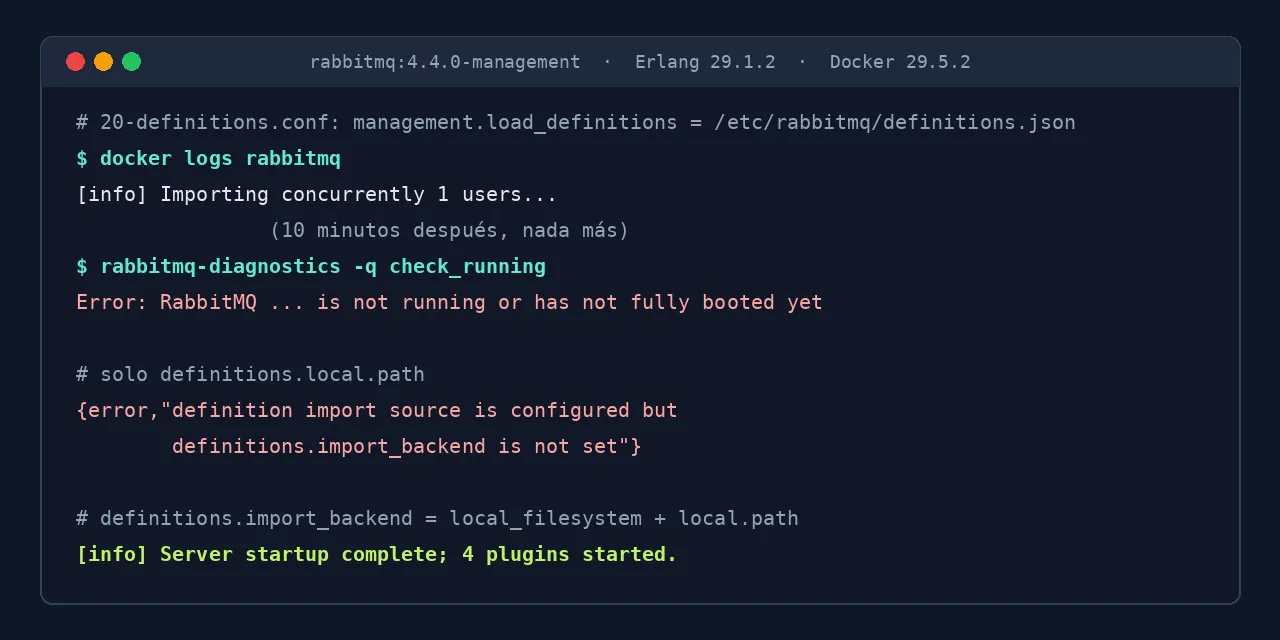
Table of contents
- Key takeaways
- Why does RabbitMQ 4.4 hang when importing definitions?
- How to recognise the hang in the logs
- Why your ping healthcheck does not catch it
- Error when applying only the maintainer's fix: import_backend is not set
- Fix: definitions.import_backend and definitions.local.path
- How long each configuration takes to boot
- Alternative: upgrade to 4.4.1 without touching the configuration
- Frequently asked questions
- Does it affect the rabbitmq:4.4.0 image without the management plugin?
- Which RabbitMQ version fixes the hang?
- Does the same happen on Kubernetes with the Cluster Operator?
- Conclusion
- Sources
RabbitMQ 4.4.0 never finishes booting if you import definitions with management.load_definitions: the log stops at Importing concurrently 1 users... and the broker never reaches Server startup complete. The failure comes from Erlang 28 and 29, which change the order of the boot steps, and the official rabbitmq:4.4.0 image already ships Erlang 29.1.2. Version 4.4.1, from 16 November 2026, fixes it; on 4.4.0, the fix is to switch to the definitions.import_backend and definitions.local.path keys, both of them together. I tested it on 12 November 2026 on Linux arm64 with Docker 29.5.2, and on the 18th I repeated the tests with 4.4.1. There is a Spanish version of this guide.
Key takeaways
- Since 17 November, the
latest,4,4.4andmanagementtags of therabbitmqimage point to 4.4.1, which boots withmanagement.load_definitionsagain. - With
management.load_definitionson 4.4.0 (Erlang 29.1.2), the node answerspingbut the broker does not start: I left it for more than 10 minutes and it did not move. - With only
definitions.local.path, the container exits withdefinitions.import_backend is not set, on 4.4.1 as well. - With
definitions.import_backend = local_filesystemanddefinitions.local.path, the node booted in 1.6 seconds. - The RabbitMQ fix (#17915) shipped on 16 November in 4.4.1 and 4.3.8; with the old key, 4.4.1 booted in 1.5 seconds.
Why does RabbitMQ 4.4 hang when importing definitions?
It hangs because a boot step of the management plugin depends on another component without declaring it, and on Erlang 28 and 29 that component starts later. Michal Kuratczyk, from the RabbitMQ team, explained it in issue #17914[1]: "The bug has been there for 6 years".
Up to Erlang 27 the order matched by chance. Erlang 28 changed the internal hash function, and the order of the steps changed with it. In my log, the rabbit_management_load_definitions step starts importing users before definition_import_worker_pool, the process pool that runs the import, exists, and it waits for it forever.
That is why the failure appeared when you updated the image and not because of a change in your configuration. The 4.4.0 release notes[2] say the series supports Erlang 28 and 29. The 4.3.7 and 4.3.6 images on Docker Hub use Erlang 27.3.4.19, and with the same configuration they booted without trouble.
How to recognise the hang in the logs
The symptom is a log that stops at the definitions import without any error. This is the configuration that triggers it, in a file under /etc/rabbitmq/conf.d/:
management.load_definitions = /etc/rabbitmq/definitions.json
With it, rabbitmq:4.4.0-management prints the banner, Starting broker..., the first import line and nothing else. If your definitions file has no users, the last line is Importing concurrently 1 vhosts.... The same happens with the -alpine variant and with the key passed through the RABBITMQ_SERVER_ADDITIONAL_ERL_ARGS variable:
[info] Starting RabbitMQ 4.4.0 on Erlang 29.1.2 [jit]
[info] Asked to import definitions. Acting user: rmq-internal
[info] Importing concurrently 1 users...
The Erlang process stays alive, so the container neither restarts nor exits with an error. From outside, clients get connection refused on port 5672 and the web UI does not answer.
Why your ping healthcheck does not catch it
The most copied RabbitMQ healthcheck for Docker Compose uses rabbitmq-diagnostics ping, and that command passes on a hung broker. ping only checks that the Erlang node answers, not that the rabbit application has started. These are the results I got against the hung node:
| Command | Exit code | Result |
|---|---|---|
rabbitmq-diagnostics -q ping |
0 | Ping succeeded |
rabbitmq-diagnostics -q check_running |
69 | has not fully booted yet |
rabbitmq-diagnostics -q check_port_connectivity |
64 | needs the rabbit application |
rabbitmqctl list_vhosts |
64 | needs the rabbit application |
I started two containers with the broken configuration and a different healthcheck on each one. After 50 seconds, the ping one was healthy and the check_running one was unhealthy. With ping, a service waiting on depends_on: condition: service_healthy starts against a broker that does not accept connections. The guide to Docker Compose healthchecks and restart policies explains how to chain those dependencies.
Error when applying only the maintainer's fix: import_backend is not set
If you replace the old key with only definitions.local.path, the node no longer hangs, but it exits during boot. Michael Klishin, from the RabbitMQ team, recommended that key in the issue because the management one "has been superseded and removed from the docs many years ago". With that key alone, the container exited with code 1 and this message, the same on 4.4.0 and on 4.4.1:
Error during startup: {error,"definition import source is
  configured but definitions.import_backend is not set"}
Runtime terminating during boot
The definitions.local.path key is not enough because RabbitMQ needs to know the type of the source: a local file or an HTTPS URL. That information goes in definitions.import_backend.
Fix: definitions.import_backend and definitions.local.path
The configuration that boots on 4.4.0 and on 4.4.1 uses the two keys from the import-on-boot documentation[3]. These keys belong to the core, so they work even if you do not enable the management plugin. Replace the old line with these three:
definitions.import_backend = local_filesystem
definitions.local.path = /etc/rabbitmq/definitions.json
definitions.skip_if_unchanged = true
The third line is optional: it makes the node import only when the file contents change. When I restarted the container with its data volume intact, the log no longer showed any Importing line. This is the Compose service I tested, now on the 4.4.1 image and with a healthcheck that does catch the hang:
services:
  rabbitmq:
    image: rabbitmq:4.4.1-management
    volumes:
      - ./rabbitmq.conf:/etc/rabbitmq/conf.d/20-definitions.conf:ro
      - ./definitions.json:/etc/rabbitmq/definitions.json:ro
      - rabbitmq-data:/var/lib/rabbitmq
    healthcheck:
      test: ["CMD", "rabbitmq-diagnostics", "-q", "check_running"]
      interval: 10s
      timeout: 10s
      retries: 6
      start_period: 20s
volumes:
  rabbitmq-data:
With this file, docker compose up -d --wait returned with the service healthy. The pedidos vhost and the facturas quorum queue from the definitions file were created. If you use quorum queues, the comparison of RabbitMQ streams and quorum queues explains when each one fits.
How long each configuration takes to boot
Every working configuration boots in the same time, so switching keys costs nothing. I measured the Time to start RabbitMQ value from the log with the same definitions file: 1 user, 2 vhosts, 1 permission and 1 queue. The configuration with management.load_definitions on 4.4.0 is missing because it never finished:
The first bar is another valid way out: the load_definitions key without the management. prefix also booted on 4.4.0. It is the one used by an affected user who runs RabbitMQ with the Kubernetes Cluster Operator. I prefer the two definitions.* keys because they are the ones RabbitMQ documents today and they support skip_if_unchanged.
Alternative: upgrade to 4.4.1 without touching the configuration
If you cannot touch the configuration right now, upgrade the image to rabbitmq:4.4.1-management. Its 4.4.1 release notes[4] include the fix for issue #17914. On 18 November it booted with management.load_definitions in 1.5 seconds and imported the pedidos vhost and the facturas queue. To stay on the 4.3 series, 4.3.8 has the same fix on Erlang 27.3.4.19 and booted in 1.6 seconds.
Check which tag your Compose file pins. latest, 4, 4.4 and management already download 4.4.1 with docker compose pull, but 4.4.0-management does not change and still hangs: I checked it again on the 18th.
If 4.4.0 has already tried to boot on your data volume, move up to 4.4.1 and do not downgrade. 4.4.1 booted with the old key on a volume where 4.4.0 had hung. On a volume like that, 4.3.7 and 4.3.8 stalled at the database boot step and after 5 minutes exited with {application_start_failure,rabbit,{{error,timeout},...}}. If you cannot change the image, 4.4.0 with the definitions.* keys also booted on that volume.
Even though 4.4.1 boots with the old key, switch to the definitions.* keys. The RabbitMQ team considers the management key retired, and the fix only restores a behaviour they no longer document. Before picking RabbitMQ for a new project, the article on when RabbitMQ is still the choice for message queues compares the alternatives.
Frequently asked questions
Does it affect the rabbitmq:4.4.0 image without the management plugin?
It does not hang, but it does not import anything either. With management.load_definitions on rabbitmq:4.4.0, the node booted with 3 plugins and rabbitmqctl list_vhosts returned an empty list; 4.4.1 behaved the same. RabbitMQ does not create the default vhost and user when definitions are pending, so the broker is left without vhosts. The definitions.* keys work on both images.
Which RabbitMQ version fixes the hang?
4.4.1 and 4.3.8, published on GitHub on 16 November 2026. Their images reached Docker Hub on 17 November, and since then latest, 4, 4.4 and management point to 4.4.1. The 4.4.0 tag does not change, so a Compose file that pins it still hangs. In the downstream issue for Testcontainers for .NET[5], the failure was first taken for a change in the startup message, and it was this same hang.
Does the same happen on Kubernetes with the Cluster Operator?
Yes, if the key reaches the node through RABBITMQ_SERVER_ADDITIONAL_ERL_ARGS or through additionalConfig. The failure depends on the key and the Erlang version, not on how you deploy. With the operator, put the definitions.* keys in spec.rabbitmq.additionalConfig.
Conclusion
The RabbitMQ 4.4.0 boot hang comes from the management.load_definitions key combined with Erlang 28 or 29, and it prints no error. Upgrade to 4.4.1 and replace the key with definitions.import_backend = local_filesystem and definitions.local.path, both of them together. Change the healthcheck from ping to check_running as well, because the first one reports a hung broker as healthy. To check your installation now, search for load_definitions in your configuration files and in the container's environment variables.
Sources: [1] RabbitMQ, issue #17914: management.load_definitions breaks on Erlang 28 and 29[1], [2] RabbitMQ, PR #17915: Fix original, management plugin-provided definition import on boot[6], [3] RabbitMQ 4.4.0 release notes[2], [4] RabbitMQ documentation: definition import at node boot time[3], [5] rabbitmq image tags on Docker Hub[7], [6] Testcontainers for .NET, issue #1803: Can't start rabbitmq 4.4.0[5], [7] RabbitMQ 4.4.1 release notes[4].