MacMD Viewer, the Markdown viewer for Mac that reads what your agent writes
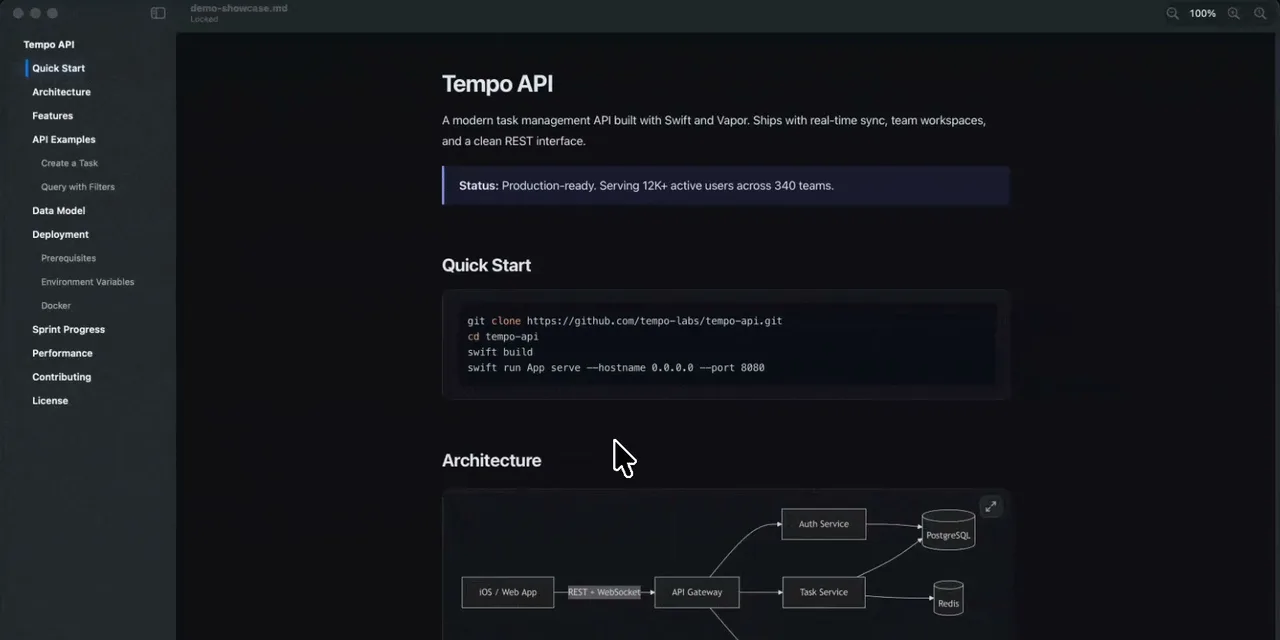
Table of contents
- Key takeaways
- What MacMD Viewer is, and why it exists
- Why you need a viewer when your agent writes the plans in Markdown
- What the MacMD Viewer website highlights, and what each feature does
- How it went on my Mac
- How it opens the files Claude Code writes on its own
- How much MacMD Viewer costs and where to buy it
- How it compares with Marked, Typora, QLMarkdown, VS Code and Glow
- What MacMD Viewer is missing
- Frequently asked questions
- Does MacMD Viewer have a free trial?
- Does it export Mermaid diagrams to the PDF?
- Does it send my files to a server?
- Conclusion
- Sources
MacMD Viewer is a read-only Markdown viewer for Mac: it opens .md files and renders them with headings, tables, highlighted code and Mermaid diagrams, without letting you edit the original. It also previews those files in Finder when you press the space bar, and exports them to PDF. It costs $19.99 as a one-time purchase. Its developers gave me a licence to test it, and I have tried every feature in this article on my Mac: it is comfortable to use and covers a wide range of uses. There is also a Spanish version.
Key takeaways
- It is a viewer, not an editor: it reads local Markdown files and never changes them, offline too.
- Version 1.8.3 came out on 2 November 2026, the twenty-ninth GitHub release since March.
- Its website highlights Quick Look in Finder, Mermaid diagrams, PDF export, live reload, 12 themes, an outline and zoom from 50% to 300%.
- It costs $19.99 for one Mac, with no subscription and no free trial, and a 14-day refund; it is also on Setapp, Homebrew and the Mac App Store.
- It has a Claude Code plugin that opens every
.mdfile the agent writes on its own.
What MacMD Viewer is, and why it exists
MacMD Viewer is a native macOS app for reading Markdown, written in Swift and SwiftUI. Its developers say on the site that they started it because they spend their days reading what AI agents produce, and macOS still shows .md files as raw text [5]. They sum up the project in one sentence:
"Reading your AI’s output properly is not a nice-to-have. It is how you catch the thing that’s wrong before you ship it." The MacMD Viewer developers [5]
The release pace is high. The changelog starts with 1.0.0 on 15 March 2026, and the GitHub release repository counts 29 releases up to 1.8.3 [3][7]. The code is not open: that repository only distributes the app.
Why you need a viewer when your agent writes the plans in Markdown
Coding agents leave their work in Markdown files. Someone has to read those files before approving them. Claude Code plan mode saves each plan as an .md, and the same goes for AGENTS.md files, specs and research reports. Reading them properly is the human-in-the-loop step for AI agents, and that is where this Markdown viewer for Mac comes in.
An editor also shows Markdown, but it is built for writing. MacMD Viewer starts from a different idea: someone else writes the file, your editor or an agent, and you only read it. That is why the features page is titled "Built for the read-side of AI workflows" [2]. If you want to know why agents write a plan first, I explain it in plan-and-execute versus ReAct.
What the MacMD Viewer website highlights, and what each feature does
The website groups its features under a list titled "Everything for the read side" [2]. I tried all of them on my Mac, and they do what they promise:
- Quick Look: press the space bar on an
.mdin Finder and see it rendered, with headings, code, tables and diagrams, without opening the app. It also works in Spotlight results and in Open and Save dialogs. - Mermaid diagrams: flowcharts, sequence, state, Gantt and pie charts written in code blocks, with no plugins and no configuration. Since 1.8.2 it also opens standalone
.mmdand.mermaidfiles [3]. - PDF export: File ▸ Export as PDF (⇧⌘P) saves the document in the theme you are using, with diagrams, highlighted code, tables, local images and working links, and no watermark.
- Syntax highlighting: every code block is coloured for its language, and since 1.8.0 it has a copy button and an option to wrap long lines [3].
- Live reload: when you save the file in VS Code, Vim or Zed, or an agent rewrites it, the view updates on its own. ⇧⌘E opens the file in your editor and ⌥⌘C copies the original Markdown.
- Dark mode and 12 themes: you pick a theme and its light or dark variant follows the macOS appearance. The Finder preview uses the same theme.
- Document outline: a sidebar with the headings that marks where you are and shows the word count and reading time.
- Zoom: ⌘+ and ⌘− scale the document from 50% to 300%, and ⌘0 resets it.
- URL scheme:
markdownviewer://opens a file from a shell script, Alfred or Raycast.
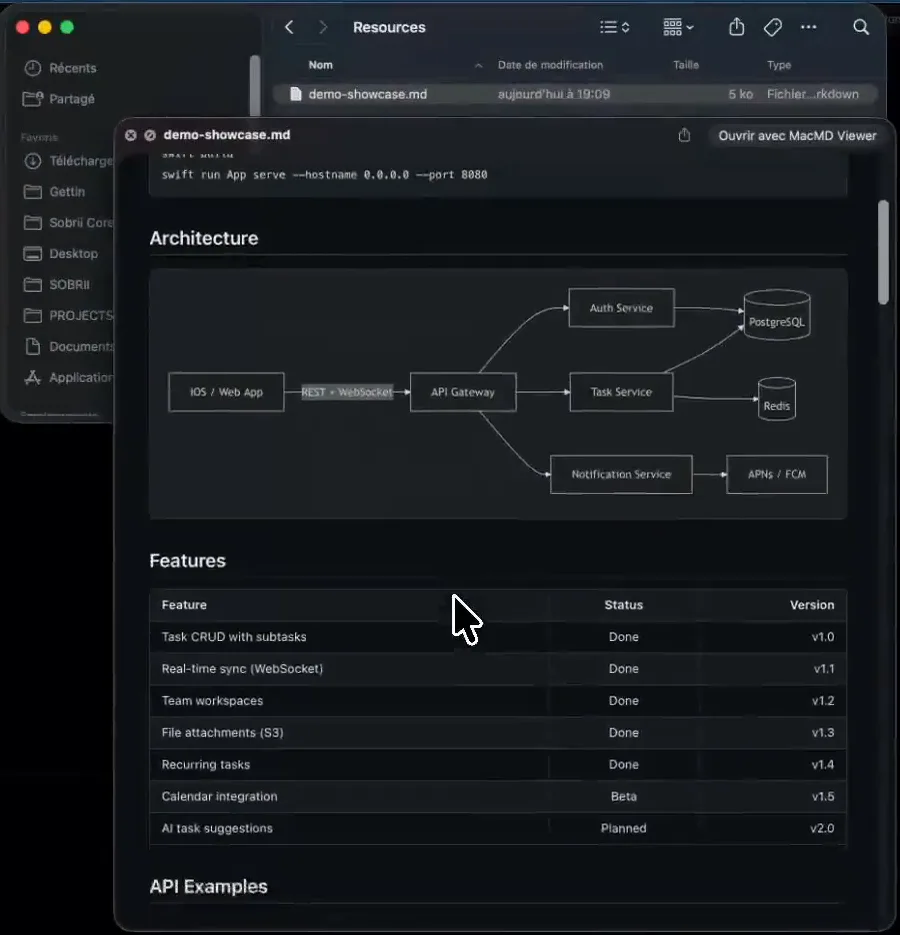
You enable Quick Look once in System Settings, under General ▸ Login Items & Extensions ▸ Quick Look (on macOS 14, under Privacy & Security ▸ Extensions) [4]. It is a separate setting from the default app for .md files.
How it went on my Mac
I tried every feature in the list above on my Mac, PDF conversion included. It is comfortable to use: you open an .md and it reads well with no setup, and the themes, outline, zoom, Quick Look and export options cover a wide range of uses. I did not measure timings or memory use, so I give no performance figures.
One PDF detail worth knowing before you export: it comes out as a single continuous page, like the scrolling view, with no page breaks and no footer [2]. For paper pages, the site itself says to use File ▸ Print (⌘P), which paginates the document through the macOS print dialog.
How it opens the files Claude Code writes on its own
MacMD Viewer has a Claude Code plugin that opens every Markdown file the agent writes in the viewer, so you do not have to look for it [6]. You install it through the Claude Code plugin system:
/plugin marketplace add macmdviewer/claude-code-plugin
/plugin install macmd-viewer@macmdviewer
/reload-plugins
The plugin is open source under the MIT licence [8]. For Cursor and Windsurf, the documentation offers a script that adds a hook to each tool’s configuration and backs up every file it touches first [6]. If you use it, run it with --dry-run first to see what it will change.
How much MacMD Viewer costs and where to buy it
MacMD Viewer is sold as a one-time purchase, with no subscription and no trial version. The way to try it is to buy it: you have 14 days to ask for a full refund [1].
| Option | Price | Macs |
|---|---|---|
| Single licence | $19.99, one-time | 1 active Mac, transferable |
| Family Pack | $39.99 | 3 Macs |
| Team Pack | $129 | 10 Macs |
| Larger packs | price on the site | 25, 50 or 100 Macs |
| Setapp | included in the Setapp subscription | per your Setapp plan |
| Mac App Store | $19.99 | per the store |
Updates within the major version are included [1]. You need macOS 14 Sonoma or later, on Apple Silicon or Intel, and the download is a 5.8 MB DMG signed and notarized by Apple [4][7]. It also installs with Homebrew (brew install --cask macmd-viewer), which served 1.8.3 on 12 November [9].
On privacy, the app reads files on your own machine and does not send them anywhere [10]. It does send anonymous usage signals through TelemetryDeck. The website build asks you during setup, the Mac App Store build sends nothing until you turn it on, and the Setapp build does not include TelemetryDeck [10].
How it compares with Marked, Typora, QLMarkdown, VS Code and Glow
MacMD Viewer competes with editors that also show Markdown and with free Quick Look extensions. The difference is that it pairs the app and the Finder preview with the same engine and the same theme, and adds the agent plugin.
| Tool | What it is | Price | Quick Look | Mermaid |
|---|---|---|---|---|
| MacMD Viewer 1.8.3 | Read-only viewer | $19.99, one-time | Yes, included | Yes |
| Marked 3 | Previewer with writing tools | $2.99 a month, $29.99 a year or $69.99 lifetime [11] | Separate product | Yes |
| Typora | WYSIWYG editor | $14.99, 3 devices, 15-day trial [12] | No | Yes |
| QLMarkdown 1.5.7 | Quick Look extension only | Free, GPL-3.0 [13] | Yes | Yes |
| VS Code | Editor preview | Free | No | Yes [14] |
| Glow 3.0 | Terminal Markdown reader | Free, MIT [15] | No | No |
If you already work in VS Code and only want to see the Markdown while you write it, its preview is enough. MacMD Viewer makes sense when someone else writes the file and you read it from Finder or a separate window.
What MacMD Viewer is missing
The limitations come from its own documentation, and they are worth knowing before you pay:
- It does not edit: ⇧⌘E opens the file in your editor to change it
- There is no trial version; the only way to try it is the 14-day refund
- The licence is per Mac, not per person
- The PDF is one continuous page; for paper pages you have to print
- The code is closed, although the Claude Code plugin is MIT
- It only runs on macOS 14 or later
Frequently asked questions
Does MacMD Viewer have a free trial?
No. You buy it before using it, and if it does not fit you can ask for a full refund by email within 14 days of purchase [1].
Does it export Mermaid diagrams to the PDF?
Yes. The PDF keeps the theme, Mermaid diagrams, highlighted code, tables, local images and links [2], and in my test it came out well.
Does it send my files to a server?
No. The privacy policy says the app does not access, store or transmit your files, and that it only sends anonymous usage signals if you allow it [10].
Conclusion
MacMD Viewer does one thing and does it well: reading Markdown on the Mac, with diagrams, highlighted code and a Finder preview that uses the same engine. It suits people who spend the day reviewing plans and documents written by agents such as Claude Code, and people who need a clean PDF out of an .md. If you only read Markdown now and then, QLMarkdown or the VS Code preview cost nothing. For more tools for a new Mac, see my list of essential software for the M5 Mac.
Thanks to the MacMD Viewer developers for the licence to test it. This is not a sponsored article: there was no payment, and what I say here is my own call.
Sources: [1] MacMD Viewer, home and pricing[1], [2] MacMD Viewer, features[2], [3] MacMD Viewer, changelog[3], [4] MacMD Viewer, download and requirements[4], [5] MacMD Viewer, about[5], [6] MacMD Viewer, AI coding tool integrations[6], [7] MacMD Viewer releases on GitHub[7], [8] MacMD Viewer plugin for Claude Code[8], [9] Homebrew cask macmd-viewer[9], [10] MacMD Viewer, privacy policy[10], [11] Marked[11], [12] Typora[12], [13] QLMarkdown on GitHub[13], [14] Markdown in VS Code[14], [15] Glow on GitHub[15].
Sources
- MacMD Viewer, home and pricing
- MacMD Viewer, features
- MacMD Viewer, changelog
- MacMD Viewer, download and requirements
- MacMD Viewer, about
- MacMD Viewer, AI coding tool integrations
- MacMD Viewer releases on GitHub
- MacMD Viewer plugin for Claude Code
- Homebrew cask macmd-viewer
- MacMD Viewer, privacy policy
- Marked
- Typora
- QLMarkdown on GitHub
- Markdown in VS Code
- Glow on GitHub