Vaultwarden 1.37.5 won’t start after updating: the config values that are now an error
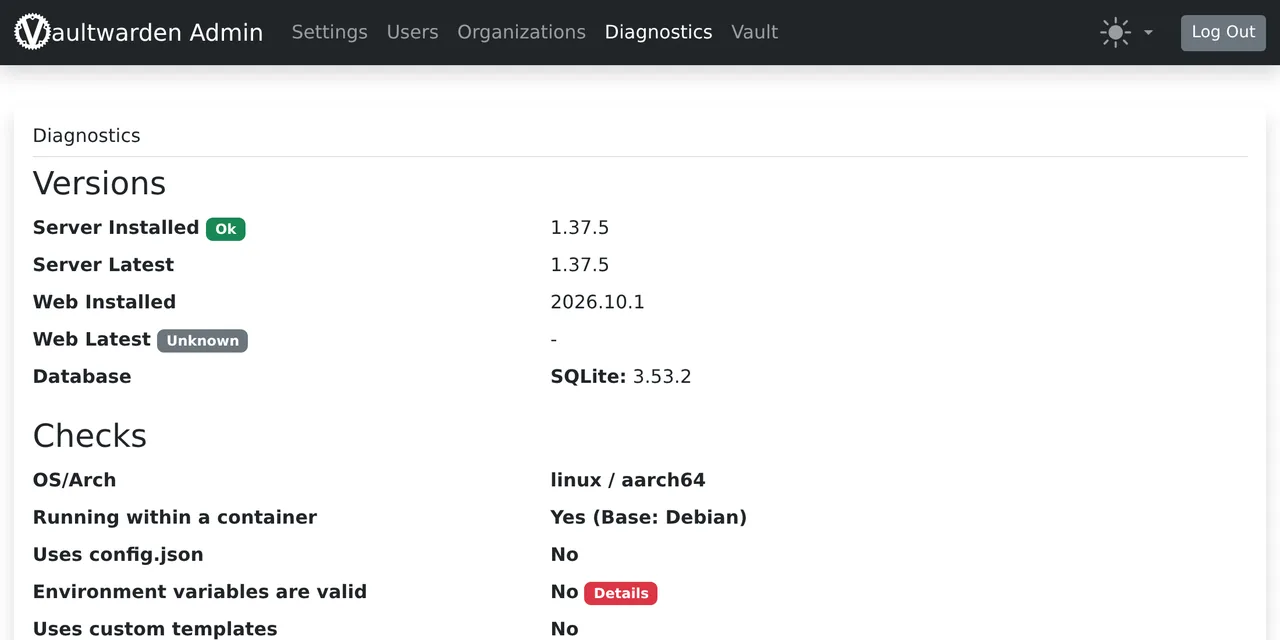
Table of contents
- Key takeaways
- What does Error loading config mean in Vaultwarden 1.37.5?
- Which values stop startup and which are ignored?
- Why out-of-range numbers do not fail at startup
- The config.json case: the whole file is ignored
- How to fix the .env so Vaultwarden 1.37.5 starts
- Check the .env before upgrading
- Upgrading from 1.37.4 to 1.37.5 step by step
- Can I roll back to 1.37.4?
- Frequently asked questions
- Why does the Vaultwarden container restart in a loop after the upgrade?
- Does 0 still disable trash auto-delete or event retention?
- How do I disable the login attempt limit now?
- Conclusion
- Sources
Vaultwarden 1.37.5 won’t start when a variable in your .env is 0 for a rate limit, DATABASE_TIMEOUT or DATABASE_IDLE_TIMEOUT, or when a purge schedule is not a valid cron expression: the container exits with code 12 and Docker restarts it in a loop. The fix is to give each variable the log names a valid value, one per start, and to check the .env before you upgrade. I reproduced it on 2 November 2026 by moving from vaultwarden/server:1.37.4 to 1.37.5 on arm64 Linux with Docker 29.5.2 and Compose v2.40.3. This guide is also available in Spanish.
Key takeaways
- 1.37.5 was released on 1 November 2026 and the Docker Hub
latesttag already points to it, so adocker compose pullwithout a pinned version installs it. - A
0in any of the six rate-limit variables (*_RATELIMIT_SECONDSand*_RATELIMIT_MAX_BURST) stops startup withmust be at least 1, and so does an invalid cron inPURGE_INCOMPLETE_SSO_AUTHorDUO_CONTEXT_PURGE_SCHEDULE. - Vaultwarden reports only the first error of each start: four bad values take four rounds, or the 24-line script in this guide, which lists them all before you upgrade.
- A negative or out-of-range number in the
.envdoes not stop startup: it is logged as[ERROR], ignored, and the default applies, which may not be what you wanted. - If the out-of-range value is in
config.json, the admin panel’s file, Vaultwarden drops the whole file; in my test the configured domain went back tohttp://localhost.
What does Error loading config mean in Vaultwarden 1.37.5?
It means the config validation found a value 1.37.5 no longer accepts and aborted startup before opening the port. This is the state I saw after switching the image in a compose file with restart: unless-stopped that worked on 1.37.4:
$ docker compose ps -a --format '{{.Name}} {{.Status}}'
vaultwarden Restarting (12) 2 seconds ago

$ docker compose logs --no-log-prefix vaultwarden
[ERROR] `TRASH_AUTO_DELETE_DAYS` contains an invalid value for its
type and is ignored, the default is used instead.
Error loading config:
  `PURGE_INCOMPLETE_SSO_AUTH` is not a valid cron expression
docker compose ps shows Restarting (12) because the process exits with code 12 and the restart policy relaunches it. On another pass I saw Up 1 second (health: starting) right between two restarts, so do not trust a glance: check RestartCount with docker inspect or read the log. Without a restart policy, the container stays at Exited (12). The guide to Docker Compose healthchecks and restart policies explains why the loop does not stop on its own.
The release notes announce it in one line. In the words of the Vaultwarden 1.37.5 release notes[1], "invalid values now stop startup with an error". That sentence holds for some variables and not for others, and the difference decides whether your server starts.
Which values stop startup and which are ignored?
I tested each variable on its own with both versions, starting a throwaway container per value. This table sums up what happened with the values seen in old .env files:
| Variable | Value | 1.37.4 | 1.37.5 |
|---|---|---|---|
LOGIN_RATELIMIT_SECONDS, ADMIN_RATELIMIT_SECONDS, UNAUTHENTICATED_RATELIMIT_SECONDS |
0 |
starts | stops: must be at least 1 second |
LOGIN_RATELIMIT_MAX_BURST, ADMIN_RATELIMIT_MAX_BURST, UNAUTHENTICATED_RATELIMIT_MAX_BURST |
0 |
starts | stops: must be at least 1 |
PURGE_INCOMPLETE_SSO_AUTH, DUO_CONTEXT_PURGE_SCHEDULE |
every hour, * * * |
starts | stops: is not a valid cron expression |
DATABASE_TIMEOUT, DATABASE_IDLE_TIMEOUT |
0 |
stops with an r2d2 panic | stops: must be at least 1 second |
DATABASE_MIN_CONNS above DATABASE_MAX_CONNS |
20 and 10 |
stops | stops |
SEND_PURGE_SCHEDULE, TRASH_PURGE_SCHEDULE, EVENT_CLEANUP_SCHEDULE |
invalid cron | stops | stops |
TRASH_AUTO_DELETE_DAYS, EVENTS_DAYS_RETAIN |
-1 or 70000 |
starts | starts, ignores the value |
LOGIN_RATELIMIT_MAX_BURST, SMTP_TIMEOUT |
70000 |
starts | starts, ignores the value |
EMAIL_ATTEMPTS_LIMIT |
300 |
starts | starts, ignores the value |
TRASH_AUTO_DELETE_DAYS, EVENTS_DAYS_RETAIN, EMAIL_ATTEMPTS_LIMIT |
0 |
starts | starts |
1.37.4 already rejected DATABASE_MIN_CONNS above the maximum and badly written crons for the older jobs, so those are not new even though the notes mention them. What is new is the zeros in the rate limits and the two purge schedules for single sign-on (SSO) and Duo. @hourly is still valid in both versions.
Why out-of-range numbers do not fail at startup
1.37.5 moved 24 numeric options to narrower unsigned integer types, according to the src/config.rs diff between the two tags. TRASH_AUTO_DELETE_DAYS went from i64 to u16, and EMAIL_ATTEMPTS_LIMIT from u64 to u8. A value that does not fit the new type is not converted, and from an environment variable the result is this warning:
[ERROR] `TRASH_AUTO_DELETE_DAYS` contains an invalid value for its
type and is ignored, the default is used instead.
The server starts with the default, and that changes behaviour without stopping anything. With LOGIN_RATELIMIT_MAX_BURST=70000 you meant to lift the login attempt limit, and now you have the default, 10. With TRASH_AUTO_DELETE_DAYS=-1 nothing changes, because the default already is never emptying the trash. The 1.37.5 .env.template file[2] also documents that 0 disables those two jobs, so 0 is the right way to say "never".
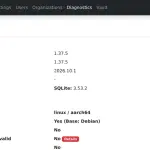
The admin panel catches it too. Under Diagnostics, the Environment variables are valid row went from Yes to No when I added TRASH_AUTO_DELETE_DAYS=-1 to the .env, with the server already running 1.37.5. It is the shortest visual check after an upgrade.
The config.json case: the whole file is ignored
config.json is where the admin panel stores the settings you change on the web, and those settings win over the .env. The official template puts it this way: "Be aware that most of these settings will be overridden if they were changed in the admin interface". If that file holds an out-of-range number, 1.37.5 does not stop, but it does not use the file either:
[ERROR] Failed to load configuration from `data/config.json`
# The file seems to exist but might contain invalid JSON or invalid
# values. Check the syntax and make sure every value is valid and
# within its allowed range.
# This file is not used until those errors are resolved.
[CAUSE] Error("invalid value: integer `-1`, expected u16", line: 1,
column: 92)
I trimmed the hash frame so it fits. In my test, a config.json with "domain": "https://vw.ejemplo.test", "signups_allowed": false and "trash_auto_delete_days": -1 left the domain at http://localhost according to /api/config. On 1.37.4, the same file returned https://vw.ejemplo.test. Every setting saved from the panel falls back to its .env or built-in value until you fix the number.
Check config.json before upgrading with this jq filter. It lists negative numbers, numbers above 65535, email_attempts_limit above 255, and zeros in rate limits and timeouts:
jq -r 'to_entries[] | select(.value | type == "number")
  | select(.value < 0 or .value > 65535
      or (.key == "email_attempts_limit" and .value > 255)
      or (.value == 0 and (.key | test("ratelimit|timeout"))))
  | "\(.key)=\(.value)"' vw-data/config.json
On a test file with those three problems, the output was trash_auto_delete_days=-1, login_ratelimit_seconds=0 and email_attempts_limit=300. Fix them from the panel while still on 1.37.4, or edit the file with the container stopped.
How to fix the .env so Vaultwarden 1.37.5 starts
Give each variable the log names a valid value, or delete it to get the default, and recreate the container. This is the .env I reproduced the failure with:
DOMAIN=http://127.0.0.1:32500
SIGNUPS_ALLOWED=true
LOGIN_RATELIMIT_SECONDS=0
ADMIN_RATELIMIT_MAX_BURST=0
PURGE_INCOMPLETE_SSO_AUTH=every hour
TRASH_AUTO_DELETE_DAYS=-1
With it, 1.37.5 stopped three times in a row, once per variable. First it named PURGE_INCOMPLETE_SSO_AUTH and, after I fixed it, LOGIN_RATELIMIT_SECONDS and then ADMIN_RATELIMIT_MAX_BURST. TRASH_AUTO_DELETE_DAYS=-1 only produced the warning. This is the .env it started with, using the template defaults for the limits:
DOMAIN=http://127.0.0.1:32500
SIGNUPS_ALLOWED=true
LOGIN_RATELIMIT_SECONDS=60
ADMIN_RATELIMIT_MAX_BURST=3
PURGE_INCOMPLETE_SSO_AUTH=0 20 0 * * *
The only deleted line is TRASH_AUTO_DELETE_DAYS, because empty already means never emptying the trash. Vaultwarden crons have six fields, with seconds first: 0 20 0 * * * is every day at 00:20:00. After docker compose up -d --force-recreate, RestartCount stayed at 0, /alive returned 200 and /version.json said 2026.10.1, the new bundled web vault. If you keep secrets in that file, the guide to Docker Compose environment variables and secrets shows how to split them out.
Check the .env before upgrading
The script below reads the resolved configuration with docker compose config, which merges env_file and environment, and flags each value with STOP if it halts 1.37.5 or IGNORED if 1.37.5 will discard it:
#!/usr/bin/env bash
# Flags values that Vaultwarden 1.37.5 rejects (STOP) or ignores (IGNORED)
f=${1:?usage: vw-precheck.sh compose.yaml [service]}; svc=${2:-vaultwarden}
u16() { [[ $1 =~ ^[0-9]+$ ]] && (($1 <= ${2:-65535})); }
docker compose -f "$f" config --format json |
jq -r --arg s "$svc" '.services[$s].environment // {} | to_entries[]
  | "\(.key)=\(.value // "")"' | {
while IFS='=' read -r k v; do
  [[ -z $v ]] && continue
  case $k in
    *_RATELIMIT_SECONDS|*_RATELIMIT_MAX_BURST|DATABASE_*TIMEOUT)
      [[ $v == 0 ]] && echo "STOP    $k=$v (minimum 1)"
      [[ $k == DATABASE_* ]] && lim=99999999999 || lim=65535
      u16 "$v" $lim || echo "IGNORED $k=$v";;
    TRASH_AUTO_DELETE_DAYS|EVENTS_DAYS_RETAIN|SMTP_TIMEOUT)
      u16 "$v" || echo "IGNORED $k=$v (0-65535)";;
    EMAIL_ATTEMPTS_LIMIT) u16 "$v" 255 || echo "IGNORED $k=$v (0-255)";;
    DATABASE_MIN_CONNS) min=$v;; DATABASE_MAX_CONNS) max=$v;;
    *_SCHEDULE|PURGE_INCOMPLETE_SSO_AUTH) n=$(wc -w <<<"$v")
      [[ $v == @* || $n == 6 || $n == 7 ]] || echo "STOP    $k=$v (cron)";;
  esac
done
if ((${min:-2} > ${max:-10})); then echo "STOP    DATABASE_MIN_CONNS > MAX"; fi
}
I ran it against the broken .env with five extra lines: DATABASE_MIN_CONNS=20, SEND_PURGE_SCHEDULE=@hourly, DATABASE_TIMEOUT=70000, LOGIN_RATELIMIT_MAX_BURST=70000 and EMAIL_ATTEMPTS_LIMIT=300. It flagged four STOP and three IGNORED, and let @hourly and DATABASE_TIMEOUT=70000 through, which 1.37.5 accepts because that option is a u32. Against the fixed .env it printed nothing. The cron check only counts fields, so a six-field cron with an impossible value slips past it; startup still catches it.
Upgrading from 1.37.4 to 1.37.5 step by step
With a clean .env, the upgrade is copy the data, check, change the tag and read the log. This is the test compose file:
services:
  vaultwarden:
    image: vaultwarden/server:1.37.5
    restart: unless-stopped
    env_file: .env
    volumes:
      - ./vw-data:/data
    ports:
      - "127.0.0.1:32500:80"
And these are the steps, in the compose directory, as I ran them on a running 1.37.4 install:
cp -a vw-data "vw-data.antes-1.37.5.$(date +%F)"
./vw-precheck.sh "$PWD/compose.yaml"
sed -i 's|vaultwarden/server:1.37.4|vaultwarden/server:1.37.5|' compose.yaml
docker compose pull && docker compose up -d
docker compose logs --no-log-prefix vaultwarden | grep -E 'ERROR|Error loading'
curl -s -o /dev/null -w '%{http_code}\n' http://127.0.0.1:32500/alive
curl -s http://127.0.0.1:32500/version.json
The grep returned nothing, /alive gave 200 and the web vault went from 2026.7.0 to 2026.10.1. If you followed the guide on how to install Vaultwarden with Docker, your compose pins 1.36.0: change that tag the same way. With Watchtower updating containers on latest, 1.37.5 may already be installed; check the log today.
Can I roll back to 1.37.4?
Yes, in my test 1.37.4 started on the data directory 1.37.5 had already migrated, though I only recommend it as a stopgap of a few hours. 1.37.5 adds a schema migration (add_org_policy_revision_date, a new column in organization policies) and fixes two security advisories, GHSA-x9cq-f669-vrr4 and GHSA-9pjj-f9g5-3x4c. Roll back from the vw-data copy you made beforehand, not on top of the migrated data, and fix the .env so you can move up again soon.
The notes add two changes that do not affect startup. If you serve your own web vault older than v2026.7.1, you may hit compatibility issues. Also, web vault 2026.7.1 or later needs 1.37.5 to turn two-step login methods on or off. If you run Vaultwarden SSO with Pocket ID, check PURGE_INCOMPLETE_SSO_AUTH first: it is one of the two variables with new validation.
Frequently asked questions
Why does the Vaultwarden container restart in a loop after the upgrade?
Because 1.37.5 exits with code 12 when it finds an invalid value, and your restart policy launches it again. docker compose logs vaultwarden shows the offending variable under Error loading config:.
Does 0 still disable trash auto-delete or event retention?
Yes. TRASH_AUTO_DELETE_DAYS=0 and EVENTS_DAYS_RETAIN=0 start on 1.37.5, and the official template documents 0 as disabled. What no longer works is -1, which is ignored with an [ERROR].
How do I disable the login attempt limit now?
You cannot with 0. The minimum is 1 and the maximum is 65535 for LOGIN_RATELIMIT_MAX_BURST, so the most permissive setting is LOGIN_RATELIMIT_SECONDS=1 with LOGIN_RATELIMIT_MAX_BURST=65535. Think twice before removing brute-force protection from a password manager.
Conclusion
Before moving to 1.37.5, run the script against your compose file and the jq filter against config.json, and fix every STOP and IGNORED. Zeros in rate limits and badly written purge crons take the server down, and out-of-range numbers change its behaviour with no warning outside the log. After the upgrade, open Diagnostics under /admin and confirm that Environment variables are valid says Yes.
Sources: [1] Vaultwarden 1.37.5 release notes[1], [2] Vaultwarden 1.37.5 .env.template[2], [3] Changes between 1.37.4 and 1.37.5[3], [4] vaultwarden/server tags on Docker Hub[4], [5] Docker, restart policies[5].
Sources
Source code
Access all the source code for this post on GitHub.
View on GitHub